


 Home
HomeLangchain Tutorial: A Guide to Summarizing YouTube Videos
In our fast-paced digital world, the ability to quickly understand the core message of a video is incredibly valuable. For researchers, students, and professionals alike, generating concise summaries of lengthy YouTube videos can be a major time-saver and productivity booster. This guide offers a clear, step-by-step method for using Langchain, OpenAI, and Whisper to automatically create summaries of YouTube content. You'll learn how to write Python scripts in Google Colab to extract audio, transcribe it into text, and then condense it using powerful AI models.
Key Points
Learn to use Langchain, OpenAI, and Whisper for automated video summarization.
Write Python code in Google Colab to download and transcribe video audio.
Apply text splitting and summarization methods to create concise overviews.
Implement the map reduce chain technique for efficiently summarizing large documents.
Utilize the OpenAI API to access advanced summarization models.
Use the RecursiveCharacterTextSplitter to divide text into smaller, manageable pieces.
Setting Up Your Environment for Video Summarization
Getting Started with Google Colab
First, make sure you have a Google account to access Google Colab, a free, cloud-based platform ideal for running Python code. Open Google Colab and create a new notebook. This will be your workspace for the video summarization project. Rename the notebook to something memorable, like 'YouTube_Summarizer', to help you stay organized.
Next, adjust the runtime configuration.
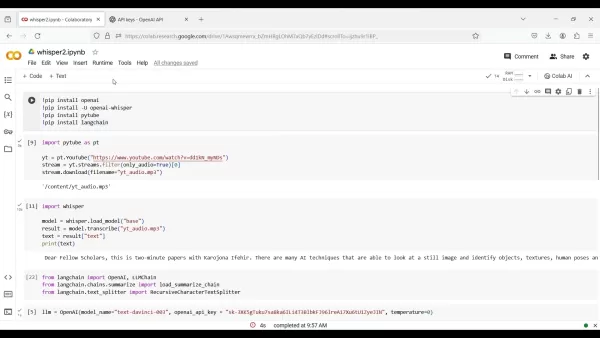
Go to the 'Runtime' menu and select 'Change runtime type'. From the dropdown, choose 'T4 GPU' as your hardware accelerator. This selection uses the GPU's processing power to speed up your code execution. Save the settings to apply them to your Colab environment. Now, you're ready to install the necessary packages.
Installing Essential Python Packages
Before writing the code, you must install the required Python libraries. These packages provide the tools for audio extraction, transcription, and summarization. Run the following commands in a Colab cell using pip install:
!pip install OpenAI!pip install -U openai-whisper!pip install pytube!pip install langchain
- OpenAI: This library enables interaction with OpenAI's language models, which are crucial for text summarization.
- Whisper: OpenAI's automatic speech recognition (ASR) system, used to convert audio into text.
- Pytube: A library for downloading audio directly from YouTube videos.
- Langchain: A powerful framework that offers a standard interface for chains and other tools, simplifying the process of building applications with language models.
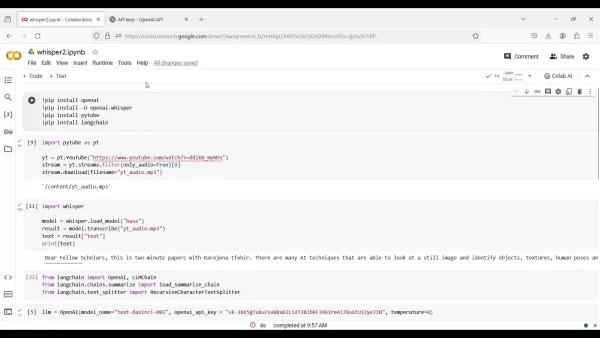
These commands will install the OpenAI, Whisper, Pytube, and Langchain libraries, giving you all the tools needed for the next steps. Once the installations finish, you can import these packages into your script.
Extracting Audio from YouTube Videos
Importing Pytube and Loading the Video
Start by importing the pytube library, which allows you to download audio from YouTube. After importing, specify the URL of the YouTube video you want to process.

The following code shows how to do this:
import pytube as ptyt = pt.YouTube("https://www.youtube.com/watch?v=dd1kN_myNDs")stream = yt.streams.filter(only_audio=True)[0]stream.download(filename='yt_audio.mp3')
This code creates a YouTube object using the provided URL, filters the available streams to select the audio-only option, and downloads it as an MP3 file named yt_audio.mp3. This file will be used for transcription in the next stage.
Transcribing Audio with Whisper
With the audio file downloaded, the next step is to convert it to text using OpenAI's Whisper model. Whisper is a robust tool for speech-to-text conversion, available via the openai-whisper library you installed earlier. Here is how to transcribe the audio:
import whispermodel = whisper.load_model("base")result = model.transcribe("yt_audio.mp3")text = result["text"]print(text)

This code loads Whisper's base model, transcribes the yt_audio.mp3 file, and extracts the resulting text. The transcribed text is printed to the console, giving you a written version of the video's audio content. With the text ready, you can now proceed to summarize it using Langchain.
Summarizing the Transcribed Text with Langchain
Now that you have the transcribed text, you can use Langchain to create a summary. Langchain provides a flexible framework for text summarization using OpenAI's language models. This process involves breaking the text into smaller segments and summarizing each one to produce a final, concise overview.
Follow these steps to set up the summarization process with Langchain:
Import the required modules from Langchain:
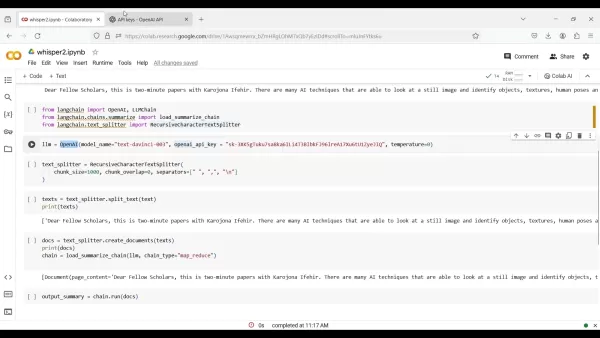
This includes modules for OpenAI integration, LLM chains, summarization, and text splitting.
from langchain import OpenAI, LLMChainfrom langchain.chains.summarize import load_summarize_chainfrom langchain.text_splitter import RecursiveCharacterTextSplitter
Initialize the OpenAI language model:
llm = OpenAI(model_name="text-davinci-003", openai_api_key="YOUR_API_KEY", temperature=0)
Replace YOUR_API_KEY with your actual OpenAI API key, which you can get from the OpenAI platform.
Split the transcribed text into manageable chunks:
text_splitter = RecursiveCharacterTextSplitter(chunk_size=1000, chunk_overlap=0, separators=["
", "", ". ", " ", ""])texts = text_splitter.split_text(text)
This code divides the text into segments of 1000 characters each, with no overlap. The `separators` parameter ensures the text is split at natural breaks like paragraphs and sentences.4.**Create document objects from the text chunks**:```pythondocs = [Document(page_content=t) for t in texts]
Load the summarization chain:
chain = load_summarize_chain(llm, chain_type="map_reduce", verbose=False)
This code initializes the summarization chain using the map_reduce method. This approach is efficient for large documents because it summarizes each chunk individually (the map step) and then combines those summaries into a final summary (the reduce step).
Execute the summarization chain:
output_summary = chain.run(docs)print(output_summary)
This runs the summarization process on the document chunks and prints the final summary. You now have a concise summary of the original YouTube video's content.
By following these steps, you can efficiently summarize YouTube videos using Langchain, OpenAI, and Whisper, automating information extraction and boosting your productivity.
Step-by-Step Guide: Summarizing YouTube Videos with Code
Step 1: Open Google Colab and Create a New Notebook
Open your web browser and go to the Google Colab website. Sign in with your Google account. Once logged in, create a new notebook by clicking 'New Notebook'. This opens a clean coding environment for your project.

Step 2: Configure Runtime Settings
To ensure optimal performance, especially for AI models, configure the runtime to use a GPU. Click on 'Runtime' in the menu bar, then select 'Change runtime type'. From the 'Hardware accelerator' dropdown, choose 'GPU'. Save your changes. This allocates a GPU to your session, accelerating the processing tasks.
Step 3: Install Required Libraries
Next, install the necessary Python libraries using pip. These include openai, openai-whisper, pytube, and langchain. Run the following code in a Colab cell:
!pip install openai!pip install -U openai-whisper!pip install pytube!pip install langchain
Execute the cell to install the libraries. Ensure the installations complete successfully before moving on.
Step 4: Import Libraries and Set Up OpenAI API Key
Import the necessary libraries into your notebook. Also, set your OpenAI API key to enable access to the language models. You can generate an API key on the OpenAI platform. Replace YOUR_API_KEY with your actual key in the code.
import pytube as ptimport whisperfrom langchain import OpenAI, LLMChainfrom langchain.chains.summarize import load_summarize_chainfrom langchain.text_splitter import RecursiveCharacterTextSplitteropenai_api_key = "YOUR_API_KEY"
Step 5: Load the YouTube Video and Extract Audio
Specify the YouTube video URL and use pytube to extract the audio. The code below creates a YouTube object, filters for audio-only streams, and downloads the audio as an MP3 file:
yt = pt.YouTube("https://www.youtube.com/watch?v=dd1kN_myNDs")stream = yt.streams.filter(only_audio=True)[0]stream.download(filename='yt_audio.mp3')
Step 6: Transcribe the Audio with Whisper
Transcribe the downloaded audio file into text using the Whisper model. Load the model and use it to transcribe the audio:
model = whisper.load_model("base")result = model.transcribe("yt_audio.mp3")text = result["text"]print(text)
Step 7: Summarize the Text with Langchain
Summarize the transcribed text using Langchain. This involves splitting the text into chunks, creating documents from them, and using a summarization chain to generate the final summary.
text_splitter = RecursiveCharacterTextSplitter(chunk_size=1000, chunk_overlap=0, separators=["", "", ". ", " ", ""])texts = text_splitter.split_text(text)from langchain.document_loaders import TextLoaderfrom langchain.docstore.document import Documentdocs = [Document(page_content=t) for t in texts]llm = OpenAI(model_name="text-davinci-003", openai_api_key=openai_api_key, temperature=0)chain = load_summarize_chain(llm, chain_type="map_reduce", verbose=False)output_summary = chain.run(docs)print(output_summary)
This code splits the text, creates documents, initializes the summarization chain, and runs it to produce the summary.
Step 8: Run the Code and Obtain the Summary
Execute all the code cells in your Colab notebook. This will run the entire summarization pipeline, from audio download to final summary generation. The resulting summary will be displayed in the console.
Pricing Considerations for Langchain, OpenAI, and Whisper
Understanding the Costs
When using Langchain, OpenAI, and Whisper, it's important to understand their respective pricing models to manage your budget effectively.
- OpenAI API: OpenAI charges based on token usage. The cost varies depending on the model (e.g., text-davinci-003) and the number of tokens processed. Pricing is typically per 1,000 tokens, so monitoring your usage is key to controlling costs.
- Whisper: You can use Whisper as an API through OpenAI or host it yourself. If using the OpenAI API, transcription costs depend on the audio duration.
- Langchain: As an open-source framework, Langchain itself is free. However, you must account for the costs of the integrated services, such as the OpenAI APIs you use through it.
Advantages and Disadvantages of Langchain-Based Video Summarization
Pros
Automation saves a substantial amount of time compared to manual summarization.
Generates concise summaries that capture the video's main points.
Customizable settings allow for tuning the summarization to your needs.
Seamless integration with powerful OpenAI language models.
Being open-source, it offers flexibility and community-driven support.
Cons
Requires basic programming knowledge to set up and configure.
The accuracy of the summary can depend on the quality of the audio transcription and the language model.
Costs are associated with using the OpenAI API.
Potential for errors or inaccuracies during transcription and summarization.
Might not capture all the subtle nuances and context of the original video.
Key Features of Langchain for Video Summarization
Leveraging Langchain's Capabilities
Langchain offers several features that make video summarization more efficient:
- Chain Abstraction: Provides a standardized way to build chains, making it easy to combine different components like language models and text splitters into a cohesive workflow.
- Text Splitting: Includes various methods for splitting text, such as the
RecursiveCharacterTextSplitter, which divides text based on specified separators like paragraphs and sentences. - Summarization Chains: Offers pre-built chains like
load_summarize_chain that use techniques like map_reduce to summarize large documents effectively.
Diverse Use Cases for Automated Video Summarization
Applications Across Various Domains
Automated video summarization has numerous practical applications in different fields:
- Education: Students and teachers can quickly review lecture videos, extract key ideas, and create study guides.
- Research: Researchers can efficiently analyze video content, extract relevant data, and identify patterns.
- Business: Professionals can stay informed about industry trends, analyze competitor content, and create summary reports.
- Media Monitoring: Agencies can track news broadcasts, analyze public opinion, and identify emerging stories.
Frequently Asked Questions
What is Langchain, and how does it facilitate video summarization?
Langchain is a framework designed to simplify building applications with language models. It provides a standard interface for creating chains of operations. For video summarization, Langchain helps manage the entire process—from processing transcribed text to generating a final summary—making it a flexible and powerful tool.
How can I obtain an OpenAI API key, and why is it necessary for video summarization?
An OpenAI API key is required to authenticate and use OpenAI's language models for text summarization. You can get an API key by signing up on the OpenAI platform and generating a key in your account settings. This key allows your script to access the models that power the summarization.
What are the key considerations for managing costs when using Langchain, OpenAI, and Whisper?
To manage costs effectively, keep an eye on your token usage for the OpenAI API, as billing is based on consumption. Optimize your code by using appropriate text chunk sizes and consider using less expensive models for simpler tasks. For Whisper, if using the API, costs are based on audio length, so processing shorter clips or using a self-hosted version can help control expenses.
Explore Further: Related Questions and Advanced Techniques
How can I improve the accuracy of video summarization using Langchain?
Enhancing summarization accuracy involves adjusting several parameters and techniques. Consider these strategies:Experiment with Different Text Splitters:Character Text Splitter: Splits text based on characters, which can help maintain sentence structure.Recursive Character Text Splitter: Splits text recursively using a list of separators, allowing for more intelligent division.Token Text Splitter: Splits text based on tokens, which can help preserve meaning.Test different splitters to see which works best for your specific video content.Adjust the Chunk Size and Overlap:Chunk Size: The size of text segments affects the summary. Smaller chunks may yield more detailed summaries, while larger chunks provide more context.Chunk Overlap: Overlap between chunks can help maintain contextual flow. Experiment with different sizes and overlaps to find the best balance.Choose a More Powerful Language Model:OpenAI offers various models with
Related article
 DeepMind CEO Hassabis: I sleep six hours a day, usually feel energetic around 1 a.m.
Fortune recently featured an interview with Demis Hassabis, CEO of Google DeepMind, revealing his unconventional approach to rest and productivity. Hassabis disclosed that he sleeps very little, structuring his waking hours into two distinct work blo
OpenAI, Anthropic Vie for Market Share Despite Revenue Shortfalls
Despite recent reports suggesting OpenAI missed revenue targets, creating pressure on tech stocks this Tuesday, private AI lab investors remain resilient. Seasoned backers have confirmed they will not reduce investment despite negative media coverage
California AV Compliance: A New Era of Tickets, Geofences, and 1M Miles
Guident operates an AuveTech shuttle in South Florida, managing a four-mile route in West Palm Beach and a one-mile route in Boca Raton using its remote monitoring technology. | Credit: GuidentCalifornia is redefining the regulatory landscape for dri
Related Special Topic Recommendations
Music composition
DeepMind CEO Hassabis: I sleep six hours a day, usually feel energetic around 1 a.m.
Fortune recently featured an interview with Demis Hassabis, CEO of Google DeepMind, revealing his unconventional approach to rest and productivity. Hassabis disclosed that he sleeps very little, structuring his waking hours into two distinct work blo
OpenAI, Anthropic Vie for Market Share Despite Revenue Shortfalls
Despite recent reports suggesting OpenAI missed revenue targets, creating pressure on tech stocks this Tuesday, private AI lab investors remain resilient. Seasoned backers have confirmed they will not reduce investment despite negative media coverage
California AV Compliance: A New Era of Tickets, Geofences, and 1M Miles
Guident operates an AuveTech shuttle in South Florida, managing a four-mile route in West Palm Beach and a one-mile route in Boca Raton using its remote monitoring technology. | Credit: GuidentCalifornia is redefining the regulatory landscape for dri
Related Special Topic Recommendations
Music composition
 AI Stem Separation Tools for Remix Production, Sampling Prep, and Karaoke Masters
2026 Latest Best Top-rated AI Stem Separation Tools Curated for Remix Production, Sampling Prep, and Karaoke Masters. These powerful game-changing tools offer real-world tests to deliver precise audio isolation, boosting productivity significantly. XIX.AI provides a weekly updated free vs paid comparison guide to help you find the must-try solution that suits your needs. Explore now to unlock your AI edge.
 8 tools
 xix.ai
Data Analysis
AI SQL Copilots for Revenue Dashboards, Funnel Analysis, and Product Metrics
xix.ai
Data Analysis
AI SQL Copilots for Revenue Dashboards, Funnel Analysis, and Product Metrics
2026 Latest Best AI SQL Copilots Ranked Top-Rated! XIX.AI curates a powerful game-changing collection for weekly updated real-world tests. These must-try tools help you generate accurate revenue dashboards, analyze sales funnels, and track product metrics swiftly, boosting productivity massively. Explore now to Discover your perfect tool for data-driven decision making! 238 characters
9 tools
xix.ai
Music composition
Best AI Melody Writing Tools for Song Drafts
2026 Latest Best Top-Rated AI Melody Writing Tools for Song Drafts! XIX.AI has curated a highly powerful game-changing collection that goes through rigorous real-world tests to deliver the best writing experience. You can find detailed free vs paid comparisons, accurate rankings, and must-try options designed to help you create stunning song drafts effortlessly and boost your creative productivity significantly. Explore now to discover your perfect tool!
8 tools
xix.ai
chatbot
Best AI Conversation Trainer Tools for Interview Practice
2026 Latest Best Top-rated AI Conversation Trainer Tools for Interview Practice are here on XIX.AI! This curated collection features powerful, game-changing tools that go through rigorous real-world tests to deliver accurate feedback. You’ll find a free vs paid comparison and detailed rankings to help you choose the must-try option that boosts your confidence and skills. Explore now to Discover your perfect tool for interview success!
12 tools
xix.ai
Design & Art
Best AI Style Transfer Tools for Creative Experiments
2026 Latest Best Top-rated AI Style Transfer Tools for Creative Experiments! XIX.AI has curated a powerful, game-changing collection of must-try tools that deliver exceptional results through real-world tests and rigorous rankings. These top solutions help creatives boost productivity significantly by accelerating content creation and unlocking endless creative possibilities. Explore now to discover your perfect tool and start creating today!
9 tools
xix.ai
Comic Creation
Best AI Dialogue Bubble Tools for Visual Storytelling
2026 Latest Best Top-Rated AI Dialogue Bubble Tools for Visual Storytelling are here on XIX.AI! This curated collection features powerful, game-changing tools that help creators boost productivity and overcome creative bottlenecks. Get a free vs paid comparison, see real-world tests, and check the latest rankings to find the must-try solutions perfect for crafting engaging visual narratives. Explore now to discover your ideal tool!
10 tools
xix.ai

 Comments (1)
0/500
Comments (1)
0/500
![HenryLopez]()
這篇教學太實用了!我常常需要看很多英文教學影片,如果能自動生成摘要真的會省下超多時間。不過我有點擔心,如果AI摘要漏掉重要細節怎麼辦?大家會完全依賴這個功能嗎?🤔
In our fast-paced digital world, the ability to quickly understand the core message of a video is incredibly valuable. For researchers, students, and professionals alike, generating concise summaries of lengthy YouTube videos can be a major time-saver and productivity booster. This guide offers a clear, step-by-step method for using Langchain, OpenAI, and Whisper to automatically create summaries of YouTube content. You'll learn how to write Python scripts in Google Colab to extract audio, transcribe it into text, and then condense it using powerful AI models.
Key Points
Learn to use Langchain, OpenAI, and Whisper for automated video summarization.
Write Python code in Google Colab to download and transcribe video audio.
Apply text splitting and summarization methods to create concise overviews.
Implement the map reduce chain technique for efficiently summarizing large documents.
Utilize the OpenAI API to access advanced summarization models.
Use the RecursiveCharacterTextSplitter to divide text into smaller, manageable pieces.
Setting Up Your Environment for Video Summarization
Getting Started with Google Colab
First, make sure you have a Google account to access Google Colab, a free, cloud-based platform ideal for running Python code. Open Google Colab and create a new notebook. This will be your workspace for the video summarization project. Rename the notebook to something memorable, like 'YouTube_Summarizer', to help you stay organized.
Next, adjust the runtime configuration.
Go to the 'Runtime' menu and select 'Change runtime type'. From the dropdown, choose 'T4 GPU' as your hardware accelerator. This selection uses the GPU's processing power to speed up your code execution. Save the settings to apply them to your Colab environment. Now, you're ready to install the necessary packages.
Installing Essential Python Packages
Before writing the code, you must install the required Python libraries. These packages provide the tools for audio extraction, transcription, and summarization. Run the following commands in a Colab cell using pip install:
!pip install OpenAI!pip install -U openai-whisper!pip install pytube!pip install langchain
- OpenAI: This library enables interaction with OpenAI's language models, which are crucial for text summarization.
- Whisper: OpenAI's automatic speech recognition (ASR) system, used to convert audio into text.
- Pytube: A library for downloading audio directly from YouTube videos.
- Langchain: A powerful framework that offers a standard interface for chains and other tools, simplifying the process of building applications with language models.
These commands will install the OpenAI, Whisper, Pytube, and Langchain libraries, giving you all the tools needed for the next steps. Once the installations finish, you can import these packages into your script.
Extracting Audio from YouTube Videos
Importing Pytube and Loading the Video
Start by importing the pytube library, which allows you to download audio from YouTube. After importing, specify the URL of the YouTube video you want to process.
The following code shows how to do this:
import pytube as ptyt = pt.YouTube("https://www.youtube.com/watch?v=dd1kN_myNDs")stream = yt.streams.filter(only_audio=True)[0]stream.download(filename='yt_audio.mp3')
This code creates a YouTube object using the provided URL, filters the available streams to select the audio-only option, and downloads it as an MP3 file named yt_audio.mp3. This file will be used for transcription in the next stage.
Transcribing Audio with Whisper
With the audio file downloaded, the next step is to convert it to text using OpenAI's Whisper model. Whisper is a robust tool for speech-to-text conversion, available via the openai-whisper library you installed earlier. Here is how to transcribe the audio:
import whispermodel = whisper.load_model("base")result = model.transcribe("yt_audio.mp3")text = result["text"]print(text)
This code loads Whisper's base model, transcribes the yt_audio.mp3 file, and extracts the resulting text. The transcribed text is printed to the console, giving you a written version of the video's audio content. With the text ready, you can now proceed to summarize it using Langchain.
Summarizing the Transcribed Text with Langchain
Now that you have the transcribed text, you can use Langchain to create a summary. Langchain provides a flexible framework for text summarization using OpenAI's language models. This process involves breaking the text into smaller segments and summarizing each one to produce a final, concise overview.
Follow these steps to set up the summarization process with Langchain:
Import the required modules from Langchain:
This includes modules for OpenAI integration, LLM chains, summarization, and text splitting.
from langchain import OpenAI, LLMChainfrom langchain.chains.summarize import load_summarize_chainfrom langchain.text_splitter import RecursiveCharacterTextSplitterInitialize the OpenAI language model:
llm = OpenAI(model_name="text-davinci-003", openai_api_key="YOUR_API_KEY", temperature=0)Replace
YOUR_API_KEYwith your actual OpenAI API key, which you can get from the OpenAI platform.Split the transcribed text into manageable chunks:
text_splitter = RecursiveCharacterTextSplitter(chunk_size=1000, chunk_overlap=0, separators=["
", "", ". ", " ", ""])texts = text_splitter.split_text(text)
This code divides the text into segments of 1000 characters each, with no overlap. The `separators` parameter ensures the text is split at natural breaks like paragraphs and sentences.4.**Create document objects from the text chunks**:```pythondocs = [Document(page_content=t) for t in texts]
Load the summarization chain:
chain = load_summarize_chain(llm, chain_type="map_reduce", verbose=False)This code initializes the summarization chain using the
map_reducemethod. This approach is efficient for large documents because it summarizes each chunk individually (the map step) and then combines those summaries into a final summary (the reduce step).Execute the summarization chain:
output_summary = chain.run(docs)print(output_summary)This runs the summarization process on the document chunks and prints the final summary. You now have a concise summary of the original YouTube video's content.
By following these steps, you can efficiently summarize YouTube videos using Langchain, OpenAI, and Whisper, automating information extraction and boosting your productivity.
Step-by-Step Guide: Summarizing YouTube Videos with Code
Step 1: Open Google Colab and Create a New Notebook
Open your web browser and go to the Google Colab website. Sign in with your Google account. Once logged in, create a new notebook by clicking 'New Notebook'. This opens a clean coding environment for your project.
Step 2: Configure Runtime Settings
To ensure optimal performance, especially for AI models, configure the runtime to use a GPU. Click on 'Runtime' in the menu bar, then select 'Change runtime type'. From the 'Hardware accelerator' dropdown, choose 'GPU'. Save your changes. This allocates a GPU to your session, accelerating the processing tasks.
Step 3: Install Required Libraries
Next, install the necessary Python libraries using pip. These include openai, openai-whisper, pytube, and langchain. Run the following code in a Colab cell:
!pip install openai!pip install -U openai-whisper!pip install pytube!pip install langchain
Execute the cell to install the libraries. Ensure the installations complete successfully before moving on.
Step 4: Import Libraries and Set Up OpenAI API Key
Import the necessary libraries into your notebook. Also, set your OpenAI API key to enable access to the language models. You can generate an API key on the OpenAI platform. Replace YOUR_API_KEY with your actual key in the code.
import pytube as ptimport whisperfrom langchain import OpenAI, LLMChainfrom langchain.chains.summarize import load_summarize_chainfrom langchain.text_splitter import RecursiveCharacterTextSplitteropenai_api_key = "YOUR_API_KEY"
Step 5: Load the YouTube Video and Extract Audio
Specify the YouTube video URL and use pytube to extract the audio. The code below creates a YouTube object, filters for audio-only streams, and downloads the audio as an MP3 file:
yt = pt.YouTube("https://www.youtube.com/watch?v=dd1kN_myNDs")stream = yt.streams.filter(only_audio=True)[0]stream.download(filename='yt_audio.mp3')
Step 6: Transcribe the Audio with Whisper
Transcribe the downloaded audio file into text using the Whisper model. Load the model and use it to transcribe the audio:
model = whisper.load_model("base")result = model.transcribe("yt_audio.mp3")text = result["text"]print(text)
Step 7: Summarize the Text with Langchain
Summarize the transcribed text using Langchain. This involves splitting the text into chunks, creating documents from them, and using a summarization chain to generate the final summary.
text_splitter = RecursiveCharacterTextSplitter(chunk_size=1000, chunk_overlap=0, separators=["", "", ". ", " ", ""])texts = text_splitter.split_text(text)from langchain.document_loaders import TextLoaderfrom langchain.docstore.document import Documentdocs = [Document(page_content=t) for t in texts]llm = OpenAI(model_name="text-davinci-003", openai_api_key=openai_api_key, temperature=0)chain = load_summarize_chain(llm, chain_type="map_reduce", verbose=False)output_summary = chain.run(docs)print(output_summary)
This code splits the text, creates documents, initializes the summarization chain, and runs it to produce the summary.
Step 8: Run the Code and Obtain the Summary
Execute all the code cells in your Colab notebook. This will run the entire summarization pipeline, from audio download to final summary generation. The resulting summary will be displayed in the console.
Pricing Considerations for Langchain, OpenAI, and Whisper
Understanding the Costs
When using Langchain, OpenAI, and Whisper, it's important to understand their respective pricing models to manage your budget effectively.
- OpenAI API: OpenAI charges based on token usage. The cost varies depending on the model (e.g., text-davinci-003) and the number of tokens processed. Pricing is typically per 1,000 tokens, so monitoring your usage is key to controlling costs.
- Whisper: You can use Whisper as an API through OpenAI or host it yourself. If using the OpenAI API, transcription costs depend on the audio duration.
- Langchain: As an open-source framework, Langchain itself is free. However, you must account for the costs of the integrated services, such as the OpenAI APIs you use through it.
Advantages and Disadvantages of Langchain-Based Video Summarization
Pros
Automation saves a substantial amount of time compared to manual summarization.
Generates concise summaries that capture the video's main points.
Customizable settings allow for tuning the summarization to your needs.
Seamless integration with powerful OpenAI language models.
Being open-source, it offers flexibility and community-driven support.
Cons
Requires basic programming knowledge to set up and configure.
The accuracy of the summary can depend on the quality of the audio transcription and the language model.
Costs are associated with using the OpenAI API.
Potential for errors or inaccuracies during transcription and summarization.
Might not capture all the subtle nuances and context of the original video.
Key Features of Langchain for Video Summarization
Leveraging Langchain's Capabilities
Langchain offers several features that make video summarization more efficient:
- Chain Abstraction: Provides a standardized way to build chains, making it easy to combine different components like language models and text splitters into a cohesive workflow.
- Text Splitting: Includes various methods for splitting text, such as the
RecursiveCharacterTextSplitter, which divides text based on specified separators like paragraphs and sentences. - Summarization Chains: Offers pre-built chains like
load_summarize_chainthat use techniques likemap_reduceto summarize large documents effectively.
Diverse Use Cases for Automated Video Summarization
Applications Across Various Domains
Automated video summarization has numerous practical applications in different fields:
- Education: Students and teachers can quickly review lecture videos, extract key ideas, and create study guides.
- Research: Researchers can efficiently analyze video content, extract relevant data, and identify patterns.
- Business: Professionals can stay informed about industry trends, analyze competitor content, and create summary reports.
- Media Monitoring: Agencies can track news broadcasts, analyze public opinion, and identify emerging stories.
Frequently Asked Questions
What is Langchain, and how does it facilitate video summarization?
Langchain is a framework designed to simplify building applications with language models. It provides a standard interface for creating chains of operations. For video summarization, Langchain helps manage the entire process—from processing transcribed text to generating a final summary—making it a flexible and powerful tool.
How can I obtain an OpenAI API key, and why is it necessary for video summarization?
An OpenAI API key is required to authenticate and use OpenAI's language models for text summarization. You can get an API key by signing up on the OpenAI platform and generating a key in your account settings. This key allows your script to access the models that power the summarization.
What are the key considerations for managing costs when using Langchain, OpenAI, and Whisper?
To manage costs effectively, keep an eye on your token usage for the OpenAI API, as billing is based on consumption. Optimize your code by using appropriate text chunk sizes and consider using less expensive models for simpler tasks. For Whisper, if using the API, costs are based on audio length, so processing shorter clips or using a self-hosted version can help control expenses.
Explore Further: Related Questions and Advanced Techniques
How can I improve the accuracy of video summarization using Langchain?
Enhancing summarization accuracy involves adjusting several parameters and techniques. Consider these strategies:Experiment with Different Text Splitters:Character Text Splitter: Splits text based on characters, which can help maintain sentence structure.Recursive Character Text Splitter: Splits text recursively using a list of separators, allowing for more intelligent division.Token Text Splitter: Splits text based on tokens, which can help preserve meaning.Test different splitters to see which works best for your specific video content.Adjust the Chunk Size and Overlap:Chunk Size: The size of text segments affects the summary. Smaller chunks may yield more detailed summaries, while larger chunks provide more context.Chunk Overlap: Overlap between chunks can help maintain contextual flow. Experiment with different sizes and overlaps to find the best balance.Choose a More Powerful Language Model:OpenAI offers various models with








 DeepMind CEO Hassabis: I sleep six hours a day, usually feel energetic around 1 a.m.
Fortune recently featured an interview with Demis Hassabis, CEO of Google DeepMind, revealing his unconventional approach to rest and productivity. Hassabis disclosed that he sleeps very little, structuring his waking hours into two distinct work blo
DeepMind CEO Hassabis: I sleep six hours a day, usually feel energetic around 1 a.m.
Fortune recently featured an interview with Demis Hassabis, CEO of Google DeepMind, revealing his unconventional approach to rest and productivity. Hassabis disclosed that he sleeps very little, structuring his waking hours into two distinct work blo
 OpenAI, Anthropic Vie for Market Share Despite Revenue Shortfalls
Despite recent reports suggesting OpenAI missed revenue targets, creating pressure on tech stocks this Tuesday, private AI lab investors remain resilient. Seasoned backers have confirmed they will not reduce investment despite negative media coverage
California AV Compliance: A New Era of Tickets, Geofences, and 1M Miles
Guident operates an AuveTech shuttle in South Florida, managing a four-mile route in West Palm Beach and a one-mile route in Boca Raton using its remote monitoring technology. | Credit: GuidentCalifornia is redefining the regulatory landscape for dri
OpenAI, Anthropic Vie for Market Share Despite Revenue Shortfalls
Despite recent reports suggesting OpenAI missed revenue targets, creating pressure on tech stocks this Tuesday, private AI lab investors remain resilient. Seasoned backers have confirmed they will not reduce investment despite negative media coverage
California AV Compliance: A New Era of Tickets, Geofences, and 1M Miles
Guident operates an AuveTech shuttle in South Florida, managing a four-mile route in West Palm Beach and a one-mile route in Boca Raton using its remote monitoring technology. | Credit: GuidentCalifornia is redefining the regulatory landscape for dri

2026 Latest Best Top-rated AI Stem Separation Tools Curated for Remix Production, Sampling Prep, and Karaoke Masters. These powerful game-changing tools offer real-world tests to deliver precise audio isolation, boosting productivity significantly. XIX.AI provides a weekly updated free vs paid comparison guide to help you find the must-try solution that suits your needs. Explore now to unlock your AI edge.
8 tools
xix.ai

2026 Latest Best AI SQL Copilots Ranked Top-Rated! XIX.AI curates a powerful game-changing collection for weekly updated real-world tests. These must-try tools help you generate accurate revenue dashboards, analyze sales funnels, and track product metrics swiftly, boosting productivity massively. Explore now to Discover your perfect tool for data-driven decision making! 238 characters
9 tools
xix.ai

2026 Latest Best Top-Rated AI Melody Writing Tools for Song Drafts! XIX.AI has curated a highly powerful game-changing collection that goes through rigorous real-world tests to deliver the best writing experience. You can find detailed free vs paid comparisons, accurate rankings, and must-try options designed to help you create stunning song drafts effortlessly and boost your creative productivity significantly. Explore now to discover your perfect tool!
8 tools
xix.ai

2026 Latest Best Top-rated AI Conversation Trainer Tools for Interview Practice are here on XIX.AI! This curated collection features powerful, game-changing tools that go through rigorous real-world tests to deliver accurate feedback. You’ll find a free vs paid comparison and detailed rankings to help you choose the must-try option that boosts your confidence and skills. Explore now to Discover your perfect tool for interview success!
12 tools
xix.ai

2026 Latest Best Top-rated AI Style Transfer Tools for Creative Experiments! XIX.AI has curated a powerful, game-changing collection of must-try tools that deliver exceptional results through real-world tests and rigorous rankings. These top solutions help creatives boost productivity significantly by accelerating content creation and unlocking endless creative possibilities. Explore now to discover your perfect tool and start creating today!
9 tools
xix.ai

2026 Latest Best Top-Rated AI Dialogue Bubble Tools for Visual Storytelling are here on XIX.AI! This curated collection features powerful, game-changing tools that help creators boost productivity and overcome creative bottlenecks. Get a free vs paid comparison, see real-world tests, and check the latest rankings to find the must-try solutions perfect for crafting engaging visual narratives. Explore now to discover your ideal tool!
10 tools
xix.ai

這篇教學太實用了!我常常需要看很多英文教學影片,如果能自動生成摘要真的會省下超多時間。不過我有點擔心,如果AI摘要漏掉重要細節怎麼辦?大家會完全依賴這個功能嗎?🤔












