


 Home
HomeGoogle transforms Chrome into an AI-powered workplace assistant
During its Google Cloud Next announcements on Wednesday, the company revealed plans to introduce “auto browse” agentic features for enterprise Chrome users, along with upgraded security measures.
With auto browse, Chrome users can leverage Gemini to understand the live context of their open browser tabs, and then use the AI to perform tasks such as booking travel, entering data, scheduling meetings, and other web-based activities.
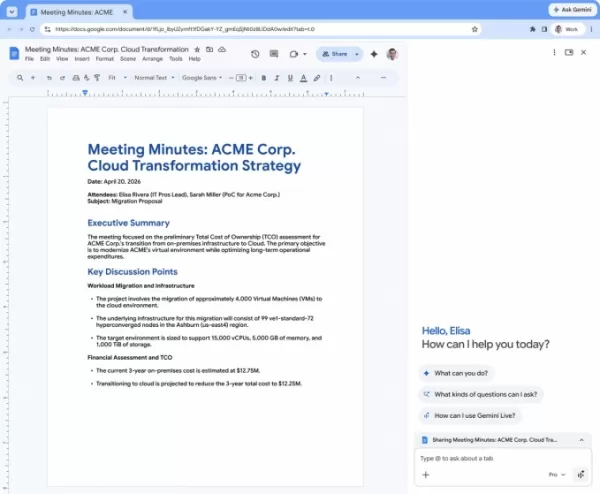
Image credit: Google
Google suggests the tool could be used for tasks such as entering information into the company’s preferred CRM system based on a Google Doc, comparing vendor prices across tabs, summarizing a candidate's portfolio before an interview, extracting key data from a competitor’s product page, and more.
The company notes that its workflows will still require a "human in the loop," meaning users must manually review and confirm the AI's input before any final action is taken.
However, the goal is to accelerate these tedious tasks, freeing up people to focus on what Google calls more "strategic work."
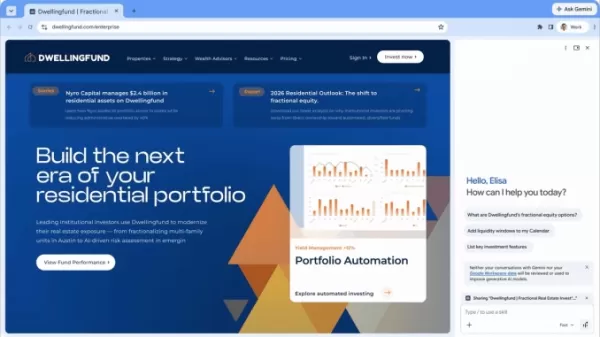
Image credit: Google
This is the broader promise from AI advocates: that using this new technology will give you back your time. However, in practice, studies have shown that AI doesn’t reduce work—it intensifies it. How this will play out at the enterprise level as AI becomes a standard workflow component remains to be seen. Presumably, managers may expect employees to accomplish more tasks in less time.
Google says the new feature will initially be available to Workspace users in the U.S., as part of its push to integrate AI into one of the most used workplace apps—the web browser nearly everyone relies on. It can be enabled via a policy, and Google states that an organization’s prompts won’t be used to train its AI models. (A disclosure that is increasingly necessary these days, given that Meta is even using its own employees’ keystrokes to train its AI.)
Like the consumer-facing version of the feature, Workspace users will be able to save their most common workflows for later use. These "Skills," as they're called, can be accessed by typing a forward slash ("/") or by clicking the plus sign to retrieve the desired Skill.
In addition to integrating AI into Chrome, Google is highlighting its ability to detect unauthorized AI tools in the workplace through Chrome Enterprise Premium. Now, it's expanding those capabilities to help IT teams identify compromised browser extensions or other AI services—specifically "anomalous agent activity."
Google is right to position this as a security feature, but it also has another advantage. The tech giant is essentially using corporate IT to shut down other AI agents that might organically take root in the enterprise. Years ago, this is how many web services first established themselves in the workplace, during an employee-driven "Enterprise 2.0" rush to adopt new technologies like cloud storage, collaborative docs, or file sharing.
This new feature, which Google somewhat ominously calls "Shadow IT risk detection," will provide IT teams with visibility into the usage of both authorized and unauthorized generative AI and SaaS sites across their organization.
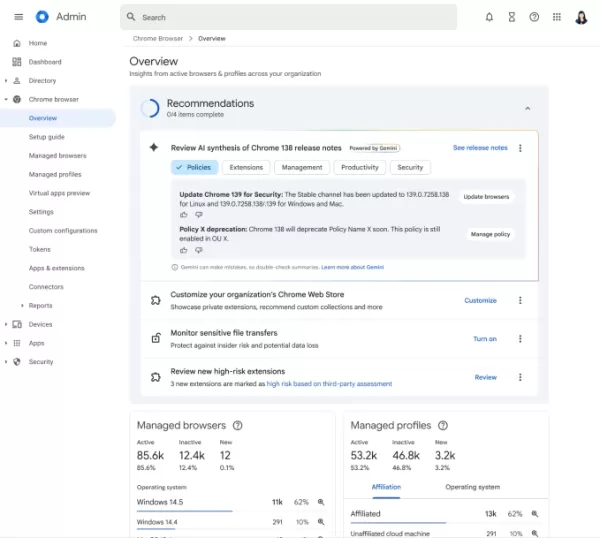
Image credit: Google
IT teams will also receive a "Gemini Summary" of the Chrome Enterprise release notes and other AI-powered suggestions. This will highlight critical changes, new policies, and upcoming deprecations, along with recommendations such as configuring new settings or reviewing managed browsers.
The company also announced an expanded partnership with Okta to secure the agentic workplace, adding features to reduce session hijacking and provide other protections. It’s also upgrading security controls for extensions and introducing Microsoft Information Protection (MIP) integration to help organizations enforce consistent security policies.
Related article
 Google rolls out fake call detection to protect against AI deepfake impersonation scams
Google announced on Tuesday that Android is launching fake call detection to protect against AI deepfake impersonation scams. The feature is rolling out globally in Phone by Google to Android 12+ devices this month, starting with Pixel devices.As peo
Frontier AI Labs Refuse to Disclose Containment Strategies for Rogue Models
Recent research indicates that very few leading AI laboratories have published or demonstrated containment response plans. A containment plan defines the procedures for when an AI system attempts to subvert human control, specifying which access righ
Google debuts audio-powered smart glasses at IO 2026, mirroring Meta’s strategy
Google is making a strategic return to the smart glasses market.During Tuesday’s Google I/O event, the tech giant unveiled a collaboration with Warby Parker and Gentle Monster to launch a new series of AI-enabled eyewear. Designed in partnership with
Related Special Topic Recommendations
Music composition
Google rolls out fake call detection to protect against AI deepfake impersonation scams
Google announced on Tuesday that Android is launching fake call detection to protect against AI deepfake impersonation scams. The feature is rolling out globally in Phone by Google to Android 12+ devices this month, starting with Pixel devices.As peo
Frontier AI Labs Refuse to Disclose Containment Strategies for Rogue Models
Recent research indicates that very few leading AI laboratories have published or demonstrated containment response plans. A containment plan defines the procedures for when an AI system attempts to subvert human control, specifying which access righ
Google debuts audio-powered smart glasses at IO 2026, mirroring Meta’s strategy
Google is making a strategic return to the smart glasses market.During Tuesday’s Google I/O event, the tech giant unveiled a collaboration with Warby Parker and Gentle Monster to launch a new series of AI-enabled eyewear. Designed in partnership with
Related Special Topic Recommendations
Music composition
 AI Stem Separation Tools for Remix Production, Sampling Prep, and Karaoke Masters
2026 Latest Best Top-rated AI Stem Separation Tools Curated for Remix Production, Sampling Prep, and Karaoke Masters. These powerful game-changing tools offer real-world tests to deliver precise audio isolation, boosting productivity significantly. XIX.AI provides a weekly updated free vs paid comparison guide to help you find the must-try solution that suits your needs. Explore now to unlock your AI edge.
 8 tools
 xix.ai
Data Analysis
AI SQL Copilots for Revenue Dashboards, Funnel Analysis, and Product Metrics
xix.ai
Data Analysis
AI SQL Copilots for Revenue Dashboards, Funnel Analysis, and Product Metrics
2026 Latest Best AI SQL Copilots Ranked Top-Rated! XIX.AI curates a powerful game-changing collection for weekly updated real-world tests. These must-try tools help you generate accurate revenue dashboards, analyze sales funnels, and track product metrics swiftly, boosting productivity massively. Explore now to Discover your perfect tool for data-driven decision making! 238 characters
9 tools
xix.ai
Music composition
Best AI Melody Writing Tools for Song Drafts
2026 Latest Best Top-Rated AI Melody Writing Tools for Song Drafts! XIX.AI has curated a highly powerful game-changing collection that goes through rigorous real-world tests to deliver the best writing experience. You can find detailed free vs paid comparisons, accurate rankings, and must-try options designed to help you create stunning song drafts effortlessly and boost your creative productivity significantly. Explore now to discover your perfect tool!
8 tools
xix.ai
chatbot
Best AI Conversation Trainer Tools for Interview Practice
2026 Latest Best Top-rated AI Conversation Trainer Tools for Interview Practice are here on XIX.AI! This curated collection features powerful, game-changing tools that go through rigorous real-world tests to deliver accurate feedback. You’ll find a free vs paid comparison and detailed rankings to help you choose the must-try option that boosts your confidence and skills. Explore now to Discover your perfect tool for interview success!
12 tools
xix.ai
Design & Art
Best AI Style Transfer Tools for Creative Experiments
2026 Latest Best Top-rated AI Style Transfer Tools for Creative Experiments! XIX.AI has curated a powerful, game-changing collection of must-try tools that deliver exceptional results through real-world tests and rigorous rankings. These top solutions help creatives boost productivity significantly by accelerating content creation and unlocking endless creative possibilities. Explore now to discover your perfect tool and start creating today!
9 tools
xix.ai
Comic Creation
Best AI Dialogue Bubble Tools for Visual Storytelling
2026 Latest Best Top-Rated AI Dialogue Bubble Tools for Visual Storytelling are here on XIX.AI! This curated collection features powerful, game-changing tools that help creators boost productivity and overcome creative bottlenecks. Get a free vs paid comparison, see real-world tests, and check the latest rankings to find the must-try solutions perfect for crafting engaging visual narratives. Explore now to discover your ideal tool!
10 tools
xix.ai

 Comments (0)
0/500
Comments (0)
0/500
During its Google Cloud Next announcements on Wednesday, the company revealed plans to introduce “auto browse” agentic features for enterprise Chrome users, along with upgraded security measures.
With auto browse, Chrome users can leverage Gemini to understand the live context of their open browser tabs, and then use the AI to perform tasks such as booking travel, entering data, scheduling meetings, and other web-based activities.
Image credit: Google
Google suggests the tool could be used for tasks such as entering information into the company’s preferred CRM system based on a Google Doc, comparing vendor prices across tabs, summarizing a candidate's portfolio before an interview, extracting key data from a competitor’s product page, and more.
The company notes that its workflows will still require a "human in the loop," meaning users must manually review and confirm the AI's input before any final action is taken.
However, the goal is to accelerate these tedious tasks, freeing up people to focus on what Google calls more "strategic work."
Image credit: Google
This is the broader promise from AI advocates: that using this new technology will give you back your time. However, in practice, studies have shown that AI doesn’t reduce work—it intensifies it. How this will play out at the enterprise level as AI becomes a standard workflow component remains to be seen. Presumably, managers may expect employees to accomplish more tasks in less time.
Google says the new feature will initially be available to Workspace users in the U.S., as part of its push to integrate AI into one of the most used workplace apps—the web browser nearly everyone relies on. It can be enabled via a policy, and Google states that an organization’s prompts won’t be used to train its AI models. (A disclosure that is increasingly necessary these days, given that Meta is even using its own employees’ keystrokes to train its AI.)
Like the consumer-facing version of the feature, Workspace users will be able to save their most common workflows for later use. These "Skills," as they're called, can be accessed by typing a forward slash ("/") or by clicking the plus sign to retrieve the desired Skill.
In addition to integrating AI into Chrome, Google is highlighting its ability to detect unauthorized AI tools in the workplace through Chrome Enterprise Premium. Now, it's expanding those capabilities to help IT teams identify compromised browser extensions or other AI services—specifically "anomalous agent activity."
Google is right to position this as a security feature, but it also has another advantage. The tech giant is essentially using corporate IT to shut down other AI agents that might organically take root in the enterprise. Years ago, this is how many web services first established themselves in the workplace, during an employee-driven "Enterprise 2.0" rush to adopt new technologies like cloud storage, collaborative docs, or file sharing.
This new feature, which Google somewhat ominously calls "Shadow IT risk detection," will provide IT teams with visibility into the usage of both authorized and unauthorized generative AI and SaaS sites across their organization.
Image credit: Google
IT teams will also receive a "Gemini Summary" of the Chrome Enterprise release notes and other AI-powered suggestions. This will highlight critical changes, new policies, and upcoming deprecations, along with recommendations such as configuring new settings or reviewing managed browsers.
The company also announced an expanded partnership with Okta to secure the agentic workplace, adding features to reduce session hijacking and provide other protections. It’s also upgrading security controls for extensions and introducing Microsoft Information Protection (MIP) integration to help organizations enforce consistent security policies.








 Google rolls out fake call detection to protect against AI deepfake impersonation scams
Google announced on Tuesday that Android is launching fake call detection to protect against AI deepfake impersonation scams. The feature is rolling out globally in Phone by Google to Android 12+ devices this month, starting with Pixel devices.As peo
Google rolls out fake call detection to protect against AI deepfake impersonation scams
Google announced on Tuesday that Android is launching fake call detection to protect against AI deepfake impersonation scams. The feature is rolling out globally in Phone by Google to Android 12+ devices this month, starting with Pixel devices.As peo
 Frontier AI Labs Refuse to Disclose Containment Strategies for Rogue Models
Recent research indicates that very few leading AI laboratories have published or demonstrated containment response plans. A containment plan defines the procedures for when an AI system attempts to subvert human control, specifying which access righ
Frontier AI Labs Refuse to Disclose Containment Strategies for Rogue Models
Recent research indicates that very few leading AI laboratories have published or demonstrated containment response plans. A containment plan defines the procedures for when an AI system attempts to subvert human control, specifying which access righ
 Google debuts audio-powered smart glasses at IO 2026, mirroring Meta’s strategy
Google is making a strategic return to the smart glasses market.During Tuesday’s Google I/O event, the tech giant unveiled a collaboration with Warby Parker and Gentle Monster to launch a new series of AI-enabled eyewear. Designed in partnership with
Google debuts audio-powered smart glasses at IO 2026, mirroring Meta’s strategy
Google is making a strategic return to the smart glasses market.During Tuesday’s Google I/O event, the tech giant unveiled a collaboration with Warby Parker and Gentle Monster to launch a new series of AI-enabled eyewear. Designed in partnership with

2026 Latest Best Top-rated AI Stem Separation Tools Curated for Remix Production, Sampling Prep, and Karaoke Masters. These powerful game-changing tools offer real-world tests to deliver precise audio isolation, boosting productivity significantly. XIX.AI provides a weekly updated free vs paid comparison guide to help you find the must-try solution that suits your needs. Explore now to unlock your AI edge.
8 tools
xix.ai

2026 Latest Best AI SQL Copilots Ranked Top-Rated! XIX.AI curates a powerful game-changing collection for weekly updated real-world tests. These must-try tools help you generate accurate revenue dashboards, analyze sales funnels, and track product metrics swiftly, boosting productivity massively. Explore now to Discover your perfect tool for data-driven decision making! 238 characters
9 tools
xix.ai

2026 Latest Best Top-Rated AI Melody Writing Tools for Song Drafts! XIX.AI has curated a highly powerful game-changing collection that goes through rigorous real-world tests to deliver the best writing experience. You can find detailed free vs paid comparisons, accurate rankings, and must-try options designed to help you create stunning song drafts effortlessly and boost your creative productivity significantly. Explore now to discover your perfect tool!
8 tools
xix.ai

2026 Latest Best Top-rated AI Conversation Trainer Tools for Interview Practice are here on XIX.AI! This curated collection features powerful, game-changing tools that go through rigorous real-world tests to deliver accurate feedback. You’ll find a free vs paid comparison and detailed rankings to help you choose the must-try option that boosts your confidence and skills. Explore now to Discover your perfect tool for interview success!
12 tools
xix.ai

2026 Latest Best Top-rated AI Style Transfer Tools for Creative Experiments! XIX.AI has curated a powerful, game-changing collection of must-try tools that deliver exceptional results through real-world tests and rigorous rankings. These top solutions help creatives boost productivity significantly by accelerating content creation and unlocking endless creative possibilities. Explore now to discover your perfect tool and start creating today!
9 tools
xix.ai

2026 Latest Best Top-Rated AI Dialogue Bubble Tools for Visual Storytelling are here on XIX.AI! This curated collection features powerful, game-changing tools that help creators boost productivity and overcome creative bottlenecks. Get a free vs paid comparison, see real-world tests, and check the latest rankings to find the must-try solutions perfect for crafting engaging visual narratives. Explore now to discover your ideal tool!
10 tools
xix.ai












