


 Home
HomeAdobe Illustrator AI Files Converted to Layered Photoshop PSDs
Graphic designers often need to convert files between Adobe Illustrator (AI) and Photoshop (PSD) seamlessly. This comprehensive guide explains how to maintain editable layers when converting AI to PSD format, ensuring full design flexibility in Photoshop. You'll learn why preserving layers prevents flattening and keeps elements editable, with detailed conversion steps for optimal workflow efficiency. We'll also address common post-conversion transparency issues.
Key Points
Why preserving layers matters during format conversion.
Complete walkthrough for converting AI to PSD with intact layers.
Pre-conversion optimization techniques in Illustrator.
Color mode considerations between RGB and CMYK.
Solutions for transparency problems post-conversion.
Trimming excess transparent areas in Photoshop.
Utilizing Illustrator's Release to Layers functionality.
Understanding AI to PSD Conversion
What is AI to PSD Conversion?
AI to PSD conversion transforms vector-based Adobe Illustrator files into raster-based Photoshop documents. This process enables designers to leverage Photoshop's pixel-editing capabilities while maintaining design integrity.
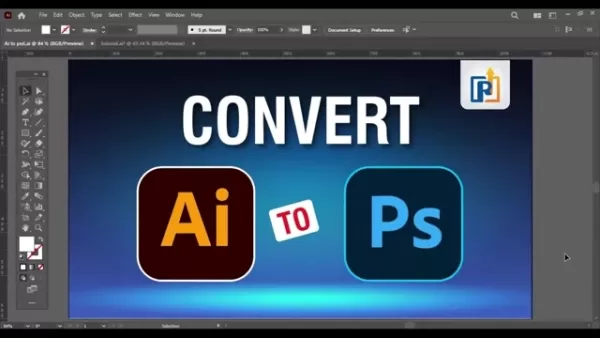
The conversion allows designers to utilize Photoshop's specialized tools for detailed image editing and effects that aren't available in Illustrator.
Conversion Benefits
- Precise Editing: Photoshop provides superior tools for pixel-perfect adjustments.
- Photo Enhancement: Ideal for designs requiring photo edits or complex raster effects.
- Format Requirements: Some projects specifically demand PSD format deliverables.
Conversion Challenges
- Layer Management: Maintaining organized, editable layers requires proper setup.
- Color Consistency: Ensuring accurate color translation between formats.
- Transparency Handling: Managing alpha channels and transparent elements.
Learning Outcomes
This tutorial provides practical techniques for layer-preserving conversion while addressing color and transparency considerations.
The Importance of Layer Preservation
Preserving layers during AI to PSD conversion fundamentally impacts design flexibility and workflow efficiency. Maintaining layered elements facilitates ongoing edits and adaptations in Photoshop.
Editing Advantages
- Component Isolation: Individual adjustment of text, shapes, and effects.
- Non-Destructive Workflow: Flexible experimentation with layer-based edits.
Collaboration Benefits
- Team Efficiency: Clear layer organization improves collaborative editing.
- Future Updates: Simplifies design modifications for different uses.
Flattening Consequences
- Edit Limitations: Combined layers eliminate element-level adjustments.
- Quality Constraints: Flattened designs restrict creative flexibility.
Proper layer preservation empowers designers to modify typography, recolors elements, and adjust effects independently, maintaining design versatility.
Step-by-Step Guide: Converting AI to PSD with Layer Preservation
Step 1: Prepare Your Adobe Illustrator File for Conversion
Careful file preparation ensures optimal conversion results. Proper setup minimizes issues with grouped elements and color representation.
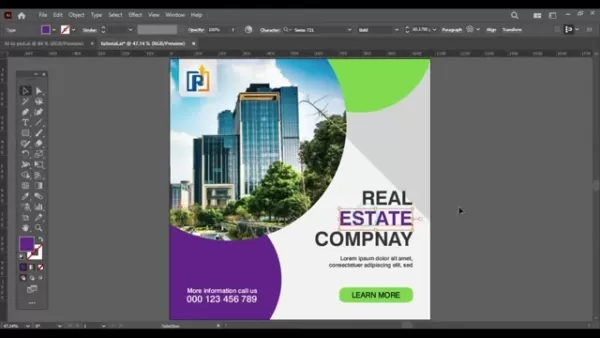
Separate Elements: Ungroup all components by selecting and choosing Ungroup repeatedly.
Verify Color Settings: Confirm appropriate color mode selection.
- Digital Projects: Use RGB color mode.
- Print Projects: Select CMYK color mode.
Color models define how colors are numerically represented in digital formats
- Navigation: File > Document Color Mode
Step 2: Releasing Layers in Illustrator
Illustrator's Release to Layers feature prepares artwork for conversion by separating elements onto individual layers.
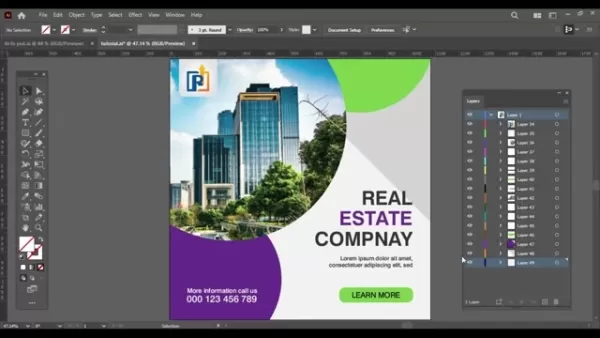
- Access Layers Panel: Window > Layers or press F7.
- Identify Primary Layer: Locate main artwork container.
- Distribute Elements: Choose Release to Layers (Sequence) from panel menu.
Step 3: Exporting to PSD
Proper export settings maintain layer structure during format conversion.
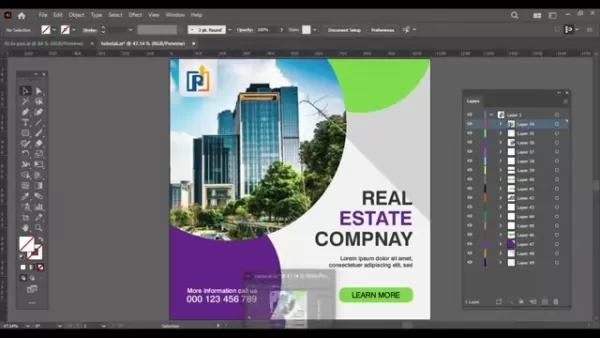
- Initiate Export: File > Export > Export As
- Select Format: Choose Photoshop (PSD)
Configure Settings
- Color Selection: Match project requirements
- Resolution Choice: 72dpi (web) or 300dpi (print)
- Layer Option: Enable Write Layers
- Complete Export: Click OK
Step 4: Opening and Verifying in Adobe Photoshop
Post-conversion verification ensures successful layer transfer.
Access File: File > Open
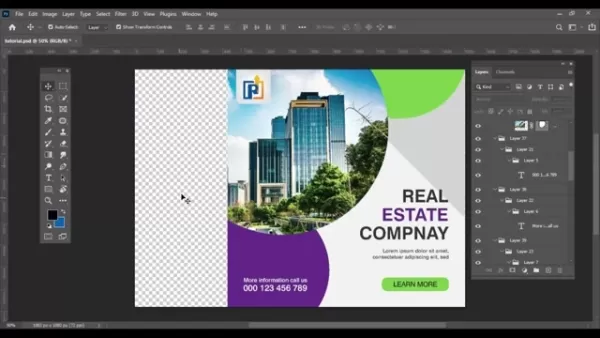
Layer Inspection
- Element Verification: Confirm each component exists independently
- Text Validation: Double-check editable text layers
Step 5: Dealing with Transparency Issues
Address transparency artifacts that may appear post-conversion.
Transparency Origins
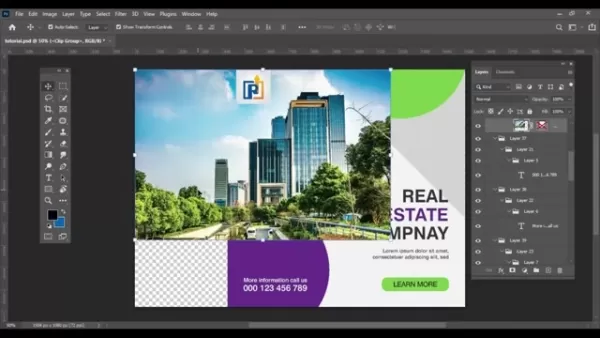
Transparency Solution
- Access Tool: Image > Trim
- Select Settings: Transparent Pixels option
- Apply Changes: Confirm selection
Pros and Cons of Converting AI to PSD
Pros
Access to Photoshop's advanced pixel editing tools.
Enhanced photo manipulation capabilities.
Meeting client PSD format requirements.
Sustained element-level editability.
Cons
Possible layer organization complications.
Transparency interpretation challenges.
Color mode translation issues.
Clipping mask adaptation difficulties.
Frequently Asked Questions (FAQ)
What does it mean to flatten layers?
Flattening merges visible layers into a single background layer, reducing editability but decreasing file size.
How do I check the color mode of my Adobe Illustrator document?
Navigate to File > Document Color Mode to verify RGB/CMYK settings.
Can I edit text layers after converting from AI to PSD?
Yes, with proper Write Layers export settings enabled.
Why are there extra transparent pixels after converting?
These often result from differing transparency interpretations between applications.
Related Questions
How does file conversion affect image quality?
Vector-to-raster conversion may impact quality if resolution settings aren't appropriate.
How can I optimize my workflow for converting AI to PSD?
Streamline conversions through proper file preparation, careful export configuration, and post-conversion verification.
Related article
 DeepMind CEO Hassabis: I sleep six hours a day, usually feel energetic around 1 a.m.
Fortune recently featured an interview with Demis Hassabis, CEO of Google DeepMind, revealing his unconventional approach to rest and productivity. Hassabis disclosed that he sleeps very little, structuring his waking hours into two distinct work blo
OpenAI, Anthropic Vie for Market Share Despite Revenue Shortfalls
Despite recent reports suggesting OpenAI missed revenue targets, creating pressure on tech stocks this Tuesday, private AI lab investors remain resilient. Seasoned backers have confirmed they will not reduce investment despite negative media coverage
California AV Compliance: A New Era of Tickets, Geofences, and 1M Miles
Guident operates an AuveTech shuttle in South Florida, managing a four-mile route in West Palm Beach and a one-mile route in Boca Raton using its remote monitoring technology. | Credit: GuidentCalifornia is redefining the regulatory landscape for dri
Related Special Topic Recommendations
writing
DeepMind CEO Hassabis: I sleep six hours a day, usually feel energetic around 1 a.m.
Fortune recently featured an interview with Demis Hassabis, CEO of Google DeepMind, revealing his unconventional approach to rest and productivity. Hassabis disclosed that he sleeps very little, structuring his waking hours into two distinct work blo
OpenAI, Anthropic Vie for Market Share Despite Revenue Shortfalls
Despite recent reports suggesting OpenAI missed revenue targets, creating pressure on tech stocks this Tuesday, private AI lab investors remain resilient. Seasoned backers have confirmed they will not reduce investment despite negative media coverage
California AV Compliance: A New Era of Tickets, Geofences, and 1M Miles
Guident operates an AuveTech shuttle in South Florida, managing a four-mile route in West Palm Beach and a one-mile route in Boca Raton using its remote monitoring technology. | Credit: GuidentCalifornia is redefining the regulatory landscape for dri
Related Special Topic Recommendations
writing
 AI Article Outline Tools for Long Form Writing
2026 Latest Best Top-Rated AI Article Outline Tools for Long Form Writing! This curated collection features powerful, game-changing tools that deliver accurate, structured outlines with real-world tests to boost writing efficiency significantly. XIX.AI is part of this elite selection. Get a free vs paid comparison to help you choose the perfect tool. Explore now and Unlock your AI edge!
 9 tools
 xix.ai
chatbot
Best AI Roleplay Chat Apps for Language Practice, Interview Prep, and Daily Fluency
xix.ai
chatbot
Best AI Roleplay Chat Apps for Language Practice, Interview Prep, and Daily Fluency
2026 Latest Best Top-rated AI Roleplay Chat Apps for Language Practice, Interview Prep, and Daily Fluency! XIX.AI curates a powerful game-changing collection that offers free vs paid comparison, real-world tests, and updated rankings weekly. These must-try tools help you boost writing skills, overcome fluency challenges, and improve communication efficiency across all daily scenarios. Explore now to discover your perfect tool for language growth!
10 tools
xix.ai
Music composition
AI Stem Separation Tools for Remix Production, Sampling Prep, and Karaoke Masters
2026 Latest Best Top-rated AI Stem Separation Tools Curated for Remix Production, Sampling Prep, and Karaoke Masters. These powerful game-changing tools offer real-world tests to deliver precise audio isolation, boosting productivity significantly. XIX.AI provides a weekly updated free vs paid comparison guide to help you find the must-try solution that suits your needs. Explore now to unlock your AI edge.
8 tools
xix.ai
Data Analysis
AI SQL Copilots for Revenue Dashboards, Funnel Analysis, and Product Metrics
2026 Latest Best AI SQL Copilots Ranked Top-Rated! XIX.AI curates a powerful game-changing collection for weekly updated real-world tests. These must-try tools help you generate accurate revenue dashboards, analyze sales funnels, and track product metrics swiftly, boosting productivity massively. Explore now to Discover your perfect tool for data-driven decision making! 238 characters
9 tools
xix.ai
Music composition
Best AI Melody Writing Tools for Song Drafts
2026 Latest Best Top-Rated AI Melody Writing Tools for Song Drafts! XIX.AI has curated a highly powerful game-changing collection that goes through rigorous real-world tests to deliver the best writing experience. You can find detailed free vs paid comparisons, accurate rankings, and must-try options designed to help you create stunning song drafts effortlessly and boost your creative productivity significantly. Explore now to discover your perfect tool!
8 tools
xix.ai
chatbot
Best AI Conversation Trainer Tools for Interview Practice
2026 Latest Best Top-rated AI Conversation Trainer Tools for Interview Practice are here on XIX.AI! This curated collection features powerful, game-changing tools that go through rigorous real-world tests to deliver accurate feedback. You’ll find a free vs paid comparison and detailed rankings to help you choose the must-try option that boosts your confidence and skills. Explore now to Discover your perfect tool for interview success!
12 tools
xix.ai

 Comments (1)
0/500
Comments (1)
0/500
![StevenNelson]()
AIからPSDへの変換でレイヤーを保持する方法が知りたかったんです!これでデザインワークフローがかなりスムーズになりますね✨ でもAdobeは互換性の問題をわざと残してサブスクリプション継続を促してる気がする...競合ツールが出てきたら改善されるのかな?
Graphic designers often need to convert files between Adobe Illustrator (AI) and Photoshop (PSD) seamlessly. This comprehensive guide explains how to maintain editable layers when converting AI to PSD format, ensuring full design flexibility in Photoshop. You'll learn why preserving layers prevents flattening and keeps elements editable, with detailed conversion steps for optimal workflow efficiency. We'll also address common post-conversion transparency issues.
Key Points
Why preserving layers matters during format conversion.
Complete walkthrough for converting AI to PSD with intact layers.
Pre-conversion optimization techniques in Illustrator.
Color mode considerations between RGB and CMYK.
Solutions for transparency problems post-conversion.
Trimming excess transparent areas in Photoshop.
Utilizing Illustrator's Release to Layers functionality.
Understanding AI to PSD Conversion
What is AI to PSD Conversion?
AI to PSD conversion transforms vector-based Adobe Illustrator files into raster-based Photoshop documents. This process enables designers to leverage Photoshop's pixel-editing capabilities while maintaining design integrity.
The conversion allows designers to utilize Photoshop's specialized tools for detailed image editing and effects that aren't available in Illustrator.
Conversion Benefits
- Precise Editing: Photoshop provides superior tools for pixel-perfect adjustments.
- Photo Enhancement: Ideal for designs requiring photo edits or complex raster effects.
- Format Requirements: Some projects specifically demand PSD format deliverables.
Conversion Challenges
- Layer Management: Maintaining organized, editable layers requires proper setup.
- Color Consistency: Ensuring accurate color translation between formats.
- Transparency Handling: Managing alpha channels and transparent elements.
Learning Outcomes
This tutorial provides practical techniques for layer-preserving conversion while addressing color and transparency considerations.
The Importance of Layer Preservation
Preserving layers during AI to PSD conversion fundamentally impacts design flexibility and workflow efficiency. Maintaining layered elements facilitates ongoing edits and adaptations in Photoshop.
Editing Advantages
- Component Isolation: Individual adjustment of text, shapes, and effects.
- Non-Destructive Workflow: Flexible experimentation with layer-based edits.
Collaboration Benefits
- Team Efficiency: Clear layer organization improves collaborative editing.
- Future Updates: Simplifies design modifications for different uses.
Flattening Consequences
- Edit Limitations: Combined layers eliminate element-level adjustments.
- Quality Constraints: Flattened designs restrict creative flexibility.
Proper layer preservation empowers designers to modify typography, recolors elements, and adjust effects independently, maintaining design versatility.
Step-by-Step Guide: Converting AI to PSD with Layer Preservation
Step 1: Prepare Your Adobe Illustrator File for Conversion
Careful file preparation ensures optimal conversion results. Proper setup minimizes issues with grouped elements and color representation.
Separate Elements: Ungroup all components by selecting and choosing Ungroup repeatedly.
Verify Color Settings: Confirm appropriate color mode selection.
- Digital Projects: Use RGB color mode.
- Print Projects: Select CMYK color mode.
Color models define how colors are numerically represented in digital formats
- Navigation: File > Document Color Mode
Step 2: Releasing Layers in Illustrator
Illustrator's Release to Layers feature prepares artwork for conversion by separating elements onto individual layers.
- Access Layers Panel: Window > Layers or press F7.
- Identify Primary Layer: Locate main artwork container.
- Distribute Elements: Choose Release to Layers (Sequence) from panel menu.
Step 3: Exporting to PSD
Proper export settings maintain layer structure during format conversion.
- Initiate Export: File > Export > Export As
- Select Format: Choose Photoshop (PSD)
Configure Settings
- Color Selection: Match project requirements
- Resolution Choice: 72dpi (web) or 300dpi (print)
- Layer Option: Enable Write Layers
- Complete Export: Click OK
Step 4: Opening and Verifying in Adobe Photoshop
Post-conversion verification ensures successful layer transfer.
Access File: File > Open
Layer Inspection
- Element Verification: Confirm each component exists independently
- Text Validation: Double-check editable text layers
Step 5: Dealing with Transparency Issues
Address transparency artifacts that may appear post-conversion.
Transparency Origins
Transparency Solution
- Access Tool: Image > Trim
- Select Settings: Transparent Pixels option
- Apply Changes: Confirm selection
Pros and Cons of Converting AI to PSD
Pros
Access to Photoshop's advanced pixel editing tools.
Enhanced photo manipulation capabilities.
Meeting client PSD format requirements.
Sustained element-level editability.
Cons
Possible layer organization complications.
Transparency interpretation challenges.
Color mode translation issues.
Clipping mask adaptation difficulties.
Frequently Asked Questions (FAQ)
What does it mean to flatten layers?
Flattening merges visible layers into a single background layer, reducing editability but decreasing file size.
How do I check the color mode of my Adobe Illustrator document?
Navigate to File > Document Color Mode to verify RGB/CMYK settings.
Can I edit text layers after converting from AI to PSD?
Yes, with proper Write Layers export settings enabled.
Why are there extra transparent pixels after converting?
These often result from differing transparency interpretations between applications.
Related Questions
How does file conversion affect image quality?
Vector-to-raster conversion may impact quality if resolution settings aren't appropriate.
How can I optimize my workflow for converting AI to PSD?
Streamline conversions through proper file preparation, careful export configuration, and post-conversion verification.








 DeepMind CEO Hassabis: I sleep six hours a day, usually feel energetic around 1 a.m.
Fortune recently featured an interview with Demis Hassabis, CEO of Google DeepMind, revealing his unconventional approach to rest and productivity. Hassabis disclosed that he sleeps very little, structuring his waking hours into two distinct work blo
DeepMind CEO Hassabis: I sleep six hours a day, usually feel energetic around 1 a.m.
Fortune recently featured an interview with Demis Hassabis, CEO of Google DeepMind, revealing his unconventional approach to rest and productivity. Hassabis disclosed that he sleeps very little, structuring his waking hours into two distinct work blo
 OpenAI, Anthropic Vie for Market Share Despite Revenue Shortfalls
Despite recent reports suggesting OpenAI missed revenue targets, creating pressure on tech stocks this Tuesday, private AI lab investors remain resilient. Seasoned backers have confirmed they will not reduce investment despite negative media coverage
California AV Compliance: A New Era of Tickets, Geofences, and 1M Miles
Guident operates an AuveTech shuttle in South Florida, managing a four-mile route in West Palm Beach and a one-mile route in Boca Raton using its remote monitoring technology. | Credit: GuidentCalifornia is redefining the regulatory landscape for dri
OpenAI, Anthropic Vie for Market Share Despite Revenue Shortfalls
Despite recent reports suggesting OpenAI missed revenue targets, creating pressure on tech stocks this Tuesday, private AI lab investors remain resilient. Seasoned backers have confirmed they will not reduce investment despite negative media coverage
California AV Compliance: A New Era of Tickets, Geofences, and 1M Miles
Guident operates an AuveTech shuttle in South Florida, managing a four-mile route in West Palm Beach and a one-mile route in Boca Raton using its remote monitoring technology. | Credit: GuidentCalifornia is redefining the regulatory landscape for dri

2026 Latest Best Top-Rated AI Article Outline Tools for Long Form Writing! This curated collection features powerful, game-changing tools that deliver accurate, structured outlines with real-world tests to boost writing efficiency significantly. XIX.AI is part of this elite selection. Get a free vs paid comparison to help you choose the perfect tool. Explore now and Unlock your AI edge!
9 tools
xix.ai

2026 Latest Best Top-rated AI Roleplay Chat Apps for Language Practice, Interview Prep, and Daily Fluency! XIX.AI curates a powerful game-changing collection that offers free vs paid comparison, real-world tests, and updated rankings weekly. These must-try tools help you boost writing skills, overcome fluency challenges, and improve communication efficiency across all daily scenarios. Explore now to discover your perfect tool for language growth!
10 tools
xix.ai

2026 Latest Best Top-rated AI Stem Separation Tools Curated for Remix Production, Sampling Prep, and Karaoke Masters. These powerful game-changing tools offer real-world tests to deliver precise audio isolation, boosting productivity significantly. XIX.AI provides a weekly updated free vs paid comparison guide to help you find the must-try solution that suits your needs. Explore now to unlock your AI edge.
8 tools
xix.ai

2026 Latest Best AI SQL Copilots Ranked Top-Rated! XIX.AI curates a powerful game-changing collection for weekly updated real-world tests. These must-try tools help you generate accurate revenue dashboards, analyze sales funnels, and track product metrics swiftly, boosting productivity massively. Explore now to Discover your perfect tool for data-driven decision making! 238 characters
9 tools
xix.ai

2026 Latest Best Top-Rated AI Melody Writing Tools for Song Drafts! XIX.AI has curated a highly powerful game-changing collection that goes through rigorous real-world tests to deliver the best writing experience. You can find detailed free vs paid comparisons, accurate rankings, and must-try options designed to help you create stunning song drafts effortlessly and boost your creative productivity significantly. Explore now to discover your perfect tool!
8 tools
xix.ai

2026 Latest Best Top-rated AI Conversation Trainer Tools for Interview Practice are here on XIX.AI! This curated collection features powerful, game-changing tools that go through rigorous real-world tests to deliver accurate feedback. You’ll find a free vs paid comparison and detailed rankings to help you choose the must-try option that boosts your confidence and skills. Explore now to Discover your perfect tool for interview success!
12 tools
xix.ai

AIからPSDへの変換でレイヤーを保持する方法が知りたかったんです!これでデザインワークフローがかなりスムーズになりますね✨ でもAdobeは互換性の問題をわざと残してサブスクリプション継続を促してる気がする...競合ツールが出てきたら改善されるのかな?












