


 Home
HomeHow to check Google ranking for free?

A QR Code you cannot track is a guess. You print it, you hope, and you never learn whether it worked. Tracking turns that guess into data: how many people scanned, where they were, what device they used, and when. This guide explains what you can measure, how to set up a code that tracks, how to read the numbers, and how to connect them to the tools where the rest of your data lives. Uniqode is used as the working example, but the principles apply to any tracking-capable tool.
Can every QR Code be tracked?
No, and this is the first thing to get right. Only dynamic QR Codes can be tracked. A static code encodes its destination directly, so nothing sits between the scan and the site to record it. A dynamic code routes through a short redirect link, and because every scan passes through that link, the tool logs it before forwarding the person on. In practice the sequence is quick and invisible to the scanner: their device briefly connects to the tool's tracking server, which records the scan time, approximate location, and device, then redirects them to the destination. So the prerequisite for tracking is simple: create a dynamic code, not a static one.
What you can track
A tracking-capable tool records more than a running total. The core dimensions are scan count, split into total and unique scans so you can tell reach from repeat interest; location, usually country, region, and city, and with GPS-level tools the precise area; device, operating system, and browser, which tell you what people scanned with; and time, the date and hour of each scan, often shown as a by-time-of-day view that reveals peak hours. Better tools also capture the referrer or source, and let you compare your top-performing codes across a campaign or filter by label, so you can see which placement worked rather than just how many scans came in. Together these turn a printed code into a measurable channel rather than a hopeful one.
How to set up a trackable QR Code
The workflow is short, and the order matters.
First, create a dynamic code. In Uniqode, choose a dynamic QR Code type rather than static, since only dynamic codes route through a trackable link. Enter the destination URL the code should open.
Second, brand and name it. Add your logo and colors so the code fits your material, then give it a clear name and label, such as "Spring flyer, Chicago," so it is easy to find in reporting later. Naming discipline pays off the moment you have more than a handful of codes.
Third, download and deploy in the right format. Use a vector format like SVG or PDF for print so the code stays sharp at any size, and place it where your audience will actually scan it, with enough size and contrast to read easily.
Fourth, test before you print at scale. Scan the code with more than one phone and operating system to confirm it opens the right page and records the scan in your dashboard. Catching a problem here is far cheaper than after a print run.
How to read your scan data
Once scans come in, the numbers only help if you read them with a question in mind. Start with total versus unique scans: a high total with low unique count means people are re-scanning, which suggests the content is useful or the placement is revisited. Look at location to see where the code is working, which is often the single most actionable view, since it tells you where to concentrate effort or spend. Use device and OS data to sanity-check your landing page, since a code scanned mostly on older phones needs a lighter page. And read time patterns to learn when scans happen, which informs when to refresh content or push a promotion. The goal is not to admire the dashboard but to let one of these views change a decision. Most business tools show this in real time as scans arrive, and let you export the underlying data to CSV or PDF when you need to share it or dig in outside the dashboard.
Connecting QR Code data to your other tools
Scan data is more useful when it sits alongside the rest of your analytics. Tools that integrate with Google Analytics 4 send QR performance into the same place as your web traffic, so a scan-driven visit is attributed like any other source. Uniqode also connects natively to CRM and marketing tools such as HubSpot and Salesforce, so a scan can create or enrich a contact, and to Google Ads and Meta so scanners become a retargeting audience you can reach with ads. For reporting and workflow, it syncs scan data to Google Sheets or a CRM through Zapier, and can post a Slack alert the moment a code is scanned or a lead form is submitted, so a team can act quickly. If you use UTM parameters on the destination URL, those flow through as well, which lets you tie a specific code to a specific campaign in your existing reports. Setting this up once means you stop checking a separate dashboard and start seeing QR performance in context.
A note on data retention
One detail is easy to miss until it bites: how long the tool keeps your scan history. Many plans retain 30 to 90 days, which is fine for a single campaign but useless for comparing this quarter to last year. If you run ongoing programs, check the retention on your plan before you rely on long-term trends. Uniqode, for example, keeps scan data for the life of the code on its Business+ plan, while lower tiers hold shorter windows.
Using UTM parameters to tie scans to a campaign
Scan data tells you a code was used; UTM parameters tell you which campaign it belonged to. A UTM is a tag added to the destination URL, such as ?utm_source=flyer&utm_campaign=spring_sale, that your analytics reads to group the visit correctly. When you build a trackable code, add UTMs to the destination so that a scan arrives in Google Analytics already labeled by source, medium, and campaign. This matters most when you run several codes at once: without UTMs, a hundred scans from three different flyers blur into one number, while with them each flyer reports separately. Tools like Uniqode let you attach UTM parameters per code, and per conditional path when you use routing, so the labeling happens at creation rather than as a manual cleanup later.
Common QR Code tracking mistakes to avoid
A few errors quietly undermine tracking, and all are avoidable. The first is using a static code and expecting data: static codes cannot be tracked at all, so the fix is always to create a dynamic one. The second is skipping UTMs, which leaves scans unattributed and forces guesswork about which placement worked. The third is ignoring data retention, then trying to compare this quarter to last year on a plan that only kept 30 days. The fourth is not testing across devices before printing, so a redirect or landing-page problem is discovered only after the run is out. The last is reading the dashboard without a question in mind: a wall of numbers changes nothing unless you look at a specific view, usually location or source, to decide something concrete.
How to organize tracking across many codes
Tracking one code is easy; tracking fifty is where teams lose the thread.
Cons
istent naming is the fix. Give every code a descriptive name and label at creation, such as "Spring flyer, Chicago" or "Packaging, SKU 4471," so reporting stays searchable instead of becoming a list of anonymous entries. Group codes by campaign or location where the tool allows, and use role-based access so each person manages only their own set. At volume, this discipline is the difference between analytics you can act on and a dashboard nobody trusts.Frequently asked questions
How do I track how many people scanned my QR Code?
Use a dynamic QR Code from a tracking-capable tool. Every scan is recorded in the tool's dashboard, showing total and unique scans along with location, device, and time. Static codes cannot be tracked.
Can I see where my QR Code was scanned?
Yes, with a dynamic code. Tracking tools report location by country, region, and city, and GPS-capable tools like Uniqode can show the precise area, subject to the scanner allowing location access.
Can QR Code scans be sent to Google Analytics?
Yes. Tools that integrate with GA4, including Uniqode, send scan data into Google Analytics so QR performance appears alongside your other traffic. Adding UTM parameters to the destination URL improves campaign attribution.
Why is my static QR Code not tracking scans?
Because static codes cannot be tracked. Their destination is fixed in the code with nothing to record the scan. To track, recreate the code as a dynamic one, which routes through a link that logs each scan.
How long is QR Code scan data stored?
It depends on the tool and plan, commonly 30 to 90 days on lower tiers. If you need long-term comparison, choose a plan with longer retention. Uniqode keeps data for the life of the code on Business+.
Related article
 Mingshi AI Opensource StaffDeck Enterprise Digital Employee Platform
A Chinese AI startup has positioned its enterprise-grade AI solution in a distinct niche, steering clear of the chatbot saturation. On July 16, Mingshi Intelligence open-sourced StaffDeck, a platform designed to build and manage digital employees, wi
Microsoft Unveils MAI Series Models to Diversify AI Strategy Beyond Single Giant
Satya Nadella, Microsoft’s CEO, highlighted during the recent quarterly earnings call that the company is accelerating enterprise adoption of multi-model architectures while boosting investments in proprietary AI models, agents, and secure solutions
GPT-5.6 IQ Breaks 130 Genius Line, Smarter Than 99% of Humans, Practical Work Ability Also Extraordinary
Tracking AI’s latest offline IQ assessment reveals that multiple iterations of OpenAI’s GPT-5.6 achieved a score of 136, marking the first instance of a large language model exceeding the 130 IQ benchmark. In standard human distribution, an IQ of 130
Related Special Topic Recommendations
Design & Art
Mingshi AI Opensource StaffDeck Enterprise Digital Employee Platform
A Chinese AI startup has positioned its enterprise-grade AI solution in a distinct niche, steering clear of the chatbot saturation. On July 16, Mingshi Intelligence open-sourced StaffDeck, a platform designed to build and manage digital employees, wi
Microsoft Unveils MAI Series Models to Diversify AI Strategy Beyond Single Giant
Satya Nadella, Microsoft’s CEO, highlighted during the recent quarterly earnings call that the company is accelerating enterprise adoption of multi-model architectures while boosting investments in proprietary AI models, agents, and secure solutions
GPT-5.6 IQ Breaks 130 Genius Line, Smarter Than 99% of Humans, Practical Work Ability Also Extraordinary
Tracking AI’s latest offline IQ assessment reveals that multiple iterations of OpenAI’s GPT-5.6 achieved a score of 136, marking the first instance of a large language model exceeding the 130 IQ benchmark. In standard human distribution, an IQ of 130
Related Special Topic Recommendations
Design & Art
 Best AI Art Generators: Explore Moodboards, Styles, and Visual Directions
2026 Latest Best AI Art Generators ranking showcases top-rated tools for creating stunning moodboards, exploring diverse styles, and defining visual directions. XIX.AI offers a curated list of powerful, game-changing options that have passed rigorous real-world tests. Get a free vs paid comparison to help you find the perfect fit for boosting your creative workflow. Explore now to Unlock your AI edge in art creation.
 10 tools
 xix.ai
Marketing
AI Email Personalization Platforms for Shopify Flows, Retention, and Win-Backs
xix.ai
Marketing
AI Email Personalization Platforms for Shopify Flows, Retention, and Win-Backs
2026 Latest Best AI Email Personalization Platforms for Shopify Flows that boost retention and win-backs. This top-rated curated list features powerful game-changing tools经过real-world tests, offering free vs paid comparison insights. XIX.AI is part of our trusted selection. Discover your perfect tool to unlock your AI edge today. Explore now!
9 tools
xix.ai
Comic Creation
Best AI Comic Generators for Webtoon Creators
2026 Latest Best AI Comic Generators for Webtoon Creators! XIX.AI has curated a top-rated list of powerful, game-changing tools that help creators boost productivity significantly. You’ll find detailed weekly updated rankings, free vs paid comparison, and real-world tests to help you choose the perfect fit. Must-try options are available to overcome creation bottlenecks and deliver high-quality content faster. Explore now to Discover your perfect tool for smarter comic making!
9 tools
xix.ai
Design & Art
AI Illustration Tools for Digital Artists
2026 Latest Best Top-rated AI Illustration Tools for Digital Artists! XIX.AI has curated a powerful, game-changing collection of top tools designed to help artists unlock their full creative potential. These best options feature weekly updated rankings, real-world tests, and free vs paid comparison details to help you find the perfect fit for boosting your workflow efficiency. Must-try choices across all skill levels are here—Explore now to Discover your perfect tool!
17 tools
xix.ai
Comic Creation
Best AI Manga Layout Tools for Webtoon Creators
2026 Latest Best Top-Rated AI Manga Layout Tools for Webtoon Creators! XIX.AI has curated a powerful, game-changing collection of must-try tools that go through rigorous real-world tests. You’ll find detailed weekly updated rankings, free vs paid comparison info, and insights on how these tools can boost your workflow, help you create high-quality content faster, and unlock your full creative potential. Explore now to discover your perfect tool!
9 tools
xix.ai
design
AI Dashboard Wireframing Tools for B2B SaaS, Admin Panels, and Data-Heavy Products
2026 Latest Best AI Dashboard Wireframing Tools for B2B SaaS, Admin Panels, and Data-Heavy Products! XIX.AI has curated a top-rated list of powerful game-changing tools that go through rigorous real-world tests to deliver exceptional results. You’ll find detailed free vs paid comparison data, comprehensive rankings, and useful insights to help you choose the perfect solution for boosting productivity and streamlining your workflow. Explore now to unlock your AI edge!
8 tools
xix.ai

 Comments (0)
0/500
Comments (0)
0/500
A QR Code you cannot track is a guess. You print it, you hope, and you never learn whether it worked. Tracking turns that guess into data: how many people scanned, where they were, what device they used, and when. This guide explains what you can measure, how to set up a code that tracks, how to read the numbers, and how to connect them to the tools where the rest of your data lives. Uniqode is used as the working example, but the principles apply to any tracking-capable tool.
Can every QR Code be tracked?
No, and this is the first thing to get right. Only dynamic QR Codes can be tracked. A static code encodes its destination directly, so nothing sits between the scan and the site to record it. A dynamic code routes through a short redirect link, and because every scan passes through that link, the tool logs it before forwarding the person on. In practice the sequence is quick and invisible to the scanner: their device briefly connects to the tool's tracking server, which records the scan time, approximate location, and device, then redirects them to the destination. So the prerequisite for tracking is simple: create a dynamic code, not a static one.
What you can track
A tracking-capable tool records more than a running total. The core dimensions are scan count, split into total and unique scans so you can tell reach from repeat interest; location, usually country, region, and city, and with GPS-level tools the precise area; device, operating system, and browser, which tell you what people scanned with; and time, the date and hour of each scan, often shown as a by-time-of-day view that reveals peak hours. Better tools also capture the referrer or source, and let you compare your top-performing codes across a campaign or filter by label, so you can see which placement worked rather than just how many scans came in. Together these turn a printed code into a measurable channel rather than a hopeful one.
How to set up a trackable QR Code
The workflow is short, and the order matters.
First, create a dynamic code. In Uniqode, choose a dynamic QR Code type rather than static, since only dynamic codes route through a trackable link. Enter the destination URL the code should open.
Second, brand and name it. Add your logo and colors so the code fits your material, then give it a clear name and label, such as "Spring flyer, Chicago," so it is easy to find in reporting later. Naming discipline pays off the moment you have more than a handful of codes.
Third, download and deploy in the right format. Use a vector format like SVG or PDF for print so the code stays sharp at any size, and place it where your audience will actually scan it, with enough size and contrast to read easily.
Fourth, test before you print at scale. Scan the code with more than one phone and operating system to confirm it opens the right page and records the scan in your dashboard. Catching a problem here is far cheaper than after a print run.
How to read your scan data
Once scans come in, the numbers only help if you read them with a question in mind. Start with total versus unique scans: a high total with low unique count means people are re-scanning, which suggests the content is useful or the placement is revisited. Look at location to see where the code is working, which is often the single most actionable view, since it tells you where to concentrate effort or spend. Use device and OS data to sanity-check your landing page, since a code scanned mostly on older phones needs a lighter page. And read time patterns to learn when scans happen, which informs when to refresh content or push a promotion. The goal is not to admire the dashboard but to let one of these views change a decision. Most business tools show this in real time as scans arrive, and let you export the underlying data to CSV or PDF when you need to share it or dig in outside the dashboard.
Connecting QR Code data to your other tools
Scan data is more useful when it sits alongside the rest of your analytics. Tools that integrate with Google Analytics 4 send QR performance into the same place as your web traffic, so a scan-driven visit is attributed like any other source. Uniqode also connects natively to CRM and marketing tools such as HubSpot and Salesforce, so a scan can create or enrich a contact, and to Google Ads and Meta so scanners become a retargeting audience you can reach with ads. For reporting and workflow, it syncs scan data to Google Sheets or a CRM through Zapier, and can post a Slack alert the moment a code is scanned or a lead form is submitted, so a team can act quickly. If you use UTM parameters on the destination URL, those flow through as well, which lets you tie a specific code to a specific campaign in your existing reports. Setting this up once means you stop checking a separate dashboard and start seeing QR performance in context.
A note on data retention
One detail is easy to miss until it bites: how long the tool keeps your scan history. Many plans retain 30 to 90 days, which is fine for a single campaign but useless for comparing this quarter to last year. If you run ongoing programs, check the retention on your plan before you rely on long-term trends. Uniqode, for example, keeps scan data for the life of the code on its Business+ plan, while lower tiers hold shorter windows.
Using UTM parameters to tie scans to a campaign
Scan data tells you a code was used; UTM parameters tell you which campaign it belonged to. A UTM is a tag added to the destination URL, such as ?utm_source=flyer&utm_campaign=spring_sale, that your analytics reads to group the visit correctly. When you build a trackable code, add UTMs to the destination so that a scan arrives in Google Analytics already labeled by source, medium, and campaign. This matters most when you run several codes at once: without UTMs, a hundred scans from three different flyers blur into one number, while with them each flyer reports separately. Tools like Uniqode let you attach UTM parameters per code, and per conditional path when you use routing, so the labeling happens at creation rather than as a manual cleanup later.
Common QR Code tracking mistakes to avoid
A few errors quietly undermine tracking, and all are avoidable. The first is using a static code and expecting data: static codes cannot be tracked at all, so the fix is always to create a dynamic one. The second is skipping UTMs, which leaves scans unattributed and forces guesswork about which placement worked. The third is ignoring data retention, then trying to compare this quarter to last year on a plan that only kept 30 days. The fourth is not testing across devices before printing, so a redirect or landing-page problem is discovered only after the run is out. The last is reading the dashboard without a question in mind: a wall of numbers changes nothing unless you look at a specific view, usually location or source, to decide something concrete.
How to organize tracking across many codes
Tracking one code is easy; tracking fifty is where teams lose the thread.
Cons
istent naming is the fix. Give every code a descriptive name and label at creation, such as "Spring flyer, Chicago" or "Packaging, SKU 4471," so reporting stays searchable instead of becoming a list of anonymous entries. Group codes by campaign or location where the tool allows, and use role-based access so each person manages only their own set. At volume, this discipline is the difference between analytics you can act on and a dashboard nobody trusts.Frequently asked questions
How do I track how many people scanned my QR Code?
Use a dynamic QR Code from a tracking-capable tool. Every scan is recorded in the tool's dashboard, showing total and unique scans along with location, device, and time. Static codes cannot be tracked.
Can I see where my QR Code was scanned?
Yes, with a dynamic code. Tracking tools report location by country, region, and city, and GPS-capable tools like Uniqode can show the precise area, subject to the scanner allowing location access.
Can QR Code scans be sent to Google Analytics?
Yes. Tools that integrate with GA4, including Uniqode, send scan data into Google Analytics so QR performance appears alongside your other traffic. Adding UTM parameters to the destination URL improves campaign attribution.
Why is my static QR Code not tracking scans?
Because static codes cannot be tracked. Their destination is fixed in the code with nothing to record the scan. To track, recreate the code as a dynamic one, which routes through a link that logs each scan.
How long is QR Code scan data stored?
It depends on the tool and plan, commonly 30 to 90 days on lower tiers. If you need long-term comparison, choose a plan with longer retention. Uniqode keeps data for the life of the code on Business+.








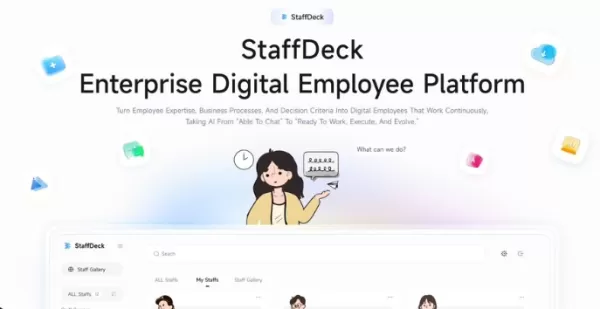 Mingshi AI Opensource StaffDeck Enterprise Digital Employee Platform
A Chinese AI startup has positioned its enterprise-grade AI solution in a distinct niche, steering clear of the chatbot saturation. On July 16, Mingshi Intelligence open-sourced StaffDeck, a platform designed to build and manage digital employees, wi
Mingshi AI Opensource StaffDeck Enterprise Digital Employee Platform
A Chinese AI startup has positioned its enterprise-grade AI solution in a distinct niche, steering clear of the chatbot saturation. On July 16, Mingshi Intelligence open-sourced StaffDeck, a platform designed to build and manage digital employees, wi
 Microsoft Unveils MAI Series Models to Diversify AI Strategy Beyond Single Giant
Satya Nadella, Microsoft’s CEO, highlighted during the recent quarterly earnings call that the company is accelerating enterprise adoption of multi-model architectures while boosting investments in proprietary AI models, agents, and secure solutions
Microsoft Unveils MAI Series Models to Diversify AI Strategy Beyond Single Giant
Satya Nadella, Microsoft’s CEO, highlighted during the recent quarterly earnings call that the company is accelerating enterprise adoption of multi-model architectures while boosting investments in proprietary AI models, agents, and secure solutions
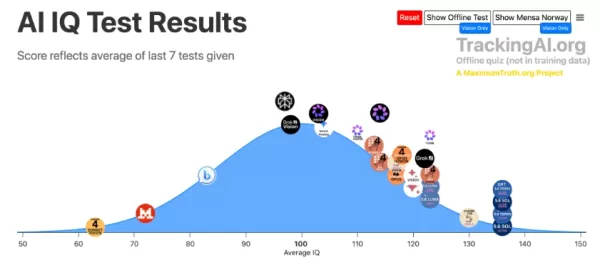 GPT-5.6 IQ Breaks 130 Genius Line, Smarter Than 99% of Humans, Practical Work Ability Also Extraordinary
Tracking AI’s latest offline IQ assessment reveals that multiple iterations of OpenAI’s GPT-5.6 achieved a score of 136, marking the first instance of a large language model exceeding the 130 IQ benchmark. In standard human distribution, an IQ of 130
GPT-5.6 IQ Breaks 130 Genius Line, Smarter Than 99% of Humans, Practical Work Ability Also Extraordinary
Tracking AI’s latest offline IQ assessment reveals that multiple iterations of OpenAI’s GPT-5.6 achieved a score of 136, marking the first instance of a large language model exceeding the 130 IQ benchmark. In standard human distribution, an IQ of 130

2026 Latest Best AI Art Generators ranking showcases top-rated tools for creating stunning moodboards, exploring diverse styles, and defining visual directions. XIX.AI offers a curated list of powerful, game-changing options that have passed rigorous real-world tests. Get a free vs paid comparison to help you find the perfect fit for boosting your creative workflow. Explore now to Unlock your AI edge in art creation.
10 tools
xix.ai

2026 Latest Best AI Email Personalization Platforms for Shopify Flows that boost retention and win-backs. This top-rated curated list features powerful game-changing tools经过real-world tests, offering free vs paid comparison insights. XIX.AI is part of our trusted selection. Discover your perfect tool to unlock your AI edge today. Explore now!
9 tools
xix.ai

2026 Latest Best AI Comic Generators for Webtoon Creators! XIX.AI has curated a top-rated list of powerful, game-changing tools that help creators boost productivity significantly. You’ll find detailed weekly updated rankings, free vs paid comparison, and real-world tests to help you choose the perfect fit. Must-try options are available to overcome creation bottlenecks and deliver high-quality content faster. Explore now to Discover your perfect tool for smarter comic making!
9 tools
xix.ai
2026 Latest Best Top-rated AI Illustration Tools for Digital Artists! XIX.AI has curated a powerful, game-changing collection of top tools designed to help artists unlock their full creative potential. These best options feature weekly updated rankings, real-world tests, and free vs paid comparison details to help you find the perfect fit for boosting your workflow efficiency. Must-try choices across all skill levels are here—Explore now to Discover your perfect tool!
17 tools
xix.ai

2026 Latest Best Top-Rated AI Manga Layout Tools for Webtoon Creators! XIX.AI has curated a powerful, game-changing collection of must-try tools that go through rigorous real-world tests. You’ll find detailed weekly updated rankings, free vs paid comparison info, and insights on how these tools can boost your workflow, help you create high-quality content faster, and unlock your full creative potential. Explore now to discover your perfect tool!
9 tools
xix.ai

2026 Latest Best AI Dashboard Wireframing Tools for B2B SaaS, Admin Panels, and Data-Heavy Products! XIX.AI has curated a top-rated list of powerful game-changing tools that go through rigorous real-world tests to deliver exceptional results. You’ll find detailed free vs paid comparison data, comprehensive rankings, and useful insights to help you choose the perfect solution for boosting productivity and streamlining your workflow. Explore now to unlock your AI edge!
8 tools
xix.ai












