


 Home
HomeHow to use NotebookLM to enhance student learning in 2025? A complete guide.
In today's fast-paced academic landscape, students continuously seek innovative tools to enrich their learning. NotebookLM, an AI-powered platform, stands out as a powerful ally, delivering numerous advantages to students across diverse fields of study. The tool is freely accessible and enhances the educational journey. This in-depth article examines how NotebookLM can be used to improve study routines, understand challenging lecture content, and prepare more effectively for exams.
Key Benefits of Using NotebookLM
Better understanding of lectures
Improved study routines and organization
Efficient exam preparation methods
AI-driven summarization of difficult content
Tailored learning experience
Free access with a Gmail account
Assists in gathering information and sources
Understanding NotebookLM: An AI-Powered Learning Companion
What is NotebookLM?
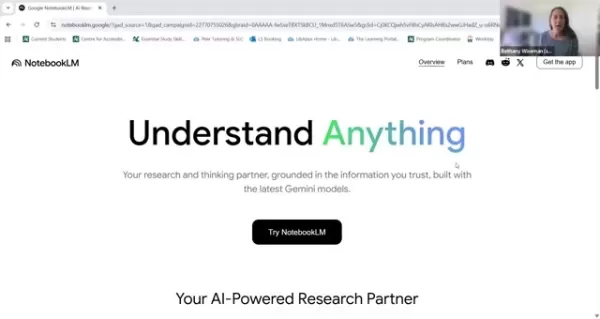
NotebookLM is an AI tool created to assist students in their academic efforts. According to Bethany Wiseman, a Learning Strategist at the Centre for Accessible Learning, NotebookLM acts as a research and thinking partner, developed with advanced Gemini models to help students comprehend and synthesize information. The platform is available online at no cost and benefits many learners. Whether you're previewing class material, summarizing notes, or studying for a test, NotebookLM provides a flexible learning method. The presenter walks you through NotebookLM, reviewing the website and highlighting the simple access via a Gmail account. Clicking "Try NotebookLM" directs her to her account since she is already signed in, enabling you to get the most out of the experience.
Why Students Should Cons
ider NotebookLM
NotebookLM offers significant potential for students aiming to boost their academic results. By previewing materials before lectures

, students can grasp the topics more easily, participate more actively, and gain more from their time in class. Reviewing NotebookLM before attending a lecture or class is a smart strategy. The platform also helps with studying, summarizing, and reviewing information through various customized approaches. NotebookLM can significantly improve a student's comprehension and study effectiveness.
Free Access with Gmail: Getting Started
A major benefit of NotebookLM is its availability. Students with a Gmail account can use the tool without any cost, removing financial obstacles to academic improvement. This allows a broader range of learners to take advantage of NotebookLM's features, irrespective of their financial situation. You can try NotebookLM for free by signing up with a Gmail account. Creating a free Gmail account is simple, and Gmail itself is a valuable resource.
Navigating the NotebookLM Interface: A Step-by-Step Guide
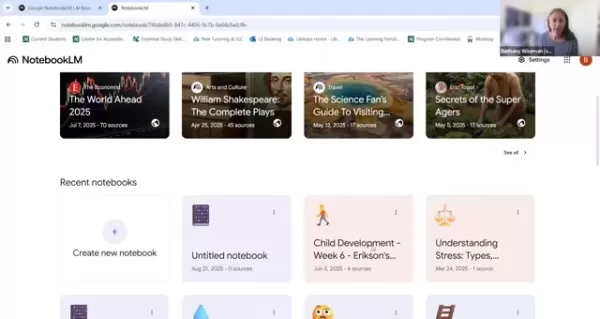
After registering, users encounter an intuitive interface where they can start new notebooks or explore featured ones. The homepage offers multiple choices. NotebookLM automatically saves all your active notebooks. The platform also includes external notebooks that you can utilize. To start, the recent notebooks section at the bottom is most crucial.

To upload your materials, click on "create new notebook", where you can add sources or paste text. To upload information, you need to save a file as a PDF and then upload that source to NotebookLM. Adding sources or links lets users import PDFs, text files, audio files, websites, and YouTube links, creating a centralized learning environment. Remember that NotebookLM has limits on the number of sources you can upload. Each notebook holds a maximum of fifty sources, so select your materials carefully and avoid overloading your notebook.
Supported File Types and Source Limits
NotebookLM accommodates various file formats, such as PDFs, TXT files, Markdown files, and MP3 audio files, supporting a wide range of learning resources. However, it's important to remember that the free version of NotebookLM restricts each notebook to fifty sources. Although this is adequate for many students, effective source management is key to leveraging the platform's full potential. PowerPoint files cannot be uploaded directly to NotebookLM, so be sure to save any PowerPoint presentations as PDFs before attempting to add them.
Keep in mind that NotebookLM does not support every file type, so verify compatibility when uploading different kinds of files.
Organizing Your NotebookLM Workspace: Tips and Tricks
NotebookLM automatically assigns AI-generated titles. For better organization, students should customize these titles. There are other ways to manage your workspace in NotebookLM, and knowing them is important.
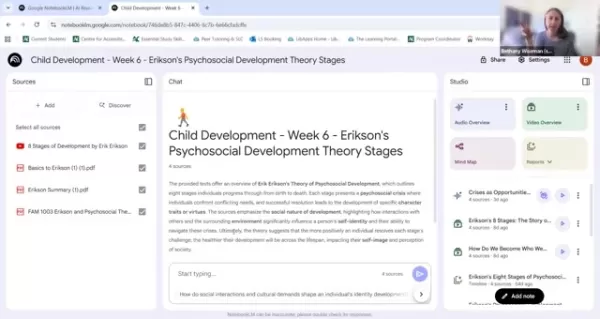
Ensure your work is easy to navigate by adding your personal touch and custom titles. When managing numerous files from various sources, use your sources as more than a final repository. Also, remember to treat these sources as a starting point for your studies, not the finish line. Use them, as previously mentioned, to prepare for lectures. This practice will significantly boost your academic progress.
NotebookLM Studio's Video and MindMap
The Power of Video & Audio Overview
NotebookLM improves student understanding using both audio and visual elements. This aids in deconstructing subjects for more effective study and learning. However, remember that NotebookLM is merely a starting point, not the ultimate destination.
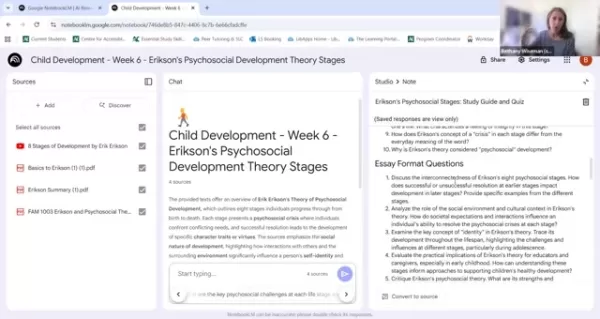
There is no substitute for reviewing the material firsthand or simply attending class. But these tools are more than sufficient to help you reach your study goals. Bethany has observed the AI tool undergo several updates. AI is continuously evolving and discovering improved methods to deliver the best user experience. So, allow some time to familiarize yourself with the material before giving up, as it will certainly guide you in the right direction.
MindMap to Find Important Facets and Points
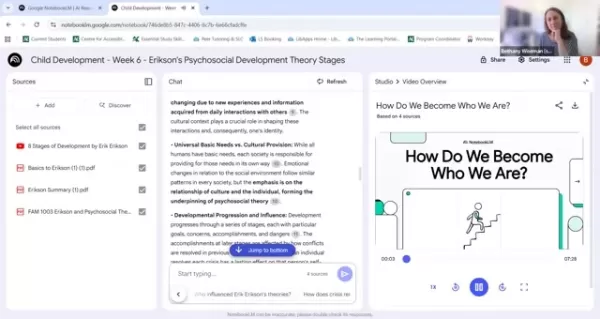
Understanding how different concepts interrelate can be challenging. MindMap deconstructs key ideas and helps link them, making the information easier to visualize and apply. It identifies all the components and emphasizes the most critical ones for you. Then, it consolidates them into a chart that is simple to memorize. It should be noted, however, that AI technology is still under development and may not always summarize information accurately.
Frequently Asked Questions About NotebookLM
Is NotebookLM really free?
Yes, NotebookLM is free for anyone with a Gmail account. Google accounts are also free to create.
What file types are supported by NotebookLM?
NotebookLM accepts PDFs, TXT files, Markdown files, and MP3 audio files. However, PowerPoint presentations are not supported.
Can NotebookLM replace the need to attend lectures?
NotebookLM is designed as a supplementary aid and should not be used as a substitute for lectures. Lectures provide essential information to help you get the most out of your education.
How many sources can I upload per notebook?
Each notebook has a limit of fifty sources. Strategize how to best utilize and optimize your use of NotebookLM.
Further Exploration: Related Learning Resources
What other AI-powered educational tools are available for students?
The field of AI in education is rapidly growing, providing a wide range of tools to meet various learning requirements. From AI-powered tutoring systems and essay writing aids to language learning applications, students now have a vast selection of resources that can customize and improve their educational experience. Examples of such tools include QuillBot, Grammarly, and Khan Academy.
How can students effectively integrate AI tools into their existing study routine?
To successfully incorporate AI tools like NotebookLM into their study habits, students should begin by clearly defining their learning goals and pinpointing where AI support would be most helpful. This helps prevent feeling overwhelmed. A useful suggestion is to maintain realistic expectations, use AI as a supplement rather than a replacement, and experiment with different AI applications.
What are the ethical considerations surrounding the use of AI in education?
As AI gains a stronger foothold in education, it is vital to consider the ethical implications of its use. Key issues include plagiarism, academic honesty, and data security. By promoting responsible and ethical use of AI tools, educators can help ensure these technologies serve as beneficial learning supports, not as workarounds for academic achievement.
Related article
 Former OpenAI Chief Scientist Ilya’s SSI Unveils First Model
AI has achieved another major milestone. Following his departure from OpenAI, former chief scientist Ilya Sutskever established Safe Superintelligence Inc. (SSI), which has recently unveiled details regarding its inaugural model. Reports from oversea
Lovable Leads Atech's Seed Round as AI Ambient Coding Officially Enters the Hardware Field
On May 14, 2026, AI application development platform Lovable announced its participation in the $800,000 seed funding round for Danish hardware startup Atech. Led by Lovable, the round attracted top-tier venture capital firms including the a16z Scout
Anthropic Expands Claude AI Coding Tools to Japan in Push for Overseas Growth
Anthropic, a prominent U.S. artificial intelligence firm, is intensifying its global outreach. On Wednesday, the company hosted a major developer gathering, "Code with Claude," in Tokyo, drawing close to 500 software engineers. This initiative seeks
Related Special Topic Recommendations
chatbot
Former OpenAI Chief Scientist Ilya’s SSI Unveils First Model
AI has achieved another major milestone. Following his departure from OpenAI, former chief scientist Ilya Sutskever established Safe Superintelligence Inc. (SSI), which has recently unveiled details regarding its inaugural model. Reports from oversea
Lovable Leads Atech's Seed Round as AI Ambient Coding Officially Enters the Hardware Field
On May 14, 2026, AI application development platform Lovable announced its participation in the $800,000 seed funding round for Danish hardware startup Atech. Led by Lovable, the round attracted top-tier venture capital firms including the a16z Scout
Anthropic Expands Claude AI Coding Tools to Japan in Push for Overseas Growth
Anthropic, a prominent U.S. artificial intelligence firm, is intensifying its global outreach. On Wednesday, the company hosted a major developer gathering, "Code with Claude," in Tokyo, drawing close to 500 software engineers. This initiative seeks
Related Special Topic Recommendations
chatbot
 Best AI Conversation Trainer Tools for Interview Practice
2026 Latest Best Top-rated AI Conversation Trainer Tools for Interview Practice are here on XIX.AI! This curated collection features powerful, game-changing tools that go through rigorous real-world tests to deliver accurate feedback. You’ll find a free vs paid comparison and detailed rankings to help you choose the must-try option that boosts your confidence and skills. Explore now to Discover your perfect tool for interview success!
 12 tools
 xix.ai
Design & Art
Best AI Style Transfer Tools for Creative Experiments
xix.ai
Design & Art
Best AI Style Transfer Tools for Creative Experiments
2026 Latest Best Top-rated AI Style Transfer Tools for Creative Experiments! XIX.AI has curated a powerful, game-changing collection of must-try tools that deliver exceptional results through real-world tests and rigorous rankings. These top solutions help creatives boost productivity significantly by accelerating content creation and unlocking endless creative possibilities. Explore now to discover your perfect tool and start creating today!
9 tools
xix.ai
Comic Creation
Best AI Dialogue Bubble Tools for Visual Storytelling
2026 Latest Best Top-Rated AI Dialogue Bubble Tools for Visual Storytelling are here on XIX.AI! This curated collection features powerful, game-changing tools that help creators boost productivity and overcome creative bottlenecks. Get a free vs paid comparison, see real-world tests, and check the latest rankings to find the must-try solutions perfect for crafting engaging visual narratives. Explore now to discover your ideal tool!
10 tools
xix.ai
Meeting Assistant
Top AI Meeting Summary Tools: Track Decisions and Follow-Ups Clearly
2026 Latest Top-Rated Best AI Meeting Summary Tools for Clear Decision Tracking and Effortless Follow-Ups. This curated list showcases powerful, game-changing solutions that boost productivity dramatically by automating meeting notes, identifying key action items, and streamlining team coordination across all projects. Get a free vs paid comparison along with real-world tests and weekly updated rankings to help you find the perfect tool. Explore now to unlock your AI edge!
9 tools
xix.ai
Data Analysis
Best AI Data Cleaning Tools: Fix Missing Values and Duplicates Fast
2026 Latest Best Top-rated AI Data Cleaning Tools for quick fixing of missing values and duplicates. This curated list showcases powerful, game-changing solutions that boost productivity significantly. Each option has undergone rigorous real-world tests to ensure reliability. Get a free vs paid comparison and discover the must-try tool that fits your needs best. Explore now at XIX.AI to Unlock your AI edge.
11 tools
xix.ai
Design & Art
Best AI Creative Ideation Tools for Artists: Break Through Visual Blocks
2026 Latest Best Top-Rated AI Creative Ideation Tools for Artists are curated by XIX.AI to help creators break through visual blocks and boost creativity instantly. These powerful game-changing tools offer real-world tests, detailed free vs paid comparison, and weekly updated rankings. Discover your perfect tool to accelerate content creation and unlock your AI edge today. Explore now!
14 tools
xix.ai

 Comments (1)
0/500
Comments (1)
0/500
![JoeClark]()
NotebookLM這平台看起來挺有意思的,把AI變成學習夥伴。不過我好奇,它真的能適應不同學科的思考方式嗎?比如學文學和學程式需要的邏輯就不太一樣。希望開發團隊有考慮到這點,不然可能只是另一個高級的筆記工具而已。期待看到實際的應用案例!📚
In today's fast-paced academic landscape, students continuously seek innovative tools to enrich their learning. NotebookLM, an AI-powered platform, stands out as a powerful ally, delivering numerous advantages to students across diverse fields of study. The tool is freely accessible and enhances the educational journey. This in-depth article examines how NotebookLM can be used to improve study routines, understand challenging lecture content, and prepare more effectively for exams.
Key Benefits of Using NotebookLM
Better understanding of lectures
Improved study routines and organization
Efficient exam preparation methods
AI-driven summarization of difficult content
Tailored learning experience
Free access with a Gmail account
Assists in gathering information and sources
Understanding NotebookLM: An AI-Powered Learning Companion
What is NotebookLM?
NotebookLM is an AI tool created to assist students in their academic efforts. According to Bethany Wiseman, a Learning Strategist at the Centre for Accessible Learning, NotebookLM acts as a research and thinking partner, developed with advanced Gemini models to help students comprehend and synthesize information. The platform is available online at no cost and benefits many learners. Whether you're previewing class material, summarizing notes, or studying for a test, NotebookLM provides a flexible learning method. The presenter walks you through NotebookLM, reviewing the website and highlighting the simple access via a Gmail account. Clicking "Try NotebookLM" directs her to her account since she is already signed in, enabling you to get the most out of the experience.
Why Students Should Cons
ider NotebookLM
NotebookLM offers significant potential for students aiming to boost their academic results. By previewing materials before lectures
, students can grasp the topics more easily, participate more actively, and gain more from their time in class. Reviewing NotebookLM before attending a lecture or class is a smart strategy. The platform also helps with studying, summarizing, and reviewing information through various customized approaches. NotebookLM can significantly improve a student's comprehension and study effectiveness.
Free Access with Gmail: Getting Started
A major benefit of NotebookLM is its availability. Students with a Gmail account can use the tool without any cost, removing financial obstacles to academic improvement. This allows a broader range of learners to take advantage of NotebookLM's features, irrespective of their financial situation. You can try NotebookLM for free by signing up with a Gmail account. Creating a free Gmail account is simple, and Gmail itself is a valuable resource.
Navigating the NotebookLM Interface: A Step-by-Step Guide
After registering, users encounter an intuitive interface where they can start new notebooks or explore featured ones. The homepage offers multiple choices. NotebookLM automatically saves all your active notebooks. The platform also includes external notebooks that you can utilize. To start, the recent notebooks section at the bottom is most crucial.
To upload your materials, click on "create new notebook", where you can add sources or paste text. To upload information, you need to save a file as a PDF and then upload that source to NotebookLM. Adding sources or links lets users import PDFs, text files, audio files, websites, and YouTube links, creating a centralized learning environment. Remember that NotebookLM has limits on the number of sources you can upload. Each notebook holds a maximum of fifty sources, so select your materials carefully and avoid overloading your notebook.
Supported File Types and Source Limits
NotebookLM accommodates various file formats, such as PDFs, TXT files, Markdown files, and MP3 audio files, supporting a wide range of learning resources. However, it's important to remember that the free version of NotebookLM restricts each notebook to fifty sources. Although this is adequate for many students, effective source management is key to leveraging the platform's full potential. PowerPoint files cannot be uploaded directly to NotebookLM, so be sure to save any PowerPoint presentations as PDFs before attempting to add them.
Keep in mind that NotebookLM does not support every file type, so verify compatibility when uploading different kinds of files.
Organizing Your NotebookLM Workspace: Tips and Tricks
NotebookLM automatically assigns AI-generated titles. For better organization, students should customize these titles. There are other ways to manage your workspace in NotebookLM, and knowing them is important.
Ensure your work is easy to navigate by adding your personal touch and custom titles. When managing numerous files from various sources, use your sources as more than a final repository. Also, remember to treat these sources as a starting point for your studies, not the finish line. Use them, as previously mentioned, to prepare for lectures. This practice will significantly boost your academic progress.
NotebookLM Studio's Video and MindMap
The Power of Video & Audio Overview
NotebookLM improves student understanding using both audio and visual elements. This aids in deconstructing subjects for more effective study and learning. However, remember that NotebookLM is merely a starting point, not the ultimate destination.
There is no substitute for reviewing the material firsthand or simply attending class. But these tools are more than sufficient to help you reach your study goals. Bethany has observed the AI tool undergo several updates. AI is continuously evolving and discovering improved methods to deliver the best user experience. So, allow some time to familiarize yourself with the material before giving up, as it will certainly guide you in the right direction.
MindMap to Find Important Facets and Points
Understanding how different concepts interrelate can be challenging. MindMap deconstructs key ideas and helps link them, making the information easier to visualize and apply. It identifies all the components and emphasizes the most critical ones for you. Then, it consolidates them into a chart that is simple to memorize. It should be noted, however, that AI technology is still under development and may not always summarize information accurately.
Frequently Asked Questions About NotebookLM
Is NotebookLM really free?
Yes, NotebookLM is free for anyone with a Gmail account. Google accounts are also free to create.
What file types are supported by NotebookLM?
NotebookLM accepts PDFs, TXT files, Markdown files, and MP3 audio files. However, PowerPoint presentations are not supported.
Can NotebookLM replace the need to attend lectures?
NotebookLM is designed as a supplementary aid and should not be used as a substitute for lectures. Lectures provide essential information to help you get the most out of your education.
How many sources can I upload per notebook?
Each notebook has a limit of fifty sources. Strategize how to best utilize and optimize your use of NotebookLM.
Further Exploration: Related Learning Resources
What other AI-powered educational tools are available for students?
The field of AI in education is rapidly growing, providing a wide range of tools to meet various learning requirements. From AI-powered tutoring systems and essay writing aids to language learning applications, students now have a vast selection of resources that can customize and improve their educational experience. Examples of such tools include QuillBot, Grammarly, and Khan Academy.
How can students effectively integrate AI tools into their existing study routine?
To successfully incorporate AI tools like NotebookLM into their study habits, students should begin by clearly defining their learning goals and pinpointing where AI support would be most helpful. This helps prevent feeling overwhelmed. A useful suggestion is to maintain realistic expectations, use AI as a supplement rather than a replacement, and experiment with different AI applications.
What are the ethical considerations surrounding the use of AI in education?
As AI gains a stronger foothold in education, it is vital to consider the ethical implications of its use. Key issues include plagiarism, academic honesty, and data security. By promoting responsible and ethical use of AI tools, educators can help ensure these technologies serve as beneficial learning supports, not as workarounds for academic achievement.








 Former OpenAI Chief Scientist Ilya’s SSI Unveils First Model
AI has achieved another major milestone. Following his departure from OpenAI, former chief scientist Ilya Sutskever established Safe Superintelligence Inc. (SSI), which has recently unveiled details regarding its inaugural model. Reports from oversea
Former OpenAI Chief Scientist Ilya’s SSI Unveils First Model
AI has achieved another major milestone. Following his departure from OpenAI, former chief scientist Ilya Sutskever established Safe Superintelligence Inc. (SSI), which has recently unveiled details regarding its inaugural model. Reports from oversea
 Lovable Leads Atech's Seed Round as AI Ambient Coding Officially Enters the Hardware Field
On May 14, 2026, AI application development platform Lovable announced its participation in the $800,000 seed funding round for Danish hardware startup Atech. Led by Lovable, the round attracted top-tier venture capital firms including the a16z Scout
Lovable Leads Atech's Seed Round as AI Ambient Coding Officially Enters the Hardware Field
On May 14, 2026, AI application development platform Lovable announced its participation in the $800,000 seed funding round for Danish hardware startup Atech. Led by Lovable, the round attracted top-tier venture capital firms including the a16z Scout
 Anthropic Expands Claude AI Coding Tools to Japan in Push for Overseas Growth
Anthropic, a prominent U.S. artificial intelligence firm, is intensifying its global outreach. On Wednesday, the company hosted a major developer gathering, "Code with Claude," in Tokyo, drawing close to 500 software engineers. This initiative seeks
Anthropic Expands Claude AI Coding Tools to Japan in Push for Overseas Growth
Anthropic, a prominent U.S. artificial intelligence firm, is intensifying its global outreach. On Wednesday, the company hosted a major developer gathering, "Code with Claude," in Tokyo, drawing close to 500 software engineers. This initiative seeks

2026 Latest Best Top-rated AI Conversation Trainer Tools for Interview Practice are here on XIX.AI! This curated collection features powerful, game-changing tools that go through rigorous real-world tests to deliver accurate feedback. You’ll find a free vs paid comparison and detailed rankings to help you choose the must-try option that boosts your confidence and skills. Explore now to Discover your perfect tool for interview success!
12 tools
xix.ai

2026 Latest Best Top-rated AI Style Transfer Tools for Creative Experiments! XIX.AI has curated a powerful, game-changing collection of must-try tools that deliver exceptional results through real-world tests and rigorous rankings. These top solutions help creatives boost productivity significantly by accelerating content creation and unlocking endless creative possibilities. Explore now to discover your perfect tool and start creating today!
9 tools
xix.ai

2026 Latest Best Top-Rated AI Dialogue Bubble Tools for Visual Storytelling are here on XIX.AI! This curated collection features powerful, game-changing tools that help creators boost productivity and overcome creative bottlenecks. Get a free vs paid comparison, see real-world tests, and check the latest rankings to find the must-try solutions perfect for crafting engaging visual narratives. Explore now to discover your ideal tool!
10 tools
xix.ai

2026 Latest Top-Rated Best AI Meeting Summary Tools for Clear Decision Tracking and Effortless Follow-Ups. This curated list showcases powerful, game-changing solutions that boost productivity dramatically by automating meeting notes, identifying key action items, and streamlining team coordination across all projects. Get a free vs paid comparison along with real-world tests and weekly updated rankings to help you find the perfect tool. Explore now to unlock your AI edge!
9 tools
xix.ai

2026 Latest Best Top-rated AI Data Cleaning Tools for quick fixing of missing values and duplicates. This curated list showcases powerful, game-changing solutions that boost productivity significantly. Each option has undergone rigorous real-world tests to ensure reliability. Get a free vs paid comparison and discover the must-try tool that fits your needs best. Explore now at XIX.AI to Unlock your AI edge.
11 tools
xix.ai

2026 Latest Best Top-Rated AI Creative Ideation Tools for Artists are curated by XIX.AI to help creators break through visual blocks and boost creativity instantly. These powerful game-changing tools offer real-world tests, detailed free vs paid comparison, and weekly updated rankings. Discover your perfect tool to accelerate content creation and unlock your AI edge today. Explore now!
14 tools
xix.ai

NotebookLM這平台看起來挺有意思的,把AI變成學習夥伴。不過我好奇,它真的能適應不同學科的思考方式嗎?比如學文學和學程式需要的邏輯就不太一樣。希望開發團隊有考慮到這點,不然可能只是另一個高級的筆記工具而已。期待看到實際的應用案例!📚












