


 Home
HomeFree AI voice generation in 2025? Complete guide using Google AI Studio.
Want to create professional voiceovers or audio content without breaking the bank? AI voice generation is now more accessible than ever, enabling anyone to produce high-quality audio using just a computer or mobile device. This guide walks you through the process of generating AI voices for free with Google AI Studio. It includes everything you need to get started and produce compelling audio. You’ll learn about Google AI Studio’s key features, get step-by-step usage instructions, and discover tips for enhancing your AI-generated audio. Unlock your creative potential with free AI audio tools!
Key Points
Use Google AI Studio to create AI voices at no cost.
A detailed guide for setting up and using Google AI Studio for voice generation.
How to optimize AI-generated audio for different applications.
Download and integrate your AI voice recordings into your projects.
Explore the range of voice styles and customization options in Google AI Studio.
Create innovative audio content using AI, completely free.
Introduction to AI Voice Generation
What is AI Voice Generation?
AI voice generation uses artificial intelligence to create speech that sounds natural and human-like. The technology has advanced quickly, now offering varied accents, tones, and emotional expression. Powered by sophisticated algorithms, AI voice generators transform text into fluid, expressive speech. This opens up new possibilities for content creators, marketers, and educators alike. With AI voice generation, you can produce voiceovers, audiobooks, and other audio content fast—no need for expensive voice actors or recording gear. Audio production is now more accessible and affordable, and Google AI Studio gives you a powerful, free platform to explore this capability.
Why Use Free AI Voice Generators?
Opting for a free AI voice generator like Google AI Studio is especially helpful for those on a limited budget or just starting out. These tools remove the cost of hiring voice talent and buying recording equipment, significantly cutting production expenses. A free AI voice generator lets you try out different voices and styles until you find the right match for your project. This approach saves time and money compared to traditional recording methods. Additionally, AI voice generators are highly efficient, letting you produce audio quickly and make edits as needed. With its clean interface and strong feature set, Google AI Studio is an excellent choice for free and effective AI voice generation.
Optimizing Your AI-Generated Audio
Tips for Better Audio Quality
To get the most out of your AI-generated audio, try the following tips:
- Proofread Your Script: Check for grammar or spelling mistakes in your script, as AI depends on correct text.
- Use Natural Language: Write conversationally to help the AI voice sound authentic. Avoid long, complicated sentences.
- Experiment with Different Voices: Test various voice options in Google AI Studio to match your content’s style and audience.
- Adjust Pronunciation: Some AI tools let you fine-tune pronunciation. Use this to fix mispronounced words and improve clarity.
- Add Pauses and Intonations: Include pauses and adjust speech rhythm to make the AI voice more human and engaging.
Applying these tips will help you produce higher quality, more effective AI-generated audio.
Enhancing Audio with Post-Processing
Use post-processing to polish your AI-generated audio. Audio editing software can remove background noise, balance volume, and apply EQ to improve sound. Adding background music or sound effects can make the listening experience richer and more immersive. Mastering ensures your audio sounds great across devices and platforms. You can use free tools like Audacity or premium software like Adobe Audition for these tasks. Proper post-processing can turn your AI-generated audio into professional-grade content that resonates with listeners.
Step-by-Step Guide: Generating AI Voices with Google AI Studio
Step 1: Accessing Google AI Studio
First, open your browser and search “Google AI Studio AI” on Google

. This will bring you to the platform where you can begin crafting your AI-generated audio. Make sure you have a Google account, as you’ll need to log in to start.
Step 2: Configuring Desktop Site View
On your phone, tap the three dots in the upper right corner of the screen. Scroll and select “Desktop Site”. This step is important to access all Google AI Studio features on mobile.
Step 3: Navigating to Generate Native Speech
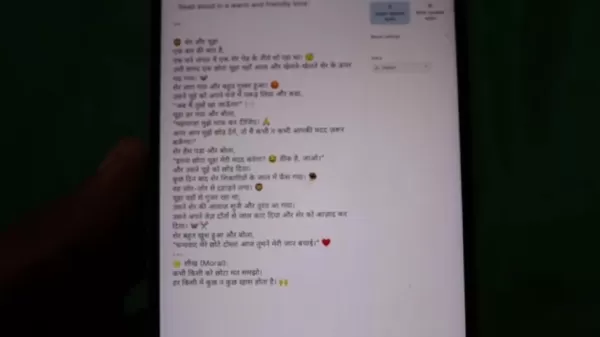
Once inside Google AI Studio, find and click “Generate Native Speech with Gemini”. This option takes you directly to the voice creation screen.
Step 4: Selecting Single Speaker Audio

You’ll see choices for single speaker and multi-speaker audio. For this walkthrough, pick “Single Speaker Audio” for a simple voice generation workflow.
Step 5: Entering Your Text
In the text box, paste the script you want to convert to speech

. A well-formatted script yields the best results. Longer texts may need more time to process.
Step 6: Choosing a Voice
Click Voice settings to pick your preferred voice.

Here, you can choose from a list of voice actors. Try different ones to match your script’s tone and feel. Before previewing, set your device volume to maximum.
Step 7: Generating the Audio

Once your text is entered and voice selected, click “Run” below. The site will process your text into audio—processing time depends on text length.
Step 8: Downloading Your AI Voice
After the audio is generated, click the three dots. This reveals the download option. Save the file to your device for use in your work. With these steps, you can easily generate custom AI voices for any purpose, enriching your audio content.
Pricing for AI Voice Generation Tools
Overview of Google AI Studio
Google AI Studio offers free AI voice generation, making it ideal for cost-conscious users. While it includes many useful features, it may have certain constraints compared to premium services. It’s a great tool for getting started with AI voice technology.
For comparison, here’s a look at popular AI voice tools and their pricing:
Tool Name Pricing Model Key Features Google AI StudioFreeBasic voice generation, limited voice selectionMurf AISubscription-based (multiple tiers)Diverse voice catalog, advanced customization, commercial rightsSynthesiaSubscription-based (multiple tiers)AI avatars, screen recording, collaboration, commercial rightsDescriptSubscription-based (multiple tiers)Audio/video editing, transcription, voice cloning, team collaborationLovo.aiSubscription-based (multiple tiers)AI voice generation, video editing, text-to-speech APINaturalReadersSubscription-based (multiple tiers)AI voice generation, multi-language supportNote: Pricing and features may be updated, so always check each provider’s official website.
Pros and Cons of Using Google AI Studio
Pros
Completely free, so accessible to all.
Simple, intuitive interface—easy for beginners.
No need for costly voice actors or recording gear.
Generate audio content swiftly and efficiently.
Useful for many scenarios, from education to marketing.
Cons
Fewer voice options than paid alternatives.
May not include advanced custom features.
Audio quality may fall short of professional studio work.
Requires an internet connection.
Commercial usage may be limited.
Creative Use Cases for Free AI Voice Generation
Engaging Educational Content
Build interesting educational materials with AI voice generation. Use the platform to narrate e-learning courses, explanatory videos, and language lessons. This can make learning more approachable and enjoyable for students. Since Google AI Studio is free, it’s a budget-friendly resource for schools and teachers.
Enhancing Marketing and Advertising
Boost your marketing and advertising campaigns using AI voice generation. Create appealing voiceovers for commercials, promotional clips, and social media posts. This helps broaden your reach and increase engagement without hiring voice professionals. Use Google AI Studio to produce multiple voice versions and A/B test them to identify the best performer.
Creating Audiobooks and Podcasts
Turn written material into audiobooks and podcasts through AI voice generation. This is ideal for authors and creators expanding their audience with audio versions. The straightforward design of Google AI Studio helps you quickly transform text into polished audio, increasing your content’s accessibility.
Improving Accessibility
Enhance accessibility by turning text into audio with AI voice generation. This helps people with visual impairments access articles, documents, and other written resources. Using Google AI Studio, you can deliver a helpful service to those who prefer audio, supporting inclusivity and wider access.
Frequently Asked Questions (FAQ)
Is Google AI Studio really free?
Yes, Google AI Studio is totally free. You can generate AI voices without subscription fees or hidden charges. However, commercial use could be limited, so check the service terms.
What kind of audio quality can I expect from Google AI Studio?
Google AI Studio offers solid audio quality, though it might not equal professionally recorded speech. It works well for education, marketing, and personal projects. For high-stakes commercial work, a paid AI voice service might provide superior quality.
Can I use Google AI Studio for commercial purposes?
Commercial rights may be limited. Please review the platform’s terms of service for specifics. If you require full commercial rights, a paid AI voice tool with those permissions may be a better fit.
Do I need any special software to use Google AI Studio?
No special software is required. Google AI Studio runs in your web browser. An internet connection is necessary to use the service.
How can I improve the audio quality of my AI-generated voices?
To boost audio quality, review your script for errors, write naturally, test different voice actors, and adjust pronunciation settings. You can also apply post-processing with audio editing software.
Related Questions
Are there other free AI voice generation tools available?
Yes, other free AI voice tools are available online, such as: FreeTTS TTSFreeListnrHowever, Google AI Studio delivers an easy and efficient user experience. Each tool has unique features and limits, so try a few to find the best one for your needs. Many paid plans also include free trials so you can test their features before subscribing.
Related article
 Stripe to Acquire OpenRouter as AI Model Routing Gains Momentum
Stripe has agreed to acquire OpenRouter, an AI model-routing platform that gives developers access to hundreds of models through a single interface. The deal adds model selection and routing to Stripe’s existing work around AI usage and token-based b
Former OpenAI Researcher Barrett Zoph Returns to Google to Support Gemini Development
Barret Zoph, who previously abruptly left and joined OpenAI due to a disagreement with Thinking Machines Lab CEO Miriam Mularati, has once again changed employers. Alphabet's Google announced that Zoph will return as Vice President of Research, bring
How Recursive Intelligence Raised $335M at $4B Valuation in 4 Months
The co-founders of startup Ricursive Intelligence seemed destined to be co-founders.Anna Goldie, CEO, and Azalia Mirhoseini, CTO, are so well-known in the AI community that they were among those AI engineers who “got those weird emails from Zuckerber
Related Special Topic Recommendations
Design & Art
Stripe to Acquire OpenRouter as AI Model Routing Gains Momentum
Stripe has agreed to acquire OpenRouter, an AI model-routing platform that gives developers access to hundreds of models through a single interface. The deal adds model selection and routing to Stripe’s existing work around AI usage and token-based b
Former OpenAI Researcher Barrett Zoph Returns to Google to Support Gemini Development
Barret Zoph, who previously abruptly left and joined OpenAI due to a disagreement with Thinking Machines Lab CEO Miriam Mularati, has once again changed employers. Alphabet's Google announced that Zoph will return as Vice President of Research, bring
How Recursive Intelligence Raised $335M at $4B Valuation in 4 Months
The co-founders of startup Ricursive Intelligence seemed destined to be co-founders.Anna Goldie, CEO, and Azalia Mirhoseini, CTO, are so well-known in the AI community that they were among those AI engineers who “got those weird emails from Zuckerber
Related Special Topic Recommendations
Design & Art
 Top AI Illustration Tools: Create Editorial Scenes and Cover Art Faster
2026 Latest Top-rated AI Illustration Tools: Our curated list features the best powerfully designed tools for creating stunning editorial scenes and eye-catching cover art quickly. Each option has gone through rigorous real-world tests, offering a free vs paid comparison to help you find the perfect match for your workflow. Try these must-try solutions today to unlock your AI edge and boost your creative productivity. Explore now at XIX.AI.
 10 tools
 xix.ai
Education and Learning
Top AI Tutors for Exam Prep: Practice Math, Science, and English
xix.ai
Education and Learning
Top AI Tutors for Exam Prep: Practice Math, Science, and English
2026 Latest Top-Rated Best AI Tutors for Exam Prep are here on XIX.AI! Our curated list features powerful game-changing tools that offer free vs paid comparison, real-world tests, and weekly updated rankings. They help boost your writing efficiency, simplify complex topic learning, and unlock your academic potential. Explore now to Discover your perfect exam prep tool and Start creating today to Unlock your AI edge!
10 tools
xix.ai
Finance
AI Budget Planning Tools for Personal Money Management
2026 Latest Best Top-Rated AI Budget Planning Tools for Personal Money Management are here on XIX.AI! This curated collection features powerful, game-changing solutions that help you conduct real-world tests, understand spending habits, and create personalized plans to boost productivity. Enjoy a free vs paid comparison along with detailed rankings. Must-try tools designed to simplify money management and unlock your AI edge. Explore now!
11 tools
xix.ai
Health & Wellness
AI Sleep Tracking Assistants: Improve Recovery with Better Bedtime Habits
2026 Latest Best Top-Rated AI Sleep Tracking Assistants curated for ultimate recovery. This fully updated weekly guide features powerful tools that deliver real-world tests, free vs paid comparison, and detailed rankings to help you find the must-try solution that boosts sleep quality and supports better bedtime habits. Explore now at XIX.AI to Unlock your AI edge.
10 tools
xix.ai
Data Analysis
AI SQL Copilots for Product and Revenue Analytics
2026 Latest Best Top-Rated AI SQL Copilots for Product and Revenue Analytics! XIX.AI has curated a powerful, game-changing collection of must-try tools that undergo real-world tests through weekly updated rankings. These tools help users boost productivity significantly by accelerating data analysis, streamlining complex queries, and generating accurate insights to drive smarter business decisions. Explore now to Discover your perfect tool for unlocking your AI edge!
14 tools
xix.ai
Education and Learning
Best AI Homework Helpers That Teach: Learn Concepts, Not Just Answers
2026 Latest Best Top-Rated AI Homework Helpers That Teach Core Concepts Not Just Answers Powerful Tools for Students Must-Try Curated List Weekly Updated Free vs Paid Comparison Real-World Tests Accurate Rankings to Help You Unlock Your Full Learning Potential Explore now to Discover your perfect tool for smarter studying.
10 tools
xix.ai

 Comments (0)
0/500
Comments (0)
0/500
Want to create professional voiceovers or audio content without breaking the bank? AI voice generation is now more accessible than ever, enabling anyone to produce high-quality audio using just a computer or mobile device. This guide walks you through the process of generating AI voices for free with Google AI Studio. It includes everything you need to get started and produce compelling audio. You’ll learn about Google AI Studio’s key features, get step-by-step usage instructions, and discover tips for enhancing your AI-generated audio. Unlock your creative potential with free AI audio tools!
Key Points
Use Google AI Studio to create AI voices at no cost.
A detailed guide for setting up and using Google AI Studio for voice generation.
How to optimize AI-generated audio for different applications.
Download and integrate your AI voice recordings into your projects.
Explore the range of voice styles and customization options in Google AI Studio.
Create innovative audio content using AI, completely free.
Introduction to AI Voice Generation
What is AI Voice Generation?
AI voice generation uses artificial intelligence to create speech that sounds natural and human-like. The technology has advanced quickly, now offering varied accents, tones, and emotional expression. Powered by sophisticated algorithms, AI voice generators transform text into fluid, expressive speech. This opens up new possibilities for content creators, marketers, and educators alike. With AI voice generation, you can produce voiceovers, audiobooks, and other audio content fast—no need for expensive voice actors or recording gear. Audio production is now more accessible and affordable, and Google AI Studio gives you a powerful, free platform to explore this capability.
Why Use Free AI Voice Generators?
Opting for a free AI voice generator like Google AI Studio is especially helpful for those on a limited budget or just starting out. These tools remove the cost of hiring voice talent and buying recording equipment, significantly cutting production expenses. A free AI voice generator lets you try out different voices and styles until you find the right match for your project. This approach saves time and money compared to traditional recording methods. Additionally, AI voice generators are highly efficient, letting you produce audio quickly and make edits as needed. With its clean interface and strong feature set, Google AI Studio is an excellent choice for free and effective AI voice generation.
Optimizing Your AI-Generated Audio
Tips for Better Audio Quality
To get the most out of your AI-generated audio, try the following tips:
- Proofread Your Script: Check for grammar or spelling mistakes in your script, as AI depends on correct text.
- Use Natural Language: Write conversationally to help the AI voice sound authentic. Avoid long, complicated sentences.
- Experiment with Different Voices: Test various voice options in Google AI Studio to match your content’s style and audience.
- Adjust Pronunciation: Some AI tools let you fine-tune pronunciation. Use this to fix mispronounced words and improve clarity.
- Add Pauses and Intonations: Include pauses and adjust speech rhythm to make the AI voice more human and engaging.
Applying these tips will help you produce higher quality, more effective AI-generated audio.
Enhancing Audio with Post-Processing
Use post-processing to polish your AI-generated audio. Audio editing software can remove background noise, balance volume, and apply EQ to improve sound. Adding background music or sound effects can make the listening experience richer and more immersive. Mastering ensures your audio sounds great across devices and platforms. You can use free tools like Audacity or premium software like Adobe Audition for these tasks. Proper post-processing can turn your AI-generated audio into professional-grade content that resonates with listeners.
Step-by-Step Guide: Generating AI Voices with Google AI Studio
Step 1: Accessing Google AI Studio
First, open your browser and search “Google AI Studio AI” on Google
. This will bring you to the platform where you can begin crafting your AI-generated audio. Make sure you have a Google account, as you’ll need to log in to start.
Step 2: Configuring Desktop Site View
On your phone, tap the three dots in the upper right corner of the screen. Scroll and select “Desktop Site”. This step is important to access all Google AI Studio features on mobile.
Step 3: Navigating to Generate Native Speech
Once inside Google AI Studio, find and click “Generate Native Speech with Gemini”. This option takes you directly to the voice creation screen.
Step 4: Selecting Single Speaker Audio
You’ll see choices for single speaker and multi-speaker audio. For this walkthrough, pick “Single Speaker Audio” for a simple voice generation workflow.
Step 5: Entering Your Text
In the text box, paste the script you want to convert to speech
. A well-formatted script yields the best results. Longer texts may need more time to process.
Step 6: Choosing a Voice
Click Voice settings to pick your preferred voice.
Here, you can choose from a list of voice actors. Try different ones to match your script’s tone and feel. Before previewing, set your device volume to maximum.
Step 7: Generating the Audio
Once your text is entered and voice selected, click “Run” below. The site will process your text into audio—processing time depends on text length.
Step 8: Downloading Your AI Voice
After the audio is generated, click the three dots. This reveals the download option. Save the file to your device for use in your work. With these steps, you can easily generate custom AI voices for any purpose, enriching your audio content.
Pricing for AI Voice Generation Tools
Overview of Google AI Studio
Google AI Studio offers free AI voice generation, making it ideal for cost-conscious users. While it includes many useful features, it may have certain constraints compared to premium services. It’s a great tool for getting started with AI voice technology.
For comparison, here’s a look at popular AI voice tools and their pricing:
Note: Pricing and features may be updated, so always check each provider’s official website.
Pros and Cons of Using Google AI Studio
Pros
Completely free, so accessible to all.
Simple, intuitive interface—easy for beginners.
No need for costly voice actors or recording gear.
Generate audio content swiftly and efficiently.
Useful for many scenarios, from education to marketing.
Cons
Fewer voice options than paid alternatives.
May not include advanced custom features.
Audio quality may fall short of professional studio work.
Requires an internet connection.
Commercial usage may be limited.
Creative Use Cases for Free AI Voice Generation
Engaging Educational Content
Build interesting educational materials with AI voice generation. Use the platform to narrate e-learning courses, explanatory videos, and language lessons. This can make learning more approachable and enjoyable for students. Since Google AI Studio is free, it’s a budget-friendly resource for schools and teachers.
Enhancing Marketing and Advertising
Boost your marketing and advertising campaigns using AI voice generation. Create appealing voiceovers for commercials, promotional clips, and social media posts. This helps broaden your reach and increase engagement without hiring voice professionals. Use Google AI Studio to produce multiple voice versions and A/B test them to identify the best performer.
Creating Audiobooks and Podcasts
Turn written material into audiobooks and podcasts through AI voice generation. This is ideal for authors and creators expanding their audience with audio versions. The straightforward design of Google AI Studio helps you quickly transform text into polished audio, increasing your content’s accessibility.
Improving Accessibility
Enhance accessibility by turning text into audio with AI voice generation. This helps people with visual impairments access articles, documents, and other written resources. Using Google AI Studio, you can deliver a helpful service to those who prefer audio, supporting inclusivity and wider access.
Frequently Asked Questions (FAQ)
Is Google AI Studio really free?
Yes, Google AI Studio is totally free. You can generate AI voices without subscription fees or hidden charges. However, commercial use could be limited, so check the service terms.
What kind of audio quality can I expect from Google AI Studio?
Google AI Studio offers solid audio quality, though it might not equal professionally recorded speech. It works well for education, marketing, and personal projects. For high-stakes commercial work, a paid AI voice service might provide superior quality.
Can I use Google AI Studio for commercial purposes?
Commercial rights may be limited. Please review the platform’s terms of service for specifics. If you require full commercial rights, a paid AI voice tool with those permissions may be a better fit.
Do I need any special software to use Google AI Studio?
No special software is required. Google AI Studio runs in your web browser. An internet connection is necessary to use the service.
How can I improve the audio quality of my AI-generated voices?
To boost audio quality, review your script for errors, write naturally, test different voice actors, and adjust pronunciation settings. You can also apply post-processing with audio editing software.
Related Questions
Are there other free AI voice generation tools available?
Yes, other free AI voice tools are available online, such as: FreeTTS TTSFreeListnrHowever, Google AI Studio delivers an easy and efficient user experience. Each tool has unique features and limits, so try a few to find the best one for your needs. Many paid plans also include free trials so you can test their features before subscribing.








 Stripe to Acquire OpenRouter as AI Model Routing Gains Momentum
Stripe has agreed to acquire OpenRouter, an AI model-routing platform that gives developers access to hundreds of models through a single interface. The deal adds model selection and routing to Stripe’s existing work around AI usage and token-based b
Stripe to Acquire OpenRouter as AI Model Routing Gains Momentum
Stripe has agreed to acquire OpenRouter, an AI model-routing platform that gives developers access to hundreds of models through a single interface. The deal adds model selection and routing to Stripe’s existing work around AI usage and token-based b
 Former OpenAI Researcher Barrett Zoph Returns to Google to Support Gemini Development
Barret Zoph, who previously abruptly left and joined OpenAI due to a disagreement with Thinking Machines Lab CEO Miriam Mularati, has once again changed employers. Alphabet's Google announced that Zoph will return as Vice President of Research, bring
Former OpenAI Researcher Barrett Zoph Returns to Google to Support Gemini Development
Barret Zoph, who previously abruptly left and joined OpenAI due to a disagreement with Thinking Machines Lab CEO Miriam Mularati, has once again changed employers. Alphabet's Google announced that Zoph will return as Vice President of Research, bring
 How Recursive Intelligence Raised $335M at $4B Valuation in 4 Months
The co-founders of startup Ricursive Intelligence seemed destined to be co-founders.Anna Goldie, CEO, and Azalia Mirhoseini, CTO, are so well-known in the AI community that they were among those AI engineers who “got those weird emails from Zuckerber
How Recursive Intelligence Raised $335M at $4B Valuation in 4 Months
The co-founders of startup Ricursive Intelligence seemed destined to be co-founders.Anna Goldie, CEO, and Azalia Mirhoseini, CTO, are so well-known in the AI community that they were among those AI engineers who “got those weird emails from Zuckerber

2026 Latest Top-rated AI Illustration Tools: Our curated list features the best powerfully designed tools for creating stunning editorial scenes and eye-catching cover art quickly. Each option has gone through rigorous real-world tests, offering a free vs paid comparison to help you find the perfect match for your workflow. Try these must-try solutions today to unlock your AI edge and boost your creative productivity. Explore now at XIX.AI.
10 tools
xix.ai

2026 Latest Top-Rated Best AI Tutors for Exam Prep are here on XIX.AI! Our curated list features powerful game-changing tools that offer free vs paid comparison, real-world tests, and weekly updated rankings. They help boost your writing efficiency, simplify complex topic learning, and unlock your academic potential. Explore now to Discover your perfect exam prep tool and Start creating today to Unlock your AI edge!
10 tools
xix.ai

2026 Latest Best Top-Rated AI Budget Planning Tools for Personal Money Management are here on XIX.AI! This curated collection features powerful, game-changing solutions that help you conduct real-world tests, understand spending habits, and create personalized plans to boost productivity. Enjoy a free vs paid comparison along with detailed rankings. Must-try tools designed to simplify money management and unlock your AI edge. Explore now!
11 tools
xix.ai

2026 Latest Best Top-Rated AI Sleep Tracking Assistants curated for ultimate recovery. This fully updated weekly guide features powerful tools that deliver real-world tests, free vs paid comparison, and detailed rankings to help you find the must-try solution that boosts sleep quality and supports better bedtime habits. Explore now at XIX.AI to Unlock your AI edge.
10 tools
xix.ai

2026 Latest Best Top-Rated AI SQL Copilots for Product and Revenue Analytics! XIX.AI has curated a powerful, game-changing collection of must-try tools that undergo real-world tests through weekly updated rankings. These tools help users boost productivity significantly by accelerating data analysis, streamlining complex queries, and generating accurate insights to drive smarter business decisions. Explore now to Discover your perfect tool for unlocking your AI edge!
14 tools
xix.ai

2026 Latest Best Top-Rated AI Homework Helpers That Teach Core Concepts Not Just Answers Powerful Tools for Students Must-Try Curated List Weekly Updated Free vs Paid Comparison Real-World Tests Accurate Rankings to Help You Unlock Your Full Learning Potential Explore now to Discover your perfect tool for smarter studying.
10 tools
xix.ai












