


 Home
HomeAI and Google Sheets Integration Revolutionizes Cold Email Outreach Automation
Are you a solopreneur or running a small team and struggling with the time-consuming task of sending cold emails to potential clients? Crafting and sending each email by hand can really eat into your resources. But don't worry, there's a way to streamline this process using AI automation. In this article, we'll explore how you can automate your cold email outreach by integrating Google Sheets, web scraping, and tools like Make.com. This approach not only personalizes your emails but also saves you a significant amount of time and effort.
Key Points
- Automate personalized email outreach to prospective clients.
- Use Google Sheets as a central repository for prospect data.
- Employ web scraping techniques to gather prospect information automatically.
- Integrate AI tools like Make.com to automate email sending based on Google Sheets data.
- Save time and resources by reducing manual email efforts.
- Ensure email personalization for higher engagement and conversion rates.
Introduction to Automated Cold Email Outreach
The Challenge of Manual Cold Emailing
Manually sending out cold emails can feel like a never-ending task. It takes a lot of time to find potential clients, gather their contact details, write personalized emails, and then keep track of their responses. This method just isn't scalable and can really hold back your outreach, especially when resources are tight. But by automating this process, you can send out more emails in less time and shift your focus to other areas of your business.
The Power of AI Automation
AI automation can be a game-changer for your cold email strategy. It can handle the heavy lifting of gathering prospect information, crafting personalized emails, and even scheduling follow-ups. With AI, you can streamline your outreach, making it more efficient and effective. Integrating AI automation into your workflow will free up your time and resources, allowing you to focus on growing your business.
Building Your Automated Cold Email System
Step 1: Centralizing Data with Google Sheets
The first step in setting up your automated cold email system is to gather all your prospect data into a Google Sheet. You'll want to create columns for key information like names, email addresses, website URLs, and any other relevant details. This will be the backbone of your automation, keeping all your leads organized and ready for your email campaign.
Here's an example of what your Google Sheet columns might look like:
Column Header Description GBP Link Google Business Profile Link Rating Rating of the business Total Review The total review of the business Total Revi Address Full Address of the business Website URL for company website Country Cod Phone Country Code & Phone Number Email Company Contact Email FB Page Facebook URL Instagram Instagram Profile Link LinkedIn LinkedIn URL First email sent YES, if email was sent out/ NO, if email was not sent
Step 2: Automating Data Collection with Web Scraping
Gathering prospect data manually is a real time-sink. That's where web scraping comes in handy. By using web scraping tools, you can automatically pull data from websites and fill in your Google Sheet. This can speed up your data collection process significantly. Plus, there are tools out there that can even find email addresses from website data, making your email outreach campaign even more efficient.
Step 3: Integrating Make.com for Automation
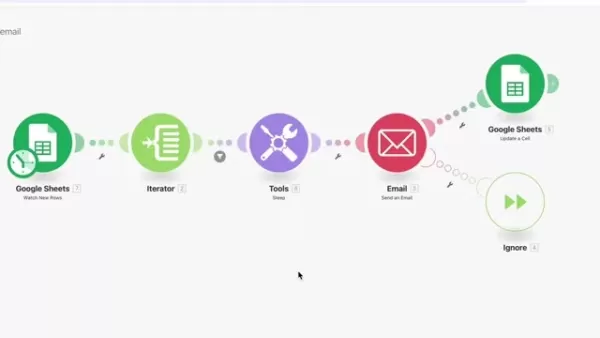
Make.com is a powerful automation platform that lets you connect different apps and services. You'll use it to link your Google Sheet with your email sending platform, automating the process of sending personalized emails based on the data in your sheet. Make.com uses a drag-and-drop module system, making it easy to set up your workflow and trigger automated tasks.
Step 4: Personalizing Emails with Dynamic Content
Personalization is key to successful cold emailing. With Make.com, you can dynamically insert data from your Google Sheet into your emails. This means you can address each prospect by name, mention their website, and tailor your message to their specific needs. Personalized emails stand out and are more likely to get a response than generic ones. Don't forget to include the company name and key selling points to make your emails even more engaging.
How to Automate Cold Emails with Make.com
Configuring Google Sheets Module
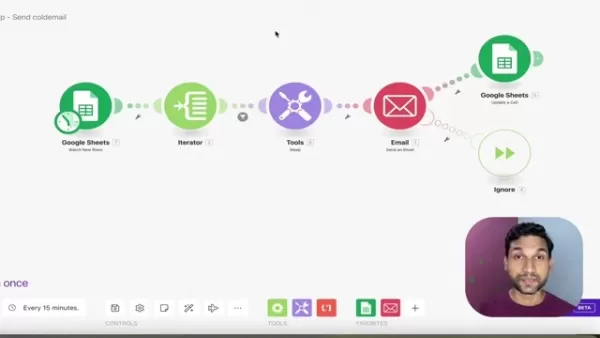
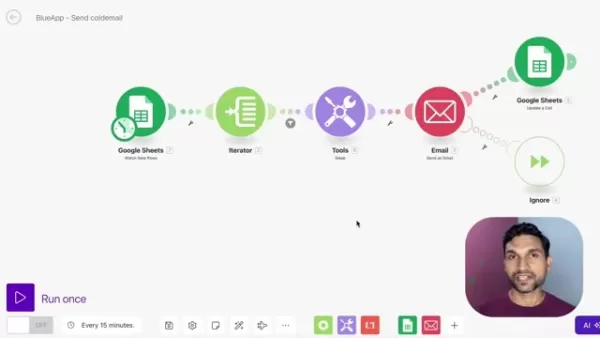
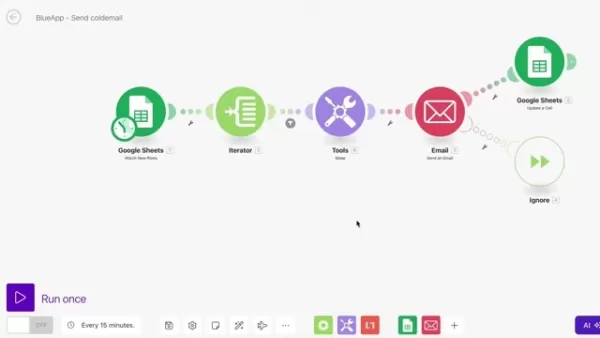
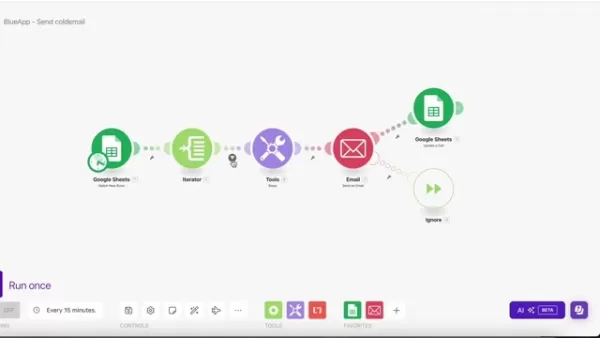
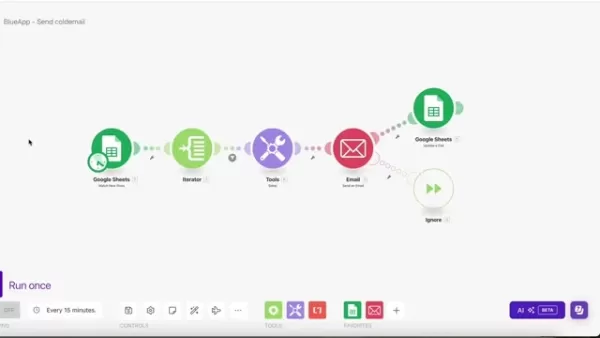
Start by setting up a 'Watch New Rows' module in Make.com that's connected to your Google Sheet. This module will trigger your automation whenever a new row is added to your sheet, ensuring your emails go out automatically.
Setting Up the Iterator Module
If you're dealing with multiple rows at once, you'll need an 'Iterator' module to loop through each row in your Google Sheet. This ensures that each prospect gets an individual email, rather than a generic blast.
Adding a Filter Module for Email Validation
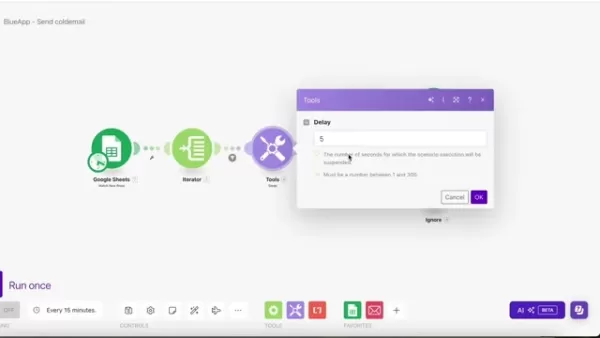
To avoid sending emails to invalid addresses, add a 'Filter' module to check for proper email formatting and make sure the email column isn't empty. This step helps prevent errors and keeps your sending reputation intact.
Adding a Delay Module
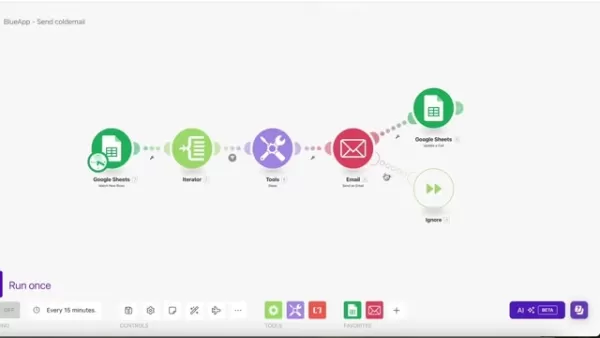
It's a good idea to add a 'Delay' module to space out your email sending. This prevents your emails from being flagged as spam. A delay of a few seconds between emails usually does the trick.
Configuring the Email Module
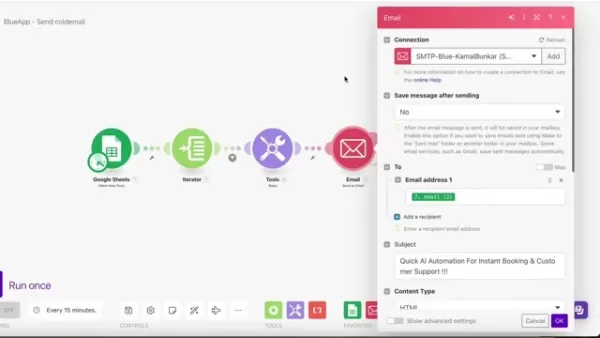
Set up an 'Email' module using your preferred email sending service, like SMTP or Gmail. Configure it to send personalized emails using the data from your Google Sheet. Make sure to include a compelling subject line and a clear call to action to increase your chances of a response.
Adding an Ignore Module
Include an 'Ignore' module to handle any errors that might occur. If an email fails to send, this module will keep your automation running smoothly, allowing it to continue processing other rows.
Updating Google Sheets
Finally, add a 'Google Sheets' module to update your sheet after an email is sent. This can mark the email as sent or record the date of the email, helping you track your outreach progress.
Pricing for Automation Tools
Understanding Make.com's Pricing
Make.com offers different pricing plans based on the number of operations and data transfer you need. It's important to review their pricing page and choose a plan that fits your usage needs. Consider how many emails you plan to send and the complexity of your automation workflows. The more tasks you automate per month, the higher the cost, but it can be well worth it if you're saving significant time and money. Keep in mind there's a free plan, but it's often limited in what it can do.
Advantages and Disadvantages of AI Automation
Pros
- Increased Efficiency
- Enhanced Personalization
- Improved Scalability
Cons
- Cost of Implementation
- Technical Expertise Required
- Potential for Errors
Key Features for Cold Email Automation
Dynamic Content Insertion
The ability to insert dynamic content from Google Sheets into your emails is crucial. It allows you to personalize your messages and create more engaging content, which is far more effective than sending out mass emails that might get flagged as spam.
Conditional Logic
Use conditional logic to tailor your email sending based on specific criteria in your Google Sheet. For example, you can send different emails to prospects based on their industry or company size, which is especially useful for custom marketing campaigns.
Error Handling
Proper error handling is essential to keep your automation running smoothly. Implement mechanisms to prevent your automation from stopping due to invalid email addresses or other issues.
Use Cases for Automated Cold Email Outreach
Lead Generation
Automate your initial outreach to potential leads, introducing your product or service and capturing their interest. Use a web scraper to build your lead list and let automated Google Sheets send out your email campaign.
Sales Prospecting
Identify and connect with potential sales prospects, tailoring your message to their specific needs and pain points. For instance, if you know one of their weaknesses, focus your selling point on addressing that pain point.
Partnership Outreach
Reach out to potential partners, proposing collaborations and exploring mutually beneficial opportunities. If you're selling complementary products, this could lead to a fruitful business relationship.
FAQ
What is the most crucial element of cold emailing automation?
Personalization and ensuring emails do not get flagged as spam are key. Think carefully about your key selling points and personalize your message to make recipients more likely to engage with your content.
What is Make.com?
Make.com is a visual platform that lets you design, build, and automate anything – from simple tasks to complex workflows. It connects apps and automates workflows using a drag-and-drop interface, with pricing based on operations.
Related Questions
How can I improve the deliverability of my automated cold emails?
To boost the deliverability of your automated cold emails, consider these strategies:
- Email Authentication: Set up protocols like SPF, DKIM, and DMARC to verify your authority to send emails from your domain. This builds trust with ISPs and reduces the chance of being marked as spam.
- Dedicated IP Addresses: Use dedicated IP addresses for sending emails to build a positive sending reputation.
- Warm-Up Your IP Address: Gradually increase your email volume over time to avoid triggering spam filters.
- Monitor Your Sending Reputation: Regularly check your sending reputation using tools like Sender Score or Google Postmaster Tools to identify and address deliverability issues.
- Personalization and Segmentation: Personalize your emails to increase engagement and reduce the likelihood of being marked as spam. Segment your list based on criteria like industry or company size.
- Avoid Spam Trigger Words: Steer clear of words or phrases that trigger spam filters, like "free," "guarantee," or excessive use of exclamation marks.
- Use Plain Text Versions: Provide both HTML and plain text versions of your emails to cater to different recipient preferences.
- Maintain Clean Email Lists: Regularly remove inactive or invalid email addresses to protect your sending reputation.
- Test Your Emails: Use tools like Mail-Tester to identify and fix deliverability issues before launching your campaign.
- Monitor Engagement Metrics: Keep an eye on open rates, click-through rates, and bounce rates to understand and improve engagement.
- Obtain Explicit Consent: Ensure you have permission from recipients before sending emails to comply with regulations like GDPR and CAN-SPAM.
- Provide Easy Unsubscribe Options: Include a clear unsubscribe link in every email to comply with regulations and respect recipient preferences.
- Use a Consistent From Address: Maintain a consistent from address to build brand recognition and trust.
- Optimize Sending Times: Experiment with different sending times to find when your recipients are most likely to engage.
- Authenticate Your Domain with DNS Records: Properly configure your DNS records to include SPF, DKIM, and DMARC to prevent spoofing and phishing.
By implementing these techniques, you can significantly improve the deliverability of your automated cold emails and enhance the effectiveness of your outreach efforts.
Related article
 Ultraman’s College Critique Sparks Debate on Redefining Growth and Careers in the AI Era
In an era defined by rapid AI advancement, traditional education and career planning face unprecedented challenges. OpenAI CEO Sam Altman recently delivered a provocative address at the Internapalooza tech intern event, arguing that a four-year colle
Ctrip Business Travel Unveils AI Ecosystem with 7 Industry Agents and 17 Core Capabilities
Ctrip Business Travel has officially unveiled the "Ctrip Business Travel AI Ecosystem," leveraging large language models to fundamentally restructure corporate travel management. This comprehensive ecosystem addresses four core scenarios: travel arra
Stripe to Acquire OpenRouter as AI Model Routing Gains Momentum
Stripe has agreed to acquire OpenRouter, an AI model-routing platform that gives developers access to hundreds of models through a single interface. The deal adds model selection and routing to Stripe’s existing work around AI usage and token-based b
Related Special Topic Recommendations
Design & Art
Ultraman’s College Critique Sparks Debate on Redefining Growth and Careers in the AI Era
In an era defined by rapid AI advancement, traditional education and career planning face unprecedented challenges. OpenAI CEO Sam Altman recently delivered a provocative address at the Internapalooza tech intern event, arguing that a four-year colle
Ctrip Business Travel Unveils AI Ecosystem with 7 Industry Agents and 17 Core Capabilities
Ctrip Business Travel has officially unveiled the "Ctrip Business Travel AI Ecosystem," leveraging large language models to fundamentally restructure corporate travel management. This comprehensive ecosystem addresses four core scenarios: travel arra
Stripe to Acquire OpenRouter as AI Model Routing Gains Momentum
Stripe has agreed to acquire OpenRouter, an AI model-routing platform that gives developers access to hundreds of models through a single interface. The deal adds model selection and routing to Stripe’s existing work around AI usage and token-based b
Related Special Topic Recommendations
Design & Art
 Top AI Illustration Tools: Create Editorial Scenes and Cover Art Faster
2026 Latest Top-rated AI Illustration Tools: Our curated list features the best powerfully designed tools for creating stunning editorial scenes and eye-catching cover art quickly. Each option has gone through rigorous real-world tests, offering a free vs paid comparison to help you find the perfect match for your workflow. Try these must-try solutions today to unlock your AI edge and boost your creative productivity. Explore now at XIX.AI.
 10 tools
 xix.ai
Education and Learning
Top AI Tutors for Exam Prep: Practice Math, Science, and English
xix.ai
Education and Learning
Top AI Tutors for Exam Prep: Practice Math, Science, and English
2026 Latest Top-Rated Best AI Tutors for Exam Prep are here on XIX.AI! Our curated list features powerful game-changing tools that offer free vs paid comparison, real-world tests, and weekly updated rankings. They help boost your writing efficiency, simplify complex topic learning, and unlock your academic potential. Explore now to Discover your perfect exam prep tool and Start creating today to Unlock your AI edge!
10 tools
xix.ai
Finance
AI Budget Planning Tools for Personal Money Management
2026 Latest Best Top-Rated AI Budget Planning Tools for Personal Money Management are here on XIX.AI! This curated collection features powerful, game-changing solutions that help you conduct real-world tests, understand spending habits, and create personalized plans to boost productivity. Enjoy a free vs paid comparison along with detailed rankings. Must-try tools designed to simplify money management and unlock your AI edge. Explore now!
11 tools
xix.ai
Health & Wellness
AI Sleep Tracking Assistants: Improve Recovery with Better Bedtime Habits
2026 Latest Best Top-Rated AI Sleep Tracking Assistants curated for ultimate recovery. This fully updated weekly guide features powerful tools that deliver real-world tests, free vs paid comparison, and detailed rankings to help you find the must-try solution that boosts sleep quality and supports better bedtime habits. Explore now at XIX.AI to Unlock your AI edge.
10 tools
xix.ai
Data Analysis
AI SQL Copilots for Product and Revenue Analytics
2026 Latest Best Top-Rated AI SQL Copilots for Product and Revenue Analytics! XIX.AI has curated a powerful, game-changing collection of must-try tools that undergo real-world tests through weekly updated rankings. These tools help users boost productivity significantly by accelerating data analysis, streamlining complex queries, and generating accurate insights to drive smarter business decisions. Explore now to Discover your perfect tool for unlocking your AI edge!
14 tools
xix.ai
Education and Learning
Best AI Homework Helpers That Teach: Learn Concepts, Not Just Answers
2026 Latest Best Top-Rated AI Homework Helpers That Teach Core Concepts Not Just Answers Powerful Tools for Students Must-Try Curated List Weekly Updated Free vs Paid Comparison Real-World Tests Accurate Rankings to Help You Unlock Your Full Learning Potential Explore now to Discover your perfect tool for smarter studying.
10 tools
xix.ai

 Comments (6)
0/500
Comments (6)
0/500
![DennisRodriguez]()
As a solopreneur, this is exactly what I need! Manual email outreach is such a drag. Integrating AI with Google Sheets seems like a game changer. But I wonder about deliverability issues? Still, kudos to the author! 🚀
![RogerLee]()
This is exactly what I needed! As a freelancer, I spend way too much time on cold emails. The idea of automating it with AI and Google Sheets sounds like a game-changer. Can't wait to try setting this up and hopefully get more time back for actual client work. 🤞
![JonathanKing]()
Nunca imaginé que Google Sheets pudiera usarse para automatizar correos fríos así. ¿El AI analiza datos de la hoja y genera mensajes personalizados? Me pregunto si esto también serviría para gestión de redes sociales. Aunque parece útil, me preocupa que los correos puedan sonar demasiado robóticos y pierdan autenticidad. Habrá que probarlo ajustando el tono del AI. 🧐 📊
![BenJackson]()
Habe eben meinen ersten Google Sheets + AI Workflow für Cold Emails aufgesetzt - und ich lüge nicht, das hat meine Arbeitszeit fast halbiert! Das spart wirklich Kapazitäten. Aber gut, natürlich darf man nicht übertreiben: Persönliche Ansprache macht den Unterschied. Man darf bloß nicht zulassen, dass das komplett automatisiert wird und dann jeder den selben generischen Kram liefert. 😄
![WilliamAnderson]()
This AI-Google Sheets combo for cold emails sounds like a game-changer! I’ve been drowning in manual outreach for my startup, so this could save me hours. Gotta try it out! 🚀
![BillyAdams]()
This AI-Google Sheets combo sounds like a game-changer for cold emails! As a freelancer, I’m stoked to try automating my outreach. Any tips on avoiding spam filters with this? 😎
Are you a solopreneur or running a small team and struggling with the time-consuming task of sending cold emails to potential clients? Crafting and sending each email by hand can really eat into your resources. But don't worry, there's a way to streamline this process using AI automation. In this article, we'll explore how you can automate your cold email outreach by integrating Google Sheets, web scraping, and tools like Make.com. This approach not only personalizes your emails but also saves you a significant amount of time and effort.
Key Points
- Automate personalized email outreach to prospective clients.
- Use Google Sheets as a central repository for prospect data.
- Employ web scraping techniques to gather prospect information automatically.
- Integrate AI tools like Make.com to automate email sending based on Google Sheets data.
- Save time and resources by reducing manual email efforts.
- Ensure email personalization for higher engagement and conversion rates.
Introduction to Automated Cold Email Outreach
The Challenge of Manual Cold Emailing
Manually sending out cold emails can feel like a never-ending task. It takes a lot of time to find potential clients, gather their contact details, write personalized emails, and then keep track of their responses. This method just isn't scalable and can really hold back your outreach, especially when resources are tight. But by automating this process, you can send out more emails in less time and shift your focus to other areas of your business.
The Power of AI Automation
AI automation can be a game-changer for your cold email strategy. It can handle the heavy lifting of gathering prospect information, crafting personalized emails, and even scheduling follow-ups. With AI, you can streamline your outreach, making it more efficient and effective. Integrating AI automation into your workflow will free up your time and resources, allowing you to focus on growing your business.
Building Your Automated Cold Email System
Step 1: Centralizing Data with Google Sheets
The first step in setting up your automated cold email system is to gather all your prospect data into a Google Sheet. You'll want to create columns for key information like names, email addresses, website URLs, and any other relevant details. This will be the backbone of your automation, keeping all your leads organized and ready for your email campaign.
Here's an example of what your Google Sheet columns might look like:
| Column Header | Description |
|---|---|
| GBP Link | Google Business Profile Link |
| Rating | Rating of the business |
| Total Review | The total review of the business |
| Total Revi Address | Full Address of the business |
| Website | URL for company website |
| Country Cod Phone | Country Code & Phone Number |
| Company Contact Email | |
| FB Page | Facebook URL |
| Instagram Profile Link | |
| LinkedIn URL | |
| First email sent | YES, if email was sent out/ NO, if email was not sent |
Step 2: Automating Data Collection with Web Scraping
Gathering prospect data manually is a real time-sink. That's where web scraping comes in handy. By using web scraping tools, you can automatically pull data from websites and fill in your Google Sheet. This can speed up your data collection process significantly. Plus, there are tools out there that can even find email addresses from website data, making your email outreach campaign even more efficient.
Step 3: Integrating Make.com for Automation
Make.com is a powerful automation platform that lets you connect different apps and services. You'll use it to link your Google Sheet with your email sending platform, automating the process of sending personalized emails based on the data in your sheet. Make.com uses a drag-and-drop module system, making it easy to set up your workflow and trigger automated tasks.
Step 4: Personalizing Emails with Dynamic Content
Personalization is key to successful cold emailing. With Make.com, you can dynamically insert data from your Google Sheet into your emails. This means you can address each prospect by name, mention their website, and tailor your message to their specific needs. Personalized emails stand out and are more likely to get a response than generic ones. Don't forget to include the company name and key selling points to make your emails even more engaging.
How to Automate Cold Emails with Make.com
Configuring Google Sheets Module
Start by setting up a 'Watch New Rows' module in Make.com that's connected to your Google Sheet. This module will trigger your automation whenever a new row is added to your sheet, ensuring your emails go out automatically.
Setting Up the Iterator Module
If you're dealing with multiple rows at once, you'll need an 'Iterator' module to loop through each row in your Google Sheet. This ensures that each prospect gets an individual email, rather than a generic blast.
Adding a Filter Module for Email Validation
To avoid sending emails to invalid addresses, add a 'Filter' module to check for proper email formatting and make sure the email column isn't empty. This step helps prevent errors and keeps your sending reputation intact.
Adding a Delay Module
It's a good idea to add a 'Delay' module to space out your email sending. This prevents your emails from being flagged as spam. A delay of a few seconds between emails usually does the trick.
Configuring the Email Module
Set up an 'Email' module using your preferred email sending service, like SMTP or Gmail. Configure it to send personalized emails using the data from your Google Sheet. Make sure to include a compelling subject line and a clear call to action to increase your chances of a response.
Adding an Ignore Module
Include an 'Ignore' module to handle any errors that might occur. If an email fails to send, this module will keep your automation running smoothly, allowing it to continue processing other rows.
Updating Google Sheets
Finally, add a 'Google Sheets' module to update your sheet after an email is sent. This can mark the email as sent or record the date of the email, helping you track your outreach progress.
Pricing for Automation Tools
Understanding Make.com's Pricing
Make.com offers different pricing plans based on the number of operations and data transfer you need. It's important to review their pricing page and choose a plan that fits your usage needs. Consider how many emails you plan to send and the complexity of your automation workflows. The more tasks you automate per month, the higher the cost, but it can be well worth it if you're saving significant time and money. Keep in mind there's a free plan, but it's often limited in what it can do.
Advantages and Disadvantages of AI Automation
Pros
- Increased Efficiency
- Enhanced Personalization
- Improved Scalability
Cons
- Cost of Implementation
- Technical Expertise Required
- Potential for Errors
Key Features for Cold Email Automation
Dynamic Content Insertion
The ability to insert dynamic content from Google Sheets into your emails is crucial. It allows you to personalize your messages and create more engaging content, which is far more effective than sending out mass emails that might get flagged as spam.
Conditional Logic
Use conditional logic to tailor your email sending based on specific criteria in your Google Sheet. For example, you can send different emails to prospects based on their industry or company size, which is especially useful for custom marketing campaigns.
Error Handling
Proper error handling is essential to keep your automation running smoothly. Implement mechanisms to prevent your automation from stopping due to invalid email addresses or other issues.
Use Cases for Automated Cold Email Outreach
Lead Generation
Automate your initial outreach to potential leads, introducing your product or service and capturing their interest. Use a web scraper to build your lead list and let automated Google Sheets send out your email campaign.
Sales Prospecting
Identify and connect with potential sales prospects, tailoring your message to their specific needs and pain points. For instance, if you know one of their weaknesses, focus your selling point on addressing that pain point.
Partnership Outreach
Reach out to potential partners, proposing collaborations and exploring mutually beneficial opportunities. If you're selling complementary products, this could lead to a fruitful business relationship.
FAQ
What is the most crucial element of cold emailing automation?
Personalization and ensuring emails do not get flagged as spam are key. Think carefully about your key selling points and personalize your message to make recipients more likely to engage with your content.
What is Make.com?
Make.com is a visual platform that lets you design, build, and automate anything – from simple tasks to complex workflows. It connects apps and automates workflows using a drag-and-drop interface, with pricing based on operations.
Related Questions
How can I improve the deliverability of my automated cold emails?
To boost the deliverability of your automated cold emails, consider these strategies:
- Email Authentication: Set up protocols like SPF, DKIM, and DMARC to verify your authority to send emails from your domain. This builds trust with ISPs and reduces the chance of being marked as spam.
- Dedicated IP Addresses: Use dedicated IP addresses for sending emails to build a positive sending reputation.
- Warm-Up Your IP Address: Gradually increase your email volume over time to avoid triggering spam filters.
- Monitor Your Sending Reputation: Regularly check your sending reputation using tools like Sender Score or Google Postmaster Tools to identify and address deliverability issues.
- Personalization and Segmentation: Personalize your emails to increase engagement and reduce the likelihood of being marked as spam. Segment your list based on criteria like industry or company size.
- Avoid Spam Trigger Words: Steer clear of words or phrases that trigger spam filters, like "free," "guarantee," or excessive use of exclamation marks.
- Use Plain Text Versions: Provide both HTML and plain text versions of your emails to cater to different recipient preferences.
- Maintain Clean Email Lists: Regularly remove inactive or invalid email addresses to protect your sending reputation.
- Test Your Emails: Use tools like Mail-Tester to identify and fix deliverability issues before launching your campaign.
- Monitor Engagement Metrics: Keep an eye on open rates, click-through rates, and bounce rates to understand and improve engagement.
- Obtain Explicit Consent: Ensure you have permission from recipients before sending emails to comply with regulations like GDPR and CAN-SPAM.
- Provide Easy Unsubscribe Options: Include a clear unsubscribe link in every email to comply with regulations and respect recipient preferences.
- Use a Consistent From Address: Maintain a consistent from address to build brand recognition and trust.
- Optimize Sending Times: Experiment with different sending times to find when your recipients are most likely to engage.
- Authenticate Your Domain with DNS Records: Properly configure your DNS records to include SPF, DKIM, and DMARC to prevent spoofing and phishing.
By implementing these techniques, you can significantly improve the deliverability of your automated cold emails and enhance the effectiveness of your outreach efforts.








 Ultraman’s College Critique Sparks Debate on Redefining Growth and Careers in the AI Era
In an era defined by rapid AI advancement, traditional education and career planning face unprecedented challenges. OpenAI CEO Sam Altman recently delivered a provocative address at the Internapalooza tech intern event, arguing that a four-year colle
Ultraman’s College Critique Sparks Debate on Redefining Growth and Careers in the AI Era
In an era defined by rapid AI advancement, traditional education and career planning face unprecedented challenges. OpenAI CEO Sam Altman recently delivered a provocative address at the Internapalooza tech intern event, arguing that a four-year colle
 Ctrip Business Travel Unveils AI Ecosystem with 7 Industry Agents and 17 Core Capabilities
Ctrip Business Travel has officially unveiled the "Ctrip Business Travel AI Ecosystem," leveraging large language models to fundamentally restructure corporate travel management. This comprehensive ecosystem addresses four core scenarios: travel arra
Ctrip Business Travel Unveils AI Ecosystem with 7 Industry Agents and 17 Core Capabilities
Ctrip Business Travel has officially unveiled the "Ctrip Business Travel AI Ecosystem," leveraging large language models to fundamentally restructure corporate travel management. This comprehensive ecosystem addresses four core scenarios: travel arra
 Stripe to Acquire OpenRouter as AI Model Routing Gains Momentum
Stripe has agreed to acquire OpenRouter, an AI model-routing platform that gives developers access to hundreds of models through a single interface. The deal adds model selection and routing to Stripe’s existing work around AI usage and token-based b
Stripe to Acquire OpenRouter as AI Model Routing Gains Momentum
Stripe has agreed to acquire OpenRouter, an AI model-routing platform that gives developers access to hundreds of models through a single interface. The deal adds model selection and routing to Stripe’s existing work around AI usage and token-based b

2026 Latest Top-rated AI Illustration Tools: Our curated list features the best powerfully designed tools for creating stunning editorial scenes and eye-catching cover art quickly. Each option has gone through rigorous real-world tests, offering a free vs paid comparison to help you find the perfect match for your workflow. Try these must-try solutions today to unlock your AI edge and boost your creative productivity. Explore now at XIX.AI.
10 tools
xix.ai

2026 Latest Top-Rated Best AI Tutors for Exam Prep are here on XIX.AI! Our curated list features powerful game-changing tools that offer free vs paid comparison, real-world tests, and weekly updated rankings. They help boost your writing efficiency, simplify complex topic learning, and unlock your academic potential. Explore now to Discover your perfect exam prep tool and Start creating today to Unlock your AI edge!
10 tools
xix.ai

2026 Latest Best Top-Rated AI Budget Planning Tools for Personal Money Management are here on XIX.AI! This curated collection features powerful, game-changing solutions that help you conduct real-world tests, understand spending habits, and create personalized plans to boost productivity. Enjoy a free vs paid comparison along with detailed rankings. Must-try tools designed to simplify money management and unlock your AI edge. Explore now!
11 tools
xix.ai

2026 Latest Best Top-Rated AI Sleep Tracking Assistants curated for ultimate recovery. This fully updated weekly guide features powerful tools that deliver real-world tests, free vs paid comparison, and detailed rankings to help you find the must-try solution that boosts sleep quality and supports better bedtime habits. Explore now at XIX.AI to Unlock your AI edge.
10 tools
xix.ai

2026 Latest Best Top-Rated AI SQL Copilots for Product and Revenue Analytics! XIX.AI has curated a powerful, game-changing collection of must-try tools that undergo real-world tests through weekly updated rankings. These tools help users boost productivity significantly by accelerating data analysis, streamlining complex queries, and generating accurate insights to drive smarter business decisions. Explore now to Discover your perfect tool for unlocking your AI edge!
14 tools
xix.ai

2026 Latest Best Top-Rated AI Homework Helpers That Teach Core Concepts Not Just Answers Powerful Tools for Students Must-Try Curated List Weekly Updated Free vs Paid Comparison Real-World Tests Accurate Rankings to Help You Unlock Your Full Learning Potential Explore now to Discover your perfect tool for smarter studying.
10 tools
xix.ai

As a solopreneur, this is exactly what I need! Manual email outreach is such a drag. Integrating AI with Google Sheets seems like a game changer. But I wonder about deliverability issues? Still, kudos to the author! 🚀
This is exactly what I needed! As a freelancer, I spend way too much time on cold emails. The idea of automating it with AI and Google Sheets sounds like a game-changer. Can't wait to try setting this up and hopefully get more time back for actual client work. 🤞
Nunca imaginé que Google Sheets pudiera usarse para automatizar correos fríos así. ¿El AI analiza datos de la hoja y genera mensajes personalizados? Me pregunto si esto también serviría para gestión de redes sociales. Aunque parece útil, me preocupa que los correos puedan sonar demasiado robóticos y pierdan autenticidad. Habrá que probarlo ajustando el tono del AI. 🧐 📊
Habe eben meinen ersten Google Sheets + AI Workflow für Cold Emails aufgesetzt - und ich lüge nicht, das hat meine Arbeitszeit fast halbiert! Das spart wirklich Kapazitäten. Aber gut, natürlich darf man nicht übertreiben: Persönliche Ansprache macht den Unterschied. Man darf bloß nicht zulassen, dass das komplett automatisiert wird und dann jeder den selben generischen Kram liefert. 😄
This AI-Google Sheets combo for cold emails sounds like a game-changer! I’ve been drowning in manual outreach for my startup, so this could save me hours. Gotta try it out! 🚀
This AI-Google Sheets combo sounds like a game-changer for cold emails! As a freelancer, I’m stoked to try automating my outreach. Any tips on avoiding spam filters with this? 😎












