


 Home
HomeWhat is SAP Data Migration? Guide to LSMW, BDC, BAPI in 2025
Data migration is a pivotal step in system implementation, upgrade, or consolidation projects. This guide offers a comprehensive look at SAP data migration, detailing the tools and methodologies employed to transfer data between systems, with a special focus on LSMW (Legacy System Migration Workbench), BDC (Batch Data Communication), and BAPI (Business Application Programming Interface). A solid grasp of data migration principles is key to ensuring a seamless transition and maintaining data integrity.
Key Points
Data migration involves transferring data from one system to another.
Essential factors include strategic planning, data sequencing, field mapping, and conversion rules.
Master data and transaction data are the two main categories of data migrated.
Migration is vital for new SAP rollouts, system upgrades, and consolidations.
LSMW, BDC, and BAPI are standard tools for SAP data migration.
S/4HANA introduces newer tools such as LTMC and LTMOM.
Understanding SAP Data Migration
What is Data Migration?
Data migration is the process of moving data from a source system to a target system.
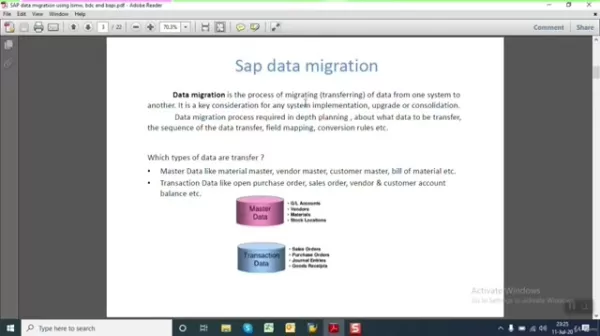
This is a foundational activity for any system implementation, upgrade, or consolidation. It demands meticulous planning and precise execution to guarantee data is moved accurately and efficiently. Data migration is far more than a simple copy-paste operation; it requires thorough preparation to determine which data to transfer, the sequence of transfer, how fields correspond, and the rules for data conversion.
A successful migration strategy requires a deep understanding of both the source and target systems, including their data structures, formats, and business logic. A well-defined plan minimizes disruption and ensures data is correctly represented in the new environment.
Critical components of data migration include:
- Identifying the specific data sets to be migrated.
- Establishing the correct sequence for data transfer.
- Mapping fields from the source to the target system.
- Defining rules for data cleansing and transformation.
- Performing data validation checks post-migration.
Types of Data Transferred
Within any ERP system, data is generally classified into two main types: Master Data and Transaction Data.
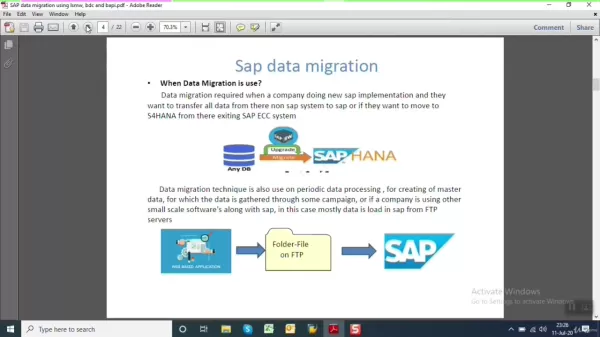
Master Data: This is the core, stable data that is shared across business processes. It defines the key entities an organization works with. Examples include:
- Material Master: Core information about materials, including descriptions, units of measure, and procurement data.
- Vendor Master: Details about suppliers, such as contact information, payment terms, and purchasing conditions.
- Customer Master: Information about customers, including addresses, credit limits, and sales-related data.
- Bill of Material (BOM): A list of components and quantities required to produce a finished product.
- G/L Accounts: The chart of accounts used for financial reporting.
Transaction Data: This is dynamic data generated from daily business operations. It changes frequently and includes:
- Purchase Orders: Documents detailing purchase agreements for goods or services.
- Sales Orders: Records of customer sales, including items and quantities.
- Vendor and Customer Ledgers: Historical records of financial transactions with suppliers and customers.
- Customer Account Balances: The current financial standing of customer accounts.
Recognizing the distinction between these data types is crucial for planning the migration. Master data typically needs to be migrated first, as it provides the necessary foundation for transaction data.
When is Data Migration Used?
Data migration is commonly undertaken during a new SAP implementation, a system upgrade, or when consolidating multiple systems into one.
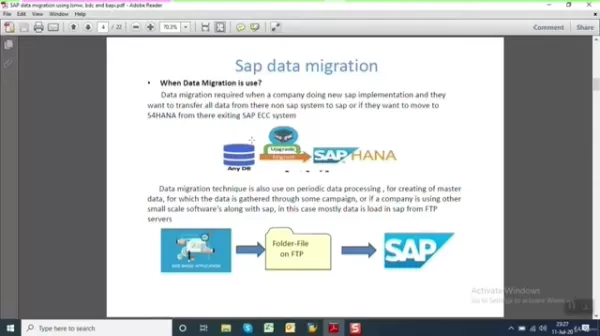
Typical scenarios include:
- New SAP Implementation: Migrating data from legacy systems when adopting SAP for the first time.
- SAP System Upgrade: Moving data to ensure compatibility with a newer SAP version.
- System Consolidation: Combining data from multiple SAP instances into a single, unified system.
- Moving to S/4HANA: Executing a comprehensive data migration to leverage the advanced features of SAP S/4HANA.
Data migration is also performed periodically for master data updates. For instance, a company might collect data in a CRM system or a web application and then transfer it to SAP via an FTP folder or web services. This helps maintain data consistency across different platforms.
In these cases, data can be transferred to SAP via an FTP folder or web service. The data is then read from the file using BDC or BAPI and loaded into the SAP system.
Ultimately, effective data migration acts as a bridge, ensuring your historical and operational data integrates smoothly into your new or upgraded SAP landscape.
FAQ
What is the primary goal of SAP data migration?
The primary objective is to transfer data accurately and efficiently from a source system to a target SAP system, preserving data integrity and consistency.
What types of data are typically migrated in SAP?
The most commonly migrated data types are master data (like material and vendor masters) and transaction data (such as sales and purchase orders).
What tools are commonly used for SAP data migration?
LSMW, BDC, and BAPI are widely used. S/4HANA provides additional tools like LTMC and LTMOM.
Why is data migration important for system upgrades?
It guarantees that existing data remains compatible with the new system, preserving business history and minimizing operational disruption.
What key considerations should be kept in mind during data migration?
Important factors include thorough planning, determining data sequence, accurate field mapping, data cleansing, and defining conversion rules to adapt source data for SAP.
Related Questions
What are the challenges involved in SAP data migration?
Data migration presents several challenges that require careful management. Firstly, data reconciliation is critical. After transferring data, you must perform an upload, reconcile the data, and establish a method for tracking values. Secondly, testing the data transfer is a vital yet often underestimated step. Utilizing existing tools like LSMW to test uploads in a controlled testing environment with full visibility is ideal. Thirdly, data mapping can be complex because the table structures in a legacy system may not directly align with the target SAP system. For calculated data elements, the same logic must be recreated for each record during the load. Additionally, field values can differ between systems, necessitating the creation of proper custom structures to prevent errors.
Related article
 Stripe to Acquire OpenRouter as AI Model Routing Gains Momentum
Stripe has agreed to acquire OpenRouter, an AI model-routing platform that gives developers access to hundreds of models through a single interface. The deal adds model selection and routing to Stripe’s existing work around AI usage and token-based b
Former OpenAI Researcher Barrett Zoph Returns to Google to Support Gemini Development
Barret Zoph, who previously abruptly left and joined OpenAI due to a disagreement with Thinking Machines Lab CEO Miriam Mularati, has once again changed employers. Alphabet's Google announced that Zoph will return as Vice President of Research, bring
How Recursive Intelligence Raised $335M at $4B Valuation in 4 Months
The co-founders of startup Ricursive Intelligence seemed destined to be co-founders.Anna Goldie, CEO, and Azalia Mirhoseini, CTO, are so well-known in the AI community that they were among those AI engineers who “got those weird emails from Zuckerber
Related Special Topic Recommendations
Design & Art
Stripe to Acquire OpenRouter as AI Model Routing Gains Momentum
Stripe has agreed to acquire OpenRouter, an AI model-routing platform that gives developers access to hundreds of models through a single interface. The deal adds model selection and routing to Stripe’s existing work around AI usage and token-based b
Former OpenAI Researcher Barrett Zoph Returns to Google to Support Gemini Development
Barret Zoph, who previously abruptly left and joined OpenAI due to a disagreement with Thinking Machines Lab CEO Miriam Mularati, has once again changed employers. Alphabet's Google announced that Zoph will return as Vice President of Research, bring
How Recursive Intelligence Raised $335M at $4B Valuation in 4 Months
The co-founders of startup Ricursive Intelligence seemed destined to be co-founders.Anna Goldie, CEO, and Azalia Mirhoseini, CTO, are so well-known in the AI community that they were among those AI engineers who “got those weird emails from Zuckerber
Related Special Topic Recommendations
Design & Art
 Top AI Illustration Tools: Create Editorial Scenes and Cover Art Faster
2026 Latest Top-rated AI Illustration Tools: Our curated list features the best powerfully designed tools for creating stunning editorial scenes and eye-catching cover art quickly. Each option has gone through rigorous real-world tests, offering a free vs paid comparison to help you find the perfect match for your workflow. Try these must-try solutions today to unlock your AI edge and boost your creative productivity. Explore now at XIX.AI.
 10 tools
 xix.ai
Education and Learning
Top AI Tutors for Exam Prep: Practice Math, Science, and English
xix.ai
Education and Learning
Top AI Tutors for Exam Prep: Practice Math, Science, and English
2026 Latest Top-Rated Best AI Tutors for Exam Prep are here on XIX.AI! Our curated list features powerful game-changing tools that offer free vs paid comparison, real-world tests, and weekly updated rankings. They help boost your writing efficiency, simplify complex topic learning, and unlock your academic potential. Explore now to Discover your perfect exam prep tool and Start creating today to Unlock your AI edge!
10 tools
xix.ai
Finance
AI Budget Planning Tools for Personal Money Management
2026 Latest Best Top-Rated AI Budget Planning Tools for Personal Money Management are here on XIX.AI! This curated collection features powerful, game-changing solutions that help you conduct real-world tests, understand spending habits, and create personalized plans to boost productivity. Enjoy a free vs paid comparison along with detailed rankings. Must-try tools designed to simplify money management and unlock your AI edge. Explore now!
11 tools
xix.ai
Health & Wellness
AI Sleep Tracking Assistants: Improve Recovery with Better Bedtime Habits
2026 Latest Best Top-Rated AI Sleep Tracking Assistants curated for ultimate recovery. This fully updated weekly guide features powerful tools that deliver real-world tests, free vs paid comparison, and detailed rankings to help you find the must-try solution that boosts sleep quality and supports better bedtime habits. Explore now at XIX.AI to Unlock your AI edge.
10 tools
xix.ai
Data Analysis
AI SQL Copilots for Product and Revenue Analytics
2026 Latest Best Top-Rated AI SQL Copilots for Product and Revenue Analytics! XIX.AI has curated a powerful, game-changing collection of must-try tools that undergo real-world tests through weekly updated rankings. These tools help users boost productivity significantly by accelerating data analysis, streamlining complex queries, and generating accurate insights to drive smarter business decisions. Explore now to Discover your perfect tool for unlocking your AI edge!
14 tools
xix.ai
Education and Learning
Best AI Homework Helpers That Teach: Learn Concepts, Not Just Answers
2026 Latest Best Top-Rated AI Homework Helpers That Teach Core Concepts Not Just Answers Powerful Tools for Students Must-Try Curated List Weekly Updated Free vs Paid Comparison Real-World Tests Accurate Rankings to Help You Unlock Your Full Learning Potential Explore now to Discover your perfect tool for smarter studying.
10 tools
xix.ai

 Comments (0)
0/500
Comments (0)
0/500
Data migration is a pivotal step in system implementation, upgrade, or consolidation projects. This guide offers a comprehensive look at SAP data migration, detailing the tools and methodologies employed to transfer data between systems, with a special focus on LSMW (Legacy System Migration Workbench), BDC (Batch Data Communication), and BAPI (Business Application Programming Interface). A solid grasp of data migration principles is key to ensuring a seamless transition and maintaining data integrity.
Key Points
Data migration involves transferring data from one system to another.
Essential factors include strategic planning, data sequencing, field mapping, and conversion rules.
Master data and transaction data are the two main categories of data migrated.
Migration is vital for new SAP rollouts, system upgrades, and consolidations.
LSMW, BDC, and BAPI are standard tools for SAP data migration.
S/4HANA introduces newer tools such as LTMC and LTMOM.
Understanding SAP Data Migration
What is Data Migration?
Data migration is the process of moving data from a source system to a target system.
This is a foundational activity for any system implementation, upgrade, or consolidation. It demands meticulous planning and precise execution to guarantee data is moved accurately and efficiently. Data migration is far more than a simple copy-paste operation; it requires thorough preparation to determine which data to transfer, the sequence of transfer, how fields correspond, and the rules for data conversion.
A successful migration strategy requires a deep understanding of both the source and target systems, including their data structures, formats, and business logic. A well-defined plan minimizes disruption and ensures data is correctly represented in the new environment.
Critical components of data migration include:
- Identifying the specific data sets to be migrated.
- Establishing the correct sequence for data transfer.
- Mapping fields from the source to the target system.
- Defining rules for data cleansing and transformation.
- Performing data validation checks post-migration.
Types of Data Transferred
Within any ERP system, data is generally classified into two main types: Master Data and Transaction Data.
Master Data: This is the core, stable data that is shared across business processes. It defines the key entities an organization works with. Examples include:
- Material Master: Core information about materials, including descriptions, units of measure, and procurement data.
- Vendor Master: Details about suppliers, such as contact information, payment terms, and purchasing conditions.
- Customer Master: Information about customers, including addresses, credit limits, and sales-related data.
- Bill of Material (BOM): A list of components and quantities required to produce a finished product.
- G/L Accounts: The chart of accounts used for financial reporting.
Transaction Data: This is dynamic data generated from daily business operations. It changes frequently and includes:
- Purchase Orders: Documents detailing purchase agreements for goods or services.
- Sales Orders: Records of customer sales, including items and quantities.
- Vendor and Customer Ledgers: Historical records of financial transactions with suppliers and customers.
- Customer Account Balances: The current financial standing of customer accounts.
Recognizing the distinction between these data types is crucial for planning the migration. Master data typically needs to be migrated first, as it provides the necessary foundation for transaction data.
When is Data Migration Used?
Data migration is commonly undertaken during a new SAP implementation, a system upgrade, or when consolidating multiple systems into one.
Typical scenarios include:
- New SAP Implementation: Migrating data from legacy systems when adopting SAP for the first time.
- SAP System Upgrade: Moving data to ensure compatibility with a newer SAP version.
- System Consolidation: Combining data from multiple SAP instances into a single, unified system.
- Moving to S/4HANA: Executing a comprehensive data migration to leverage the advanced features of SAP S/4HANA.
Data migration is also performed periodically for master data updates. For instance, a company might collect data in a CRM system or a web application and then transfer it to SAP via an FTP folder or web services. This helps maintain data consistency across different platforms.
In these cases, data can be transferred to SAP via an FTP folder or web service. The data is then read from the file using BDC or BAPI and loaded into the SAP system.
Ultimately, effective data migration acts as a bridge, ensuring your historical and operational data integrates smoothly into your new or upgraded SAP landscape.
FAQ
What is the primary goal of SAP data migration?
The primary objective is to transfer data accurately and efficiently from a source system to a target SAP system, preserving data integrity and consistency.
What types of data are typically migrated in SAP?
The most commonly migrated data types are master data (like material and vendor masters) and transaction data (such as sales and purchase orders).
What tools are commonly used for SAP data migration?
LSMW, BDC, and BAPI are widely used. S/4HANA provides additional tools like LTMC and LTMOM.
Why is data migration important for system upgrades?
It guarantees that existing data remains compatible with the new system, preserving business history and minimizing operational disruption.
What key considerations should be kept in mind during data migration?
Important factors include thorough planning, determining data sequence, accurate field mapping, data cleansing, and defining conversion rules to adapt source data for SAP.
Related Questions
What are the challenges involved in SAP data migration?
Data migration presents several challenges that require careful management. Firstly, data reconciliation is critical. After transferring data, you must perform an upload, reconcile the data, and establish a method for tracking values. Secondly, testing the data transfer is a vital yet often underestimated step. Utilizing existing tools like LSMW to test uploads in a controlled testing environment with full visibility is ideal. Thirdly, data mapping can be complex because the table structures in a legacy system may not directly align with the target SAP system. For calculated data elements, the same logic must be recreated for each record during the load. Additionally, field values can differ between systems, necessitating the creation of proper custom structures to prevent errors.








 Stripe to Acquire OpenRouter as AI Model Routing Gains Momentum
Stripe has agreed to acquire OpenRouter, an AI model-routing platform that gives developers access to hundreds of models through a single interface. The deal adds model selection and routing to Stripe’s existing work around AI usage and token-based b
Stripe to Acquire OpenRouter as AI Model Routing Gains Momentum
Stripe has agreed to acquire OpenRouter, an AI model-routing platform that gives developers access to hundreds of models through a single interface. The deal adds model selection and routing to Stripe’s existing work around AI usage and token-based b
 Former OpenAI Researcher Barrett Zoph Returns to Google to Support Gemini Development
Barret Zoph, who previously abruptly left and joined OpenAI due to a disagreement with Thinking Machines Lab CEO Miriam Mularati, has once again changed employers. Alphabet's Google announced that Zoph will return as Vice President of Research, bring
Former OpenAI Researcher Barrett Zoph Returns to Google to Support Gemini Development
Barret Zoph, who previously abruptly left and joined OpenAI due to a disagreement with Thinking Machines Lab CEO Miriam Mularati, has once again changed employers. Alphabet's Google announced that Zoph will return as Vice President of Research, bring
 How Recursive Intelligence Raised $335M at $4B Valuation in 4 Months
The co-founders of startup Ricursive Intelligence seemed destined to be co-founders.Anna Goldie, CEO, and Azalia Mirhoseini, CTO, are so well-known in the AI community that they were among those AI engineers who “got those weird emails from Zuckerber
How Recursive Intelligence Raised $335M at $4B Valuation in 4 Months
The co-founders of startup Ricursive Intelligence seemed destined to be co-founders.Anna Goldie, CEO, and Azalia Mirhoseini, CTO, are so well-known in the AI community that they were among those AI engineers who “got those weird emails from Zuckerber

2026 Latest Top-rated AI Illustration Tools: Our curated list features the best powerfully designed tools for creating stunning editorial scenes and eye-catching cover art quickly. Each option has gone through rigorous real-world tests, offering a free vs paid comparison to help you find the perfect match for your workflow. Try these must-try solutions today to unlock your AI edge and boost your creative productivity. Explore now at XIX.AI.
10 tools
xix.ai

2026 Latest Top-Rated Best AI Tutors for Exam Prep are here on XIX.AI! Our curated list features powerful game-changing tools that offer free vs paid comparison, real-world tests, and weekly updated rankings. They help boost your writing efficiency, simplify complex topic learning, and unlock your academic potential. Explore now to Discover your perfect exam prep tool and Start creating today to Unlock your AI edge!
10 tools
xix.ai

2026 Latest Best Top-Rated AI Budget Planning Tools for Personal Money Management are here on XIX.AI! This curated collection features powerful, game-changing solutions that help you conduct real-world tests, understand spending habits, and create personalized plans to boost productivity. Enjoy a free vs paid comparison along with detailed rankings. Must-try tools designed to simplify money management and unlock your AI edge. Explore now!
11 tools
xix.ai

2026 Latest Best Top-Rated AI Sleep Tracking Assistants curated for ultimate recovery. This fully updated weekly guide features powerful tools that deliver real-world tests, free vs paid comparison, and detailed rankings to help you find the must-try solution that boosts sleep quality and supports better bedtime habits. Explore now at XIX.AI to Unlock your AI edge.
10 tools
xix.ai

2026 Latest Best Top-Rated AI SQL Copilots for Product and Revenue Analytics! XIX.AI has curated a powerful, game-changing collection of must-try tools that undergo real-world tests through weekly updated rankings. These tools help users boost productivity significantly by accelerating data analysis, streamlining complex queries, and generating accurate insights to drive smarter business decisions. Explore now to Discover your perfect tool for unlocking your AI edge!
14 tools
xix.ai

2026 Latest Best Top-Rated AI Homework Helpers That Teach Core Concepts Not Just Answers Powerful Tools for Students Must-Try Curated List Weekly Updated Free vs Paid Comparison Real-World Tests Accurate Rankings to Help You Unlock Your Full Learning Potential Explore now to Discover your perfect tool for smarter studying.
10 tools
xix.ai












