


 Home
HomeHow to convert documents effortlessly in 2026? Complete FileDrop guide.
In today's fast-paced business world, the ability to convert documents quickly and accurately is more important than ever. Whether you need to turn a PDF into an editable Word file or transform a CSV into an Excel spreadsheet, a reliable document conversion tool saves both time and effort. FileDrop's document conversion feature stands out as a powerful solution, designed to simplify your file processing workflows and boost productivity. This guide offers a complete look at FileDrop, covering its features, practical applications, and how it supports seamless document management.
Key Points
FileDrop provides a robust document conversion tool as part of its file processing platform.
The tool enables conversion across more than 37 file types, including everyday formats like DOCX, CSV, and PDF, as well as specialized ones.
FileDrop's document conversion focuses on high precision and speed, preserving your data's structure throughout the process.
The platform features an intuitive interface for straightforward uploading, format selection, and downloading of converted files.
FileDrop's conversion tool is built for business users who need flexible document processing options.
Users can reach the document conversion tool directly through FileDrop’s website, creating a central hub for all file-related tasks.
FileDrop consistently refines its document conversion features using user input, improving both usability and performance.
Introduction to FileDrop's Document Conversion Tool
What is FileDrop?
FileDrop is a flexible file processing platform that helps businesses manage and convert documents with ease. It includes a suite of tools that allow users to convert files between different formats, ensuring compatibility and access across various systems.
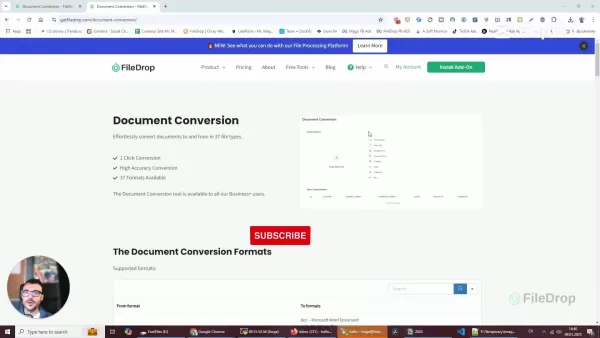
Its document conversion feature is particularly notable, offering a smooth solution for companies aiming to optimize their document workflows. With FileDrop, converting documents is as simple as a single click, conserving valuable time and resources. The platform accommodates over 37 file types, providing a broad spectrum of conversion options to meet different business needs. Available to all business users, FileDrop is a must-have for organizations seeking to improve their document management. It guarantees high accuracy during conversions, keeping your data intact while changing formats. From making PDFs editable in Word to turning CSV files into Excel spreadsheets, FileDrop handles numerous tasks with precision and simplicity. This blend of features makes FileDrop an essential tool for any business wanting to streamline document processes and increase overall efficiency. Thanks to its user-focused design and strong functionality, document conversion has never been easier.
Why Document Conversion is Essential for Modern Businesses
In today's business environment, document conversion is more than a convenience—it's a critical requirement. The capacity to effortlessly change documents between formats ensures that information remains accessible and useful across different platforms and systems.
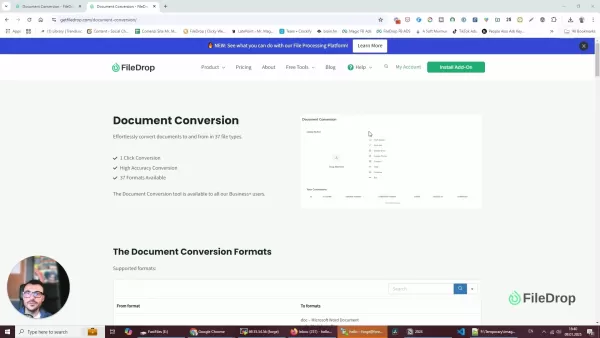
This adaptability is vital for teamwork, data analysis, and meeting industry regulations. Document conversion removes obstacles, letting teams work together efficiently no matter which software or operating systems they use. Think about the need to turn a scanned PDF into an editable Word document for updates or convert a detailed CSV file into a clear Excel spreadsheet for analysis. These are everyday tasks, and a dependable conversion tool makes them quicker, saving both time and resources. Additionally, following industry-specific rules often means submitting documents in certain formats. A solid document conversion tool ensures businesses can meet these demands without difficulty. By enabling smooth compatibility and access, tools like FileDrop are crucial for modern companies looking to improve operations and strengthen their competitive position. The power to convert documents swiftly and accurately keeps information moving freely across the organization, helping teams make well-informed choices and spur business growth.
Cons
Consider the need to convert a scanned PDF into an editable Word document for revisions or transforming a complex CSV file into an easily digestible Excel spreadsheet for data analysis. These tasks are commonplace, and having a reliable conversion tool streamlines these processes, saving valuable time and resources. Moreover, compliance with industry-specific regulations often requires documents to be submitted in particular formats. A robust document conversion tool ensures that businesses can meet these requirements without hassle. By enabling seamless compatibility and accessibility, document conversion tools like FileDrop are indispensable for modern businesses seeking to optimize their operations and enhance their competitive edge. The ability to convert documents quickly and accurately ensures that information flows smoothly throughout the organization, empowering teams to make informed decisions and drive business growth.
Exploring Specific Document Conversion Use Cases
Converting PDF to Editable Word Documents
One of the most frequent uses for document conversion is changing a PDF into an editable Word document. This is especially helpful when you need to modify a document originally saved as a PDF. FileDrop’s precise conversion ensures the Word file keeps the original layout, formatting, and content. This lets you effortlessly add, remove, or edit text, insert images, and make other required adjustments. With FileDrop, you can rapidly convert PDFs to DOCX format, enabling smooth editing and collaboration. This function is crucial for businesses that often handle PDFs and need the freedom to update and revise their content. FileDrop makes the process efficient, saving time and making sure converted documents are ready to use right away.
Transforming CSV Files into Excel Spreadsheets
Another common need is converting CSV files into Excel spreadsheets for data analysis and reporting. While CSV files are good for storing table data, they can be challenging to work with directly. Converting them to Excel lets you use Excel’s advanced data tools, like formulas, charts, and pivot tables. FileDrop makes this conversion simple, ensuring data transfers accurately and formats properly in Excel. This ability is extremely valuable for businesses that depend on data analysis to make smart decisions. With FileDrop, you can quickly change CSV files into XLSX format, allowing for smooth data analysis and reporting. This conversion optimizes workflows, saving time and presenting your data in a clear, understandable way.
Converting Various Image Formats for Compatibility
FileDrop also allows conversion between different image formats, ensuring they work well across various platforms and apps. Whether you need to change a JPEG to a PNG or a TIFF to a GIF, FileDrop manages a wide array of image conversion jobs. This is particularly useful when optimizing images for the web or making sure they are compatible with specific software. FileDrop’s high-quality image conversion preserves the visual clarity of images, so they look great in any format. This feature is essential for businesses that use visual content in marketing, advertising, and communication. With FileDrop, you can easily convert images to the format you need, ensuring smooth compatibility and the best visual results. This conversion improves workflows, saves time, and keeps your images prepared for any use.
Step-by-Step Guide: Converting Documents with FileDrop
Step 1: Access the Document Conversion Tool
Start by going to FileDrop’s website and logging into your account.

If you don’t have an account, you can sign up for a free trial to test the platform’s features. Once logged in, find the 'Document Conversion' option in the main menu or dashboard. Clicking this will bring you to the conversion interface, where you can start uploading and converting your files.
Step 2: Upload Your Document
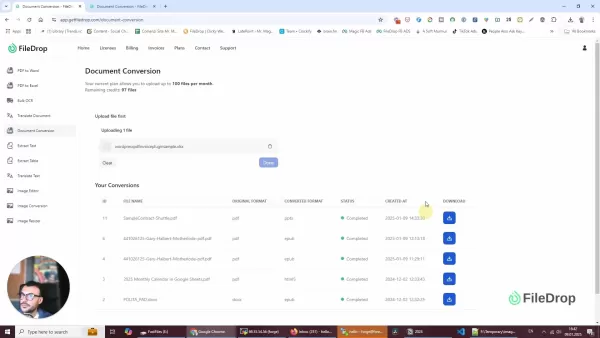
In the conversion interface, you’ll see an upload area where you can drag and drop files or choose them from your computer.
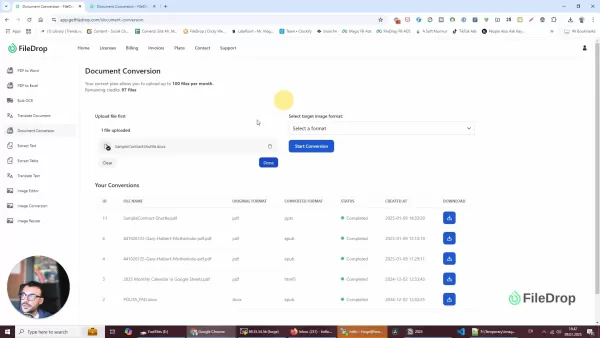
FileDrop supports multiple upload methods, including importing files directly from cloud services like Google Drive, Dropbox, OneDrive, and Box. Pick the file you want to convert and upload it to the platform. FileDrop works with files of different sizes, though larger files might take more time to upload.
Step 3: Select the Target Format
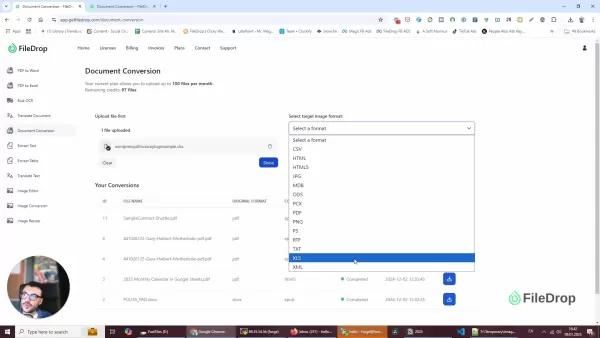
After your file is uploaded, FileDrop will identify the file type and show you a list of available output formats.
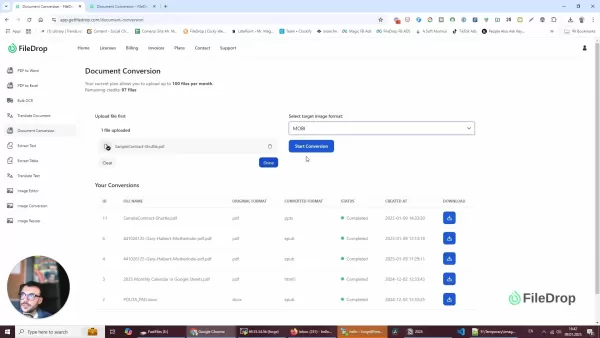
Choose the format that fits your needs from the dropdown menu. FileDrop supports over 37 file formats, so you’re likely to find the one you need. Popular conversions include PDF to Word (DOCX), CSV to Excel (XLSX), and various image format changes.
Step 4: Start the Conversion
Once you’ve picked the target format, click the 'Start Conversion' button to begin the process. FileDrop will process your file and convert it to the chosen format. The time needed depends on the file size and conversion complexity. You can track the progress in the platform’s conversion queue.
Step 5: Download the Converted File
When the conversion is done, FileDrop will alert you, and the converted file will be ready to download. Click the 'Download' button next to the finished conversion in the queue. Save the file to your preferred location on your computer. You can then open and use the converted file as needed.
Understanding FileDrop’s Pricing Plans
Overview of Subscription Options
FileDrop offers a variety of pricing plans to fit different business needs. These plans generally differ in the number of monthly file uploads and the amount of storage provided. The platform includes both free and paid subscriptions, so you can pick the plan that matches your budget and usage. Free plans usually have restricted features and file upload limits, while paid plans provide greater capabilities, like higher upload allowances, more storage, and premium support. FileDrop’s pricing is clear, with no hidden fees or long-term commitments. You can easily change your subscription as your business grows. This flexibility means you only pay for what you use, making FileDrop a cost-efficient option for document conversion and file management.
Benefits of Paid Subscriptions
Although FileDrop has a free plan, paid subscriptions offer extra benefits that can greatly improve your document conversion and file management experience. Paid plans typically include higher monthly upload limits, letting you convert and process more files without restrictions. They also provide larger storage capacities, so you can securely store converted files on the platform. Plus, paid subscribers often get priority support, ensuring their questions and issues are handled quickly. Some premium plans include advanced features like bulk document conversion, custom branding, and integrations with other business apps. By choosing a paid subscription, you can fully utilize FileDrop’s capabilities, streamlining workflows and increasing productivity. Investing in a paid plan can quickly pay off through time savings, better collaboration, and stronger document security.
Weighing the Advantages and Disadvantages of FileDrop
Pros
Supports a wide range of file formats for versatile conversion options.
High-accuracy conversion maintains data integrity and formatting.
User-friendly interface simplifies the conversion process for all users.
Seamless integration with cloud storage services enhances accessibility.
Offers a centralized file processing platform for document management.
Transparent pricing and flexible subscription options provide cost-effectiveness.
Regular updates and improvements based on user feedback ensure continuous enhancement.
Cons
Free plan has limited file upload quotas, which may not suit heavy users.
Some premium features are only available on paid plans.
The speed of conversion may vary based on file size and complexity.
May require an internet connection for document conversion and access.
Potential for occasional software glitches or compatibility issues.
Key Features of FileDrop's Document Conversion
Extensive File Format Support
FileDrop stands out by supporting a vast array of file formats, covering a wide range of document types. From standard formats like DOCX, CSV, and PDF to more specialized extensions, FileDrop ensures compatibility across different systems and applications.
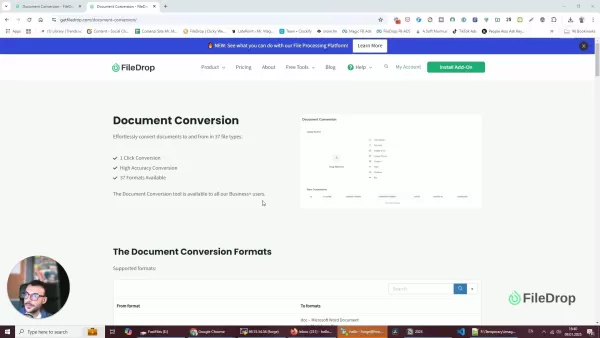
The platform’s ability to convert vector files and other unique formats adds to its versatility, making it a complete solution for all document conversion needs. This broad support helps businesses prevent compatibility problems, ensuring every team member can access and work with necessary documents, no matter their software choice. The list of supported formats is regularly updated, showing FileDrop's dedication to keeping up with industry changes. By supporting many file types, FileDrop removes the need for multiple conversion tools, offering a single platform for all document processing. This method not only simplifies workflows but also lowers the chance of errors from using different conversion techniques. With FileDrop, businesses can trust that their documents will be converted accurately, keeping data intact and enabling smooth collaboration across the organization.
High Accuracy Conversion
Accuracy is critical in document conversion, and FileDrop performs exceptionally well here. The platform is built to maintain data integrity during conversion, making sure the final output closely matches the original document.

This high level of accuracy is key for preserving important information, formatting, and layouts, especially with complex documents. FileDrop’s conversion algorithms are regularly improved to reduce errors and ensure converted files are functional and dependable. Whether converting PDFs to editable Word documents or changing spreadsheets for data analysis, FileDrop’s focus on accuracy helps businesses avoid mistakes and rework. This reliability leads to time savings and better productivity, as teams can trust that converted documents are ready for immediate use. With FileDrop, businesses can convert documents confidently, knowing the information will stay complete and consistent. This emphasis on precision makes FileDrop a trusted solution for document conversion, ensuring data integrity is always maintained.
User-Friendly Interface
FileDrop's document conversion tool features a user-friendly interface, made to simplify the entire conversion process. The platform’s intuitive design lets users upload files, choose the desired output format, and start the conversion with just a few clicks.
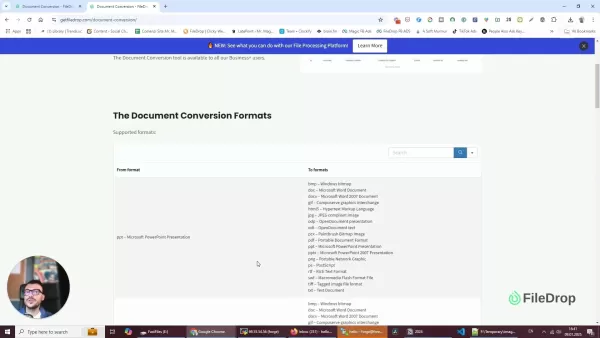
This simplicity is key to boosting productivity, as it shortens the learning curve and reduces time spent on document tasks. The interface gives clear instructions and visual guides, leading users through each step of the conversion. Whether you’re an experienced professional or a beginner, FileDrop’s straightforward design ensures a smooth, trouble-free experience. Moreover, the platform offers a clean, organized layout, making it easy to find and use the various conversion options. This user-centered approach highlights FileDrop's commitment to providing a tool that is both powerful and accessible to all. With FileDrop, document conversion becomes a simple, efficient task, letting businesses focus on their main goals instead of dealing with complicated software.
Seamless Integration
FileDrop integrates smoothly with various cloud storage services like Google Drive, Dropbox, OneDrive, and Box, making document conversion easier.
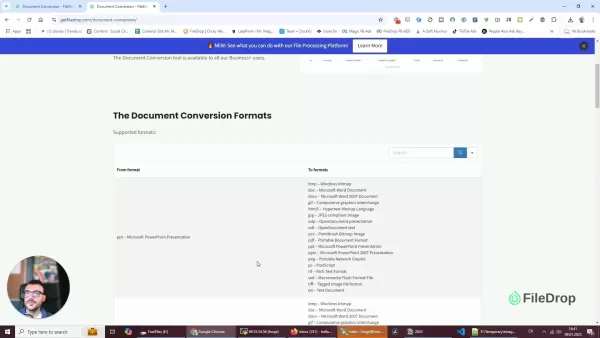
Users can import files directly from these platforms, removing the need to download and re-upload documents by hand. This integration simplifies workflows, saves time, and keeps documents current. By linking FileDrop with your preferred cloud storage, you can create a centralized document management system that is both efficient and secure. The platform supports direct sharing, allowing you to easily send converted files to team members and clients. This seamless integration improves collaboration, making sure everyone has access to the latest document versions. FileDrop’s compatibility with these popular cloud services shows its dedication to providing a versatile, user-friendly solution for document conversion. With FileDrop, managing and converting documents becomes a natural part of your existing workflow, increasing productivity and simplifying daily tasks.
Efficient File Processing Platform
FileDrop acts as an efficient file processing platform, serving as a central hub for all your document management needs. Beyond document conversion, FileDrop offers tools for text extraction, document translation, image editing, and more.
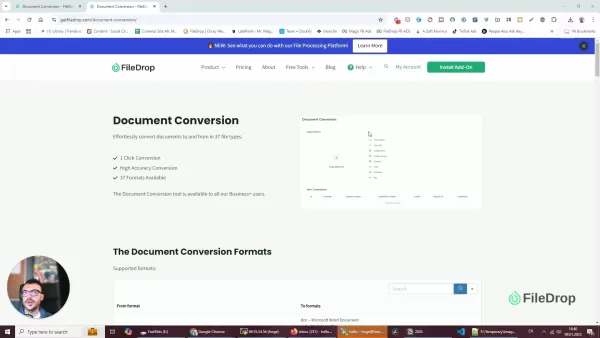
This comprehensive approach streamlines workflows, eliminating the need for multiple specialized apps. FileDrop's intuitive interface makes it easy to access and use these various features, helping businesses manage documents effectively. The platform’s scalability ensures it can meet the needs of both small businesses and large corporations. By centralizing file processing tasks, FileDrop promotes consistency and reduces the risk of errors. This all-in-one approach boosts productivity, enabling teams to focus on core objectives instead of managing different software solutions. With FileDrop, businesses can trust that their documents are handled in a secure, efficient, and user-friendly environment.
Real-World Use Cases for FileDrop's Conversion Capabilities
Legal Document Processing
Law firms and legal departments often need to convert documents for court filings, client communications, and internal records. FileDrop simplifies these tasks by quickly converting legal documents to the required formats.
For instance, a scanned PDF contract can be turned into an editable Word document for changes, or a CSV file with client data can be converted to an Excel spreadsheet for analysis. FileDrop’s high accuracy ensures legal documents are converted error-free, maintaining their reliability and integrity. Using FileDrop, legal professionals save time, lower the risk of mistakes, and meet court requirements with ease.
Academic Research and Collaboration
Researchers and academics often collaborate on projects involving diverse document types. FileDrop supports this collaboration by enabling smooth document conversion. A researcher might need to convert a colleague’s PDF report into an editable format for notes, or change a dataset from a CSV file to an Excel spreadsheet for analysis.
FileDrop’s intuitive interface and broad file format support make it easy for researchers to share and work on documents together, regardless of their preferred software or operating systems. This speeds up the research process, encouraging better collaboration and productivity.
Marketing Content Management
Marketing teams often work with various file types, including text documents, images, and spreadsheets. FileDrop aids in managing marketing content by providing a central tool for document conversion. A marketer might need to convert a Word document to a PDF for distribution, or change a CSV file with campaign data into an Excel spreadsheet for reporting. FileDrop’s efficient file processing platform ensures marketing content is always in the right format, ready for campaigns, presentations, and other activities. Using FileDrop, marketing teams save time, maintain consistency, and optimize their content for maximum effect.
Common Queries About Document Conversion
What are the most common document conversion needs for businesses?
The most common document conversion needs for businesses include turning PDFs into editable Word documents, converting CSV files into Excel spreadsheets for data analysis, and ensuring image formats are compatible for web use. These conversions improve workflows, aid collaboration, and help meet industry standards. Businesses often need fast, accurate document conversions to adapt to changing project needs and regulatory requirements. Thus, document conversion software is key for enabling flexibility and efficiency. The ability to change documents smoothly between formats ensures information is accessible and usable across different platforms and systems, boosting productivity and supporting informed decisions.
How does document conversion impact productivity?
Document conversion greatly boosts productivity by removing compatibility issues and streamlining workflows. By allowing easy transformation between file formats, businesses save time and resources that would otherwise go toward manual adjustments or rework. The ability to quickly convert documents helps teams collaborate more effectively, no matter their preferred software or operating systems. Document conversion also reduces the risk of errors from manual data entry, maintaining data integrity and accuracy. The effect on productivity is especially noticeable in industries handling large volumes of documents, like legal, finance, and education. In these fields, efficient document management is essential for meeting deadlines, staying compliant, and achieving operational excellence. Therefore, document conversion is not just a convenience; it’s a strategic need for modern businesses.
What should I look for in a document conversion tool?
When choosing a document conversion tool, consider several factors to ensure top performance and value. The tool should support a wide range of file formats, covering both common and specialized types, to handle diverse document needs. It should also emphasize accuracy, ensuring converted files keep the original document’s integrity and formatting. A user-friendly interface is crucial for easy navigation and efficient use, reducing the learning curve and time spent on document tasks. Integration with cloud storage services like Google Drive and Dropbox can further increase productivity, allowing easy file access from different locations. Scalability is important too, as the tool should meet the needs of both small businesses and large enterprises. Finally, transparent pricing and flexible subscription options ensure you only pay for what you use, making the tool a cost-effective choice. By considering these factors, you can pick a document conversion tool that fits your specific needs and drives major gains in efficiency and collaboration.
Frequently Asked Questions About FileDrop's Document Conversion
How many file formats does FileDrop support for document conversion?
FileDrop supports conversion between more than 37 different file formats. This includes common types like DOCX, CSV, and PDF, as well as specialized formats, ensuring compatibility across various systems and applications. The platform’s broad support helps businesses avoid compatibility issues, making sure every team member can access and work with necessary documents, regardless of their software preferences.
Is FileDrop's document conversion tool accurate?
Yes, accuracy is a top priority. FileDrop is designed to maintain data integrity during conversion, ensuring the final output closely matches the original document. The platform’s conversion algorithms are continually refined to minimize errors and guarantee that converted files are usable and reliable.
Can I upload files directly from cloud storage services like Google Drive or Dropbox?
Yes, FileDrop integrates seamlessly with various cloud storage services like Google Drive, Dropbox, OneDrive, and Box, simplifying the document conversion process. Users can import files directly from these platforms, avoiding the need to download and re-upload documents manually. This integration streamlines workflows, saves time, and keeps documents up-to-date.
What types of businesses can benefit from using FileDrop's document conversion tool?
Many types of businesses can benefit from FileDrop's document conversion tool, including law firms, academic institutions, marketing teams, and any organization that regularly works with diverse document types. FileDrop streamlines workflows, saving time and ensuring documents are always in the correct format. This versatility makes it a valuable resource for companies of all sizes.
Related article
 Floqer’s AI Agents Research Sales Prospects So Teams Don’t Have To
Floqer operates as an autonomous customer knowledge platform, empowering B2B sales and marketing teams with an AI-driven database that continuously gathers, organizes, and updates critical customer insights.Floqer is set to pitch on the Startup Battl
Former Apple AI Chief John Giannandrea Departs This Week as Duties Are Redistributed
Mark Gurman, a Bloomberg reporter, disclosed in the latest "Power On" newsletter that John Giannandrea, Apple’s former AI chief, is concluding his leave of absence this week, finalizing his exit. This shift became apparent in March 2025 when Apple sc
Trump Launches AI Unit, Projecting Future Contribution of 25% to U.S. GDP
U.S. President Donald Trump announced on social media on September 19 that he plans to form a dedicated "artificial intelligence team."Trump indicated he would soon appoint an "administrator" for AI affairs to lead this initiative. He described artif
Related Special Topic Recommendations
Design & Art
Floqer’s AI Agents Research Sales Prospects So Teams Don’t Have To
Floqer operates as an autonomous customer knowledge platform, empowering B2B sales and marketing teams with an AI-driven database that continuously gathers, organizes, and updates critical customer insights.Floqer is set to pitch on the Startup Battl
Former Apple AI Chief John Giannandrea Departs This Week as Duties Are Redistributed
Mark Gurman, a Bloomberg reporter, disclosed in the latest "Power On" newsletter that John Giannandrea, Apple’s former AI chief, is concluding his leave of absence this week, finalizing his exit. This shift became apparent in March 2025 when Apple sc
Trump Launches AI Unit, Projecting Future Contribution of 25% to U.S. GDP
U.S. President Donald Trump announced on social media on September 19 that he plans to form a dedicated "artificial intelligence team."Trump indicated he would soon appoint an "administrator" for AI affairs to lead this initiative. He described artif
Related Special Topic Recommendations
Design & Art
 Top AI Illustration Tools: Create Editorial Scenes and Cover Art Faster
2026 Latest Top-rated AI Illustration Tools: Our curated list features the best powerfully designed tools for creating stunning editorial scenes and eye-catching cover art quickly. Each option has gone through rigorous real-world tests, offering a free vs paid comparison to help you find the perfect match for your workflow. Try these must-try solutions today to unlock your AI edge and boost your creative productivity. Explore now at XIX.AI.
 10 tools
 xix.ai
Education and Learning
Top AI Tutors for Exam Prep: Practice Math, Science, and English
xix.ai
Education and Learning
Top AI Tutors for Exam Prep: Practice Math, Science, and English
2026 Latest Top-Rated Best AI Tutors for Exam Prep are here on XIX.AI! Our curated list features powerful game-changing tools that offer free vs paid comparison, real-world tests, and weekly updated rankings. They help boost your writing efficiency, simplify complex topic learning, and unlock your academic potential. Explore now to Discover your perfect exam prep tool and Start creating today to Unlock your AI edge!
10 tools
xix.ai
Finance
AI Budget Planning Tools for Personal Money Management
2026 Latest Best Top-Rated AI Budget Planning Tools for Personal Money Management are here on XIX.AI! This curated collection features powerful, game-changing solutions that help you conduct real-world tests, understand spending habits, and create personalized plans to boost productivity. Enjoy a free vs paid comparison along with detailed rankings. Must-try tools designed to simplify money management and unlock your AI edge. Explore now!
11 tools
xix.ai
Health & Wellness
AI Sleep Tracking Assistants: Improve Recovery with Better Bedtime Habits
2026 Latest Best Top-Rated AI Sleep Tracking Assistants curated for ultimate recovery. This fully updated weekly guide features powerful tools that deliver real-world tests, free vs paid comparison, and detailed rankings to help you find the must-try solution that boosts sleep quality and supports better bedtime habits. Explore now at XIX.AI to Unlock your AI edge.
10 tools
xix.ai
Data Analysis
AI SQL Copilots for Product and Revenue Analytics
2026 Latest Best Top-Rated AI SQL Copilots for Product and Revenue Analytics! XIX.AI has curated a powerful, game-changing collection of must-try tools that undergo real-world tests through weekly updated rankings. These tools help users boost productivity significantly by accelerating data analysis, streamlining complex queries, and generating accurate insights to drive smarter business decisions. Explore now to Discover your perfect tool for unlocking your AI edge!
14 tools
xix.ai
Education and Learning
Best AI Homework Helpers That Teach: Learn Concepts, Not Just Answers
2026 Latest Best Top-Rated AI Homework Helpers That Teach Core Concepts Not Just Answers Powerful Tools for Students Must-Try Curated List Weekly Updated Free vs Paid Comparison Real-World Tests Accurate Rankings to Help You Unlock Your Full Learning Potential Explore now to Discover your perfect tool for smarter studying.
10 tools
xix.ai

 Comments (1)
0/500
Comments (1)
0/500
![WilliamAnderson]()
Honestly, another 'revolutionary' tool dropping in 2026? 🙄 I've seen a dozen 'effortless' converters that just mess up my formatting. If FileDrop actually handles complex CSV-to-Excel mappings without turning my data into garbage, I might give it a shot. But let's be real, most of these AI wrappers are just marketing fluff. Show me the error rates, don't just sell me the dream! 💻✨
In today's fast-paced business world, the ability to convert documents quickly and accurately is more important than ever. Whether you need to turn a PDF into an editable Word file or transform a CSV into an Excel spreadsheet, a reliable document conversion tool saves both time and effort. FileDrop's document conversion feature stands out as a powerful solution, designed to simplify your file processing workflows and boost productivity. This guide offers a complete look at FileDrop, covering its features, practical applications, and how it supports seamless document management.
Key Points
FileDrop provides a robust document conversion tool as part of its file processing platform.
The tool enables conversion across more than 37 file types, including everyday formats like DOCX, CSV, and PDF, as well as specialized ones.
FileDrop's document conversion focuses on high precision and speed, preserving your data's structure throughout the process.
The platform features an intuitive interface for straightforward uploading, format selection, and downloading of converted files.
FileDrop's conversion tool is built for business users who need flexible document processing options.
Users can reach the document conversion tool directly through FileDrop’s website, creating a central hub for all file-related tasks.
FileDrop consistently refines its document conversion features using user input, improving both usability and performance.
Introduction to FileDrop's Document Conversion Tool
What is FileDrop?
FileDrop is a flexible file processing platform that helps businesses manage and convert documents with ease. It includes a suite of tools that allow users to convert files between different formats, ensuring compatibility and access across various systems.
Its document conversion feature is particularly notable, offering a smooth solution for companies aiming to optimize their document workflows. With FileDrop, converting documents is as simple as a single click, conserving valuable time and resources. The platform accommodates over 37 file types, providing a broad spectrum of conversion options to meet different business needs. Available to all business users, FileDrop is a must-have for organizations seeking to improve their document management. It guarantees high accuracy during conversions, keeping your data intact while changing formats. From making PDFs editable in Word to turning CSV files into Excel spreadsheets, FileDrop handles numerous tasks with precision and simplicity. This blend of features makes FileDrop an essential tool for any business wanting to streamline document processes and increase overall efficiency. Thanks to its user-focused design and strong functionality, document conversion has never been easier.
Why Document Conversion is Essential for Modern Businesses
In today's business environment, document conversion is more than a convenience—it's a critical requirement. The capacity to effortlessly change documents between formats ensures that information remains accessible and useful across different platforms and systems.
This adaptability is vital for teamwork, data analysis, and meeting industry regulations. Document conversion removes obstacles, letting teams work together efficiently no matter which software or operating systems they use. Think about the need to turn a scanned PDF into an editable Word document for updates or convert a detailed CSV file into a clear Excel spreadsheet for analysis. These are everyday tasks, and a dependable conversion tool makes them quicker, saving both time and resources. Additionally, following industry-specific rules often means submitting documents in certain formats. A solid document conversion tool ensures businesses can meet these demands without difficulty. By enabling smooth compatibility and access, tools like FileDrop are crucial for modern companies looking to improve operations and strengthen their competitive position. The power to convert documents swiftly and accurately keeps information moving freely across the organization, helping teams make well-informed choices and spur business growth.
Cons
Consider the need to convert a scanned PDF into an editable Word document for revisions or transforming a complex CSV file into an easily digestible Excel spreadsheet for data analysis. These tasks are commonplace, and having a reliable conversion tool streamlines these processes, saving valuable time and resources. Moreover, compliance with industry-specific regulations often requires documents to be submitted in particular formats. A robust document conversion tool ensures that businesses can meet these requirements without hassle. By enabling seamless compatibility and accessibility, document conversion tools like FileDrop are indispensable for modern businesses seeking to optimize their operations and enhance their competitive edge. The ability to convert documents quickly and accurately ensures that information flows smoothly throughout the organization, empowering teams to make informed decisions and drive business growth.
Exploring Specific Document Conversion Use Cases
Converting PDF to Editable Word Documents
One of the most frequent uses for document conversion is changing a PDF into an editable Word document. This is especially helpful when you need to modify a document originally saved as a PDF. FileDrop’s precise conversion ensures the Word file keeps the original layout, formatting, and content. This lets you effortlessly add, remove, or edit text, insert images, and make other required adjustments. With FileDrop, you can rapidly convert PDFs to DOCX format, enabling smooth editing and collaboration. This function is crucial for businesses that often handle PDFs and need the freedom to update and revise their content. FileDrop makes the process efficient, saving time and making sure converted documents are ready to use right away.
Transforming CSV Files into Excel Spreadsheets
Another common need is converting CSV files into Excel spreadsheets for data analysis and reporting. While CSV files are good for storing table data, they can be challenging to work with directly. Converting them to Excel lets you use Excel’s advanced data tools, like formulas, charts, and pivot tables. FileDrop makes this conversion simple, ensuring data transfers accurately and formats properly in Excel. This ability is extremely valuable for businesses that depend on data analysis to make smart decisions. With FileDrop, you can quickly change CSV files into XLSX format, allowing for smooth data analysis and reporting. This conversion optimizes workflows, saving time and presenting your data in a clear, understandable way.
Converting Various Image Formats for Compatibility
FileDrop also allows conversion between different image formats, ensuring they work well across various platforms and apps. Whether you need to change a JPEG to a PNG or a TIFF to a GIF, FileDrop manages a wide array of image conversion jobs. This is particularly useful when optimizing images for the web or making sure they are compatible with specific software. FileDrop’s high-quality image conversion preserves the visual clarity of images, so they look great in any format. This feature is essential for businesses that use visual content in marketing, advertising, and communication. With FileDrop, you can easily convert images to the format you need, ensuring smooth compatibility and the best visual results. This conversion improves workflows, saves time, and keeps your images prepared for any use.
Step-by-Step Guide: Converting Documents with FileDrop
Step 1: Access the Document Conversion Tool
Start by going to FileDrop’s website and logging into your account.
If you don’t have an account, you can sign up for a free trial to test the platform’s features. Once logged in, find the 'Document Conversion' option in the main menu or dashboard. Clicking this will bring you to the conversion interface, where you can start uploading and converting your files.
Step 2: Upload Your Document
In the conversion interface, you’ll see an upload area where you can drag and drop files or choose them from your computer.
FileDrop supports multiple upload methods, including importing files directly from cloud services like Google Drive, Dropbox, OneDrive, and Box. Pick the file you want to convert and upload it to the platform. FileDrop works with files of different sizes, though larger files might take more time to upload.
Step 3: Select the Target Format
After your file is uploaded, FileDrop will identify the file type and show you a list of available output formats.
Choose the format that fits your needs from the dropdown menu. FileDrop supports over 37 file formats, so you’re likely to find the one you need. Popular conversions include PDF to Word (DOCX), CSV to Excel (XLSX), and various image format changes.
Step 4: Start the Conversion
Once you’ve picked the target format, click the 'Start Conversion' button to begin the process. FileDrop will process your file and convert it to the chosen format. The time needed depends on the file size and conversion complexity. You can track the progress in the platform’s conversion queue.
Step 5: Download the Converted File
When the conversion is done, FileDrop will alert you, and the converted file will be ready to download. Click the 'Download' button next to the finished conversion in the queue. Save the file to your preferred location on your computer. You can then open and use the converted file as needed.
Understanding FileDrop’s Pricing Plans
Overview of Subscription Options
FileDrop offers a variety of pricing plans to fit different business needs. These plans generally differ in the number of monthly file uploads and the amount of storage provided. The platform includes both free and paid subscriptions, so you can pick the plan that matches your budget and usage. Free plans usually have restricted features and file upload limits, while paid plans provide greater capabilities, like higher upload allowances, more storage, and premium support. FileDrop’s pricing is clear, with no hidden fees or long-term commitments. You can easily change your subscription as your business grows. This flexibility means you only pay for what you use, making FileDrop a cost-efficient option for document conversion and file management.
Benefits of Paid Subscriptions
Although FileDrop has a free plan, paid subscriptions offer extra benefits that can greatly improve your document conversion and file management experience. Paid plans typically include higher monthly upload limits, letting you convert and process more files without restrictions. They also provide larger storage capacities, so you can securely store converted files on the platform. Plus, paid subscribers often get priority support, ensuring their questions and issues are handled quickly. Some premium plans include advanced features like bulk document conversion, custom branding, and integrations with other business apps. By choosing a paid subscription, you can fully utilize FileDrop’s capabilities, streamlining workflows and increasing productivity. Investing in a paid plan can quickly pay off through time savings, better collaboration, and stronger document security.
Weighing the Advantages and Disadvantages of FileDrop
Pros
Supports a wide range of file formats for versatile conversion options.
High-accuracy conversion maintains data integrity and formatting.
User-friendly interface simplifies the conversion process for all users.
Seamless integration with cloud storage services enhances accessibility.
Offers a centralized file processing platform for document management.
Transparent pricing and flexible subscription options provide cost-effectiveness.
Regular updates and improvements based on user feedback ensure continuous enhancement.
Cons
Free plan has limited file upload quotas, which may not suit heavy users.
Some premium features are only available on paid plans.
The speed of conversion may vary based on file size and complexity.
May require an internet connection for document conversion and access.
Potential for occasional software glitches or compatibility issues.
Key Features of FileDrop's Document Conversion
Extensive File Format Support
FileDrop stands out by supporting a vast array of file formats, covering a wide range of document types. From standard formats like DOCX, CSV, and PDF to more specialized extensions, FileDrop ensures compatibility across different systems and applications.
The platform’s ability to convert vector files and other unique formats adds to its versatility, making it a complete solution for all document conversion needs. This broad support helps businesses prevent compatibility problems, ensuring every team member can access and work with necessary documents, no matter their software choice. The list of supported formats is regularly updated, showing FileDrop's dedication to keeping up with industry changes. By supporting many file types, FileDrop removes the need for multiple conversion tools, offering a single platform for all document processing. This method not only simplifies workflows but also lowers the chance of errors from using different conversion techniques. With FileDrop, businesses can trust that their documents will be converted accurately, keeping data intact and enabling smooth collaboration across the organization.
High Accuracy Conversion
Accuracy is critical in document conversion, and FileDrop performs exceptionally well here. The platform is built to maintain data integrity during conversion, making sure the final output closely matches the original document.
This high level of accuracy is key for preserving important information, formatting, and layouts, especially with complex documents. FileDrop’s conversion algorithms are regularly improved to reduce errors and ensure converted files are functional and dependable. Whether converting PDFs to editable Word documents or changing spreadsheets for data analysis, FileDrop’s focus on accuracy helps businesses avoid mistakes and rework. This reliability leads to time savings and better productivity, as teams can trust that converted documents are ready for immediate use. With FileDrop, businesses can convert documents confidently, knowing the information will stay complete and consistent. This emphasis on precision makes FileDrop a trusted solution for document conversion, ensuring data integrity is always maintained.
User-Friendly Interface
FileDrop's document conversion tool features a user-friendly interface, made to simplify the entire conversion process. The platform’s intuitive design lets users upload files, choose the desired output format, and start the conversion with just a few clicks.
This simplicity is key to boosting productivity, as it shortens the learning curve and reduces time spent on document tasks. The interface gives clear instructions and visual guides, leading users through each step of the conversion. Whether you’re an experienced professional or a beginner, FileDrop’s straightforward design ensures a smooth, trouble-free experience. Moreover, the platform offers a clean, organized layout, making it easy to find and use the various conversion options. This user-centered approach highlights FileDrop's commitment to providing a tool that is both powerful and accessible to all. With FileDrop, document conversion becomes a simple, efficient task, letting businesses focus on their main goals instead of dealing with complicated software.
Seamless Integration
FileDrop integrates smoothly with various cloud storage services like Google Drive, Dropbox, OneDrive, and Box, making document conversion easier.
Users can import files directly from these platforms, removing the need to download and re-upload documents by hand. This integration simplifies workflows, saves time, and keeps documents current. By linking FileDrop with your preferred cloud storage, you can create a centralized document management system that is both efficient and secure. The platform supports direct sharing, allowing you to easily send converted files to team members and clients. This seamless integration improves collaboration, making sure everyone has access to the latest document versions. FileDrop’s compatibility with these popular cloud services shows its dedication to providing a versatile, user-friendly solution for document conversion. With FileDrop, managing and converting documents becomes a natural part of your existing workflow, increasing productivity and simplifying daily tasks.
Efficient File Processing Platform
FileDrop acts as an efficient file processing platform, serving as a central hub for all your document management needs. Beyond document conversion, FileDrop offers tools for text extraction, document translation, image editing, and more.
This comprehensive approach streamlines workflows, eliminating the need for multiple specialized apps. FileDrop's intuitive interface makes it easy to access and use these various features, helping businesses manage documents effectively. The platform’s scalability ensures it can meet the needs of both small businesses and large corporations. By centralizing file processing tasks, FileDrop promotes consistency and reduces the risk of errors. This all-in-one approach boosts productivity, enabling teams to focus on core objectives instead of managing different software solutions. With FileDrop, businesses can trust that their documents are handled in a secure, efficient, and user-friendly environment.
Real-World Use Cases for FileDrop's Conversion Capabilities
Legal Document Processing
Law firms and legal departments often need to convert documents for court filings, client communications, and internal records. FileDrop simplifies these tasks by quickly converting legal documents to the required formats.
For instance, a scanned PDF contract can be turned into an editable Word document for changes, or a CSV file with client data can be converted to an Excel spreadsheet for analysis. FileDrop’s high accuracy ensures legal documents are converted error-free, maintaining their reliability and integrity. Using FileDrop, legal professionals save time, lower the risk of mistakes, and meet court requirements with ease.
Academic Research and Collaboration
Researchers and academics often collaborate on projects involving diverse document types. FileDrop supports this collaboration by enabling smooth document conversion. A researcher might need to convert a colleague’s PDF report into an editable format for notes, or change a dataset from a CSV file to an Excel spreadsheet for analysis.
FileDrop’s intuitive interface and broad file format support make it easy for researchers to share and work on documents together, regardless of their preferred software or operating systems. This speeds up the research process, encouraging better collaboration and productivity.
Marketing Content Management
Marketing teams often work with various file types, including text documents, images, and spreadsheets. FileDrop aids in managing marketing content by providing a central tool for document conversion. A marketer might need to convert a Word document to a PDF for distribution, or change a CSV file with campaign data into an Excel spreadsheet for reporting. FileDrop’s efficient file processing platform ensures marketing content is always in the right format, ready for campaigns, presentations, and other activities. Using FileDrop, marketing teams save time, maintain consistency, and optimize their content for maximum effect.
Common Queries About Document Conversion
What are the most common document conversion needs for businesses?
The most common document conversion needs for businesses include turning PDFs into editable Word documents, converting CSV files into Excel spreadsheets for data analysis, and ensuring image formats are compatible for web use. These conversions improve workflows, aid collaboration, and help meet industry standards. Businesses often need fast, accurate document conversions to adapt to changing project needs and regulatory requirements. Thus, document conversion software is key for enabling flexibility and efficiency. The ability to change documents smoothly between formats ensures information is accessible and usable across different platforms and systems, boosting productivity and supporting informed decisions.
How does document conversion impact productivity?
Document conversion greatly boosts productivity by removing compatibility issues and streamlining workflows. By allowing easy transformation between file formats, businesses save time and resources that would otherwise go toward manual adjustments or rework. The ability to quickly convert documents helps teams collaborate more effectively, no matter their preferred software or operating systems. Document conversion also reduces the risk of errors from manual data entry, maintaining data integrity and accuracy. The effect on productivity is especially noticeable in industries handling large volumes of documents, like legal, finance, and education. In these fields, efficient document management is essential for meeting deadlines, staying compliant, and achieving operational excellence. Therefore, document conversion is not just a convenience; it’s a strategic need for modern businesses.
What should I look for in a document conversion tool?
When choosing a document conversion tool, consider several factors to ensure top performance and value. The tool should support a wide range of file formats, covering both common and specialized types, to handle diverse document needs. It should also emphasize accuracy, ensuring converted files keep the original document’s integrity and formatting. A user-friendly interface is crucial for easy navigation and efficient use, reducing the learning curve and time spent on document tasks. Integration with cloud storage services like Google Drive and Dropbox can further increase productivity, allowing easy file access from different locations. Scalability is important too, as the tool should meet the needs of both small businesses and large enterprises. Finally, transparent pricing and flexible subscription options ensure you only pay for what you use, making the tool a cost-effective choice. By considering these factors, you can pick a document conversion tool that fits your specific needs and drives major gains in efficiency and collaboration.
Frequently Asked Questions About FileDrop's Document Conversion
How many file formats does FileDrop support for document conversion?
FileDrop supports conversion between more than 37 different file formats. This includes common types like DOCX, CSV, and PDF, as well as specialized formats, ensuring compatibility across various systems and applications. The platform’s broad support helps businesses avoid compatibility issues, making sure every team member can access and work with necessary documents, regardless of their software preferences.
Is FileDrop's document conversion tool accurate?
Yes, accuracy is a top priority. FileDrop is designed to maintain data integrity during conversion, ensuring the final output closely matches the original document. The platform’s conversion algorithms are continually refined to minimize errors and guarantee that converted files are usable and reliable.
Can I upload files directly from cloud storage services like Google Drive or Dropbox?
Yes, FileDrop integrates seamlessly with various cloud storage services like Google Drive, Dropbox, OneDrive, and Box, simplifying the document conversion process. Users can import files directly from these platforms, avoiding the need to download and re-upload documents manually. This integration streamlines workflows, saves time, and keeps documents up-to-date.
What types of businesses can benefit from using FileDrop's document conversion tool?
Many types of businesses can benefit from FileDrop's document conversion tool, including law firms, academic institutions, marketing teams, and any organization that regularly works with diverse document types. FileDrop streamlines workflows, saving time and ensuring documents are always in the correct format. This versatility makes it a valuable resource for companies of all sizes.








 Floqer’s AI Agents Research Sales Prospects So Teams Don’t Have To
Floqer operates as an autonomous customer knowledge platform, empowering B2B sales and marketing teams with an AI-driven database that continuously gathers, organizes, and updates critical customer insights.Floqer is set to pitch on the Startup Battl
Floqer’s AI Agents Research Sales Prospects So Teams Don’t Have To
Floqer operates as an autonomous customer knowledge platform, empowering B2B sales and marketing teams with an AI-driven database that continuously gathers, organizes, and updates critical customer insights.Floqer is set to pitch on the Startup Battl
 Former Apple AI Chief John Giannandrea Departs This Week as Duties Are Redistributed
Mark Gurman, a Bloomberg reporter, disclosed in the latest "Power On" newsletter that John Giannandrea, Apple’s former AI chief, is concluding his leave of absence this week, finalizing his exit. This shift became apparent in March 2025 when Apple sc
Former Apple AI Chief John Giannandrea Departs This Week as Duties Are Redistributed
Mark Gurman, a Bloomberg reporter, disclosed in the latest "Power On" newsletter that John Giannandrea, Apple’s former AI chief, is concluding his leave of absence this week, finalizing his exit. This shift became apparent in March 2025 when Apple sc
 Trump Launches AI Unit, Projecting Future Contribution of 25% to U.S. GDP
U.S. President Donald Trump announced on social media on September 19 that he plans to form a dedicated "artificial intelligence team."Trump indicated he would soon appoint an "administrator" for AI affairs to lead this initiative. He described artif
Trump Launches AI Unit, Projecting Future Contribution of 25% to U.S. GDP
U.S. President Donald Trump announced on social media on September 19 that he plans to form a dedicated "artificial intelligence team."Trump indicated he would soon appoint an "administrator" for AI affairs to lead this initiative. He described artif

2026 Latest Top-rated AI Illustration Tools: Our curated list features the best powerfully designed tools for creating stunning editorial scenes and eye-catching cover art quickly. Each option has gone through rigorous real-world tests, offering a free vs paid comparison to help you find the perfect match for your workflow. Try these must-try solutions today to unlock your AI edge and boost your creative productivity. Explore now at XIX.AI.
10 tools
xix.ai

2026 Latest Top-Rated Best AI Tutors for Exam Prep are here on XIX.AI! Our curated list features powerful game-changing tools that offer free vs paid comparison, real-world tests, and weekly updated rankings. They help boost your writing efficiency, simplify complex topic learning, and unlock your academic potential. Explore now to Discover your perfect exam prep tool and Start creating today to Unlock your AI edge!
10 tools
xix.ai

2026 Latest Best Top-Rated AI Budget Planning Tools for Personal Money Management are here on XIX.AI! This curated collection features powerful, game-changing solutions that help you conduct real-world tests, understand spending habits, and create personalized plans to boost productivity. Enjoy a free vs paid comparison along with detailed rankings. Must-try tools designed to simplify money management and unlock your AI edge. Explore now!
11 tools
xix.ai

2026 Latest Best Top-Rated AI Sleep Tracking Assistants curated for ultimate recovery. This fully updated weekly guide features powerful tools that deliver real-world tests, free vs paid comparison, and detailed rankings to help you find the must-try solution that boosts sleep quality and supports better bedtime habits. Explore now at XIX.AI to Unlock your AI edge.
10 tools
xix.ai

2026 Latest Best Top-Rated AI SQL Copilots for Product and Revenue Analytics! XIX.AI has curated a powerful, game-changing collection of must-try tools that undergo real-world tests through weekly updated rankings. These tools help users boost productivity significantly by accelerating data analysis, streamlining complex queries, and generating accurate insights to drive smarter business decisions. Explore now to Discover your perfect tool for unlocking your AI edge!
14 tools
xix.ai

2026 Latest Best Top-Rated AI Homework Helpers That Teach Core Concepts Not Just Answers Powerful Tools for Students Must-Try Curated List Weekly Updated Free vs Paid Comparison Real-World Tests Accurate Rankings to Help You Unlock Your Full Learning Potential Explore now to Discover your perfect tool for smarter studying.
10 tools
xix.ai

Honestly, another 'revolutionary' tool dropping in 2026? 🙄 I've seen a dozen 'effortless' converters that just mess up my formatting. If FileDrop actually handles complex CSV-to-Excel mappings without turning my data into garbage, I might give it a shot. But let's be real, most of these AI wrappers are just marketing fluff. Show me the error rates, don't just sell me the dream! 💻✨












