


 Home
HomeClaude Gains Ground on ChatGPT as Users Migrate
Following a series of controversies involving ChatGPT and its parent company OpenAI, a growing number of users are migrating to Claude.
The turning point occurred after Anthropic, Claude's creator, declined a Department of Defense request to utilize its AI models for widespread domestic surveillance or fully autonomous weaponry. In retaliation, President Trump mandated all federal agencies cease using Anthropic's products, and Defense Secretary Pete Hegseth moved to classify the company as a supply-chain threat.
Shortly thereafter, OpenAI revealed its own partnership with the Pentagon, asserting it included protective measures. Nonetheless, the agreement has ignited a broad public discussion on privacy and the ethical deployment of artificial intelligence.
Consequently, Claude has rocketed to the number one spot on the free app charts in Apple's U.S. App Store, surpassing ChatGPT. Anthropic reports daily registrations have reached unprecedented levels, free users have increased by over 60% since January, and paid subscriptions have more than doubled this year.
For many, the recent events have positioned Claude as a powerful alternative to ChatGPT. If you're thinking of switching, this guide will show you how to transfer your data and deactivate your ChatGPT account.
Exporting Your Data from ChatGPT
Leaving ChatGPT doesn't have to mean abandoning your digital history. Rather than starting over with a new AI assistant, you can migrate your information to Claude so it can quickly learn your preferences.
There are several methods to accomplish this. A good starting point is within Settings. Navigate to Personalization and locate the Memory section. Click "Manage" to review your saved data, updating any details that are no longer current. Once everything is accurate, copy the content you wish to preserve.
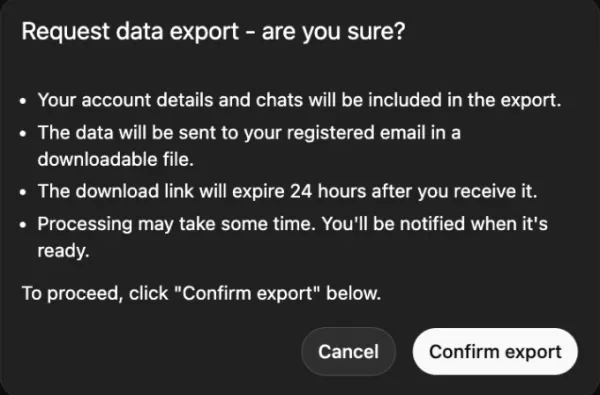
Image Credits:Screenshot of ChatGPT Settings by TechCrunch
You can also take a manual approach by copying pivotal conversations from your history or asking ChatGPT to compile a summary of your core preferences, frequently discussed topics, and any custom instructions you employ.
Importing Your Data into Claude
Once you have compiled your data, moving it to Claude is a simple process.
Open Claude, access Settings, then go to Capabilities, and ensure the Memory feature is activated. (Access to this feature requires a Pro, Max, Team, or Enterprise subscription.) Next, initiate a new conversation and use a prompt such as, "Here is some important context I'd like you to remember. Please update your memory about me with this information." Then, paste your data or summaries directly into the chat.
For exported chat logs, avoid pasting the raw data. Instead, prompt Claude with: "Please review this and summarize my key preferences."
We also recommend confirming with Claude that your information has been correctly saved. You can always revisit and adjust your preferences as they evolve.
Permanently Deleting Your ChatGPT Account
To make a clean break from ChatGPT, merely canceling your subscription will not erase your data.
Follow these steps:
Go to Settings, then Personalization, and select Memory.Delete any stored memory or personalized settings.For added certainty, type "Delete all my memory and personalized data" as a final command in the chat.Then proceed to your account management settings to permanently delete your entire account.
Related article
 Anthropic CEO Outlines Plan To Pace The Frontier
AI researchers have issued increasingly urgent warnings about artificial intelligence risks, with OpenAI CEO Sam Altman suggesting it may be time to “pace” development. But what would that actually entail?In a recent blog post, Anthropic CEO Dario Am
Anthropic Unveils Opus 4.6, a Controversial Content Generator
Anthropic’s universal usage standards for Claude prohibit the model from generating sexually explicit content, including depicting or requesting sexual intercourse or sex acts, generating content related to sexual fetishes or fantasies, or engaging i
Anthropic reports workforce seniority rising as meeting time increases
Anthropic’s workforce composition and work patterns have shifted dramatically over the last year, according to a report released by the AI company on Friday.Anthropic suggests its internal trends may signal broader economic shifts in hiring, labor de
Related Special Topic Recommendations
Design & Art
Anthropic CEO Outlines Plan To Pace The Frontier
AI researchers have issued increasingly urgent warnings about artificial intelligence risks, with OpenAI CEO Sam Altman suggesting it may be time to “pace” development. But what would that actually entail?In a recent blog post, Anthropic CEO Dario Am
Anthropic Unveils Opus 4.6, a Controversial Content Generator
Anthropic’s universal usage standards for Claude prohibit the model from generating sexually explicit content, including depicting or requesting sexual intercourse or sex acts, generating content related to sexual fetishes or fantasies, or engaging i
Anthropic reports workforce seniority rising as meeting time increases
Anthropic’s workforce composition and work patterns have shifted dramatically over the last year, according to a report released by the AI company on Friday.Anthropic suggests its internal trends may signal broader economic shifts in hiring, labor de
Related Special Topic Recommendations
Design & Art
 Top AI Illustration Tools: Create Editorial Scenes and Cover Art Faster
2026 Latest Top-rated AI Illustration Tools: Our curated list features the best powerfully designed tools for creating stunning editorial scenes and eye-catching cover art quickly. Each option has gone through rigorous real-world tests, offering a free vs paid comparison to help you find the perfect match for your workflow. Try these must-try solutions today to unlock your AI edge and boost your creative productivity. Explore now at XIX.AI.
 10 tools
 xix.ai
Education and Learning
Top AI Tutors for Exam Prep: Practice Math, Science, and English
xix.ai
Education and Learning
Top AI Tutors for Exam Prep: Practice Math, Science, and English
2026 Latest Top-Rated Best AI Tutors for Exam Prep are here on XIX.AI! Our curated list features powerful game-changing tools that offer free vs paid comparison, real-world tests, and weekly updated rankings. They help boost your writing efficiency, simplify complex topic learning, and unlock your academic potential. Explore now to Discover your perfect exam prep tool and Start creating today to Unlock your AI edge!
10 tools
xix.ai
Finance
AI Budget Planning Tools for Personal Money Management
2026 Latest Best Top-Rated AI Budget Planning Tools for Personal Money Management are here on XIX.AI! This curated collection features powerful, game-changing solutions that help you conduct real-world tests, understand spending habits, and create personalized plans to boost productivity. Enjoy a free vs paid comparison along with detailed rankings. Must-try tools designed to simplify money management and unlock your AI edge. Explore now!
11 tools
xix.ai
Health & Wellness
AI Sleep Tracking Assistants: Improve Recovery with Better Bedtime Habits
2026 Latest Best Top-Rated AI Sleep Tracking Assistants curated for ultimate recovery. This fully updated weekly guide features powerful tools that deliver real-world tests, free vs paid comparison, and detailed rankings to help you find the must-try solution that boosts sleep quality and supports better bedtime habits. Explore now at XIX.AI to Unlock your AI edge.
10 tools
xix.ai
Data Analysis
AI SQL Copilots for Product and Revenue Analytics
2026 Latest Best Top-Rated AI SQL Copilots for Product and Revenue Analytics! XIX.AI has curated a powerful, game-changing collection of must-try tools that undergo real-world tests through weekly updated rankings. These tools help users boost productivity significantly by accelerating data analysis, streamlining complex queries, and generating accurate insights to drive smarter business decisions. Explore now to Discover your perfect tool for unlocking your AI edge!
14 tools
xix.ai
Education and Learning
Best AI Homework Helpers That Teach: Learn Concepts, Not Just Answers
2026 Latest Best Top-Rated AI Homework Helpers That Teach Core Concepts Not Just Answers Powerful Tools for Students Must-Try Curated List Weekly Updated Free vs Paid Comparison Real-World Tests Accurate Rankings to Help You Unlock Your Full Learning Potential Explore now to Discover your perfect tool for smarter studying.
10 tools
xix.ai

 Comments (0)
0/500
Comments (0)
0/500
Following a series of controversies involving ChatGPT and its parent company OpenAI, a growing number of users are migrating to Claude.
The turning point occurred after Anthropic, Claude's creator, declined a Department of Defense request to utilize its AI models for widespread domestic surveillance or fully autonomous weaponry. In retaliation, President Trump mandated all federal agencies cease using Anthropic's products, and Defense Secretary Pete Hegseth moved to classify the company as a supply-chain threat.
Shortly thereafter, OpenAI revealed its own partnership with the Pentagon, asserting it included protective measures. Nonetheless, the agreement has ignited a broad public discussion on privacy and the ethical deployment of artificial intelligence.
Consequently, Claude has rocketed to the number one spot on the free app charts in Apple's U.S. App Store, surpassing ChatGPT. Anthropic reports daily registrations have reached unprecedented levels, free users have increased by over 60% since January, and paid subscriptions have more than doubled this year.
For many, the recent events have positioned Claude as a powerful alternative to ChatGPT. If you're thinking of switching, this guide will show you how to transfer your data and deactivate your ChatGPT account.
Exporting Your Data from ChatGPT
Leaving ChatGPT doesn't have to mean abandoning your digital history. Rather than starting over with a new AI assistant, you can migrate your information to Claude so it can quickly learn your preferences.
There are several methods to accomplish this. A good starting point is within Settings. Navigate to Personalization and locate the Memory section. Click "Manage" to review your saved data, updating any details that are no longer current. Once everything is accurate, copy the content you wish to preserve.
Image Credits:Screenshot of ChatGPT Settings by TechCrunch
You can also take a manual approach by copying pivotal conversations from your history or asking ChatGPT to compile a summary of your core preferences, frequently discussed topics, and any custom instructions you employ.
Importing Your Data into Claude
Once you have compiled your data, moving it to Claude is a simple process.
Open Claude, access Settings, then go to Capabilities, and ensure the Memory feature is activated. (Access to this feature requires a Pro, Max, Team, or Enterprise subscription.) Next, initiate a new conversation and use a prompt such as, "Here is some important context I'd like you to remember. Please update your memory about me with this information." Then, paste your data or summaries directly into the chat.
For exported chat logs, avoid pasting the raw data. Instead, prompt Claude with: "Please review this and summarize my key preferences."
We also recommend confirming with Claude that your information has been correctly saved. You can always revisit and adjust your preferences as they evolve.
Permanently Deleting Your ChatGPT Account
To make a clean break from ChatGPT, merely canceling your subscription will not erase your data.
Follow these steps:
Go to Settings, then Personalization, and select Memory.Delete any stored memory or personalized settings.For added certainty, type "Delete all my memory and personalized data" as a final command in the chat.Then proceed to your account management settings to permanently delete your entire account.








 Anthropic CEO Outlines Plan To Pace The Frontier
AI researchers have issued increasingly urgent warnings about artificial intelligence risks, with OpenAI CEO Sam Altman suggesting it may be time to “pace” development. But what would that actually entail?In a recent blog post, Anthropic CEO Dario Am
Anthropic CEO Outlines Plan To Pace The Frontier
AI researchers have issued increasingly urgent warnings about artificial intelligence risks, with OpenAI CEO Sam Altman suggesting it may be time to “pace” development. But what would that actually entail?In a recent blog post, Anthropic CEO Dario Am
 Anthropic Unveils Opus 4.6, a Controversial Content Generator
Anthropic’s universal usage standards for Claude prohibit the model from generating sexually explicit content, including depicting or requesting sexual intercourse or sex acts, generating content related to sexual fetishes or fantasies, or engaging i
Anthropic Unveils Opus 4.6, a Controversial Content Generator
Anthropic’s universal usage standards for Claude prohibit the model from generating sexually explicit content, including depicting or requesting sexual intercourse or sex acts, generating content related to sexual fetishes or fantasies, or engaging i
 Anthropic reports workforce seniority rising as meeting time increases
Anthropic’s workforce composition and work patterns have shifted dramatically over the last year, according to a report released by the AI company on Friday.Anthropic suggests its internal trends may signal broader economic shifts in hiring, labor de
Anthropic reports workforce seniority rising as meeting time increases
Anthropic’s workforce composition and work patterns have shifted dramatically over the last year, according to a report released by the AI company on Friday.Anthropic suggests its internal trends may signal broader economic shifts in hiring, labor de

2026 Latest Top-rated AI Illustration Tools: Our curated list features the best powerfully designed tools for creating stunning editorial scenes and eye-catching cover art quickly. Each option has gone through rigorous real-world tests, offering a free vs paid comparison to help you find the perfect match for your workflow. Try these must-try solutions today to unlock your AI edge and boost your creative productivity. Explore now at XIX.AI.
10 tools
xix.ai

2026 Latest Top-Rated Best AI Tutors for Exam Prep are here on XIX.AI! Our curated list features powerful game-changing tools that offer free vs paid comparison, real-world tests, and weekly updated rankings. They help boost your writing efficiency, simplify complex topic learning, and unlock your academic potential. Explore now to Discover your perfect exam prep tool and Start creating today to Unlock your AI edge!
10 tools
xix.ai

2026 Latest Best Top-Rated AI Budget Planning Tools for Personal Money Management are here on XIX.AI! This curated collection features powerful, game-changing solutions that help you conduct real-world tests, understand spending habits, and create personalized plans to boost productivity. Enjoy a free vs paid comparison along with detailed rankings. Must-try tools designed to simplify money management and unlock your AI edge. Explore now!
11 tools
xix.ai

2026 Latest Best Top-Rated AI Sleep Tracking Assistants curated for ultimate recovery. This fully updated weekly guide features powerful tools that deliver real-world tests, free vs paid comparison, and detailed rankings to help you find the must-try solution that boosts sleep quality and supports better bedtime habits. Explore now at XIX.AI to Unlock your AI edge.
10 tools
xix.ai

2026 Latest Best Top-Rated AI SQL Copilots for Product and Revenue Analytics! XIX.AI has curated a powerful, game-changing collection of must-try tools that undergo real-world tests through weekly updated rankings. These tools help users boost productivity significantly by accelerating data analysis, streamlining complex queries, and generating accurate insights to drive smarter business decisions. Explore now to Discover your perfect tool for unlocking your AI edge!
14 tools
xix.ai

2026 Latest Best Top-Rated AI Homework Helpers That Teach Core Concepts Not Just Answers Powerful Tools for Students Must-Try Curated List Weekly Updated Free vs Paid Comparison Real-World Tests Accurate Rankings to Help You Unlock Your Full Learning Potential Explore now to Discover your perfect tool for smarter studying.
10 tools
xix.ai












