


 Home
HomeAI Challenges Human Creativity: The Debate Over Artistic Control
The emergence of artificial intelligence has ignited debates in numerous fields, and the art world is actively participating. As AI demonstrates an impressive ability to generate visuals in diverse styles, a critical question arises: will it eventually supplant human artists? This article investigates the debate through the lens of creative control, comparing the capabilities of AI and human artists while assessing their distinct advantages and limitations. We will explore the creative process, technical underpinnings, and philosophical questions to uncover who ultimately directs the artistic vision.
Key Points
AI is highly proficient at replicating established artistic styles and producing variations based on specific parameters.
Human artists maintain the unique capacity to originate novel concepts and convey profound emotions through their creations.
The central debate questions whether AI can achieve genuine creativity or if it simply reassembles and mimics existing data.
True creative control encompasses not just technical ability but also conceptual depth and emotional resonance.
The trajectory of art points toward a collaborative future, with AI and human artists blending their respective strengths.
The AI Art Revolution: Capabilities and Limitations
What is AI Art?
AI art refers to visual artwork produced by artificial intelligence algorithms. These algorithms are trained on extensive datasets containing countless images, styles, and techniques, enabling them to generate new pictures, paintings, and designs.
Tools such as Microsoft Bing Image Creator, Craiyon (previously DALL-E mini), and other diffusion models are making AI art creation more accessible and powerful than ever.
Many AI art tools operate on a "text-to-image generation" principle. Users provide a text prompt describing the desired image, and the AI algorithm interprets this text to produce a visual representation. This method offers considerable control, allowing users to dictate style, subject matter, and composition.
Nevertheless, AI art has its constraints. Although AI can imitate existing styles adeptly, it often falters when tasked with producing genuinely original or groundbreaking work. This limitation stems from the fact that AI algorithms operate based on patterns and data from their training. They may lack the inherent ability to conceptualize entirely new ideas or express nuanced emotions, which are hallmarks of human creativity.
Technical Aspects of AI Art Generation
The technical foundation of AI art generation is built on machine learning, particularly a branch known as deep learning. Models such as Generative Adversarial Networks (GANs) and diffusion models are trained on massive image datasets. During training, the model analyzes countless examples of artwork to discern the underlying patterns and characteristics of various styles and techniques.
GANs consist of two neural networks: a generator and a discriminator. The generator creates new images, while the discriminator evaluates them, attempting to distinguish these generated images from real ones in the training data. This competitive process pushes the generator to produce increasingly realistic and convincing artwork.
Diffusion models, conversely, work by progressively adding noise to an image until it becomes entirely random. The model is then trained to reverse this process, learning to remove the noise and reconstruct a coherent image. This enables the model to generate new images by starting from random noise and refining it step-by-step into a visually appealing result.
The quality of the final artwork is heavily dependent on the quality and diversity of the training data. A model trained on a narrow or biased dataset may produce artwork that reflects those limitations. Users can further influence the output by adjusting parameters like prompt wording, the number of images generated, and using built-in editing tools. A prompt like "Garfield in the style of Picasso" exemplifies this control.
Examples of AI Art Styles and Applications
AI art can be applied to create a wide spectrum of styles, from photorealistic scenes to abstract forms. Some popular styles include:
- Photo-realism: Generating images that are nearly indistinguishable from actual photographs.
- Abstract Art: Creating non-representational compositions featuring bold colors and shapes.
- Concept Art: Designing visuals for video games, films, and other media projects.
- Style Transfer: Applying the distinctive style of one image to the content of another.
AI image creation platforms often include additional features. Users can typically share their creations online, save images, apply further customization with editing tools, and download the final products.
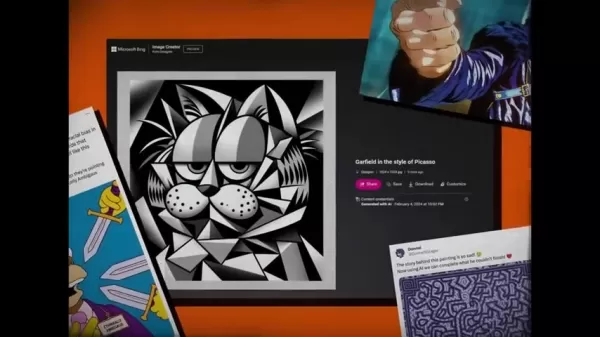
A single, well-crafted prompt can yield multiple images with consistent themes and aesthetics, allowing artists to build cohesive portfolios or series with a unified creative direction.
However, the use of AI in art raises significant copyright and ethical concerns, as the training data often includes copyrighted works. Legal actions, such as artists suing over Stable Diffusion's use of their work, highlight these issues. Critical viewpoints, including claims that "AI art is theft" or that it "regurgitates the work of thousands of artists," underscore the ongoing ethical debate.
The Role of AI as a Tool for Human Artists
AI as a Creative Assistant
While some view AI as a threat to human artists, others embrace it as a powerful tool that can augment the creative process. AI can assist artists in several key areas:
- Generating ideas and concepts: AI can analyze vast collections of images and text to propose new artistic ideas and themes.
For instance, an artist using ChatGPT might receive suggestions like “Mismatched Features Pokemon,” “Invisible Pokemon,” “Literal Object Pokemon,” “Pun-tastic Pokemon,” and “Evolving Pokemon” as starting points for drawings.
- Automating repetitive tasks: AI can handle tedious chores such as color correction, image retouching, and background removal, freeing artists to concentrate on the more creative aspects of their projects.
- Exploring new styles and techniques: Artists can use AI to experiment by generating variations of their work in different artistic styles. The ideal scenario involves AI generating initial ideas that the artist then develops into finished artwork.
- Expanding creative possibilities: AI can empower artists to create pieces that would be challenging or impossible to produce manually, such as highly complex abstract compositions or hyper-realistic imagery. As one artist noted, the goal is to discover "who's the better aesthetic chameleon," exploring AI's potential for reimagining Nickelodeon characters, designing YouTube thumbnails, and more.
Examples of AI-Human Collaboration in Art
The art world already showcases numerous successful collaborations between AI and human artists, where AI generates artwork under human direction. Notable examples include:
- AI-assisted painting: Artists utilize AI to produce initial sketches or compositions, which they then refine and enhance using their own skills and techniques.
- Interactive installations: AI algorithms drive interactive art installations that respond to the movements and actions of the audience.
- Generative design: AI is employed to create evolving designs for products, architecture, and fashion.
- Music Composition: Tools like Amper Music and Aiva assist musicians in composing original scores by generating melodies, harmonies, and rhythms based on user input, allowing for rapid creation of backing tracks or exploration of new musical ideas.
While some speculate that AI could replace animators, a more nuanced view suggests that the real challenge lies in adapting. As one commentator quipped, animators should be wary of "Harry Gold," implying that the synergy between AI and human creativity often yields superior results.
The Future of Art: A Symbiotic Relationship?
The future of art is likely to be defined by a symbiotic partnership between AI and human artists. AI will evolve as an increasingly sophisticated tool for idea generation, task automation, and exploring new creative frontiers. Human artists will continue to provide the irreplaceable elements of originality, emotional depth, and personal perspective.
This collaborative approach promises to birth entirely new and exciting art forms previously unimaginable. Artists will be equipped to push creative boundaries, experiment with unprecedented techniques, and express themselves in novel ways.
Addressing ethical considerations is paramount to ensuring AI is used responsibly and does not devalue human artistic labor. This involves resolving copyright disputes, ensuring AI training data is ethically sourced, and promoting transparency in AI's application within the arts. Ultimately, public reception ("Vox Populi") will play a significant role in determining what is celebrated as high art in this new era.
Unleashing Creativity: How to Use AI Art Tools Effectively
Getting Started with AI Image Generators
AI image generators are increasingly user-friendly. Follow this step-by-step guide to begin your journey:
- Choose an AI Image Generator: Numerous platforms are available, including Microsoft Bing Image Creator, Craiyon, and more advanced options like Midjourney and DALL-E 2. Select one that fits your artistic goals and budget. Be aware that some platforms may have content filters that restrict certain types of imagery.
- Create an Account: Most services require account creation, which usually involves providing an email address or linking a social media account.
- Understand the Interface: Familiarize yourself with the platform's layout, which typically includes a text prompt box, style selection options, and settings for image resolution and variations. Some tools, like Bing Image Creator from Designer, offer a "Preview" feature to help spark ideas.
- Crafting Effective Prompts: The quality of your prompt is crucial. Here are tips for creating effective prompts:
- Be Specific: Include detailed information about your desired subject, style, and composition.
- Use Descriptive Language: Employ vivid adjectives and nouns to create a clear mental picture for the AI.
- Iterate and Refine: Experiment with different phrasings and adjust your prompts based on the results to hone your vision. Carefully word your prompts to avoid triggering any AI safety filters.
By applying these tips, you can confidently navigate AI image generation, transforming your conceptual ideas into striking visual creations.
How to Generate New Designs for Fake Pokémon
Leveraging AI and strategic text prompts, you can design an entire roster of fictional Pokémon. Here's a methodical approach:
- Start with a Concept: Define a central theme or category for your Pokémon, such as an element, animal, or object. You can also use an AI like ChatGPT for initial inspiration; for example, it might suggest designing "Literal Object Pokémon."
- Brainstorm Features: List distinctive traits, abilities, and visual characteristics. Consider unique combinations, like a "Toaster Pokemon that shoots toast as its attack or a couch Pokemon that makes opponents fall asleep when they sit on it."
- Craft Detailed Prompts: Describe your Pokémon meticulously, specifying its appearance, attributes, and abilities. Use prompts such as, Toaster Pokemon in the Pokemon art style.
- Refine and Customize: Utilize image editing software to add final touches, correct any imperfections, and enhance the overall polish of the AI-generated image, making it more presentable.
How to draw a Nickelodeon character in three different art styles
You can reimagine a single cartoon character across multiple artistic styles by following these steps:
- Choose a Character: Select a recognizable Nickelodeon character, such as SpongeBob SquarePants. Alternatively, ask an AI to suggest both a character and suitable art styles.
- Identify Art Styles: Pick three distinct art styles from other Nickelodeon shows, like the simplistic style of Rugrats, the detailed aesthetic of Hey Arnold!, or the modern look of The Loud House. ChatGPT might recommend styles from Rugrats, Avatar The Last Airbender, and The Loud House.
- Create Variations: Use AI to generate images of your chosen character reinterpreted in each of the selected styles. Using a consistent base prompt ensures thematic cohesion across all variations.
- Incorporate Key Elements: While adapting the character to each style, retain its core identifying features—such as facial structure, silhouette, and iconic details—while incorporating the unique hallmarks of the target style.
Crafting Attention-Grabbing YouTube Thumbnails with AI
Your YouTube thumbnail is a critical first impression. AI can help you design compelling thumbnails that improve click-through rates. Follow this guide:
- Start with a Concept: Brainstorm thumbnail ideas that effectively communicate your video's content and tone—is it educational, a review, or humorous? AI can assist in generating these concepts.
- Use Attention-Grabbing Text: Incorporate concise, playful text overlays to capture viewer interest. Use large, bold, and colorful fonts to ensure the text is easily readable even at small sizes.
- Include Artist Persona: Add a small, stylized image of yourself to the thumbnail to foster a personal connection with your audience. Convey enthusiasm and creativity.
- Add Creative Elements: Integrate doodles, splashes, bubbles, or other graphical elements that relate directly to the video's theme.
- Use Contrast and Composition: Ensure strong visual contrast to make key elements stand out. Experiment with complementary colors and dynamic layouts.
- Combine Existing Elements: Consider a split-screen composition that features your AI-assisted rendition of a character alongside the original Nickelodeon version, giving viewers a clear and intriguing comparison.
Pricing of AI Art Tools
Cost Considerations for AI Art Generation
Pricing for AI art tools varies widely, from free tiers to subscription-based plans. Free options often impose limitations on image resolution, generation frequency, or feature access. Subscription plans generally provide increased usage limits, higher resolution outputs, and access to premium features.
Some platforms operate on a credit system, where users purchase credits that are consumed with each image generated. Charges are often based on a per-image or per-prompt basis.When selecting a tool, evaluate your budget and specific needs to find the most suitable and cost-effective plan. A detailed comparison is provided in the table below:
Feature Free Plans Paid Plans Usage Limited usage per day/month Unlimited or higher usage Image Resolution Lower resolution Higher resolution options Advanced Features Limited access to advanced features Full access to advanced editing tools Commercial Use Restrictions on commercial use Full commercial usage rights
AI Art: Advantages and Disadvantages
Pros
Enhanced efficiency and productivity in the creative workflow.
Democratizes art creation, making it accessible to a broader audience.
Facilitates experimentation with new artistic styles and techniques.
A cost-effective solution for generating commercial visuals.
Capable of producing highly complex and intricate designs.
Cons
Can lack genuine originality and emotional depth.
Raises ethical concerns regarding copyright infringement and data usage.
Inherently dependent on pre-existing data patterns.
Potential to perpetuate biases present in training data.
Often requires significant human refinement to achieve polished results.
Core Features of AI Art Tools
Key Capabilities of AI Image Generation
AI art tools are equipped with a suite of powerful features designed to facilitate unique artwork creation. These core capabilities include:
- Text-to-Image Generation: The fundamental ability to convert written descriptions into visual images.
- Style Transfer: Applying the artistic style of one image to the content of another.
- Image Editing: Tools for refining and adjusting generated images post-creation.
- Resolution Control: Options to adjust the output resolution of generated images.
- Variation Generation: Creating multiple interpretations or versions of a single prompt. Some tools feature a "Creation" mode that produces several related images from one idea.
- Content Filtering: Built-in safeguards to prevent the generation of inappropriate content.
Beyond these core functions, many platforms offer additional utilities like online sharing, image saving, advanced customization with editing tools, and download options.
Use Cases of AI Art
Applications of AI in Creative Industries
AI art finds practical application across a wide range of creative sectors, including:
- Graphic Design: Generating logos, marketing collateral, and website graphics.
- Video Game Development: Creating concept art, environmental textures, and character designs.
- Film and Animation: Producing storyboards, background art, and visual effects assets.
- Fashion Design: Developing textile patterns, clothing designs, and fashion illustrations.
- Advertising: Crafting eye-catching visuals for ad campaigns and social media content.
AI art is already being utilized by illustrators, designers, and animators, for instance, in conceptualizing fictional Pokemon, reimagining NickToons characters, and other creative explorations.
Frequently Asked Questions About AI Art
Will AI replace human artists?
A complete replacement of human artists by AI is improbable. A more likely scenario is AI serving as a tool that augments and enhances human creativity. Artists will remain essential for conceptualizing ideas, infusing work with emotion, and making critical artistic judgments.
Is AI art considered real art?
Whether AI-generated art qualifies as "real" art is a subject of ongoing discussion. Critics argue it lacks the intentionality and emotional depth of human-made art, while proponents contend
Related article
 DeepMind CEO Hassabis: I sleep six hours a day, usually feel energetic around 1 a.m.
Fortune recently featured an interview with Demis Hassabis, CEO of Google DeepMind, revealing his unconventional approach to rest and productivity. Hassabis disclosed that he sleeps very little, structuring his waking hours into two distinct work blo
OpenAI, Anthropic Vie for Market Share Despite Revenue Shortfalls
Despite recent reports suggesting OpenAI missed revenue targets, creating pressure on tech stocks this Tuesday, private AI lab investors remain resilient. Seasoned backers have confirmed they will not reduce investment despite negative media coverage
California AV Compliance: A New Era of Tickets, Geofences, and 1M Miles
Guident operates an AuveTech shuttle in South Florida, managing a four-mile route in West Palm Beach and a one-mile route in Boca Raton using its remote monitoring technology. | Credit: GuidentCalifornia is redefining the regulatory landscape for dri
Related Special Topic Recommendations
chatbot
DeepMind CEO Hassabis: I sleep six hours a day, usually feel energetic around 1 a.m.
Fortune recently featured an interview with Demis Hassabis, CEO of Google DeepMind, revealing his unconventional approach to rest and productivity. Hassabis disclosed that he sleeps very little, structuring his waking hours into two distinct work blo
OpenAI, Anthropic Vie for Market Share Despite Revenue Shortfalls
Despite recent reports suggesting OpenAI missed revenue targets, creating pressure on tech stocks this Tuesday, private AI lab investors remain resilient. Seasoned backers have confirmed they will not reduce investment despite negative media coverage
California AV Compliance: A New Era of Tickets, Geofences, and 1M Miles
Guident operates an AuveTech shuttle in South Florida, managing a four-mile route in West Palm Beach and a one-mile route in Boca Raton using its remote monitoring technology. | Credit: GuidentCalifornia is redefining the regulatory landscape for dri
Related Special Topic Recommendations
chatbot
 Best AI Roleplay Chat Apps for Language Practice, Interview Prep, and Daily Fluency
2026 Latest Best Top-rated AI Roleplay Chat Apps for Language Practice, Interview Prep, and Daily Fluency! XIX.AI curates a powerful game-changing collection that offers free vs paid comparison, real-world tests, and updated rankings weekly. These must-try tools help you boost writing skills, overcome fluency challenges, and improve communication efficiency across all daily scenarios. Explore now to discover your perfect tool for language growth!
 10 tools
 xix.ai
Music composition
AI Stem Separation Tools for Remix Production, Sampling Prep, and Karaoke Masters
xix.ai
Music composition
AI Stem Separation Tools for Remix Production, Sampling Prep, and Karaoke Masters
2026 Latest Best Top-rated AI Stem Separation Tools Curated for Remix Production, Sampling Prep, and Karaoke Masters. These powerful game-changing tools offer real-world tests to deliver precise audio isolation, boosting productivity significantly. XIX.AI provides a weekly updated free vs paid comparison guide to help you find the must-try solution that suits your needs. Explore now to unlock your AI edge.
8 tools
xix.ai
Data Analysis
AI SQL Copilots for Revenue Dashboards, Funnel Analysis, and Product Metrics
2026 Latest Best AI SQL Copilots Ranked Top-Rated! XIX.AI curates a powerful game-changing collection for weekly updated real-world tests. These must-try tools help you generate accurate revenue dashboards, analyze sales funnels, and track product metrics swiftly, boosting productivity massively. Explore now to Discover your perfect tool for data-driven decision making! 238 characters
9 tools
xix.ai
Music composition
Best AI Melody Writing Tools for Song Drafts
2026 Latest Best Top-Rated AI Melody Writing Tools for Song Drafts! XIX.AI has curated a highly powerful game-changing collection that goes through rigorous real-world tests to deliver the best writing experience. You can find detailed free vs paid comparisons, accurate rankings, and must-try options designed to help you create stunning song drafts effortlessly and boost your creative productivity significantly. Explore now to discover your perfect tool!
8 tools
xix.ai
chatbot
Best AI Conversation Trainer Tools for Interview Practice
2026 Latest Best Top-rated AI Conversation Trainer Tools for Interview Practice are here on XIX.AI! This curated collection features powerful, game-changing tools that go through rigorous real-world tests to deliver accurate feedback. You’ll find a free vs paid comparison and detailed rankings to help you choose the must-try option that boosts your confidence and skills. Explore now to Discover your perfect tool for interview success!
12 tools
xix.ai
Design & Art
Best AI Style Transfer Tools for Creative Experiments
2026 Latest Best Top-rated AI Style Transfer Tools for Creative Experiments! XIX.AI has curated a powerful, game-changing collection of must-try tools that deliver exceptional results through real-world tests and rigorous rankings. These top solutions help creatives boost productivity significantly by accelerating content creation and unlocking endless creative possibilities. Explore now to discover your perfect tool and start creating today!
9 tools
xix.ai

 Comments (0)
0/500
Comments (0)
0/500
The emergence of artificial intelligence has ignited debates in numerous fields, and the art world is actively participating. As AI demonstrates an impressive ability to generate visuals in diverse styles, a critical question arises: will it eventually supplant human artists? This article investigates the debate through the lens of creative control, comparing the capabilities of AI and human artists while assessing their distinct advantages and limitations. We will explore the creative process, technical underpinnings, and philosophical questions to uncover who ultimately directs the artistic vision.
Key Points
AI is highly proficient at replicating established artistic styles and producing variations based on specific parameters.
Human artists maintain the unique capacity to originate novel concepts and convey profound emotions through their creations.
The central debate questions whether AI can achieve genuine creativity or if it simply reassembles and mimics existing data.
True creative control encompasses not just technical ability but also conceptual depth and emotional resonance.
The trajectory of art points toward a collaborative future, with AI and human artists blending their respective strengths.
The AI Art Revolution: Capabilities and Limitations
What is AI Art?
AI art refers to visual artwork produced by artificial intelligence algorithms. These algorithms are trained on extensive datasets containing countless images, styles, and techniques, enabling them to generate new pictures, paintings, and designs.
Tools such as Microsoft Bing Image Creator, Craiyon (previously DALL-E mini), and other diffusion models are making AI art creation more accessible and powerful than ever.
Many AI art tools operate on a "text-to-image generation" principle. Users provide a text prompt describing the desired image, and the AI algorithm interprets this text to produce a visual representation. This method offers considerable control, allowing users to dictate style, subject matter, and composition.
Nevertheless, AI art has its constraints. Although AI can imitate existing styles adeptly, it often falters when tasked with producing genuinely original or groundbreaking work. This limitation stems from the fact that AI algorithms operate based on patterns and data from their training. They may lack the inherent ability to conceptualize entirely new ideas or express nuanced emotions, which are hallmarks of human creativity.
Technical Aspects of AI Art Generation
The technical foundation of AI art generation is built on machine learning, particularly a branch known as deep learning. Models such as Generative Adversarial Networks (GANs) and diffusion models are trained on massive image datasets. During training, the model analyzes countless examples of artwork to discern the underlying patterns and characteristics of various styles and techniques.
GANs consist of two neural networks: a generator and a discriminator. The generator creates new images, while the discriminator evaluates them, attempting to distinguish these generated images from real ones in the training data. This competitive process pushes the generator to produce increasingly realistic and convincing artwork.
Diffusion models, conversely, work by progressively adding noise to an image until it becomes entirely random. The model is then trained to reverse this process, learning to remove the noise and reconstruct a coherent image. This enables the model to generate new images by starting from random noise and refining it step-by-step into a visually appealing result.
The quality of the final artwork is heavily dependent on the quality and diversity of the training data. A model trained on a narrow or biased dataset may produce artwork that reflects those limitations. Users can further influence the output by adjusting parameters like prompt wording, the number of images generated, and using built-in editing tools. A prompt like "Garfield in the style of Picasso" exemplifies this control.
Examples of AI Art Styles and Applications
AI art can be applied to create a wide spectrum of styles, from photorealistic scenes to abstract forms. Some popular styles include:
- Photo-realism: Generating images that are nearly indistinguishable from actual photographs.
- Abstract Art: Creating non-representational compositions featuring bold colors and shapes.
- Concept Art: Designing visuals for video games, films, and other media projects.
- Style Transfer: Applying the distinctive style of one image to the content of another.
AI image creation platforms often include additional features. Users can typically share their creations online, save images, apply further customization with editing tools, and download the final products.
A single, well-crafted prompt can yield multiple images with consistent themes and aesthetics, allowing artists to build cohesive portfolios or series with a unified creative direction.
However, the use of AI in art raises significant copyright and ethical concerns, as the training data often includes copyrighted works. Legal actions, such as artists suing over Stable Diffusion's use of their work, highlight these issues. Critical viewpoints, including claims that "AI art is theft" or that it "regurgitates the work of thousands of artists," underscore the ongoing ethical debate.
The Role of AI as a Tool for Human Artists
AI as a Creative Assistant
While some view AI as a threat to human artists, others embrace it as a powerful tool that can augment the creative process. AI can assist artists in several key areas:
- Generating ideas and concepts: AI can analyze vast collections of images and text to propose new artistic ideas and themes.
For instance, an artist using ChatGPT might receive suggestions like “Mismatched Features Pokemon,” “Invisible Pokemon,” “Literal Object Pokemon,” “Pun-tastic Pokemon,” and “Evolving Pokemon” as starting points for drawings.
- Automating repetitive tasks: AI can handle tedious chores such as color correction, image retouching, and background removal, freeing artists to concentrate on the more creative aspects of their projects.
- Exploring new styles and techniques: Artists can use AI to experiment by generating variations of their work in different artistic styles. The ideal scenario involves AI generating initial ideas that the artist then develops into finished artwork.
- Expanding creative possibilities: AI can empower artists to create pieces that would be challenging or impossible to produce manually, such as highly complex abstract compositions or hyper-realistic imagery. As one artist noted, the goal is to discover "who's the better aesthetic chameleon," exploring AI's potential for reimagining Nickelodeon characters, designing YouTube thumbnails, and more.
Examples of AI-Human Collaboration in Art
The art world already showcases numerous successful collaborations between AI and human artists, where AI generates artwork under human direction. Notable examples include:
- AI-assisted painting: Artists utilize AI to produce initial sketches or compositions, which they then refine and enhance using their own skills and techniques.
- Interactive installations: AI algorithms drive interactive art installations that respond to the movements and actions of the audience.
- Generative design: AI is employed to create evolving designs for products, architecture, and fashion.
- Music Composition: Tools like Amper Music and Aiva assist musicians in composing original scores by generating melodies, harmonies, and rhythms based on user input, allowing for rapid creation of backing tracks or exploration of new musical ideas.
While some speculate that AI could replace animators, a more nuanced view suggests that the real challenge lies in adapting. As one commentator quipped, animators should be wary of "Harry Gold," implying that the synergy between AI and human creativity often yields superior results.
The Future of Art: A Symbiotic Relationship?
The future of art is likely to be defined by a symbiotic partnership between AI and human artists. AI will evolve as an increasingly sophisticated tool for idea generation, task automation, and exploring new creative frontiers. Human artists will continue to provide the irreplaceable elements of originality, emotional depth, and personal perspective.
This collaborative approach promises to birth entirely new and exciting art forms previously unimaginable. Artists will be equipped to push creative boundaries, experiment with unprecedented techniques, and express themselves in novel ways.
Addressing ethical considerations is paramount to ensuring AI is used responsibly and does not devalue human artistic labor. This involves resolving copyright disputes, ensuring AI training data is ethically sourced, and promoting transparency in AI's application within the arts. Ultimately, public reception ("Vox Populi") will play a significant role in determining what is celebrated as high art in this new era.
Unleashing Creativity: How to Use AI Art Tools Effectively
Getting Started with AI Image Generators
AI image generators are increasingly user-friendly. Follow this step-by-step guide to begin your journey:
- Choose an AI Image Generator: Numerous platforms are available, including Microsoft Bing Image Creator, Craiyon, and more advanced options like Midjourney and DALL-E 2. Select one that fits your artistic goals and budget. Be aware that some platforms may have content filters that restrict certain types of imagery.
- Create an Account: Most services require account creation, which usually involves providing an email address or linking a social media account.
- Understand the Interface: Familiarize yourself with the platform's layout, which typically includes a text prompt box, style selection options, and settings for image resolution and variations. Some tools, like Bing Image Creator from Designer, offer a "Preview" feature to help spark ideas.
- Crafting Effective Prompts: The quality of your prompt is crucial. Here are tips for creating effective prompts:
- Be Specific: Include detailed information about your desired subject, style, and composition.
- Use Descriptive Language: Employ vivid adjectives and nouns to create a clear mental picture for the AI.
- Iterate and Refine: Experiment with different phrasings and adjust your prompts based on the results to hone your vision. Carefully word your prompts to avoid triggering any AI safety filters.
By applying these tips, you can confidently navigate AI image generation, transforming your conceptual ideas into striking visual creations.
How to Generate New Designs for Fake Pokémon
Leveraging AI and strategic text prompts, you can design an entire roster of fictional Pokémon. Here's a methodical approach:
- Start with a Concept: Define a central theme or category for your Pokémon, such as an element, animal, or object. You can also use an AI like ChatGPT for initial inspiration; for example, it might suggest designing "Literal Object Pokémon."
- Brainstorm Features: List distinctive traits, abilities, and visual characteristics. Consider unique combinations, like a "Toaster Pokemon that shoots toast as its attack or a couch Pokemon that makes opponents fall asleep when they sit on it."
- Craft Detailed Prompts: Describe your Pokémon meticulously, specifying its appearance, attributes, and abilities. Use prompts such as, Toaster Pokemon in the Pokemon art style.
- Refine and Customize: Utilize image editing software to add final touches, correct any imperfections, and enhance the overall polish of the AI-generated image, making it more presentable.
How to draw a Nickelodeon character in three different art styles
You can reimagine a single cartoon character across multiple artistic styles by following these steps:
- Choose a Character: Select a recognizable Nickelodeon character, such as SpongeBob SquarePants. Alternatively, ask an AI to suggest both a character and suitable art styles.
- Identify Art Styles: Pick three distinct art styles from other Nickelodeon shows, like the simplistic style of Rugrats, the detailed aesthetic of Hey Arnold!, or the modern look of The Loud House. ChatGPT might recommend styles from Rugrats, Avatar The Last Airbender, and The Loud House.
- Create Variations: Use AI to generate images of your chosen character reinterpreted in each of the selected styles. Using a consistent base prompt ensures thematic cohesion across all variations.
- Incorporate Key Elements: While adapting the character to each style, retain its core identifying features—such as facial structure, silhouette, and iconic details—while incorporating the unique hallmarks of the target style.
Crafting Attention-Grabbing YouTube Thumbnails with AI
Your YouTube thumbnail is a critical first impression. AI can help you design compelling thumbnails that improve click-through rates. Follow this guide:
- Start with a Concept: Brainstorm thumbnail ideas that effectively communicate your video's content and tone—is it educational, a review, or humorous? AI can assist in generating these concepts.
- Use Attention-Grabbing Text: Incorporate concise, playful text overlays to capture viewer interest. Use large, bold, and colorful fonts to ensure the text is easily readable even at small sizes.
- Include Artist Persona: Add a small, stylized image of yourself to the thumbnail to foster a personal connection with your audience. Convey enthusiasm and creativity.
- Add Creative Elements: Integrate doodles, splashes, bubbles, or other graphical elements that relate directly to the video's theme.
- Use Contrast and Composition: Ensure strong visual contrast to make key elements stand out. Experiment with complementary colors and dynamic layouts.
- Combine Existing Elements: Consider a split-screen composition that features your AI-assisted rendition of a character alongside the original Nickelodeon version, giving viewers a clear and intriguing comparison.
Pricing of AI Art Tools
Cost Considerations for AI Art Generation
Pricing for AI art tools varies widely, from free tiers to subscription-based plans. Free options often impose limitations on image resolution, generation frequency, or feature access. Subscription plans generally provide increased usage limits, higher resolution outputs, and access to premium features.
Some platforms operate on a credit system, where users purchase credits that are consumed with each image generated. Charges are often based on a per-image or per-prompt basis.When selecting a tool, evaluate your budget and specific needs to find the most suitable and cost-effective plan. A detailed comparison is provided in the table below:
| Feature | Free Plans | Paid Plans | |
|---|---|---|---|
| Usage | Limited usage per day/month | Unlimited or higher usage | |
| Image Resolution | Lower resolution | Higher resolution options | |
| Advanced Features | Limited access to advanced features | Full access to advanced editing tools | |
| Commercial Use | Restrictions on commercial use | Full commercial usage rights |
AI Art: Advantages and Disadvantages
Pros
Enhanced efficiency and productivity in the creative workflow.
Democratizes art creation, making it accessible to a broader audience.
Facilitates experimentation with new artistic styles and techniques.
A cost-effective solution for generating commercial visuals.
Capable of producing highly complex and intricate designs.
Cons
Can lack genuine originality and emotional depth.
Raises ethical concerns regarding copyright infringement and data usage.
Inherently dependent on pre-existing data patterns.
Potential to perpetuate biases present in training data.
Often requires significant human refinement to achieve polished results.
Core Features of AI Art Tools
Key Capabilities of AI Image Generation
AI art tools are equipped with a suite of powerful features designed to facilitate unique artwork creation. These core capabilities include:
- Text-to-Image Generation: The fundamental ability to convert written descriptions into visual images.
- Style Transfer: Applying the artistic style of one image to the content of another.
- Image Editing: Tools for refining and adjusting generated images post-creation.
- Resolution Control: Options to adjust the output resolution of generated images.
- Variation Generation: Creating multiple interpretations or versions of a single prompt. Some tools feature a "Creation" mode that produces several related images from one idea.
- Content Filtering: Built-in safeguards to prevent the generation of inappropriate content.
Beyond these core functions, many platforms offer additional utilities like online sharing, image saving, advanced customization with editing tools, and download options.
Use Cases of AI Art
Applications of AI in Creative Industries
AI art finds practical application across a wide range of creative sectors, including:
- Graphic Design: Generating logos, marketing collateral, and website graphics.
- Video Game Development: Creating concept art, environmental textures, and character designs.
- Film and Animation: Producing storyboards, background art, and visual effects assets.
- Fashion Design: Developing textile patterns, clothing designs, and fashion illustrations.
- Advertising: Crafting eye-catching visuals for ad campaigns and social media content.
AI art is already being utilized by illustrators, designers, and animators, for instance, in conceptualizing fictional Pokemon, reimagining NickToons characters, and other creative explorations.
Frequently Asked Questions About AI Art
Will AI replace human artists?
A complete replacement of human artists by AI is improbable. A more likely scenario is AI serving as a tool that augments and enhances human creativity. Artists will remain essential for conceptualizing ideas, infusing work with emotion, and making critical artistic judgments.
Is AI art considered real art?
Whether AI-generated art qualifies as "real" art is a subject of ongoing discussion. Critics argue it lacks the intentionality and emotional depth of human-made art, while proponents contend








 DeepMind CEO Hassabis: I sleep six hours a day, usually feel energetic around 1 a.m.
Fortune recently featured an interview with Demis Hassabis, CEO of Google DeepMind, revealing his unconventional approach to rest and productivity. Hassabis disclosed that he sleeps very little, structuring his waking hours into two distinct work blo
DeepMind CEO Hassabis: I sleep six hours a day, usually feel energetic around 1 a.m.
Fortune recently featured an interview with Demis Hassabis, CEO of Google DeepMind, revealing his unconventional approach to rest and productivity. Hassabis disclosed that he sleeps very little, structuring his waking hours into two distinct work blo
 OpenAI, Anthropic Vie for Market Share Despite Revenue Shortfalls
Despite recent reports suggesting OpenAI missed revenue targets, creating pressure on tech stocks this Tuesday, private AI lab investors remain resilient. Seasoned backers have confirmed they will not reduce investment despite negative media coverage
California AV Compliance: A New Era of Tickets, Geofences, and 1M Miles
Guident operates an AuveTech shuttle in South Florida, managing a four-mile route in West Palm Beach and a one-mile route in Boca Raton using its remote monitoring technology. | Credit: GuidentCalifornia is redefining the regulatory landscape for dri
OpenAI, Anthropic Vie for Market Share Despite Revenue Shortfalls
Despite recent reports suggesting OpenAI missed revenue targets, creating pressure on tech stocks this Tuesday, private AI lab investors remain resilient. Seasoned backers have confirmed they will not reduce investment despite negative media coverage
California AV Compliance: A New Era of Tickets, Geofences, and 1M Miles
Guident operates an AuveTech shuttle in South Florida, managing a four-mile route in West Palm Beach and a one-mile route in Boca Raton using its remote monitoring technology. | Credit: GuidentCalifornia is redefining the regulatory landscape for dri

2026 Latest Best Top-rated AI Roleplay Chat Apps for Language Practice, Interview Prep, and Daily Fluency! XIX.AI curates a powerful game-changing collection that offers free vs paid comparison, real-world tests, and updated rankings weekly. These must-try tools help you boost writing skills, overcome fluency challenges, and improve communication efficiency across all daily scenarios. Explore now to discover your perfect tool for language growth!
10 tools
xix.ai

2026 Latest Best Top-rated AI Stem Separation Tools Curated for Remix Production, Sampling Prep, and Karaoke Masters. These powerful game-changing tools offer real-world tests to deliver precise audio isolation, boosting productivity significantly. XIX.AI provides a weekly updated free vs paid comparison guide to help you find the must-try solution that suits your needs. Explore now to unlock your AI edge.
8 tools
xix.ai

2026 Latest Best AI SQL Copilots Ranked Top-Rated! XIX.AI curates a powerful game-changing collection for weekly updated real-world tests. These must-try tools help you generate accurate revenue dashboards, analyze sales funnels, and track product metrics swiftly, boosting productivity massively. Explore now to Discover your perfect tool for data-driven decision making! 238 characters
9 tools
xix.ai

2026 Latest Best Top-Rated AI Melody Writing Tools for Song Drafts! XIX.AI has curated a highly powerful game-changing collection that goes through rigorous real-world tests to deliver the best writing experience. You can find detailed free vs paid comparisons, accurate rankings, and must-try options designed to help you create stunning song drafts effortlessly and boost your creative productivity significantly. Explore now to discover your perfect tool!
8 tools
xix.ai

2026 Latest Best Top-rated AI Conversation Trainer Tools for Interview Practice are here on XIX.AI! This curated collection features powerful, game-changing tools that go through rigorous real-world tests to deliver accurate feedback. You’ll find a free vs paid comparison and detailed rankings to help you choose the must-try option that boosts your confidence and skills. Explore now to Discover your perfect tool for interview success!
12 tools
xix.ai

2026 Latest Best Top-rated AI Style Transfer Tools for Creative Experiments! XIX.AI has curated a powerful, game-changing collection of must-try tools that deliver exceptional results through real-world tests and rigorous rankings. These top solutions help creatives boost productivity significantly by accelerating content creation and unlocking endless creative possibilities. Explore now to discover your perfect tool and start creating today!
9 tools
xix.ai












