


 Home
HomeHow to test and optimize website speed in 2025 for peak performance?
In today's digital world, fast website performance is non-negotiable. Users demand quick interactions, and search engines reward sites that deliver them. A slow-loading site frustrates visitors, increases bounce rates, and damages your bottom line. This guide explores the critical process of website speed testing and analysis, offering practical strategies to optimize your site for peak performance and a superior user experience.
Key Points
Website speed is a direct driver of user experience and search engine rankings.
Performance analysis tools deliver essential data for effective website optimization.
Key metrics to track include Largest Contentful Paint (LCP), Total Blocking Time (TBT), and Cumulative Layout Shift (CLS).
Improving speed involves optimizing images, enabling compression, and streamlining code.
Consistent testing and analysis are vital for maintaining high performance.
Understanding Website Speed and Analysis
Why Website Speed Matters
Website speed is crucial for user satisfaction, SEO success, and achieving your online goals. A fast site keeps users engaged, lowers bounce rates, and boosts conversions. Slow loading, conversely, leads to frustration, visitor loss, and a tarnished brand image.
From an SEO perspective, search engines like Google use page speed as a ranking factor. Faster sites gain an advantage in search results, leading to greater organic traffic and visibility. Therefore, optimizing your site's speed is essential for both attracting visitors and pleasing search engines.
Core Web Vitals are the specific user experience metrics Google prioritizes and are intrinsically linked to your site's speed.
- Largest Contentful Paint (LCP): Measures loading speed.
- First Input Delay (FID): Measures interactivity.
- Cumulative Layout Shift (CLS): Measures visual stability.
Maintaining strong performance in these areas ensures a user-friendly website that keeps visitors happy and engaged.
Introducing Webpage Analyzers
Webpage analyzers are specialized tools that perform a thorough performance checkup on your website, delivering detailed data and actionable optimization advice. They evaluate critical aspects like load speed, page weight, resource requests, and code efficiency. By pinpointing performance bottlenecks, these tools empower you to enhance your site and deliver a superior user experience.
A typical analyzer's report provides a clear breakdown of:
- What's working well: Highlighting your site's current strengths.
- What needs improvement: Identifying the specific issues hampering your speed.
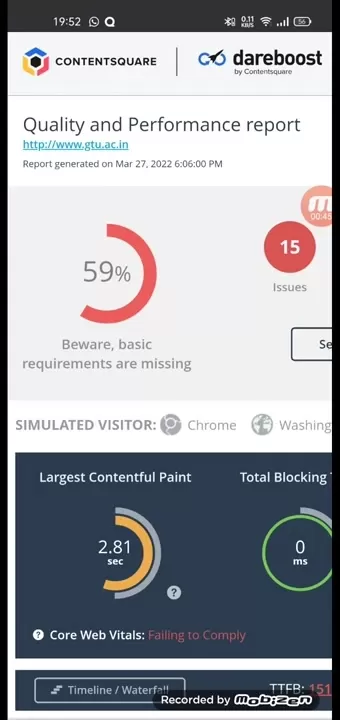
Interpreting these findings and implementing the recommended fixes is the key to unlocking better website performance.
Deep Dive into Key Performance Metrics
Largest Contentful Paint (LCP): The User's First Impression
Largest Contentful Paint, or LCP, measures how long it takes for the main content element (like a hero image or headline) to appear on screen. This metric shapes the user's initial perception of speed. An LCP under 2.5 seconds is considered good, while anything over 4 seconds requires urgent attention.
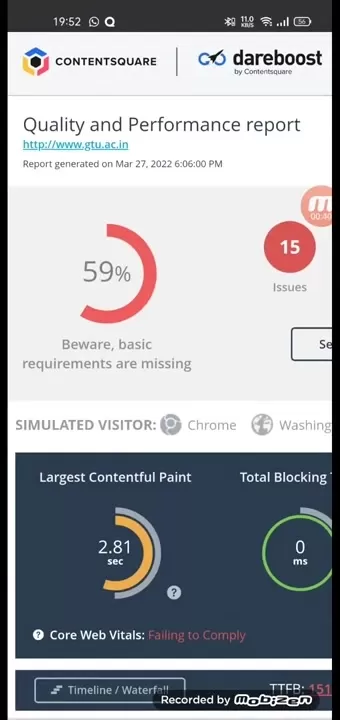
To optimize your LCP:
- Optimize images: Compress and resize images efficiently to reduce their file size.
- Implement a Content Delivery Network (CDN): Serve your site's assets from servers geographically closer to your visitors.
- Minify CSS and JavaScript: Remove unnecessary characters from code files to speed up their download and parsing.
Total Blocking Time (TBT): Ensuring a Smooth User Experience
Total Blocking Time, or TBT, quantifies the total period during page load when the browser is too busy to respond to user input. A high TBT leads to a sluggish, unresponsive experience. Aim for a TBT below 300 milliseconds for optimal smoothness.
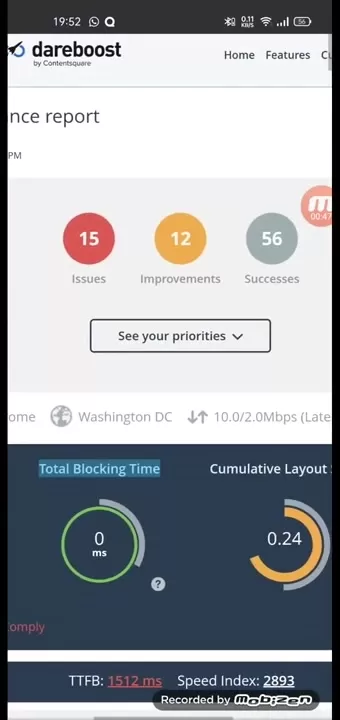
To reduce your TBT:
- Streamline JavaScript: Optimize and defer non-critical JavaScript to free up the main thread.
- Leverage browser caching: Instruct browsers to store static assets locally, so returning visitors load your site faster.
- Audit third-party scripts: Evaluate and remove any non-essential or poorly performing third-party code.
Cumulative Layout Shift (CLS): Maintaining Visual Stability
Cumulative Layout Shift, or CLS, measures unexpected movement of page elements as it loads. High CLS is disruptive, causing users to misclick or lose their reading place. Strive for a CLS score below 0.1 for a stable and predictable visual experience.
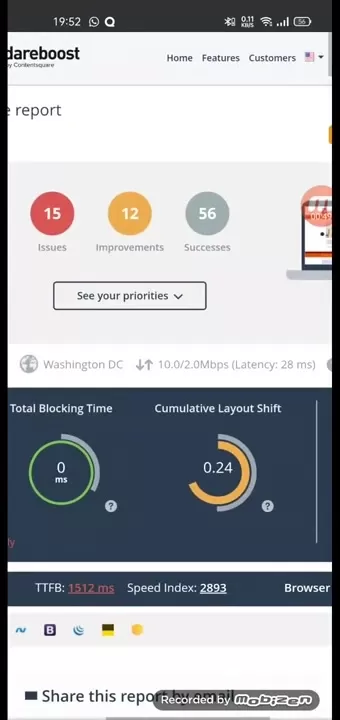
To improve your CLS score:
- Define dimensions for media: Always specify width and height attributes for images and videos.
- Reserve space for dynamic content: Allocate space for elements like ads or embeds so they don't push content down when they load.
- Avoid injecting content above existing content: Adding new elements above existing ones forces the layout to shift, disrupting the user.
Performing a Website Speed Test: A Step-by-Step Guide
Selecting a Webpage Analyzer
A variety of webpage analyzers are available, each with unique features. Popular and reliable options include:
- Dareboost: Offers in-depth reports with clear, actionable recommendations.
- Google PageSpeed Insights: Provides performance scores and suggestions for both mobile and desktop.
- GTmetrix: A comprehensive tool for detailed analysis, offering performance reports and historical tracking.
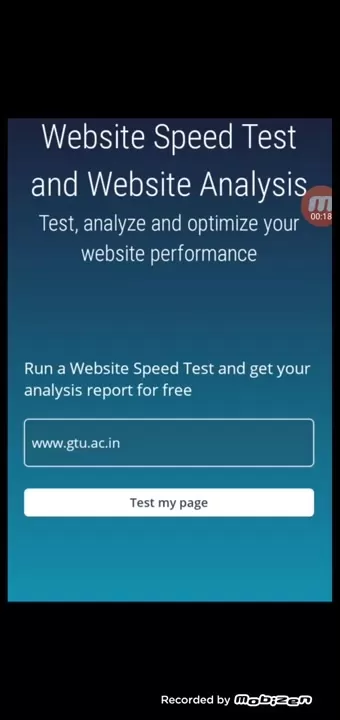
Choose a tool that aligns with your specific needs and provides the insights required to improve your site. For example, Dareboost delivers reports that clearly outline performance scores, identify issues, and highlight successes.
Inputting Your Website URL
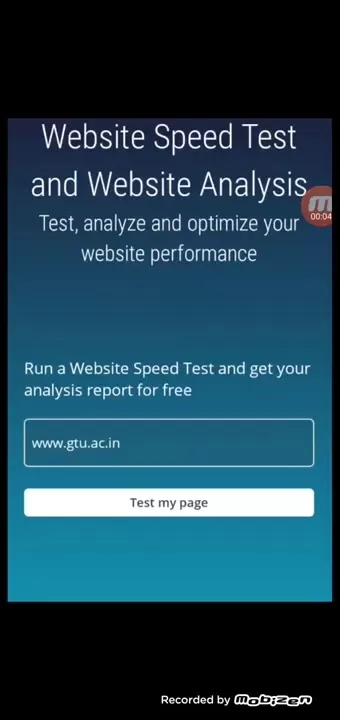
Once you've chosen a tool, simply enter your website's full address (URL) into the provided field. The analyzer will then scan your site and generate a performance report.
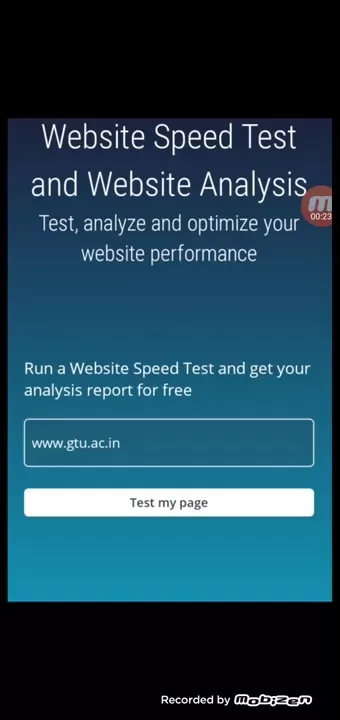
To ensure the most accurate test, use the exact URL that visitors see, including the 'www' prefix if your site uses it.
Analyzing the Results
After the scan, you will receive a detailed report. Review it carefully, focusing on the key metrics (LCP, TBT, CLS) and the specific recommendations. Identify both your strengths and the areas needing improvement.
Pay special attention to sections labeled 'Opportunities' or 'Items to Fix.' These provide direct, actionable steps you or your developer can take to accelerate your site.
Below is an example structure of a typical performance analysis report:
Dareboost - Pros
and Cons
Pros
Comprehensive analysis: Dareboost delivers in-depth insights into speed, SEO, and accessibility.
Actionable advice: The tool provides clear, practical recommendations for improvement.
User-friendly interface: The dashboard is intuitive and easy to navigate for users of all levels.
Performance monitoring: It allows you to track your site's performance over time to gauge progress.
Cons
Cost: Subscription plans may be expensive for small businesses or individual site owners.
Information overload: The detailed reports can be overwhelming for beginners.
Limited free tier: The features available in the free plan are restricted.
FAQ
How often should I test my website speed?
Test your website speed regularly—at least once a month—and whenever you make significant updates. This proactive approach helps you catch performance issues early and maintain an optimal experience.
What is a good website speed score?
A good score varies by tool, but generally, aim for a score above 80-90 on Google PageSpeed Insights or a full load time under 3 seconds on tools like GTmetrix.
What are some common causes of slow website speed?
Common culprits include:Unoptimized, heavy images.Excessively large CSS and JavaScript files.Too many HTTP requests.Slow server response times.Not using browser caching effectively.
Related Questions
How can I optimize images for faster loading times?
Optimize images by:Compressing them: Use tools like TinyPNG, ShortPixel, or ImageOptim to reduce file size while preserving quality.Choosing the correct format: Use JPEG for photos, PNG for graphics with transparency, and consider modern formats like WebP.Resizing them: Ensure images are no larger than the dimensions at which they'll be displayed on the page.Implementing lazy loading: Delay loading off-screen images until a user scrolls near them.These practices drastically improve load times and user experience, and also help prevent layout shifts (CLS).
What are the benefits of using a Content Delivery Network (CDN)?
A Content Delivery Network (CDN) provides several key benefits:Faster global delivery: By serving content from servers near your users, a CDN significantly reduces load times worldwide.Enhanced reliability: CDNs provide redundancy, keeping your site online even if one server has an issue.Reduced origin server load: Offloading traffic to the CDN improves the stability and responsiveness of your main server.SEO advantage: Faster loading times contribute positively to search engine rankings.Using a CDN is a highly effective strategy for improving speed and user satisfaction across the globe.
How can I minify CSS and JavaScript files?
You can minify CSS and JavaScript using online tools (like minifycode.com) or build automation tools (like Webpack, Gulp). These processes remove unnecessary whitespace, comments, and line breaks, reducing file size for faster downloads. For WordPress users, plugins like Autoptimize can handle this automatically. Always test your site after minification to ensure no functionality is broken.
Related article
 Robot Startup Generalist Closes New Funding Round, Valued at $3 Billion
Robotics startup Generalist has achieved a $3 billion valuation after closing a $200 million funding round led by 8VC. According to regulatory filings and industry sources, this latest investment extends the company’s $400 million Series B round, ori
How to fix Core Web Vitals for better SEO rankings?
Turn PDFs into Audio: Free Urdu Text-to-Speech SolutionTable of Contents:IntroductionWhat is PD2Audio?The Benefits of PD2AudioHow to Convert a PDF into AudioStep 1: Visit the PD2Audio websiteStep 2: Choose your languageStep 3: Customize the settingsS
ZTE Partners With Tencent to Launch AI Cloud PC Featuring Native Hunyuan Large Model Integration
China’s "AI + PC" and cloud infrastructure sectors are undergoing a major cross-industry integration. At the AI Cloud Computer Experience Day event on June 3rd, ZTE officially announced a deep strategic partnership with Tencent. The two companies wil
Related Special Topic Recommendations
Design & Art
Robot Startup Generalist Closes New Funding Round, Valued at $3 Billion
Robotics startup Generalist has achieved a $3 billion valuation after closing a $200 million funding round led by 8VC. According to regulatory filings and industry sources, this latest investment extends the company’s $400 million Series B round, ori
How to fix Core Web Vitals for better SEO rankings?
Turn PDFs into Audio: Free Urdu Text-to-Speech SolutionTable of Contents:IntroductionWhat is PD2Audio?The Benefits of PD2AudioHow to Convert a PDF into AudioStep 1: Visit the PD2Audio websiteStep 2: Choose your languageStep 3: Customize the settingsS
ZTE Partners With Tencent to Launch AI Cloud PC Featuring Native Hunyuan Large Model Integration
China’s "AI + PC" and cloud infrastructure sectors are undergoing a major cross-industry integration. At the AI Cloud Computer Experience Day event on June 3rd, ZTE officially announced a deep strategic partnership with Tencent. The two companies wil
Related Special Topic Recommendations
Design & Art
 Top AI Illustration Tools: Create Editorial Scenes and Cover Art Faster
2026 Latest Top-rated AI Illustration Tools: Our curated list features the best powerfully designed tools for creating stunning editorial scenes and eye-catching cover art quickly. Each option has gone through rigorous real-world tests, offering a free vs paid comparison to help you find the perfect match for your workflow. Try these must-try solutions today to unlock your AI edge and boost your creative productivity. Explore now at XIX.AI.
 10 tools
 xix.ai
Education and Learning
Top AI Tutors for Exam Prep: Practice Math, Science, and English
xix.ai
Education and Learning
Top AI Tutors for Exam Prep: Practice Math, Science, and English
2026 Latest Top-Rated Best AI Tutors for Exam Prep are here on XIX.AI! Our curated list features powerful game-changing tools that offer free vs paid comparison, real-world tests, and weekly updated rankings. They help boost your writing efficiency, simplify complex topic learning, and unlock your academic potential. Explore now to Discover your perfect exam prep tool and Start creating today to Unlock your AI edge!
10 tools
xix.ai
Finance
AI Budget Planning Tools for Personal Money Management
2026 Latest Best Top-Rated AI Budget Planning Tools for Personal Money Management are here on XIX.AI! This curated collection features powerful, game-changing solutions that help you conduct real-world tests, understand spending habits, and create personalized plans to boost productivity. Enjoy a free vs paid comparison along with detailed rankings. Must-try tools designed to simplify money management and unlock your AI edge. Explore now!
11 tools
xix.ai
Health & Wellness
AI Sleep Tracking Assistants: Improve Recovery with Better Bedtime Habits
2026 Latest Best Top-Rated AI Sleep Tracking Assistants curated for ultimate recovery. This fully updated weekly guide features powerful tools that deliver real-world tests, free vs paid comparison, and detailed rankings to help you find the must-try solution that boosts sleep quality and supports better bedtime habits. Explore now at XIX.AI to Unlock your AI edge.
10 tools
xix.ai
Data Analysis
AI SQL Copilots for Product and Revenue Analytics
2026 Latest Best Top-Rated AI SQL Copilots for Product and Revenue Analytics! XIX.AI has curated a powerful, game-changing collection of must-try tools that undergo real-world tests through weekly updated rankings. These tools help users boost productivity significantly by accelerating data analysis, streamlining complex queries, and generating accurate insights to drive smarter business decisions. Explore now to Discover your perfect tool for unlocking your AI edge!
14 tools
xix.ai
Education and Learning
Best AI Homework Helpers That Teach: Learn Concepts, Not Just Answers
2026 Latest Best Top-Rated AI Homework Helpers That Teach Core Concepts Not Just Answers Powerful Tools for Students Must-Try Curated List Weekly Updated Free vs Paid Comparison Real-World Tests Accurate Rankings to Help You Unlock Your Full Learning Potential Explore now to Discover your perfect tool for smarter studying.
10 tools
xix.ai

 Comments (2)
0/500
Comments (2)
0/500
![AlbertHarris]()
Just realized my site speed test results are basically a horror movie in graph form 🎬📉 Tempted to just throw more servers at it, but optimization tips here seem more sustainable. Anyone else find the Core Web Vitals changes in 2025 confusing?
![EricAllen]()
Je ne savais pas que la vitesse du site web avait un tel impact sur le taux de rebond 😮 C'est un peu effrayant de penser que quelques secondes de retard peuvent coûter des clients. Est-ce que les outils de test mentionnés sont adaptés aux petits sites e-commerce ?
In today's digital world, fast website performance is non-negotiable. Users demand quick interactions, and search engines reward sites that deliver them. A slow-loading site frustrates visitors, increases bounce rates, and damages your bottom line. This guide explores the critical process of website speed testing and analysis, offering practical strategies to optimize your site for peak performance and a superior user experience.
Key Points
Website speed is a direct driver of user experience and search engine rankings.
Performance analysis tools deliver essential data for effective website optimization.
Key metrics to track include Largest Contentful Paint (LCP), Total Blocking Time (TBT), and Cumulative Layout Shift (CLS).
Improving speed involves optimizing images, enabling compression, and streamlining code.
Consistent testing and analysis are vital for maintaining high performance.
Understanding Website Speed and Analysis
Why Website Speed Matters
Website speed is crucial for user satisfaction, SEO success, and achieving your online goals. A fast site keeps users engaged, lowers bounce rates, and boosts conversions. Slow loading, conversely, leads to frustration, visitor loss, and a tarnished brand image.
From an SEO perspective, search engines like Google use page speed as a ranking factor. Faster sites gain an advantage in search results, leading to greater organic traffic and visibility. Therefore, optimizing your site's speed is essential for both attracting visitors and pleasing search engines.
Core Web Vitals are the specific user experience metrics Google prioritizes and are intrinsically linked to your site's speed.
- Largest Contentful Paint (LCP): Measures loading speed.
- First Input Delay (FID): Measures interactivity.
- Cumulative Layout Shift (CLS): Measures visual stability.
Maintaining strong performance in these areas ensures a user-friendly website that keeps visitors happy and engaged.
Introducing Webpage Analyzers
Webpage analyzers are specialized tools that perform a thorough performance checkup on your website, delivering detailed data and actionable optimization advice. They evaluate critical aspects like load speed, page weight, resource requests, and code efficiency. By pinpointing performance bottlenecks, these tools empower you to enhance your site and deliver a superior user experience.
A typical analyzer's report provides a clear breakdown of:
- What's working well: Highlighting your site's current strengths.
- What needs improvement: Identifying the specific issues hampering your speed.
Interpreting these findings and implementing the recommended fixes is the key to unlocking better website performance.
Deep Dive into Key Performance Metrics
Largest Contentful Paint (LCP): The User's First Impression
Largest Contentful Paint, or LCP, measures how long it takes for the main content element (like a hero image or headline) to appear on screen. This metric shapes the user's initial perception of speed. An LCP under 2.5 seconds is considered good, while anything over 4 seconds requires urgent attention.
To optimize your LCP:
- Optimize images: Compress and resize images efficiently to reduce their file size.
- Implement a Content Delivery Network (CDN): Serve your site's assets from servers geographically closer to your visitors.
- Minify CSS and JavaScript: Remove unnecessary characters from code files to speed up their download and parsing.
Total Blocking Time (TBT): Ensuring a Smooth User Experience
Total Blocking Time, or TBT, quantifies the total period during page load when the browser is too busy to respond to user input. A high TBT leads to a sluggish, unresponsive experience. Aim for a TBT below 300 milliseconds for optimal smoothness.
To reduce your TBT:
- Streamline JavaScript: Optimize and defer non-critical JavaScript to free up the main thread.
- Leverage browser caching: Instruct browsers to store static assets locally, so returning visitors load your site faster.
- Audit third-party scripts: Evaluate and remove any non-essential or poorly performing third-party code.
Cumulative Layout Shift (CLS): Maintaining Visual Stability
Cumulative Layout Shift, or CLS, measures unexpected movement of page elements as it loads. High CLS is disruptive, causing users to misclick or lose their reading place. Strive for a CLS score below 0.1 for a stable and predictable visual experience.
To improve your CLS score:
- Define dimensions for media: Always specify width and height attributes for images and videos.
- Reserve space for dynamic content: Allocate space for elements like ads or embeds so they don't push content down when they load.
- Avoid injecting content above existing content: Adding new elements above existing ones forces the layout to shift, disrupting the user.
Performing a Website Speed Test: A Step-by-Step Guide
Selecting a Webpage Analyzer
A variety of webpage analyzers are available, each with unique features. Popular and reliable options include:
- Dareboost: Offers in-depth reports with clear, actionable recommendations.
- Google PageSpeed Insights: Provides performance scores and suggestions for both mobile and desktop.
- GTmetrix: A comprehensive tool for detailed analysis, offering performance reports and historical tracking.
Choose a tool that aligns with your specific needs and provides the insights required to improve your site. For example, Dareboost delivers reports that clearly outline performance scores, identify issues, and highlight successes.
Inputting Your Website URL
Once you've chosen a tool, simply enter your website's full address (URL) into the provided field. The analyzer will then scan your site and generate a performance report.
To ensure the most accurate test, use the exact URL that visitors see, including the 'www' prefix if your site uses it.
Analyzing the Results
After the scan, you will receive a detailed report. Review it carefully, focusing on the key metrics (LCP, TBT, CLS) and the specific recommendations. Identify both your strengths and the areas needing improvement.
Pay special attention to sections labeled 'Opportunities' or 'Items to Fix.' These provide direct, actionable steps you or your developer can take to accelerate your site.
Below is an example structure of a typical performance analysis report:
Dareboost - Pros
and Cons
Pros
Comprehensive analysis: Dareboost delivers in-depth insights into speed, SEO, and accessibility.
Actionable advice: The tool provides clear, practical recommendations for improvement.
User-friendly interface: The dashboard is intuitive and easy to navigate for users of all levels.
Performance monitoring: It allows you to track your site's performance over time to gauge progress.
Cons
Cost: Subscription plans may be expensive for small businesses or individual site owners.
Information overload: The detailed reports can be overwhelming for beginners.
Limited free tier: The features available in the free plan are restricted.
FAQ
How often should I test my website speed?
Test your website speed regularly—at least once a month—and whenever you make significant updates. This proactive approach helps you catch performance issues early and maintain an optimal experience.
What is a good website speed score?
A good score varies by tool, but generally, aim for a score above 80-90 on Google PageSpeed Insights or a full load time under 3 seconds on tools like GTmetrix.
What are some common causes of slow website speed?
Common culprits include:Unoptimized, heavy images.Excessively large CSS and JavaScript files.Too many HTTP requests.Slow server response times.Not using browser caching effectively.
Related Questions
How can I optimize images for faster loading times?
Optimize images by:Compressing them: Use tools like TinyPNG, ShortPixel, or ImageOptim to reduce file size while preserving quality.Choosing the correct format: Use JPEG for photos, PNG for graphics with transparency, and consider modern formats like WebP.Resizing them: Ensure images are no larger than the dimensions at which they'll be displayed on the page.Implementing lazy loading: Delay loading off-screen images until a user scrolls near them.These practices drastically improve load times and user experience, and also help prevent layout shifts (CLS).
What are the benefits of using a Content Delivery Network (CDN)?
A Content Delivery Network (CDN) provides several key benefits:Faster global delivery: By serving content from servers near your users, a CDN significantly reduces load times worldwide.Enhanced reliability: CDNs provide redundancy, keeping your site online even if one server has an issue.Reduced origin server load: Offloading traffic to the CDN improves the stability and responsiveness of your main server.SEO advantage: Faster loading times contribute positively to search engine rankings.Using a CDN is a highly effective strategy for improving speed and user satisfaction across the globe.
How can I minify CSS and JavaScript files?
You can minify CSS and JavaScript using online tools (like minifycode.com) or build automation tools (like Webpack, Gulp). These processes remove unnecessary whitespace, comments, and line breaks, reducing file size for faster downloads. For WordPress users, plugins like Autoptimize can handle this automatically. Always test your site after minification to ensure no functionality is broken.








 Robot Startup Generalist Closes New Funding Round, Valued at $3 Billion
Robotics startup Generalist has achieved a $3 billion valuation after closing a $200 million funding round led by 8VC. According to regulatory filings and industry sources, this latest investment extends the company’s $400 million Series B round, ori
Robot Startup Generalist Closes New Funding Round, Valued at $3 Billion
Robotics startup Generalist has achieved a $3 billion valuation after closing a $200 million funding round led by 8VC. According to regulatory filings and industry sources, this latest investment extends the company’s $400 million Series B round, ori
 How to fix Core Web Vitals for better SEO rankings?
Turn PDFs into Audio: Free Urdu Text-to-Speech SolutionTable of Contents:IntroductionWhat is PD2Audio?The Benefits of PD2AudioHow to Convert a PDF into AudioStep 1: Visit the PD2Audio websiteStep 2: Choose your languageStep 3: Customize the settingsS
How to fix Core Web Vitals for better SEO rankings?
Turn PDFs into Audio: Free Urdu Text-to-Speech SolutionTable of Contents:IntroductionWhat is PD2Audio?The Benefits of PD2AudioHow to Convert a PDF into AudioStep 1: Visit the PD2Audio websiteStep 2: Choose your languageStep 3: Customize the settingsS
 ZTE Partners With Tencent to Launch AI Cloud PC Featuring Native Hunyuan Large Model Integration
China’s "AI + PC" and cloud infrastructure sectors are undergoing a major cross-industry integration. At the AI Cloud Computer Experience Day event on June 3rd, ZTE officially announced a deep strategic partnership with Tencent. The two companies wil
ZTE Partners With Tencent to Launch AI Cloud PC Featuring Native Hunyuan Large Model Integration
China’s "AI + PC" and cloud infrastructure sectors are undergoing a major cross-industry integration. At the AI Cloud Computer Experience Day event on June 3rd, ZTE officially announced a deep strategic partnership with Tencent. The two companies wil

2026 Latest Top-rated AI Illustration Tools: Our curated list features the best powerfully designed tools for creating stunning editorial scenes and eye-catching cover art quickly. Each option has gone through rigorous real-world tests, offering a free vs paid comparison to help you find the perfect match for your workflow. Try these must-try solutions today to unlock your AI edge and boost your creative productivity. Explore now at XIX.AI.
10 tools
xix.ai

2026 Latest Top-Rated Best AI Tutors for Exam Prep are here on XIX.AI! Our curated list features powerful game-changing tools that offer free vs paid comparison, real-world tests, and weekly updated rankings. They help boost your writing efficiency, simplify complex topic learning, and unlock your academic potential. Explore now to Discover your perfect exam prep tool and Start creating today to Unlock your AI edge!
10 tools
xix.ai

2026 Latest Best Top-Rated AI Budget Planning Tools for Personal Money Management are here on XIX.AI! This curated collection features powerful, game-changing solutions that help you conduct real-world tests, understand spending habits, and create personalized plans to boost productivity. Enjoy a free vs paid comparison along with detailed rankings. Must-try tools designed to simplify money management and unlock your AI edge. Explore now!
11 tools
xix.ai

2026 Latest Best Top-Rated AI Sleep Tracking Assistants curated for ultimate recovery. This fully updated weekly guide features powerful tools that deliver real-world tests, free vs paid comparison, and detailed rankings to help you find the must-try solution that boosts sleep quality and supports better bedtime habits. Explore now at XIX.AI to Unlock your AI edge.
10 tools
xix.ai

2026 Latest Best Top-Rated AI SQL Copilots for Product and Revenue Analytics! XIX.AI has curated a powerful, game-changing collection of must-try tools that undergo real-world tests through weekly updated rankings. These tools help users boost productivity significantly by accelerating data analysis, streamlining complex queries, and generating accurate insights to drive smarter business decisions. Explore now to Discover your perfect tool for unlocking your AI edge!
14 tools
xix.ai

2026 Latest Best Top-Rated AI Homework Helpers That Teach Core Concepts Not Just Answers Powerful Tools for Students Must-Try Curated List Weekly Updated Free vs Paid Comparison Real-World Tests Accurate Rankings to Help You Unlock Your Full Learning Potential Explore now to Discover your perfect tool for smarter studying.
10 tools
xix.ai

Just realized my site speed test results are basically a horror movie in graph form 🎬📉 Tempted to just throw more servers at it, but optimization tips here seem more sustainable. Anyone else find the Core Web Vitals changes in 2025 confusing?
Je ne savais pas que la vitesse du site web avait un tel impact sur le taux de rebond 😮 C'est un peu effrayant de penser que quelques secondes de retard peuvent coûter des clients. Est-ce que les outils de test mentionnés sont adaptés aux petits sites e-commerce ?












