


 Home
HomeMaster Vmaker AI: Effortlessly Enhance Videos with Emojis
In today's digital world, video is essential for communication and content creation. Making videos both engaging and emotionally impactful is key. Vmaker AI provides a one-click solution for automatically adding emojis to videos. This guide shows you how to use Vmaker AI to effortlessly boost the emotional resonance and humor in your videos, all while saving significant time and energy.
Key Points
Emojis can amplify humor and emphasize emotions in videos.
Vmaker AI automates the process of inserting relevant emojis.
Manual fine-tuning ensures perfect emoji positioning.
The software delivers a polished finish with animated elements.
Vmaker AI is built to save time and effort for video editors.
Understanding the Power of Emojis in Video Content
Why Emojis Matter in Video Marketing
Emojis have evolved into a universal language for digital communication. They express emotions and responses quickly and clearly. Adding emojis to your videos increases audience engagement and helps viewers connect with your content on a deeper, more personal level. For marketers, using emojis can strengthen brand recall and build a more approachable brand identity.
Humor isn't universal.

What one person finds funny might confuse someone else. Emojis serve as visual cues that enhance comedic moments, ensuring the audience catches the intended tone. They work like visual punchlines, making jokes more effective and fostering a shared sense of fun.
Emojis help express both subtle and overt excitement, enriching the viewer's experience.
The Problem with Traditional Video Editing
Adding emojis to videos by hand is a tedious and time-intensive process. Conventional editing software forces you to find, position, and animate emojis one frame at a time. This method is inefficient, especially for longer videos or large batches of content. Manual editing also increases the risk of misplacing emojis or mistiming their appearance, which can lower the overall video quality.
Identifying the emotional highs and lows in a video also slows down production. AI handles this analysis automatically.
Vmaker AI: A Step-by-Step Guide to Adding Emojis
Step 1: Accessing the Vmaker AI Editor
Start by creating a Vmaker account and entering the Vmaker AI dashboard.

Here, you can either record a new video, start a new project, or edit with AI. To begin adding emojis, choose the "Edit with AI" option. This feature lets you upload existing video footage for enhancement.
Step 2: Uploading Your Video
Next, upload the video you want to enhance with emojis.
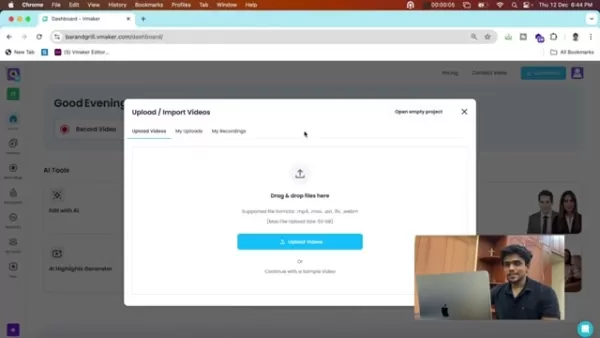
Vmaker AI supports multiple video formats, so it works with your existing content library. Supported formats include .mp4, .mov, .avi, .flv, and .webm. Once you select your video, it will upload to the Vmaker AI platform, ready for emoji integration.
Step 3: Selecting Editing Effects
Once your video is uploaded, you'll choose the editing effects to apply.

Vmaker AI offers a variety of options to improve your video. For this tutorial, select both the "Emoji" and "Subtitles" options. These features automatically insert relevant emojis and create subtitles to boost accessibility and engagement.
Step 4: Automatic Emoji Integration and Manual Adjustments
Once you've selected your effects, Vmaker AI scans your video and automatically inserts emojis at the most fitting moments.
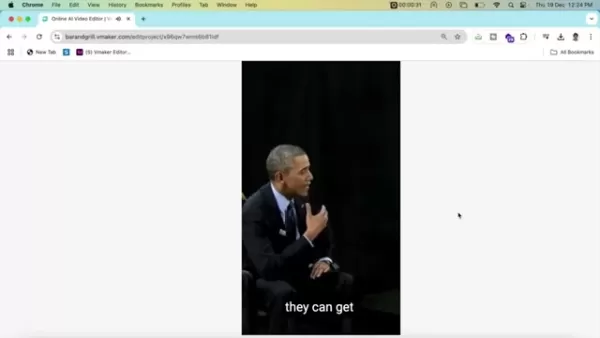
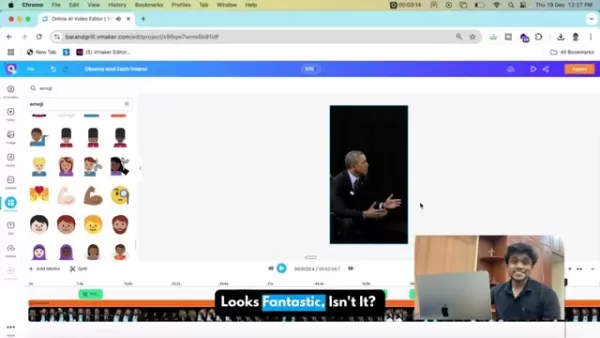
The platform uses sophisticated algorithms to detect key emotional cues and humorous segments, placing emojis strategically. Vmaker also lets you manually add extra emojis and elements at specific timestamps.
Although the automatic emoji placement is highly accurate, Vmaker AI enables manual refinements. You can adjust the position, timing, and scale of each emoji to align perfectly with your creative vision. This control guarantees a final product that is both captivating and visually attractive.
Step 5: Adding Professional Touches with Animations
To further improve your video's visual quality, Vmaker AI lets you incorporate intro and outro animations.
These subtle effects give your video a refined, professional appearance. Select from animation styles like fade-in and fade-out to craft a smooth and engaging viewing experience. These animations help the emojis integrate naturally into the video, producing a cohesive and visually appealing outcome.
Step 6: Exporting Your Enhanced Video
When you're happy with the emoji placement and animations, you can export your final video. Vmaker AI provides several export settings, letting you select the quality, file type, and resolution. Adjust these settings to optimize your video for various platforms and devices. After choosing your preferences, click “Download,” and your enhanced video will save to your computer, ready to share.
Vmaker AI Pricing Details
Exploring Vmaker AI's Subscription Options
Vmaker AI offers multiple pricing plans to suit various user needs and budgets. Here is a simplified overview of the available options:
- Basic (Free): Great for beginners and casual users, this plan includes core video recording and editing functions but adds a watermark.
- Starter: Suitable for users who need higher video quality than the free version offers.
- Pro: Tailored for professionals and small businesses, the Pro plan unlocks advanced editing tools, cloud storage, and watermark removal.
- Teams: Designed for larger organizations, this plan includes team collaboration features, in-depth analytics, and priority customer support.
Weighing the Advantages and Disadvantages of Vmaker AI
Pros
Automated emoji integration saves time.
Intuitive interface makes navigation simple.
Versatile tool for a wide range of video improvements.
Professional results with polished animations.
Cloud storage and team collaboration capabilities.
Cons
Access to advanced features requires a paid subscription.
Relies on an internet connection for cloud storage access.
Overusing emojis can make content seem less professional.
Vmaker AI Core Features
Key Features of Vmaker AI
Vmaker AI is equipped with numerous features that simplify video creation and editing.
Automated Emoji Integration: This function analyzes your video and automatically inserts fitting emojis to heighten emotions and humor.
Manual Emoji Adjustments: Users can precisely control the location, timing, and dimensions of emojis to fit their creative intent.
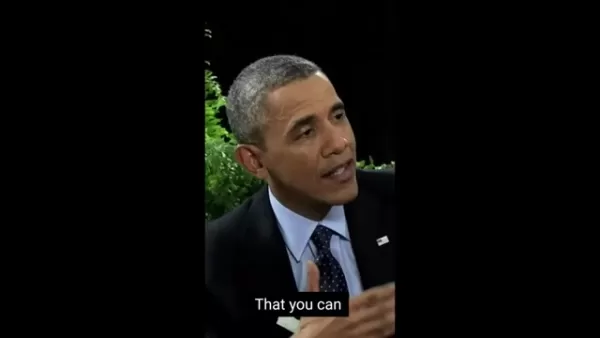
Animation Effects: Incorporate intro and outro animations for a sleek, professional appearance.
Screen Recording: Record your screen with audio and webcam overlay for tutorials and presentations.
Video Editing Tools: Trim, crop, merge videos, and include text, transitions, and background music.
Cloud Storage: Save and retrieve videos securely from any location using cloud storage.
Team Collaboration: Work together with team members on video projects using shared workspaces and feedback tools.
Diverse Use Cases for Vmaker AI
Exploring How Vmaker AI Can Enhance Video Projects
Vmaker AI is a flexible tool that can improve video content across many applications.
- Marketing and Advertising: Use emojis and animations in promotional videos to increase engagement and build a more relatable brand.
- Social Media Content: Boost social media videos with emojis to stand out in busy feeds and attract more views.
- E-learning and Training: Utilize screen recording and editing features to develop compelling online courses and training resources.
- Internal Communications: Enhance internal communications with improved videos that deliver information more clearly.
- Product Demos: Emphasize important features and benefits using emojis and animations in product demonstration videos.
- Content Creation and YouTube: Add an extra layer of entertainment!
Frequently Asked Questions About Vmaker AI
What types of videos can I enhance with Vmaker AI?
You can enhance many kinds of videos, such as marketing content, social media clips, e-learning modules, internal communications, and product demonstrations.
Can I use Vmaker AI to add subtitles to my videos?
Yes, Vmaker AI enables you to generate and add subtitles to videos, improving both accessibility and viewer engagement.
Is Vmaker AI suitable for beginners?
Yes, Vmaker AI is built with a user-friendly, intuitive interface that helps beginners start quickly. It also provides different subscription plans.
Related Questions
What are the main benefits of using AI for video editing?
AI-driven video editing tools like Vmaker AI provide several advantages, including automated emoji placement, AI-generated subtitles, automatic highlight creation, and time-saving automation. This leads to greater efficiency, accuracy, and creative potential. It minimizes repetitive work, elevates content quality, and lets creators concentrate on storytelling and the viewer's experience. With some help from AI, you can spend less time editing and more time enjoying your final video.
Related article
 DeepMind CEO Hassabis: I sleep six hours a day, usually feel energetic around 1 a.m.
Fortune recently featured an interview with Demis Hassabis, CEO of Google DeepMind, revealing his unconventional approach to rest and productivity. Hassabis disclosed that he sleeps very little, structuring his waking hours into two distinct work blo
OpenAI, Anthropic Vie for Market Share Despite Revenue Shortfalls
Despite recent reports suggesting OpenAI missed revenue targets, creating pressure on tech stocks this Tuesday, private AI lab investors remain resilient. Seasoned backers have confirmed they will not reduce investment despite negative media coverage
California AV Compliance: A New Era of Tickets, Geofences, and 1M Miles
Guident operates an AuveTech shuttle in South Florida, managing a four-mile route in West Palm Beach and a one-mile route in Boca Raton using its remote monitoring technology. | Credit: GuidentCalifornia is redefining the regulatory landscape for dri
Related Special Topic Recommendations
chatbot
DeepMind CEO Hassabis: I sleep six hours a day, usually feel energetic around 1 a.m.
Fortune recently featured an interview with Demis Hassabis, CEO of Google DeepMind, revealing his unconventional approach to rest and productivity. Hassabis disclosed that he sleeps very little, structuring his waking hours into two distinct work blo
OpenAI, Anthropic Vie for Market Share Despite Revenue Shortfalls
Despite recent reports suggesting OpenAI missed revenue targets, creating pressure on tech stocks this Tuesday, private AI lab investors remain resilient. Seasoned backers have confirmed they will not reduce investment despite negative media coverage
California AV Compliance: A New Era of Tickets, Geofences, and 1M Miles
Guident operates an AuveTech shuttle in South Florida, managing a four-mile route in West Palm Beach and a one-mile route in Boca Raton using its remote monitoring technology. | Credit: GuidentCalifornia is redefining the regulatory landscape for dri
Related Special Topic Recommendations
chatbot
 Best AI Roleplay Chat Apps for Language Practice, Interview Prep, and Daily Fluency
2026 Latest Best Top-rated AI Roleplay Chat Apps for Language Practice, Interview Prep, and Daily Fluency! XIX.AI curates a powerful game-changing collection that offers free vs paid comparison, real-world tests, and updated rankings weekly. These must-try tools help you boost writing skills, overcome fluency challenges, and improve communication efficiency across all daily scenarios. Explore now to discover your perfect tool for language growth!
 10 tools
 xix.ai
Music composition
AI Stem Separation Tools for Remix Production, Sampling Prep, and Karaoke Masters
xix.ai
Music composition
AI Stem Separation Tools for Remix Production, Sampling Prep, and Karaoke Masters
2026 Latest Best Top-rated AI Stem Separation Tools Curated for Remix Production, Sampling Prep, and Karaoke Masters. These powerful game-changing tools offer real-world tests to deliver precise audio isolation, boosting productivity significantly. XIX.AI provides a weekly updated free vs paid comparison guide to help you find the must-try solution that suits your needs. Explore now to unlock your AI edge.
8 tools
xix.ai
Data Analysis
AI SQL Copilots for Revenue Dashboards, Funnel Analysis, and Product Metrics
2026 Latest Best AI SQL Copilots Ranked Top-Rated! XIX.AI curates a powerful game-changing collection for weekly updated real-world tests. These must-try tools help you generate accurate revenue dashboards, analyze sales funnels, and track product metrics swiftly, boosting productivity massively. Explore now to Discover your perfect tool for data-driven decision making! 238 characters
9 tools
xix.ai
Music composition
Best AI Melody Writing Tools for Song Drafts
2026 Latest Best Top-Rated AI Melody Writing Tools for Song Drafts! XIX.AI has curated a highly powerful game-changing collection that goes through rigorous real-world tests to deliver the best writing experience. You can find detailed free vs paid comparisons, accurate rankings, and must-try options designed to help you create stunning song drafts effortlessly and boost your creative productivity significantly. Explore now to discover your perfect tool!
8 tools
xix.ai
chatbot
Best AI Conversation Trainer Tools for Interview Practice
2026 Latest Best Top-rated AI Conversation Trainer Tools for Interview Practice are here on XIX.AI! This curated collection features powerful, game-changing tools that go through rigorous real-world tests to deliver accurate feedback. You’ll find a free vs paid comparison and detailed rankings to help you choose the must-try option that boosts your confidence and skills. Explore now to Discover your perfect tool for interview success!
12 tools
xix.ai
Design & Art
Best AI Style Transfer Tools for Creative Experiments
2026 Latest Best Top-rated AI Style Transfer Tools for Creative Experiments! XIX.AI has curated a powerful, game-changing collection of must-try tools that deliver exceptional results through real-world tests and rigorous rankings. These top solutions help creatives boost productivity significantly by accelerating content creation and unlocking endless creative possibilities. Explore now to discover your perfect tool and start creating today!
9 tools
xix.ai

 Comments (1)
0/500
Comments (1)
0/500
![PeterRodriguez]()
I was totally surprised by this tool! Just upload a video and it adds super cute emojis that match the mood perfectly, making even short clips way more lively. It’s like having a free emoji designer in my phone all the time.
In today's digital world, video is essential for communication and content creation. Making videos both engaging and emotionally impactful is key. Vmaker AI provides a one-click solution for automatically adding emojis to videos. This guide shows you how to use Vmaker AI to effortlessly boost the emotional resonance and humor in your videos, all while saving significant time and energy.
Key Points
Emojis can amplify humor and emphasize emotions in videos.
Vmaker AI automates the process of inserting relevant emojis.
Manual fine-tuning ensures perfect emoji positioning.
The software delivers a polished finish with animated elements.
Vmaker AI is built to save time and effort for video editors.
Understanding the Power of Emojis in Video Content
Why Emojis Matter in Video Marketing
Emojis have evolved into a universal language for digital communication. They express emotions and responses quickly and clearly. Adding emojis to your videos increases audience engagement and helps viewers connect with your content on a deeper, more personal level. For marketers, using emojis can strengthen brand recall and build a more approachable brand identity.
Humor isn't universal.
What one person finds funny might confuse someone else. Emojis serve as visual cues that enhance comedic moments, ensuring the audience catches the intended tone. They work like visual punchlines, making jokes more effective and fostering a shared sense of fun.
Emojis help express both subtle and overt excitement, enriching the viewer's experience.
The Problem with Traditional Video Editing
Adding emojis to videos by hand is a tedious and time-intensive process. Conventional editing software forces you to find, position, and animate emojis one frame at a time. This method is inefficient, especially for longer videos or large batches of content. Manual editing also increases the risk of misplacing emojis or mistiming their appearance, which can lower the overall video quality.
Identifying the emotional highs and lows in a video also slows down production. AI handles this analysis automatically.
Vmaker AI: A Step-by-Step Guide to Adding Emojis
Step 1: Accessing the Vmaker AI Editor
Start by creating a Vmaker account and entering the Vmaker AI dashboard.
Here, you can either record a new video, start a new project, or edit with AI. To begin adding emojis, choose the "Edit with AI" option. This feature lets you upload existing video footage for enhancement.
Step 2: Uploading Your Video
Next, upload the video you want to enhance with emojis.
Vmaker AI supports multiple video formats, so it works with your existing content library. Supported formats include .mp4, .mov, .avi, .flv, and .webm. Once you select your video, it will upload to the Vmaker AI platform, ready for emoji integration.
Step 3: Selecting Editing Effects
Once your video is uploaded, you'll choose the editing effects to apply.
Vmaker AI offers a variety of options to improve your video. For this tutorial, select both the "Emoji" and "Subtitles" options. These features automatically insert relevant emojis and create subtitles to boost accessibility and engagement.
Step 4: Automatic Emoji Integration and Manual Adjustments
Once you've selected your effects, Vmaker AI scans your video and automatically inserts emojis at the most fitting moments.
The platform uses sophisticated algorithms to detect key emotional cues and humorous segments, placing emojis strategically. Vmaker also lets you manually add extra emojis and elements at specific timestamps.
Although the automatic emoji placement is highly accurate, Vmaker AI enables manual refinements. You can adjust the position, timing, and scale of each emoji to align perfectly with your creative vision. This control guarantees a final product that is both captivating and visually attractive.
Step 5: Adding Professional Touches with Animations
To further improve your video's visual quality, Vmaker AI lets you incorporate intro and outro animations.
These subtle effects give your video a refined, professional appearance. Select from animation styles like fade-in and fade-out to craft a smooth and engaging viewing experience. These animations help the emojis integrate naturally into the video, producing a cohesive and visually appealing outcome.
Step 6: Exporting Your Enhanced Video
When you're happy with the emoji placement and animations, you can export your final video. Vmaker AI provides several export settings, letting you select the quality, file type, and resolution. Adjust these settings to optimize your video for various platforms and devices. After choosing your preferences, click “Download,” and your enhanced video will save to your computer, ready to share.
Vmaker AI Pricing Details
Exploring Vmaker AI's Subscription Options
Vmaker AI offers multiple pricing plans to suit various user needs and budgets. Here is a simplified overview of the available options:
- Basic (Free): Great for beginners and casual users, this plan includes core video recording and editing functions but adds a watermark.
- Starter: Suitable for users who need higher video quality than the free version offers.
- Pro: Tailored for professionals and small businesses, the Pro plan unlocks advanced editing tools, cloud storage, and watermark removal.
- Teams: Designed for larger organizations, this plan includes team collaboration features, in-depth analytics, and priority customer support.
Weighing the Advantages and Disadvantages of Vmaker AI
Pros
Automated emoji integration saves time.
Intuitive interface makes navigation simple.
Versatile tool for a wide range of video improvements.
Professional results with polished animations.
Cloud storage and team collaboration capabilities.
Cons
Access to advanced features requires a paid subscription.
Relies on an internet connection for cloud storage access.
Overusing emojis can make content seem less professional.
Vmaker AI Core Features
Key Features of Vmaker AI
Vmaker AI is equipped with numerous features that simplify video creation and editing.
Automated Emoji Integration: This function analyzes your video and automatically inserts fitting emojis to heighten emotions and humor.
Manual Emoji Adjustments: Users can precisely control the location, timing, and dimensions of emojis to fit their creative intent.
Animation Effects: Incorporate intro and outro animations for a sleek, professional appearance.
Screen Recording: Record your screen with audio and webcam overlay for tutorials and presentations.
Video Editing Tools: Trim, crop, merge videos, and include text, transitions, and background music.
Cloud Storage: Save and retrieve videos securely from any location using cloud storage.
Team Collaboration: Work together with team members on video projects using shared workspaces and feedback tools.
Diverse Use Cases for Vmaker AI
Exploring How Vmaker AI Can Enhance Video Projects
Vmaker AI is a flexible tool that can improve video content across many applications.
- Marketing and Advertising: Use emojis and animations in promotional videos to increase engagement and build a more relatable brand.
- Social Media Content: Boost social media videos with emojis to stand out in busy feeds and attract more views.
- E-learning and Training: Utilize screen recording and editing features to develop compelling online courses and training resources.
- Internal Communications: Enhance internal communications with improved videos that deliver information more clearly.
- Product Demos: Emphasize important features and benefits using emojis and animations in product demonstration videos.
- Content Creation and YouTube: Add an extra layer of entertainment!
Frequently Asked Questions About Vmaker AI
What types of videos can I enhance with Vmaker AI?
You can enhance many kinds of videos, such as marketing content, social media clips, e-learning modules, internal communications, and product demonstrations.
Can I use Vmaker AI to add subtitles to my videos?
Yes, Vmaker AI enables you to generate and add subtitles to videos, improving both accessibility and viewer engagement.
Is Vmaker AI suitable for beginners?
Yes, Vmaker AI is built with a user-friendly, intuitive interface that helps beginners start quickly. It also provides different subscription plans.
Related Questions
What are the main benefits of using AI for video editing?
AI-driven video editing tools like Vmaker AI provide several advantages, including automated emoji placement, AI-generated subtitles, automatic highlight creation, and time-saving automation. This leads to greater efficiency, accuracy, and creative potential. It minimizes repetitive work, elevates content quality, and lets creators concentrate on storytelling and the viewer's experience. With some help from AI, you can spend less time editing and more time enjoying your final video.








 DeepMind CEO Hassabis: I sleep six hours a day, usually feel energetic around 1 a.m.
Fortune recently featured an interview with Demis Hassabis, CEO of Google DeepMind, revealing his unconventional approach to rest and productivity. Hassabis disclosed that he sleeps very little, structuring his waking hours into two distinct work blo
DeepMind CEO Hassabis: I sleep six hours a day, usually feel energetic around 1 a.m.
Fortune recently featured an interview with Demis Hassabis, CEO of Google DeepMind, revealing his unconventional approach to rest and productivity. Hassabis disclosed that he sleeps very little, structuring his waking hours into two distinct work blo
 OpenAI, Anthropic Vie for Market Share Despite Revenue Shortfalls
Despite recent reports suggesting OpenAI missed revenue targets, creating pressure on tech stocks this Tuesday, private AI lab investors remain resilient. Seasoned backers have confirmed they will not reduce investment despite negative media coverage
California AV Compliance: A New Era of Tickets, Geofences, and 1M Miles
Guident operates an AuveTech shuttle in South Florida, managing a four-mile route in West Palm Beach and a one-mile route in Boca Raton using its remote monitoring technology. | Credit: GuidentCalifornia is redefining the regulatory landscape for dri
OpenAI, Anthropic Vie for Market Share Despite Revenue Shortfalls
Despite recent reports suggesting OpenAI missed revenue targets, creating pressure on tech stocks this Tuesday, private AI lab investors remain resilient. Seasoned backers have confirmed they will not reduce investment despite negative media coverage
California AV Compliance: A New Era of Tickets, Geofences, and 1M Miles
Guident operates an AuveTech shuttle in South Florida, managing a four-mile route in West Palm Beach and a one-mile route in Boca Raton using its remote monitoring technology. | Credit: GuidentCalifornia is redefining the regulatory landscape for dri

2026 Latest Best Top-rated AI Roleplay Chat Apps for Language Practice, Interview Prep, and Daily Fluency! XIX.AI curates a powerful game-changing collection that offers free vs paid comparison, real-world tests, and updated rankings weekly. These must-try tools help you boost writing skills, overcome fluency challenges, and improve communication efficiency across all daily scenarios. Explore now to discover your perfect tool for language growth!
10 tools
xix.ai

2026 Latest Best Top-rated AI Stem Separation Tools Curated for Remix Production, Sampling Prep, and Karaoke Masters. These powerful game-changing tools offer real-world tests to deliver precise audio isolation, boosting productivity significantly. XIX.AI provides a weekly updated free vs paid comparison guide to help you find the must-try solution that suits your needs. Explore now to unlock your AI edge.
8 tools
xix.ai

2026 Latest Best AI SQL Copilots Ranked Top-Rated! XIX.AI curates a powerful game-changing collection for weekly updated real-world tests. These must-try tools help you generate accurate revenue dashboards, analyze sales funnels, and track product metrics swiftly, boosting productivity massively. Explore now to Discover your perfect tool for data-driven decision making! 238 characters
9 tools
xix.ai

2026 Latest Best Top-Rated AI Melody Writing Tools for Song Drafts! XIX.AI has curated a highly powerful game-changing collection that goes through rigorous real-world tests to deliver the best writing experience. You can find detailed free vs paid comparisons, accurate rankings, and must-try options designed to help you create stunning song drafts effortlessly and boost your creative productivity significantly. Explore now to discover your perfect tool!
8 tools
xix.ai

2026 Latest Best Top-rated AI Conversation Trainer Tools for Interview Practice are here on XIX.AI! This curated collection features powerful, game-changing tools that go through rigorous real-world tests to deliver accurate feedback. You’ll find a free vs paid comparison and detailed rankings to help you choose the must-try option that boosts your confidence and skills. Explore now to Discover your perfect tool for interview success!
12 tools
xix.ai

2026 Latest Best Top-rated AI Style Transfer Tools for Creative Experiments! XIX.AI has curated a powerful, game-changing collection of must-try tools that deliver exceptional results through real-world tests and rigorous rankings. These top solutions help creatives boost productivity significantly by accelerating content creation and unlocking endless creative possibilities. Explore now to discover your perfect tool and start creating today!
9 tools
xix.ai

I was totally surprised by this tool! Just upload a video and it adds super cute emojis that match the mood perfectly, making even short clips way more lively. It’s like having a free emoji designer in my phone all the time.












