


 Home
HomeAI Video Translation Opens Global Markets for Higher Revenue
Are you a YouTube creator looking to increase your income? Expanding your audience globally can significantly boost your revenue. Translating your content into multiple languages allows you to connect with viewers worldwide, ultimately increasing your CPM and overall earnings. This in-depth guide will show you how to use AI video translation tools to grow your audience and maximize your YouTube revenue. By the end, you'll know exactly how to translate your videos to successfully attract an international viewership. Let's explore how to unlock your channel's true earning potential!
Key Points
Use AI-powered video translation for fast and precise localization.
Translate videos into 95+ languages to engage a global audience.
Clone your voice to maintain consistent branding across languages.
Create and customize subtitles to boost viewer engagement.
Target countries with higher CPM rates to increase your income.
Download separate audio and subtitle files for flexible use.
Consider AI dubbing for a seamless and natural viewing experience.
The Power of AI Video Translation for YouTube Earnings
Why Global Reach Matters for YouTube Creators
In today's digital world, content creators have a nearly unlimited potential audience. Yet, language barriers can limit your viewership. Translating your videos helps you break through these barriers and access new markets. Countries like the United States, United Kingdom, and Australia offer significantly higher CPM rates compared to India.
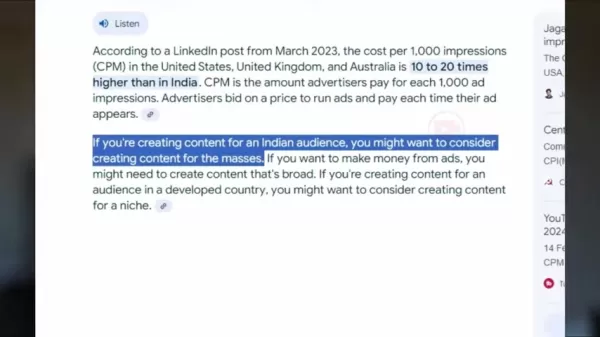
Producing content for a global audience ensures you earn more from every view.
The Key Benefits of Video Translation:
- Higher CPM: International markets often provide CPM rates ten to twenty times greater than India's.
- Expanded Audience: Connect with viewers who speak different languages.
- Improved Engagement: Use localized subtitles so viewers can fully understand your content.
- Better Discovery: Optimize titles and descriptions in multiple languages to enhance search visibility.
Introducing BlipCut: Your AI Video Translation Solution
You might assume you need to speak multiple languages, but AI tools can translate your videos quickly and accurately. BlipCut is an AI video translator designed to help creators reach a global audience without being multilingual.
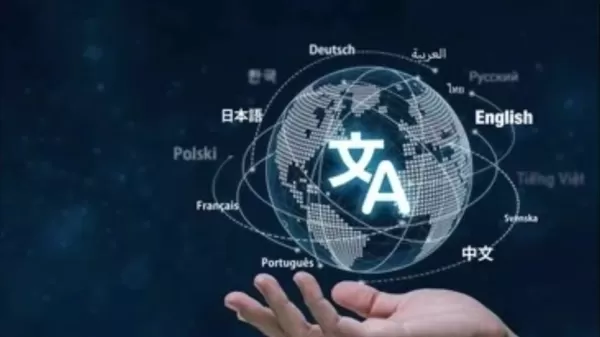
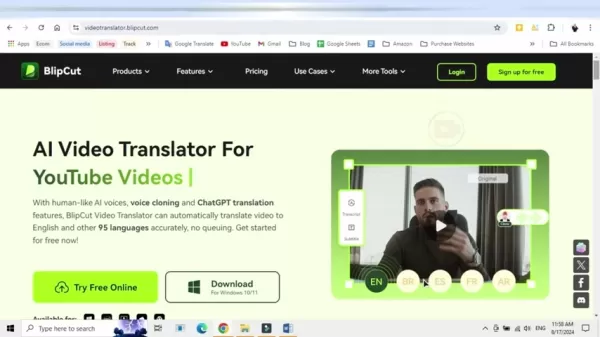
This platform automatically translates your videos into over 95 languages. Its main advantage is producing translations that sound completely natural. Features like Voice Cloning and ChatGPT integration ensure translations are precise.
Using human-like AI voices, your translated videos maintain a personal touch for viewers, regardless of their native language.
Comprehensive Features of BlipCut for Maximizing YouTube Reach
Multi-Language Video Translation & Dubbing
BlipCut provides a range of features to help content creators expand their audience and boost earnings.
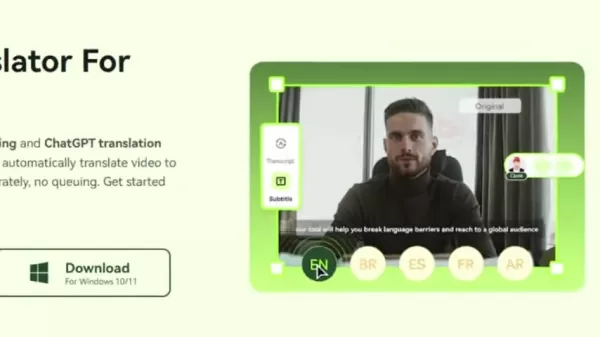
Here are the core features:
- Extensive Language Support: Translate into over 95 languages to target diverse global markets.
- Voice Cloning: Replicate your voice for consistent branding in different languages, keeping your content authentic even when dubbed.
- Subtitle Generation & Editing: Automatically generate subtitles and edit them for accuracy, catering to viewers who prefer to read or need accessibility support.
- AI Dubbing: Automatically translate and dub videos into multiple languages, maintaining engagement without you needing to be fluent.
- Subtitle File Download: Download separate subtitle files to add to existing videos or other platforms.
- Audio File Download: Download standalone audio files for further editing or use elsewhere.
- Automatic Audio Sync: The audio dynamically adjusts as you edit the subtitles.
This allows creators to easily manage every part of the video translation process.
Step-by-Step Guide to Translating Your Video with BlipCut
Now that you know the benefits and features, let's go through the translation process step by step.
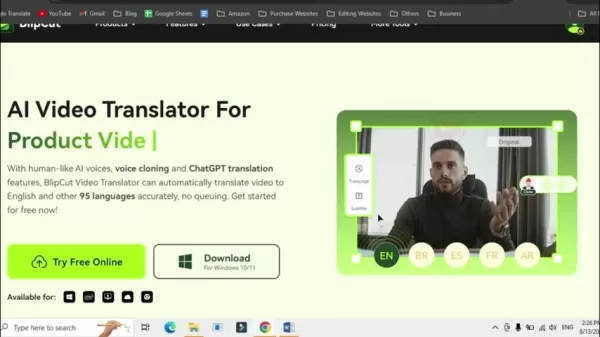
Step 1: Open BlipCut Website:
Visit the BlipCut website [video translator.blipcut.com]. The link is available in the description and comment section.
Step 2: Sign Up:
Click "Sign up for free" in the top right corner to create an account. You'll be taken to your dashboard after signing up.
Step 3: Start Translating Your Video:
On the homepage, click the "Try Free Online" button to begin translation.
Step 4: Upload or Paste your Video:
You have two upload options: directly from your device ("My Device") or by pasting a video URL ("URL").
My Device: Select "Upload File" to choose a file from your computer.
URL: Copy and paste the link from a YouTube, TikTok, or Twitter video.
Step 5: Select your Target and Source Language:
After uploading, choose the source language (the video's current language) and the target language (the language you want to translate into).
For an accurate translation, BlipCut needs to know the language you're speaking.
Select the language and AI voice for the translated video. You can choose a voice style, like androgynous or feminine, for your cloned voice.
Step 6: Enable Speaking Rate Control:
Click the "Advanced Settings" tab, then select "Speaking rate control."
Step 7: Translate and Download:
Click the "Translate" button.
Once processing is complete, you have several download options:
- Select subtitles by enabling the "With Subtitles" option.
- Download the audio file only.
- Download the subtitle file.
- Download the final video.
After choosing your preferred options, click "Download." Now you're ready to start earning!
Unlocking AI Dubbing For Video Localization
If you can't provide your own voice-over, you can use AI dubbing. After localizing the video with your AI voice, you can apply AI dubbing using a voice from BlipCut's library. Here's how:
- In the BlipCut AI Video Translator, select "Try it free" and then "AI Voiceover."
- Enter the script's language and the source/target languages.
- Type what you want the video to say in the text box.
- Choose your preferred AI voice and click the plus (+) button to add it to the script. Preview it with the play button.
- Click "Voiceover" to generate the audio. The resulting MP3 file can be uploaded to your already uploaded video.
Utilizing Translated Content Effectively
Adding Audio Tracks to Existing Videos
Once your video is translated, you can upload it directly to YouTube. You can also download the separate audio track.
Go to your video settings, select "Audio track," and upload the file.
This is helpful for viewers with hearing impairments or those who only need the audio.
Using Subtitle Files
BlipCut also allows you to translate and download subtitle files independently. Select the format and subtitle language, then click download.
After creating the subtitle file, go to your uploaded video. Choose "Subtitles" and then "Upload File."
This means you don't need to re-dub a video that's already published.
The Ups and Downs of Using AI Video Translation
Pros
User-friendly interface
Clone your own voice
Extensive selection of target languages
Cons
Can be time-consuming to use correctly
Payment required after free credits are used
Translation consumes credits
FAQ
Is AI video translation accurate?
AI video translation has become dramatically more accurate. While it once struggled to sound natural, it now commonly achieves this. The technology continues to improve and will likely keep getting better.
How much does AI dubbing on BlipCut cost?
BlipCut provides a free trial with a limited number of credits. After using them, you can move to a paid plan. Pricing depends on the credit amount and features you require, with weekly, monthly, and annual options available. Check their website for the latest pricing details.
Can I edit subtitles generated by AI?
Absolutely. A major benefit of BlipCut's AI subtitles is the ability to edit them for perfect accuracy. Since auto-generated subtitles can contain errors, this feature helps creators ensure their content is correct.
Related Questions
What are some tips for optimizing my translated videos for international audiences?
To effectively optimize your translated videos:Localize Titles and Descriptions: Translate your video titles and descriptions, using keywords that your target audience typically searches for.Create Compelling Thumbnails: Design thumbnails that are visually attractive and culturally appropriate. Use vibrant colors and engaging images to encourage clicks.Promote on Local Platforms: Share your translated videos on social media and forums popular in your target region. Engage with viewers in their language to build community.Collaborate with Local Creators: Partner with well-known creators in your target market to cross-promote content, which can greatly increase your reach and credibility.Engage with Comments: Take time to reply to comments and questions from international viewers in their language. This demonstrates you value their interaction and are dedicated to creating content for them.
Related article
 DeepMind CEO Hassabis: I sleep six hours a day, usually feel energetic around 1 a.m.
Fortune recently featured an interview with Demis Hassabis, CEO of Google DeepMind, revealing his unconventional approach to rest and productivity. Hassabis disclosed that he sleeps very little, structuring his waking hours into two distinct work blo
OpenAI, Anthropic Vie for Market Share Despite Revenue Shortfalls
Despite recent reports suggesting OpenAI missed revenue targets, creating pressure on tech stocks this Tuesday, private AI lab investors remain resilient. Seasoned backers have confirmed they will not reduce investment despite negative media coverage
California AV Compliance: A New Era of Tickets, Geofences, and 1M Miles
Guident operates an AuveTech shuttle in South Florida, managing a four-mile route in West Palm Beach and a one-mile route in Boca Raton using its remote monitoring technology. | Credit: GuidentCalifornia is redefining the regulatory landscape for dri
Related Special Topic Recommendations
chatbot
DeepMind CEO Hassabis: I sleep six hours a day, usually feel energetic around 1 a.m.
Fortune recently featured an interview with Demis Hassabis, CEO of Google DeepMind, revealing his unconventional approach to rest and productivity. Hassabis disclosed that he sleeps very little, structuring his waking hours into two distinct work blo
OpenAI, Anthropic Vie for Market Share Despite Revenue Shortfalls
Despite recent reports suggesting OpenAI missed revenue targets, creating pressure on tech stocks this Tuesday, private AI lab investors remain resilient. Seasoned backers have confirmed they will not reduce investment despite negative media coverage
California AV Compliance: A New Era of Tickets, Geofences, and 1M Miles
Guident operates an AuveTech shuttle in South Florida, managing a four-mile route in West Palm Beach and a one-mile route in Boca Raton using its remote monitoring technology. | Credit: GuidentCalifornia is redefining the regulatory landscape for dri
Related Special Topic Recommendations
chatbot
 Best AI Roleplay Chat Apps for Language Practice, Interview Prep, and Daily Fluency
2026 Latest Best Top-rated AI Roleplay Chat Apps for Language Practice, Interview Prep, and Daily Fluency! XIX.AI curates a powerful game-changing collection that offers free vs paid comparison, real-world tests, and updated rankings weekly. These must-try tools help you boost writing skills, overcome fluency challenges, and improve communication efficiency across all daily scenarios. Explore now to discover your perfect tool for language growth!
 10 tools
 xix.ai
Music composition
AI Stem Separation Tools for Remix Production, Sampling Prep, and Karaoke Masters
xix.ai
Music composition
AI Stem Separation Tools for Remix Production, Sampling Prep, and Karaoke Masters
2026 Latest Best Top-rated AI Stem Separation Tools Curated for Remix Production, Sampling Prep, and Karaoke Masters. These powerful game-changing tools offer real-world tests to deliver precise audio isolation, boosting productivity significantly. XIX.AI provides a weekly updated free vs paid comparison guide to help you find the must-try solution that suits your needs. Explore now to unlock your AI edge.
8 tools
xix.ai
Data Analysis
AI SQL Copilots for Revenue Dashboards, Funnel Analysis, and Product Metrics
2026 Latest Best AI SQL Copilots Ranked Top-Rated! XIX.AI curates a powerful game-changing collection for weekly updated real-world tests. These must-try tools help you generate accurate revenue dashboards, analyze sales funnels, and track product metrics swiftly, boosting productivity massively. Explore now to Discover your perfect tool for data-driven decision making! 238 characters
9 tools
xix.ai
Music composition
Best AI Melody Writing Tools for Song Drafts
2026 Latest Best Top-Rated AI Melody Writing Tools for Song Drafts! XIX.AI has curated a highly powerful game-changing collection that goes through rigorous real-world tests to deliver the best writing experience. You can find detailed free vs paid comparisons, accurate rankings, and must-try options designed to help you create stunning song drafts effortlessly and boost your creative productivity significantly. Explore now to discover your perfect tool!
8 tools
xix.ai
chatbot
Best AI Conversation Trainer Tools for Interview Practice
2026 Latest Best Top-rated AI Conversation Trainer Tools for Interview Practice are here on XIX.AI! This curated collection features powerful, game-changing tools that go through rigorous real-world tests to deliver accurate feedback. You’ll find a free vs paid comparison and detailed rankings to help you choose the must-try option that boosts your confidence and skills. Explore now to Discover your perfect tool for interview success!
12 tools
xix.ai
Design & Art
Best AI Style Transfer Tools for Creative Experiments
2026 Latest Best Top-rated AI Style Transfer Tools for Creative Experiments! XIX.AI has curated a powerful, game-changing collection of must-try tools that deliver exceptional results through real-world tests and rigorous rankings. These top solutions help creatives boost productivity significantly by accelerating content creation and unlocking endless creative possibilities. Explore now to discover your perfect tool and start creating today!
9 tools
xix.ai

 Comments (2)
0/500
Comments (2)
0/500
![DouglasMitchell]()
¿Traducir videos con IA? ¡Qué idea más práctica! Me pregunto si la voz sonará natural o si se notará que es una máquina. De todos modos, abre muchas puertas para creadores pequeños como yo. Habrá que probarlo, aunque me da un poco de miedo perder el toque personal del canal. 😅
![JonathanGreen]()
Ça paraît tellement évident, mais en pratique c'est si complexe d'adapter le ton et l'humour à d'autres cultures ! Je me demande comment l'IA gère les blagues ou les références locales. Un faux pas culturel pourrait vite faire du bruit 😅. Mais l'idée est puissante, surtout pour les créateurs indépendants.
Are you a YouTube creator looking to increase your income? Expanding your audience globally can significantly boost your revenue. Translating your content into multiple languages allows you to connect with viewers worldwide, ultimately increasing your CPM and overall earnings. This in-depth guide will show you how to use AI video translation tools to grow your audience and maximize your YouTube revenue. By the end, you'll know exactly how to translate your videos to successfully attract an international viewership. Let's explore how to unlock your channel's true earning potential!
Key Points
Use AI-powered video translation for fast and precise localization.
Translate videos into 95+ languages to engage a global audience.
Clone your voice to maintain consistent branding across languages.
Create and customize subtitles to boost viewer engagement.
Target countries with higher CPM rates to increase your income.
Download separate audio and subtitle files for flexible use.
Consider AI dubbing for a seamless and natural viewing experience.
The Power of AI Video Translation for YouTube Earnings
Why Global Reach Matters for YouTube Creators
In today's digital world, content creators have a nearly unlimited potential audience. Yet, language barriers can limit your viewership. Translating your videos helps you break through these barriers and access new markets. Countries like the United States, United Kingdom, and Australia offer significantly higher CPM rates compared to India.
Producing content for a global audience ensures you earn more from every view.
The Key Benefits of Video Translation:
- Higher CPM: International markets often provide CPM rates ten to twenty times greater than India's.
- Expanded Audience: Connect with viewers who speak different languages.
- Improved Engagement: Use localized subtitles so viewers can fully understand your content.
- Better Discovery: Optimize titles and descriptions in multiple languages to enhance search visibility.
Introducing BlipCut: Your AI Video Translation Solution
You might assume you need to speak multiple languages, but AI tools can translate your videos quickly and accurately. BlipCut is an AI video translator designed to help creators reach a global audience without being multilingual.
This platform automatically translates your videos into over 95 languages. Its main advantage is producing translations that sound completely natural. Features like Voice Cloning and ChatGPT integration ensure translations are precise.
Using human-like AI voices, your translated videos maintain a personal touch for viewers, regardless of their native language.
Comprehensive Features of BlipCut for Maximizing YouTube Reach
Multi-Language Video Translation & Dubbing
BlipCut provides a range of features to help content creators expand their audience and boost earnings.
Here are the core features:
- Extensive Language Support: Translate into over 95 languages to target diverse global markets.
- Voice Cloning: Replicate your voice for consistent branding in different languages, keeping your content authentic even when dubbed.
- Subtitle Generation & Editing: Automatically generate subtitles and edit them for accuracy, catering to viewers who prefer to read or need accessibility support.
- AI Dubbing: Automatically translate and dub videos into multiple languages, maintaining engagement without you needing to be fluent.
- Subtitle File Download: Download separate subtitle files to add to existing videos or other platforms.
- Audio File Download: Download standalone audio files for further editing or use elsewhere.
- Automatic Audio Sync: The audio dynamically adjusts as you edit the subtitles.
This allows creators to easily manage every part of the video translation process.
Step-by-Step Guide to Translating Your Video with BlipCut
Now that you know the benefits and features, let's go through the translation process step by step.
Step 1: Open BlipCut Website:
Visit the BlipCut website [video translator.blipcut.com]. The link is available in the description and comment section.
Step 2: Sign Up:
Click "Sign up for free" in the top right corner to create an account. You'll be taken to your dashboard after signing up.
Step 3: Start Translating Your Video:
On the homepage, click the "Try Free Online" button to begin translation.
Step 4: Upload or Paste your Video:
You have two upload options: directly from your device ("My Device") or by pasting a video URL ("URL").
My Device: Select "Upload File" to choose a file from your computer.
URL: Copy and paste the link from a YouTube, TikTok, or Twitter video.
Step 5: Select your Target and Source Language:
After uploading, choose the source language (the video's current language) and the target language (the language you want to translate into).
For an accurate translation, BlipCut needs to know the language you're speaking.
Select the language and AI voice for the translated video. You can choose a voice style, like androgynous or feminine, for your cloned voice.
Step 6: Enable Speaking Rate Control:
Click the "Advanced Settings" tab, then select "Speaking rate control."
Step 7: Translate and Download:
Click the "Translate" button.
Once processing is complete, you have several download options:
- Select subtitles by enabling the "With Subtitles" option.
- Download the audio file only.
- Download the subtitle file.
- Download the final video.
After choosing your preferred options, click "Download." Now you're ready to start earning!
Unlocking AI Dubbing For Video Localization
If you can't provide your own voice-over, you can use AI dubbing. After localizing the video with your AI voice, you can apply AI dubbing using a voice from BlipCut's library. Here's how:
- In the BlipCut AI Video Translator, select "Try it free" and then "AI Voiceover."
- Enter the script's language and the source/target languages.
- Type what you want the video to say in the text box.
- Choose your preferred AI voice and click the plus (+) button to add it to the script. Preview it with the play button.
- Click "Voiceover" to generate the audio. The resulting MP3 file can be uploaded to your already uploaded video.
Utilizing Translated Content Effectively
Adding Audio Tracks to Existing Videos
Once your video is translated, you can upload it directly to YouTube. You can also download the separate audio track.
Go to your video settings, select "Audio track," and upload the file.
This is helpful for viewers with hearing impairments or those who only need the audio.
Using Subtitle Files
BlipCut also allows you to translate and download subtitle files independently. Select the format and subtitle language, then click download.
After creating the subtitle file, go to your uploaded video. Choose "Subtitles" and then "Upload File."
This means you don't need to re-dub a video that's already published.
The Ups and Downs of Using AI Video Translation
Pros
User-friendly interface
Clone your own voice
Extensive selection of target languages
Cons
Can be time-consuming to use correctly
Payment required after free credits are used
Translation consumes credits
FAQ
Is AI video translation accurate?
AI video translation has become dramatically more accurate. While it once struggled to sound natural, it now commonly achieves this. The technology continues to improve and will likely keep getting better.
How much does AI dubbing on BlipCut cost?
BlipCut provides a free trial with a limited number of credits. After using them, you can move to a paid plan. Pricing depends on the credit amount and features you require, with weekly, monthly, and annual options available. Check their website for the latest pricing details.
Can I edit subtitles generated by AI?
Absolutely. A major benefit of BlipCut's AI subtitles is the ability to edit them for perfect accuracy. Since auto-generated subtitles can contain errors, this feature helps creators ensure their content is correct.
Related Questions
What are some tips for optimizing my translated videos for international audiences?
To effectively optimize your translated videos:Localize Titles and Descriptions: Translate your video titles and descriptions, using keywords that your target audience typically searches for.Create Compelling Thumbnails: Design thumbnails that are visually attractive and culturally appropriate. Use vibrant colors and engaging images to encourage clicks.Promote on Local Platforms: Share your translated videos on social media and forums popular in your target region. Engage with viewers in their language to build community.Collaborate with Local Creators: Partner with well-known creators in your target market to cross-promote content, which can greatly increase your reach and credibility.Engage with Comments: Take time to reply to comments and questions from international viewers in their language. This demonstrates you value their interaction and are dedicated to creating content for them.








 DeepMind CEO Hassabis: I sleep six hours a day, usually feel energetic around 1 a.m.
Fortune recently featured an interview with Demis Hassabis, CEO of Google DeepMind, revealing his unconventional approach to rest and productivity. Hassabis disclosed that he sleeps very little, structuring his waking hours into two distinct work blo
DeepMind CEO Hassabis: I sleep six hours a day, usually feel energetic around 1 a.m.
Fortune recently featured an interview with Demis Hassabis, CEO of Google DeepMind, revealing his unconventional approach to rest and productivity. Hassabis disclosed that he sleeps very little, structuring his waking hours into two distinct work blo
 OpenAI, Anthropic Vie for Market Share Despite Revenue Shortfalls
Despite recent reports suggesting OpenAI missed revenue targets, creating pressure on tech stocks this Tuesday, private AI lab investors remain resilient. Seasoned backers have confirmed they will not reduce investment despite negative media coverage
California AV Compliance: A New Era of Tickets, Geofences, and 1M Miles
Guident operates an AuveTech shuttle in South Florida, managing a four-mile route in West Palm Beach and a one-mile route in Boca Raton using its remote monitoring technology. | Credit: GuidentCalifornia is redefining the regulatory landscape for dri
OpenAI, Anthropic Vie for Market Share Despite Revenue Shortfalls
Despite recent reports suggesting OpenAI missed revenue targets, creating pressure on tech stocks this Tuesday, private AI lab investors remain resilient. Seasoned backers have confirmed they will not reduce investment despite negative media coverage
California AV Compliance: A New Era of Tickets, Geofences, and 1M Miles
Guident operates an AuveTech shuttle in South Florida, managing a four-mile route in West Palm Beach and a one-mile route in Boca Raton using its remote monitoring technology. | Credit: GuidentCalifornia is redefining the regulatory landscape for dri

2026 Latest Best Top-rated AI Roleplay Chat Apps for Language Practice, Interview Prep, and Daily Fluency! XIX.AI curates a powerful game-changing collection that offers free vs paid comparison, real-world tests, and updated rankings weekly. These must-try tools help you boost writing skills, overcome fluency challenges, and improve communication efficiency across all daily scenarios. Explore now to discover your perfect tool for language growth!
10 tools
xix.ai

2026 Latest Best Top-rated AI Stem Separation Tools Curated for Remix Production, Sampling Prep, and Karaoke Masters. These powerful game-changing tools offer real-world tests to deliver precise audio isolation, boosting productivity significantly. XIX.AI provides a weekly updated free vs paid comparison guide to help you find the must-try solution that suits your needs. Explore now to unlock your AI edge.
8 tools
xix.ai

2026 Latest Best AI SQL Copilots Ranked Top-Rated! XIX.AI curates a powerful game-changing collection for weekly updated real-world tests. These must-try tools help you generate accurate revenue dashboards, analyze sales funnels, and track product metrics swiftly, boosting productivity massively. Explore now to Discover your perfect tool for data-driven decision making! 238 characters
9 tools
xix.ai

2026 Latest Best Top-Rated AI Melody Writing Tools for Song Drafts! XIX.AI has curated a highly powerful game-changing collection that goes through rigorous real-world tests to deliver the best writing experience. You can find detailed free vs paid comparisons, accurate rankings, and must-try options designed to help you create stunning song drafts effortlessly and boost your creative productivity significantly. Explore now to discover your perfect tool!
8 tools
xix.ai

2026 Latest Best Top-rated AI Conversation Trainer Tools for Interview Practice are here on XIX.AI! This curated collection features powerful, game-changing tools that go through rigorous real-world tests to deliver accurate feedback. You’ll find a free vs paid comparison and detailed rankings to help you choose the must-try option that boosts your confidence and skills. Explore now to Discover your perfect tool for interview success!
12 tools
xix.ai

2026 Latest Best Top-rated AI Style Transfer Tools for Creative Experiments! XIX.AI has curated a powerful, game-changing collection of must-try tools that deliver exceptional results through real-world tests and rigorous rankings. These top solutions help creatives boost productivity significantly by accelerating content creation and unlocking endless creative possibilities. Explore now to discover your perfect tool and start creating today!
9 tools
xix.ai

¿Traducir videos con IA? ¡Qué idea más práctica! Me pregunto si la voz sonará natural o si se notará que es una máquina. De todos modos, abre muchas puertas para creadores pequeños como yo. Habrá que probarlo, aunque me da un poco de miedo perder el toque personal del canal. 😅
Ça paraît tellement évident, mais en pratique c'est si complexe d'adapter le ton et l'humour à d'autres cultures ! Je me demande comment l'IA gère les blagues ou les références locales. Un faux pas culturel pourrait vite faire du bruit 😅. Mais l'idée est puissante, surtout pour les créateurs indépendants.












