


 Home
HomeHow to unlock AI video editing magic with CapCut in 2025? Deep dive guide.
In today's fast-paced digital landscape, producing compelling video content is often time-consuming and technically demanding. CapCut changes the game as an AI-driven video editing ecosystem, meticulously designed to simplify the entire creation process. Whether you're a professional editor or a complete beginner, CapCut's suite of intelligent features empowers you to transform a raw concept into a polished video in minutes. Let's explore how CapCut can redefine your approach to video production.
Key Points
CapCut is a comprehensive AI-powered video editing platform packed with advanced capabilities.
Its features include AI scriptwriting, animated digital avatars, automated editing, intelligent cuts, and seamless real-time transitions.
The application is fully accessible across iOS, Android, desktop computers, and web browsers.
The AI Story Maker builds complete videos from basic concepts, crafting scripts, scenes, and fitting background scores.
AI avatars enable you to produce engaging on-camera content without needing to appear personally.
Its video translator provides single-click translation with synchronized voiceovers and lip movements.
CapCut streamlines the entire video production pipeline from initial idea to final publication.
It enriches content by automatically pairing it with relevant imagery and soundtracks.
CapCut offers multiple integrated pathways for distributing your finished creations.
Exploring CapCut's AI Video Editing Prowess
CapCut: More Than Just a Simple Video Editor
CapCut is far more than a basic video editing app. It has developed one of the most robust AI-powered video editing ecosystems on the market. While other applications are still integrating AI features, CapCut already delivers a complete and seamless toolkit. This serves as a clear signal for anyone yet to discover AI's potential in editing. The platform leverages artificial intelligence to handle full script generation, deploy animated avatars, automate editing processes, apply smart cuts, and create fluid real-time transitions, among other tasks.
It functions not merely as a tool but as an end-to-end, AI-enhanced workflow for mobile, desktop, and web. CapCut provides a remarkably smooth path to creating virtually any video format, making modern video production effortless and efficient.
Getting Started with CapCut: A Quick Overview

CapCut supports multiple platforms, including iOS, Android, Windows/Mac, and web browsers. For this guide, we will focus on the mobile application. To begin, download the app, register for an account, and log in. You will then see the main dashboard, which is your hub for all creative projects. Relevant download links are available in the description below. Upon launching the app, you can locate the core AI Tools in several prominent areas. Start by tapping the ‘All Tools’ button on the home screen.
AI Story Maker: Transforming Ideas into Reality
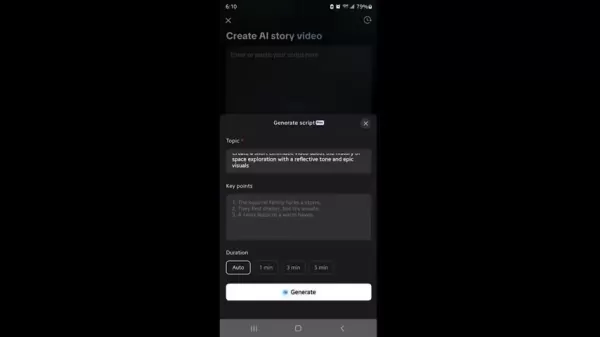
The AI Story Maker acts as a powerful video generator. Imagine wanting to create a video but having no script, voiceover, or visuals—just a core idea. This is where CapCut’s AI Story Maker excels. This tool takes your initial concept and develops it into a fully-editable video project, complete with a generated script, sequenced scenes, visual assets, and background music.
You can input your own script or let CapCut generate one for you. To generate a script, simply provide a few thematic prompts, and the AI will construct a narrative. For instance, you could ask it to create a short, cinematic video on the history of space exploration, adopting a reflective tone with epic visuals.
Next, select a visual style from numerous options such as anime, dynamic, or futuristic. Then, navigate to the ‘Voiceover’ section to choose from a wide selection of AI voices. Finally, set your preferred aspect ratio, like 9:16 for vertical video. After confirming these settings, click ‘Generate’. The AI will now produce a narrated video with synchronized visuals and a fully assembled timeline ready for customization. You can freely edit the text, swap out visuals, and apply extensive adjustments within CapCut's built-in editor.
Bringing Content to Life with AI Avatars

Once your story is crafted, you can animate it without appearing on camera yourself. CapCut’s AI Avatars are ideal for this purpose. Navigate to ‘All Tools’ and select ‘AI Avatars’.
The tool will prompt you to choose an existing piece of content from your library or a current CapCut project. You then gain access to a diverse library of over 900 avatars, varying in appearance, attire, and age. You even have the option to clone your own likeness to create a personalized digital avatar. After selecting an avatar, you can input a short script for it to deliver.
Break Language Barriers with Video Translator
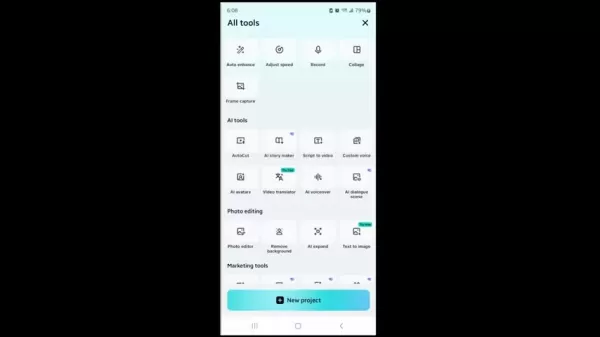
With a single click, CapCut translates your video into another language, adds a synchronized voiceover, and even matches lip movements using its dedicated Video Translator. From the 'All Tools' menu, find the AI tools section and select ‘Video Translator’.
You can then translate a previous video from, for example, English to Spanish. The original subtitles can remain in English. Follow the simple steps, and you will quickly have a professionally translated video in Spanish.
Content Creation Pipeline with AI in CapCut

CapCut revolutionizes video creation by making the journey from idea to script, to avatar, to editing, translation, and finally publication remarkably efficient. Using CapCut makes sophisticated content creation feel intuitive. Numerous tools are available to experiment with, and Pro options may vary depending on your geographic region.
Enhanced AI Tools for Creative Expression in CapCut
AI Dialogue Scene Tool: Crafting Dynamic Interactions
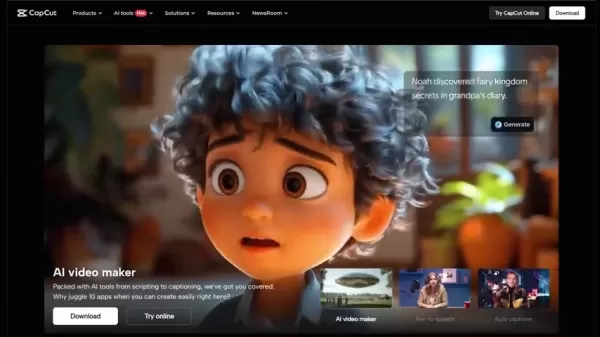
CapCut's AI Dialogue Scene tool allows you to create dynamic and engaging character interactions within your videos. This feature simplifies the process: upload a static image, like a group photo, and assign different dialogue lines to each person pictured. CapCut automatically animates their facial expressions to match the spoken lines, perfect for crafting comic sketches or simulating interview scenarios.
Simple Steps to Create a Video with CapCut
Step-by-Step Guide for Content Creation on CapCut
- Download and install CapCut from your device's app store or via their official website.
- Create an account and log in to access the primary editing interface.
- Select your desired AI Tool, such as AI Story Maker, AI Avatars, or Video Translator, from the ‘All Tools’ section.
- Use the AI Story Maker to develop a script, choose a visual aesthetic, and generate a complete video draft.
- Employ AI avatars by selecting or creating an avatar and having it narrate your video script.
- Refine your video through editing. Integrate the AI avatars, adjust styles, and apply other edits as needed.
- Translate the video into another language using the ‘Video Translator’ feature.
- Export the final video and share it across your chosen platforms.
Pricing Plans to Unlock Premium Features on CapCut
Free vs. Premium: Understanding CapCut’s Offerings
CapCut provides an extensive range of features at no cost, though availability can depend on your region. Additional advanced capabilities are accessible through its premium subscription. The free version offers a vast toolkit suitable for most users, encompassing core editing functions, a library of effects and transitions, and access to AI-powered tools like auto-captions and background removal. For advanced users and professionals, the premium subscription unlocks further resources and enhanced functionality.
Analyzing the Pros
and Cons
of CapCut
Pros
A comprehensive suite of AI tools that simplifies video editing and production.
CapCut is available on mobile, desktop, and web, enabling content creation from virtually any location.
The platform allows users to translate videos into different languages, making content relevant for international audiences.
An extensive avatar library facilitates easy creation of animated video content.
Cons
Access to some advanced features requires a paid Pro subscription.
The quality of AI-generated scripts can be inconsistent.
While powerful, its AI tools may not match the granular control of high-end professional desktop editing software.
Highlighting the Core Features of CapCut’s AI Editing Suite
Key Features That Make CapCut Stand Out
- Full AI Script Generation
- Customizable Animated Avatars
- Automated Editing Assistance
- Intelligent Smart Cuts
- Real-Time Transitions
Maximizing the Potential: Diverse Use Cases for CapCut
Exploring Creative Applications with CapCut
CapCut opens numerous avenues for content generation. It is widely used for creating TikTok clips and Instagram Reels, producing educational explainer videos, and designing captivating intros for YouTube channels.
Frequently Asked Questions about CapCut AI
Where can I use CapCut?
CapCut is available on iOS, Android, PC, and Web. This cross-platform compatibility allows you to start a project on one device and seamlessly continue editing on another, offering ultimate flexibility for creators. Whether you're on the move or at your desk, CapCut lets you capture and develop creative ideas whenever inspiration strikes.
Can CapCut generate AI scripts?
Absolutely, via its AI Story Maker. Simply open the AI Story Maker tool and provide a few conceptual prompts. CapCut will then generate a complete script, which can be for any topic, such as a cinematic piece on the history of space exploration.
Can I create AI Avatars?
Yes. Navigate to 'All Tools' and select 'AI Avatars'. CapCut will guide you to choose a content piece and then assist you in creating or selecting a digital avatar.
More about Video Editing in the Digital Era
How are other AI video tools changing content creation?
AI video tools are fundamentally transforming content creation by automating complex tasks. From generating scripts and visual scenes to handling translation and editing, these technologies are becoming essential for modern creators. They empower users to produce high-quality videos more efficiently, significantly accelerating workflows and enhancing the overall production value.
Related article
 DeepMind CEO Hassabis: I sleep six hours a day, usually feel energetic around 1 a.m.
Fortune recently featured an interview with Demis Hassabis, CEO of Google DeepMind, revealing his unconventional approach to rest and productivity. Hassabis disclosed that he sleeps very little, structuring his waking hours into two distinct work blo
OpenAI, Anthropic Vie for Market Share Despite Revenue Shortfalls
Despite recent reports suggesting OpenAI missed revenue targets, creating pressure on tech stocks this Tuesday, private AI lab investors remain resilient. Seasoned backers have confirmed they will not reduce investment despite negative media coverage
California AV Compliance: A New Era of Tickets, Geofences, and 1M Miles
Guident operates an AuveTech shuttle in South Florida, managing a four-mile route in West Palm Beach and a one-mile route in Boca Raton using its remote monitoring technology. | Credit: GuidentCalifornia is redefining the regulatory landscape for dri
Related Special Topic Recommendations
chatbot
DeepMind CEO Hassabis: I sleep six hours a day, usually feel energetic around 1 a.m.
Fortune recently featured an interview with Demis Hassabis, CEO of Google DeepMind, revealing his unconventional approach to rest and productivity. Hassabis disclosed that he sleeps very little, structuring his waking hours into two distinct work blo
OpenAI, Anthropic Vie for Market Share Despite Revenue Shortfalls
Despite recent reports suggesting OpenAI missed revenue targets, creating pressure on tech stocks this Tuesday, private AI lab investors remain resilient. Seasoned backers have confirmed they will not reduce investment despite negative media coverage
California AV Compliance: A New Era of Tickets, Geofences, and 1M Miles
Guident operates an AuveTech shuttle in South Florida, managing a four-mile route in West Palm Beach and a one-mile route in Boca Raton using its remote monitoring technology. | Credit: GuidentCalifornia is redefining the regulatory landscape for dri
Related Special Topic Recommendations
chatbot
 Best AI Roleplay Chat Apps for Language Practice, Interview Prep, and Daily Fluency
2026 Latest Best Top-rated AI Roleplay Chat Apps for Language Practice, Interview Prep, and Daily Fluency! XIX.AI curates a powerful game-changing collection that offers free vs paid comparison, real-world tests, and updated rankings weekly. These must-try tools help you boost writing skills, overcome fluency challenges, and improve communication efficiency across all daily scenarios. Explore now to discover your perfect tool for language growth!
 10 tools
 xix.ai
Music composition
AI Stem Separation Tools for Remix Production, Sampling Prep, and Karaoke Masters
xix.ai
Music composition
AI Stem Separation Tools for Remix Production, Sampling Prep, and Karaoke Masters
2026 Latest Best Top-rated AI Stem Separation Tools Curated for Remix Production, Sampling Prep, and Karaoke Masters. These powerful game-changing tools offer real-world tests to deliver precise audio isolation, boosting productivity significantly. XIX.AI provides a weekly updated free vs paid comparison guide to help you find the must-try solution that suits your needs. Explore now to unlock your AI edge.
8 tools
xix.ai
Data Analysis
AI SQL Copilots for Revenue Dashboards, Funnel Analysis, and Product Metrics
2026 Latest Best AI SQL Copilots Ranked Top-Rated! XIX.AI curates a powerful game-changing collection for weekly updated real-world tests. These must-try tools help you generate accurate revenue dashboards, analyze sales funnels, and track product metrics swiftly, boosting productivity massively. Explore now to Discover your perfect tool for data-driven decision making! 238 characters
9 tools
xix.ai
Music composition
Best AI Melody Writing Tools for Song Drafts
2026 Latest Best Top-Rated AI Melody Writing Tools for Song Drafts! XIX.AI has curated a highly powerful game-changing collection that goes through rigorous real-world tests to deliver the best writing experience. You can find detailed free vs paid comparisons, accurate rankings, and must-try options designed to help you create stunning song drafts effortlessly and boost your creative productivity significantly. Explore now to discover your perfect tool!
8 tools
xix.ai
chatbot
Best AI Conversation Trainer Tools for Interview Practice
2026 Latest Best Top-rated AI Conversation Trainer Tools for Interview Practice are here on XIX.AI! This curated collection features powerful, game-changing tools that go through rigorous real-world tests to deliver accurate feedback. You’ll find a free vs paid comparison and detailed rankings to help you choose the must-try option that boosts your confidence and skills. Explore now to Discover your perfect tool for interview success!
12 tools
xix.ai
Design & Art
Best AI Style Transfer Tools for Creative Experiments
2026 Latest Best Top-rated AI Style Transfer Tools for Creative Experiments! XIX.AI has curated a powerful, game-changing collection of must-try tools that deliver exceptional results through real-world tests and rigorous rankings. These top solutions help creatives boost productivity significantly by accelerating content creation and unlocking endless creative possibilities. Explore now to discover your perfect tool and start creating today!
9 tools
xix.ai

 Comments (1)
0/500
Comments (1)
0/500
![WalterAnderson]()
Just tried CapCut's AI features for a quick project, and honestly, it cut my editing time in half. The auto-captioning is scarily accurate! 😅 Makes me wonder though, as these tools get smarter, are we losing the 'craft' part of editing? Still, for creators on a tight schedule, this is a game-changer.
In today's fast-paced digital landscape, producing compelling video content is often time-consuming and technically demanding. CapCut changes the game as an AI-driven video editing ecosystem, meticulously designed to simplify the entire creation process. Whether you're a professional editor or a complete beginner, CapCut's suite of intelligent features empowers you to transform a raw concept into a polished video in minutes. Let's explore how CapCut can redefine your approach to video production.
Key Points
CapCut is a comprehensive AI-powered video editing platform packed with advanced capabilities.
Its features include AI scriptwriting, animated digital avatars, automated editing, intelligent cuts, and seamless real-time transitions.
The application is fully accessible across iOS, Android, desktop computers, and web browsers.
The AI Story Maker builds complete videos from basic concepts, crafting scripts, scenes, and fitting background scores.
AI avatars enable you to produce engaging on-camera content without needing to appear personally.
Its video translator provides single-click translation with synchronized voiceovers and lip movements.
CapCut streamlines the entire video production pipeline from initial idea to final publication.
It enriches content by automatically pairing it with relevant imagery and soundtracks.
CapCut offers multiple integrated pathways for distributing your finished creations.
Exploring CapCut's AI Video Editing Prowess
CapCut: More Than Just a Simple Video Editor
CapCut is far more than a basic video editing app. It has developed one of the most robust AI-powered video editing ecosystems on the market. While other applications are still integrating AI features, CapCut already delivers a complete and seamless toolkit. This serves as a clear signal for anyone yet to discover AI's potential in editing. The platform leverages artificial intelligence to handle full script generation, deploy animated avatars, automate editing processes, apply smart cuts, and create fluid real-time transitions, among other tasks.
It functions not merely as a tool but as an end-to-end, AI-enhanced workflow for mobile, desktop, and web. CapCut provides a remarkably smooth path to creating virtually any video format, making modern video production effortless and efficient.
Getting Started with CapCut: A Quick Overview
CapCut supports multiple platforms, including iOS, Android, Windows/Mac, and web browsers. For this guide, we will focus on the mobile application. To begin, download the app, register for an account, and log in. You will then see the main dashboard, which is your hub for all creative projects. Relevant download links are available in the description below. Upon launching the app, you can locate the core AI Tools in several prominent areas. Start by tapping the ‘All Tools’ button on the home screen.
AI Story Maker: Transforming Ideas into Reality
The AI Story Maker acts as a powerful video generator. Imagine wanting to create a video but having no script, voiceover, or visuals—just a core idea. This is where CapCut’s AI Story Maker excels. This tool takes your initial concept and develops it into a fully-editable video project, complete with a generated script, sequenced scenes, visual assets, and background music.
You can input your own script or let CapCut generate one for you. To generate a script, simply provide a few thematic prompts, and the AI will construct a narrative. For instance, you could ask it to create a short, cinematic video on the history of space exploration, adopting a reflective tone with epic visuals.
Next, select a visual style from numerous options such as anime, dynamic, or futuristic. Then, navigate to the ‘Voiceover’ section to choose from a wide selection of AI voices. Finally, set your preferred aspect ratio, like 9:16 for vertical video. After confirming these settings, click ‘Generate’. The AI will now produce a narrated video with synchronized visuals and a fully assembled timeline ready for customization. You can freely edit the text, swap out visuals, and apply extensive adjustments within CapCut's built-in editor.
Bringing Content to Life with AI Avatars
Once your story is crafted, you can animate it without appearing on camera yourself. CapCut’s AI Avatars are ideal for this purpose. Navigate to ‘All Tools’ and select ‘AI Avatars’.
The tool will prompt you to choose an existing piece of content from your library or a current CapCut project. You then gain access to a diverse library of over 900 avatars, varying in appearance, attire, and age. You even have the option to clone your own likeness to create a personalized digital avatar. After selecting an avatar, you can input a short script for it to deliver.
Break Language Barriers with Video Translator
With a single click, CapCut translates your video into another language, adds a synchronized voiceover, and even matches lip movements using its dedicated Video Translator. From the 'All Tools' menu, find the AI tools section and select ‘Video Translator’.
You can then translate a previous video from, for example, English to Spanish. The original subtitles can remain in English. Follow the simple steps, and you will quickly have a professionally translated video in Spanish.
Content Creation Pipeline with AI in CapCut
CapCut revolutionizes video creation by making the journey from idea to script, to avatar, to editing, translation, and finally publication remarkably efficient. Using CapCut makes sophisticated content creation feel intuitive. Numerous tools are available to experiment with, and Pro options may vary depending on your geographic region.
Enhanced AI Tools for Creative Expression in CapCut
AI Dialogue Scene Tool: Crafting Dynamic Interactions
CapCut's AI Dialogue Scene tool allows you to create dynamic and engaging character interactions within your videos. This feature simplifies the process: upload a static image, like a group photo, and assign different dialogue lines to each person pictured. CapCut automatically animates their facial expressions to match the spoken lines, perfect for crafting comic sketches or simulating interview scenarios.
Simple Steps to Create a Video with CapCut
Step-by-Step Guide for Content Creation on CapCut
- Download and install CapCut from your device's app store or via their official website.
- Create an account and log in to access the primary editing interface.
- Select your desired AI Tool, such as AI Story Maker, AI Avatars, or Video Translator, from the ‘All Tools’ section.
- Use the AI Story Maker to develop a script, choose a visual aesthetic, and generate a complete video draft.
- Employ AI avatars by selecting or creating an avatar and having it narrate your video script.
- Refine your video through editing. Integrate the AI avatars, adjust styles, and apply other edits as needed.
- Translate the video into another language using the ‘Video Translator’ feature.
- Export the final video and share it across your chosen platforms.
Pricing Plans to Unlock Premium Features on CapCut
Free vs. Premium: Understanding CapCut’s Offerings
CapCut provides an extensive range of features at no cost, though availability can depend on your region. Additional advanced capabilities are accessible through its premium subscription. The free version offers a vast toolkit suitable for most users, encompassing core editing functions, a library of effects and transitions, and access to AI-powered tools like auto-captions and background removal. For advanced users and professionals, the premium subscription unlocks further resources and enhanced functionality.
Analyzing the Pros
and Cons
of CapCut
Pros
A comprehensive suite of AI tools that simplifies video editing and production.
CapCut is available on mobile, desktop, and web, enabling content creation from virtually any location.
The platform allows users to translate videos into different languages, making content relevant for international audiences.
An extensive avatar library facilitates easy creation of animated video content.
Cons
Access to some advanced features requires a paid Pro subscription.
The quality of AI-generated scripts can be inconsistent.
While powerful, its AI tools may not match the granular control of high-end professional desktop editing software.
Highlighting the Core Features of CapCut’s AI Editing Suite
Key Features That Make CapCut Stand Out
- Full AI Script Generation
- Customizable Animated Avatars
- Automated Editing Assistance
- Intelligent Smart Cuts
- Real-Time Transitions
Maximizing the Potential: Diverse Use Cases for CapCut
Exploring Creative Applications with CapCut
CapCut opens numerous avenues for content generation. It is widely used for creating TikTok clips and Instagram Reels, producing educational explainer videos, and designing captivating intros for YouTube channels.
Frequently Asked Questions about CapCut AI
Where can I use CapCut?
CapCut is available on iOS, Android, PC, and Web. This cross-platform compatibility allows you to start a project on one device and seamlessly continue editing on another, offering ultimate flexibility for creators. Whether you're on the move or at your desk, CapCut lets you capture and develop creative ideas whenever inspiration strikes.
Can CapCut generate AI scripts?
Absolutely, via its AI Story Maker. Simply open the AI Story Maker tool and provide a few conceptual prompts. CapCut will then generate a complete script, which can be for any topic, such as a cinematic piece on the history of space exploration.
Can I create AI Avatars?
Yes. Navigate to 'All Tools' and select 'AI Avatars'. CapCut will guide you to choose a content piece and then assist you in creating or selecting a digital avatar.
More about Video Editing in the Digital Era
How are other AI video tools changing content creation?
AI video tools are fundamentally transforming content creation by automating complex tasks. From generating scripts and visual scenes to handling translation and editing, these technologies are becoming essential for modern creators. They empower users to produce high-quality videos more efficiently, significantly accelerating workflows and enhancing the overall production value.








 DeepMind CEO Hassabis: I sleep six hours a day, usually feel energetic around 1 a.m.
Fortune recently featured an interview with Demis Hassabis, CEO of Google DeepMind, revealing his unconventional approach to rest and productivity. Hassabis disclosed that he sleeps very little, structuring his waking hours into two distinct work blo
DeepMind CEO Hassabis: I sleep six hours a day, usually feel energetic around 1 a.m.
Fortune recently featured an interview with Demis Hassabis, CEO of Google DeepMind, revealing his unconventional approach to rest and productivity. Hassabis disclosed that he sleeps very little, structuring his waking hours into two distinct work blo
 OpenAI, Anthropic Vie for Market Share Despite Revenue Shortfalls
Despite recent reports suggesting OpenAI missed revenue targets, creating pressure on tech stocks this Tuesday, private AI lab investors remain resilient. Seasoned backers have confirmed they will not reduce investment despite negative media coverage
California AV Compliance: A New Era of Tickets, Geofences, and 1M Miles
Guident operates an AuveTech shuttle in South Florida, managing a four-mile route in West Palm Beach and a one-mile route in Boca Raton using its remote monitoring technology. | Credit: GuidentCalifornia is redefining the regulatory landscape for dri
OpenAI, Anthropic Vie for Market Share Despite Revenue Shortfalls
Despite recent reports suggesting OpenAI missed revenue targets, creating pressure on tech stocks this Tuesday, private AI lab investors remain resilient. Seasoned backers have confirmed they will not reduce investment despite negative media coverage
California AV Compliance: A New Era of Tickets, Geofences, and 1M Miles
Guident operates an AuveTech shuttle in South Florida, managing a four-mile route in West Palm Beach and a one-mile route in Boca Raton using its remote monitoring technology. | Credit: GuidentCalifornia is redefining the regulatory landscape for dri

2026 Latest Best Top-rated AI Roleplay Chat Apps for Language Practice, Interview Prep, and Daily Fluency! XIX.AI curates a powerful game-changing collection that offers free vs paid comparison, real-world tests, and updated rankings weekly. These must-try tools help you boost writing skills, overcome fluency challenges, and improve communication efficiency across all daily scenarios. Explore now to discover your perfect tool for language growth!
10 tools
xix.ai

2026 Latest Best Top-rated AI Stem Separation Tools Curated for Remix Production, Sampling Prep, and Karaoke Masters. These powerful game-changing tools offer real-world tests to deliver precise audio isolation, boosting productivity significantly. XIX.AI provides a weekly updated free vs paid comparison guide to help you find the must-try solution that suits your needs. Explore now to unlock your AI edge.
8 tools
xix.ai

2026 Latest Best AI SQL Copilots Ranked Top-Rated! XIX.AI curates a powerful game-changing collection for weekly updated real-world tests. These must-try tools help you generate accurate revenue dashboards, analyze sales funnels, and track product metrics swiftly, boosting productivity massively. Explore now to Discover your perfect tool for data-driven decision making! 238 characters
9 tools
xix.ai

2026 Latest Best Top-Rated AI Melody Writing Tools for Song Drafts! XIX.AI has curated a highly powerful game-changing collection that goes through rigorous real-world tests to deliver the best writing experience. You can find detailed free vs paid comparisons, accurate rankings, and must-try options designed to help you create stunning song drafts effortlessly and boost your creative productivity significantly. Explore now to discover your perfect tool!
8 tools
xix.ai

2026 Latest Best Top-rated AI Conversation Trainer Tools for Interview Practice are here on XIX.AI! This curated collection features powerful, game-changing tools that go through rigorous real-world tests to deliver accurate feedback. You’ll find a free vs paid comparison and detailed rankings to help you choose the must-try option that boosts your confidence and skills. Explore now to Discover your perfect tool for interview success!
12 tools
xix.ai

2026 Latest Best Top-rated AI Style Transfer Tools for Creative Experiments! XIX.AI has curated a powerful, game-changing collection of must-try tools that deliver exceptional results through real-world tests and rigorous rankings. These top solutions help creatives boost productivity significantly by accelerating content creation and unlocking endless creative possibilities. Explore now to discover your perfect tool and start creating today!
9 tools
xix.ai

Just tried CapCut's AI features for a quick project, and honestly, it cut my editing time in half. The auto-captioning is scarily accurate! 😅 Makes me wonder though, as these tools get smarter, are we losing the 'craft' part of editing? Still, for creators on a tight schedule, this is a game-changer.












