


 Home
HomeWhat are the 4 unique, free techniques for AI photo editing in 2025?
Are you tired of seeing the same AI photo editing styles everywhere? This guide introduces four distinctive, free techniques using AI to craft truly exceptional visuals. Break away from the ordinary and learn to produce realistic, captivating, and high-quality images that stand out. Get ready to transform your social media presence with these innovative editing methods!
Key Points
Explore four distinct and free AI photo editing methods.
Generate realistic and engaging visuals using Gemini AI.
Master unconventional editing styles to distinguish yourself on social media.
Improve photo quality and eliminate unwanted elements with AI.
Access prompt resources to create a wide variety of unique AI edits.
Unleashing Unique Photo Editing with AI
The Current State of AI Photo Editing Trends
The world of social media is saturated with AI-edited photos, yet many of these edits look strikingly similar. The common approach often lacks creativity. Our objective is to escape this uniformity and highlight truly original artistic expressions. The essential strategy is to use AI to produce edits that are lifelike, attention-grabbing, superior in quality, and, crucially, rare. Move beyond standard AI filters—it's time to pioneer unexplored styles in photo editing!
This involves experimenting with various prompts, combinations, and aesthetics within AI tools. Rather than replicating a tutorial step-by-step, use it as a springboard for your own creations. Let's examine four approaches to kickstart your journey in unique AI photo editing. The best part? All methods are free and straightforward to implement!
Entering the Realm of Gemini AI
The landscape of AI image generation is broad and diverse, with many platforms offering robust features. For our exploration into unique editing, we'll concentrate on Gemini AI, an advanced platform engineered to convert your standard photos into breathtaking artwork.
Gemini AI represents just one option among many; it's beneficial to test different tools to find your ideal match. Nevertheless, the fundamental principles and creative prompts are generally applicable across platforms. Let's first examine what Gemini AI provides before detailing the editing procedures.
Gemini AI offers functionalities for:
- Create Image. Generate entirely new images from text descriptions.
- Write. Request Gemini to compose stories, blog posts, and other written content.
- Build. Materialize your creative concepts.
- Deep Research. Investigate any subject to uncover facts and specifics.
Step-by-Step Guide: Editing Your First AI Photo with Gemini
Here’s a quick walkthrough for editing your photos in Gemini AI. This will clarify the process before we dive into the specifics:
Launch Gemini AI.
Go to the "Create Image" feature.
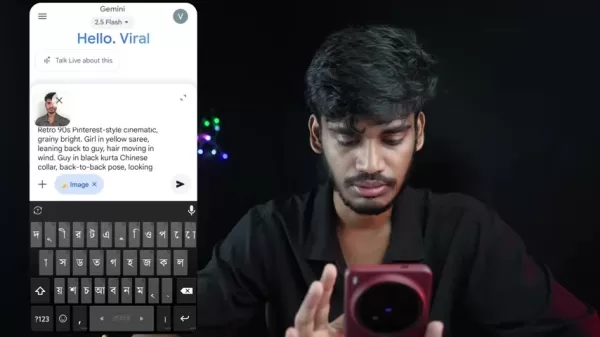
In the prompt field, click the Plus icon.
Choose the "Gallery" option.
Upload your chosen personal photo.
With your image uploaded, type your text prompt and submit.
For the most realistic edits, we recommend using a clear, close-up selfie. Photos taken from a distance can sometimes challenge facial recognition. Once your new image is ready, you can download it immediately to share online!
Now that we've covered the basics, let's start the photo editing process.
Enhancing Your Photos in Picsart
Removing Watermarks and Enhancing Image Quality
After generating images, you'll often need to perform some cleanup, such as removing embedded watermarks. Furthermore, AI-generated photos might not always be in the highest resolution. Fortunately, Picsart offers simple solutions for these issues.
- Open Picsart and tap the plus icon.
- Choose your target image.
- Go to "Tools", then select "Remove".
- Brush over the area you wish to clean, and tap "Remove" again.
To boost general quality, return to Tools and select "AI Enhance"! This will refine the image, enhancing its sharpness and detail.
Tool Description Remove ToolThis feature lets you erase unwanted objects from an image, such as a watermark.AI Enhance ToolThe AI Enhance function boosts the overall clarity and detail of a photo, resulting in higher quality than the original output from Gemini AI.With these steps, your photos will look better than ever!
4 Unique AI Photo Editing Techniques
Method 1: The Classic Couple Photo
This technique puts a creative twist on the popular pose of a woman resting her head on a man's shoulder. Instead of using commonplace prompts, innovate by altering specific details to reflect your unique style.
Consider this example prompt, which includes the photo to be edited—a critical component:
"Retro 90s Pinterest-style cinematic, grainy bright. Girl in yellow saree, leaning back to guy, hair moving in wind. Guy in black kurta Chinese collar, back-to-back pose, looking frontways. Faces identical to reference. Medium shot, 60mm lens, dramatic shadows on wall, nostalgic cinematic feel."
Feel free to modify the prompt for even more distinctive outcomes. Try altering the attire colors or even the subjects featured.
Executing this prompt should yield a beautiful image. While the underlying trend might be popular, your specific customizations—like the yellow saree—will make your edit truly one-of-a-kind.
Method 2: Vintage Rose Portrait
Shift the focus from couples to individual portraits. This aesthetic emphasizes a vintage look, featuring a subject holding a rose. The facial details remain accurate, producing a striking final result.
Use this prompt to achieve this photo style:
"Create a retro vintage grainy but brighter image of the reference individual, draped in a perfect Red wine color Pinterest aesthetic retro shirt with white pants and holding a Rose in hands. It must feel like a 90s movie and romanticize a windy environment. The person is standing against a solid wall with deep shadows."
The resulting photograph showcases impressive detail, though a watermark may remain in the corner. Don't worry—a simple tool for its removal will be discussed shortly! Continuously infuse unique elements into your prompts, such as variations in hairstyle or clothing.
Method 3: The Football Poster
Harness AI to transform yourself into anyone you imagine! If you're a sports enthusiast, especially of football (soccer), you can redesign your image into an impressive poster.
Experiment with this prompt:
"Create a cinematic professional football (soccer) poster featuring [reference image]. Keep the original face, hair, shape, and angle exactly as in the image. Show the person in three perspectives: a super close-up portrait with a Real Madrid jersey, a side profile view wearing a Real Madrid jersey with the back name DIDAR, and a full-body shot in a complete football kit (Real Madrid 2025 jersey, shorts, socks, and cleats) featuring sponsor logos. At the bottom, include a dynamic action scene of the player in motion."
With an edit like this, you can commemorate a special occasion or envision yourself as a sports icon!
Method 4: The Peaceful Meadow
Sometimes, the goal is to convey a sense of inner tranquility. This AI photo editing style places you within a serene landscape, promoting reflection and calm.
Apply this prompt to achieve the effect:
"Creating a serene and peaceful atmosphere. A young man [reference photo], in an oversized soft-colored shirt and pants, sits thoughtfully in a lush green meadow. The background is a soft, misty landscape with rolling hills. The lighting is natural and diffused, contributing to a serene and peaceful atmosphere. The style is a realistic photograph with a cinematic quality."
Gemini AI: Pros
and Cons
of Photo Editing
Pros
Entirely free to use
Produces high-quality AI-generated edits
Simple process for removing unwanted images
Access to numerous styles and trends
Cons
Some features deliver superior results to others
Gemini AI can experience server connection problems, occasionally preventing edits
The process sometimes involves significant trial and error
Requires adding uniqueness through subtle prompt variations
FAQ
Is Gemini AI genuinely free for photo editing?
Yes! Gemini AI's core features, such as image generation and editing, are available at no cost.
What should I do if Gemini AI has connection problems?
For a smooth and optimal photo editing session, ensure you have the most recent app version installed. Check your app store for any available updates.
What exactly is a prompt?
Prompts are the key ingredient for achieving personalized AI artwork. They are typically short phrases or descriptions that instruct the AI on your desired outcome.
Related Questions
What distinguishes these AI photo editing techniques as 'unique'?
These methods emphasize moving past generic AI results. By employing detailed prompts and incorporating specific stylistic elements, you can craft highly personalized and uncommon visuals that capture attention.
Where can I find more inventive and original AI photo editing prompts?
A valuable resource for discovering AI photo editing prompts is the creator's Telegram channel, Didar Official. It offers specific prompts that enable users to create edits efficiently, saving hours of manual work.
Related article
 DeepMind CEO Hassabis: I sleep six hours a day, usually feel energetic around 1 a.m.
Fortune recently featured an interview with Demis Hassabis, CEO of Google DeepMind, revealing his unconventional approach to rest and productivity. Hassabis disclosed that he sleeps very little, structuring his waking hours into two distinct work blo
OpenAI, Anthropic Vie for Market Share Despite Revenue Shortfalls
Despite recent reports suggesting OpenAI missed revenue targets, creating pressure on tech stocks this Tuesday, private AI lab investors remain resilient. Seasoned backers have confirmed they will not reduce investment despite negative media coverage
California AV Compliance: A New Era of Tickets, Geofences, and 1M Miles
Guident operates an AuveTech shuttle in South Florida, managing a four-mile route in West Palm Beach and a one-mile route in Boca Raton using its remote monitoring technology. | Credit: GuidentCalifornia is redefining the regulatory landscape for dri
Related Special Topic Recommendations
Video creation
DeepMind CEO Hassabis: I sleep six hours a day, usually feel energetic around 1 a.m.
Fortune recently featured an interview with Demis Hassabis, CEO of Google DeepMind, revealing his unconventional approach to rest and productivity. Hassabis disclosed that he sleeps very little, structuring his waking hours into two distinct work blo
OpenAI, Anthropic Vie for Market Share Despite Revenue Shortfalls
Despite recent reports suggesting OpenAI missed revenue targets, creating pressure on tech stocks this Tuesday, private AI lab investors remain resilient. Seasoned backers have confirmed they will not reduce investment despite negative media coverage
California AV Compliance: A New Era of Tickets, Geofences, and 1M Miles
Guident operates an AuveTech shuttle in South Florida, managing a four-mile route in West Palm Beach and a one-mile route in Boca Raton using its remote monitoring technology. | Credit: GuidentCalifornia is redefining the regulatory landscape for dri
Related Special Topic Recommendations
Video creation
 AI Short-Form Video Hook Generators for Reels, Shorts, and Product Launch Campaigns
2026 Latest Best AI Short-Form Video Hook Generators for Reels Shorts and Product Launch Campaigns! XIX.AI curates top-rated powerful game-changing tools that deliver must-try results through real-world tests. This weekly updated page offers free vs paid comparison rankings to help you find the perfect solution for boosting content creativity and productivity. Explore now to Unlock your AI edge!
 11 tools
 xix.ai
writing
AI Article Outline Tools for Long Form Writing
xix.ai
writing
AI Article Outline Tools for Long Form Writing
2026 Latest Best Top-Rated AI Article Outline Tools for Long Form Writing! This curated collection features powerful, game-changing tools that deliver accurate, structured outlines with real-world tests to boost writing efficiency significantly. XIX.AI is part of this elite selection. Get a free vs paid comparison to help you choose the perfect tool. Explore now and Unlock your AI edge!
9 tools
xix.ai
chatbot
Best AI Roleplay Chat Apps for Language Practice, Interview Prep, and Daily Fluency
2026 Latest Best Top-rated AI Roleplay Chat Apps for Language Practice, Interview Prep, and Daily Fluency! XIX.AI curates a powerful game-changing collection that offers free vs paid comparison, real-world tests, and updated rankings weekly. These must-try tools help you boost writing skills, overcome fluency challenges, and improve communication efficiency across all daily scenarios. Explore now to discover your perfect tool for language growth!
10 tools
xix.ai
Music composition
AI Stem Separation Tools for Remix Production, Sampling Prep, and Karaoke Masters
2026 Latest Best Top-rated AI Stem Separation Tools Curated for Remix Production, Sampling Prep, and Karaoke Masters. These powerful game-changing tools offer real-world tests to deliver precise audio isolation, boosting productivity significantly. XIX.AI provides a weekly updated free vs paid comparison guide to help you find the must-try solution that suits your needs. Explore now to unlock your AI edge.
8 tools
xix.ai
Data Analysis
AI SQL Copilots for Revenue Dashboards, Funnel Analysis, and Product Metrics
2026 Latest Best AI SQL Copilots Ranked Top-Rated! XIX.AI curates a powerful game-changing collection for weekly updated real-world tests. These must-try tools help you generate accurate revenue dashboards, analyze sales funnels, and track product metrics swiftly, boosting productivity massively. Explore now to Discover your perfect tool for data-driven decision making! 238 characters
9 tools
xix.ai
Music composition
Best AI Melody Writing Tools for Song Drafts
2026 Latest Best Top-Rated AI Melody Writing Tools for Song Drafts! XIX.AI has curated a highly powerful game-changing collection that goes through rigorous real-world tests to deliver the best writing experience. You can find detailed free vs paid comparisons, accurate rankings, and must-try options designed to help you create stunning song drafts effortlessly and boost your creative productivity significantly. Explore now to discover your perfect tool!
8 tools
xix.ai

 Comments (0)
0/500
Comments (0)
0/500
Are you tired of seeing the same AI photo editing styles everywhere? This guide introduces four distinctive, free techniques using AI to craft truly exceptional visuals. Break away from the ordinary and learn to produce realistic, captivating, and high-quality images that stand out. Get ready to transform your social media presence with these innovative editing methods!
Key Points
Explore four distinct and free AI photo editing methods.
Generate realistic and engaging visuals using Gemini AI.
Master unconventional editing styles to distinguish yourself on social media.
Improve photo quality and eliminate unwanted elements with AI.
Access prompt resources to create a wide variety of unique AI edits.
Unleashing Unique Photo Editing with AI
The Current State of AI Photo Editing Trends
The world of social media is saturated with AI-edited photos, yet many of these edits look strikingly similar. The common approach often lacks creativity. Our objective is to escape this uniformity and highlight truly original artistic expressions. The essential strategy is to use AI to produce edits that are lifelike, attention-grabbing, superior in quality, and, crucially, rare. Move beyond standard AI filters—it's time to pioneer unexplored styles in photo editing!
This involves experimenting with various prompts, combinations, and aesthetics within AI tools. Rather than replicating a tutorial step-by-step, use it as a springboard for your own creations. Let's examine four approaches to kickstart your journey in unique AI photo editing. The best part? All methods are free and straightforward to implement!
Entering the Realm of Gemini AI
The landscape of AI image generation is broad and diverse, with many platforms offering robust features. For our exploration into unique editing, we'll concentrate on Gemini AI, an advanced platform engineered to convert your standard photos into breathtaking artwork.
Gemini AI represents just one option among many; it's beneficial to test different tools to find your ideal match. Nevertheless, the fundamental principles and creative prompts are generally applicable across platforms. Let's first examine what Gemini AI provides before detailing the editing procedures.
Gemini AI offers functionalities for:
- Create Image. Generate entirely new images from text descriptions.
- Write. Request Gemini to compose stories, blog posts, and other written content.
- Build. Materialize your creative concepts.
- Deep Research. Investigate any subject to uncover facts and specifics.
Step-by-Step Guide: Editing Your First AI Photo with Gemini
Here’s a quick walkthrough for editing your photos in Gemini AI. This will clarify the process before we dive into the specifics:
Launch Gemini AI.
Go to the "Create Image" feature.
In the prompt field, click the Plus icon.
Choose the "Gallery" option.
Upload your chosen personal photo.
With your image uploaded, type your text prompt and submit.
For the most realistic edits, we recommend using a clear, close-up selfie. Photos taken from a distance can sometimes challenge facial recognition. Once your new image is ready, you can download it immediately to share online!
Now that we've covered the basics, let's start the photo editing process.
Enhancing Your Photos in Picsart
Removing Watermarks and Enhancing Image Quality
After generating images, you'll often need to perform some cleanup, such as removing embedded watermarks. Furthermore, AI-generated photos might not always be in the highest resolution. Fortunately, Picsart offers simple solutions for these issues.
- Open Picsart and tap the plus icon.
- Choose your target image.
- Go to "Tools", then select "Remove".
- Brush over the area you wish to clean, and tap "Remove" again.
To boost general quality, return to Tools and select "AI Enhance"! This will refine the image, enhancing its sharpness and detail.
With these steps, your photos will look better than ever!
4 Unique AI Photo Editing Techniques
Method 1: The Classic Couple Photo
This technique puts a creative twist on the popular pose of a woman resting her head on a man's shoulder. Instead of using commonplace prompts, innovate by altering specific details to reflect your unique style.
Consider this example prompt, which includes the photo to be edited—a critical component:
"Retro 90s Pinterest-style cinematic, grainy bright. Girl in yellow saree, leaning back to guy, hair moving in wind. Guy in black kurta Chinese collar, back-to-back pose, looking frontways. Faces identical to reference. Medium shot, 60mm lens, dramatic shadows on wall, nostalgic cinematic feel."
Feel free to modify the prompt for even more distinctive outcomes. Try altering the attire colors or even the subjects featured.
Executing this prompt should yield a beautiful image. While the underlying trend might be popular, your specific customizations—like the yellow saree—will make your edit truly one-of-a-kind.
Method 2: Vintage Rose Portrait
Shift the focus from couples to individual portraits. This aesthetic emphasizes a vintage look, featuring a subject holding a rose. The facial details remain accurate, producing a striking final result.
Use this prompt to achieve this photo style:
"Create a retro vintage grainy but brighter image of the reference individual, draped in a perfect Red wine color Pinterest aesthetic retro shirt with white pants and holding a Rose in hands. It must feel like a 90s movie and romanticize a windy environment. The person is standing against a solid wall with deep shadows."
The resulting photograph showcases impressive detail, though a watermark may remain in the corner. Don't worry—a simple tool for its removal will be discussed shortly! Continuously infuse unique elements into your prompts, such as variations in hairstyle or clothing.
Method 3: The Football Poster
Harness AI to transform yourself into anyone you imagine! If you're a sports enthusiast, especially of football (soccer), you can redesign your image into an impressive poster.
Experiment with this prompt:
"Create a cinematic professional football (soccer) poster featuring [reference image]. Keep the original face, hair, shape, and angle exactly as in the image. Show the person in three perspectives: a super close-up portrait with a Real Madrid jersey, a side profile view wearing a Real Madrid jersey with the back name DIDAR, and a full-body shot in a complete football kit (Real Madrid 2025 jersey, shorts, socks, and cleats) featuring sponsor logos. At the bottom, include a dynamic action scene of the player in motion."
With an edit like this, you can commemorate a special occasion or envision yourself as a sports icon!
Method 4: The Peaceful Meadow
Sometimes, the goal is to convey a sense of inner tranquility. This AI photo editing style places you within a serene landscape, promoting reflection and calm.
Apply this prompt to achieve the effect:
"Creating a serene and peaceful atmosphere. A young man [reference photo], in an oversized soft-colored shirt and pants, sits thoughtfully in a lush green meadow. The background is a soft, misty landscape with rolling hills. The lighting is natural and diffused, contributing to a serene and peaceful atmosphere. The style is a realistic photograph with a cinematic quality."
Gemini AI: Pros
and Cons
of Photo Editing
Pros
Entirely free to use
Produces high-quality AI-generated edits
Simple process for removing unwanted images
Access to numerous styles and trends
Cons
Some features deliver superior results to others
Gemini AI can experience server connection problems, occasionally preventing edits
The process sometimes involves significant trial and error
Requires adding uniqueness through subtle prompt variations
FAQ
Is Gemini AI genuinely free for photo editing?
Yes! Gemini AI's core features, such as image generation and editing, are available at no cost.
What should I do if Gemini AI has connection problems?
For a smooth and optimal photo editing session, ensure you have the most recent app version installed. Check your app store for any available updates.
What exactly is a prompt?
Prompts are the key ingredient for achieving personalized AI artwork. They are typically short phrases or descriptions that instruct the AI on your desired outcome.
Related Questions
What distinguishes these AI photo editing techniques as 'unique'?
These methods emphasize moving past generic AI results. By employing detailed prompts and incorporating specific stylistic elements, you can craft highly personalized and uncommon visuals that capture attention.
Where can I find more inventive and original AI photo editing prompts?
A valuable resource for discovering AI photo editing prompts is the creator's Telegram channel, Didar Official. It offers specific prompts that enable users to create edits efficiently, saving hours of manual work.








 DeepMind CEO Hassabis: I sleep six hours a day, usually feel energetic around 1 a.m.
Fortune recently featured an interview with Demis Hassabis, CEO of Google DeepMind, revealing his unconventional approach to rest and productivity. Hassabis disclosed that he sleeps very little, structuring his waking hours into two distinct work blo
DeepMind CEO Hassabis: I sleep six hours a day, usually feel energetic around 1 a.m.
Fortune recently featured an interview with Demis Hassabis, CEO of Google DeepMind, revealing his unconventional approach to rest and productivity. Hassabis disclosed that he sleeps very little, structuring his waking hours into two distinct work blo
 OpenAI, Anthropic Vie for Market Share Despite Revenue Shortfalls
Despite recent reports suggesting OpenAI missed revenue targets, creating pressure on tech stocks this Tuesday, private AI lab investors remain resilient. Seasoned backers have confirmed they will not reduce investment despite negative media coverage
California AV Compliance: A New Era of Tickets, Geofences, and 1M Miles
Guident operates an AuveTech shuttle in South Florida, managing a four-mile route in West Palm Beach and a one-mile route in Boca Raton using its remote monitoring technology. | Credit: GuidentCalifornia is redefining the regulatory landscape for dri
OpenAI, Anthropic Vie for Market Share Despite Revenue Shortfalls
Despite recent reports suggesting OpenAI missed revenue targets, creating pressure on tech stocks this Tuesday, private AI lab investors remain resilient. Seasoned backers have confirmed they will not reduce investment despite negative media coverage
California AV Compliance: A New Era of Tickets, Geofences, and 1M Miles
Guident operates an AuveTech shuttle in South Florida, managing a four-mile route in West Palm Beach and a one-mile route in Boca Raton using its remote monitoring technology. | Credit: GuidentCalifornia is redefining the regulatory landscape for dri

2026 Latest Best AI Short-Form Video Hook Generators for Reels Shorts and Product Launch Campaigns! XIX.AI curates top-rated powerful game-changing tools that deliver must-try results through real-world tests. This weekly updated page offers free vs paid comparison rankings to help you find the perfect solution for boosting content creativity and productivity. Explore now to Unlock your AI edge!
11 tools
xix.ai

2026 Latest Best Top-Rated AI Article Outline Tools for Long Form Writing! This curated collection features powerful, game-changing tools that deliver accurate, structured outlines with real-world tests to boost writing efficiency significantly. XIX.AI is part of this elite selection. Get a free vs paid comparison to help you choose the perfect tool. Explore now and Unlock your AI edge!
9 tools
xix.ai

2026 Latest Best Top-rated AI Roleplay Chat Apps for Language Practice, Interview Prep, and Daily Fluency! XIX.AI curates a powerful game-changing collection that offers free vs paid comparison, real-world tests, and updated rankings weekly. These must-try tools help you boost writing skills, overcome fluency challenges, and improve communication efficiency across all daily scenarios. Explore now to discover your perfect tool for language growth!
10 tools
xix.ai

2026 Latest Best Top-rated AI Stem Separation Tools Curated for Remix Production, Sampling Prep, and Karaoke Masters. These powerful game-changing tools offer real-world tests to deliver precise audio isolation, boosting productivity significantly. XIX.AI provides a weekly updated free vs paid comparison guide to help you find the must-try solution that suits your needs. Explore now to unlock your AI edge.
8 tools
xix.ai

2026 Latest Best AI SQL Copilots Ranked Top-Rated! XIX.AI curates a powerful game-changing collection for weekly updated real-world tests. These must-try tools help you generate accurate revenue dashboards, analyze sales funnels, and track product metrics swiftly, boosting productivity massively. Explore now to Discover your perfect tool for data-driven decision making! 238 characters
9 tools
xix.ai

2026 Latest Best Top-Rated AI Melody Writing Tools for Song Drafts! XIX.AI has curated a highly powerful game-changing collection that goes through rigorous real-world tests to deliver the best writing experience. You can find detailed free vs paid comparisons, accurate rankings, and must-try options designed to help you create stunning song drafts effortlessly and boost your creative productivity significantly. Explore now to discover your perfect tool!
8 tools
xix.ai












