


 Home
Home
Tencent Unveils OS-Level AI Assistant Marvis with Cross-Device Control and Local Privacy Mode
On May 20, Tencent announced the official release of Marvis, an operating system-level AI assistant now available for download on the official website (Marvis.qq.com) with no invitation code required. Beyond standard AI agent capabilities, Marvis offers more intelligent system and file management, safer switching between on-device and cloud computing, lower barriers to using agent services, and smoother cross-device collaboration, all built on a deep understanding of computer systems, computing power, files, applications, and other information.

Unlike traditional AI conversation tools or single-application agents, Marvis is built around the "operating system level." It integrates the terminal system, files, applications, computing power, and cross-device connections into a single AI intermediary layer: users no longer need to remember setup entry points, file paths, or software operation steps. They simply state their goal in one sentence, and Marvis understands the task, breaks it down into steps, calls the appropriate agent to execute, and hands over to the user for confirmation at key moments such as privacy, security, and payments.
Operating System-Level Understanding: Making Computers Smarter
Marvis turns the entire computer into a "smart object" that can access the system level directly, enabling true closed-loop control from system settings to data processing. With a single sentence, users can call up, find, and adjust Windows system settings: they can ask about computer configuration, battery health, or network status, or let Marvis check whether hardware can run a game smoothly. They can also adjust system settings, optimize startup items, and clean up redundant files through chat.
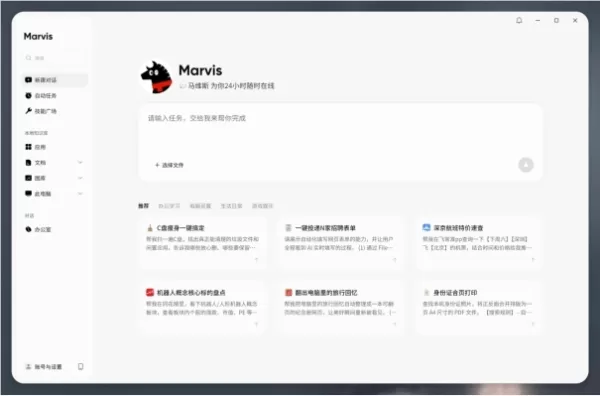
For novice and elderly users, this lowers the barrier to system settings and troubleshooting; for office users, it turns scattered configuration, retrieval, and processing tasks into a more convenient entry point.
Building on this, Marvis combines multiple local models to understand files, allowing users to search file and image content, recognize text within images, and offers features like AI photo albums and AI document libraries organized by people, content themes, holidays, and locations. This helps users create a personalized knowledge base and solves the problem of not finding files when you can't remember the filename.
On security boundaries, Marvis establishes an L2-level safety mechanism that enforces a "hard inquiry": sensitive actions such as deleting or modifying files and adjusting core system configurations first present an execution plan and request user confirmation; higher-sensitivity actions like payments must be completed by the user themselves.
Optional On-Device Models: Data Stays on Your Computer, No Cloud Upload
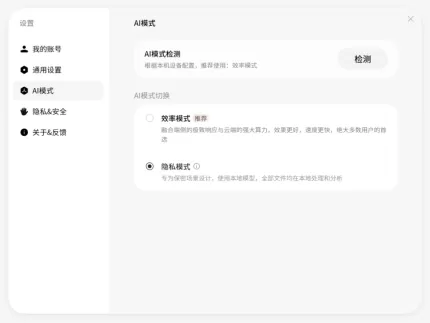
Marvis offers two working modes: "Efficiency Mode" and "Privacy Mode," allowing different users to choose based on the task nature and hardware configuration. For daily tasks, Efficiency Mode uses a combination of on-device and cloud processing: complex problem understanding and planning can use cloud models, while file processing, execution actions, and local indexing are handled on the device as much as possible for faster response and a more stable experience.
"Privacy Mode" uses only on-device models, ensuring all data parsing, image recognition, and conversations happen locally without uploading to the cloud. This meets the needs of scenarios with high data security requirements, such as finance, legal, and HR. Even without internet access, it can still be used normally.
This device-cloud collaboration isn't simply a choice between "local or cloud" but breaks tasks into different levels: tasks that can be completed locally are processed locally, and cloud capabilities are only called when necessary. Thanks to extensive on-device preprocessing, Marvis significantly reduces cloud token consumption for tasks like image search and file understanding, lowering usage costs and minimizing unnecessary data transfers.
Multiple Preloaded Agents: Get to Work Right Away
Most mainstream agent products require users to set up workflows or configure skills manually before use. Marvis comes pre-installed with a multi-agent collaboration system.
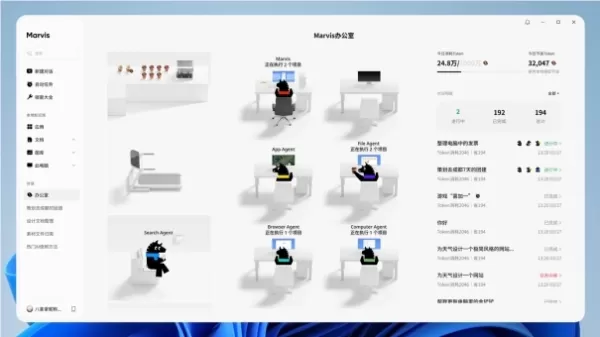
An "AI team" of six agents is available 24/7: the main agent handles overall coordination, understands needs, breaks down tasks, and schedules other agents to complete them; the File agent acts as a digital asset manager, handling file searches, reading, editing, generation, and format conversion; the Computer agent functions as a Windows system maintenance specialist, managing low-level configurations and automation; the App agent handles application operations, calling apps and .exe applications on the computer; the Browser agent serves as a web interaction specialist, taking over web pages for interaction and data scraping; the Search agent is an expert in web searching and information aggregation, quickly locating answers from public resources and providing key citations. Users can issue a single instruction, and multiple agents can process in parallel, displaying progress and results through execution logs and output areas.
This "preloaded multi-agent mode" lowers the learning curve for users. For example, users can ask Marvis to find the latest quarter's invoices and organize them into a table in chronological order; they can also have it monitor flight prices regularly, track updates on a specific website, or organize materials for multi-platform publishing.
Visual Cross-Device Control: More Convenient Collaboration
Marvis has powerful cross-device capabilities, supporting multiple platforms including Windows, Mac, iOS, and Android, with account synchronization across devices: users can directly view and take control of their computer screen from their phone, and even unlock and control the PC remotely while it is locked. Tasks that can be done on the computer can also be done remotely via the phone, creating a personal computer you can carry with you. Unlike most products that are limited to "remote commands," Marvis provides real-time visual control at the desktop level.
Related article
 Google Chrome 149 Teams with Gemini 3.5 Flash to Enhance Screenshot Interaction
Google has natively integrated the Gemini 3.5 Flash model into its latest Chrome 149 browser release, introducing a new "Select from screen" interaction feature.This feature enables users to directly select portions of the screen for targeted AI conv
Uber HR to Exhaust Annual Budget in 4 Months, Cuts Staff; Official Denies AI Link
Uber has initiated a significant overhaul of its human resources division, led by new president Jill Hazelbaker. The restructuring involves a 23% workforce reduction within the department to optimize operational efficiency.CEO Dara Khosrowshahi clari
Former TikTok Execs Launch AI-Powered App to Master Photo Poses
Businesses are increasingly leveraging AI image generation to educate users on photography techniques. Last year, Google introduced Camera Coach on Pixel devices to assist with framing and composition, and in July, Adobe launched a new feature in its
Related Special Topic Recommendations
automation
Google Chrome 149 Teams with Gemini 3.5 Flash to Enhance Screenshot Interaction
Google has natively integrated the Gemini 3.5 Flash model into its latest Chrome 149 browser release, introducing a new "Select from screen" interaction feature.This feature enables users to directly select portions of the screen for targeted AI conv
Uber HR to Exhaust Annual Budget in 4 Months, Cuts Staff; Official Denies AI Link
Uber has initiated a significant overhaul of its human resources division, led by new president Jill Hazelbaker. The restructuring involves a 23% workforce reduction within the department to optimize operational efficiency.CEO Dara Khosrowshahi clari
Former TikTok Execs Launch AI-Powered App to Master Photo Poses
Businesses are increasingly leveraging AI image generation to educate users on photography techniques. Last year, Google introduced Camera Coach on Pixel devices to assist with framing and composition, and in July, Adobe launched a new feature in its
Related Special Topic Recommendations
automation
 Best AI Task Routing Tools for Support Workflows
2026 Latest Best Top-rated AI Task Routing Tools for Support Workflows! XIX.AI has curated a highly powerful game-changing collection of must-try solutions, all undergoing rigorous real-world tests and updated weekly. These tools streamline workflows, boost productivity, and help teams deliver faster, more efficient support. Explore now to discover your perfect tool and unlock your AI edge!
 17 tools
 xix.ai
Academic Research
AI Citation and Paper Summary Tools
xix.ai
Academic Research
AI Citation and Paper Summary Tools
2026 Latest Best Top-Rated AI Citation and Paper Summary Tools Curated by XIX.AI. Get powerful game-changing solutions for quick content creation, improved writing efficiency, and boosting productivity. We offer a free vs paid comparison along with real-world tests and weekly updated rankings to help you find the must-try tool that fits your needs perfectly. Explore now to Unlock your AI edge.
10 tools
xix.ai
Productivity
Best AI Productivity Tools for Daily Work
2026 Latest Best Top-Rated AI Productivity Tools for Daily Work! XIX.AI has curated a powerful, game-changing selection based on rigorous weekly updated rankings and real-world tests. You’ll find must-try options that boost writing efficiency, streamline content creation, and help you overcome daily work challenges. Get a free vs paid comparison to find the perfect fit for your needs. Explore now to unlock your AI edge!
9 tools
xix.ai
Academic Research
AI Systematic Review Tools for Research Screening
2026 Latest Best Top-Rated AI Systematic Review Tools for Research Screening are here on XIX.AI! This curated collection includes powerful, game-changing solutions that go through rigorous real-world tests to deliver accurate results. We also offer a free vs paid comparison along with weekly updated rankings to help you find the must-try option that boosts your research efficiency significantly. Explore now to unlock your AI edge in academic work!
11 tools
xix.ai
Design & Art
AI Moodboard Tools for Brand and Art Direction
2026 Latest Best AI Moodboard Tools for Brand and Art Direction! XIX.AI has curated a top-rated list of powerful, game-changing tools that help creators boost productivity significantly. You’ll find detailed weekly updated rankings, free vs paid comparison, and real-world tests to help you choose the perfect option. Must-try features include instant idea generation, seamless collaboration, and optimized workflows for all your design projects. Explore now to unlock your AI edge!
9 tools
xix.ai
Academic Research
AI Systematic Review Tools for Screening Abstracts, Datasets, and Citation Networks
2026 Latest Best Top-rated AI Systematic Review Tools for Screening Abstracts, Datasets, and Citation Networks are curated by XIX.AI through rigorous real-world tests. These powerful game-changing tools offer a free vs paid comparison to help researchers boost productivity significantly. Explore now to discover your perfect tool for accelerating scientific research.
9 tools
xix.ai

 Comments (1)
0/500
Comments (1)
0/500
![HenryDavis]()
Finally, Tencent jumps into the OS-level AI game with Marvis. Cross-device control sounds cool, but I'm more curious about that local privacy mode—does it actually keep data offline or just a fancy toggle? 🤔 Also, who's gonna trust an AI that runs on your entire operating system? Hope they've tested it thoroughly. 😅
On May 20, Tencent announced the official release of Marvis, an operating system-level AI assistant now available for download on the official website (Marvis.qq.com) with no invitation code required. Beyond standard AI agent capabilities, Marvis offers more intelligent system and file management, safer switching between on-device and cloud computing, lower barriers to using agent services, and smoother cross-device collaboration, all built on a deep understanding of computer systems, computing power, files, applications, and other information.
Unlike traditional AI conversation tools or single-application agents, Marvis is built around the "operating system level." It integrates the terminal system, files, applications, computing power, and cross-device connections into a single AI intermediary layer: users no longer need to remember setup entry points, file paths, or software operation steps. They simply state their goal in one sentence, and Marvis understands the task, breaks it down into steps, calls the appropriate agent to execute, and hands over to the user for confirmation at key moments such as privacy, security, and payments.
Operating System-Level Understanding: Making Computers Smarter
Marvis turns the entire computer into a "smart object" that can access the system level directly, enabling true closed-loop control from system settings to data processing. With a single sentence, users can call up, find, and adjust Windows system settings: they can ask about computer configuration, battery health, or network status, or let Marvis check whether hardware can run a game smoothly. They can also adjust system settings, optimize startup items, and clean up redundant files through chat.
For novice and elderly users, this lowers the barrier to system settings and troubleshooting; for office users, it turns scattered configuration, retrieval, and processing tasks into a more convenient entry point.
Building on this, Marvis combines multiple local models to understand files, allowing users to search file and image content, recognize text within images, and offers features like AI photo albums and AI document libraries organized by people, content themes, holidays, and locations. This helps users create a personalized knowledge base and solves the problem of not finding files when you can't remember the filename.
On security boundaries, Marvis establishes an L2-level safety mechanism that enforces a "hard inquiry": sensitive actions such as deleting or modifying files and adjusting core system configurations first present an execution plan and request user confirmation; higher-sensitivity actions like payments must be completed by the user themselves.
Optional On-Device Models: Data Stays on Your Computer, No Cloud Upload
Marvis offers two working modes: "Efficiency Mode" and "Privacy Mode," allowing different users to choose based on the task nature and hardware configuration. For daily tasks, Efficiency Mode uses a combination of on-device and cloud processing: complex problem understanding and planning can use cloud models, while file processing, execution actions, and local indexing are handled on the device as much as possible for faster response and a more stable experience.
"Privacy Mode" uses only on-device models, ensuring all data parsing, image recognition, and conversations happen locally without uploading to the cloud. This meets the needs of scenarios with high data security requirements, such as finance, legal, and HR. Even without internet access, it can still be used normally.
This device-cloud collaboration isn't simply a choice between "local or cloud" but breaks tasks into different levels: tasks that can be completed locally are processed locally, and cloud capabilities are only called when necessary. Thanks to extensive on-device preprocessing, Marvis significantly reduces cloud token consumption for tasks like image search and file understanding, lowering usage costs and minimizing unnecessary data transfers.
Multiple Preloaded Agents: Get to Work Right Away
Most mainstream agent products require users to set up workflows or configure skills manually before use. Marvis comes pre-installed with a multi-agent collaboration system.
An "AI team" of six agents is available 24/7: the main agent handles overall coordination, understands needs, breaks down tasks, and schedules other agents to complete them; the File agent acts as a digital asset manager, handling file searches, reading, editing, generation, and format conversion; the Computer agent functions as a Windows system maintenance specialist, managing low-level configurations and automation; the App agent handles application operations, calling apps and .exe applications on the computer; the Browser agent serves as a web interaction specialist, taking over web pages for interaction and data scraping; the Search agent is an expert in web searching and information aggregation, quickly locating answers from public resources and providing key citations. Users can issue a single instruction, and multiple agents can process in parallel, displaying progress and results through execution logs and output areas.
This "preloaded multi-agent mode" lowers the learning curve for users. For example, users can ask Marvis to find the latest quarter's invoices and organize them into a table in chronological order; they can also have it monitor flight prices regularly, track updates on a specific website, or organize materials for multi-platform publishing.
Visual Cross-Device Control: More Convenient Collaboration
Marvis has powerful cross-device capabilities, supporting multiple platforms including Windows, Mac, iOS, and Android, with account synchronization across devices: users can directly view and take control of their computer screen from their phone, and even unlock and control the PC remotely while it is locked. Tasks that can be done on the computer can also be done remotely via the phone, creating a personal computer you can carry with you. Unlike most products that are limited to "remote commands," Marvis provides real-time visual control at the desktop level.








 Google Chrome 149 Teams with Gemini 3.5 Flash to Enhance Screenshot Interaction
Google has natively integrated the Gemini 3.5 Flash model into its latest Chrome 149 browser release, introducing a new "Select from screen" interaction feature.This feature enables users to directly select portions of the screen for targeted AI conv
Google Chrome 149 Teams with Gemini 3.5 Flash to Enhance Screenshot Interaction
Google has natively integrated the Gemini 3.5 Flash model into its latest Chrome 149 browser release, introducing a new "Select from screen" interaction feature.This feature enables users to directly select portions of the screen for targeted AI conv
 Uber HR to Exhaust Annual Budget in 4 Months, Cuts Staff; Official Denies AI Link
Uber has initiated a significant overhaul of its human resources division, led by new president Jill Hazelbaker. The restructuring involves a 23% workforce reduction within the department to optimize operational efficiency.CEO Dara Khosrowshahi clari
Uber HR to Exhaust Annual Budget in 4 Months, Cuts Staff; Official Denies AI Link
Uber has initiated a significant overhaul of its human resources division, led by new president Jill Hazelbaker. The restructuring involves a 23% workforce reduction within the department to optimize operational efficiency.CEO Dara Khosrowshahi clari
 Former TikTok Execs Launch AI-Powered App to Master Photo Poses
Businesses are increasingly leveraging AI image generation to educate users on photography techniques. Last year, Google introduced Camera Coach on Pixel devices to assist with framing and composition, and in July, Adobe launched a new feature in its
Former TikTok Execs Launch AI-Powered App to Master Photo Poses
Businesses are increasingly leveraging AI image generation to educate users on photography techniques. Last year, Google introduced Camera Coach on Pixel devices to assist with framing and composition, and in July, Adobe launched a new feature in its

2026 Latest Best Top-rated AI Task Routing Tools for Support Workflows! XIX.AI has curated a highly powerful game-changing collection of must-try solutions, all undergoing rigorous real-world tests and updated weekly. These tools streamline workflows, boost productivity, and help teams deliver faster, more efficient support. Explore now to discover your perfect tool and unlock your AI edge!
17 tools
xix.ai

2026 Latest Best Top-Rated AI Citation and Paper Summary Tools Curated by XIX.AI. Get powerful game-changing solutions for quick content creation, improved writing efficiency, and boosting productivity. We offer a free vs paid comparison along with real-world tests and weekly updated rankings to help you find the must-try tool that fits your needs perfectly. Explore now to Unlock your AI edge.
10 tools
xix.ai

2026 Latest Best Top-Rated AI Productivity Tools for Daily Work! XIX.AI has curated a powerful, game-changing selection based on rigorous weekly updated rankings and real-world tests. You’ll find must-try options that boost writing efficiency, streamline content creation, and help you overcome daily work challenges. Get a free vs paid comparison to find the perfect fit for your needs. Explore now to unlock your AI edge!
9 tools
xix.ai

2026 Latest Best Top-Rated AI Systematic Review Tools for Research Screening are here on XIX.AI! This curated collection includes powerful, game-changing solutions that go through rigorous real-world tests to deliver accurate results. We also offer a free vs paid comparison along with weekly updated rankings to help you find the must-try option that boosts your research efficiency significantly. Explore now to unlock your AI edge in academic work!
11 tools
xix.ai

2026 Latest Best AI Moodboard Tools for Brand and Art Direction! XIX.AI has curated a top-rated list of powerful, game-changing tools that help creators boost productivity significantly. You’ll find detailed weekly updated rankings, free vs paid comparison, and real-world tests to help you choose the perfect option. Must-try features include instant idea generation, seamless collaboration, and optimized workflows for all your design projects. Explore now to unlock your AI edge!
9 tools
xix.ai

2026 Latest Best Top-rated AI Systematic Review Tools for Screening Abstracts, Datasets, and Citation Networks are curated by XIX.AI through rigorous real-world tests. These powerful game-changing tools offer a free vs paid comparison to help researchers boost productivity significantly. Explore now to discover your perfect tool for accelerating scientific research.
9 tools
xix.ai

Finally, Tencent jumps into the OS-level AI game with Marvis. Cross-device control sounds cool, but I'm more curious about that local privacy mode—does it actually keep data offline or just a fancy toggle? 🤔 Also, who's gonna trust an AI that runs on your entire operating system? Hope they've tested it thoroughly. 😅












