


 Home
HomeMaster YouTube Summaries with Google's Bard Gemini AI: A Step-by-Step Guide
In our fast-paced world, saving time is paramount. Google Bard, supercharged with Gemini AI, offers a powerful way to quickly understand YouTube videos without watching them entirely. This guide details the process, showcasing key features and settings to boost your efficiency. We'll demonstrate how to use Google Bard's capabilities to summarize video content, conserving your valuable time. Leveraging AI to streamline information gathering is transformative. Let's begin exploring how to summarize YouTube videos using Google Bard and Gemini AI.
Key Points
Configuring Google Bard with Gemini AI for optimal results.
Activating and using the necessary extensions within Google Bard.
Crafting effective prompts to obtain accurate and concise video summaries.
Reviewing practical examples of summarizing various YouTube video types.
Resolving common problems when using Google Bard for video summarization.
Getting Started with Google Bard and Gemini AI
What is Google Bard Gemini AI?
Google Bard, powered by Gemini AI, is an advanced conversational AI that allows for natural and intuitive interaction with Google's vast knowledge resources. Gemini AI enhances Bard's capabilities, providing better understanding, reasoning, and creative output. This makes Bard an excellent tool for tasks like summarizing YouTube videos, answering complex questions, and generating content. With Gemini, Bard can quickly analyze and condense large volumes of information, saving you considerable time. The integration significantly improves the accuracy and relevance of Bard's summaries, transforming it into a resourceful assistant that understands context and delivers tailored insights. For effective summarization, proper configuration and enabling the right extensions are essential, forming the foundation for a smooth workflow. From writing aid to fast information retrieval, Bard and Gemini AI have become indispensable in many professional and academic environments. By harnessing these AI capabilities, users can boost productivity and maintain a competitive edge. Whether you're a researcher, student, or content creator, learning to use Bard effectively opens up many possibilities. Let's examine the step-by-step method for using Google Bard with Gemini AI to summarize YouTube videos efficiently, empowering you to get the most from this innovative technology.
Setting Up Google Bard for Optimal Use
To ensure the best experience with Google Bard, proper initial configuration is key. Start by visiting bard.google.com.
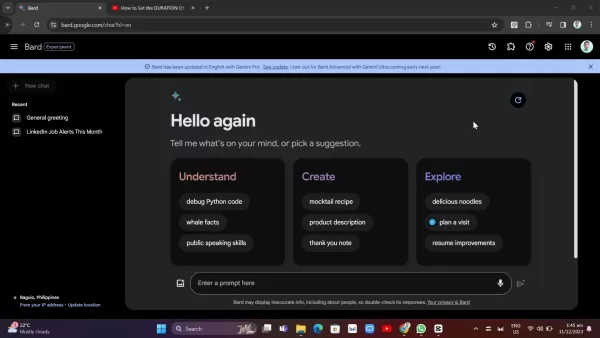
Make sure you're using the latest version to access the full capabilities of Gemini AI. Proper setup involves enabling extensions that grant Bard access to process YouTube content. These extensions are vital for generating accurate video summaries. Optimizing your settings ensures Bard delivers precise and relevant results, significantly impacting its performance and your overall experience. It's worth spending a few minutes adjusting settings to match your needs, such as granting account access or modifying privacy controls. This configuration allows Bard to provide personalized, effective assistance. Don't skip this step; it's the groundwork for a successful summarization process. A well-configured Bard enhances its utility for content creation, research, and other tasks. You can customize settings based on your specific requirements and preferences. Regular updates introduce new features and improvements, so stay informed to leverage the most advanced capabilities. Google Bard's versatility makes it ideal for students, professionals, and anyone seeking efficient information management. Now, let's see how to enable extensions in Bard.
Troubleshooting Common Issues
Addressing Common Problems
While Google Bard with Gemini AI is a powerful tool for summarizing YouTube videos, you might encounter some common issues. Here are troubleshooting tips to help you resolve them:
- Inaccurate Summaries:
- Problem: The summary does not accurately reflect the video's content.
- Solution: Refine your prompt with more specific instructions or context. Try different keywords to guide Bard's analysis.
- Extension Issues:
- Problem: The YouTube extension isn't working or causes errors.
- Solution: Verify the extension is enabled and updated. Try disabling and re-enabling it to fix connectivity problems.
- Permission Errors:
- Problem: Bard cannot access YouTube content due to permission restrictions.
- Solution: Grant Bard the necessary permissions to access your Google account and YouTube data. Check your privacy settings.
- Slow Performance:
- Problem: Bard takes too long to generate summaries.
- Solution: Close unnecessary browser tabs and applications to free up system resources. Ensure you have a stable, fast internet connection.
- Generic Summaries:
- Problem: The summary is too vague and lacks specific insights.
- Solution: Use more detailed prompts to direct Bard's focus to the video's key aspects. Include relevant keywords and context.
Addressing these common issues can greatly improve your experience with Google Bard for YouTube video summarization. Following these tips helps overcome technical challenges, leading to more accurate and useful summaries. Promptly resolving errors enhances the tool's effectiveness. Regular maintenance is needed to keep operations smooth. Proactive troubleshooting ensures Bard functions at its best, guaranteeing efficient information gathering.
Step-by-Step Guide to Summarizing YouTube Videos with Google Bard
Enabling Extensions in Google Bard
To summarize YouTube videos effectively, you must enable the necessary extensions in Google Bard. Here's how:
- Access Extensions: Click the extensions tab on the Bard interface.
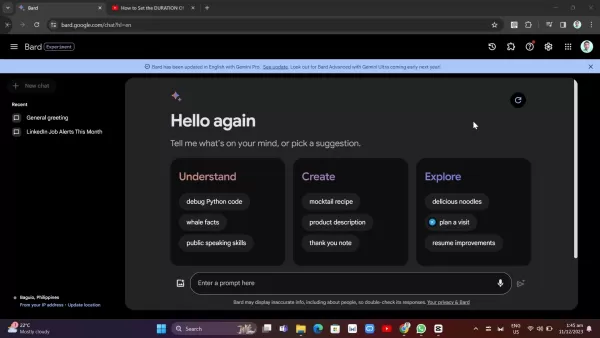
This opens a panel showing all available extensions.
- Enable YouTube Extension: Locate the YouTube extension in the list. Ensure the toggle switch is turned on to activate it.
- Grant Permissions: Bard may request permissions to access your Google account and YouTube data. Grant these to allow proper functionality.
Enabling these extensions allows Bard to access and analyze YouTube video content, which is crucial for creating accurate, comprehensive summaries. Without the YouTube extension, Bard cannot directly access video content. The extension acts as a bridge, enabling seamless data transfer and analysis. Once enabled, you're ready to start summarizing videos. This simple process is essential for unlocking Bard's full potential. Always keep the extension updated to benefit from the latest features and improvements. Keeping it active ensures continuous access to Bard's YouTube summarization capabilities, making it an invaluable tool for students, researchers, and professionals. Now, let's learn how to write proper prompts for quality output.
Crafting Effective Prompts for Summarization
The key to obtaining accurate and useful summaries from Google Bard is crafting effective prompts. Here are some tips for creating prompts that yield the best results:
- Be Specific: Clearly state what you want. Instead of "Summarize this video," try "Provide a detailed summary of this YouTube video focusing on the three main arguments and the final conclusion."
- Provide Context: Include relevant context about the video's topic, creator, or specific elements you're interested in.
- Specify Length: Indicate your desired summary length. For example, "Summarize this video in 150 words" ensures a concise overview.
- Use Keywords: Incorporate relevant keywords to guide Bard's analysis, especially if focusing on particular themes.
- Example Prompts: Below are examples of effective prompts:
- "Summarize this YouTube video on climate change, highlighting the primary causes discussed and the proposed solutions."
- "Provide a brief summary of this Python programming tutorial video, focusing on the steps to create a basic function."
- "Summarize this interview with Elon Musk, emphasizing his views on the future of space exploration and AI ethics."
Effective prompts guide Bard to generate the summaries you need. The more specific and contextual information you provide, the better the results. Avoid vague or ambiguous prompts that lead to generic or inaccurate summaries. Prompt engineering improves with practice. Experiment with different prompts to see what works best for you. Pay attention to the structure and language of your prompts to optimize Bard's performance. Mastering prompt creation unlocks the full potential of Google Bard for YouTube video summarization, streamlining your information gathering and boosting productivity. Now, let's explore some practical examples.
Example: Summarizing a YouTube Video
To illustrate how to summarize YouTube videos with Google Bard, let's walk through a practical example. Suppose you want to summarize a video titled "How to Set the Duration of Goals in Google Analytics 4".Here’s how to proceed:
- Copy the YouTube Video URL: Copy the URL of the YouTube video you wish to summarize.
- Enter the Prompt in Google Bard: In the Bard interface, enter a prompt like: "Summarize this YouTube video: [Paste the URL here]. Focus on the step-by-step process for setting goal durations in Google Analytics 4."
- Review the Summary: Bard will analyze the video and generate a summary based on your prompt. Review it to ensure it accurately captures the video's key points.
This example shows how straightforward it is to use Google Bard for summarizing YouTube videos. By providing a clear, specific prompt, you can quickly get a concise overview of the content. Use Bard's summarization to grasp new concepts, follow tutorials, or extract main points from lengthy presentations, saving time and effort. Experiment with different video types and prompts to further explore Bard's capabilities. The more you use it, the better you'll become at crafting effective prompts and interpreting the generated summaries. This tool has the potential to transform how you learn and manage information, increasing productivity in your studies and work. Next, let's discuss some potential problems and their solutions.
Advantages and Disadvantages of Using Google Bard for YouTube Video Summarization
Pros
Saves Time: Quickly understand YouTube video content without full-length viewing.
Efficient: Analyzes and condenses large amounts of information into concise summaries.
Accessible: Obtains key insights from videos even when you're short on time.
Enhances Learning: Helps understand new concepts and follow tutorials more efficiently.
Boosts Productivity: Streamlines information gathering and improves overall productivity.
Cons
Accuracy: Summaries may not always be perfectly accurate or capture every nuance.
Context Dependency: Summary quality heavily relies on prompt effectiveness.
Extension Reliability: Functionality depends on Google Bard's extensions working correctly.
Potential Bias: AI-generated summaries may reflect biases from the source video or training data.
Limited Understanding: AI may struggle with videos containing highly complex or abstract concepts.
Frequently Asked Questions
Can Google Bard summarize any YouTube video?
Google Bard can summarize most YouTube videos, but its effectiveness depends on factors like content, length, and accessibility. For best results, ensure the YouTube extension is enabled and that the video has accurate transcripts. Bard tends to perform better with videos that have clear audio and good production quality. Copyright restrictions or privacy settings may prevent Bard from summarizing certain videos. Using descriptive prompts helps ensure accurate and valuable summaries. Remember, while Bard AI is a powerful assistant, it's wise to verify critical information independently.
Related Questions
Are there alternative AI tools for summarizing YouTube videos?
Yes, several other AI-powered tools can summarize YouTube videos. Otter.ai excels at transcribing and summarizing audio and video content. Descript is a robust video editing platform that also offers transcription and summarization features. Summarize.tech is specifically designed for quickly and efficiently summarizing YouTube videos. Each tool has its own strengths, so it's worth exploring a few to find the best match for your needs. Otter.ai is ideal for users who need precise transcriptions, making it popular in academic and professional circles. Descript offers a wider suite of features beyond summarization, serving as a comprehensive video editing solution. If you seek a specialized summarization tool, Summarize.tech is a solid choice. Evaluating these options based on your specific requirements and budget will help you find the most efficient method for understanding YouTube videos quickly.
Related article
 DeepMind CEO Hassabis: I sleep six hours a day, usually feel energetic around 1 a.m.
Fortune recently featured an interview with Demis Hassabis, CEO of Google DeepMind, revealing his unconventional approach to rest and productivity. Hassabis disclosed that he sleeps very little, structuring his waking hours into two distinct work blo
OpenAI, Anthropic Vie for Market Share Despite Revenue Shortfalls
Despite recent reports suggesting OpenAI missed revenue targets, creating pressure on tech stocks this Tuesday, private AI lab investors remain resilient. Seasoned backers have confirmed they will not reduce investment despite negative media coverage
California AV Compliance: A New Era of Tickets, Geofences, and 1M Miles
Guident operates an AuveTech shuttle in South Florida, managing a four-mile route in West Palm Beach and a one-mile route in Boca Raton using its remote monitoring technology. | Credit: GuidentCalifornia is redefining the regulatory landscape for dri
Related Special Topic Recommendations
chatbot
DeepMind CEO Hassabis: I sleep six hours a day, usually feel energetic around 1 a.m.
Fortune recently featured an interview with Demis Hassabis, CEO of Google DeepMind, revealing his unconventional approach to rest and productivity. Hassabis disclosed that he sleeps very little, structuring his waking hours into two distinct work blo
OpenAI, Anthropic Vie for Market Share Despite Revenue Shortfalls
Despite recent reports suggesting OpenAI missed revenue targets, creating pressure on tech stocks this Tuesday, private AI lab investors remain resilient. Seasoned backers have confirmed they will not reduce investment despite negative media coverage
California AV Compliance: A New Era of Tickets, Geofences, and 1M Miles
Guident operates an AuveTech shuttle in South Florida, managing a four-mile route in West Palm Beach and a one-mile route in Boca Raton using its remote monitoring technology. | Credit: GuidentCalifornia is redefining the regulatory landscape for dri
Related Special Topic Recommendations
chatbot
 Best AI Roleplay Chat Apps for Language Practice, Interview Prep, and Daily Fluency
2026 Latest Best Top-rated AI Roleplay Chat Apps for Language Practice, Interview Prep, and Daily Fluency! XIX.AI curates a powerful game-changing collection that offers free vs paid comparison, real-world tests, and updated rankings weekly. These must-try tools help you boost writing skills, overcome fluency challenges, and improve communication efficiency across all daily scenarios. Explore now to discover your perfect tool for language growth!
 10 tools
 xix.ai
Music composition
AI Stem Separation Tools for Remix Production, Sampling Prep, and Karaoke Masters
xix.ai
Music composition
AI Stem Separation Tools for Remix Production, Sampling Prep, and Karaoke Masters
2026 Latest Best Top-rated AI Stem Separation Tools Curated for Remix Production, Sampling Prep, and Karaoke Masters. These powerful game-changing tools offer real-world tests to deliver precise audio isolation, boosting productivity significantly. XIX.AI provides a weekly updated free vs paid comparison guide to help you find the must-try solution that suits your needs. Explore now to unlock your AI edge.
8 tools
xix.ai
Data Analysis
AI SQL Copilots for Revenue Dashboards, Funnel Analysis, and Product Metrics
2026 Latest Best AI SQL Copilots Ranked Top-Rated! XIX.AI curates a powerful game-changing collection for weekly updated real-world tests. These must-try tools help you generate accurate revenue dashboards, analyze sales funnels, and track product metrics swiftly, boosting productivity massively. Explore now to Discover your perfect tool for data-driven decision making! 238 characters
9 tools
xix.ai
Music composition
Best AI Melody Writing Tools for Song Drafts
2026 Latest Best Top-Rated AI Melody Writing Tools for Song Drafts! XIX.AI has curated a highly powerful game-changing collection that goes through rigorous real-world tests to deliver the best writing experience. You can find detailed free vs paid comparisons, accurate rankings, and must-try options designed to help you create stunning song drafts effortlessly and boost your creative productivity significantly. Explore now to discover your perfect tool!
8 tools
xix.ai
chatbot
Best AI Conversation Trainer Tools for Interview Practice
2026 Latest Best Top-rated AI Conversation Trainer Tools for Interview Practice are here on XIX.AI! This curated collection features powerful, game-changing tools that go through rigorous real-world tests to deliver accurate feedback. You’ll find a free vs paid comparison and detailed rankings to help you choose the must-try option that boosts your confidence and skills. Explore now to Discover your perfect tool for interview success!
12 tools
xix.ai
Design & Art
Best AI Style Transfer Tools for Creative Experiments
2026 Latest Best Top-rated AI Style Transfer Tools for Creative Experiments! XIX.AI has curated a powerful, game-changing collection of must-try tools that deliver exceptional results through real-world tests and rigorous rankings. These top solutions help creatives boost productivity significantly by accelerating content creation and unlocking endless creative possibilities. Explore now to discover your perfect tool and start creating today!
9 tools
xix.ai

 Comments (1)
0/500
Comments (1)
0/500
![EdwardYoung]()
Cool guide! Bard's Gemini integration sounds super helpful for those long tutorials I always put off watching 😅 Does it handle niche topics well, or does it struggle with technical jargon?
In our fast-paced world, saving time is paramount. Google Bard, supercharged with Gemini AI, offers a powerful way to quickly understand YouTube videos without watching them entirely. This guide details the process, showcasing key features and settings to boost your efficiency. We'll demonstrate how to use Google Bard's capabilities to summarize video content, conserving your valuable time. Leveraging AI to streamline information gathering is transformative. Let's begin exploring how to summarize YouTube videos using Google Bard and Gemini AI.
Key Points
Configuring Google Bard with Gemini AI for optimal results.
Activating and using the necessary extensions within Google Bard.
Crafting effective prompts to obtain accurate and concise video summaries.
Reviewing practical examples of summarizing various YouTube video types.
Resolving common problems when using Google Bard for video summarization.
Getting Started with Google Bard and Gemini AI
What is Google Bard Gemini AI?
Google Bard, powered by Gemini AI, is an advanced conversational AI that allows for natural and intuitive interaction with Google's vast knowledge resources. Gemini AI enhances Bard's capabilities, providing better understanding, reasoning, and creative output. This makes Bard an excellent tool for tasks like summarizing YouTube videos, answering complex questions, and generating content. With Gemini, Bard can quickly analyze and condense large volumes of information, saving you considerable time. The integration significantly improves the accuracy and relevance of Bard's summaries, transforming it into a resourceful assistant that understands context and delivers tailored insights. For effective summarization, proper configuration and enabling the right extensions are essential, forming the foundation for a smooth workflow. From writing aid to fast information retrieval, Bard and Gemini AI have become indispensable in many professional and academic environments. By harnessing these AI capabilities, users can boost productivity and maintain a competitive edge. Whether you're a researcher, student, or content creator, learning to use Bard effectively opens up many possibilities. Let's examine the step-by-step method for using Google Bard with Gemini AI to summarize YouTube videos efficiently, empowering you to get the most from this innovative technology.
Setting Up Google Bard for Optimal Use
To ensure the best experience with Google Bard, proper initial configuration is key. Start by visiting bard.google.com.
Make sure you're using the latest version to access the full capabilities of Gemini AI. Proper setup involves enabling extensions that grant Bard access to process YouTube content. These extensions are vital for generating accurate video summaries. Optimizing your settings ensures Bard delivers precise and relevant results, significantly impacting its performance and your overall experience. It's worth spending a few minutes adjusting settings to match your needs, such as granting account access or modifying privacy controls. This configuration allows Bard to provide personalized, effective assistance. Don't skip this step; it's the groundwork for a successful summarization process. A well-configured Bard enhances its utility for content creation, research, and other tasks. You can customize settings based on your specific requirements and preferences. Regular updates introduce new features and improvements, so stay informed to leverage the most advanced capabilities. Google Bard's versatility makes it ideal for students, professionals, and anyone seeking efficient information management. Now, let's see how to enable extensions in Bard.
Troubleshooting Common Issues
Addressing Common Problems
While Google Bard with Gemini AI is a powerful tool for summarizing YouTube videos, you might encounter some common issues. Here are troubleshooting tips to help you resolve them:
- Inaccurate Summaries:
- Problem: The summary does not accurately reflect the video's content.
- Solution: Refine your prompt with more specific instructions or context. Try different keywords to guide Bard's analysis.
- Extension Issues:
- Problem: The YouTube extension isn't working or causes errors.
- Solution: Verify the extension is enabled and updated. Try disabling and re-enabling it to fix connectivity problems.
- Permission Errors:
- Problem: Bard cannot access YouTube content due to permission restrictions.
- Solution: Grant Bard the necessary permissions to access your Google account and YouTube data. Check your privacy settings.
- Slow Performance:
- Problem: Bard takes too long to generate summaries.
- Solution: Close unnecessary browser tabs and applications to free up system resources. Ensure you have a stable, fast internet connection.
- Generic Summaries:
- Problem: The summary is too vague and lacks specific insights.
- Solution: Use more detailed prompts to direct Bard's focus to the video's key aspects. Include relevant keywords and context.
Addressing these common issues can greatly improve your experience with Google Bard for YouTube video summarization. Following these tips helps overcome technical challenges, leading to more accurate and useful summaries. Promptly resolving errors enhances the tool's effectiveness. Regular maintenance is needed to keep operations smooth. Proactive troubleshooting ensures Bard functions at its best, guaranteeing efficient information gathering.
Step-by-Step Guide to Summarizing YouTube Videos with Google Bard
Enabling Extensions in Google Bard
To summarize YouTube videos effectively, you must enable the necessary extensions in Google Bard. Here's how:
- Access Extensions: Click the extensions tab on the Bard interface.
This opens a panel showing all available extensions.
- Enable YouTube Extension: Locate the YouTube extension in the list. Ensure the toggle switch is turned on to activate it.
- Grant Permissions: Bard may request permissions to access your Google account and YouTube data. Grant these to allow proper functionality.
Enabling these extensions allows Bard to access and analyze YouTube video content, which is crucial for creating accurate, comprehensive summaries. Without the YouTube extension, Bard cannot directly access video content. The extension acts as a bridge, enabling seamless data transfer and analysis. Once enabled, you're ready to start summarizing videos. This simple process is essential for unlocking Bard's full potential. Always keep the extension updated to benefit from the latest features and improvements. Keeping it active ensures continuous access to Bard's YouTube summarization capabilities, making it an invaluable tool for students, researchers, and professionals. Now, let's learn how to write proper prompts for quality output.
Crafting Effective Prompts for Summarization
The key to obtaining accurate and useful summaries from Google Bard is crafting effective prompts. Here are some tips for creating prompts that yield the best results:
- Be Specific: Clearly state what you want. Instead of "Summarize this video," try "Provide a detailed summary of this YouTube video focusing on the three main arguments and the final conclusion."
- Provide Context: Include relevant context about the video's topic, creator, or specific elements you're interested in.
- Specify Length: Indicate your desired summary length. For example, "Summarize this video in 150 words" ensures a concise overview.
- Use Keywords: Incorporate relevant keywords to guide Bard's analysis, especially if focusing on particular themes.
- Example Prompts: Below are examples of effective prompts:
- "Summarize this YouTube video on climate change, highlighting the primary causes discussed and the proposed solutions."
- "Provide a brief summary of this Python programming tutorial video, focusing on the steps to create a basic function."
- "Summarize this interview with Elon Musk, emphasizing his views on the future of space exploration and AI ethics."
Effective prompts guide Bard to generate the summaries you need. The more specific and contextual information you provide, the better the results. Avoid vague or ambiguous prompts that lead to generic or inaccurate summaries. Prompt engineering improves with practice. Experiment with different prompts to see what works best for you. Pay attention to the structure and language of your prompts to optimize Bard's performance. Mastering prompt creation unlocks the full potential of Google Bard for YouTube video summarization, streamlining your information gathering and boosting productivity. Now, let's explore some practical examples.
Example: Summarizing a YouTube Video
To illustrate how to summarize YouTube videos with Google Bard, let's walk through a practical example. Suppose you want to summarize a video titled "How to Set the Duration of Goals in Google Analytics 4".Here’s how to proceed:
- Copy the YouTube Video URL: Copy the URL of the YouTube video you wish to summarize.
- Enter the Prompt in Google Bard: In the Bard interface, enter a prompt like: "Summarize this YouTube video: [Paste the URL here]. Focus on the step-by-step process for setting goal durations in Google Analytics 4."
- Review the Summary: Bard will analyze the video and generate a summary based on your prompt. Review it to ensure it accurately captures the video's key points.
This example shows how straightforward it is to use Google Bard for summarizing YouTube videos. By providing a clear, specific prompt, you can quickly get a concise overview of the content. Use Bard's summarization to grasp new concepts, follow tutorials, or extract main points from lengthy presentations, saving time and effort. Experiment with different video types and prompts to further explore Bard's capabilities. The more you use it, the better you'll become at crafting effective prompts and interpreting the generated summaries. This tool has the potential to transform how you learn and manage information, increasing productivity in your studies and work. Next, let's discuss some potential problems and their solutions.
Advantages and Disadvantages of Using Google Bard for YouTube Video Summarization
Pros
Saves Time: Quickly understand YouTube video content without full-length viewing.
Efficient: Analyzes and condenses large amounts of information into concise summaries.
Accessible: Obtains key insights from videos even when you're short on time.
Enhances Learning: Helps understand new concepts and follow tutorials more efficiently.
Boosts Productivity: Streamlines information gathering and improves overall productivity.
Cons
Accuracy: Summaries may not always be perfectly accurate or capture every nuance.
Context Dependency: Summary quality heavily relies on prompt effectiveness.
Extension Reliability: Functionality depends on Google Bard's extensions working correctly.
Potential Bias: AI-generated summaries may reflect biases from the source video or training data.
Limited Understanding: AI may struggle with videos containing highly complex or abstract concepts.
Frequently Asked Questions
Can Google Bard summarize any YouTube video?
Google Bard can summarize most YouTube videos, but its effectiveness depends on factors like content, length, and accessibility. For best results, ensure the YouTube extension is enabled and that the video has accurate transcripts. Bard tends to perform better with videos that have clear audio and good production quality. Copyright restrictions or privacy settings may prevent Bard from summarizing certain videos. Using descriptive prompts helps ensure accurate and valuable summaries. Remember, while Bard AI is a powerful assistant, it's wise to verify critical information independently.
Related Questions
Are there alternative AI tools for summarizing YouTube videos?
Yes, several other AI-powered tools can summarize YouTube videos. Otter.ai excels at transcribing and summarizing audio and video content. Descript is a robust video editing platform that also offers transcription and summarization features. Summarize.tech is specifically designed for quickly and efficiently summarizing YouTube videos. Each tool has its own strengths, so it's worth exploring a few to find the best match for your needs. Otter.ai is ideal for users who need precise transcriptions, making it popular in academic and professional circles. Descript offers a wider suite of features beyond summarization, serving as a comprehensive video editing solution. If you seek a specialized summarization tool, Summarize.tech is a solid choice. Evaluating these options based on your specific requirements and budget will help you find the most efficient method for understanding YouTube videos quickly.








 DeepMind CEO Hassabis: I sleep six hours a day, usually feel energetic around 1 a.m.
Fortune recently featured an interview with Demis Hassabis, CEO of Google DeepMind, revealing his unconventional approach to rest and productivity. Hassabis disclosed that he sleeps very little, structuring his waking hours into two distinct work blo
DeepMind CEO Hassabis: I sleep six hours a day, usually feel energetic around 1 a.m.
Fortune recently featured an interview with Demis Hassabis, CEO of Google DeepMind, revealing his unconventional approach to rest and productivity. Hassabis disclosed that he sleeps very little, structuring his waking hours into two distinct work blo
 OpenAI, Anthropic Vie for Market Share Despite Revenue Shortfalls
Despite recent reports suggesting OpenAI missed revenue targets, creating pressure on tech stocks this Tuesday, private AI lab investors remain resilient. Seasoned backers have confirmed they will not reduce investment despite negative media coverage
California AV Compliance: A New Era of Tickets, Geofences, and 1M Miles
Guident operates an AuveTech shuttle in South Florida, managing a four-mile route in West Palm Beach and a one-mile route in Boca Raton using its remote monitoring technology. | Credit: GuidentCalifornia is redefining the regulatory landscape for dri
OpenAI, Anthropic Vie for Market Share Despite Revenue Shortfalls
Despite recent reports suggesting OpenAI missed revenue targets, creating pressure on tech stocks this Tuesday, private AI lab investors remain resilient. Seasoned backers have confirmed they will not reduce investment despite negative media coverage
California AV Compliance: A New Era of Tickets, Geofences, and 1M Miles
Guident operates an AuveTech shuttle in South Florida, managing a four-mile route in West Palm Beach and a one-mile route in Boca Raton using its remote monitoring technology. | Credit: GuidentCalifornia is redefining the regulatory landscape for dri

2026 Latest Best Top-rated AI Roleplay Chat Apps for Language Practice, Interview Prep, and Daily Fluency! XIX.AI curates a powerful game-changing collection that offers free vs paid comparison, real-world tests, and updated rankings weekly. These must-try tools help you boost writing skills, overcome fluency challenges, and improve communication efficiency across all daily scenarios. Explore now to discover your perfect tool for language growth!
10 tools
xix.ai

2026 Latest Best Top-rated AI Stem Separation Tools Curated for Remix Production, Sampling Prep, and Karaoke Masters. These powerful game-changing tools offer real-world tests to deliver precise audio isolation, boosting productivity significantly. XIX.AI provides a weekly updated free vs paid comparison guide to help you find the must-try solution that suits your needs. Explore now to unlock your AI edge.
8 tools
xix.ai

2026 Latest Best AI SQL Copilots Ranked Top-Rated! XIX.AI curates a powerful game-changing collection for weekly updated real-world tests. These must-try tools help you generate accurate revenue dashboards, analyze sales funnels, and track product metrics swiftly, boosting productivity massively. Explore now to Discover your perfect tool for data-driven decision making! 238 characters
9 tools
xix.ai

2026 Latest Best Top-Rated AI Melody Writing Tools for Song Drafts! XIX.AI has curated a highly powerful game-changing collection that goes through rigorous real-world tests to deliver the best writing experience. You can find detailed free vs paid comparisons, accurate rankings, and must-try options designed to help you create stunning song drafts effortlessly and boost your creative productivity significantly. Explore now to discover your perfect tool!
8 tools
xix.ai

2026 Latest Best Top-rated AI Conversation Trainer Tools for Interview Practice are here on XIX.AI! This curated collection features powerful, game-changing tools that go through rigorous real-world tests to deliver accurate feedback. You’ll find a free vs paid comparison and detailed rankings to help you choose the must-try option that boosts your confidence and skills. Explore now to Discover your perfect tool for interview success!
12 tools
xix.ai

2026 Latest Best Top-rated AI Style Transfer Tools for Creative Experiments! XIX.AI has curated a powerful, game-changing collection of must-try tools that deliver exceptional results through real-world tests and rigorous rankings. These top solutions help creatives boost productivity significantly by accelerating content creation and unlocking endless creative possibilities. Explore now to discover your perfect tool and start creating today!
9 tools
xix.ai

Cool guide! Bard's Gemini integration sounds super helpful for those long tutorials I always put off watching 😅 Does it handle niche topics well, or does it struggle with technical jargon?












