


 Home
HomeDeepSeek AI Unveils Tool to Summarize YouTube Videos Efficiently
In today's fast-paced digital landscape, efficiently extracting key insights from lengthy YouTube videos has become essential. Cutting-edge AI tools are transforming this process, offering intelligent solutions for content consumption. This guide explores how DeepSeek's innovative AI technology delivers precise YouTube video summaries quickly and effectively. Ideal for students, professionals, and lifelong learners, mastering this approach can dramatically improve how you process video content.
Key Points
Master DeepSeek's AI-powered YouTube summarization capabilities
Discover efficient methods for retrieving video transcripts
Learn about Chrome extensions that streamline transcript extraction
Understand the workflow for processing transcripts with DeepSeek
Recognize the productivity benefits of AI-powered video digesting
Unlocking AI Video Summarization
The Power of AI in Content Consumption
The overwhelming volume of online video content demands smarter consumption strategies. AI summarization offers an efficient solution, enabling users to quickly capture core concepts without extensive viewing time. This proves particularly valuable for educational materials, technical tutorials, and professional presentations where information extraction is critical. Platforms like DeepSeek empower users to transform their learning and research processes, fundamentally changing how we engage with digital media. By identifying central themes and condensing lengthy narratives into digestible formats, AI tools free up mental bandwidth for deeper comprehension and analysis.
Introducing DeepSeek: Your AI Summarization Assistant
DeepSeek stands out as a premier AI platform specializing in complex information processing. Its sophisticated text comprehension makes it exceptionally suited for video transcript summarization. By feeding YouTube transcripts into DeepSeek, users receive condensed versions highlighting key insights and main arguments. The platform proves invaluable for students reviewing lectures, researchers scanning academic content, and professionals staying current with industry trends. Beyond summarization, DeepSeek offers robust capabilities in data interpretation, content generation, and natural language processing.
Accessing YouTube Video Transcripts: Essential First Steps
Effective summarization begins with obtaining accurate video transcripts. While YouTube provides auto-generated transcripts for many videos, quality may vary. Follow these steps:
- Open the YouTube Video:

Navigate to your target YouTube video recording
- Access the Video Description: Expand the video description section beneath the player
- Find the Transcript Section: Locate the 'Transcript' or 'Show Transcript' option
Display the Transcript: Activate the transcript display alongside the video
For enhanced reliability, consider specialized Chrome extensions that improve transcript accessibility and accuracy.
Utilizing Google Chrome Extensions for Simplified Transcript Access
Simplify transcript retrieval with dedicated Chrome extensions that integrate directly with YouTube:
YouTube Transcript: Dedicated extension offering one-click transcript access
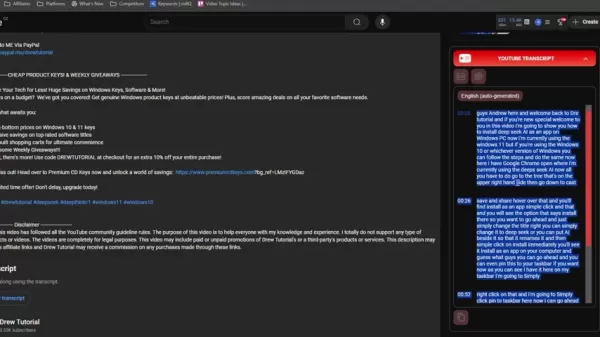
Nesley YouTube Research & Analytics: Comprehensive toolset including transcript extraction
These extensions provide reliable alternatives to native YouTube transcripts, ensuring high-quality input for DeepSeek processing. Installation is straightforward through the Chrome Web Store.
Step-by-Step Guide: Summarizing with DeepSeek
Preparing the Transcript
After obtaining your transcript, verify accuracy and optimize formatting:
Step 1: Copy the Transcript
Select and copy the complete transcript text
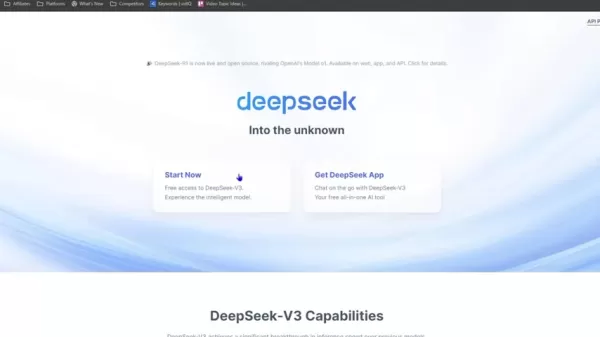
Step 2: Access DeepSeek AI
Navigate to DeepSeek's platform via your preferred browser
Step 3: Initiating the Summarization Process
Locate the text input field within DeepSeek's interface
Step 4: Inputting the Transcript into DeepSeek
Paste your prepared transcript into the designated area
Step 5: Instructing DeepSeek for Summarization
Include clear summarization instructions such as:
- 'Summarize this video transcript highlighting key takeaways'
- 'Condense this content into bullet points'
- 'Extract the main arguments from this discussion'
Step 6: Configuring the DeepThink Option for Enhanced Summarization
Enable DeepThink mode for improved analysis depth
Step 7: Reviewing and Utilizing the Summary
Evaluate DeepSeek's output for accuracy and completeness
Tips for Effective AI Video Summarization
Fine-Tuning Your Summaries
Optimize your summarization results with these strategies:
- Precise Prompting: Specify summary length and focus areas
- Quality Review: Always verify AI-generated summaries
- Human Enhancement: Combine AI output with expert insights
DeepSeek Pricing
Understanding DeepSeek's Cost Structure
DeepSeek offers scalable pricing including a free tier for basic usage and premium options with advanced features. Each plan provides distinct processing capacities, with flexible upgrade paths.
DeepSeek: Weighing the Advantages and Disadvantages
Pros
Exceptional time efficiency
Intuitive user experience
Enhanced DeepThink analytics
Seamless Chrome integration
Generous free tier availability
Cons
Transcript quality dependency
Output variability
Advanced feature learning curve
Manual refinement sometimes needed
Current language limitations
DeepSeek's Key Features
Exploring Core Capabilities
DeepSeek distinguishes itself through:
- Advanced Summarization: Rapid conversion of dense content
- DeepThink Enhancement: Context-aware processing
- Accessible Interface: Straightforward user experience
- Browser Integration: Efficient workflow solutions
- Customization Options: Tailored output configurations
DeepSeek Use Cases
Applications Across Industries
DeepSeek delivers value across multiple domains:
- Academic Research: Efficient literature review
- Professional Training: Rapid skill acquisition
- Market Intelligence: Competitive analysis
- Media Production: Content ideation
- Personal Development: Accelerated learning
Frequently Asked Questions
Is DeepSeek free to use?
DeepSeek provides complimentary basic access alongside premium subscription options.
How accurate are AI-generated summaries?
While generally reliable, summaries benefit from human verification.
Can I summarize videos in languages other than English?
DeepSeek supports multiple languages with varying capability levels.
Do I need technical skills to use DeepSeek?
The platform is designed for users of all technical backgrounds.
Related Questions
What other AI tools are available for video summarization?
Alternatives include Otter.ai, Descript, and SummarizeBot.
How can I improve the accuracy of YouTube's auto-generated transcripts?
Manual editing and content creator interventions enhance accuracy.
Are there legal considerations when summarizing YouTube videos?
Fair use principles and proper attribution are essential factors.
Related article
 DeepMind CEO Hassabis: I sleep six hours a day, usually feel energetic around 1 a.m.
Fortune recently featured an interview with Demis Hassabis, CEO of Google DeepMind, revealing his unconventional approach to rest and productivity. Hassabis disclosed that he sleeps very little, structuring his waking hours into two distinct work blo
OpenAI, Anthropic Vie for Market Share Despite Revenue Shortfalls
Despite recent reports suggesting OpenAI missed revenue targets, creating pressure on tech stocks this Tuesday, private AI lab investors remain resilient. Seasoned backers have confirmed they will not reduce investment despite negative media coverage
California AV Compliance: A New Era of Tickets, Geofences, and 1M Miles
Guident operates an AuveTech shuttle in South Florida, managing a four-mile route in West Palm Beach and a one-mile route in Boca Raton using its remote monitoring technology. | Credit: GuidentCalifornia is redefining the regulatory landscape for dri
Related Special Topic Recommendations
Music composition
DeepMind CEO Hassabis: I sleep six hours a day, usually feel energetic around 1 a.m.
Fortune recently featured an interview with Demis Hassabis, CEO of Google DeepMind, revealing his unconventional approach to rest and productivity. Hassabis disclosed that he sleeps very little, structuring his waking hours into two distinct work blo
OpenAI, Anthropic Vie for Market Share Despite Revenue Shortfalls
Despite recent reports suggesting OpenAI missed revenue targets, creating pressure on tech stocks this Tuesday, private AI lab investors remain resilient. Seasoned backers have confirmed they will not reduce investment despite negative media coverage
California AV Compliance: A New Era of Tickets, Geofences, and 1M Miles
Guident operates an AuveTech shuttle in South Florida, managing a four-mile route in West Palm Beach and a one-mile route in Boca Raton using its remote monitoring technology. | Credit: GuidentCalifornia is redefining the regulatory landscape for dri
Related Special Topic Recommendations
Music composition
 AI Stem Separation Tools for Remix Production, Sampling Prep, and Karaoke Masters
2026 Latest Best Top-rated AI Stem Separation Tools Curated for Remix Production, Sampling Prep, and Karaoke Masters. These powerful game-changing tools offer real-world tests to deliver precise audio isolation, boosting productivity significantly. XIX.AI provides a weekly updated free vs paid comparison guide to help you find the must-try solution that suits your needs. Explore now to unlock your AI edge.
 8 tools
 xix.ai
Data Analysis
AI SQL Copilots for Revenue Dashboards, Funnel Analysis, and Product Metrics
xix.ai
Data Analysis
AI SQL Copilots for Revenue Dashboards, Funnel Analysis, and Product Metrics
2026 Latest Best AI SQL Copilots Ranked Top-Rated! XIX.AI curates a powerful game-changing collection for weekly updated real-world tests. These must-try tools help you generate accurate revenue dashboards, analyze sales funnels, and track product metrics swiftly, boosting productivity massively. Explore now to Discover your perfect tool for data-driven decision making! 238 characters
9 tools
xix.ai
Music composition
Best AI Melody Writing Tools for Song Drafts
2026 Latest Best Top-Rated AI Melody Writing Tools for Song Drafts! XIX.AI has curated a highly powerful game-changing collection that goes through rigorous real-world tests to deliver the best writing experience. You can find detailed free vs paid comparisons, accurate rankings, and must-try options designed to help you create stunning song drafts effortlessly and boost your creative productivity significantly. Explore now to discover your perfect tool!
8 tools
xix.ai
chatbot
Best AI Conversation Trainer Tools for Interview Practice
2026 Latest Best Top-rated AI Conversation Trainer Tools for Interview Practice are here on XIX.AI! This curated collection features powerful, game-changing tools that go through rigorous real-world tests to deliver accurate feedback. You’ll find a free vs paid comparison and detailed rankings to help you choose the must-try option that boosts your confidence and skills. Explore now to Discover your perfect tool for interview success!
12 tools
xix.ai
Design & Art
Best AI Style Transfer Tools for Creative Experiments
2026 Latest Best Top-rated AI Style Transfer Tools for Creative Experiments! XIX.AI has curated a powerful, game-changing collection of must-try tools that deliver exceptional results through real-world tests and rigorous rankings. These top solutions help creatives boost productivity significantly by accelerating content creation and unlocking endless creative possibilities. Explore now to discover your perfect tool and start creating today!
9 tools
xix.ai
Comic Creation
Best AI Dialogue Bubble Tools for Visual Storytelling
2026 Latest Best Top-Rated AI Dialogue Bubble Tools for Visual Storytelling are here on XIX.AI! This curated collection features powerful, game-changing tools that help creators boost productivity and overcome creative bottlenecks. Get a free vs paid comparison, see real-world tests, and check the latest rankings to find the must-try solutions perfect for crafting engaging visual narratives. Explore now to discover your ideal tool!
10 tools
xix.ai

 Comments (0)
0/500
Comments (0)
0/500
In today's fast-paced digital landscape, efficiently extracting key insights from lengthy YouTube videos has become essential. Cutting-edge AI tools are transforming this process, offering intelligent solutions for content consumption. This guide explores how DeepSeek's innovative AI technology delivers precise YouTube video summaries quickly and effectively. Ideal for students, professionals, and lifelong learners, mastering this approach can dramatically improve how you process video content.
Key Points
Master DeepSeek's AI-powered YouTube summarization capabilities
Discover efficient methods for retrieving video transcripts
Learn about Chrome extensions that streamline transcript extraction
Understand the workflow for processing transcripts with DeepSeek
Recognize the productivity benefits of AI-powered video digesting
Unlocking AI Video Summarization
The Power of AI in Content Consumption
The overwhelming volume of online video content demands smarter consumption strategies. AI summarization offers an efficient solution, enabling users to quickly capture core concepts without extensive viewing time. This proves particularly valuable for educational materials, technical tutorials, and professional presentations where information extraction is critical. Platforms like DeepSeek empower users to transform their learning and research processes, fundamentally changing how we engage with digital media. By identifying central themes and condensing lengthy narratives into digestible formats, AI tools free up mental bandwidth for deeper comprehension and analysis.
Introducing DeepSeek: Your AI Summarization Assistant
DeepSeek stands out as a premier AI platform specializing in complex information processing. Its sophisticated text comprehension makes it exceptionally suited for video transcript summarization. By feeding YouTube transcripts into DeepSeek, users receive condensed versions highlighting key insights and main arguments. The platform proves invaluable for students reviewing lectures, researchers scanning academic content, and professionals staying current with industry trends. Beyond summarization, DeepSeek offers robust capabilities in data interpretation, content generation, and natural language processing.
Accessing YouTube Video Transcripts: Essential First Steps
Effective summarization begins with obtaining accurate video transcripts. While YouTube provides auto-generated transcripts for many videos, quality may vary. Follow these steps:
- Open the YouTube Video:
Navigate to your target YouTube video recording
- Access the Video Description: Expand the video description section beneath the player
- Find the Transcript Section: Locate the 'Transcript' or 'Show Transcript' option
Display the Transcript: Activate the transcript display alongside the video
For enhanced reliability, consider specialized Chrome extensions that improve transcript accessibility and accuracy.
Utilizing Google Chrome Extensions for Simplified Transcript Access
Simplify transcript retrieval with dedicated Chrome extensions that integrate directly with YouTube:
YouTube Transcript: Dedicated extension offering one-click transcript access
Nesley YouTube Research & Analytics: Comprehensive toolset including transcript extraction
These extensions provide reliable alternatives to native YouTube transcripts, ensuring high-quality input for DeepSeek processing. Installation is straightforward through the Chrome Web Store.
Step-by-Step Guide: Summarizing with DeepSeek
Preparing the Transcript
After obtaining your transcript, verify accuracy and optimize formatting:
Step 1: Copy the Transcript
Select and copy the complete transcript text
Step 2: Access DeepSeek AI
Navigate to DeepSeek's platform via your preferred browser
Step 3: Initiating the Summarization Process
Locate the text input field within DeepSeek's interface
Step 4: Inputting the Transcript into DeepSeek
Paste your prepared transcript into the designated area
Step 5: Instructing DeepSeek for Summarization
Include clear summarization instructions such as:
- 'Summarize this video transcript highlighting key takeaways'
- 'Condense this content into bullet points'
- 'Extract the main arguments from this discussion'
Step 6: Configuring the DeepThink Option for Enhanced Summarization
Enable DeepThink mode for improved analysis depth
Step 7: Reviewing and Utilizing the Summary
Evaluate DeepSeek's output for accuracy and completeness
Tips for Effective AI Video Summarization
Fine-Tuning Your Summaries
Optimize your summarization results with these strategies:
- Precise Prompting: Specify summary length and focus areas
- Quality Review: Always verify AI-generated summaries
- Human Enhancement: Combine AI output with expert insights
DeepSeek Pricing
Understanding DeepSeek's Cost Structure
DeepSeek offers scalable pricing including a free tier for basic usage and premium options with advanced features. Each plan provides distinct processing capacities, with flexible upgrade paths.
DeepSeek: Weighing the Advantages and Disadvantages
Pros
Exceptional time efficiency
Intuitive user experience
Enhanced DeepThink analytics
Seamless Chrome integration
Generous free tier availability
Cons
Transcript quality dependency
Output variability
Advanced feature learning curve
Manual refinement sometimes needed
Current language limitations
DeepSeek's Key Features
Exploring Core Capabilities
DeepSeek distinguishes itself through:
- Advanced Summarization: Rapid conversion of dense content
- DeepThink Enhancement: Context-aware processing
- Accessible Interface: Straightforward user experience
- Browser Integration: Efficient workflow solutions
- Customization Options: Tailored output configurations
DeepSeek Use Cases
Applications Across Industries
DeepSeek delivers value across multiple domains:
- Academic Research: Efficient literature review
- Professional Training: Rapid skill acquisition
- Market Intelligence: Competitive analysis
- Media Production: Content ideation
- Personal Development: Accelerated learning
Frequently Asked Questions
Is DeepSeek free to use?
DeepSeek provides complimentary basic access alongside premium subscription options.
How accurate are AI-generated summaries?
While generally reliable, summaries benefit from human verification.
Can I summarize videos in languages other than English?
DeepSeek supports multiple languages with varying capability levels.
Do I need technical skills to use DeepSeek?
The platform is designed for users of all technical backgrounds.
Related Questions
What other AI tools are available for video summarization?
Alternatives include Otter.ai, Descript, and SummarizeBot.
How can I improve the accuracy of YouTube's auto-generated transcripts?
Manual editing and content creator interventions enhance accuracy.
Are there legal considerations when summarizing YouTube videos?
Fair use principles and proper attribution are essential factors.








 DeepMind CEO Hassabis: I sleep six hours a day, usually feel energetic around 1 a.m.
Fortune recently featured an interview with Demis Hassabis, CEO of Google DeepMind, revealing his unconventional approach to rest and productivity. Hassabis disclosed that he sleeps very little, structuring his waking hours into two distinct work blo
DeepMind CEO Hassabis: I sleep six hours a day, usually feel energetic around 1 a.m.
Fortune recently featured an interview with Demis Hassabis, CEO of Google DeepMind, revealing his unconventional approach to rest and productivity. Hassabis disclosed that he sleeps very little, structuring his waking hours into two distinct work blo
 OpenAI, Anthropic Vie for Market Share Despite Revenue Shortfalls
Despite recent reports suggesting OpenAI missed revenue targets, creating pressure on tech stocks this Tuesday, private AI lab investors remain resilient. Seasoned backers have confirmed they will not reduce investment despite negative media coverage
California AV Compliance: A New Era of Tickets, Geofences, and 1M Miles
Guident operates an AuveTech shuttle in South Florida, managing a four-mile route in West Palm Beach and a one-mile route in Boca Raton using its remote monitoring technology. | Credit: GuidentCalifornia is redefining the regulatory landscape for dri
OpenAI, Anthropic Vie for Market Share Despite Revenue Shortfalls
Despite recent reports suggesting OpenAI missed revenue targets, creating pressure on tech stocks this Tuesday, private AI lab investors remain resilient. Seasoned backers have confirmed they will not reduce investment despite negative media coverage
California AV Compliance: A New Era of Tickets, Geofences, and 1M Miles
Guident operates an AuveTech shuttle in South Florida, managing a four-mile route in West Palm Beach and a one-mile route in Boca Raton using its remote monitoring technology. | Credit: GuidentCalifornia is redefining the regulatory landscape for dri

2026 Latest Best Top-rated AI Stem Separation Tools Curated for Remix Production, Sampling Prep, and Karaoke Masters. These powerful game-changing tools offer real-world tests to deliver precise audio isolation, boosting productivity significantly. XIX.AI provides a weekly updated free vs paid comparison guide to help you find the must-try solution that suits your needs. Explore now to unlock your AI edge.
8 tools
xix.ai

2026 Latest Best AI SQL Copilots Ranked Top-Rated! XIX.AI curates a powerful game-changing collection for weekly updated real-world tests. These must-try tools help you generate accurate revenue dashboards, analyze sales funnels, and track product metrics swiftly, boosting productivity massively. Explore now to Discover your perfect tool for data-driven decision making! 238 characters
9 tools
xix.ai

2026 Latest Best Top-Rated AI Melody Writing Tools for Song Drafts! XIX.AI has curated a highly powerful game-changing collection that goes through rigorous real-world tests to deliver the best writing experience. You can find detailed free vs paid comparisons, accurate rankings, and must-try options designed to help you create stunning song drafts effortlessly and boost your creative productivity significantly. Explore now to discover your perfect tool!
8 tools
xix.ai

2026 Latest Best Top-rated AI Conversation Trainer Tools for Interview Practice are here on XIX.AI! This curated collection features powerful, game-changing tools that go through rigorous real-world tests to deliver accurate feedback. You’ll find a free vs paid comparison and detailed rankings to help you choose the must-try option that boosts your confidence and skills. Explore now to Discover your perfect tool for interview success!
12 tools
xix.ai

2026 Latest Best Top-rated AI Style Transfer Tools for Creative Experiments! XIX.AI has curated a powerful, game-changing collection of must-try tools that deliver exceptional results through real-world tests and rigorous rankings. These top solutions help creatives boost productivity significantly by accelerating content creation and unlocking endless creative possibilities. Explore now to discover your perfect tool and start creating today!
9 tools
xix.ai

2026 Latest Best Top-Rated AI Dialogue Bubble Tools for Visual Storytelling are here on XIX.AI! This curated collection features powerful, game-changing tools that help creators boost productivity and overcome creative bottlenecks. Get a free vs paid comparison, see real-world tests, and check the latest rankings to find the must-try solutions perfect for crafting engaging visual narratives. Explore now to discover your ideal tool!
10 tools
xix.ai












