


 Home
HomeProSchool.ai Launches Guide to Setting Up Teacher Profiles and Creating Courses
ProSchool.ai transforms online education with AI-driven tools that help teachers build dynamic and captivating learning environments. This guide offers a complete walkthrough on establishing a personalized teacher profile, customizing your AI assistant, and creating your first course. Elevate your teaching and expand your impact with ProSchool.ai!
Key Points
Register as a teacher on ProSchool.ai to access a personalized AI assistant.
Customize your AI assistant with a unique name, preferred tone, and a tailored welcome message.
Design engaging courses with detailed descriptions and AI-generated visuals.
Quickly produce lessons, assignments, and rubrics with AI support.
Edit and personalize AI-generated content to fit your unique teaching approach.
Getting Started with ProSchool.ai
Initial Registration: Setting Up Your Teacher Account
The first step to harnessing ProSchool.ai's power is to create your teacher account.
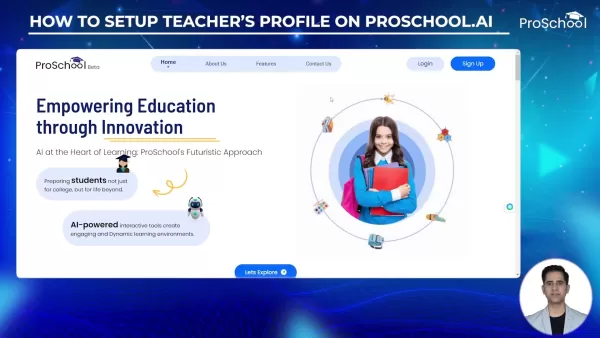
On the ProSchool.AI website, locate the prominent 'Sign Up' button and click to begin. You'll be given the choice to register as a student, teacher, or parent. Selecting 'Teacher' is essential to unlock the platform's dedicated educator tools. Next, enter your email address and create a strong, secure password that meets the platform's requirements. ProSchool.ai provides a straightforward registration process, allowing you to sign up with your email or use your Google account.
Email Verification: After submitting your details, you will receive a verification code via email. This step confirms your email address and secures your account. Enter the code on the ProSchool.ai site to finalize your registration. Without completing verification, you cannot proceed to set up your profile or create courses.
Completing the initial registration lays the groundwork for a tailored teaching experience on ProSchool.ai, enabling you to craft engaging courses and use AI to enhance your instructional strategies. Keep your login credentials secure and accessible, as you'll need them to use all the platform's features.
Personalizing Your Teacher Profile: The Key to Effective AI Assistance
After verifying your account, the next critical step is to set up your teacher profile.
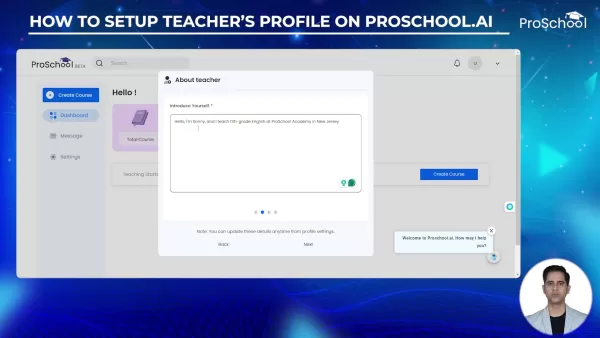
This involves entering detailed personal information, which allows ProSchool.ai to tailor its AI support to your specific needs and teaching style. Upon logging in, you'll see a prompt to 'Setup Profile'. Click this button to begin personalizing your account.
Core Information: Provide your full name, date of birth, gender, location, and preferred language. These details are vital for personalization. Your location helps ProSchool.ai offer geographically relevant content, while your language preference ensures clear communication.
Teaching Details: This section lets you specify the subjects you teach and write a brief personal introduction. Accurate information here ensures ProSchool.ai can suggest relevant lesson plans, assignments, and rubrics. This introduction acts as a virtual handshake with your students, so make it compelling.
Specifying your teaching subjects is crucial for effective AI support. It enables the platform to filter content and provide suggestions directly aligned with your curriculum, saving you time and ensuring resources match your teaching goals.
Customizing your profile goes beyond form-filling. It's about building a digital identity that reflects your teaching philosophy and expertise. A well-crafted profile enhances your ProSchool.ai experience and creates an inviting, informative space for your students.
Breathing Life into Your AI Assistant: Customization is Key
One of ProSchool.ai's most exciting features is the ability to personalize your AI assistant.
This assistant acts as your virtual teaching partner, aiding with tasks from lesson planning to student support. Customizing it creates a unique and engaging experience for you and your students.
Naming Your AI: Give your assistant a name that reflects its role or your personality. This name will be used in all interactions, making the AI feel like a genuine team member. A name that resonates can foster connection and collaboration. In the tutorial, the AI was named Mr. Arcot AI.
Setting the Tone: ProSchool.ai allows you to define your assistant's tone. Choose from options like formal, informative, inspirational, or enthusiastic. A formal tone suits academic content, while an enthusiastic tone may engage younger students more effectively.
Customizing the Welcome Message: The welcome message is your AI's first contact with students. Make it count by crafting something informative and welcoming. You can use a pre-designed template or write a custom message that reflects your personal style.
Adding a Visual Touch: Uploading a profile picture for your AI assistant is important. It provides a visual reference, making the AI feel more real and approachable. Many teachers use their school photo for consistency. This personal touch can greatly improve the student experience, making them more receptive to AI assistance.
By investing time in customizing your AI assistant, you create a powerful tool aligned with your teaching style and objectives. This personalized approach significantly boosts how effectively you use AI to enhance your teaching.
Creating Your First Course: A Step-by-Step Guide
With your profile ready and AI assistant personalized, you can now create your first course on ProSchool.ai.
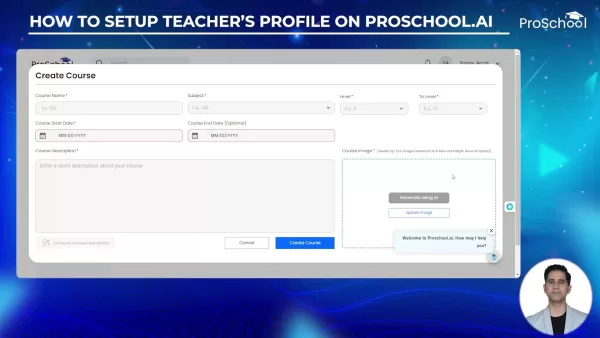
This process involves defining educational content, setting timelines, and adding visual elements to make your course engaging and clear.
Defining Course Details: Start by naming your course. Choose a clear, concise title that reflects the content. Next, select the subjects covered in the course. Accurate subject selection is key to aligning with curriculum standards and resources. Don't forget to specify the grade level.
Setting the Timeline: Establish start and end dates for your course. These dates provide a clear framework for you and your students. Consider the academic calendar to align with school terms and holidays.
Crafting a Course Description: Use the description to outline what the course covers and what students will learn. Write in clear, concise language to convey the course objectives and benefits. A well-written description attracts students and sets the stage for a successful learning journey.
Adding Visual Appeal: Every course needs a visual identifier. You can upload your own image or use the 'Generate using AI' button. This AI feature creates an image based on your course name and description. You can regenerate the image until you find one that perfectly captures your course's essence. This visual element makes your course more attractive and memorable for students.
This process lets you turn your educational vision into a structured, engaging online course ready to inspire and educate your students.
Generating Lessons, Assignments, and Rubrics: AI-Powered Efficiency
Once your course is set up, the next step is to create compelling lessons, assignments, and rubrics. ProSchool.ai’s AI-powered tools streamline this process, enabling you to quickly generate high-quality content tailored to your needs.
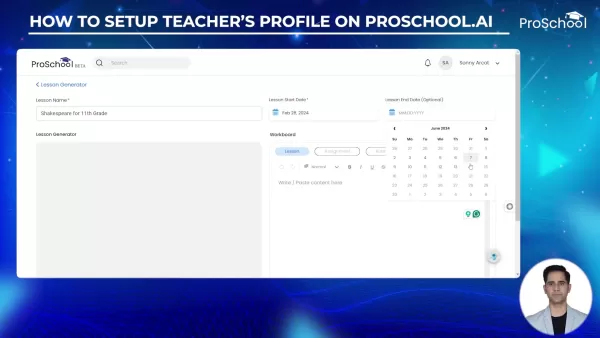
Creating Lessons: Begin by naming your lesson. Select a clear, concise title that reflects the content. Then, set the lesson's start and end dates. You can then write a prompt and use ProSchool.ai's generator to create comprehensive, tailored lesson plans. The AI rapidly produces a structured plan, saving valuable preparation time.
Crafting Engaging Assignments: Assignments reinforce learning and assess understanding. Use ProSchool.ai's assignment generator to create diverse and engaging tasks. Set clear durations, start dates, and expiration dates to manage student workload. Consider different assignment types like essays, quizzes, or projects to cater to various learning styles.
Generating Rubrics: A rubric is essential for providing clear, consistent feedback. ProSchool.ai lets you quickly create grading rubrics aligned with your learning objectives. Input specific criteria into the prompt box, and the AI will generate a comprehensive rubric, ensuring fair and transparent assessment.
Through this process, AI becomes an invaluable aid, drastically reducing preparation time while ensuring material is engaging, relevant, and appropriately evaluated.
Enhanced Features on ProSchool.ai
Personalized Learning Paths
ProSchool.ai excels at crafting personalized learning paths that address individual student needs. By analyzing performance data, the AI tailors the learning experience, recommending resources and activities to fill specific knowledge gaps. This approach boosts engagement, motivation, and overall outcomes. The platform also offers adaptive assessments that adjust in difficulty based on student performance, providing a more accurate measure of understanding.
By creating a dynamic, personalized learning environment, ProSchool.ai empowers students to take ownership of their education, fostering a lifelong love for learning. Personalized learning is a fundamental shift in education delivery, and ProSchool.ai leads this movement.
Evaluating ProSchool.ai: Benefits and Limitations
Pros
AI-Powered Assistance: Streamlines lesson planning and content creation.
Personalized Learning: Offers tailored learning paths for individual students.
Time Efficiency: Reduces teacher workload and preparation time.
Engaging Content: Enhances student engagement with dynamic learning environments.
Streamlined Assessment: Provides robust support for evaluation.
Cons
Dependence on AI: Over-reliance may hinder critical thinking development.
Learning Curve: Requires time to master all features fully.
Cost: Subscription plans may be a barrier for some educators.
Security: Potential security concerns are inherent to AI platforms.
Need for human Review: AI can make errors, requiring human oversight.
Frequently Asked Questions
How do I sign up as a teacher on ProSchool.ai?
Visit the ProSchool.ai website and click 'Sign Up'. Choose the 'Teacher' option, then follow the prompts to enter your email and create a password. Complete the process by verifying your email with the code sent to your inbox.
Can I customize the AI assistant's tone?
Yes. ProSchool.ai lets you select a tone for your AI assistant, such as formal, informative, inspirational, or enthusiastic, to match your teaching style and preferences.
How can I create a course image?
You have two options: upload your own image or use the 'Generate using AI' feature, which creates an image based on your course name and description.
Is it possible to create assignments and rubrics with AI assistance?
Yes. ProSchool.ai provides AI-powered tools to generate lessons, assignments, and rubrics, streamlining content creation and saving you significant time.
Can I edit and customize AI-generated content?
Absolutely. You can easily edit and refine AI-generated content on the platform to align with your teaching style and curriculum, ensuring lessons and assignments meet your specific objectives.
Related Questions
What other AI tools can enhance online teaching?
AI offers numerous tools beyond ProSchool.ai that can transform online teaching. From automated grading systems to personalized feedback mechanisms, these technologies are reshaping education. Imagine AI grading essays while delivering highly customized feedback for each student. Consider AI-driven tools that curate educational content from across the web, providing resources tailored to individual student interests and needs. These advancements are about more than efficiency; they create more engaging, effective, and personalized learning experiences. ProSchool.ai is just the beginning. As AI integrates further into education, it provides educators with innovative ways to connect with students and deliver high-quality instruction. The key is to stay informed, embrace new technologies, and use AI as a teaching partner. In an online classroom, AI can offer individualized support, and ProSchool.ai provides many ways to boost your effectiveness as an online educator.
Related article
 DeepMind CEO Hassabis: I sleep six hours a day, usually feel energetic around 1 a.m.
Fortune recently featured an interview with Demis Hassabis, CEO of Google DeepMind, revealing his unconventional approach to rest and productivity. Hassabis disclosed that he sleeps very little, structuring his waking hours into two distinct work blo
OpenAI, Anthropic Vie for Market Share Despite Revenue Shortfalls
Despite recent reports suggesting OpenAI missed revenue targets, creating pressure on tech stocks this Tuesday, private AI lab investors remain resilient. Seasoned backers have confirmed they will not reduce investment despite negative media coverage
California AV Compliance: A New Era of Tickets, Geofences, and 1M Miles
Guident operates an AuveTech shuttle in South Florida, managing a four-mile route in West Palm Beach and a one-mile route in Boca Raton using its remote monitoring technology. | Credit: GuidentCalifornia is redefining the regulatory landscape for dri
Related Special Topic Recommendations
Music composition
DeepMind CEO Hassabis: I sleep six hours a day, usually feel energetic around 1 a.m.
Fortune recently featured an interview with Demis Hassabis, CEO of Google DeepMind, revealing his unconventional approach to rest and productivity. Hassabis disclosed that he sleeps very little, structuring his waking hours into two distinct work blo
OpenAI, Anthropic Vie for Market Share Despite Revenue Shortfalls
Despite recent reports suggesting OpenAI missed revenue targets, creating pressure on tech stocks this Tuesday, private AI lab investors remain resilient. Seasoned backers have confirmed they will not reduce investment despite negative media coverage
California AV Compliance: A New Era of Tickets, Geofences, and 1M Miles
Guident operates an AuveTech shuttle in South Florida, managing a four-mile route in West Palm Beach and a one-mile route in Boca Raton using its remote monitoring technology. | Credit: GuidentCalifornia is redefining the regulatory landscape for dri
Related Special Topic Recommendations
Music composition
 AI Stem Separation Tools for Remix Production, Sampling Prep, and Karaoke Masters
2026 Latest Best Top-rated AI Stem Separation Tools Curated for Remix Production, Sampling Prep, and Karaoke Masters. These powerful game-changing tools offer real-world tests to deliver precise audio isolation, boosting productivity significantly. XIX.AI provides a weekly updated free vs paid comparison guide to help you find the must-try solution that suits your needs. Explore now to unlock your AI edge.
 8 tools
 xix.ai
Data Analysis
AI SQL Copilots for Revenue Dashboards, Funnel Analysis, and Product Metrics
xix.ai
Data Analysis
AI SQL Copilots for Revenue Dashboards, Funnel Analysis, and Product Metrics
2026 Latest Best AI SQL Copilots Ranked Top-Rated! XIX.AI curates a powerful game-changing collection for weekly updated real-world tests. These must-try tools help you generate accurate revenue dashboards, analyze sales funnels, and track product metrics swiftly, boosting productivity massively. Explore now to Discover your perfect tool for data-driven decision making! 238 characters
9 tools
xix.ai
Music composition
Best AI Melody Writing Tools for Song Drafts
2026 Latest Best Top-Rated AI Melody Writing Tools for Song Drafts! XIX.AI has curated a highly powerful game-changing collection that goes through rigorous real-world tests to deliver the best writing experience. You can find detailed free vs paid comparisons, accurate rankings, and must-try options designed to help you create stunning song drafts effortlessly and boost your creative productivity significantly. Explore now to discover your perfect tool!
8 tools
xix.ai
chatbot
Best AI Conversation Trainer Tools for Interview Practice
2026 Latest Best Top-rated AI Conversation Trainer Tools for Interview Practice are here on XIX.AI! This curated collection features powerful, game-changing tools that go through rigorous real-world tests to deliver accurate feedback. You’ll find a free vs paid comparison and detailed rankings to help you choose the must-try option that boosts your confidence and skills. Explore now to Discover your perfect tool for interview success!
12 tools
xix.ai
Design & Art
Best AI Style Transfer Tools for Creative Experiments
2026 Latest Best Top-rated AI Style Transfer Tools for Creative Experiments! XIX.AI has curated a powerful, game-changing collection of must-try tools that deliver exceptional results through real-world tests and rigorous rankings. These top solutions help creatives boost productivity significantly by accelerating content creation and unlocking endless creative possibilities. Explore now to discover your perfect tool and start creating today!
9 tools
xix.ai
Comic Creation
Best AI Dialogue Bubble Tools for Visual Storytelling
2026 Latest Best Top-Rated AI Dialogue Bubble Tools for Visual Storytelling are here on XIX.AI! This curated collection features powerful, game-changing tools that help creators boost productivity and overcome creative bottlenecks. Get a free vs paid comparison, see real-world tests, and check the latest rankings to find the must-try solutions perfect for crafting engaging visual narratives. Explore now to discover your ideal tool!
10 tools
xix.ai

 Comments (0)
0/500
Comments (0)
0/500
ProSchool.ai transforms online education with AI-driven tools that help teachers build dynamic and captivating learning environments. This guide offers a complete walkthrough on establishing a personalized teacher profile, customizing your AI assistant, and creating your first course. Elevate your teaching and expand your impact with ProSchool.ai!
Key Points
Register as a teacher on ProSchool.ai to access a personalized AI assistant.
Customize your AI assistant with a unique name, preferred tone, and a tailored welcome message.
Design engaging courses with detailed descriptions and AI-generated visuals.
Quickly produce lessons, assignments, and rubrics with AI support.
Edit and personalize AI-generated content to fit your unique teaching approach.
Getting Started with ProSchool.ai
Initial Registration: Setting Up Your Teacher Account
The first step to harnessing ProSchool.ai's power is to create your teacher account.
On the ProSchool.AI website, locate the prominent 'Sign Up' button and click to begin. You'll be given the choice to register as a student, teacher, or parent. Selecting 'Teacher' is essential to unlock the platform's dedicated educator tools. Next, enter your email address and create a strong, secure password that meets the platform's requirements. ProSchool.ai provides a straightforward registration process, allowing you to sign up with your email or use your Google account.
Email Verification: After submitting your details, you will receive a verification code via email. This step confirms your email address and secures your account. Enter the code on the ProSchool.ai site to finalize your registration. Without completing verification, you cannot proceed to set up your profile or create courses.
Completing the initial registration lays the groundwork for a tailored teaching experience on ProSchool.ai, enabling you to craft engaging courses and use AI to enhance your instructional strategies. Keep your login credentials secure and accessible, as you'll need them to use all the platform's features.
Personalizing Your Teacher Profile: The Key to Effective AI Assistance
After verifying your account, the next critical step is to set up your teacher profile.
This involves entering detailed personal information, which allows ProSchool.ai to tailor its AI support to your specific needs and teaching style. Upon logging in, you'll see a prompt to 'Setup Profile'. Click this button to begin personalizing your account.
Core Information: Provide your full name, date of birth, gender, location, and preferred language. These details are vital for personalization. Your location helps ProSchool.ai offer geographically relevant content, while your language preference ensures clear communication.
Teaching Details: This section lets you specify the subjects you teach and write a brief personal introduction. Accurate information here ensures ProSchool.ai can suggest relevant lesson plans, assignments, and rubrics. This introduction acts as a virtual handshake with your students, so make it compelling.
Specifying your teaching subjects is crucial for effective AI support. It enables the platform to filter content and provide suggestions directly aligned with your curriculum, saving you time and ensuring resources match your teaching goals.
Customizing your profile goes beyond form-filling. It's about building a digital identity that reflects your teaching philosophy and expertise. A well-crafted profile enhances your ProSchool.ai experience and creates an inviting, informative space for your students.
Breathing Life into Your AI Assistant: Customization is Key
One of ProSchool.ai's most exciting features is the ability to personalize your AI assistant.
This assistant acts as your virtual teaching partner, aiding with tasks from lesson planning to student support. Customizing it creates a unique and engaging experience for you and your students.
Naming Your AI: Give your assistant a name that reflects its role or your personality. This name will be used in all interactions, making the AI feel like a genuine team member. A name that resonates can foster connection and collaboration. In the tutorial, the AI was named Mr. Arcot AI.
Setting the Tone: ProSchool.ai allows you to define your assistant's tone. Choose from options like formal, informative, inspirational, or enthusiastic. A formal tone suits academic content, while an enthusiastic tone may engage younger students more effectively.
Customizing the Welcome Message: The welcome message is your AI's first contact with students. Make it count by crafting something informative and welcoming. You can use a pre-designed template or write a custom message that reflects your personal style.
Adding a Visual Touch: Uploading a profile picture for your AI assistant is important. It provides a visual reference, making the AI feel more real and approachable. Many teachers use their school photo for consistency. This personal touch can greatly improve the student experience, making them more receptive to AI assistance.
By investing time in customizing your AI assistant, you create a powerful tool aligned with your teaching style and objectives. This personalized approach significantly boosts how effectively you use AI to enhance your teaching.
Creating Your First Course: A Step-by-Step Guide
With your profile ready and AI assistant personalized, you can now create your first course on ProSchool.ai.
This process involves defining educational content, setting timelines, and adding visual elements to make your course engaging and clear.
Defining Course Details: Start by naming your course. Choose a clear, concise title that reflects the content. Next, select the subjects covered in the course. Accurate subject selection is key to aligning with curriculum standards and resources. Don't forget to specify the grade level.
Setting the Timeline: Establish start and end dates for your course. These dates provide a clear framework for you and your students. Consider the academic calendar to align with school terms and holidays.
Crafting a Course Description: Use the description to outline what the course covers and what students will learn. Write in clear, concise language to convey the course objectives and benefits. A well-written description attracts students and sets the stage for a successful learning journey.
Adding Visual Appeal: Every course needs a visual identifier. You can upload your own image or use the 'Generate using AI' button. This AI feature creates an image based on your course name and description. You can regenerate the image until you find one that perfectly captures your course's essence. This visual element makes your course more attractive and memorable for students.
This process lets you turn your educational vision into a structured, engaging online course ready to inspire and educate your students.
Generating Lessons, Assignments, and Rubrics: AI-Powered Efficiency
Once your course is set up, the next step is to create compelling lessons, assignments, and rubrics. ProSchool.ai’s AI-powered tools streamline this process, enabling you to quickly generate high-quality content tailored to your needs.
Creating Lessons: Begin by naming your lesson. Select a clear, concise title that reflects the content. Then, set the lesson's start and end dates. You can then write a prompt and use ProSchool.ai's generator to create comprehensive, tailored lesson plans. The AI rapidly produces a structured plan, saving valuable preparation time.
Crafting Engaging Assignments: Assignments reinforce learning and assess understanding. Use ProSchool.ai's assignment generator to create diverse and engaging tasks. Set clear durations, start dates, and expiration dates to manage student workload. Consider different assignment types like essays, quizzes, or projects to cater to various learning styles.
Generating Rubrics: A rubric is essential for providing clear, consistent feedback. ProSchool.ai lets you quickly create grading rubrics aligned with your learning objectives. Input specific criteria into the prompt box, and the AI will generate a comprehensive rubric, ensuring fair and transparent assessment.
Through this process, AI becomes an invaluable aid, drastically reducing preparation time while ensuring material is engaging, relevant, and appropriately evaluated.
Enhanced Features on ProSchool.ai
Personalized Learning Paths
ProSchool.ai excels at crafting personalized learning paths that address individual student needs. By analyzing performance data, the AI tailors the learning experience, recommending resources and activities to fill specific knowledge gaps. This approach boosts engagement, motivation, and overall outcomes. The platform also offers adaptive assessments that adjust in difficulty based on student performance, providing a more accurate measure of understanding.
By creating a dynamic, personalized learning environment, ProSchool.ai empowers students to take ownership of their education, fostering a lifelong love for learning. Personalized learning is a fundamental shift in education delivery, and ProSchool.ai leads this movement.
Evaluating ProSchool.ai: Benefits and Limitations
Pros
AI-Powered Assistance: Streamlines lesson planning and content creation.
Personalized Learning: Offers tailored learning paths for individual students.
Time Efficiency: Reduces teacher workload and preparation time.
Engaging Content: Enhances student engagement with dynamic learning environments.
Streamlined Assessment: Provides robust support for evaluation.
Cons
Dependence on AI: Over-reliance may hinder critical thinking development.
Learning Curve: Requires time to master all features fully.
Cost: Subscription plans may be a barrier for some educators.
Security: Potential security concerns are inherent to AI platforms.
Need for human Review: AI can make errors, requiring human oversight.
Frequently Asked Questions
How do I sign up as a teacher on ProSchool.ai?
Visit the ProSchool.ai website and click 'Sign Up'. Choose the 'Teacher' option, then follow the prompts to enter your email and create a password. Complete the process by verifying your email with the code sent to your inbox.
Can I customize the AI assistant's tone?
Yes. ProSchool.ai lets you select a tone for your AI assistant, such as formal, informative, inspirational, or enthusiastic, to match your teaching style and preferences.
How can I create a course image?
You have two options: upload your own image or use the 'Generate using AI' feature, which creates an image based on your course name and description.
Is it possible to create assignments and rubrics with AI assistance?
Yes. ProSchool.ai provides AI-powered tools to generate lessons, assignments, and rubrics, streamlining content creation and saving you significant time.
Can I edit and customize AI-generated content?
Absolutely. You can easily edit and refine AI-generated content on the platform to align with your teaching style and curriculum, ensuring lessons and assignments meet your specific objectives.
Related Questions
What other AI tools can enhance online teaching?
AI offers numerous tools beyond ProSchool.ai that can transform online teaching. From automated grading systems to personalized feedback mechanisms, these technologies are reshaping education. Imagine AI grading essays while delivering highly customized feedback for each student. Consider AI-driven tools that curate educational content from across the web, providing resources tailored to individual student interests and needs. These advancements are about more than efficiency; they create more engaging, effective, and personalized learning experiences. ProSchool.ai is just the beginning. As AI integrates further into education, it provides educators with innovative ways to connect with students and deliver high-quality instruction. The key is to stay informed, embrace new technologies, and use AI as a teaching partner. In an online classroom, AI can offer individualized support, and ProSchool.ai provides many ways to boost your effectiveness as an online educator.








 DeepMind CEO Hassabis: I sleep six hours a day, usually feel energetic around 1 a.m.
Fortune recently featured an interview with Demis Hassabis, CEO of Google DeepMind, revealing his unconventional approach to rest and productivity. Hassabis disclosed that he sleeps very little, structuring his waking hours into two distinct work blo
DeepMind CEO Hassabis: I sleep six hours a day, usually feel energetic around 1 a.m.
Fortune recently featured an interview with Demis Hassabis, CEO of Google DeepMind, revealing his unconventional approach to rest and productivity. Hassabis disclosed that he sleeps very little, structuring his waking hours into two distinct work blo
 OpenAI, Anthropic Vie for Market Share Despite Revenue Shortfalls
Despite recent reports suggesting OpenAI missed revenue targets, creating pressure on tech stocks this Tuesday, private AI lab investors remain resilient. Seasoned backers have confirmed they will not reduce investment despite negative media coverage
California AV Compliance: A New Era of Tickets, Geofences, and 1M Miles
Guident operates an AuveTech shuttle in South Florida, managing a four-mile route in West Palm Beach and a one-mile route in Boca Raton using its remote monitoring technology. | Credit: GuidentCalifornia is redefining the regulatory landscape for dri
OpenAI, Anthropic Vie for Market Share Despite Revenue Shortfalls
Despite recent reports suggesting OpenAI missed revenue targets, creating pressure on tech stocks this Tuesday, private AI lab investors remain resilient. Seasoned backers have confirmed they will not reduce investment despite negative media coverage
California AV Compliance: A New Era of Tickets, Geofences, and 1M Miles
Guident operates an AuveTech shuttle in South Florida, managing a four-mile route in West Palm Beach and a one-mile route in Boca Raton using its remote monitoring technology. | Credit: GuidentCalifornia is redefining the regulatory landscape for dri

2026 Latest Best Top-rated AI Stem Separation Tools Curated for Remix Production, Sampling Prep, and Karaoke Masters. These powerful game-changing tools offer real-world tests to deliver precise audio isolation, boosting productivity significantly. XIX.AI provides a weekly updated free vs paid comparison guide to help you find the must-try solution that suits your needs. Explore now to unlock your AI edge.
8 tools
xix.ai

2026 Latest Best AI SQL Copilots Ranked Top-Rated! XIX.AI curates a powerful game-changing collection for weekly updated real-world tests. These must-try tools help you generate accurate revenue dashboards, analyze sales funnels, and track product metrics swiftly, boosting productivity massively. Explore now to Discover your perfect tool for data-driven decision making! 238 characters
9 tools
xix.ai

2026 Latest Best Top-Rated AI Melody Writing Tools for Song Drafts! XIX.AI has curated a highly powerful game-changing collection that goes through rigorous real-world tests to deliver the best writing experience. You can find detailed free vs paid comparisons, accurate rankings, and must-try options designed to help you create stunning song drafts effortlessly and boost your creative productivity significantly. Explore now to discover your perfect tool!
8 tools
xix.ai

2026 Latest Best Top-rated AI Conversation Trainer Tools for Interview Practice are here on XIX.AI! This curated collection features powerful, game-changing tools that go through rigorous real-world tests to deliver accurate feedback. You’ll find a free vs paid comparison and detailed rankings to help you choose the must-try option that boosts your confidence and skills. Explore now to Discover your perfect tool for interview success!
12 tools
xix.ai

2026 Latest Best Top-rated AI Style Transfer Tools for Creative Experiments! XIX.AI has curated a powerful, game-changing collection of must-try tools that deliver exceptional results through real-world tests and rigorous rankings. These top solutions help creatives boost productivity significantly by accelerating content creation and unlocking endless creative possibilities. Explore now to discover your perfect tool and start creating today!
9 tools
xix.ai

2026 Latest Best Top-Rated AI Dialogue Bubble Tools for Visual Storytelling are here on XIX.AI! This curated collection features powerful, game-changing tools that help creators boost productivity and overcome creative bottlenecks. Get a free vs paid comparison, see real-world tests, and check the latest rankings to find the must-try solutions perfect for crafting engaging visual narratives. Explore now to discover your ideal tool!
10 tools
xix.ai












