


 Home
HomeMaster AI Video Inpainting: A Pika Tutorial on Techniques & Best Practices
Dive into the world of AI video inpainting with Pika Additions! This powerful feature allows you to effortlessly place objects, characters, and animals into existing videos, seamlessly merging reality with artificial intelligence. This complete guide will show you how to access and master Pika Additions, explore its top use cases, and spark your creativity to produce unique AI-enhanced videos.
Key Points
Pika Additions performs AI video inpainting, enabling you to insert objects into real footage.
To use it, simply upload a 5-second video and a source image to the Pika platform.
For best results, use clear images on white backgrounds.
Source videos with minimal camera movement yield higher quality inpainting.
Using natural language prompts helps the AI position the new object accurately.
Video inpainting is perfect for blending real-world scenes with AI-generated content.
Understanding AI Video Inpainting with Pika Additions
What is AI Video Inpainting?
AI video inpainting is the groundbreaking process of integrating objects, characters, or animals seamlessly into existing video clips
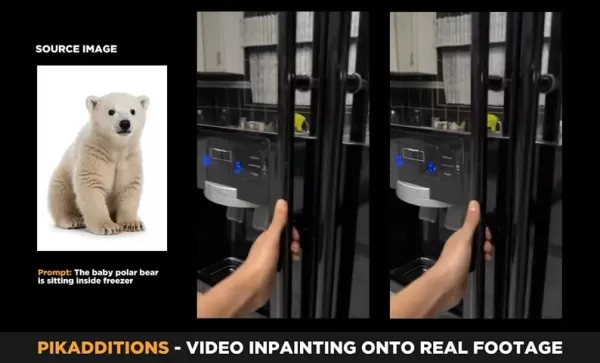
. This goes beyond traditional editing; AI analyzes the scene to realistically position the new element, matching lighting, perspective, and motion. It convincingly merges reality with the creative potential of artificial intelligence.
Pika Additions is a new feature that lets users combine real-world footage with AI for seamless video inpainting. It represents a major advancement in fusing AI-generated objects with reality. This process enables the creation of short videos with highly specific requirements that were once impossible.
Although video inpainting as a concept has existed, its exploration in the AI space has been limited. Pika Labs is leading the change with Pika Additions, expanding the limits of AI-powered video editing. This new tool is set to become essential for content creators, marketers, and anyone wanting to add AI-powered effects to their videos.
Accessing Pika Additions: A Step-by-Step Guide
Getting started with Pika Additions is simple. Follow these steps to use the feature:
- Navigate to Pika: Visit the Pika platform's homepage.
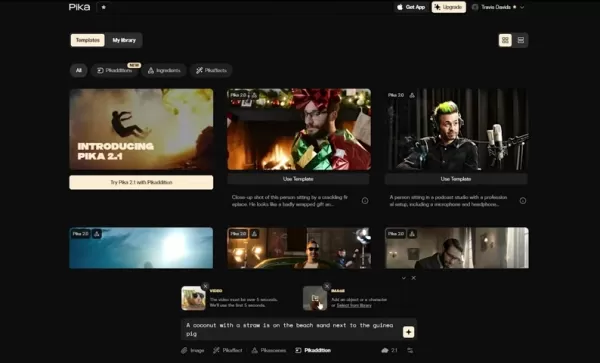
- Locate Pika Additions: Find the 'PikaAdditions' icon, which has been recently added to the home screen
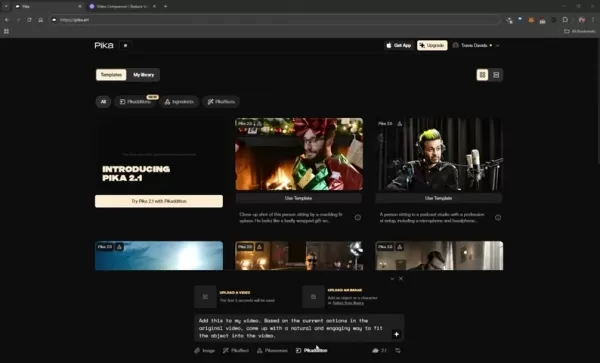
.
- Initiate the Process: Click the PikaAdditions icon to view the feature’s specific options.
- Upload Your Video: Select the video you want to modify. Aim for a length of about 5 seconds. If the video is longer, the system will automatically clip it. Ensure the file size is under 25 MB.
- Upload an Image: Provide the image of the object, character, or animal you want to add to the video.
- Type your Prompt: Enter your text prompt.
- Start Generating: Click the designated icon to begin the video generation process.
Should your video exceed 25MB, compress it using a free online tool like FreeConvert's Video Compressor.
Following this process will get you started on producing unique and engaging AI-enhanced videos with Pika Additions. The range of effective text prompts is limited only by your creativity and imagination. The Pika AI video inpainting tools have a vast number of potential applications.
Mastering Pika Additions: Best Practices for Stunning Results
Images and Visual Clarity
To achieve the best results with Pika Additions, use the following types of images:
- Clear White Backgrounds: Images with a plain white background help the AI isolate the subject accurately
. This leads to a clean cut-out and a more natural integration into your video.
- Minimal Distractions: Images with little to no background clutter also produce superior outcomes. The AI can concentrate on the main subject without interference from unnecessary details.
That said, the AI can often still identify the main subject for video inpainting even with a background present.
When creating your own images, add "on a white background" at the end of your prompt for the highest quality result. Always plan the image you intend to use beforehand to ensure a realistic and high-quality final video.
Here's an example using generated polar bears, showing which images work best for AI video inpainting:
Type Image Results Polar bear with background image of a polar bear with distractions The AI can select the subject, but the final output could be improved. Polar bear on white background image of a polar bear with a white background Makes it easier for the AI to select the subject and cut it out cleanly for a more optimal final video.
Movement and Stability
Regarding movement, careful consideration of the video's content is crucial. For optimal performance:
- Slow and Minimal Movement: When recording your video, use slow and minimal camera movements
. Fast camera motion often causes inconsistencies and pixelation, reducing the overall quality. Keeping your subject relatively still will produce the best result.
- Bad Results: Videos with excessive movement lead to visual inconsistencies and pixelation.
Intentional Imagery
The images you use in your prompt are critical for generating a relevant outcome. Keep these points in mind for top-tier results:
Contextual Relevance: Choose source images that logically fit into the video's context
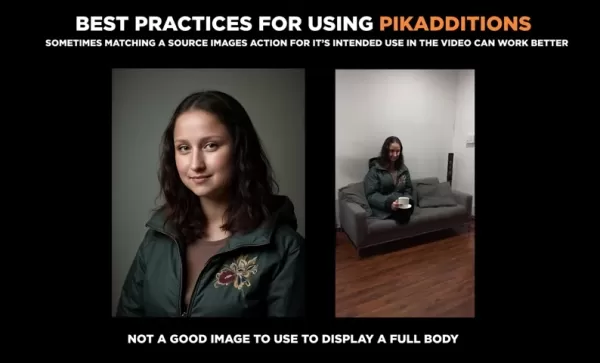
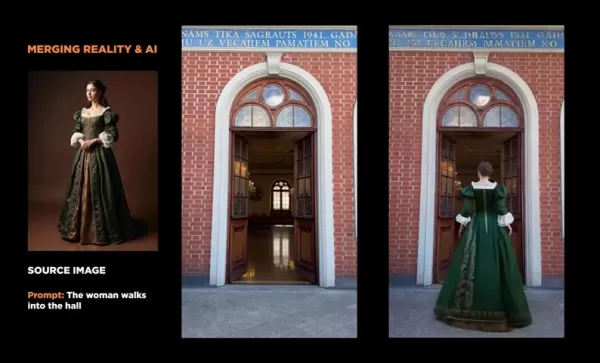
. For example, if you're adding a character to a couch, use an image of someone sitting down. This assists the AI in understanding the spatial relationship between the new element and the existing scene, resulting in a more believable and coherent video.
Here is a comparison:
Scenario Results Torso shot of a character meant to sit The AI might guess the lower body incorrectly, leading to integration issues. An image of a character already seated The AI extracts more contextual information from the source image, allowing it to blend the character into the video more naturally for a superior, realistic effect.
Natural Language Prompts
Pika Additions uses natural language for object placement; there is no manual selection brush. Therefore, clarity in your prompts is essential to guide the AI correctly. Here is a key tip to remember:
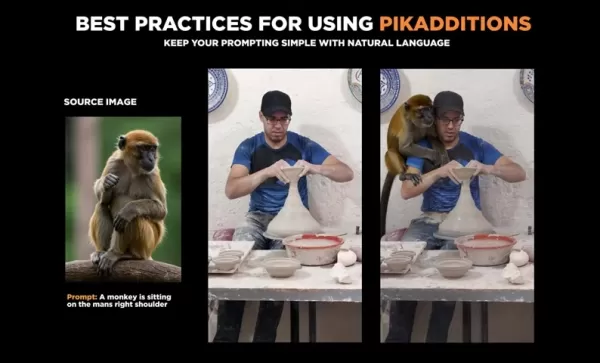
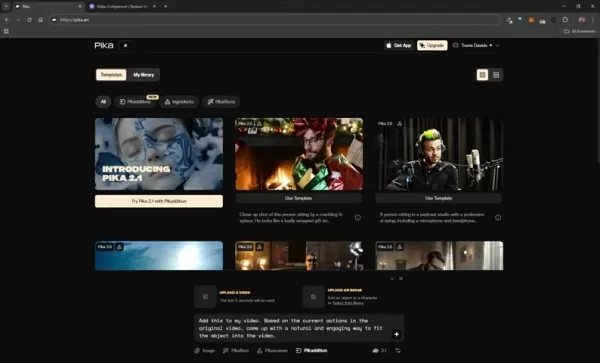
- Keep it Simple: According to Pika's documentation, simple prompting achieves the best results
. State what you want the AI to accomplish in plain language, rather than describing what you want to avoid.
Weighing the Options: Pros and Cons of Using Pika Additions
Pros
Flawlessly integrates AI-generated objects with real video footage.
Offers affordable access to cutting-edge video generation technology that enhances content.
Uses simple text prompts that require no technical expertise.
Cons
A short video is necessary for the process.
Results may not always perfectly match the text prompt.
It often takes several attempts to achieve the desired outcome.
Unlocking Creativity: Use Cases for Pika Additions
Merging Reality and AI
The most compelling use for Pika Additions is its ability to blend real-world footage convincingly with AI-generated elements
. Imagine filming a scene and then using Pika to add mythical creatures, futuristic gadgets, or surprising objects that weren't originally there. For instance, here's what a polar bear infestation might look like, allowing you to quickly inject humorous or surprising effects for comedic value. This unlocks new possibilities for highly engaging and imaginative content that captures audience interest.
These applications do require some pre-planning to achieve the best outcome, but it is an incredibly powerful tool for tasks such as:
- Choosing a location.
- Recording the base footage.
- Deciding which objects or elements to include.
- Applying the Pika Addition to a 5-second clip.
Enhancing AI-Generated Videos
Pika Additions can also be used to add new objects to AI-generated videos, increasing their value and appeal. For example, placing a coconut drink next to a relaxing guinea pig on a beach adds context and enjoyment for the viewer

.
Adding Style
To create unique, eye-catching videos, you can add accessories like sunglasses to characters who weren't originally wearing them. This grants the user significant creative control. With the right prompt and description, a photo can be transformed to produce captivating and mind-bending visuals.
Merging 3D with AI
Combine Unreal Engine and AI to introduce new objects and enhance 3D graphics. Integrating AI can make the final product more appealing and attract a larger audience.
Frequently Asked Questions about Pika Additions
How long can the uploaded video be for Pika Addition?
The uploaded video should be approximately 5 seconds long. The AI will automatically trim any video longer than this down to 5 seconds.
What is the size limit for my video file for Pika Additions?
Video files must be under 25MB, but you can compress them using external tools if needed.
How does Pika Addition differ from other video editing software?
Pika Addition's main advantage is its effortless integration of AI-generated content into real footage, enabling astonishing and surreal video results.
Does it require any coding to generate videos with Pika Addition?
No prior coding knowledge is needed to use Pika Addition, as it relies on basic text prompts. However, more advanced users can incorporate coding, for example, by creating a character in MidJourney and then inserting it into their footage.
Related Questions
What other AI software is used to generate content?
While the Pika addition tool is innovative on its own, it's beneficial to explore other AI software to further enhance your video projects. Here are some tools worth considering:FreeConvert Video Compressor: Easily compress videos for use in Pika Additions. Freepik AI: A great platform for generating AI videos and images to use with the Pika Addition feature. MidJourney: Combine with Pika Addition to merge 3D with AI and add high-quality AI renders into video clips. This method requires more experience than simply using photos, as it involves character creation before insertion into your AI video inpainting.
Related article
 DeepMind CEO Hassabis: I sleep six hours a day, usually feel energetic around 1 a.m.
Fortune recently featured an interview with Demis Hassabis, CEO of Google DeepMind, revealing his unconventional approach to rest and productivity. Hassabis disclosed that he sleeps very little, structuring his waking hours into two distinct work blo
OpenAI, Anthropic Vie for Market Share Despite Revenue Shortfalls
Despite recent reports suggesting OpenAI missed revenue targets, creating pressure on tech stocks this Tuesday, private AI lab investors remain resilient. Seasoned backers have confirmed they will not reduce investment despite negative media coverage
California AV Compliance: A New Era of Tickets, Geofences, and 1M Miles
Guident operates an AuveTech shuttle in South Florida, managing a four-mile route in West Palm Beach and a one-mile route in Boca Raton using its remote monitoring technology. | Credit: GuidentCalifornia is redefining the regulatory landscape for dri
Related Special Topic Recommendations
Video creation
DeepMind CEO Hassabis: I sleep six hours a day, usually feel energetic around 1 a.m.
Fortune recently featured an interview with Demis Hassabis, CEO of Google DeepMind, revealing his unconventional approach to rest and productivity. Hassabis disclosed that he sleeps very little, structuring his waking hours into two distinct work blo
OpenAI, Anthropic Vie for Market Share Despite Revenue Shortfalls
Despite recent reports suggesting OpenAI missed revenue targets, creating pressure on tech stocks this Tuesday, private AI lab investors remain resilient. Seasoned backers have confirmed they will not reduce investment despite negative media coverage
California AV Compliance: A New Era of Tickets, Geofences, and 1M Miles
Guident operates an AuveTech shuttle in South Florida, managing a four-mile route in West Palm Beach and a one-mile route in Boca Raton using its remote monitoring technology. | Credit: GuidentCalifornia is redefining the regulatory landscape for dri
Related Special Topic Recommendations
Video creation
 AI Short-Form Video Hook Generators for Reels, Shorts, and Product Launch Campaigns
2026 Latest Best AI Short-Form Video Hook Generators for Reels Shorts and Product Launch Campaigns! XIX.AI curates top-rated powerful game-changing tools that deliver must-try results through real-world tests. This weekly updated page offers free vs paid comparison rankings to help you find the perfect solution for boosting content creativity and productivity. Explore now to Unlock your AI edge!
 11 tools
 xix.ai
writing
AI Article Outline Tools for Long Form Writing
xix.ai
writing
AI Article Outline Tools for Long Form Writing
2026 Latest Best Top-Rated AI Article Outline Tools for Long Form Writing! This curated collection features powerful, game-changing tools that deliver accurate, structured outlines with real-world tests to boost writing efficiency significantly. XIX.AI is part of this elite selection. Get a free vs paid comparison to help you choose the perfect tool. Explore now and Unlock your AI edge!
9 tools
xix.ai
chatbot
Best AI Roleplay Chat Apps for Language Practice, Interview Prep, and Daily Fluency
2026 Latest Best Top-rated AI Roleplay Chat Apps for Language Practice, Interview Prep, and Daily Fluency! XIX.AI curates a powerful game-changing collection that offers free vs paid comparison, real-world tests, and updated rankings weekly. These must-try tools help you boost writing skills, overcome fluency challenges, and improve communication efficiency across all daily scenarios. Explore now to discover your perfect tool for language growth!
10 tools
xix.ai
Music composition
AI Stem Separation Tools for Remix Production, Sampling Prep, and Karaoke Masters
2026 Latest Best Top-rated AI Stem Separation Tools Curated for Remix Production, Sampling Prep, and Karaoke Masters. These powerful game-changing tools offer real-world tests to deliver precise audio isolation, boosting productivity significantly. XIX.AI provides a weekly updated free vs paid comparison guide to help you find the must-try solution that suits your needs. Explore now to unlock your AI edge.
8 tools
xix.ai
Data Analysis
AI SQL Copilots for Revenue Dashboards, Funnel Analysis, and Product Metrics
2026 Latest Best AI SQL Copilots Ranked Top-Rated! XIX.AI curates a powerful game-changing collection for weekly updated real-world tests. These must-try tools help you generate accurate revenue dashboards, analyze sales funnels, and track product metrics swiftly, boosting productivity massively. Explore now to Discover your perfect tool for data-driven decision making! 238 characters
9 tools
xix.ai
Music composition
Best AI Melody Writing Tools for Song Drafts
2026 Latest Best Top-Rated AI Melody Writing Tools for Song Drafts! XIX.AI has curated a highly powerful game-changing collection that goes through rigorous real-world tests to deliver the best writing experience. You can find detailed free vs paid comparisons, accurate rankings, and must-try options designed to help you create stunning song drafts effortlessly and boost your creative productivity significantly. Explore now to discover your perfect tool!
8 tools
xix.ai

 Comments (1)
0/500
Comments (1)
0/500
![RalphBaker]()
So you're telling me I can just plop a pink elephant into my vacation video? 😅 The future is wild, but also slightly terrifying for video authenticity. Great tutorial though, very clear steps!
Dive into the world of AI video inpainting with Pika Additions! This powerful feature allows you to effortlessly place objects, characters, and animals into existing videos, seamlessly merging reality with artificial intelligence. This complete guide will show you how to access and master Pika Additions, explore its top use cases, and spark your creativity to produce unique AI-enhanced videos.
Key Points
Pika Additions performs AI video inpainting, enabling you to insert objects into real footage.
To use it, simply upload a 5-second video and a source image to the Pika platform.
For best results, use clear images on white backgrounds.
Source videos with minimal camera movement yield higher quality inpainting.
Using natural language prompts helps the AI position the new object accurately.
Video inpainting is perfect for blending real-world scenes with AI-generated content.
Understanding AI Video Inpainting with Pika Additions
What is AI Video Inpainting?
AI video inpainting is the groundbreaking process of integrating objects, characters, or animals seamlessly into existing video clips
. This goes beyond traditional editing; AI analyzes the scene to realistically position the new element, matching lighting, perspective, and motion. It convincingly merges reality with the creative potential of artificial intelligence.
Pika Additions is a new feature that lets users combine real-world footage with AI for seamless video inpainting. It represents a major advancement in fusing AI-generated objects with reality. This process enables the creation of short videos with highly specific requirements that were once impossible.
Although video inpainting as a concept has existed, its exploration in the AI space has been limited. Pika Labs is leading the change with Pika Additions, expanding the limits of AI-powered video editing. This new tool is set to become essential for content creators, marketers, and anyone wanting to add AI-powered effects to their videos.
Accessing Pika Additions: A Step-by-Step Guide
Getting started with Pika Additions is simple. Follow these steps to use the feature:
- Navigate to Pika: Visit the Pika platform's homepage.
- Locate Pika Additions: Find the 'PikaAdditions' icon, which has been recently added to the home screen
.
- Initiate the Process: Click the PikaAdditions icon to view the feature’s specific options.
- Upload Your Video: Select the video you want to modify. Aim for a length of about 5 seconds. If the video is longer, the system will automatically clip it. Ensure the file size is under 25 MB.
- Upload an Image: Provide the image of the object, character, or animal you want to add to the video.
- Type your Prompt: Enter your text prompt.
- Start Generating: Click the designated icon to begin the video generation process.
Should your video exceed 25MB, compress it using a free online tool like FreeConvert's Video Compressor.
Following this process will get you started on producing unique and engaging AI-enhanced videos with Pika Additions. The range of effective text prompts is limited only by your creativity and imagination. The Pika AI video inpainting tools have a vast number of potential applications.
Mastering Pika Additions: Best Practices for Stunning Results
Images and Visual Clarity
To achieve the best results with Pika Additions, use the following types of images:
- Clear White Backgrounds: Images with a plain white background help the AI isolate the subject accurately
. This leads to a clean cut-out and a more natural integration into your video.
- Minimal Distractions: Images with little to no background clutter also produce superior outcomes. The AI can concentrate on the main subject without interference from unnecessary details.
That said, the AI can often still identify the main subject for video inpainting even with a background present.
When creating your own images, add "on a white background" at the end of your prompt for the highest quality result. Always plan the image you intend to use beforehand to ensure a realistic and high-quality final video.
Here's an example using generated polar bears, showing which images work best for AI video inpainting:
| Type | Image | Results |
|---|---|---|
| Polar bear with background | image of a polar bear with distractions | The AI can select the subject, but the final output could be improved. |
| Polar bear on white background | image of a polar bear with a white background | Makes it easier for the AI to select the subject and cut it out cleanly for a more optimal final video. |
Movement and Stability
Regarding movement, careful consideration of the video's content is crucial. For optimal performance:
- Slow and Minimal Movement: When recording your video, use slow and minimal camera movements
. Fast camera motion often causes inconsistencies and pixelation, reducing the overall quality. Keeping your subject relatively still will produce the best result.
- Bad Results: Videos with excessive movement lead to visual inconsistencies and pixelation.
Intentional Imagery
The images you use in your prompt are critical for generating a relevant outcome. Keep these points in mind for top-tier results:
Contextual Relevance: Choose source images that logically fit into the video's context
. For example, if you're adding a character to a couch, use an image of someone sitting down. This assists the AI in understanding the spatial relationship between the new element and the existing scene, resulting in a more believable and coherent video.
Here is a comparison:
Scenario Results Torso shot of a character meant to sit The AI might guess the lower body incorrectly, leading to integration issues. An image of a character already seated The AI extracts more contextual information from the source image, allowing it to blend the character into the video more naturally for a superior, realistic effect.
Natural Language Prompts
Pika Additions uses natural language for object placement; there is no manual selection brush. Therefore, clarity in your prompts is essential to guide the AI correctly. Here is a key tip to remember:
- Keep it Simple: According to Pika's documentation, simple prompting achieves the best results
. State what you want the AI to accomplish in plain language, rather than describing what you want to avoid.
Weighing the Options: Pros and Cons of Using Pika Additions
Pros
Flawlessly integrates AI-generated objects with real video footage.
Offers affordable access to cutting-edge video generation technology that enhances content.
Uses simple text prompts that require no technical expertise.
Cons
A short video is necessary for the process.
Results may not always perfectly match the text prompt.
It often takes several attempts to achieve the desired outcome.
Unlocking Creativity: Use Cases for Pika Additions
Merging Reality and AI
The most compelling use for Pika Additions is its ability to blend real-world footage convincingly with AI-generated elements
. Imagine filming a scene and then using Pika to add mythical creatures, futuristic gadgets, or surprising objects that weren't originally there. For instance, here's what a polar bear infestation might look like, allowing you to quickly inject humorous or surprising effects for comedic value. This unlocks new possibilities for highly engaging and imaginative content that captures audience interest.
These applications do require some pre-planning to achieve the best outcome, but it is an incredibly powerful tool for tasks such as:
- Choosing a location.
- Recording the base footage.
- Deciding which objects or elements to include.
- Applying the Pika Addition to a 5-second clip.
Enhancing AI-Generated Videos
Pika Additions can also be used to add new objects to AI-generated videos, increasing their value and appeal. For example, placing a coconut drink next to a relaxing guinea pig on a beach adds context and enjoyment for the viewer
.
Adding Style
To create unique, eye-catching videos, you can add accessories like sunglasses to characters who weren't originally wearing them. This grants the user significant creative control. With the right prompt and description, a photo can be transformed to produce captivating and mind-bending visuals.
Merging 3D with AI
Combine Unreal Engine and AI to introduce new objects and enhance 3D graphics. Integrating AI can make the final product more appealing and attract a larger audience.
Frequently Asked Questions about Pika Additions
How long can the uploaded video be for Pika Addition?
The uploaded video should be approximately 5 seconds long. The AI will automatically trim any video longer than this down to 5 seconds.
What is the size limit for my video file for Pika Additions?
Video files must be under 25MB, but you can compress them using external tools if needed.
How does Pika Addition differ from other video editing software?
Pika Addition's main advantage is its effortless integration of AI-generated content into real footage, enabling astonishing and surreal video results.
Does it require any coding to generate videos with Pika Addition?
No prior coding knowledge is needed to use Pika Addition, as it relies on basic text prompts. However, more advanced users can incorporate coding, for example, by creating a character in MidJourney and then inserting it into their footage.
Related Questions
What other AI software is used to generate content?
While the Pika addition tool is innovative on its own, it's beneficial to explore other AI software to further enhance your video projects. Here are some tools worth considering:FreeConvert Video Compressor: Easily compress videos for use in Pika Additions. Freepik AI: A great platform for generating AI videos and images to use with the Pika Addition feature. MidJourney: Combine with Pika Addition to merge 3D with AI and add high-quality AI renders into video clips. This method requires more experience than simply using photos, as it involves character creation before insertion into your AI video inpainting.








 DeepMind CEO Hassabis: I sleep six hours a day, usually feel energetic around 1 a.m.
Fortune recently featured an interview with Demis Hassabis, CEO of Google DeepMind, revealing his unconventional approach to rest and productivity. Hassabis disclosed that he sleeps very little, structuring his waking hours into two distinct work blo
DeepMind CEO Hassabis: I sleep six hours a day, usually feel energetic around 1 a.m.
Fortune recently featured an interview with Demis Hassabis, CEO of Google DeepMind, revealing his unconventional approach to rest and productivity. Hassabis disclosed that he sleeps very little, structuring his waking hours into two distinct work blo
 OpenAI, Anthropic Vie for Market Share Despite Revenue Shortfalls
Despite recent reports suggesting OpenAI missed revenue targets, creating pressure on tech stocks this Tuesday, private AI lab investors remain resilient. Seasoned backers have confirmed they will not reduce investment despite negative media coverage
California AV Compliance: A New Era of Tickets, Geofences, and 1M Miles
Guident operates an AuveTech shuttle in South Florida, managing a four-mile route in West Palm Beach and a one-mile route in Boca Raton using its remote monitoring technology. | Credit: GuidentCalifornia is redefining the regulatory landscape for dri
OpenAI, Anthropic Vie for Market Share Despite Revenue Shortfalls
Despite recent reports suggesting OpenAI missed revenue targets, creating pressure on tech stocks this Tuesday, private AI lab investors remain resilient. Seasoned backers have confirmed they will not reduce investment despite negative media coverage
California AV Compliance: A New Era of Tickets, Geofences, and 1M Miles
Guident operates an AuveTech shuttle in South Florida, managing a four-mile route in West Palm Beach and a one-mile route in Boca Raton using its remote monitoring technology. | Credit: GuidentCalifornia is redefining the regulatory landscape for dri

2026 Latest Best AI Short-Form Video Hook Generators for Reels Shorts and Product Launch Campaigns! XIX.AI curates top-rated powerful game-changing tools that deliver must-try results through real-world tests. This weekly updated page offers free vs paid comparison rankings to help you find the perfect solution for boosting content creativity and productivity. Explore now to Unlock your AI edge!
11 tools
xix.ai

2026 Latest Best Top-Rated AI Article Outline Tools for Long Form Writing! This curated collection features powerful, game-changing tools that deliver accurate, structured outlines with real-world tests to boost writing efficiency significantly. XIX.AI is part of this elite selection. Get a free vs paid comparison to help you choose the perfect tool. Explore now and Unlock your AI edge!
9 tools
xix.ai

2026 Latest Best Top-rated AI Roleplay Chat Apps for Language Practice, Interview Prep, and Daily Fluency! XIX.AI curates a powerful game-changing collection that offers free vs paid comparison, real-world tests, and updated rankings weekly. These must-try tools help you boost writing skills, overcome fluency challenges, and improve communication efficiency across all daily scenarios. Explore now to discover your perfect tool for language growth!
10 tools
xix.ai

2026 Latest Best Top-rated AI Stem Separation Tools Curated for Remix Production, Sampling Prep, and Karaoke Masters. These powerful game-changing tools offer real-world tests to deliver precise audio isolation, boosting productivity significantly. XIX.AI provides a weekly updated free vs paid comparison guide to help you find the must-try solution that suits your needs. Explore now to unlock your AI edge.
8 tools
xix.ai

2026 Latest Best AI SQL Copilots Ranked Top-Rated! XIX.AI curates a powerful game-changing collection for weekly updated real-world tests. These must-try tools help you generate accurate revenue dashboards, analyze sales funnels, and track product metrics swiftly, boosting productivity massively. Explore now to Discover your perfect tool for data-driven decision making! 238 characters
9 tools
xix.ai

2026 Latest Best Top-Rated AI Melody Writing Tools for Song Drafts! XIX.AI has curated a highly powerful game-changing collection that goes through rigorous real-world tests to deliver the best writing experience. You can find detailed free vs paid comparisons, accurate rankings, and must-try options designed to help you create stunning song drafts effortlessly and boost your creative productivity significantly. Explore now to discover your perfect tool!
8 tools
xix.ai

So you're telling me I can just plop a pink elephant into my vacation video? 😅 The future is wild, but also slightly terrifying for video authenticity. Great tutorial though, very clear steps!












