


 Home
HomeHow to monetize AI YouTube channels in 2026 and avoid reused content rejection?
Is your AI-powered YouTube channel struggling to earn revenue? Many creators find their monetization requests denied because of reused content policies, particularly when employing standard AI voices. This guide details the essential steps to convert generic AI material into original, distinctive, and revenue-ready videos. Discover techniques for modifying AI voices, writing custom scripts, and improving your audio to satisfy YouTube's criteria and start generating income from your channel.
Key Points
Grasp YouTube's reused content policy as it relates to AI-generated material.
Master the process of editing and customizing AI voices to achieve uniqueness.
Understand why writing original, value-adding scripts is crucial.
Find out which tools can upgrade AI-generated audio to a professional level.
Steer clear of typical mistakes that result in monetization denial.
Understanding the Challenges of AI YouTube Channel Monetization
The Reused Content Dilemma
Numerous YouTube creators exploring AI-generated content encounter a surprising obstacle: monetization rejection. The leading cause is the platform's 'reused content' policy. YouTube's systems are built to identify material that seems mass-produced, repetitive, or simply lacks originality. This risk is especially pronounced with AI voices.
Picture investing endless hours into developing a channel, producing content consistently, and hitting significant benchmarks like 10 million views or 4,000 watch hours. Then, upon applying for monetization, you get the feared 'reused content' alert. This is particularly disheartening when you feel your work is unique. So, what's the underlying issue?
The central problem frequently stems from employing generic AI voices. If you're using the same freely available AI voice tools as countless other creators, your content may not possess the distinctiveness YouTube requires. The algorithm recognizes these synthetic voices and marks the content as unoriginal, triggering monetization problems. Some channels are even being removed from YouTube entirely due to this issue.
Consequently, it's essential to recognize that merely producing content with AI is insufficient. To successfully monetize an AI-driven channel, you must convert generic AI inputs into original, valuable, and compelling videos. This transformation requires several key approaches, which we will examine in depth.
The AI Voice Problem
A primary challenge for AI-driven YouTube channels is the prevalent use of identical AI voices.
Whether you utilize Eleven Labs' complimentary voice options or other easily accessible tools, the algorithm frequently detects a shortage of originality. The problem is that many creators are employing the identical voice, identical tone, and identical delivery, making it simple for YouTube's systems to classify the content as repetitive. Thus, it's imperative to customize AI voices to make them distinctive. You must edit, adjust, and alter them in a manner that sets your content apart from the multitude of AI-generated videos. The objective is to make your AI voice resemble a real person, not a machine, and to provide value to your content.
Transforming AI Content: Key Strategies for Monetization
Crafting Personalized Scripts with ChatGPT
The initial step in producing monetizable AI content is to write a distinct and compelling script. Begin by employing a tool like ChatGPT to create a foundational script. However, don't conclude there. Customize the script by incorporating your own creative contributions, emotions, and unique narrative components.
Here’s how to improve your script:
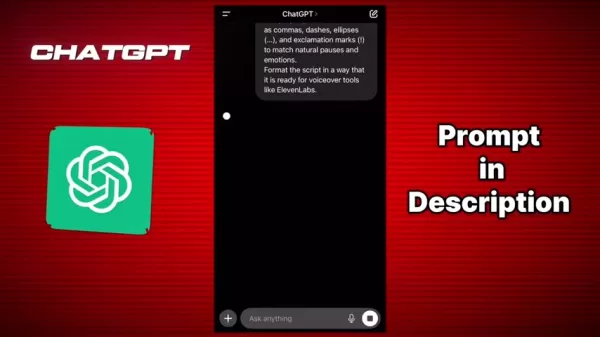
Copy and Paste Your Base Script: Input your initial script into ChatGPT.
Add the Custom Prompt: Use a prompt containing explicit instructions to rewrite the script with specific emotions, emphasis, and formatting. For instance:
'Prepare the above script for an AI voiceover. Write all Hindi words in the Devanagari script, keep all English words in their original form. Use proper punctuation such as commas, dashes, ellipses, and exclamation marks to match natural pauses and emotions. Format the script in a way that it is ready for voiceover tools like Eleven Labs.'
Review and Edit: Scrutinize the rewritten script carefully. Verify proper punctuation, clarity, and emotional tone. Modify as necessary to ensure the script is prepared for AI voice generation.
This method guarantees the script is optimized for AI voiceover, resulting in a more natural and engaging output. It also helps distinguish your content by infusing it with unique traits that aren't easily replicated by others. This is a vital first step in making your content noticeable and meeting YouTube's standards for originality.
AI Voice Editing and Enhancement
Once you possess a personalized script, the subsequent step is to edit and improve the AI voice. Refrain from using the unprocessed, unedited output from AI voice generators, as this is a common reason for content being labeled as reused.
Instead, take these steps to enhance your AI voice:
Generate the AI Voice: Utilize tools like ElevenLabs to produce the voiceover from your personalized script.
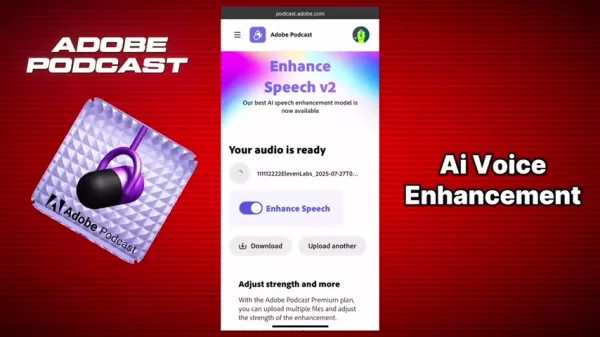
Enhance the Audio: Use Adobe Podcast to improve your generated AI voice. Upload your AI-generated voice to Adobe Podcast. Be certain to enhance the speech.
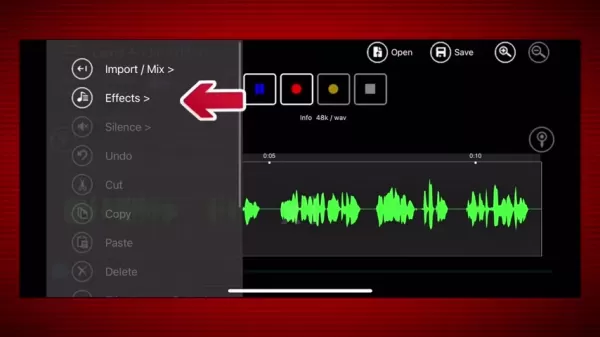
Audio Editing with Lexis Audio Editor: Open Lexis Audio Editor. Apply the settings to inject personality and uniqueness into the voice.
- Go to the effects menu and choose 'Change Pitch'.
- Modify pitch settings. Begin with a minor increase, such as +1, and test different values.
- Proceed to the effect menu, then select ‘Compressor’. Ensure you apply these settings:
- Threshold: -20 dB
- Rate: 5.0/1
- Attack / Release: 50ms/200 ms
- Makeup gain: +1dB
- Return to the effects menu, and choose 'Equalizer'. Adjust settings according to your preference.
By implementing these adjustments, you can produce an AI voice that sounds more authentic and unique, adding personality and character to your content.
Step-by-Step Guide to Monetizing AI-Generated Content
Step 1: Script Personalization with ChatGPT
Start with a Base Script: Use ChatGPT to generate a script for your YouTube video.
Add a Custom Prompt: Input the following prompt into ChatGPT, along with your script:
- 'Prepare the above script for an AI voiceover. Write all Hindi words in the Devanagari script, keep all English words in their original form. Use proper punctuation such as commas, dashes, ellipses, and exclamation marks to match natural pauses and emotions. Format the script in a way that it is ready for voiceover tools like Eleven Labs.'
Review and Edit the Script: Examine the rewritten script thoroughly and make any necessary modifications.
Step 2: AI Voice Generation and Enhancement
- Generate the AI Voice: Paste the script into ElevenLabs, select your preferred voice, and generate the AI voice. Download the resulting audio file to your device.
- Enhance the Audio: Use Adobe Podcast to refine your generated AI voice. Upload the AI-generated audio, then ensure you enhance the speech. Download the improved audio to your device.
- Edit with Lexis Audio Editor: After uploading the enhanced audio to Lexis Audio Editor, use the settings to inject personality and uniqueness into the voice:
- Navigate to the effects menu and select 'Change Pitch'.
- Adjust the pitch settings. Start with a slight increase, like +1, and experiment.
- Return to the effects menu and choose ‘Compressor’. Be sure to apply these settings:
- Threshold: -20 dB
- Rate: 5.0/1
- Attack / Release: 50ms/200 ms
- Makeup gain: +1dB
- Return to the effects menu and select 'Equalizer'. Tweak the settings to your liking.
Step 3: Finalize Your Content
- Integrate the audio into your final video.
- Ensure your video includes edits and visual components. Avoid publishing entirely static videos that only feature an audio track.
Pros and Cons of Using AI for YouTube Content Creation
Pros
Efficiency: AI can rapidly produce scripts and voiceovers, saving considerable time and effort.
Scalability: AI enables the production of high volumes of content without requiring additional human resources.
Cost-Effective: AI tools are often more budget-friendly than hiring voice actors and scriptwriters.
Accessibility: AI opens up content creation to individuals who may lack traditional skills or resources.
Cons
Lack of Originality: Generic AI content can be flagged as reused and denied monetization.
Emotional Tone: AI voices may lack the emotional depth and subtlety of human performers.
Editing Complexity: Modifying and personalizing AI content demands technical skills and extra work.
Compliance Risks: Non-compliance with YouTube's monetization policies can lead to channel penalties or removal.
FAQ
Why is my AI-generated content being rejected for monetization?
Your content may be flagged as 'reused' if it utilizes generic AI voices and scripts that lack distinctiveness. YouTube's algorithms are designed to identify repetitive or mass-produced material.
How can I make my AI voice sound more unique?
Edit and refine the AI voice using tools like Lexis Audio Editor. Tweak the pitch, tempo, equalization, and compression settings to inject personality and reduce the robotic sound. Experiment with minor adjustments to create a distinctive voice.
What role does the script play in monetizing AI content?
A customized and engaging script is vital. Use ChatGPT to establish a foundation, but then incorporate your own creativity, emotions, and storytelling elements to make it truly unique. Ensure the script is correctly formatted for AI voiceover tools to maximize output quality.
Which audio editing tools are recommended for enhancing AI voices?
Lexis Audio Editor and Adobe Podcast are suggested for editing and refining AI voices. These tools provide features such as pitch adjustment, equalization, compression, and noise reduction to improve audio quality.
Is it necessary to edit AI voices even if I have a well-written script?
Yes, editing AI voices is necessary. Even with an excellent script, using the raw output from AI generators can cause your content to be flagged as reused. Editing adds uniqueness and a personal touch that helps your content stand out.
Related Questions
What are the best AI tools for generating realistic voiceovers?
Several AI tools can create realistic voiceovers, including ElevenLabs, Murf.ai, and Descript. Each offers different features and voice options, so test a few to determine which fits your needs best. Seek out tools that permit customization and editing to improve the final result.
How can I ensure my YouTube channel complies with monetization policies?
To guarantee compliance with YouTube's monetization policies, concentrate on creating original, valuable content. Steer clear of copyrighted material, adhere to community guidelines, and regularly review YouTube's monetization policies. Always add substantial value and unique aspects to any AI-generated content to prevent being flagged as reused.
What types of AI-generated content are most likely to be monetized on YouTube?
AI-generated content that delivers significant value, such as educational videos, tutorials, and original narratives, is more likely to be monetized. Content that is extensively edited, personalized, and includes unique creative elements tends to perform better and meet YouTube's standards for originality.
Are there specific niches where AI-generated content performs particularly well?
Yes, AI-generated content often excels in niches like explainer videos, language learning, and personalized stories. These areas can benefit from AI's efficiency and scalability while still allowing for creative input to ensure distinctiveness.
Related article
 DeepMind CEO Hassabis: I sleep six hours a day, usually feel energetic around 1 a.m.
Fortune recently featured an interview with Demis Hassabis, CEO of Google DeepMind, revealing his unconventional approach to rest and productivity. Hassabis disclosed that he sleeps very little, structuring his waking hours into two distinct work blo
OpenAI, Anthropic Vie for Market Share Despite Revenue Shortfalls
Despite recent reports suggesting OpenAI missed revenue targets, creating pressure on tech stocks this Tuesday, private AI lab investors remain resilient. Seasoned backers have confirmed they will not reduce investment despite negative media coverage
California AV Compliance: A New Era of Tickets, Geofences, and 1M Miles
Guident operates an AuveTech shuttle in South Florida, managing a four-mile route in West Palm Beach and a one-mile route in Boca Raton using its remote monitoring technology. | Credit: GuidentCalifornia is redefining the regulatory landscape for dri
Related Special Topic Recommendations
chatbot
DeepMind CEO Hassabis: I sleep six hours a day, usually feel energetic around 1 a.m.
Fortune recently featured an interview with Demis Hassabis, CEO of Google DeepMind, revealing his unconventional approach to rest and productivity. Hassabis disclosed that he sleeps very little, structuring his waking hours into two distinct work blo
OpenAI, Anthropic Vie for Market Share Despite Revenue Shortfalls
Despite recent reports suggesting OpenAI missed revenue targets, creating pressure on tech stocks this Tuesday, private AI lab investors remain resilient. Seasoned backers have confirmed they will not reduce investment despite negative media coverage
California AV Compliance: A New Era of Tickets, Geofences, and 1M Miles
Guident operates an AuveTech shuttle in South Florida, managing a four-mile route in West Palm Beach and a one-mile route in Boca Raton using its remote monitoring technology. | Credit: GuidentCalifornia is redefining the regulatory landscape for dri
Related Special Topic Recommendations
chatbot
 Best AI Roleplay Chat Apps for Language Practice, Interview Prep, and Daily Fluency
2026 Latest Best Top-rated AI Roleplay Chat Apps for Language Practice, Interview Prep, and Daily Fluency! XIX.AI curates a powerful game-changing collection that offers free vs paid comparison, real-world tests, and updated rankings weekly. These must-try tools help you boost writing skills, overcome fluency challenges, and improve communication efficiency across all daily scenarios. Explore now to discover your perfect tool for language growth!
 10 tools
 xix.ai
Music composition
AI Stem Separation Tools for Remix Production, Sampling Prep, and Karaoke Masters
xix.ai
Music composition
AI Stem Separation Tools for Remix Production, Sampling Prep, and Karaoke Masters
2026 Latest Best Top-rated AI Stem Separation Tools Curated for Remix Production, Sampling Prep, and Karaoke Masters. These powerful game-changing tools offer real-world tests to deliver precise audio isolation, boosting productivity significantly. XIX.AI provides a weekly updated free vs paid comparison guide to help you find the must-try solution that suits your needs. Explore now to unlock your AI edge.
8 tools
xix.ai
Data Analysis
AI SQL Copilots for Revenue Dashboards, Funnel Analysis, and Product Metrics
2026 Latest Best AI SQL Copilots Ranked Top-Rated! XIX.AI curates a powerful game-changing collection for weekly updated real-world tests. These must-try tools help you generate accurate revenue dashboards, analyze sales funnels, and track product metrics swiftly, boosting productivity massively. Explore now to Discover your perfect tool for data-driven decision making! 238 characters
9 tools
xix.ai
Music composition
Best AI Melody Writing Tools for Song Drafts
2026 Latest Best Top-Rated AI Melody Writing Tools for Song Drafts! XIX.AI has curated a highly powerful game-changing collection that goes through rigorous real-world tests to deliver the best writing experience. You can find detailed free vs paid comparisons, accurate rankings, and must-try options designed to help you create stunning song drafts effortlessly and boost your creative productivity significantly. Explore now to discover your perfect tool!
8 tools
xix.ai
chatbot
Best AI Conversation Trainer Tools for Interview Practice
2026 Latest Best Top-rated AI Conversation Trainer Tools for Interview Practice are here on XIX.AI! This curated collection features powerful, game-changing tools that go through rigorous real-world tests to deliver accurate feedback. You’ll find a free vs paid comparison and detailed rankings to help you choose the must-try option that boosts your confidence and skills. Explore now to Discover your perfect tool for interview success!
12 tools
xix.ai
Design & Art
Best AI Style Transfer Tools for Creative Experiments
2026 Latest Best Top-rated AI Style Transfer Tools for Creative Experiments! XIX.AI has curated a powerful, game-changing collection of must-try tools that deliver exceptional results through real-world tests and rigorous rankings. These top solutions help creatives boost productivity significantly by accelerating content creation and unlocking endless creative possibilities. Explore now to discover your perfect tool and start creating today!
9 tools
xix.ai

 Comments (1)
0/500
Comments (1)
0/500
![JasonSmith]()
Interesting read! I've been using AI voices for my channel and got hit with the reused content flag last month. This guide's tip about layering custom sound effects seems like a simple but effective workaround. Gonna try mixing in some royalty-free background music too. Hope it works for the next review! 🤞
Is your AI-powered YouTube channel struggling to earn revenue? Many creators find their monetization requests denied because of reused content policies, particularly when employing standard AI voices. This guide details the essential steps to convert generic AI material into original, distinctive, and revenue-ready videos. Discover techniques for modifying AI voices, writing custom scripts, and improving your audio to satisfy YouTube's criteria and start generating income from your channel.
Key Points
Grasp YouTube's reused content policy as it relates to AI-generated material.
Master the process of editing and customizing AI voices to achieve uniqueness.
Understand why writing original, value-adding scripts is crucial.
Find out which tools can upgrade AI-generated audio to a professional level.
Steer clear of typical mistakes that result in monetization denial.
Understanding the Challenges of AI YouTube Channel Monetization
The Reused Content Dilemma
Numerous YouTube creators exploring AI-generated content encounter a surprising obstacle: monetization rejection. The leading cause is the platform's 'reused content' policy. YouTube's systems are built to identify material that seems mass-produced, repetitive, or simply lacks originality. This risk is especially pronounced with AI voices.
Picture investing endless hours into developing a channel, producing content consistently, and hitting significant benchmarks like 10 million views or 4,000 watch hours. Then, upon applying for monetization, you get the feared 'reused content' alert. This is particularly disheartening when you feel your work is unique. So, what's the underlying issue?
The central problem frequently stems from employing generic AI voices. If you're using the same freely available AI voice tools as countless other creators, your content may not possess the distinctiveness YouTube requires. The algorithm recognizes these synthetic voices and marks the content as unoriginal, triggering monetization problems. Some channels are even being removed from YouTube entirely due to this issue.
Consequently, it's essential to recognize that merely producing content with AI is insufficient. To successfully monetize an AI-driven channel, you must convert generic AI inputs into original, valuable, and compelling videos. This transformation requires several key approaches, which we will examine in depth.
The AI Voice Problem
A primary challenge for AI-driven YouTube channels is the prevalent use of identical AI voices.
Whether you utilize Eleven Labs' complimentary voice options or other easily accessible tools, the algorithm frequently detects a shortage of originality. The problem is that many creators are employing the identical voice, identical tone, and identical delivery, making it simple for YouTube's systems to classify the content as repetitive. Thus, it's imperative to customize AI voices to make them distinctive. You must edit, adjust, and alter them in a manner that sets your content apart from the multitude of AI-generated videos. The objective is to make your AI voice resemble a real person, not a machine, and to provide value to your content.
Transforming AI Content: Key Strategies for Monetization
Crafting Personalized Scripts with ChatGPT
The initial step in producing monetizable AI content is to write a distinct and compelling script. Begin by employing a tool like ChatGPT to create a foundational script. However, don't conclude there. Customize the script by incorporating your own creative contributions, emotions, and unique narrative components.
Here’s how to improve your script:
Copy and Paste Your Base Script: Input your initial script into ChatGPT.
Add the Custom Prompt: Use a prompt containing explicit instructions to rewrite the script with specific emotions, emphasis, and formatting. For instance:
'Prepare the above script for an AI voiceover. Write all Hindi words in the Devanagari script, keep all English words in their original form. Use proper punctuation such as commas, dashes, ellipses, and exclamation marks to match natural pauses and emotions. Format the script in a way that it is ready for voiceover tools like Eleven Labs.'
Review and Edit: Scrutinize the rewritten script carefully. Verify proper punctuation, clarity, and emotional tone. Modify as necessary to ensure the script is prepared for AI voice generation.
This method guarantees the script is optimized for AI voiceover, resulting in a more natural and engaging output. It also helps distinguish your content by infusing it with unique traits that aren't easily replicated by others. This is a vital first step in making your content noticeable and meeting YouTube's standards for originality.
AI Voice Editing and Enhancement
Once you possess a personalized script, the subsequent step is to edit and improve the AI voice. Refrain from using the unprocessed, unedited output from AI voice generators, as this is a common reason for content being labeled as reused.
Instead, take these steps to enhance your AI voice:
Generate the AI Voice: Utilize tools like ElevenLabs to produce the voiceover from your personalized script.
Enhance the Audio: Use Adobe Podcast to improve your generated AI voice. Upload your AI-generated voice to Adobe Podcast. Be certain to enhance the speech.
Audio Editing with Lexis Audio Editor: Open Lexis Audio Editor. Apply the settings to inject personality and uniqueness into the voice.
- Go to the effects menu and choose 'Change Pitch'.
- Modify pitch settings. Begin with a minor increase, such as +1, and test different values.
- Proceed to the effect menu, then select ‘Compressor’. Ensure you apply these settings:
- Threshold: -20 dB
- Rate: 5.0/1
- Attack / Release: 50ms/200 ms
- Makeup gain: +1dB
- Return to the effects menu, and choose 'Equalizer'. Adjust settings according to your preference.
By implementing these adjustments, you can produce an AI voice that sounds more authentic and unique, adding personality and character to your content.
Step-by-Step Guide to Monetizing AI-Generated Content
Step 1: Script Personalization with ChatGPT
Start with a Base Script: Use ChatGPT to generate a script for your YouTube video.
Add a Custom Prompt: Input the following prompt into ChatGPT, along with your script:
- 'Prepare the above script for an AI voiceover. Write all Hindi words in the Devanagari script, keep all English words in their original form. Use proper punctuation such as commas, dashes, ellipses, and exclamation marks to match natural pauses and emotions. Format the script in a way that it is ready for voiceover tools like Eleven Labs.'
Review and Edit the Script: Examine the rewritten script thoroughly and make any necessary modifications.
Step 2: AI Voice Generation and Enhancement
- Generate the AI Voice: Paste the script into ElevenLabs, select your preferred voice, and generate the AI voice. Download the resulting audio file to your device.
- Enhance the Audio: Use Adobe Podcast to refine your generated AI voice. Upload the AI-generated audio, then ensure you enhance the speech. Download the improved audio to your device.
- Edit with Lexis Audio Editor: After uploading the enhanced audio to Lexis Audio Editor, use the settings to inject personality and uniqueness into the voice:
- Navigate to the effects menu and select 'Change Pitch'.
- Adjust the pitch settings. Start with a slight increase, like +1, and experiment.
- Return to the effects menu and choose ‘Compressor’. Be sure to apply these settings:
- Threshold: -20 dB
- Rate: 5.0/1
- Attack / Release: 50ms/200 ms
- Makeup gain: +1dB
- Return to the effects menu and select 'Equalizer'. Tweak the settings to your liking.
Step 3: Finalize Your Content
- Integrate the audio into your final video.
- Ensure your video includes edits and visual components. Avoid publishing entirely static videos that only feature an audio track.
Pros and Cons of Using AI for YouTube Content Creation
Pros
Efficiency: AI can rapidly produce scripts and voiceovers, saving considerable time and effort.
Scalability: AI enables the production of high volumes of content without requiring additional human resources.
Cost-Effective: AI tools are often more budget-friendly than hiring voice actors and scriptwriters.
Accessibility: AI opens up content creation to individuals who may lack traditional skills or resources.
Cons
Lack of Originality: Generic AI content can be flagged as reused and denied monetization.
Emotional Tone: AI voices may lack the emotional depth and subtlety of human performers.
Editing Complexity: Modifying and personalizing AI content demands technical skills and extra work.
Compliance Risks: Non-compliance with YouTube's monetization policies can lead to channel penalties or removal.
FAQ
Why is my AI-generated content being rejected for monetization?
Your content may be flagged as 'reused' if it utilizes generic AI voices and scripts that lack distinctiveness. YouTube's algorithms are designed to identify repetitive or mass-produced material.
How can I make my AI voice sound more unique?
Edit and refine the AI voice using tools like Lexis Audio Editor. Tweak the pitch, tempo, equalization, and compression settings to inject personality and reduce the robotic sound. Experiment with minor adjustments to create a distinctive voice.
What role does the script play in monetizing AI content?
A customized and engaging script is vital. Use ChatGPT to establish a foundation, but then incorporate your own creativity, emotions, and storytelling elements to make it truly unique. Ensure the script is correctly formatted for AI voiceover tools to maximize output quality.
Which audio editing tools are recommended for enhancing AI voices?
Lexis Audio Editor and Adobe Podcast are suggested for editing and refining AI voices. These tools provide features such as pitch adjustment, equalization, compression, and noise reduction to improve audio quality.
Is it necessary to edit AI voices even if I have a well-written script?
Yes, editing AI voices is necessary. Even with an excellent script, using the raw output from AI generators can cause your content to be flagged as reused. Editing adds uniqueness and a personal touch that helps your content stand out.
Related Questions
What are the best AI tools for generating realistic voiceovers?
Several AI tools can create realistic voiceovers, including ElevenLabs, Murf.ai, and Descript. Each offers different features and voice options, so test a few to determine which fits your needs best. Seek out tools that permit customization and editing to improve the final result.
How can I ensure my YouTube channel complies with monetization policies?
To guarantee compliance with YouTube's monetization policies, concentrate on creating original, valuable content. Steer clear of copyrighted material, adhere to community guidelines, and regularly review YouTube's monetization policies. Always add substantial value and unique aspects to any AI-generated content to prevent being flagged as reused.
What types of AI-generated content are most likely to be monetized on YouTube?
AI-generated content that delivers significant value, such as educational videos, tutorials, and original narratives, is more likely to be monetized. Content that is extensively edited, personalized, and includes unique creative elements tends to perform better and meet YouTube's standards for originality.
Are there specific niches where AI-generated content performs particularly well?
Yes, AI-generated content often excels in niches like explainer videos, language learning, and personalized stories. These areas can benefit from AI's efficiency and scalability while still allowing for creative input to ensure distinctiveness.








 DeepMind CEO Hassabis: I sleep six hours a day, usually feel energetic around 1 a.m.
Fortune recently featured an interview with Demis Hassabis, CEO of Google DeepMind, revealing his unconventional approach to rest and productivity. Hassabis disclosed that he sleeps very little, structuring his waking hours into two distinct work blo
DeepMind CEO Hassabis: I sleep six hours a day, usually feel energetic around 1 a.m.
Fortune recently featured an interview with Demis Hassabis, CEO of Google DeepMind, revealing his unconventional approach to rest and productivity. Hassabis disclosed that he sleeps very little, structuring his waking hours into two distinct work blo
 OpenAI, Anthropic Vie for Market Share Despite Revenue Shortfalls
Despite recent reports suggesting OpenAI missed revenue targets, creating pressure on tech stocks this Tuesday, private AI lab investors remain resilient. Seasoned backers have confirmed they will not reduce investment despite negative media coverage
California AV Compliance: A New Era of Tickets, Geofences, and 1M Miles
Guident operates an AuveTech shuttle in South Florida, managing a four-mile route in West Palm Beach and a one-mile route in Boca Raton using its remote monitoring technology. | Credit: GuidentCalifornia is redefining the regulatory landscape for dri
OpenAI, Anthropic Vie for Market Share Despite Revenue Shortfalls
Despite recent reports suggesting OpenAI missed revenue targets, creating pressure on tech stocks this Tuesday, private AI lab investors remain resilient. Seasoned backers have confirmed they will not reduce investment despite negative media coverage
California AV Compliance: A New Era of Tickets, Geofences, and 1M Miles
Guident operates an AuveTech shuttle in South Florida, managing a four-mile route in West Palm Beach and a one-mile route in Boca Raton using its remote monitoring technology. | Credit: GuidentCalifornia is redefining the regulatory landscape for dri

2026 Latest Best Top-rated AI Roleplay Chat Apps for Language Practice, Interview Prep, and Daily Fluency! XIX.AI curates a powerful game-changing collection that offers free vs paid comparison, real-world tests, and updated rankings weekly. These must-try tools help you boost writing skills, overcome fluency challenges, and improve communication efficiency across all daily scenarios. Explore now to discover your perfect tool for language growth!
10 tools
xix.ai

2026 Latest Best Top-rated AI Stem Separation Tools Curated for Remix Production, Sampling Prep, and Karaoke Masters. These powerful game-changing tools offer real-world tests to deliver precise audio isolation, boosting productivity significantly. XIX.AI provides a weekly updated free vs paid comparison guide to help you find the must-try solution that suits your needs. Explore now to unlock your AI edge.
8 tools
xix.ai

2026 Latest Best AI SQL Copilots Ranked Top-Rated! XIX.AI curates a powerful game-changing collection for weekly updated real-world tests. These must-try tools help you generate accurate revenue dashboards, analyze sales funnels, and track product metrics swiftly, boosting productivity massively. Explore now to Discover your perfect tool for data-driven decision making! 238 characters
9 tools
xix.ai

2026 Latest Best Top-Rated AI Melody Writing Tools for Song Drafts! XIX.AI has curated a highly powerful game-changing collection that goes through rigorous real-world tests to deliver the best writing experience. You can find detailed free vs paid comparisons, accurate rankings, and must-try options designed to help you create stunning song drafts effortlessly and boost your creative productivity significantly. Explore now to discover your perfect tool!
8 tools
xix.ai

2026 Latest Best Top-rated AI Conversation Trainer Tools for Interview Practice are here on XIX.AI! This curated collection features powerful, game-changing tools that go through rigorous real-world tests to deliver accurate feedback. You’ll find a free vs paid comparison and detailed rankings to help you choose the must-try option that boosts your confidence and skills. Explore now to Discover your perfect tool for interview success!
12 tools
xix.ai

2026 Latest Best Top-rated AI Style Transfer Tools for Creative Experiments! XIX.AI has curated a powerful, game-changing collection of must-try tools that deliver exceptional results through real-world tests and rigorous rankings. These top solutions help creatives boost productivity significantly by accelerating content creation and unlocking endless creative possibilities. Explore now to discover your perfect tool and start creating today!
9 tools
xix.ai

Interesting read! I've been using AI voices for my channel and got hit with the reused content flag last month. This guide's tip about layering custom sound effects seems like a simple but effective workaround. Gonna try mixing in some royalty-free background music too. Hope it works for the next review! 🤞












