


 Home
HomeMixaudio AI Transforms Music Production with AI Stem Separation
Artificial Intelligence is revolutionizing music production, empowering artists with new ways to create, customize, and distribute their work. While existing AI tools show great potential, they've often been limited to generating single audio samples. Mixaudio AI breaks through this barrier by delivering multimodal music generation with customizable AI stems. Every piece of music is 100% royalty-free and accessible to creators of all levels.
Key Points
Mixaudio AI is a multimodal AI music generation platform.
It produces high-quality background music using text descriptions, images, and audio cues.
Users can toggle individual AI stems on or off to tailor the output.
The platform is built for all creators and provides fully royalty-free music.
Specialized tools like AI BGM, AI Remix, and AI Radio support diverse creative requirements.
Unleashing AI in Music Production: The Rise of Mixaudio AI
The Promise and Limitations of AI Music Tools
AI-powered Text-to-Music generators have created exciting possibilities for music production. These platforms make it quick and straightforward to compose music, often requiring little technical knowledge. They expand creative options by offering instruments and sounds that might otherwise be inaccessible. However, conventional AI tools typically generate just one audio sample per request, limiting creative freedom if an unwanted instrument appears. This constraint can hinder the artistic process, leaving musicians seeking greater personalization.
Introducing Mixaudio AI: The Multimodal AI Music Generator
Mixaudio AI overcomes these constraints through its multimodal music generation system.

The platform enables music creation through text descriptions, uploaded visuals, and audio references. Its most innovative aspect is stem-level control, allowing users to activate or deactivate specific components like rhythm, bass, melody, and effects within generated tracks. AI stems form the foundation of music creation. This granular control empowers creators to shape the AI-generated music according to their specific artistic vision, offering unprecedented customization capabilities.
Understanding the Multimodal Approach
Mixaudio AI's standout feature is its multimodal creation method. You can direct the AI's composition using various inputs, including:
Text Prompts:

Describe the mood, genre, and musical style you're imagining. More vivid and detailed descriptions help the AI better interpret your creative direction.
Image Input: Upload a visual that captures the feeling or theme you want your music to express. This effectively inspires the AI and steers it toward a particular aesthetic.
Audio Input: Submit an audio clip from a song or sound you'd like to emulate. The AI analyzes characteristics of your reference audio to produce music with a similar atmosphere.
By integrating these diverse inputs, Mixaudio AI delivers a uniquely adaptable music creation experience.
Mixaudio AI's Creative Arsenal: Features That Set It Apart
AI BGM (Background Music) Generator
The AI BGM function is the platform's core feature for effortless background music creation.
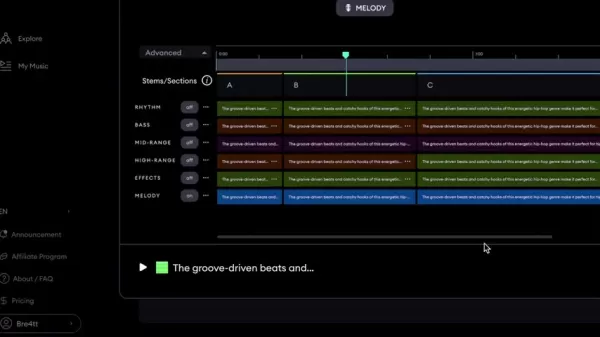
Combine descriptive prompts and images to establish a specific ambiance, then adjust stems to match your preference. Mixaudio enables you to produce distinctive and captivating background scores perfectly suited to your project. This is ideal for content creators, marketers, and anyone needing original, royalty-free music.
AI Remix: Put Your Spin on Existing Tracks
The AI Remix function lets you reinterpret songs through artificial intelligence. Upload a track, and Mixaudio AI will produce a transformed version. This is perfect for breathing new life into familiar melodies. The platform encourages exploration of alternative musical interpretations.

Leverage this feature to experiment with AI-driven musical innovation.
AI Radio: Dive into Endless AI-Generated Soundscapes
Need continuous music for inspiration or workflow? The AI Radio function delivers exactly that.

Immerse yourself in an infinite stream of AI-composed music curated to your taste. With multiple modes and categories, you can find the perfect sound for any situation, keeping your creative process fueled by fresh, engaging audio.
How to Use Mixaudio AI: A Step-by-Step Guide
Step 1: Accessing Mixaudio AI
- Visit the Mixaudio AI website.
- Register for an account or sign into an existing one.
- Explore the interface, paying special attention to primary features like AI BGM, AI Remix, and AI Radio.
Step 2: Generating Music with AI BGM
- Select the AI BGM tool.
- Enter a text description outlining your desired background music. Use the Prompt Genius for creative ideas if necessary.
- Upload an image that reflects your music's mood or theme.
- Optionally, provide an audio sample for the AI to reference.
- Click Generate to create your music sample.
Step 3: Customizing with AI Stems
After generation, you'll see separate AI stems for Rhythm, Bass, Melody, and Effects.
Toggle these stems on or off to customize your track.
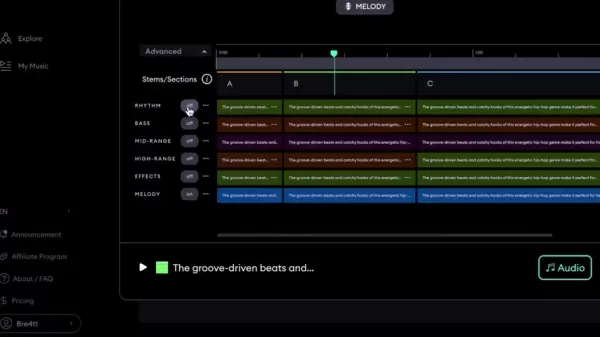
You can also recreate specific stems using the Regenerate function.
Review and refine stems until you're satisfied.
Export to your digital audio workstation.
Step 4: Advanced Customization
Mixaudio AI provides sophisticated customization beyond basic stem management: Regenerate individual stems using new prompts. Replace stems using a reference audio track. Remove stems to achieve a more minimal arrangement.
Step 5: Remixing Existing Tracks
- Choose the AI Remix feature.
- Select an artist from the available catalog to remix.
- Enter a text description defining your remix approach.
- Upload an image or audio sample to guide the AI.
- Click Generate to produce your remix.
Step 6: Exploring AI Radio
- Access the AI Radio feature.
- Pick a theme or genre to begin your station.
- Enjoy the continuous flow of AI-generated music aligned with your preferences.
- Download any tracks that inspire you for use in your projects.
Understanding Mixaudio AI's Pricing Structure
Transparency in Access: Mixaudio AI's Pricing Details
Mixaudio AI provides complimentary access for product testing. Please note that AI tool pricing structures may change over time.
Mixaudio AI: Benefits and Drawbacks
Pros
User-Friendly Interface: Intuitive navigation makes music creation approachable.
Multimodal Input: Accommodates text, image, and audio prompts for versatile creation.
AI Stem Control: Enables precise adjustment of generated music components.
100% Royalty-Free: Provides legal security for both personal and commercial applications.
AI Remix Feature: Enables creative reinterpretation of existing songs.
Cons
Prompt Comprehension: Sometimes requires detailed instructions to achieve intended results.
Custom Stems Download: The stem download process could be more efficient with batch download capabilities.
No Full Music Video Does not include complete music videos, requiring separate image/audio sources for video projects.
Mixaudio AI: Core Features That Define the Future of Music Creation
Highlighting Mixaudio AI's Key Capabilities
- Multimodal AI Music Generation: Create music using text descriptions, images, and audio references.
- AI Stems Customization: Fine-tune music using stem controls for rhythm, bass, melody, and effects.
- AI Remix: Reinterpret songs from various artists and produce creative remixes. The AI model supports various remix styles from hip hop to dark atmospheric versions.
- AI Radio: Experience a limitless flow of AI-composed music to stimulate creativity or provide relaxation.
Unlocking the Potential: Mixaudio AI Use Cases Across Industries
Diverse Applications of Mixaudio AI
- Content Creators: Produce compelling background music for videos, podcasts, and other media formats.
- Musicians and Producers: Find inspiration, develop new concepts, and experiment with different sonic textures.
- Marketers: Build distinctive audio branding for campaigns and commercial use.
- Educators: Teach music production and AI applications through creative methodologies.
- Anyone Seeking Royalty-Free Music: Access completely royalty-free music for both personal and business purposes.
Frequently Asked Questions About Mixaudio AI
What makes Mixaudio AI different from other AI music generators?
Mixaudio AI distinguishes itself through multimodal input options and AI stem customization, delivering superior control and flexibility compared to standard tools.
Is Mixaudio AI royalty-free?
Yes, all music created with Mixaudio AI is completely royalty-free for creators.
Can I use my own audio samples as input?
Absolutely, Mixaudio AI accepts audio input, allowing you to influence the AI's creative direction with your own sounds.
What file formats are supported for image and audio input?
Mixaudio AI accepts PNG and JPEG for images and MP3 or WAV for audio files. Maximum file size is 20MB with a duration limit of 15 minutes.
Related Questions About AI Music Generation
How will AI change the music industry?
AI has powerful potential to democratize music creation, making it accessible to broader audiences. It can help professional artists overcome creative obstacles, generate novel ideas, and optimize their workflows. However, AI also presents challenges regarding copyright, ownership rights, and the intrinsic value of human creativity. The integration of AI into music continues to generate significant discussion.
Is AI music going to replace human musicians?
This is highly improbable. Most experts believe AI will complement and enhance human creativity rather than replace it. The most compelling music will likely emerge from collaborations between human artists and AI systems, combining the strengths of both.
What are the ethical considerations of using AI in music?
Primary ethical concerns include copyright compliance, fair compensation for artists whose work trains AI models, and the risk of AI perpetuating biases present in its training data.
Related article
 DeepMind CEO Hassabis: I sleep six hours a day, usually feel energetic around 1 a.m.
Fortune recently featured an interview with Demis Hassabis, CEO of Google DeepMind, revealing his unconventional approach to rest and productivity. Hassabis disclosed that he sleeps very little, structuring his waking hours into two distinct work blo
OpenAI, Anthropic Vie for Market Share Despite Revenue Shortfalls
Despite recent reports suggesting OpenAI missed revenue targets, creating pressure on tech stocks this Tuesday, private AI lab investors remain resilient. Seasoned backers have confirmed they will not reduce investment despite negative media coverage
California AV Compliance: A New Era of Tickets, Geofences, and 1M Miles
Guident operates an AuveTech shuttle in South Florida, managing a four-mile route in West Palm Beach and a one-mile route in Boca Raton using its remote monitoring technology. | Credit: GuidentCalifornia is redefining the regulatory landscape for dri
Related Special Topic Recommendations
writing
DeepMind CEO Hassabis: I sleep six hours a day, usually feel energetic around 1 a.m.
Fortune recently featured an interview with Demis Hassabis, CEO of Google DeepMind, revealing his unconventional approach to rest and productivity. Hassabis disclosed that he sleeps very little, structuring his waking hours into two distinct work blo
OpenAI, Anthropic Vie for Market Share Despite Revenue Shortfalls
Despite recent reports suggesting OpenAI missed revenue targets, creating pressure on tech stocks this Tuesday, private AI lab investors remain resilient. Seasoned backers have confirmed they will not reduce investment despite negative media coverage
California AV Compliance: A New Era of Tickets, Geofences, and 1M Miles
Guident operates an AuveTech shuttle in South Florida, managing a four-mile route in West Palm Beach and a one-mile route in Boca Raton using its remote monitoring technology. | Credit: GuidentCalifornia is redefining the regulatory landscape for dri
Related Special Topic Recommendations
writing
 AI Article Outline Tools for Long Form Writing
2026 Latest Best Top-Rated AI Article Outline Tools for Long Form Writing! This curated collection features powerful, game-changing tools that deliver accurate, structured outlines with real-world tests to boost writing efficiency significantly. XIX.AI is part of this elite selection. Get a free vs paid comparison to help you choose the perfect tool. Explore now and Unlock your AI edge!
 9 tools
 xix.ai
chatbot
Best AI Roleplay Chat Apps for Language Practice, Interview Prep, and Daily Fluency
xix.ai
chatbot
Best AI Roleplay Chat Apps for Language Practice, Interview Prep, and Daily Fluency
2026 Latest Best Top-rated AI Roleplay Chat Apps for Language Practice, Interview Prep, and Daily Fluency! XIX.AI curates a powerful game-changing collection that offers free vs paid comparison, real-world tests, and updated rankings weekly. These must-try tools help you boost writing skills, overcome fluency challenges, and improve communication efficiency across all daily scenarios. Explore now to discover your perfect tool for language growth!
10 tools
xix.ai
Music composition
AI Stem Separation Tools for Remix Production, Sampling Prep, and Karaoke Masters
2026 Latest Best Top-rated AI Stem Separation Tools Curated for Remix Production, Sampling Prep, and Karaoke Masters. These powerful game-changing tools offer real-world tests to deliver precise audio isolation, boosting productivity significantly. XIX.AI provides a weekly updated free vs paid comparison guide to help you find the must-try solution that suits your needs. Explore now to unlock your AI edge.
8 tools
xix.ai
Data Analysis
AI SQL Copilots for Revenue Dashboards, Funnel Analysis, and Product Metrics
2026 Latest Best AI SQL Copilots Ranked Top-Rated! XIX.AI curates a powerful game-changing collection for weekly updated real-world tests. These must-try tools help you generate accurate revenue dashboards, analyze sales funnels, and track product metrics swiftly, boosting productivity massively. Explore now to Discover your perfect tool for data-driven decision making! 238 characters
9 tools
xix.ai
Music composition
Best AI Melody Writing Tools for Song Drafts
2026 Latest Best Top-Rated AI Melody Writing Tools for Song Drafts! XIX.AI has curated a highly powerful game-changing collection that goes through rigorous real-world tests to deliver the best writing experience. You can find detailed free vs paid comparisons, accurate rankings, and must-try options designed to help you create stunning song drafts effortlessly and boost your creative productivity significantly. Explore now to discover your perfect tool!
8 tools
xix.ai
chatbot
Best AI Conversation Trainer Tools for Interview Practice
2026 Latest Best Top-rated AI Conversation Trainer Tools for Interview Practice are here on XIX.AI! This curated collection features powerful, game-changing tools that go through rigorous real-world tests to deliver accurate feedback. You’ll find a free vs paid comparison and detailed rankings to help you choose the must-try option that boosts your confidence and skills. Explore now to Discover your perfect tool for interview success!
12 tools
xix.ai

 Comments (1)
0/500
Comments (1)
0/500
![GeorgeMiller]()
This AI stem separation thing is wild! As a bedroom producer, I've spent hours trying to isolate vocals from tracks for remixes. If this actually works cleanly, it could save so much time. Though I wonder about the audio quality loss compared to professional studio stems. Still, exciting times for independent creators! 🎧
Artificial Intelligence is revolutionizing music production, empowering artists with new ways to create, customize, and distribute their work. While existing AI tools show great potential, they've often been limited to generating single audio samples. Mixaudio AI breaks through this barrier by delivering multimodal music generation with customizable AI stems. Every piece of music is 100% royalty-free and accessible to creators of all levels.
Key Points
Mixaudio AI is a multimodal AI music generation platform.
It produces high-quality background music using text descriptions, images, and audio cues.
Users can toggle individual AI stems on or off to tailor the output.
The platform is built for all creators and provides fully royalty-free music.
Specialized tools like AI BGM, AI Remix, and AI Radio support diverse creative requirements.
Unleashing AI in Music Production: The Rise of Mixaudio AI
The Promise and Limitations of AI Music Tools
AI-powered Text-to-Music generators have created exciting possibilities for music production. These platforms make it quick and straightforward to compose music, often requiring little technical knowledge. They expand creative options by offering instruments and sounds that might otherwise be inaccessible. However, conventional AI tools typically generate just one audio sample per request, limiting creative freedom if an unwanted instrument appears. This constraint can hinder the artistic process, leaving musicians seeking greater personalization.
Introducing Mixaudio AI: The Multimodal AI Music Generator
Mixaudio AI overcomes these constraints through its multimodal music generation system.
The platform enables music creation through text descriptions, uploaded visuals, and audio references. Its most innovative aspect is stem-level control, allowing users to activate or deactivate specific components like rhythm, bass, melody, and effects within generated tracks. AI stems form the foundation of music creation. This granular control empowers creators to shape the AI-generated music according to their specific artistic vision, offering unprecedented customization capabilities.
Understanding the Multimodal Approach
Mixaudio AI's standout feature is its multimodal creation method. You can direct the AI's composition using various inputs, including:
Text Prompts:
Describe the mood, genre, and musical style you're imagining. More vivid and detailed descriptions help the AI better interpret your creative direction.
Image Input: Upload a visual that captures the feeling or theme you want your music to express. This effectively inspires the AI and steers it toward a particular aesthetic.
Audio Input: Submit an audio clip from a song or sound you'd like to emulate. The AI analyzes characteristics of your reference audio to produce music with a similar atmosphere.
By integrating these diverse inputs, Mixaudio AI delivers a uniquely adaptable music creation experience.
Mixaudio AI's Creative Arsenal: Features That Set It Apart
AI BGM (Background Music) Generator
The AI BGM function is the platform's core feature for effortless background music creation.
Combine descriptive prompts and images to establish a specific ambiance, then adjust stems to match your preference. Mixaudio enables you to produce distinctive and captivating background scores perfectly suited to your project. This is ideal for content creators, marketers, and anyone needing original, royalty-free music.
AI Remix: Put Your Spin on Existing Tracks
The AI Remix function lets you reinterpret songs through artificial intelligence. Upload a track, and Mixaudio AI will produce a transformed version. This is perfect for breathing new life into familiar melodies. The platform encourages exploration of alternative musical interpretations.
Leverage this feature to experiment with AI-driven musical innovation.
AI Radio: Dive into Endless AI-Generated Soundscapes
Need continuous music for inspiration or workflow? The AI Radio function delivers exactly that.
Immerse yourself in an infinite stream of AI-composed music curated to your taste. With multiple modes and categories, you can find the perfect sound for any situation, keeping your creative process fueled by fresh, engaging audio.
How to Use Mixaudio AI: A Step-by-Step Guide
Step 1: Accessing Mixaudio AI
- Visit the Mixaudio AI website.
- Register for an account or sign into an existing one.
- Explore the interface, paying special attention to primary features like AI BGM, AI Remix, and AI Radio.
Step 2: Generating Music with AI BGM
- Select the AI BGM tool.
- Enter a text description outlining your desired background music. Use the Prompt Genius for creative ideas if necessary.
- Upload an image that reflects your music's mood or theme.
- Optionally, provide an audio sample for the AI to reference.
- Click Generate to create your music sample.
Step 3: Customizing with AI Stems
After generation, you'll see separate AI stems for Rhythm, Bass, Melody, and Effects.
Toggle these stems on or off to customize your track.
You can also recreate specific stems using the Regenerate function.
Review and refine stems until you're satisfied.
Export to your digital audio workstation.
Step 4: Advanced Customization
Mixaudio AI provides sophisticated customization beyond basic stem management: Regenerate individual stems using new prompts. Replace stems using a reference audio track. Remove stems to achieve a more minimal arrangement.
Step 5: Remixing Existing Tracks
- Choose the AI Remix feature.
- Select an artist from the available catalog to remix.
- Enter a text description defining your remix approach.
- Upload an image or audio sample to guide the AI.
- Click Generate to produce your remix.
Step 6: Exploring AI Radio
- Access the AI Radio feature.
- Pick a theme or genre to begin your station.
- Enjoy the continuous flow of AI-generated music aligned with your preferences.
- Download any tracks that inspire you for use in your projects.
Understanding Mixaudio AI's Pricing Structure
Transparency in Access: Mixaudio AI's Pricing Details
Mixaudio AI provides complimentary access for product testing. Please note that AI tool pricing structures may change over time.
Mixaudio AI: Benefits and Drawbacks
Pros
User-Friendly Interface: Intuitive navigation makes music creation approachable.
Multimodal Input: Accommodates text, image, and audio prompts for versatile creation.
AI Stem Control: Enables precise adjustment of generated music components.
100% Royalty-Free: Provides legal security for both personal and commercial applications.
AI Remix Feature: Enables creative reinterpretation of existing songs.
Cons
Prompt Comprehension: Sometimes requires detailed instructions to achieve intended results.
Custom Stems Download: The stem download process could be more efficient with batch download capabilities.
No Full Music Video Does not include complete music videos, requiring separate image/audio sources for video projects.
Mixaudio AI: Core Features That Define the Future of Music Creation
Highlighting Mixaudio AI's Key Capabilities
- Multimodal AI Music Generation: Create music using text descriptions, images, and audio references.
- AI Stems Customization: Fine-tune music using stem controls for rhythm, bass, melody, and effects.
- AI Remix: Reinterpret songs from various artists and produce creative remixes. The AI model supports various remix styles from hip hop to dark atmospheric versions.
- AI Radio: Experience a limitless flow of AI-composed music to stimulate creativity or provide relaxation.
Unlocking the Potential: Mixaudio AI Use Cases Across Industries
Diverse Applications of Mixaudio AI
- Content Creators: Produce compelling background music for videos, podcasts, and other media formats.
- Musicians and Producers: Find inspiration, develop new concepts, and experiment with different sonic textures.
- Marketers: Build distinctive audio branding for campaigns and commercial use.
- Educators: Teach music production and AI applications through creative methodologies.
- Anyone Seeking Royalty-Free Music: Access completely royalty-free music for both personal and business purposes.
Frequently Asked Questions About Mixaudio AI
What makes Mixaudio AI different from other AI music generators?
Mixaudio AI distinguishes itself through multimodal input options and AI stem customization, delivering superior control and flexibility compared to standard tools.
Is Mixaudio AI royalty-free?
Yes, all music created with Mixaudio AI is completely royalty-free for creators.
Can I use my own audio samples as input?
Absolutely, Mixaudio AI accepts audio input, allowing you to influence the AI's creative direction with your own sounds.
What file formats are supported for image and audio input?
Mixaudio AI accepts PNG and JPEG for images and MP3 or WAV for audio files. Maximum file size is 20MB with a duration limit of 15 minutes.
Related Questions About AI Music Generation
How will AI change the music industry?
AI has powerful potential to democratize music creation, making it accessible to broader audiences. It can help professional artists overcome creative obstacles, generate novel ideas, and optimize their workflows. However, AI also presents challenges regarding copyright, ownership rights, and the intrinsic value of human creativity. The integration of AI into music continues to generate significant discussion.
Is AI music going to replace human musicians?
This is highly improbable. Most experts believe AI will complement and enhance human creativity rather than replace it. The most compelling music will likely emerge from collaborations between human artists and AI systems, combining the strengths of both.
What are the ethical considerations of using AI in music?
Primary ethical concerns include copyright compliance, fair compensation for artists whose work trains AI models, and the risk of AI perpetuating biases present in its training data.








 DeepMind CEO Hassabis: I sleep six hours a day, usually feel energetic around 1 a.m.
Fortune recently featured an interview with Demis Hassabis, CEO of Google DeepMind, revealing his unconventional approach to rest and productivity. Hassabis disclosed that he sleeps very little, structuring his waking hours into two distinct work blo
DeepMind CEO Hassabis: I sleep six hours a day, usually feel energetic around 1 a.m.
Fortune recently featured an interview with Demis Hassabis, CEO of Google DeepMind, revealing his unconventional approach to rest and productivity. Hassabis disclosed that he sleeps very little, structuring his waking hours into two distinct work blo
 OpenAI, Anthropic Vie for Market Share Despite Revenue Shortfalls
Despite recent reports suggesting OpenAI missed revenue targets, creating pressure on tech stocks this Tuesday, private AI lab investors remain resilient. Seasoned backers have confirmed they will not reduce investment despite negative media coverage
California AV Compliance: A New Era of Tickets, Geofences, and 1M Miles
Guident operates an AuveTech shuttle in South Florida, managing a four-mile route in West Palm Beach and a one-mile route in Boca Raton using its remote monitoring technology. | Credit: GuidentCalifornia is redefining the regulatory landscape for dri
OpenAI, Anthropic Vie for Market Share Despite Revenue Shortfalls
Despite recent reports suggesting OpenAI missed revenue targets, creating pressure on tech stocks this Tuesday, private AI lab investors remain resilient. Seasoned backers have confirmed they will not reduce investment despite negative media coverage
California AV Compliance: A New Era of Tickets, Geofences, and 1M Miles
Guident operates an AuveTech shuttle in South Florida, managing a four-mile route in West Palm Beach and a one-mile route in Boca Raton using its remote monitoring technology. | Credit: GuidentCalifornia is redefining the regulatory landscape for dri

2026 Latest Best Top-Rated AI Article Outline Tools for Long Form Writing! This curated collection features powerful, game-changing tools that deliver accurate, structured outlines with real-world tests to boost writing efficiency significantly. XIX.AI is part of this elite selection. Get a free vs paid comparison to help you choose the perfect tool. Explore now and Unlock your AI edge!
9 tools
xix.ai

2026 Latest Best Top-rated AI Roleplay Chat Apps for Language Practice, Interview Prep, and Daily Fluency! XIX.AI curates a powerful game-changing collection that offers free vs paid comparison, real-world tests, and updated rankings weekly. These must-try tools help you boost writing skills, overcome fluency challenges, and improve communication efficiency across all daily scenarios. Explore now to discover your perfect tool for language growth!
10 tools
xix.ai

2026 Latest Best Top-rated AI Stem Separation Tools Curated for Remix Production, Sampling Prep, and Karaoke Masters. These powerful game-changing tools offer real-world tests to deliver precise audio isolation, boosting productivity significantly. XIX.AI provides a weekly updated free vs paid comparison guide to help you find the must-try solution that suits your needs. Explore now to unlock your AI edge.
8 tools
xix.ai

2026 Latest Best AI SQL Copilots Ranked Top-Rated! XIX.AI curates a powerful game-changing collection for weekly updated real-world tests. These must-try tools help you generate accurate revenue dashboards, analyze sales funnels, and track product metrics swiftly, boosting productivity massively. Explore now to Discover your perfect tool for data-driven decision making! 238 characters
9 tools
xix.ai

2026 Latest Best Top-Rated AI Melody Writing Tools for Song Drafts! XIX.AI has curated a highly powerful game-changing collection that goes through rigorous real-world tests to deliver the best writing experience. You can find detailed free vs paid comparisons, accurate rankings, and must-try options designed to help you create stunning song drafts effortlessly and boost your creative productivity significantly. Explore now to discover your perfect tool!
8 tools
xix.ai

2026 Latest Best Top-rated AI Conversation Trainer Tools for Interview Practice are here on XIX.AI! This curated collection features powerful, game-changing tools that go through rigorous real-world tests to deliver accurate feedback. You’ll find a free vs paid comparison and detailed rankings to help you choose the must-try option that boosts your confidence and skills. Explore now to Discover your perfect tool for interview success!
12 tools
xix.ai

This AI stem separation thing is wild! As a bedroom producer, I've spent hours trying to isolate vocals from tracks for remixes. If this actually works cleanly, it could save so much time. Though I wonder about the audio quality loss compared to professional studio stems. Still, exciting times for independent creators! 🎧












