


 Home
HomeMagicSchool AI: A Comprehensive Guide to Enhancing Teaching Effectiveness
As the educational landscape rapidly transforms, Artificial Intelligence (AI) is proving to be an invaluable asset for educators. MagicSchool AI distinguishes itself among AI solutions as a comprehensive platform dedicated to simplifying administrative duties and boosting teaching effectiveness. This guide delves into how MagicSchool AI can revolutionize your teaching approach, showcasing its capabilities for crafting lesson plans, designing assessments, and generating rubrics. Learn how to strategically apply AI in education to save precious time and concentrate on your core mission: student success.
Key Points
MagicSchool AI provides a suite of AI-driven tools specifically designed for educators to simplify administrative workloads.
Standout features encompass an AI image generator, AI PowerPoint generator, lesson plan generator, and rubric generator.
The platform enables educators to reclaim time spent on paperwork, redirecting focus toward student interaction and customized learning.
MagicSchool AI facilitates the rapid and efficient creation of engaging lesson plans, assessments, and grading rubrics.
The AI is engineered to assist various teaching facets, from content development to student evaluation.
Leveraging AI tools like MagicSchool AI is increasingly vital in contemporary education for optimizing instructional methods.
Introduction to MagicSchool AI
The Rise of AI in Education
The adoption of Artificial Intelligence (AI) across industries is unmistakable, and the education sector is fully embracing this trend. Teachers are increasingly acknowledging AI's capacity to refine their instructional strategies and automate administrative functions. AI tools can handle repetitive tasks, tailor learning experiences, and deliver insightful analytics on student performance. Within this ecosystem of educational technology, MagicSchool AI stands out as a versatile platform built specifically for educators, delivering a robust set of features to support diverse teaching needs.
This growing integration of AI promises multifaceted support for teachers.
What is MagicSchool AI?
MagicSchool AI is an innovative platform engineered to support educators with various administrative and creative responsibilities. It boasts a collection of specialized tools, including:
- Image Generator: Produce captivating visuals to enhance your lessons.
- PowerPoint Generator: Develop professional presentations swiftly.
- Lesson Plan Generator: Design thorough lesson plans aligned with your curriculum.
- Rubric Generator: Build consistent and effective assessment rubrics.
- Multiple Choice Quiz/Assessment Generator: Quickly generate quizzes for formative or summative evaluations.
MagicSchool AI's primary objective is to reduce the administrative load on teachers, empowering them to dedicate more energy to direct student engagement and personalized instruction. By automating processes like lesson planning and assessment creation, the platform helps educators conserve significant time. This emphasis on administrative efficiency establishes MagicSchool AI as a high-caliber tool for the modern teacher.
Overview of MagicSchool AI Tutorial Series
This guide is part of a tutorial series created to help educators master MagicSchool AI. The series is structured into three primary segments:
- Image Generator and PowerPoint Generator: Master the creation of visually stimulating lesson content.
- Lesson Plan Generator and Unit Plan Generator: Learn to construct well-organized and impactful lesson plans.
- Rubric Generator: Gain proficiency in developing clear and equitable assessment rubrics.
By progressing through this series, educators will acquire a comprehensive understanding of MagicSchool AI's functionalities, allowing them to fully leverage the platform's potential. This detailed exploration ensures you can confidently utilize these tools to enhance both your teaching and administrative workflows.
Navigating the MagicSchool AI Platform
Creating a MagicSchool AI Account
To start using MagicSchool AI, the initial step is account creation. The platform offers free registration, ensuring accessibility for all educators. Here's how to begin:
- Visit the MagicSchool AI Website:
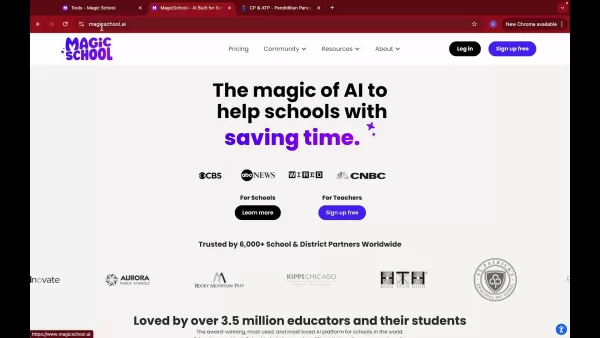
Navigate to MagicSchool.ai.
- Sign Up for Free: Locate and select the 'Sign Up Free' button on the homepage.
- Complete the Registration: Follow the on-screen instructions to enter your details and establish your account.
Once registered, you gain access to the platform's full suite of tools. The website is designed for ease of use, ensuring a smooth and intuitive onboarding process. An account is your gateway to seamlessly utilizing MagicSchool AI's capabilities.
Understanding the Dashboard
After logging in, you'll land on the MagicSchool AI dashboard. This central hub provides access to every platform feature. Key aspects include:
- Favorite Tools: The dashboard showcases your preferred tools for rapid access. You can personalize this area with your most-used features.
- Tool Categories: Tools are logically grouped into categories like planning, questions, and intellectual prep for easy navigation.
- All Tools Section: This area provides a complete list of available tools, encouraging exploration of all features.
Familiarity with the dashboard layout is crucial for efficient navigation and optimal use of MagicSchool AI. The intuitive design helps you quickly locate and deploy the necessary tools, enhancing your overall teaching experience.
Customizing Your Favorite Tools
To optimize your workflow, MagicSchool AI enables you to customize your favorite tools section. This allows for immediate access to your most frequently used features. Here’s the process:
- Identify Tools: Explore the 'All Tools' section to find the features you use most.
- Add to Favorites: Click the star icon adjacent to each tool to add it to your favorites list.
- Access Easily: Your selected favorite tools will now be prominently displayed at the top of your dashboard.
By customizing your dashboard, you create a personalized workspace that reflects your specific teaching requirements, saving time and boosting productivity. This customization ensures MagicSchool AI adapts to your unique workflow, making it an essential component of your teaching toolkit.
Using MagicSchool AI Tools: Step-by-Step Guides
Creating Multiple Choice Quizzes and Assessments
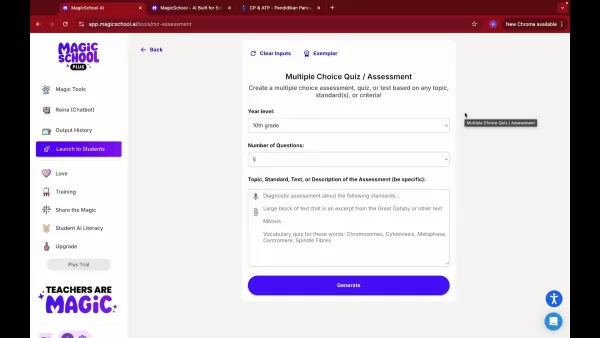
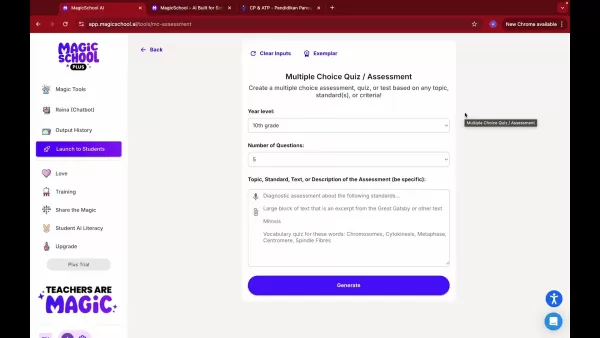
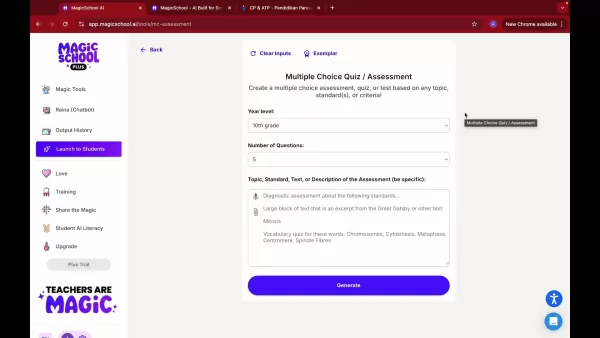
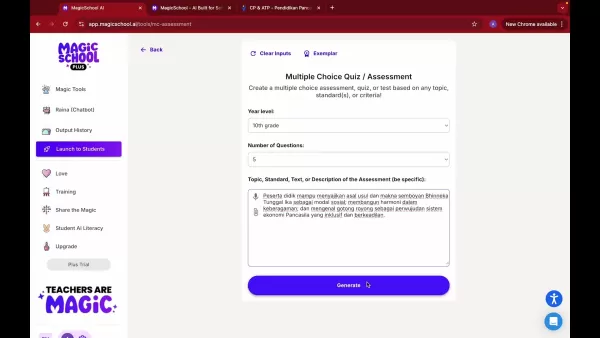
Assessments are fundamental to education, and MagicSchool AI streamlines their creation with its dedicated quiz generator. Follow these steps:
- Select the Tool: From the dashboard, click on the 'Multiple Choice Quiz/Assessment' tool.
- Enter Quiz Details:
- Year Level: Specify the appropriate grade level.
- Number of Questions: Indicate the desired number of questions.
- Topic/Standard/Text Description: Provide a detailed topic or description. Greater specificity leads to a more tailored quiz.
- Generate the Quiz: Click the 'Generate' button.
- Review and Edit: Carefully review the generated questions and answers, making edits for accuracy and relevance.
Once finalized, you can export the quiz to formats like Microsoft Word or Google Docs for easy distribution. This feature not only saves time but also ensures your assessments are closely aligned with curriculum objectives.
Generating Rubrics with MagicSchool AI
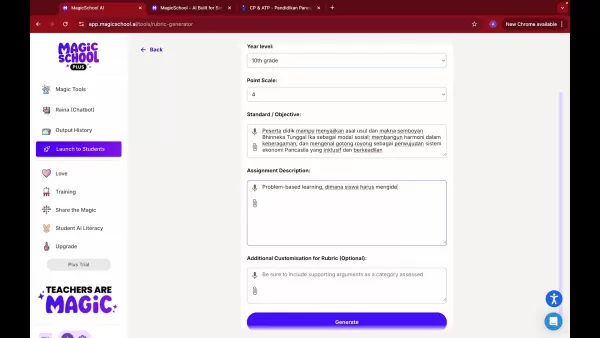
Rubrics provide clear assessment criteria, and MagicSchool AI's Rubric Generator makes their creation straightforward. Here's how:
- Select the Rubric Generator: Choose the 'Rubric Generator' tool from the dashboard.
- Input Rubric Details:
- Year Level: Select the relevant grade level.
- Point Scale: Define the scoring scale (e.g., 1-4, 1-5).
- Standard/Objective: Input the learning standard or objective.
- Assignment Description: Describe the assignment the rubric will assess.
- Additional Customization: Include any specific assessment categories or criteria.
- Generate the Rubric: Click 'Generate' to create the rubric.
- Review and Customize: Examine the generated rubric and adjust it to perfectly match your instructional goals.
MagicSchool AI makes rubric creation a fast and efficient process, promoting fair and consistent student evaluation. The customization options ensure the rubric fits your specific assessment needs.
Translating Content to Different Languages
MagicSchool AI includes a translation feature, ideal for educators serving diverse student populations. Here's how to use it:
Generate Content: First, create your quiz or rubric using the steps above.
Access Actions: Click the 'Actions' button located below the generated content.
Select Translate: Choose the 'Translate' option from the menu.
Choose Language: Select the target language from the dropdown list.
Translate: Initiate the translation process; the AI will swiftly convert your content.
This translation capability promotes inclusivity by ensuring all students can comprehend the material, regardless of their primary language. It's a rapid and highly effective feature within the platform.
Understanding MagicSchool AI Pricing
Free Access and Premium Features
MagicSchool AI operates on a freemium model, offering both free and premium tiers. The free version provides access to a basic set of tools, while the premium subscription unlocks the platform's full potential. Key details:
- Free Version: Ideal for educators wanting to explore the platform's core functionalities.
- Premium Version: Grants complete access to all AI tools, advanced customization, and priority support.
For educators aiming to maximize efficiency and impact, the premium version offers substantial value through its comprehensive AI toolkit, designed to elevate the overall teaching experience.
Pros and Cons of Using MagicSchool AI
Pros
Drastically reduces time spent on administrative tasks
Enhances the quality and speed of lesson planning and assessment creation
Offers adaptable templates for various educational needs
Supports inclusivity with robust multilingual capabilities
Features an exceptionally user-friendly interface
Optimizes and streamlines educator workflows
Rapidly produces high-quality, consistent rubrics
Cons
Advanced features require a paid subscription
AI-generated content may need human review for precision
Excessive reliance on automation could potentially hinder educator creativity
Algorithmic bias is a risk if outputs are not monitored
Core Features of MagicSchool AI
Key Capabilities of the Platform
MagicSchool AI's core features are meticulously designed to support educators. These include:
- AI-Powered Content Generation: Rapidly produce engaging lesson materials, presentations, and evaluations.
- Customizable Templates: Adapt templates to specific curricular standards and student requirements.
- Automated Assessment Creation: Effortlessly generate quizzes and detailed rubrics.
- Time-Saving Tools: Automate administrative tasks to free up time for teaching.
- Multilingual Support: Translate content to accommodate diverse learners.
- User-Friendly Interface: An intuitive design ensures effortless navigation.
These integrated features make MagicSchool AI a powerful resource for educators seeking to refine their practice and save valuable time.
Effective Use Cases for MagicSchool AI
Transforming Teaching with AI
MagicSchool AI can be applied in numerous ways to improve instruction and learning. Prominent use cases include:
- Lesson Planning: Utilize the AI to develop structured, standards-aligned lesson plans.
- Assessment Design: Generate a variety of quizzes and rubrics for different assessment types.
- Content Creation: Craft visually engaging presentations and learning materials.
- Personalized Learning: Use translation tools to support students with different language backgrounds.
- Administrative Efficiency: Automate grading and feedback processes to focus on student interaction.
Integrating MagicSchool AI into daily teaching practices allows educators to significantly enrich the student learning experience while efficiently managing their workload.
FAQ
Is MagicSchool AI really free to use?
Yes, MagicSchool AI offers a free version with access to a foundational set of tools. A premium subscription is available for full access to all features and advanced options.
Can I customize the content generated by MagicSchool AI?
Absolutely. MagicSchool AI allows for complete review and editing of all generated content, ensuring it meets your specific instructional goals and curriculum standards. You can modify questions, rubrics, and other elements.
What languages does MagicSchool AI support for translation?
MagicSchool AI supports translation into numerous languages, fostering an inclusive and equitable classroom environment.
How can MagicSchool AI help me save time on administrative tasks?
By automating routine processes such as lesson planning, assessment creation, and rubric generation, MagicSchool AI frees up significant time that can be redirected toward direct student instruction and support.
Is MagicSchool AI suitable for all grade levels?
Yes, MagicSchool AI is designed to be adaptable and supportive for educators teaching a wide range of grade levels, from elementary through high school.
Related Questions
How does AI enhance personalized learning in education?
AI significantly advances personalized learning by adapting to individual student needs and learning paces. AI-powered tools analyze performance data to pinpoint strengths and areas for improvement, enabling educators to customize their instruction. For instance, AI can generate tailored quizzes and assignments that focus on specific concepts, ensuring each student is appropriately challenged. Real-time feedback from AI also helps students understand errors and improve continuously. This high degree of personalization maintains student engagement and motivation, leading to superior educational outcomes.
What are the ethical considerations of using AI in education?
Implementing AI in education necessitates careful attention to several ethical considerations. Data privacy is paramount; since AI tools handle student data, robust protection measures, transparent policies, and compliance with regulations are essential. Algorithmic bias is another critical concern. AI systems trained on non-representative data can perpetuate biases, potentially leading to unfair treatment. It's imperative to use diverse datasets and conduct regular bias audits. Furthermore, the role of human interaction must be preserved. While AI excels at automation, it should complement, not replace, the mentorship, emotional support, and critical thinking development that teachers provide. Balancing AI efficiency with the essential human elements of teaching is crucial for ethical integration.
What future trends can be expected in the application of AI within the education sector?
The future application of AI in education points toward several exciting developments. AI-driven virtual assistants will become more prevalent, offering instant support and personalized guidance to both students and teachers. Adaptive learning platforms will grow more sophisticated, using AI to dynamically adjust content difficulty based on real-time student performance. AI will also power more immersive learning experiences through virtual and augmented reality, creating interactive simulations that deepen understanding. Additionally, predictive analytics will expand, with AI identifying students at risk of falling behind and enabling proactive interventions. These trends underscore AI's transformative potential, promising more individualized, engaging, and effective learning environments as the technology continues to mature.
Related article
 DeepMind CEO Hassabis: I sleep six hours a day, usually feel energetic around 1 a.m.
Fortune recently featured an interview with Demis Hassabis, CEO of Google DeepMind, revealing his unconventional approach to rest and productivity. Hassabis disclosed that he sleeps very little, structuring his waking hours into two distinct work blo
OpenAI, Anthropic Vie for Market Share Despite Revenue Shortfalls
Despite recent reports suggesting OpenAI missed revenue targets, creating pressure on tech stocks this Tuesday, private AI lab investors remain resilient. Seasoned backers have confirmed they will not reduce investment despite negative media coverage
California AV Compliance: A New Era of Tickets, Geofences, and 1M Miles
Guident operates an AuveTech shuttle in South Florida, managing a four-mile route in West Palm Beach and a one-mile route in Boca Raton using its remote monitoring technology. | Credit: GuidentCalifornia is redefining the regulatory landscape for dri
Related Special Topic Recommendations
Music composition
DeepMind CEO Hassabis: I sleep six hours a day, usually feel energetic around 1 a.m.
Fortune recently featured an interview with Demis Hassabis, CEO of Google DeepMind, revealing his unconventional approach to rest and productivity. Hassabis disclosed that he sleeps very little, structuring his waking hours into two distinct work blo
OpenAI, Anthropic Vie for Market Share Despite Revenue Shortfalls
Despite recent reports suggesting OpenAI missed revenue targets, creating pressure on tech stocks this Tuesday, private AI lab investors remain resilient. Seasoned backers have confirmed they will not reduce investment despite negative media coverage
California AV Compliance: A New Era of Tickets, Geofences, and 1M Miles
Guident operates an AuveTech shuttle in South Florida, managing a four-mile route in West Palm Beach and a one-mile route in Boca Raton using its remote monitoring technology. | Credit: GuidentCalifornia is redefining the regulatory landscape for dri
Related Special Topic Recommendations
Music composition
 AI Stem Separation Tools for Remix Production, Sampling Prep, and Karaoke Masters
2026 Latest Best Top-rated AI Stem Separation Tools Curated for Remix Production, Sampling Prep, and Karaoke Masters. These powerful game-changing tools offer real-world tests to deliver precise audio isolation, boosting productivity significantly. XIX.AI provides a weekly updated free vs paid comparison guide to help you find the must-try solution that suits your needs. Explore now to unlock your AI edge.
 8 tools
 xix.ai
Data Analysis
AI SQL Copilots for Revenue Dashboards, Funnel Analysis, and Product Metrics
xix.ai
Data Analysis
AI SQL Copilots for Revenue Dashboards, Funnel Analysis, and Product Metrics
2026 Latest Best AI SQL Copilots Ranked Top-Rated! XIX.AI curates a powerful game-changing collection for weekly updated real-world tests. These must-try tools help you generate accurate revenue dashboards, analyze sales funnels, and track product metrics swiftly, boosting productivity massively. Explore now to Discover your perfect tool for data-driven decision making! 238 characters
9 tools
xix.ai
Music composition
Best AI Melody Writing Tools for Song Drafts
2026 Latest Best Top-Rated AI Melody Writing Tools for Song Drafts! XIX.AI has curated a highly powerful game-changing collection that goes through rigorous real-world tests to deliver the best writing experience. You can find detailed free vs paid comparisons, accurate rankings, and must-try options designed to help you create stunning song drafts effortlessly and boost your creative productivity significantly. Explore now to discover your perfect tool!
8 tools
xix.ai
chatbot
Best AI Conversation Trainer Tools for Interview Practice
2026 Latest Best Top-rated AI Conversation Trainer Tools for Interview Practice are here on XIX.AI! This curated collection features powerful, game-changing tools that go through rigorous real-world tests to deliver accurate feedback. You’ll find a free vs paid comparison and detailed rankings to help you choose the must-try option that boosts your confidence and skills. Explore now to Discover your perfect tool for interview success!
12 tools
xix.ai
Design & Art
Best AI Style Transfer Tools for Creative Experiments
2026 Latest Best Top-rated AI Style Transfer Tools for Creative Experiments! XIX.AI has curated a powerful, game-changing collection of must-try tools that deliver exceptional results through real-world tests and rigorous rankings. These top solutions help creatives boost productivity significantly by accelerating content creation and unlocking endless creative possibilities. Explore now to discover your perfect tool and start creating today!
9 tools
xix.ai
Comic Creation
Best AI Dialogue Bubble Tools for Visual Storytelling
2026 Latest Best Top-Rated AI Dialogue Bubble Tools for Visual Storytelling are here on XIX.AI! This curated collection features powerful, game-changing tools that help creators boost productivity and overcome creative bottlenecks. Get a free vs paid comparison, see real-world tests, and check the latest rankings to find the must-try solutions perfect for crafting engaging visual narratives. Explore now to discover your ideal tool!
10 tools
xix.ai

 Comments (3)
0/500
Comments (3)
0/500
![WillieRamirez]()
Als Lehrerin finde ich solche Tools echt praktisch, aber die Datenschutzfrage macht mir Sorgen. Werden Schülerdaten sicher gespeichert? 🤔 Die Idee ist super, aber die Umsetzung muss transparent sein.
![BenJackson]()
Interessant, aber ich frage mich, ob solche KI-Tools wirklich den Unterricht verbessern oder nur mehr Verwaltungsarbeit erzeugen. In Deutschland wäre die Datenschutzfrage auch kritisch! 🤔
![CharlesRoberts]()
Seria bom ver como essa ferramenta lida com realidades educacionais de países em desenvolvimento ou se é acessível para escolas com menos recursos. 🤔 A IA na educação anda tomando um caminho interessante, mas tomara que não vire só mais uma ‘solução’ cara que ninguém consegue usar direito.
As the educational landscape rapidly transforms, Artificial Intelligence (AI) is proving to be an invaluable asset for educators. MagicSchool AI distinguishes itself among AI solutions as a comprehensive platform dedicated to simplifying administrative duties and boosting teaching effectiveness. This guide delves into how MagicSchool AI can revolutionize your teaching approach, showcasing its capabilities for crafting lesson plans, designing assessments, and generating rubrics. Learn how to strategically apply AI in education to save precious time and concentrate on your core mission: student success.
Key Points
MagicSchool AI provides a suite of AI-driven tools specifically designed for educators to simplify administrative workloads.
Standout features encompass an AI image generator, AI PowerPoint generator, lesson plan generator, and rubric generator.
The platform enables educators to reclaim time spent on paperwork, redirecting focus toward student interaction and customized learning.
MagicSchool AI facilitates the rapid and efficient creation of engaging lesson plans, assessments, and grading rubrics.
The AI is engineered to assist various teaching facets, from content development to student evaluation.
Leveraging AI tools like MagicSchool AI is increasingly vital in contemporary education for optimizing instructional methods.
Introduction to MagicSchool AI
The Rise of AI in Education
The adoption of Artificial Intelligence (AI) across industries is unmistakable, and the education sector is fully embracing this trend. Teachers are increasingly acknowledging AI's capacity to refine their instructional strategies and automate administrative functions. AI tools can handle repetitive tasks, tailor learning experiences, and deliver insightful analytics on student performance. Within this ecosystem of educational technology, MagicSchool AI stands out as a versatile platform built specifically for educators, delivering a robust set of features to support diverse teaching needs.
This growing integration of AI promises multifaceted support for teachers.
What is MagicSchool AI?
MagicSchool AI is an innovative platform engineered to support educators with various administrative and creative responsibilities. It boasts a collection of specialized tools, including:
- Image Generator: Produce captivating visuals to enhance your lessons.
- PowerPoint Generator: Develop professional presentations swiftly.
- Lesson Plan Generator: Design thorough lesson plans aligned with your curriculum.
- Rubric Generator: Build consistent and effective assessment rubrics.
- Multiple Choice Quiz/Assessment Generator: Quickly generate quizzes for formative or summative evaluations.
MagicSchool AI's primary objective is to reduce the administrative load on teachers, empowering them to dedicate more energy to direct student engagement and personalized instruction. By automating processes like lesson planning and assessment creation, the platform helps educators conserve significant time. This emphasis on administrative efficiency establishes MagicSchool AI as a high-caliber tool for the modern teacher.
Overview of MagicSchool AI Tutorial Series
This guide is part of a tutorial series created to help educators master MagicSchool AI. The series is structured into three primary segments:
- Image Generator and PowerPoint Generator: Master the creation of visually stimulating lesson content.
- Lesson Plan Generator and Unit Plan Generator: Learn to construct well-organized and impactful lesson plans.
- Rubric Generator: Gain proficiency in developing clear and equitable assessment rubrics.
By progressing through this series, educators will acquire a comprehensive understanding of MagicSchool AI's functionalities, allowing them to fully leverage the platform's potential. This detailed exploration ensures you can confidently utilize these tools to enhance both your teaching and administrative workflows.
Navigating the MagicSchool AI Platform
Creating a MagicSchool AI Account
To start using MagicSchool AI, the initial step is account creation. The platform offers free registration, ensuring accessibility for all educators. Here's how to begin:
- Visit the MagicSchool AI Website:
Navigate to MagicSchool.ai.
- Sign Up for Free: Locate and select the 'Sign Up Free' button on the homepage.
- Complete the Registration: Follow the on-screen instructions to enter your details and establish your account.
Once registered, you gain access to the platform's full suite of tools. The website is designed for ease of use, ensuring a smooth and intuitive onboarding process. An account is your gateway to seamlessly utilizing MagicSchool AI's capabilities.
Understanding the Dashboard
After logging in, you'll land on the MagicSchool AI dashboard. This central hub provides access to every platform feature. Key aspects include:
- Favorite Tools: The dashboard showcases your preferred tools for rapid access. You can personalize this area with your most-used features.
- Tool Categories: Tools are logically grouped into categories like planning, questions, and intellectual prep for easy navigation.
- All Tools Section: This area provides a complete list of available tools, encouraging exploration of all features.
Familiarity with the dashboard layout is crucial for efficient navigation and optimal use of MagicSchool AI. The intuitive design helps you quickly locate and deploy the necessary tools, enhancing your overall teaching experience.
Customizing Your Favorite Tools
To optimize your workflow, MagicSchool AI enables you to customize your favorite tools section. This allows for immediate access to your most frequently used features. Here’s the process:
- Identify Tools: Explore the 'All Tools' section to find the features you use most.
- Add to Favorites: Click the star icon adjacent to each tool to add it to your favorites list.
- Access Easily: Your selected favorite tools will now be prominently displayed at the top of your dashboard.
By customizing your dashboard, you create a personalized workspace that reflects your specific teaching requirements, saving time and boosting productivity. This customization ensures MagicSchool AI adapts to your unique workflow, making it an essential component of your teaching toolkit.
Using MagicSchool AI Tools: Step-by-Step Guides
Creating Multiple Choice Quizzes and Assessments
Assessments are fundamental to education, and MagicSchool AI streamlines their creation with its dedicated quiz generator. Follow these steps:
- Select the Tool: From the dashboard, click on the 'Multiple Choice Quiz/Assessment' tool.
- Enter Quiz Details:
- Year Level: Specify the appropriate grade level.
- Number of Questions: Indicate the desired number of questions.
- Topic/Standard/Text Description: Provide a detailed topic or description. Greater specificity leads to a more tailored quiz.
- Generate the Quiz: Click the 'Generate' button.
- Review and Edit: Carefully review the generated questions and answers, making edits for accuracy and relevance.
Once finalized, you can export the quiz to formats like Microsoft Word or Google Docs for easy distribution. This feature not only saves time but also ensures your assessments are closely aligned with curriculum objectives.
Generating Rubrics with MagicSchool AI
Rubrics provide clear assessment criteria, and MagicSchool AI's Rubric Generator makes their creation straightforward. Here's how:
- Select the Rubric Generator: Choose the 'Rubric Generator' tool from the dashboard.
- Input Rubric Details:
- Year Level: Select the relevant grade level.
- Point Scale: Define the scoring scale (e.g., 1-4, 1-5).
- Standard/Objective: Input the learning standard or objective.
- Assignment Description: Describe the assignment the rubric will assess.
- Additional Customization: Include any specific assessment categories or criteria.
- Generate the Rubric: Click 'Generate' to create the rubric.
- Review and Customize: Examine the generated rubric and adjust it to perfectly match your instructional goals.
MagicSchool AI makes rubric creation a fast and efficient process, promoting fair and consistent student evaluation. The customization options ensure the rubric fits your specific assessment needs.
Translating Content to Different Languages
MagicSchool AI includes a translation feature, ideal for educators serving diverse student populations. Here's how to use it:
Generate Content: First, create your quiz or rubric using the steps above.
Access Actions: Click the 'Actions' button located below the generated content.
Select Translate: Choose the 'Translate' option from the menu.
Choose Language: Select the target language from the dropdown list.
Translate: Initiate the translation process; the AI will swiftly convert your content.
This translation capability promotes inclusivity by ensuring all students can comprehend the material, regardless of their primary language. It's a rapid and highly effective feature within the platform.
Understanding MagicSchool AI Pricing
Free Access and Premium Features
MagicSchool AI operates on a freemium model, offering both free and premium tiers. The free version provides access to a basic set of tools, while the premium subscription unlocks the platform's full potential. Key details:
- Free Version: Ideal for educators wanting to explore the platform's core functionalities.
- Premium Version: Grants complete access to all AI tools, advanced customization, and priority support.
For educators aiming to maximize efficiency and impact, the premium version offers substantial value through its comprehensive AI toolkit, designed to elevate the overall teaching experience.
Pros and Cons of Using MagicSchool AI
Pros
Drastically reduces time spent on administrative tasks
Enhances the quality and speed of lesson planning and assessment creation
Offers adaptable templates for various educational needs
Supports inclusivity with robust multilingual capabilities
Features an exceptionally user-friendly interface
Optimizes and streamlines educator workflows
Rapidly produces high-quality, consistent rubrics
Cons
Advanced features require a paid subscription
AI-generated content may need human review for precision
Excessive reliance on automation could potentially hinder educator creativity
Algorithmic bias is a risk if outputs are not monitored
Core Features of MagicSchool AI
Key Capabilities of the Platform
MagicSchool AI's core features are meticulously designed to support educators. These include:
- AI-Powered Content Generation: Rapidly produce engaging lesson materials, presentations, and evaluations.
- Customizable Templates: Adapt templates to specific curricular standards and student requirements.
- Automated Assessment Creation: Effortlessly generate quizzes and detailed rubrics.
- Time-Saving Tools: Automate administrative tasks to free up time for teaching.
- Multilingual Support: Translate content to accommodate diverse learners.
- User-Friendly Interface: An intuitive design ensures effortless navigation.
These integrated features make MagicSchool AI a powerful resource for educators seeking to refine their practice and save valuable time.
Effective Use Cases for MagicSchool AI
Transforming Teaching with AI
MagicSchool AI can be applied in numerous ways to improve instruction and learning. Prominent use cases include:
- Lesson Planning: Utilize the AI to develop structured, standards-aligned lesson plans.
- Assessment Design: Generate a variety of quizzes and rubrics for different assessment types.
- Content Creation: Craft visually engaging presentations and learning materials.
- Personalized Learning: Use translation tools to support students with different language backgrounds.
- Administrative Efficiency: Automate grading and feedback processes to focus on student interaction.
Integrating MagicSchool AI into daily teaching practices allows educators to significantly enrich the student learning experience while efficiently managing their workload.
FAQ
Is MagicSchool AI really free to use?
Yes, MagicSchool AI offers a free version with access to a foundational set of tools. A premium subscription is available for full access to all features and advanced options.
Can I customize the content generated by MagicSchool AI?
Absolutely. MagicSchool AI allows for complete review and editing of all generated content, ensuring it meets your specific instructional goals and curriculum standards. You can modify questions, rubrics, and other elements.
What languages does MagicSchool AI support for translation?
MagicSchool AI supports translation into numerous languages, fostering an inclusive and equitable classroom environment.
How can MagicSchool AI help me save time on administrative tasks?
By automating routine processes such as lesson planning, assessment creation, and rubric generation, MagicSchool AI frees up significant time that can be redirected toward direct student instruction and support.
Is MagicSchool AI suitable for all grade levels?
Yes, MagicSchool AI is designed to be adaptable and supportive for educators teaching a wide range of grade levels, from elementary through high school.
Related Questions
How does AI enhance personalized learning in education?
AI significantly advances personalized learning by adapting to individual student needs and learning paces. AI-powered tools analyze performance data to pinpoint strengths and areas for improvement, enabling educators to customize their instruction. For instance, AI can generate tailored quizzes and assignments that focus on specific concepts, ensuring each student is appropriately challenged. Real-time feedback from AI also helps students understand errors and improve continuously. This high degree of personalization maintains student engagement and motivation, leading to superior educational outcomes.
What are the ethical considerations of using AI in education?
Implementing AI in education necessitates careful attention to several ethical considerations. Data privacy is paramount; since AI tools handle student data, robust protection measures, transparent policies, and compliance with regulations are essential. Algorithmic bias is another critical concern. AI systems trained on non-representative data can perpetuate biases, potentially leading to unfair treatment. It's imperative to use diverse datasets and conduct regular bias audits. Furthermore, the role of human interaction must be preserved. While AI excels at automation, it should complement, not replace, the mentorship, emotional support, and critical thinking development that teachers provide. Balancing AI efficiency with the essential human elements of teaching is crucial for ethical integration.
What future trends can be expected in the application of AI within the education sector?
The future application of AI in education points toward several exciting developments. AI-driven virtual assistants will become more prevalent, offering instant support and personalized guidance to both students and teachers. Adaptive learning platforms will grow more sophisticated, using AI to dynamically adjust content difficulty based on real-time student performance. AI will also power more immersive learning experiences through virtual and augmented reality, creating interactive simulations that deepen understanding. Additionally, predictive analytics will expand, with AI identifying students at risk of falling behind and enabling proactive interventions. These trends underscore AI's transformative potential, promising more individualized, engaging, and effective learning environments as the technology continues to mature.








 DeepMind CEO Hassabis: I sleep six hours a day, usually feel energetic around 1 a.m.
Fortune recently featured an interview with Demis Hassabis, CEO of Google DeepMind, revealing his unconventional approach to rest and productivity. Hassabis disclosed that he sleeps very little, structuring his waking hours into two distinct work blo
DeepMind CEO Hassabis: I sleep six hours a day, usually feel energetic around 1 a.m.
Fortune recently featured an interview with Demis Hassabis, CEO of Google DeepMind, revealing his unconventional approach to rest and productivity. Hassabis disclosed that he sleeps very little, structuring his waking hours into two distinct work blo
 OpenAI, Anthropic Vie for Market Share Despite Revenue Shortfalls
Despite recent reports suggesting OpenAI missed revenue targets, creating pressure on tech stocks this Tuesday, private AI lab investors remain resilient. Seasoned backers have confirmed they will not reduce investment despite negative media coverage
California AV Compliance: A New Era of Tickets, Geofences, and 1M Miles
Guident operates an AuveTech shuttle in South Florida, managing a four-mile route in West Palm Beach and a one-mile route in Boca Raton using its remote monitoring technology. | Credit: GuidentCalifornia is redefining the regulatory landscape for dri
OpenAI, Anthropic Vie for Market Share Despite Revenue Shortfalls
Despite recent reports suggesting OpenAI missed revenue targets, creating pressure on tech stocks this Tuesday, private AI lab investors remain resilient. Seasoned backers have confirmed they will not reduce investment despite negative media coverage
California AV Compliance: A New Era of Tickets, Geofences, and 1M Miles
Guident operates an AuveTech shuttle in South Florida, managing a four-mile route in West Palm Beach and a one-mile route in Boca Raton using its remote monitoring technology. | Credit: GuidentCalifornia is redefining the regulatory landscape for dri

2026 Latest Best Top-rated AI Stem Separation Tools Curated for Remix Production, Sampling Prep, and Karaoke Masters. These powerful game-changing tools offer real-world tests to deliver precise audio isolation, boosting productivity significantly. XIX.AI provides a weekly updated free vs paid comparison guide to help you find the must-try solution that suits your needs. Explore now to unlock your AI edge.
8 tools
xix.ai

2026 Latest Best AI SQL Copilots Ranked Top-Rated! XIX.AI curates a powerful game-changing collection for weekly updated real-world tests. These must-try tools help you generate accurate revenue dashboards, analyze sales funnels, and track product metrics swiftly, boosting productivity massively. Explore now to Discover your perfect tool for data-driven decision making! 238 characters
9 tools
xix.ai

2026 Latest Best Top-Rated AI Melody Writing Tools for Song Drafts! XIX.AI has curated a highly powerful game-changing collection that goes through rigorous real-world tests to deliver the best writing experience. You can find detailed free vs paid comparisons, accurate rankings, and must-try options designed to help you create stunning song drafts effortlessly and boost your creative productivity significantly. Explore now to discover your perfect tool!
8 tools
xix.ai

2026 Latest Best Top-rated AI Conversation Trainer Tools for Interview Practice are here on XIX.AI! This curated collection features powerful, game-changing tools that go through rigorous real-world tests to deliver accurate feedback. You’ll find a free vs paid comparison and detailed rankings to help you choose the must-try option that boosts your confidence and skills. Explore now to Discover your perfect tool for interview success!
12 tools
xix.ai

2026 Latest Best Top-rated AI Style Transfer Tools for Creative Experiments! XIX.AI has curated a powerful, game-changing collection of must-try tools that deliver exceptional results through real-world tests and rigorous rankings. These top solutions help creatives boost productivity significantly by accelerating content creation and unlocking endless creative possibilities. Explore now to discover your perfect tool and start creating today!
9 tools
xix.ai

2026 Latest Best Top-Rated AI Dialogue Bubble Tools for Visual Storytelling are here on XIX.AI! This curated collection features powerful, game-changing tools that help creators boost productivity and overcome creative bottlenecks. Get a free vs paid comparison, see real-world tests, and check the latest rankings to find the must-try solutions perfect for crafting engaging visual narratives. Explore now to discover your ideal tool!
10 tools
xix.ai

Als Lehrerin finde ich solche Tools echt praktisch, aber die Datenschutzfrage macht mir Sorgen. Werden Schülerdaten sicher gespeichert? 🤔 Die Idee ist super, aber die Umsetzung muss transparent sein.
Interessant, aber ich frage mich, ob solche KI-Tools wirklich den Unterricht verbessern oder nur mehr Verwaltungsarbeit erzeugen. In Deutschland wäre die Datenschutzfrage auch kritisch! 🤔
Seria bom ver como essa ferramenta lida com realidades educacionais de países em desenvolvimento ou se é acessível para escolas com menos recursos. 🤔 A IA na educação anda tomando um caminho interessante, mas tomara que não vire só mais uma ‘solução’ cara que ninguém consegue usar direito.












