


 Home
HomeVidnoz AI: Boost Engagement with Advanced AI Voiceovers
In today's competitive digital space, creators are always looking for fresh ways to stand out and grab their audience's attention. One powerful but often underestimated tool is the strategic use of voiceovers. Yet producing high-quality voiceovers can be costly and require significant time. That’s where Vidnoz AI comes in—this free, easy-to-use AI tool enables creators to generate realistic, engaging voiceovers in just minutes. This article looks at how Vidnoz AI can transform your content creation workflow, providing professional-grade narration without straining your budget.
Key Points
Voiceovers improve viewer engagement and retention.
Vidnoz AI gives creators a free, easy-to-access path to produce high-quality voiceovers.
The tool works across 140 languages and includes over 1,380 lifelike AI voices.
Users can adjust voice speed, pitch, and volume.
Vidnoz AI streamlines content creation for YouTube creators, educators, and professionals.
The Impact of Voiceovers on Viewer Engagement
Why Voiceovers Matter
In online content, keeping your audience engaged is key. Videos with strong narration generally perform better than those that rely only on on-screen text. Voiceovers add personality, making your content easier to enjoy and more accessible. A professional voiceover doesn’t just share information—it keeps viewers watching longer and improves retention.

But voiceovers do more than add sound—they create an immersive experience that connects with viewers, turning passive watching into active involvement. With a voiceover, content creators build emotional ties with their audience, forging a deeper connection that keeps them coming back for more. And by using voiceovers consistently, you enhance brand recognition and build a loyal following.
The Challenges of Traditional Voiceover Production
Conventionally, producing quality voiceovers meant hiring voice actors, booking studio time, and buying expensive recording gear. These costs can be a barrier, especially for independent creators or small teams. What’s more, the process takes time—often requiring multiple recording sessions and detailed edits to achieve the right result. These hurdles often steer creators away from using voiceovers, limiting their videos' impact. Matching your brand's tone and style with the right voice actor isn't easy, either. The traditional method requires careful planning and notable financial commitment. With AI voiceover tools like Vidnoz AI, creators now have a practical alternative that broadens the possibilities for making compelling, engaging videos.
Maximizing SEO with Vidnoz AI: Tips and Strategies
Optimizing Keywords for Voiceover Content
When using Vidnoz AI, weave relevant keywords into your script to help search engines grasp your video’s content and boost its ranking. Start by identifying the main keywords related to your topic, and place them naturally within your narration. Avoid keyword stuffing, because overloading your script can hurt your SEO. Focus on delivering value that answers users’ questions, and let your keywords fit naturally into the flow. For even better SEO, include your target keywords in your video’s title, description, and tags.
Enhancing Engagement through Compelling Narration
SEO isn’t just about keywords—it’s about keeping your audience hooked. Videos that hold attention often rank higher in search. Vidnoz AI helps you craft voiceovers that draw viewers in and keep them watching all the way through. Adopt a conversational tone, let your personality shine, and speak at a steady pace to maintain interest. A polished voiceover can turn an ordinary video into an immersive story that connects with viewers. This leads to longer watch times, higher retention, and better search engine performance. By creating captivating content that serves user intent, you can use Vidnoz AI to meet your SEO objectives and grow your reach online.
Step-by-Step Guide: Creating Voiceovers with Vidnoz AI
Getting Started with Vidnoz AI
Follow these steps to create impressive voiceovers using Vidnoz AI:
Access Vidnoz AI: Go to the Vidnoz AI website.
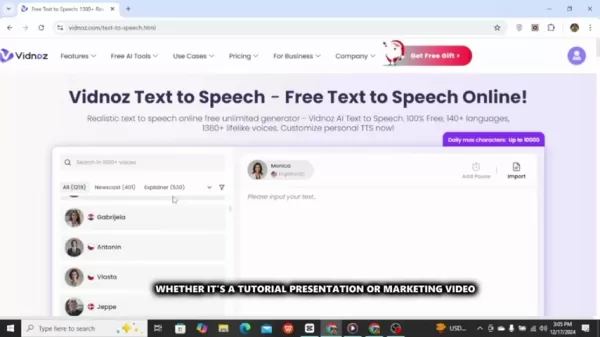
Log In: Sign up for a new account or log in with your Google account for faster access.
Navigate to AI text to speech: Look for the 'Free AI Tools' area and select 'ai text to speech'.
Choose Your Voice: Explore the wide selection of AI voices—filter by language and genre to find your ideal match. Preview options to confirm they suit your intended tone.
Input Your Script: Enter your script into the provided text box, or upload it from a file for convenience.
Customize Audio Settings: Tweak voice speed, pitch, and volume to refine your narration. Insert pauses where needed for a natural rhythm and emphasis.
Generate Audio: Click 'Generate Audio' to produce your voiceover in seconds.
Preview and Download: Listen to the result, and if it meets your expectations, download the audio file for your projects.
This smooth, easy process makes Vidnoz AI a go-to tool for adding high-quality voiceovers to your content.
Vidnoz AI Pricing: Accessible for Everyone
Vidnoz AI's Free Plan
A big draw of Vidnoz AI is its affordability. The platform includes a free plan that provides a broad set of features, which is great for individuals and small teams on a budget. Even on the free plan, users can produce polished voiceovers with no hidden fees. That makes Vidnoz AI a perfect choice for anyone wanting to add professional narration to their content without spending a fortune.
Vidnoz AI: Weighing the Pros and Cons
Pros
Free to use
Extensive language support (140 languages)
Large collection of realistic AI voices (over 1,380 options)
Customizable audio settings (speed, pitch, volume)
Intuitive user interface
Clear commercial use rights
Time-saving features like text import and pause adjustment
Cons
AI-generated voices might not capture the full emotional range of a human performer
The free tier may have usage or feature limits compared to paid options (if available)
Voice quality may differ depending on the AI voice selected
Requires an internet connection for online access
Vidnoz AI: Revolutionizing Voiceover Creation
Overview of Vidnoz AI
Vidnoz AI is a free, easy-to-use AI Text-to-Speech tool that helps content creators produce high-quality voiceovers. The platform comes packed with features, making it simple to generate believable and compelling narration for videos, presentations, and more. Vidnoz AI removes the need for costly gear or hiring voice actors, offering a budget-friendly alternative that still delivers great sound.

Whether you’re an experienced creator or a beginner, Vidnoz AI makes it straightforward to add professional-sounding voiceovers to your work, helping you engage and hold your audience’s attention.
Core Features of Vidnoz AI
Vidnoz AI includes an impressive range of features to simplify voiceover production:
- 100% Free: Access quality voiceovers with no subscription fees.
- Extensive Language Support: Make voiceovers in 140 languages, reaching a worldwide audience.
- Realistic AI Voices: Select from over 1,380 natural-sounding AI voices to fit your content’s tone.
- Customizable Audio Settings: Tweak voice speed, pitch, and volume to get your narration just right.
- User-Friendly Interface: Navigate effortlessly thanks to an intuitive layout that smooths the creation process.
- Text Import: Upload text from documents, cutting down on manual entry.
- Pause Customization: Insert breaks for natural pacing and to emphasize key moments.
- Commercial Use: Freely use the voiceovers you generate for commercial projects.
These capabilities make Vidnoz AI a must-have for creators aiming to enhance their videos with professional narration, even when working with limited funds.
Unlocking Creativity: Use Cases for Vidnoz AI
YouTube Content Creation
Vidnoz AI transforms the game for YouTube creators, helping them produce captivating content without the high price of voice actors and studios. For tutorials, reviews, or storytelling, the tool makes it easy to add gripping voiceovers that pull viewers in and extend watch time. By using Vidnoz AI, creators can zero in on visuals and scripting, confident they have a dependable way to produce pro-level narration.
Educational Videos
For educational content, clear and engaging narration is essential to helping students learn. Vidnoz AI lets educators produce informative and interesting videos that aid understanding. Its multilingual support helps you build educational materials for diverse audiences, while adjustable audio settings let you customize the delivery for your students’ needs. With Vidnoz AI, educators can upgrade their teaching resources and deliver more immersive learning.
Marketing and Promotional Videos
In marketing, a strong voiceover can be a game-changer. Vidnoz AI helps businesses craft attention-grabbing promotional videos that attract potential customers and increase sales. Lifelike AI voices lend a professional touch, and customizable settings help you shape the narration to match your brand identity. Vidnoz AI enables companies to make marketing videos that connect with their target viewers and deliver results.
Frequently Asked Questions
Is Vidnoz AI truly free to use?
Yes, Vidnoz AI’s free plan gives you plenty of features, including voiceovers in various languages and audio customization. While there could be usage caps or fewer features compared to paid options, the free tier is robust enough for individuals and small teams watching their budgets.
Can I use the voiceovers generated with Vidnoz AI for commercial purposes?
Yes, Vidnoz AI allows commercial use of the voiceovers it generates, letting creators monetize their videos without licensing worries. That makes the tool a smart pick for businesses and entrepreneurs developing marketing or promotional materials.
Does Vidnoz AI support multiple languages?
Definitely. Vidnoz AI supports 140 languages, so it’s easy to create voiceovers for international viewers. Whatever language your audience speaks, Vidnoz AI has it covered.
How realistic are the AI voices offered by Vidnoz AI?
Vidnoz AI includes more than 1,380 AI voices, spanning different tones, styles, and accents. Though AI voices may not fully match the emotional depth of human actors, they offer a professional and appealing solution, especially for content that doesn’t demand nuanced expression. The trick is to pick the AI voice that fits your content’s tone and style the best.
Can I customize the audio settings of the voiceovers generated with Vidnoz AI?
Yes, Vidnoz AI lets you adjust settings such as voice speed, pitch, and volume for the generated voiceovers. This gives creators the ability to fine-tune the narration so it fits their video’s specific needs.
Related Questions
What are some best practices for creating engaging voiceovers?
To create voiceovers that truly capture attention, focus on both technical execution and creative expression. Here are some top tips:Craft a Compelling Script: Begin with a strong script that draws your audience in and offers real value. Use a natural tone and steer clear of jargon or overly complex terms.Choose the Right Voice: Pick an AI voice that matches the tone and feel of your project. Think about accent, gender, and emotional tone.Speak at a Steady Pace: Keep a consistent speed to hold viewers’ focus and avoid losing their interest. Don’t rush or drag.Inject Personality: Bring life into your voiceover by showing humor, empathy, and energy. This builds an emotional bond and immerses your audience.Add Pauses for Emphasis: Use breaks intentionally to highlight important ideas and make the delivery feel natural. Stay away from a flat or hurried tone.Edit Carefully: Review and edit your recording closely to fix any mistakes or awkward pauses. Use audio editing tools to sharpen the sound and ensure clarity.By applying these best practices, you’ll be able to create voiceovers that take your content to the next level and truly engage your viewers.
How does Vidnoz AI compare to other AI voiceover tools on the market?
The AI voiceover market is getting more crowded, with multiple tools competing for creators’ attention. Here’s a look at how Vidnoz AI stacks up against other leading platforms:FeatureVidnoz AIOther AI Voiceover ToolsPricingFree plan availableMostly subscription-based, with different pricing tiers and feature setsLanguage Support140 languagesVaries widely; some tools provide broad language options, others are narrower in scopeAI Voices1,380+ voicesThe number and realism of voices differ widely; some platforms let you customize emotions and toneCustomizationVoice speed, pitch, volumeVaries; some platforms include advanced options like emotion controlUser InterfaceSimple and intuitiveCan be basic or complex, depending on the toolCommercial UsePermitted without extra feesMay require special licensing or higher-tier subscriptionsVidnoz AI stands out because it’s free and includes a huge voice library, which makes it highly attractive for creators on a budget. That said, some competing tools may provide more advanced customization or specialized functions for particular industries. In the end, the best AI voiceover solution depends on your unique requirements and priorities.
Related article
 DeepMind CEO Hassabis: I sleep six hours a day, usually feel energetic around 1 a.m.
Fortune recently featured an interview with Demis Hassabis, CEO of Google DeepMind, revealing his unconventional approach to rest and productivity. Hassabis disclosed that he sleeps very little, structuring his waking hours into two distinct work blo
OpenAI, Anthropic Vie for Market Share Despite Revenue Shortfalls
Despite recent reports suggesting OpenAI missed revenue targets, creating pressure on tech stocks this Tuesday, private AI lab investors remain resilient. Seasoned backers have confirmed they will not reduce investment despite negative media coverage
California AV Compliance: A New Era of Tickets, Geofences, and 1M Miles
Guident operates an AuveTech shuttle in South Florida, managing a four-mile route in West Palm Beach and a one-mile route in Boca Raton using its remote monitoring technology. | Credit: GuidentCalifornia is redefining the regulatory landscape for dri
Related Special Topic Recommendations
writing
DeepMind CEO Hassabis: I sleep six hours a day, usually feel energetic around 1 a.m.
Fortune recently featured an interview with Demis Hassabis, CEO of Google DeepMind, revealing his unconventional approach to rest and productivity. Hassabis disclosed that he sleeps very little, structuring his waking hours into two distinct work blo
OpenAI, Anthropic Vie for Market Share Despite Revenue Shortfalls
Despite recent reports suggesting OpenAI missed revenue targets, creating pressure on tech stocks this Tuesday, private AI lab investors remain resilient. Seasoned backers have confirmed they will not reduce investment despite negative media coverage
California AV Compliance: A New Era of Tickets, Geofences, and 1M Miles
Guident operates an AuveTech shuttle in South Florida, managing a four-mile route in West Palm Beach and a one-mile route in Boca Raton using its remote monitoring technology. | Credit: GuidentCalifornia is redefining the regulatory landscape for dri
Related Special Topic Recommendations
writing
 AI Article Outline Tools for Long Form Writing
2026 Latest Best Top-Rated AI Article Outline Tools for Long Form Writing! This curated collection features powerful, game-changing tools that deliver accurate, structured outlines with real-world tests to boost writing efficiency significantly. XIX.AI is part of this elite selection. Get a free vs paid comparison to help you choose the perfect tool. Explore now and Unlock your AI edge!
 9 tools
 xix.ai
chatbot
Best AI Roleplay Chat Apps for Language Practice, Interview Prep, and Daily Fluency
xix.ai
chatbot
Best AI Roleplay Chat Apps for Language Practice, Interview Prep, and Daily Fluency
2026 Latest Best Top-rated AI Roleplay Chat Apps for Language Practice, Interview Prep, and Daily Fluency! XIX.AI curates a powerful game-changing collection that offers free vs paid comparison, real-world tests, and updated rankings weekly. These must-try tools help you boost writing skills, overcome fluency challenges, and improve communication efficiency across all daily scenarios. Explore now to discover your perfect tool for language growth!
10 tools
xix.ai
Music composition
AI Stem Separation Tools for Remix Production, Sampling Prep, and Karaoke Masters
2026 Latest Best Top-rated AI Stem Separation Tools Curated for Remix Production, Sampling Prep, and Karaoke Masters. These powerful game-changing tools offer real-world tests to deliver precise audio isolation, boosting productivity significantly. XIX.AI provides a weekly updated free vs paid comparison guide to help you find the must-try solution that suits your needs. Explore now to unlock your AI edge.
8 tools
xix.ai
Data Analysis
AI SQL Copilots for Revenue Dashboards, Funnel Analysis, and Product Metrics
2026 Latest Best AI SQL Copilots Ranked Top-Rated! XIX.AI curates a powerful game-changing collection for weekly updated real-world tests. These must-try tools help you generate accurate revenue dashboards, analyze sales funnels, and track product metrics swiftly, boosting productivity massively. Explore now to Discover your perfect tool for data-driven decision making! 238 characters
9 tools
xix.ai
Music composition
Best AI Melody Writing Tools for Song Drafts
2026 Latest Best Top-Rated AI Melody Writing Tools for Song Drafts! XIX.AI has curated a highly powerful game-changing collection that goes through rigorous real-world tests to deliver the best writing experience. You can find detailed free vs paid comparisons, accurate rankings, and must-try options designed to help you create stunning song drafts effortlessly and boost your creative productivity significantly. Explore now to discover your perfect tool!
8 tools
xix.ai
chatbot
Best AI Conversation Trainer Tools for Interview Practice
2026 Latest Best Top-rated AI Conversation Trainer Tools for Interview Practice are here on XIX.AI! This curated collection features powerful, game-changing tools that go through rigorous real-world tests to deliver accurate feedback. You’ll find a free vs paid comparison and detailed rankings to help you choose the must-try option that boosts your confidence and skills. Explore now to Discover your perfect tool for interview success!
12 tools
xix.ai

 Comments (1)
0/500
Comments (1)
0/500
![JerryLopez]()
Vidnoz AI的配音工具确实挺吸睛的,现在短视频竞争这么激烈,没点声音特效还真很难留住观众。不过话说回来,AI配音虽然效率高,但总觉得少了点真人那种微妙的情感起伏,希望以后能再自然点吧!🎙️
In today's competitive digital space, creators are always looking for fresh ways to stand out and grab their audience's attention. One powerful but often underestimated tool is the strategic use of voiceovers. Yet producing high-quality voiceovers can be costly and require significant time. That’s where Vidnoz AI comes in—this free, easy-to-use AI tool enables creators to generate realistic, engaging voiceovers in just minutes. This article looks at how Vidnoz AI can transform your content creation workflow, providing professional-grade narration without straining your budget.
Key Points
Voiceovers improve viewer engagement and retention.
Vidnoz AI gives creators a free, easy-to-access path to produce high-quality voiceovers.
The tool works across 140 languages and includes over 1,380 lifelike AI voices.
Users can adjust voice speed, pitch, and volume.
Vidnoz AI streamlines content creation for YouTube creators, educators, and professionals.
The Impact of Voiceovers on Viewer Engagement
Why Voiceovers Matter
In online content, keeping your audience engaged is key. Videos with strong narration generally perform better than those that rely only on on-screen text. Voiceovers add personality, making your content easier to enjoy and more accessible. A professional voiceover doesn’t just share information—it keeps viewers watching longer and improves retention.
But voiceovers do more than add sound—they create an immersive experience that connects with viewers, turning passive watching into active involvement. With a voiceover, content creators build emotional ties with their audience, forging a deeper connection that keeps them coming back for more. And by using voiceovers consistently, you enhance brand recognition and build a loyal following.
The Challenges of Traditional Voiceover Production
Conventionally, producing quality voiceovers meant hiring voice actors, booking studio time, and buying expensive recording gear. These costs can be a barrier, especially for independent creators or small teams. What’s more, the process takes time—often requiring multiple recording sessions and detailed edits to achieve the right result. These hurdles often steer creators away from using voiceovers, limiting their videos' impact. Matching your brand's tone and style with the right voice actor isn't easy, either. The traditional method requires careful planning and notable financial commitment. With AI voiceover tools like Vidnoz AI, creators now have a practical alternative that broadens the possibilities for making compelling, engaging videos.
Maximizing SEO with Vidnoz AI: Tips and Strategies
Optimizing Keywords for Voiceover Content
When using Vidnoz AI, weave relevant keywords into your script to help search engines grasp your video’s content and boost its ranking. Start by identifying the main keywords related to your topic, and place them naturally within your narration. Avoid keyword stuffing, because overloading your script can hurt your SEO. Focus on delivering value that answers users’ questions, and let your keywords fit naturally into the flow. For even better SEO, include your target keywords in your video’s title, description, and tags.
Enhancing Engagement through Compelling Narration
SEO isn’t just about keywords—it’s about keeping your audience hooked. Videos that hold attention often rank higher in search. Vidnoz AI helps you craft voiceovers that draw viewers in and keep them watching all the way through. Adopt a conversational tone, let your personality shine, and speak at a steady pace to maintain interest. A polished voiceover can turn an ordinary video into an immersive story that connects with viewers. This leads to longer watch times, higher retention, and better search engine performance. By creating captivating content that serves user intent, you can use Vidnoz AI to meet your SEO objectives and grow your reach online.
Step-by-Step Guide: Creating Voiceovers with Vidnoz AI
Getting Started with Vidnoz AI
Follow these steps to create impressive voiceovers using Vidnoz AI:
Access Vidnoz AI: Go to the Vidnoz AI website.
Log In: Sign up for a new account or log in with your Google account for faster access.
Navigate to AI text to speech: Look for the 'Free AI Tools' area and select 'ai text to speech'.
Choose Your Voice: Explore the wide selection of AI voices—filter by language and genre to find your ideal match. Preview options to confirm they suit your intended tone.
Input Your Script: Enter your script into the provided text box, or upload it from a file for convenience.
Customize Audio Settings: Tweak voice speed, pitch, and volume to refine your narration. Insert pauses where needed for a natural rhythm and emphasis.
Generate Audio: Click 'Generate Audio' to produce your voiceover in seconds.
Preview and Download: Listen to the result, and if it meets your expectations, download the audio file for your projects.
This smooth, easy process makes Vidnoz AI a go-to tool for adding high-quality voiceovers to your content.
Vidnoz AI Pricing: Accessible for Everyone
Vidnoz AI's Free Plan
A big draw of Vidnoz AI is its affordability. The platform includes a free plan that provides a broad set of features, which is great for individuals and small teams on a budget. Even on the free plan, users can produce polished voiceovers with no hidden fees. That makes Vidnoz AI a perfect choice for anyone wanting to add professional narration to their content without spending a fortune.
Vidnoz AI: Weighing the Pros and Cons
Pros
Free to use
Extensive language support (140 languages)
Large collection of realistic AI voices (over 1,380 options)
Customizable audio settings (speed, pitch, volume)
Intuitive user interface
Clear commercial use rights
Time-saving features like text import and pause adjustment
Cons
AI-generated voices might not capture the full emotional range of a human performer
The free tier may have usage or feature limits compared to paid options (if available)
Voice quality may differ depending on the AI voice selected
Requires an internet connection for online access
Vidnoz AI: Revolutionizing Voiceover Creation
Overview of Vidnoz AI
Vidnoz AI is a free, easy-to-use AI Text-to-Speech tool that helps content creators produce high-quality voiceovers. The platform comes packed with features, making it simple to generate believable and compelling narration for videos, presentations, and more. Vidnoz AI removes the need for costly gear or hiring voice actors, offering a budget-friendly alternative that still delivers great sound.
Whether you’re an experienced creator or a beginner, Vidnoz AI makes it straightforward to add professional-sounding voiceovers to your work, helping you engage and hold your audience’s attention.
Core Features of Vidnoz AI
Vidnoz AI includes an impressive range of features to simplify voiceover production:
- 100% Free: Access quality voiceovers with no subscription fees.
- Extensive Language Support: Make voiceovers in 140 languages, reaching a worldwide audience.
- Realistic AI Voices: Select from over 1,380 natural-sounding AI voices to fit your content’s tone.
- Customizable Audio Settings: Tweak voice speed, pitch, and volume to get your narration just right.
- User-Friendly Interface: Navigate effortlessly thanks to an intuitive layout that smooths the creation process.
- Text Import: Upload text from documents, cutting down on manual entry.
- Pause Customization: Insert breaks for natural pacing and to emphasize key moments.
- Commercial Use: Freely use the voiceovers you generate for commercial projects.
These capabilities make Vidnoz AI a must-have for creators aiming to enhance their videos with professional narration, even when working with limited funds.
Unlocking Creativity: Use Cases for Vidnoz AI
YouTube Content Creation
Vidnoz AI transforms the game for YouTube creators, helping them produce captivating content without the high price of voice actors and studios. For tutorials, reviews, or storytelling, the tool makes it easy to add gripping voiceovers that pull viewers in and extend watch time. By using Vidnoz AI, creators can zero in on visuals and scripting, confident they have a dependable way to produce pro-level narration.
Educational Videos
For educational content, clear and engaging narration is essential to helping students learn. Vidnoz AI lets educators produce informative and interesting videos that aid understanding. Its multilingual support helps you build educational materials for diverse audiences, while adjustable audio settings let you customize the delivery for your students’ needs. With Vidnoz AI, educators can upgrade their teaching resources and deliver more immersive learning.
Marketing and Promotional Videos
In marketing, a strong voiceover can be a game-changer. Vidnoz AI helps businesses craft attention-grabbing promotional videos that attract potential customers and increase sales. Lifelike AI voices lend a professional touch, and customizable settings help you shape the narration to match your brand identity. Vidnoz AI enables companies to make marketing videos that connect with their target viewers and deliver results.
Frequently Asked Questions
Is Vidnoz AI truly free to use?
Yes, Vidnoz AI’s free plan gives you plenty of features, including voiceovers in various languages and audio customization. While there could be usage caps or fewer features compared to paid options, the free tier is robust enough for individuals and small teams watching their budgets.
Can I use the voiceovers generated with Vidnoz AI for commercial purposes?
Yes, Vidnoz AI allows commercial use of the voiceovers it generates, letting creators monetize their videos without licensing worries. That makes the tool a smart pick for businesses and entrepreneurs developing marketing or promotional materials.
Does Vidnoz AI support multiple languages?
Definitely. Vidnoz AI supports 140 languages, so it’s easy to create voiceovers for international viewers. Whatever language your audience speaks, Vidnoz AI has it covered.
How realistic are the AI voices offered by Vidnoz AI?
Vidnoz AI includes more than 1,380 AI voices, spanning different tones, styles, and accents. Though AI voices may not fully match the emotional depth of human actors, they offer a professional and appealing solution, especially for content that doesn’t demand nuanced expression. The trick is to pick the AI voice that fits your content’s tone and style the best.
Can I customize the audio settings of the voiceovers generated with Vidnoz AI?
Yes, Vidnoz AI lets you adjust settings such as voice speed, pitch, and volume for the generated voiceovers. This gives creators the ability to fine-tune the narration so it fits their video’s specific needs.
Related Questions
What are some best practices for creating engaging voiceovers?
To create voiceovers that truly capture attention, focus on both technical execution and creative expression. Here are some top tips:Craft a Compelling Script: Begin with a strong script that draws your audience in and offers real value. Use a natural tone and steer clear of jargon or overly complex terms.Choose the Right Voice: Pick an AI voice that matches the tone and feel of your project. Think about accent, gender, and emotional tone.Speak at a Steady Pace: Keep a consistent speed to hold viewers’ focus and avoid losing their interest. Don’t rush or drag.Inject Personality: Bring life into your voiceover by showing humor, empathy, and energy. This builds an emotional bond and immerses your audience.Add Pauses for Emphasis: Use breaks intentionally to highlight important ideas and make the delivery feel natural. Stay away from a flat or hurried tone.Edit Carefully: Review and edit your recording closely to fix any mistakes or awkward pauses. Use audio editing tools to sharpen the sound and ensure clarity.By applying these best practices, you’ll be able to create voiceovers that take your content to the next level and truly engage your viewers.
How does Vidnoz AI compare to other AI voiceover tools on the market?
The AI voiceover market is getting more crowded, with multiple tools competing for creators’ attention. Here’s a look at how Vidnoz AI stacks up against other leading platforms:FeatureVidnoz AIOther AI Voiceover ToolsPricingFree plan availableMostly subscription-based, with different pricing tiers and feature setsLanguage Support140 languagesVaries widely; some tools provide broad language options, others are narrower in scopeAI Voices1,380+ voicesThe number and realism of voices differ widely; some platforms let you customize emotions and toneCustomizationVoice speed, pitch, volumeVaries; some platforms include advanced options like emotion controlUser InterfaceSimple and intuitiveCan be basic or complex, depending on the toolCommercial UsePermitted without extra feesMay require special licensing or higher-tier subscriptionsVidnoz AI stands out because it’s free and includes a huge voice library, which makes it highly attractive for creators on a budget. That said, some competing tools may provide more advanced customization or specialized functions for particular industries. In the end, the best AI voiceover solution depends on your unique requirements and priorities.








 DeepMind CEO Hassabis: I sleep six hours a day, usually feel energetic around 1 a.m.
Fortune recently featured an interview with Demis Hassabis, CEO of Google DeepMind, revealing his unconventional approach to rest and productivity. Hassabis disclosed that he sleeps very little, structuring his waking hours into two distinct work blo
DeepMind CEO Hassabis: I sleep six hours a day, usually feel energetic around 1 a.m.
Fortune recently featured an interview with Demis Hassabis, CEO of Google DeepMind, revealing his unconventional approach to rest and productivity. Hassabis disclosed that he sleeps very little, structuring his waking hours into two distinct work blo
 OpenAI, Anthropic Vie for Market Share Despite Revenue Shortfalls
Despite recent reports suggesting OpenAI missed revenue targets, creating pressure on tech stocks this Tuesday, private AI lab investors remain resilient. Seasoned backers have confirmed they will not reduce investment despite negative media coverage
California AV Compliance: A New Era of Tickets, Geofences, and 1M Miles
Guident operates an AuveTech shuttle in South Florida, managing a four-mile route in West Palm Beach and a one-mile route in Boca Raton using its remote monitoring technology. | Credit: GuidentCalifornia is redefining the regulatory landscape for dri
OpenAI, Anthropic Vie for Market Share Despite Revenue Shortfalls
Despite recent reports suggesting OpenAI missed revenue targets, creating pressure on tech stocks this Tuesday, private AI lab investors remain resilient. Seasoned backers have confirmed they will not reduce investment despite negative media coverage
California AV Compliance: A New Era of Tickets, Geofences, and 1M Miles
Guident operates an AuveTech shuttle in South Florida, managing a four-mile route in West Palm Beach and a one-mile route in Boca Raton using its remote monitoring technology. | Credit: GuidentCalifornia is redefining the regulatory landscape for dri

2026 Latest Best Top-Rated AI Article Outline Tools for Long Form Writing! This curated collection features powerful, game-changing tools that deliver accurate, structured outlines with real-world tests to boost writing efficiency significantly. XIX.AI is part of this elite selection. Get a free vs paid comparison to help you choose the perfect tool. Explore now and Unlock your AI edge!
9 tools
xix.ai

2026 Latest Best Top-rated AI Roleplay Chat Apps for Language Practice, Interview Prep, and Daily Fluency! XIX.AI curates a powerful game-changing collection that offers free vs paid comparison, real-world tests, and updated rankings weekly. These must-try tools help you boost writing skills, overcome fluency challenges, and improve communication efficiency across all daily scenarios. Explore now to discover your perfect tool for language growth!
10 tools
xix.ai

2026 Latest Best Top-rated AI Stem Separation Tools Curated for Remix Production, Sampling Prep, and Karaoke Masters. These powerful game-changing tools offer real-world tests to deliver precise audio isolation, boosting productivity significantly. XIX.AI provides a weekly updated free vs paid comparison guide to help you find the must-try solution that suits your needs. Explore now to unlock your AI edge.
8 tools
xix.ai

2026 Latest Best AI SQL Copilots Ranked Top-Rated! XIX.AI curates a powerful game-changing collection for weekly updated real-world tests. These must-try tools help you generate accurate revenue dashboards, analyze sales funnels, and track product metrics swiftly, boosting productivity massively. Explore now to Discover your perfect tool for data-driven decision making! 238 characters
9 tools
xix.ai

2026 Latest Best Top-Rated AI Melody Writing Tools for Song Drafts! XIX.AI has curated a highly powerful game-changing collection that goes through rigorous real-world tests to deliver the best writing experience. You can find detailed free vs paid comparisons, accurate rankings, and must-try options designed to help you create stunning song drafts effortlessly and boost your creative productivity significantly. Explore now to discover your perfect tool!
8 tools
xix.ai

2026 Latest Best Top-rated AI Conversation Trainer Tools for Interview Practice are here on XIX.AI! This curated collection features powerful, game-changing tools that go through rigorous real-world tests to deliver accurate feedback. You’ll find a free vs paid comparison and detailed rankings to help you choose the must-try option that boosts your confidence and skills. Explore now to Discover your perfect tool for interview success!
12 tools
xix.ai

Vidnoz AI的配音工具确实挺吸睛的,现在短视频竞争这么激烈,没点声音特效还真很难留住观众。不过话说回来,AI配音虽然效率高,但总觉得少了点真人那种微妙的情感起伏,希望以后能再自然点吧!🎙️












