


 Home
HomeLexica AI: Free Tool to Discover and Generate Unique Images
Lexica AI is a powerful online tool that enables users to search for and create unique images using artificial intelligence. It's ideal for finding inspiration, producing content, or sourcing royalty-free images for commercial projects. This comprehensive guide covers everything from searching the platform's extensive library and generating custom coloring pages to understanding prompts and downloading your creations at no cost.
Key Points
Lexica AI is a versatile platform for both searching and AI-powered image generation.
Finding images is easy using keywords and phrases.
You can generate custom coloring pages, perfect for creative activities.
Mastering prompts is essential for effective image generation.
Images are royalty-free and suitable for commercial use.
The tool is accessible and free, making it a valuable resource for artists and designers.
Understanding Lexica AI
What is Lexica AI?
Lexica AI is an integrated search engine and AI image generator. It uses advanced artificial intelligence to deliver a broad spectrum of images, from photographs to digital art. Unlike conventional stock photo sites, it allows for dynamic image creation and modification based on user input. This makes it indispensable for sourcing tailored or unique visuals.
The platform is designed with user-friendliness in mind. Its intuitive interface ensures smooth navigation for both novices and seasoned designers. The database is continually updated, providing a fresh and diverse image collection.
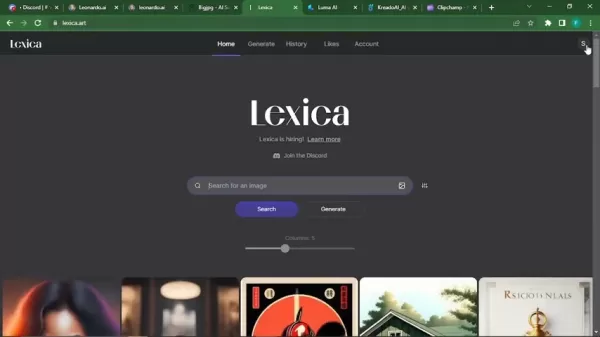
Lexica is also hiring and has a Discord community, as indicated on the site.
Whether you're a blogger, social media manager, graphic designer, or simply creating visual content, Lexica AI offers diverse tools and resources to elevate your projects. Its dual functionality means you aren't limited to existing images—you can materialize your own ideas.
Creating Coloring Pages with Lexica AI
Generating Unique Coloring Pages
Lexica AI can generate distinctive coloring pages, ideal for educators, parents, or anyone engaged in creative pursuits. By entering specific prompts, you can produce detailed line art ready for coloring.
To create a coloring page, enter 'coloring page' followed by your chosen subject in the search bar. For instance, 'coloring page cat' returns various cat-themed pages.
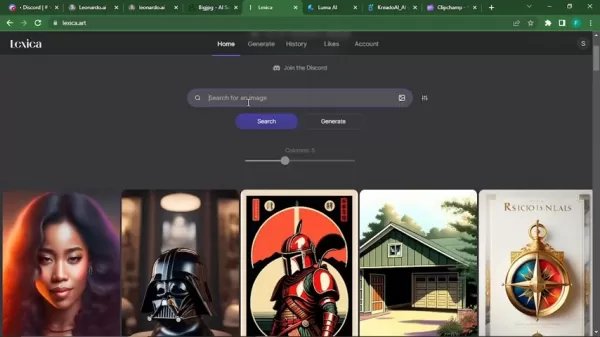
Results range from simple outlines for young children to intricate designs for adults. Experimenting with different prompts and styles is key to achieving your desired outcome.
Once you find a suitable coloring page, download and print it for immediate use. This feature provides quick, easy access to custom coloring pages for any occasion. You can also copy an image's prompt to create similar designs, giving you complete creative control.
Here is a markdown table showing different coloring page prompts and results:
Prompt Description coloring page cat Simple and complex cat outlines coloring page mandala Intricate mandala designs for adults coloring page unicorn Unicorn-themed coloring pages for kids coloring page geometric Abstract geometric designs coloring page floral Flower and plant-themed coloring pages coloring page anime Anime-themed coloring pages for different users Square Mandalas for coloring book Various unique designs.
These are several examples you can try on Lexica to produce different styles of coloring book pages.
Steps on how to search and generate the image
How to Find Images on Lexica AI
Lexica AI's search function is straightforward, helping you locate the perfect image quickly. Here’s how to use it effectively:
- Enter Your Search Term:
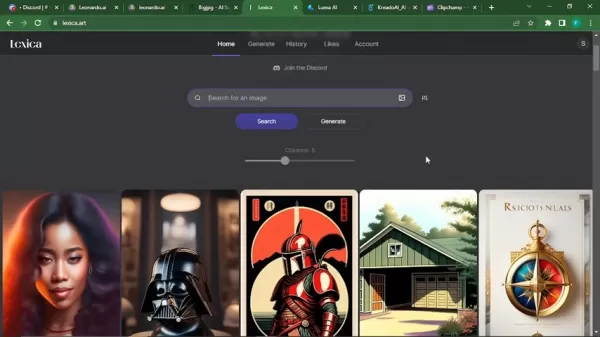
Start by typing relevant keywords or phrases into the search bar. More specific searches yield better results.
- Explore the Results: Browse the displayed images. Lexica AI shows a wide range of visuals based on your query.
- Utilize Filters (if available): Some AI platforms provide filters to refine searches by style, color, or size. Lexica, however, does not currently offer filters.
- Click to Enlarge and View Details: Click an image to see it in detail. This often reveals additional information, like the prompt used to generate it.
- Download the Image: If you find an image you like, download it for your project. Always check the licensing to ensure it meets your usage requirements.
The intuitive search functionality on Lexica AI lets you swiftly find images for any project. Its ease of use and extensive options make it a primary resource for visual content.
Lexica AI: Cost-Effective Image Solutions
Free Access to a World of Images
A key advantage of Lexica AI is its free access to a vast image library, making it perfect for individuals and businesses on a budget.
While other AI image platforms may require subscriptions or charge per image, Lexica AI offers a budget-friendly solution without sacrificing quality. This enables users to explore and experiment with various visuals risk-free.
While images are generally free, always review the specific licensing terms. Most images are royalty-free, allowing commercial use without extra fees, but confirming the agreement for each image is a best practice.
Benefits and Drawbacks of Using Lexica AI
Pros
Free access to an extensive image library
AI-powered image generation
User-friendly interface
Royalty-free images for commercial use
Regular updates with new content
Cons
Image quality can vary based on the prompt
Reliance on AI algorithms for generation
Potential copyright issues if licensing isn't verified
Key Functionalities of Lexica AI
Exploring the Core Features
Lexica AI includes several core features that make it a leading tool for image search and creation:
- Vast Image Library: An extensive, continually updated collection ensures access to diverse, fresh visuals.
- AI Image Generation: Create custom images from text prompts, enabling unique and specific visual content.
- User-Friendly Interface: The intuitive design is accessible to beginners and experts alike.
- Free Access: Cost-free use of the image library and generation tools makes it an economical choice.
- Royalty-Free Images: Most images are royalty-free, permitting commercial use without additional costs.
These combined features make Lexica AI a powerful, versatile tool for anyone needing high-quality images and bespoke visual content.
Versatile Applications of Lexica AI
How to Use Lexica in Your Daily Life
Lexica AI is a flexible tool with applications across various needs and industries:
- Content Creation: Bloggers, social media managers, and marketers can find engaging visuals to boost audience interaction.
- Graphic Design: Designers can use it for inspiration, project assets, and client-specific visuals.
- Education: Educators can create coloring pages and visual aids to make learning more interactive.
- Commercial Use: Businesses can source royalty-free images for marketing, websites, and other commercial applications, saving on stock photo costs.
- Personal Projects: Ideal for individual creative projects like digital art, scrapbooking, and custom designs.
With its wide-ranging applications, Lexica AI is an invaluable resource for enhancing visual content and creative pursuits.
Frequently Asked Questions About Lexica AI
Is Lexica AI really free?
Yes, Lexica AI provides free access to its image library and generation tools. While premium features might be introduced later, the core services remain free.
Are the images on Lexica AI royalty-free?
Most images are royalty-free, allowing commercial use without extra payments. However, always verify the specific licensing for each image.
Can I use Lexica AI to generate images for commercial use?
Yes, you can generate images for commercial purposes, provided you adhere to the licensing terms for each image. Royalty-free images can be used in marketing, websites, and other commercial contexts.
How do I create a coloring page with Lexica AI?
Enter 'coloring page' followed by your subject in the search bar. For example, 'coloring page cat' produces various cat-themed pages. Download and print your selection for instant use.
What if I can’t find the exact image I’m looking for?
If a specific image isn't available, refine your search terms, use advanced settings, or generate new images to approximate your desired result.
Related Questions
How does Lexica AI compare to other AI image generators?
Lexica AI stands out by merging search and AI generation. Other platforms may offer comparable features, but Lexica AI's user-friendly design and free access make it a popular choice. Tools like DALL-E 2 and Midjourney offer robust capabilities but often involve subscriptions or per-image fees. Lexica AI is a budget-friendly alternative that maintains quality. Its large library and royalty-free options provide versatility for personal and professional projects. If you need powerful generative AI and high-quality search without significant cost, Lexica is an excellent platform. Ultimately, Lexica AI balances accessibility, functionality, and affordability, making it a top resource for high-quality images and custom visuals.
Related article
 DeepMind CEO Hassabis: I sleep six hours a day, usually feel energetic around 1 a.m.
Fortune recently featured an interview with Demis Hassabis, CEO of Google DeepMind, revealing his unconventional approach to rest and productivity. Hassabis disclosed that he sleeps very little, structuring his waking hours into two distinct work blo
OpenAI, Anthropic Vie for Market Share Despite Revenue Shortfalls
Despite recent reports suggesting OpenAI missed revenue targets, creating pressure on tech stocks this Tuesday, private AI lab investors remain resilient. Seasoned backers have confirmed they will not reduce investment despite negative media coverage
California AV Compliance: A New Era of Tickets, Geofences, and 1M Miles
Guident operates an AuveTech shuttle in South Florida, managing a four-mile route in West Palm Beach and a one-mile route in Boca Raton using its remote monitoring technology. | Credit: GuidentCalifornia is redefining the regulatory landscape for dri
Related Special Topic Recommendations
chatbot
DeepMind CEO Hassabis: I sleep six hours a day, usually feel energetic around 1 a.m.
Fortune recently featured an interview with Demis Hassabis, CEO of Google DeepMind, revealing his unconventional approach to rest and productivity. Hassabis disclosed that he sleeps very little, structuring his waking hours into two distinct work blo
OpenAI, Anthropic Vie for Market Share Despite Revenue Shortfalls
Despite recent reports suggesting OpenAI missed revenue targets, creating pressure on tech stocks this Tuesday, private AI lab investors remain resilient. Seasoned backers have confirmed they will not reduce investment despite negative media coverage
California AV Compliance: A New Era of Tickets, Geofences, and 1M Miles
Guident operates an AuveTech shuttle in South Florida, managing a four-mile route in West Palm Beach and a one-mile route in Boca Raton using its remote monitoring technology. | Credit: GuidentCalifornia is redefining the regulatory landscape for dri
Related Special Topic Recommendations
chatbot
 Best AI Roleplay Chat Apps for Language Practice, Interview Prep, and Daily Fluency
2026 Latest Best Top-rated AI Roleplay Chat Apps for Language Practice, Interview Prep, and Daily Fluency! XIX.AI curates a powerful game-changing collection that offers free vs paid comparison, real-world tests, and updated rankings weekly. These must-try tools help you boost writing skills, overcome fluency challenges, and improve communication efficiency across all daily scenarios. Explore now to discover your perfect tool for language growth!
 10 tools
 xix.ai
Music composition
AI Stem Separation Tools for Remix Production, Sampling Prep, and Karaoke Masters
xix.ai
Music composition
AI Stem Separation Tools for Remix Production, Sampling Prep, and Karaoke Masters
2026 Latest Best Top-rated AI Stem Separation Tools Curated for Remix Production, Sampling Prep, and Karaoke Masters. These powerful game-changing tools offer real-world tests to deliver precise audio isolation, boosting productivity significantly. XIX.AI provides a weekly updated free vs paid comparison guide to help you find the must-try solution that suits your needs. Explore now to unlock your AI edge.
8 tools
xix.ai
Data Analysis
AI SQL Copilots for Revenue Dashboards, Funnel Analysis, and Product Metrics
2026 Latest Best AI SQL Copilots Ranked Top-Rated! XIX.AI curates a powerful game-changing collection for weekly updated real-world tests. These must-try tools help you generate accurate revenue dashboards, analyze sales funnels, and track product metrics swiftly, boosting productivity massively. Explore now to Discover your perfect tool for data-driven decision making! 238 characters
9 tools
xix.ai
Music composition
Best AI Melody Writing Tools for Song Drafts
2026 Latest Best Top-Rated AI Melody Writing Tools for Song Drafts! XIX.AI has curated a highly powerful game-changing collection that goes through rigorous real-world tests to deliver the best writing experience. You can find detailed free vs paid comparisons, accurate rankings, and must-try options designed to help you create stunning song drafts effortlessly and boost your creative productivity significantly. Explore now to discover your perfect tool!
8 tools
xix.ai
chatbot
Best AI Conversation Trainer Tools for Interview Practice
2026 Latest Best Top-rated AI Conversation Trainer Tools for Interview Practice are here on XIX.AI! This curated collection features powerful, game-changing tools that go through rigorous real-world tests to deliver accurate feedback. You’ll find a free vs paid comparison and detailed rankings to help you choose the must-try option that boosts your confidence and skills. Explore now to Discover your perfect tool for interview success!
12 tools
xix.ai
Design & Art
Best AI Style Transfer Tools for Creative Experiments
2026 Latest Best Top-rated AI Style Transfer Tools for Creative Experiments! XIX.AI has curated a powerful, game-changing collection of must-try tools that deliver exceptional results through real-world tests and rigorous rankings. These top solutions help creatives boost productivity significantly by accelerating content creation and unlocking endless creative possibilities. Explore now to discover your perfect tool and start creating today!
9 tools
xix.ai

 Comments (4)
0/500
Comments (4)
0/500
![DouglasMartínez]()
I've been playing with Lexica AI for a few days, and honestly, the search feature is way more useful than I expected. It's like having a mood board that reads your mind. But generating images still feels hit or miss—sometimes you get pure gold, other times it's just weird abstract blobs. Still, for free, it's a solid tool. Anyone else tried using it for commercial projects? 🎨
![LucasWalker]()
このAI画像生成ツール、実際に使ってみたらめっちゃ便利だった!商用利用可能な画像がすぐ見つかるから、デザイン作業が楽になりそう。でも、こういう無料ツールってどうやって収益上げてるんだろう?広告か有料プランがあるのかな?🤔
![JamesLopez]()
Hmm, I've been using a few different AI image tools for my blog graphics, and Lexica sounds like it could be another solid option to add to the list, especially if it’s free for basic use. The competition in this space is really heating up! 🔥 Does anyone know how its search algorithm compares to something like Midjourney's explore feature? Would love to see a head-to-head review.
![StevenAllen]()
와 이거 진짜 쓸만하네요! 🎨 저번에 디자인 작업하다가 머리 싸맸는데, 이 도구 알았더라면 훨씬 수월했을 텐데. AI 이미지 생성 기술 발전하는 속도 좀 무섭지 않나요? 앞으로 디자이너 일자리 어떻게 될지 약간 걱정되기도... 그래도 지금 당장은 유용하게 써야겠어요 ㅎㅎ
Lexica AI is a powerful online tool that enables users to search for and create unique images using artificial intelligence. It's ideal for finding inspiration, producing content, or sourcing royalty-free images for commercial projects. This comprehensive guide covers everything from searching the platform's extensive library and generating custom coloring pages to understanding prompts and downloading your creations at no cost.
Key Points
Lexica AI is a versatile platform for both searching and AI-powered image generation.
Finding images is easy using keywords and phrases.
You can generate custom coloring pages, perfect for creative activities.
Mastering prompts is essential for effective image generation.
Images are royalty-free and suitable for commercial use.
The tool is accessible and free, making it a valuable resource for artists and designers.
Understanding Lexica AI
What is Lexica AI?
Lexica AI is an integrated search engine and AI image generator. It uses advanced artificial intelligence to deliver a broad spectrum of images, from photographs to digital art. Unlike conventional stock photo sites, it allows for dynamic image creation and modification based on user input. This makes it indispensable for sourcing tailored or unique visuals.
The platform is designed with user-friendliness in mind. Its intuitive interface ensures smooth navigation for both novices and seasoned designers. The database is continually updated, providing a fresh and diverse image collection.
Lexica is also hiring and has a Discord community, as indicated on the site.
Whether you're a blogger, social media manager, graphic designer, or simply creating visual content, Lexica AI offers diverse tools and resources to elevate your projects. Its dual functionality means you aren't limited to existing images—you can materialize your own ideas.
Creating Coloring Pages with Lexica AI
Generating Unique Coloring Pages
Lexica AI can generate distinctive coloring pages, ideal for educators, parents, or anyone engaged in creative pursuits. By entering specific prompts, you can produce detailed line art ready for coloring.
To create a coloring page, enter 'coloring page' followed by your chosen subject in the search bar. For instance, 'coloring page cat' returns various cat-themed pages.
Results range from simple outlines for young children to intricate designs for adults. Experimenting with different prompts and styles is key to achieving your desired outcome.
Once you find a suitable coloring page, download and print it for immediate use. This feature provides quick, easy access to custom coloring pages for any occasion. You can also copy an image's prompt to create similar designs, giving you complete creative control.
Here is a markdown table showing different coloring page prompts and results:
| Prompt | Description |
|---|---|
| coloring page cat | Simple and complex cat outlines |
| coloring page mandala | Intricate mandala designs for adults |
| coloring page unicorn | Unicorn-themed coloring pages for kids |
| coloring page geometric | Abstract geometric designs |
| coloring page floral | Flower and plant-themed coloring pages |
| coloring page anime | Anime-themed coloring pages for different users |
| Square Mandalas for coloring book | Various unique designs. |
These are several examples you can try on Lexica to produce different styles of coloring book pages.
Steps on how to search and generate the image
How to Find Images on Lexica AI
Lexica AI's search function is straightforward, helping you locate the perfect image quickly. Here’s how to use it effectively:
- Enter Your Search Term:
Start by typing relevant keywords or phrases into the search bar. More specific searches yield better results.
- Explore the Results: Browse the displayed images. Lexica AI shows a wide range of visuals based on your query.
- Utilize Filters (if available): Some AI platforms provide filters to refine searches by style, color, or size. Lexica, however, does not currently offer filters.
- Click to Enlarge and View Details: Click an image to see it in detail. This often reveals additional information, like the prompt used to generate it.
- Download the Image: If you find an image you like, download it for your project. Always check the licensing to ensure it meets your usage requirements.
The intuitive search functionality on Lexica AI lets you swiftly find images for any project. Its ease of use and extensive options make it a primary resource for visual content.
Lexica AI: Cost-Effective Image Solutions
Free Access to a World of Images
A key advantage of Lexica AI is its free access to a vast image library, making it perfect for individuals and businesses on a budget.
While other AI image platforms may require subscriptions or charge per image, Lexica AI offers a budget-friendly solution without sacrificing quality. This enables users to explore and experiment with various visuals risk-free.
While images are generally free, always review the specific licensing terms. Most images are royalty-free, allowing commercial use without extra fees, but confirming the agreement for each image is a best practice.
Benefits and Drawbacks of Using Lexica AI
Pros
Free access to an extensive image library
AI-powered image generation
User-friendly interface
Royalty-free images for commercial use
Regular updates with new content
Cons
Image quality can vary based on the prompt
Reliance on AI algorithms for generation
Potential copyright issues if licensing isn't verified
Key Functionalities of Lexica AI
Exploring the Core Features
Lexica AI includes several core features that make it a leading tool for image search and creation:
- Vast Image Library: An extensive, continually updated collection ensures access to diverse, fresh visuals.
- AI Image Generation: Create custom images from text prompts, enabling unique and specific visual content.
- User-Friendly Interface: The intuitive design is accessible to beginners and experts alike.
- Free Access: Cost-free use of the image library and generation tools makes it an economical choice.
- Royalty-Free Images: Most images are royalty-free, permitting commercial use without additional costs.
These combined features make Lexica AI a powerful, versatile tool for anyone needing high-quality images and bespoke visual content.
Versatile Applications of Lexica AI
How to Use Lexica in Your Daily Life
Lexica AI is a flexible tool with applications across various needs and industries:
- Content Creation: Bloggers, social media managers, and marketers can find engaging visuals to boost audience interaction.
- Graphic Design: Designers can use it for inspiration, project assets, and client-specific visuals.
- Education: Educators can create coloring pages and visual aids to make learning more interactive.
- Commercial Use: Businesses can source royalty-free images for marketing, websites, and other commercial applications, saving on stock photo costs.
- Personal Projects: Ideal for individual creative projects like digital art, scrapbooking, and custom designs.
With its wide-ranging applications, Lexica AI is an invaluable resource for enhancing visual content and creative pursuits.
Frequently Asked Questions About Lexica AI
Is Lexica AI really free?
Yes, Lexica AI provides free access to its image library and generation tools. While premium features might be introduced later, the core services remain free.
Are the images on Lexica AI royalty-free?
Most images are royalty-free, allowing commercial use without extra payments. However, always verify the specific licensing for each image.
Can I use Lexica AI to generate images for commercial use?
Yes, you can generate images for commercial purposes, provided you adhere to the licensing terms for each image. Royalty-free images can be used in marketing, websites, and other commercial contexts.
How do I create a coloring page with Lexica AI?
Enter 'coloring page' followed by your subject in the search bar. For example, 'coloring page cat' produces various cat-themed pages. Download and print your selection for instant use.
What if I can’t find the exact image I’m looking for?
If a specific image isn't available, refine your search terms, use advanced settings, or generate new images to approximate your desired result.
Related Questions
How does Lexica AI compare to other AI image generators?
Lexica AI stands out by merging search and AI generation. Other platforms may offer comparable features, but Lexica AI's user-friendly design and free access make it a popular choice. Tools like DALL-E 2 and Midjourney offer robust capabilities but often involve subscriptions or per-image fees. Lexica AI is a budget-friendly alternative that maintains quality. Its large library and royalty-free options provide versatility for personal and professional projects. If you need powerful generative AI and high-quality search without significant cost, Lexica is an excellent platform. Ultimately, Lexica AI balances accessibility, functionality, and affordability, making it a top resource for high-quality images and custom visuals.








 DeepMind CEO Hassabis: I sleep six hours a day, usually feel energetic around 1 a.m.
Fortune recently featured an interview with Demis Hassabis, CEO of Google DeepMind, revealing his unconventional approach to rest and productivity. Hassabis disclosed that he sleeps very little, structuring his waking hours into two distinct work blo
DeepMind CEO Hassabis: I sleep six hours a day, usually feel energetic around 1 a.m.
Fortune recently featured an interview with Demis Hassabis, CEO of Google DeepMind, revealing his unconventional approach to rest and productivity. Hassabis disclosed that he sleeps very little, structuring his waking hours into two distinct work blo
 OpenAI, Anthropic Vie for Market Share Despite Revenue Shortfalls
Despite recent reports suggesting OpenAI missed revenue targets, creating pressure on tech stocks this Tuesday, private AI lab investors remain resilient. Seasoned backers have confirmed they will not reduce investment despite negative media coverage
California AV Compliance: A New Era of Tickets, Geofences, and 1M Miles
Guident operates an AuveTech shuttle in South Florida, managing a four-mile route in West Palm Beach and a one-mile route in Boca Raton using its remote monitoring technology. | Credit: GuidentCalifornia is redefining the regulatory landscape for dri
OpenAI, Anthropic Vie for Market Share Despite Revenue Shortfalls
Despite recent reports suggesting OpenAI missed revenue targets, creating pressure on tech stocks this Tuesday, private AI lab investors remain resilient. Seasoned backers have confirmed they will not reduce investment despite negative media coverage
California AV Compliance: A New Era of Tickets, Geofences, and 1M Miles
Guident operates an AuveTech shuttle in South Florida, managing a four-mile route in West Palm Beach and a one-mile route in Boca Raton using its remote monitoring technology. | Credit: GuidentCalifornia is redefining the regulatory landscape for dri

2026 Latest Best Top-rated AI Roleplay Chat Apps for Language Practice, Interview Prep, and Daily Fluency! XIX.AI curates a powerful game-changing collection that offers free vs paid comparison, real-world tests, and updated rankings weekly. These must-try tools help you boost writing skills, overcome fluency challenges, and improve communication efficiency across all daily scenarios. Explore now to discover your perfect tool for language growth!
10 tools
xix.ai

2026 Latest Best Top-rated AI Stem Separation Tools Curated for Remix Production, Sampling Prep, and Karaoke Masters. These powerful game-changing tools offer real-world tests to deliver precise audio isolation, boosting productivity significantly. XIX.AI provides a weekly updated free vs paid comparison guide to help you find the must-try solution that suits your needs. Explore now to unlock your AI edge.
8 tools
xix.ai

2026 Latest Best AI SQL Copilots Ranked Top-Rated! XIX.AI curates a powerful game-changing collection for weekly updated real-world tests. These must-try tools help you generate accurate revenue dashboards, analyze sales funnels, and track product metrics swiftly, boosting productivity massively. Explore now to Discover your perfect tool for data-driven decision making! 238 characters
9 tools
xix.ai

2026 Latest Best Top-Rated AI Melody Writing Tools for Song Drafts! XIX.AI has curated a highly powerful game-changing collection that goes through rigorous real-world tests to deliver the best writing experience. You can find detailed free vs paid comparisons, accurate rankings, and must-try options designed to help you create stunning song drafts effortlessly and boost your creative productivity significantly. Explore now to discover your perfect tool!
8 tools
xix.ai

2026 Latest Best Top-rated AI Conversation Trainer Tools for Interview Practice are here on XIX.AI! This curated collection features powerful, game-changing tools that go through rigorous real-world tests to deliver accurate feedback. You’ll find a free vs paid comparison and detailed rankings to help you choose the must-try option that boosts your confidence and skills. Explore now to Discover your perfect tool for interview success!
12 tools
xix.ai

2026 Latest Best Top-rated AI Style Transfer Tools for Creative Experiments! XIX.AI has curated a powerful, game-changing collection of must-try tools that deliver exceptional results through real-world tests and rigorous rankings. These top solutions help creatives boost productivity significantly by accelerating content creation and unlocking endless creative possibilities. Explore now to discover your perfect tool and start creating today!
9 tools
xix.ai

I've been playing with Lexica AI for a few days, and honestly, the search feature is way more useful than I expected. It's like having a mood board that reads your mind. But generating images still feels hit or miss—sometimes you get pure gold, other times it's just weird abstract blobs. Still, for free, it's a solid tool. Anyone else tried using it for commercial projects? 🎨
このAI画像生成ツール、実際に使ってみたらめっちゃ便利だった!商用利用可能な画像がすぐ見つかるから、デザイン作業が楽になりそう。でも、こういう無料ツールってどうやって収益上げてるんだろう?広告か有料プランがあるのかな?🤔
Hmm, I've been using a few different AI image tools for my blog graphics, and Lexica sounds like it could be another solid option to add to the list, especially if it’s free for basic use. The competition in this space is really heating up! 🔥 Does anyone know how its search algorithm compares to something like Midjourney's explore feature? Would love to see a head-to-head review.
와 이거 진짜 쓸만하네요! 🎨 저번에 디자인 작업하다가 머리 싸맸는데, 이 도구 알았더라면 훨씬 수월했을 텐데. AI 이미지 생성 기술 발전하는 속도 좀 무섭지 않나요? 앞으로 디자이너 일자리 어떻게 될지 약간 걱정되기도... 그래도 지금 당장은 유용하게 써야겠어요 ㅎㅎ












