


 Home
HomeKling AI Elements Merges AI-Generated Images Into Video Creations
Kling AI's groundbreaking "Elements" feature is revolutionizing AI-powered creative tools by enabling users to transform multiple AI-generated images into cohesive videos. This innovative solution offers a fresh perspective on content creation, providing effortless video generation without traditional editing expertise. Our comprehensive guide explores how to maximize this powerful tool's potential.
Key Features
Kling AI's Elements feature seamlessly merges up to four AI-generated images into dynamic video content.
The platform utilizes text prompts to intelligently blend uploaded images.
Users can choose between internally generated content or external image uploads.
Output quality depends on prompt clarity and image selection.
The technology democratizes video production by eliminating complex editing requirements.
Exploring Kling AI's Elements Feature
What Makes Elements Unique?
Kling AI's Elements represents a cutting-edge creative studio that transforms static images into fluid video narratives. As part of Kling AI's broader video creation suite, this tool balances simplicity with creative freedom, allowing anyone to produce engaging visual content regardless of technical skills. The feature's intelligence lies in its sophisticated prompt interpretation, weaving separate images into coherent motion sequences based on user instructions. This synergy between artificial intelligence and human creativity unlocks new possibilities for storytelling, marketing campaigns, and experimental digital art.
Navigating the Elements Interface
Accessing Elements requires following Kling AI's intuitive platform navigation. Begin by logging into the official Kling AI website (kling.ai.com).
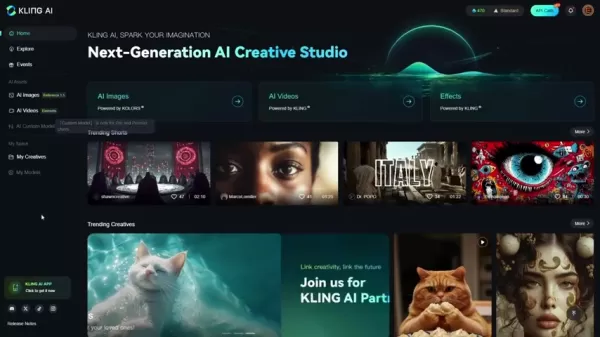
After authentication, locate the AI video section typically positioned on the left navigation panel. Within this section, identify and select the "Image to Video" transformation option. Ensure the Elements tab is activated to enable multi-image video composition. The interface will then display upload slots for 1-4 source images and a prompt field for directing the AI's creative process.
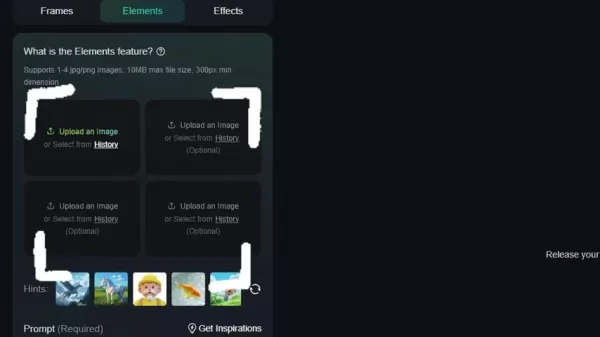
Following image selection, crafting a descriptive prompt completes the preparation phase before generation.
Comprehensive Video Creation Guide
Crafting Effective Prompts and Selecting Assets
Producing high-quality videos with Elements involves strategic image curation and precise prompting. Consider these professional recommendations:
- Asset Selection: Choose 1-4 complementary images that collectively convey your intended narrative. While Kling AI-generated assets ensure optimal compatibility, external images meeting format requirements perform equally well.
- Prompt Engineering: Develop unambiguous instructions describing desired transitions and interactions between elements. For instance, "A businessman examines architectural blueprints while walking through a modern office lobby" provides clear direction.
- Prompt Optimization: Specificity dramatically improves results. Reference distinctive attributes like "short blonde hair" or "translucent eyeglasses" enhances AI comprehension.
- Resource Utilization: Consult Kling AI's documentation for proven prompting techniques and creative best practices.
- Generation Process: Finalize your selections and execute the video creation process, typically completing within 8-10 minutes.
Refining Output Through Systematic Iteration
AI-generated content often benefits from progressive refinement. After initial generation, critically assess these aspects:
- Narrative Cohesion: Evaluate how effectively the video communicates your intended story.
- Technical Execution: Identify any visual artifacts or transition inconsistencies.
- Prompt Refinement: Adjust instruction phrasing and specificity based on initial results.
- Asset Variation: Experiment with alternative image combinations to discover superior outcomes.

The iterative process enables creators to progressively perfect their AI-generated videos.
Practical Application Examples
These real-world implementations demonstrate Elements' versatility:
Corporate Scenario:
- Objective: Professional presentation video
- Components: Executive portrait, product image, office environment
- Execution: Detailed prompt describing professional interactions
Creative Project

:
- Objective: Cinematic narrative sequence
- Components: Character portraits, props, setting images
- Execution: Multiple iterations refining motion choreography
Technical Implementation Guide
Platform Access Procedures
- Website Authentication: Visit kling.ai.com via modern web browser.
- Account Management: Enter credentials or complete registration.
- Feature Location: Select AI Videos section from primary navigation.
- Tool Selection: Choose Image to Video transformation option.
- Mode Activation: Confirm Elements functionality is enabled.
Asset Preparation Protocol
- Content Gathering: Curate 1-4 relevant high-quality images.
- Upload Methodology: Utilize drag-and-drop or file selection.
- Composition Strategy: Consider narrative sequencing when ordering assets.
Prompt Development Framework
- Instruction Location: Identify the mandatory prompt field.
- Content Requirements: Specify desired actions and transitions.
- Sample Structure: "Subject performs [action] with [object] in [environment]."

Precise phrasing directly impacts output quality.
Execution and Quality Assurance
- Process Initiation: Verify all inputs before generation.
- Processing Period: Allow adequate time for AI rendering.
- Output Evaluation: Critically assess narrative fidelity and technical execution.
Critical Feature Analysis
Advantages
Intuitive user experience
Rapid visual content production
Creative flexibility through natural language
Minimal technical prerequisites
Innovative content experimentation platform
Limitations
Variable output quality
Potential need for multiple generations
Dependence on input quality
Complex narrative constraints
Freemium credit restrictions
Essential User Queries
Compatible Image Specifications
Kling AI Elements accepts standard JPG/PNG formats with recommended minimum resolutions. The system processes between one and four images per video project.
Processing Timelines
Typical generation completes within 8-10 minutes, though complex compositions may require additional processing time.
Third-Party Asset Integration
Externally generated AI images remain compatible provided they meet platform specifications.
Pricing Structure
The platform operates on a freemium model with complimentary trial credits and premium purchase options.
AI Video Production Insights
Technology Benefits
AI video generation delivers unparalleled efficiency, cost reduction, and creative experimentation capabilities while maintaining accessibility for non-specialists. Current implementations excel at rapid prototyping though may require supplemental refinement.
Quality Enhancement Strategies
Maximizing output quality involves source image optimization, meticulous prompt engineering, and systematic testing of different parameter combinations. Post-production techniques can further polish final deliverables.
Technical Constraints
Contemporary AI video solutions face challenges with nuanced emotional expression, intricate scene compositions, and maintaining stylistic consistency across extended sequences. Ethical considerations regarding synthetic media continue evolving alongside the technology.
Related article
 DeepMind CEO Hassabis: I sleep six hours a day, usually feel energetic around 1 a.m.
Fortune recently featured an interview with Demis Hassabis, CEO of Google DeepMind, revealing his unconventional approach to rest and productivity. Hassabis disclosed that he sleeps very little, structuring his waking hours into two distinct work blo
OpenAI, Anthropic Vie for Market Share Despite Revenue Shortfalls
Despite recent reports suggesting OpenAI missed revenue targets, creating pressure on tech stocks this Tuesday, private AI lab investors remain resilient. Seasoned backers have confirmed they will not reduce investment despite negative media coverage
California AV Compliance: A New Era of Tickets, Geofences, and 1M Miles
Guident operates an AuveTech shuttle in South Florida, managing a four-mile route in West Palm Beach and a one-mile route in Boca Raton using its remote monitoring technology. | Credit: GuidentCalifornia is redefining the regulatory landscape for dri
Related Special Topic Recommendations
writing
DeepMind CEO Hassabis: I sleep six hours a day, usually feel energetic around 1 a.m.
Fortune recently featured an interview with Demis Hassabis, CEO of Google DeepMind, revealing his unconventional approach to rest and productivity. Hassabis disclosed that he sleeps very little, structuring his waking hours into two distinct work blo
OpenAI, Anthropic Vie for Market Share Despite Revenue Shortfalls
Despite recent reports suggesting OpenAI missed revenue targets, creating pressure on tech stocks this Tuesday, private AI lab investors remain resilient. Seasoned backers have confirmed they will not reduce investment despite negative media coverage
California AV Compliance: A New Era of Tickets, Geofences, and 1M Miles
Guident operates an AuveTech shuttle in South Florida, managing a four-mile route in West Palm Beach and a one-mile route in Boca Raton using its remote monitoring technology. | Credit: GuidentCalifornia is redefining the regulatory landscape for dri
Related Special Topic Recommendations
writing
 AI Article Outline Tools for Long Form Writing
2026 Latest Best Top-Rated AI Article Outline Tools for Long Form Writing! This curated collection features powerful, game-changing tools that deliver accurate, structured outlines with real-world tests to boost writing efficiency significantly. XIX.AI is part of this elite selection. Get a free vs paid comparison to help you choose the perfect tool. Explore now and Unlock your AI edge!
 9 tools
 xix.ai
chatbot
Best AI Roleplay Chat Apps for Language Practice, Interview Prep, and Daily Fluency
xix.ai
chatbot
Best AI Roleplay Chat Apps for Language Practice, Interview Prep, and Daily Fluency
2026 Latest Best Top-rated AI Roleplay Chat Apps for Language Practice, Interview Prep, and Daily Fluency! XIX.AI curates a powerful game-changing collection that offers free vs paid comparison, real-world tests, and updated rankings weekly. These must-try tools help you boost writing skills, overcome fluency challenges, and improve communication efficiency across all daily scenarios. Explore now to discover your perfect tool for language growth!
10 tools
xix.ai
Music composition
AI Stem Separation Tools for Remix Production, Sampling Prep, and Karaoke Masters
2026 Latest Best Top-rated AI Stem Separation Tools Curated for Remix Production, Sampling Prep, and Karaoke Masters. These powerful game-changing tools offer real-world tests to deliver precise audio isolation, boosting productivity significantly. XIX.AI provides a weekly updated free vs paid comparison guide to help you find the must-try solution that suits your needs. Explore now to unlock your AI edge.
8 tools
xix.ai
Data Analysis
AI SQL Copilots for Revenue Dashboards, Funnel Analysis, and Product Metrics
2026 Latest Best AI SQL Copilots Ranked Top-Rated! XIX.AI curates a powerful game-changing collection for weekly updated real-world tests. These must-try tools help you generate accurate revenue dashboards, analyze sales funnels, and track product metrics swiftly, boosting productivity massively. Explore now to Discover your perfect tool for data-driven decision making! 238 characters
9 tools
xix.ai
Music composition
Best AI Melody Writing Tools for Song Drafts
2026 Latest Best Top-Rated AI Melody Writing Tools for Song Drafts! XIX.AI has curated a highly powerful game-changing collection that goes through rigorous real-world tests to deliver the best writing experience. You can find detailed free vs paid comparisons, accurate rankings, and must-try options designed to help you create stunning song drafts effortlessly and boost your creative productivity significantly. Explore now to discover your perfect tool!
8 tools
xix.ai
chatbot
Best AI Conversation Trainer Tools for Interview Practice
2026 Latest Best Top-rated AI Conversation Trainer Tools for Interview Practice are here on XIX.AI! This curated collection features powerful, game-changing tools that go through rigorous real-world tests to deliver accurate feedback. You’ll find a free vs paid comparison and detailed rankings to help you choose the must-try option that boosts your confidence and skills. Explore now to Discover your perfect tool for interview success!
12 tools
xix.ai

 Comments (1)
0/500
Comments (1)
0/500
![ThomasScott]()
This is a game-changer for indie creators! Finally, a tool that bridges the gap between static AI art and dynamic storytelling. I can already imagine using it for quick music video concepts or social media ads. The real test will be how intuitive the editing workflow is. If it's clunky, it might just end up being another cool tech demo. Fingers crossed it's as seamless as they claim! 🎬
Kling AI's groundbreaking "Elements" feature is revolutionizing AI-powered creative tools by enabling users to transform multiple AI-generated images into cohesive videos. This innovative solution offers a fresh perspective on content creation, providing effortless video generation without traditional editing expertise. Our comprehensive guide explores how to maximize this powerful tool's potential.
Key Features
Kling AI's Elements feature seamlessly merges up to four AI-generated images into dynamic video content.
The platform utilizes text prompts to intelligently blend uploaded images.
Users can choose between internally generated content or external image uploads.
Output quality depends on prompt clarity and image selection.
The technology democratizes video production by eliminating complex editing requirements.
Exploring Kling AI's Elements Feature
What Makes Elements Unique?
Kling AI's Elements represents a cutting-edge creative studio that transforms static images into fluid video narratives. As part of Kling AI's broader video creation suite, this tool balances simplicity with creative freedom, allowing anyone to produce engaging visual content regardless of technical skills. The feature's intelligence lies in its sophisticated prompt interpretation, weaving separate images into coherent motion sequences based on user instructions. This synergy between artificial intelligence and human creativity unlocks new possibilities for storytelling, marketing campaigns, and experimental digital art.
Navigating the Elements Interface
Accessing Elements requires following Kling AI's intuitive platform navigation. Begin by logging into the official Kling AI website (kling.ai.com).
After authentication, locate the AI video section typically positioned on the left navigation panel. Within this section, identify and select the "Image to Video" transformation option. Ensure the Elements tab is activated to enable multi-image video composition. The interface will then display upload slots for 1-4 source images and a prompt field for directing the AI's creative process.
Following image selection, crafting a descriptive prompt completes the preparation phase before generation.
Comprehensive Video Creation Guide
Crafting Effective Prompts and Selecting Assets
Producing high-quality videos with Elements involves strategic image curation and precise prompting. Consider these professional recommendations:
- Asset Selection: Choose 1-4 complementary images that collectively convey your intended narrative. While Kling AI-generated assets ensure optimal compatibility, external images meeting format requirements perform equally well.
- Prompt Engineering: Develop unambiguous instructions describing desired transitions and interactions between elements. For instance, "A businessman examines architectural blueprints while walking through a modern office lobby" provides clear direction.
- Prompt Optimization: Specificity dramatically improves results. Reference distinctive attributes like "short blonde hair" or "translucent eyeglasses" enhances AI comprehension.
- Resource Utilization: Consult Kling AI's documentation for proven prompting techniques and creative best practices.
- Generation Process: Finalize your selections and execute the video creation process, typically completing within 8-10 minutes.
Refining Output Through Systematic Iteration
AI-generated content often benefits from progressive refinement. After initial generation, critically assess these aspects:
- Narrative Cohesion: Evaluate how effectively the video communicates your intended story.
- Technical Execution: Identify any visual artifacts or transition inconsistencies.
- Prompt Refinement: Adjust instruction phrasing and specificity based on initial results.
- Asset Variation: Experiment with alternative image combinations to discover superior outcomes.
The iterative process enables creators to progressively perfect their AI-generated videos.
Practical Application Examples
These real-world implementations demonstrate Elements' versatility:
Corporate Scenario:
- Objective: Professional presentation video
- Components: Executive portrait, product image, office environment
- Execution: Detailed prompt describing professional interactions
Creative Project
:
- Objective: Cinematic narrative sequence
- Components: Character portraits, props, setting images
- Execution: Multiple iterations refining motion choreography
Technical Implementation Guide
Platform Access Procedures
- Website Authentication: Visit kling.ai.com via modern web browser.
- Account Management: Enter credentials or complete registration.
- Feature Location: Select AI Videos section from primary navigation.
- Tool Selection: Choose Image to Video transformation option.
- Mode Activation: Confirm Elements functionality is enabled.
Asset Preparation Protocol
- Content Gathering: Curate 1-4 relevant high-quality images.
- Upload Methodology: Utilize drag-and-drop or file selection.
- Composition Strategy: Consider narrative sequencing when ordering assets.
Prompt Development Framework
- Instruction Location: Identify the mandatory prompt field.
- Content Requirements: Specify desired actions and transitions.
- Sample Structure: "Subject performs [action] with [object] in [environment]."
Precise phrasing directly impacts output quality.
Execution and Quality Assurance
- Process Initiation: Verify all inputs before generation.
- Processing Period: Allow adequate time for AI rendering.
- Output Evaluation: Critically assess narrative fidelity and technical execution.
Critical Feature Analysis
Advantages
Intuitive user experience
Rapid visual content production
Creative flexibility through natural language
Minimal technical prerequisites
Innovative content experimentation platform
Limitations
Variable output quality
Potential need for multiple generations
Dependence on input quality
Complex narrative constraints
Freemium credit restrictions
Essential User Queries
Compatible Image Specifications
Kling AI Elements accepts standard JPG/PNG formats with recommended minimum resolutions. The system processes between one and four images per video project.
Processing Timelines
Typical generation completes within 8-10 minutes, though complex compositions may require additional processing time.
Third-Party Asset Integration
Externally generated AI images remain compatible provided they meet platform specifications.
Pricing Structure
The platform operates on a freemium model with complimentary trial credits and premium purchase options.
AI Video Production Insights
Technology Benefits
AI video generation delivers unparalleled efficiency, cost reduction, and creative experimentation capabilities while maintaining accessibility for non-specialists. Current implementations excel at rapid prototyping though may require supplemental refinement.
Quality Enhancement Strategies
Maximizing output quality involves source image optimization, meticulous prompt engineering, and systematic testing of different parameter combinations. Post-production techniques can further polish final deliverables.
Technical Constraints
Contemporary AI video solutions face challenges with nuanced emotional expression, intricate scene compositions, and maintaining stylistic consistency across extended sequences. Ethical considerations regarding synthetic media continue evolving alongside the technology.








 DeepMind CEO Hassabis: I sleep six hours a day, usually feel energetic around 1 a.m.
Fortune recently featured an interview with Demis Hassabis, CEO of Google DeepMind, revealing his unconventional approach to rest and productivity. Hassabis disclosed that he sleeps very little, structuring his waking hours into two distinct work blo
DeepMind CEO Hassabis: I sleep six hours a day, usually feel energetic around 1 a.m.
Fortune recently featured an interview with Demis Hassabis, CEO of Google DeepMind, revealing his unconventional approach to rest and productivity. Hassabis disclosed that he sleeps very little, structuring his waking hours into two distinct work blo
 OpenAI, Anthropic Vie for Market Share Despite Revenue Shortfalls
Despite recent reports suggesting OpenAI missed revenue targets, creating pressure on tech stocks this Tuesday, private AI lab investors remain resilient. Seasoned backers have confirmed they will not reduce investment despite negative media coverage
California AV Compliance: A New Era of Tickets, Geofences, and 1M Miles
Guident operates an AuveTech shuttle in South Florida, managing a four-mile route in West Palm Beach and a one-mile route in Boca Raton using its remote monitoring technology. | Credit: GuidentCalifornia is redefining the regulatory landscape for dri
OpenAI, Anthropic Vie for Market Share Despite Revenue Shortfalls
Despite recent reports suggesting OpenAI missed revenue targets, creating pressure on tech stocks this Tuesday, private AI lab investors remain resilient. Seasoned backers have confirmed they will not reduce investment despite negative media coverage
California AV Compliance: A New Era of Tickets, Geofences, and 1M Miles
Guident operates an AuveTech shuttle in South Florida, managing a four-mile route in West Palm Beach and a one-mile route in Boca Raton using its remote monitoring technology. | Credit: GuidentCalifornia is redefining the regulatory landscape for dri

2026 Latest Best Top-Rated AI Article Outline Tools for Long Form Writing! This curated collection features powerful, game-changing tools that deliver accurate, structured outlines with real-world tests to boost writing efficiency significantly. XIX.AI is part of this elite selection. Get a free vs paid comparison to help you choose the perfect tool. Explore now and Unlock your AI edge!
9 tools
xix.ai

2026 Latest Best Top-rated AI Roleplay Chat Apps for Language Practice, Interview Prep, and Daily Fluency! XIX.AI curates a powerful game-changing collection that offers free vs paid comparison, real-world tests, and updated rankings weekly. These must-try tools help you boost writing skills, overcome fluency challenges, and improve communication efficiency across all daily scenarios. Explore now to discover your perfect tool for language growth!
10 tools
xix.ai

2026 Latest Best Top-rated AI Stem Separation Tools Curated for Remix Production, Sampling Prep, and Karaoke Masters. These powerful game-changing tools offer real-world tests to deliver precise audio isolation, boosting productivity significantly. XIX.AI provides a weekly updated free vs paid comparison guide to help you find the must-try solution that suits your needs. Explore now to unlock your AI edge.
8 tools
xix.ai

2026 Latest Best AI SQL Copilots Ranked Top-Rated! XIX.AI curates a powerful game-changing collection for weekly updated real-world tests. These must-try tools help you generate accurate revenue dashboards, analyze sales funnels, and track product metrics swiftly, boosting productivity massively. Explore now to Discover your perfect tool for data-driven decision making! 238 characters
9 tools
xix.ai

2026 Latest Best Top-Rated AI Melody Writing Tools for Song Drafts! XIX.AI has curated a highly powerful game-changing collection that goes through rigorous real-world tests to deliver the best writing experience. You can find detailed free vs paid comparisons, accurate rankings, and must-try options designed to help you create stunning song drafts effortlessly and boost your creative productivity significantly. Explore now to discover your perfect tool!
8 tools
xix.ai

2026 Latest Best Top-rated AI Conversation Trainer Tools for Interview Practice are here on XIX.AI! This curated collection features powerful, game-changing tools that go through rigorous real-world tests to deliver accurate feedback. You’ll find a free vs paid comparison and detailed rankings to help you choose the must-try option that boosts your confidence and skills. Explore now to Discover your perfect tool for interview success!
12 tools
xix.ai

This is a game-changer for indie creators! Finally, a tool that bridges the gap between static AI art and dynamic storytelling. I can already imagine using it for quick music video concepts or social media ads. The real test will be how intuitive the editing workflow is. If it's clunky, it might just end up being another cool tech demo. Fingers crossed it's as seamless as they claim! 🎬












