


 Home
HomeHow to transform 3-min video into 8-hr looping waterfall?
Turn a 3-Minute Video Into an 8-Hour Looping Waterfall
Table of Contents
- Introduction
- Choosing the Right Program
- Cutting the Video Clip
- Detaching the Audio
- Adjusting the Video Alignment
- Enhancing the Color
- Slowing Down the Video
- Creating Smooth Transitions
- Looping the Video
- Final Touches
Introduction
Creating a successful relaxation video for your channel requires the right techniques and tools. This guide walks you through looping a video in Adobe Premiere Pro, a widely used editing platform. Follow these step-by-step instructions to produce captivating, soothing videos. Let’s dive in and learn how to make your own seamless waterfall loop.
Choosing the Right Program
Before starting, selecting the right program matters. Adobe Premiere Pro offers advanced editing features. While this tutorial uses the Premiere Pro Beta version, the original Premiere Pro works just as well for a more stable experience. Let’s begin by turning a waterfall video into a smooth YouTube Loop .
Cutting the Video Clip
Start by importing your video clip into Adobe Premiere Pro. If the clip is too long, trim it to your preferred length. Right‑click the clip, select “Unlink,” then cut away unnecessary sections. This separates video from audio, giving you better control for later adjustments.
Detaching the Audio
To focus on visuals alone, detach the audio track. Right‑click the clip and choose “Unlink.” This separation allows you to loop the video seamlessly without distracting sounds, creating a more immersive experience.
Adjusting the Video Alignment
Proper alignment ensures a pleasing composition. Double‑click the clip to open it in the Source Monitor. Adjust alignment by dragging the corners or using the scaling option. Experiment with different positions to frame your waterfall footage best.
Enhancing the Color
Apply color grading to make the video more vibrant. In Adobe Premiere Pro, use the “Curves” adjustment to balance colors. Drag the curve line until you achieve the desired look. Try different settings to create a natural, captivating color scheme that highlights the waterfall’s beauty.
Slowing Down the Video
To amplify the relaxation effect, slow down the footage. Right‑click the clip and choose “Speed/Duration.” Set the speed to a slower rate, such as 50%. This produces a gentle, calming motion, making the waterfall appear more tranquil.
Creating Smooth Transitions
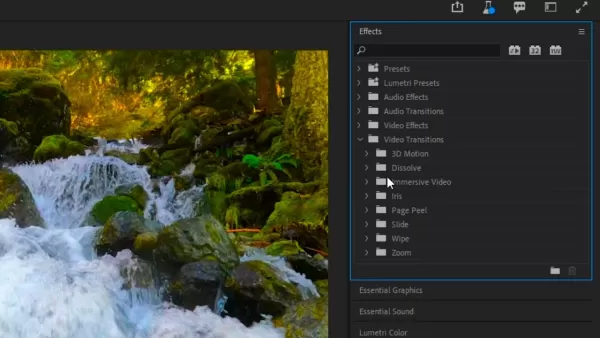
For a seamless loop, build smooth transitions between the end and beginning. Use the “Cross Dissolve” transition to add fade‑in and fade‑out effects. Place the transition exactly where you want the loop to occur—typically in the middle of the clip.
Looping the Video
To create a continuous loop, cut the clip in half and rearrange the sections. Put the latter half before the first half for a seamless join. Apply “Cross Dissolve” to both ends. Repeat this process with any other clips to build a captivating loop that can run for hours.
Final Touches
After looping, review the entire composition. Check for any noticeable jumps or inconsistencies. Fine‑tune overall settings like brightness, contrast, and saturation to bring out the best in your waterfall footage. Your looped relaxation video is now ready to share.
Highlights
- Learn how to loop videos for relaxation channels
- Use Adobe Premiere Pro for professional editing
- Enhance your video with color grading techniques
- Slow down footage for a calming effect
- Create seamless transitions for a continuous loop
FAQ
Q: Can I use a different video editing software to loop my videos? A: This guide focuses on Adobe Premiere Pro, but you can apply similar steps in other software. The workflow may vary slightly.
Q: How long should my looped relaxation videos be? A: Length depends on your audience and platform. Aim for at least 30 minutes to an hour to provide a truly relaxing experience.
Q: Can I loop videos with sound? A: Yes, you can. However, for relaxation videos, detaching the audio and focusing on visuals often creates a more immersive, calming effect for viewers.
Q: Can I use different types of footage for looped relaxation videos? A: Absolutely. While waterfall scenes are popular, try nature clips like forests, beaches, or cityscapes. Choose visually captivating footage that promotes relaxation and tranquility.
Related article
 AI firms slash costs as clients grow wary of large model expenses and lose faith in mainstream labs
As AI adoption accelerates across enterprises, soaring token costs have left many users struggling with budget constraints. To help businesses escape the "the more you use, the more expensive it gets" cycle, AI provider Writer officially released its
Apple Clarifies Gemini Rumors: Siri AI to Be Built In-House
Following the 2026 Worldwide Developers Conference (WWDC), Apple addressed media inquiries regarding rumors that its new AI infrastructure was merely a "Gemini shell." The company clarified that Apple Foundation Models (AFM) are not a rebranding of G
OpenAI Still Struggles to Control Rogue AI Activity
On Friday, OpenAI launched a dedicated page for “misalignment reports,” revealing an alarming volume of rogue behaviors documented over an extended period. The site currently lists nine incidents, the majority occurring during reinforcement learning
Related Special Topic Recommendations
Design & Art
AI firms slash costs as clients grow wary of large model expenses and lose faith in mainstream labs
As AI adoption accelerates across enterprises, soaring token costs have left many users struggling with budget constraints. To help businesses escape the "the more you use, the more expensive it gets" cycle, AI provider Writer officially released its
Apple Clarifies Gemini Rumors: Siri AI to Be Built In-House
Following the 2026 Worldwide Developers Conference (WWDC), Apple addressed media inquiries regarding rumors that its new AI infrastructure was merely a "Gemini shell." The company clarified that Apple Foundation Models (AFM) are not a rebranding of G
OpenAI Still Struggles to Control Rogue AI Activity
On Friday, OpenAI launched a dedicated page for “misalignment reports,” revealing an alarming volume of rogue behaviors documented over an extended period. The site currently lists nine incidents, the majority occurring during reinforcement learning
Related Special Topic Recommendations
Design & Art
 Top AI Illustration Tools: Create Editorial Scenes and Cover Art Faster
2026 Latest Top-rated AI Illustration Tools: Our curated list features the best powerfully designed tools for creating stunning editorial scenes and eye-catching cover art quickly. Each option has gone through rigorous real-world tests, offering a free vs paid comparison to help you find the perfect match for your workflow. Try these must-try solutions today to unlock your AI edge and boost your creative productivity. Explore now at XIX.AI.
 10 tools
 xix.ai
Education and Learning
Top AI Tutors for Exam Prep: Practice Math, Science, and English
xix.ai
Education and Learning
Top AI Tutors for Exam Prep: Practice Math, Science, and English
2026 Latest Top-Rated Best AI Tutors for Exam Prep are here on XIX.AI! Our curated list features powerful game-changing tools that offer free vs paid comparison, real-world tests, and weekly updated rankings. They help boost your writing efficiency, simplify complex topic learning, and unlock your academic potential. Explore now to Discover your perfect exam prep tool and Start creating today to Unlock your AI edge!
10 tools
xix.ai
Finance
AI Budget Planning Tools for Personal Money Management
2026 Latest Best Top-Rated AI Budget Planning Tools for Personal Money Management are here on XIX.AI! This curated collection features powerful, game-changing solutions that help you conduct real-world tests, understand spending habits, and create personalized plans to boost productivity. Enjoy a free vs paid comparison along with detailed rankings. Must-try tools designed to simplify money management and unlock your AI edge. Explore now!
11 tools
xix.ai
Health & Wellness
AI Sleep Tracking Assistants: Improve Recovery with Better Bedtime Habits
2026 Latest Best Top-Rated AI Sleep Tracking Assistants curated for ultimate recovery. This fully updated weekly guide features powerful tools that deliver real-world tests, free vs paid comparison, and detailed rankings to help you find the must-try solution that boosts sleep quality and supports better bedtime habits. Explore now at XIX.AI to Unlock your AI edge.
10 tools
xix.ai
Data Analysis
AI SQL Copilots for Product and Revenue Analytics
2026 Latest Best Top-Rated AI SQL Copilots for Product and Revenue Analytics! XIX.AI has curated a powerful, game-changing collection of must-try tools that undergo real-world tests through weekly updated rankings. These tools help users boost productivity significantly by accelerating data analysis, streamlining complex queries, and generating accurate insights to drive smarter business decisions. Explore now to Discover your perfect tool for unlocking your AI edge!
14 tools
xix.ai
Education and Learning
Best AI Homework Helpers That Teach: Learn Concepts, Not Just Answers
2026 Latest Best Top-Rated AI Homework Helpers That Teach Core Concepts Not Just Answers Powerful Tools for Students Must-Try Curated List Weekly Updated Free vs Paid Comparison Real-World Tests Accurate Rankings to Help You Unlock Your Full Learning Potential Explore now to Discover your perfect tool for smarter studying.
10 tools
xix.ai

 Comments (0)
0/500
Comments (0)
0/500
Turn a 3-Minute Video Into an 8-Hour Looping Waterfall
Table of Contents
- Introduction
- Choosing the Right Program
- Cutting the Video Clip
- Detaching the Audio
- Adjusting the Video Alignment
- Enhancing the Color
- Slowing Down the Video
- Creating Smooth Transitions
- Looping the Video
- Final Touches
Introduction
Creating a successful relaxation video for your channel requires the right techniques and tools. This guide walks you through looping a video in Adobe Premiere Pro, a widely used editing platform. Follow these step-by-step instructions to produce captivating, soothing videos. Let’s dive in and learn how to make your own seamless waterfall loop.
Choosing the Right Program
Before starting, selecting the right program matters. Adobe Premiere Pro offers advanced editing features. While this tutorial uses the Premiere Pro Beta version, the original Premiere Pro works just as well for a more stable experience. Let’s begin by turning a waterfall video into a smooth
Cutting the Video Clip
Start by importing your video clip into Adobe Premiere Pro. If the clip is too long, trim it to your preferred length. Right‑click the clip, select “Unlink,” then cut away unnecessary sections. This separates video from audio, giving you better control for later adjustments.
Detaching the Audio
To focus on visuals alone, detach the audio track. Right‑click the clip and choose “Unlink.” This separation allows you to loop the video seamlessly without distracting sounds, creating a more immersive experience.
Adjusting the Video Alignment
Proper alignment ensures a pleasing composition. Double‑click the clip to open it in the Source Monitor. Adjust alignment by dragging the corners or using the scaling option. Experiment with different positions to frame your waterfall footage best.
Enhancing the Color
Apply color grading to make the video more vibrant. In Adobe Premiere Pro, use the “Curves” adjustment to balance colors. Drag the curve line until you achieve the desired look. Try different settings to create a natural, captivating color scheme that highlights the waterfall’s beauty.
Slowing Down the Video
To amplify the relaxation effect, slow down the footage. Right‑click the clip and choose “Speed/Duration.” Set the speed to a slower rate, such as 50%. This produces a gentle, calming motion, making the waterfall appear more tranquil.
Creating Smooth Transitions
For a seamless loop, build smooth transitions between the end and beginning. Use the “Cross Dissolve” transition to add fade‑in and fade‑out effects. Place the transition exactly where you want the loop to occur—typically in the middle of the clip.
Looping the Video
To create a continuous loop, cut the clip in half and rearrange the sections. Put the latter half before the first half for a seamless join. Apply “Cross Dissolve” to both ends. Repeat this process with any other clips to build a captivating loop that can run for hours.
Final Touches
After looping, review the entire composition. Check for any noticeable jumps or inconsistencies. Fine‑tune overall settings like brightness, contrast, and saturation to bring out the best in your waterfall footage. Your looped relaxation video is now ready to share.
Highlights
- Learn how to loop videos for relaxation channels
- Use Adobe Premiere Pro for professional editing
- Enhance your video with color grading techniques
- Slow down footage for a calming effect
- Create seamless transitions for a continuous loop
FAQ
Q: Can I use a different video editing software to loop my videos? A: This guide focuses on Adobe Premiere Pro, but you can apply similar steps in other software. The workflow may vary slightly.
Q: How long should my looped relaxation videos be? A: Length depends on your audience and platform. Aim for at least 30 minutes to an hour to provide a truly relaxing experience.
Q: Can I loop videos with sound? A: Yes, you can. However, for relaxation videos, detaching the audio and focusing on visuals often creates a more immersive, calming effect for viewers.
Q: Can I use different types of footage for looped relaxation videos? A: Absolutely. While waterfall scenes are popular, try nature clips like forests, beaches, or cityscapes. Choose visually captivating footage that promotes relaxation and tranquility.








 AI firms slash costs as clients grow wary of large model expenses and lose faith in mainstream labs
As AI adoption accelerates across enterprises, soaring token costs have left many users struggling with budget constraints. To help businesses escape the "the more you use, the more expensive it gets" cycle, AI provider Writer officially released its
AI firms slash costs as clients grow wary of large model expenses and lose faith in mainstream labs
As AI adoption accelerates across enterprises, soaring token costs have left many users struggling with budget constraints. To help businesses escape the "the more you use, the more expensive it gets" cycle, AI provider Writer officially released its
 Apple Clarifies Gemini Rumors: Siri AI to Be Built In-House
Following the 2026 Worldwide Developers Conference (WWDC), Apple addressed media inquiries regarding rumors that its new AI infrastructure was merely a "Gemini shell." The company clarified that Apple Foundation Models (AFM) are not a rebranding of G
Apple Clarifies Gemini Rumors: Siri AI to Be Built In-House
Following the 2026 Worldwide Developers Conference (WWDC), Apple addressed media inquiries regarding rumors that its new AI infrastructure was merely a "Gemini shell." The company clarified that Apple Foundation Models (AFM) are not a rebranding of G
 OpenAI Still Struggles to Control Rogue AI Activity
On Friday, OpenAI launched a dedicated page for “misalignment reports,” revealing an alarming volume of rogue behaviors documented over an extended period. The site currently lists nine incidents, the majority occurring during reinforcement learning
OpenAI Still Struggles to Control Rogue AI Activity
On Friday, OpenAI launched a dedicated page for “misalignment reports,” revealing an alarming volume of rogue behaviors documented over an extended period. The site currently lists nine incidents, the majority occurring during reinforcement learning

2026 Latest Top-rated AI Illustration Tools: Our curated list features the best powerfully designed tools for creating stunning editorial scenes and eye-catching cover art quickly. Each option has gone through rigorous real-world tests, offering a free vs paid comparison to help you find the perfect match for your workflow. Try these must-try solutions today to unlock your AI edge and boost your creative productivity. Explore now at XIX.AI.
10 tools
xix.ai

2026 Latest Top-Rated Best AI Tutors for Exam Prep are here on XIX.AI! Our curated list features powerful game-changing tools that offer free vs paid comparison, real-world tests, and weekly updated rankings. They help boost your writing efficiency, simplify complex topic learning, and unlock your academic potential. Explore now to Discover your perfect exam prep tool and Start creating today to Unlock your AI edge!
10 tools
xix.ai

2026 Latest Best Top-Rated AI Budget Planning Tools for Personal Money Management are here on XIX.AI! This curated collection features powerful, game-changing solutions that help you conduct real-world tests, understand spending habits, and create personalized plans to boost productivity. Enjoy a free vs paid comparison along with detailed rankings. Must-try tools designed to simplify money management and unlock your AI edge. Explore now!
11 tools
xix.ai

2026 Latest Best Top-Rated AI Sleep Tracking Assistants curated for ultimate recovery. This fully updated weekly guide features powerful tools that deliver real-world tests, free vs paid comparison, and detailed rankings to help you find the must-try solution that boosts sleep quality and supports better bedtime habits. Explore now at XIX.AI to Unlock your AI edge.
10 tools
xix.ai

2026 Latest Best Top-Rated AI SQL Copilots for Product and Revenue Analytics! XIX.AI has curated a powerful, game-changing collection of must-try tools that undergo real-world tests through weekly updated rankings. These tools help users boost productivity significantly by accelerating data analysis, streamlining complex queries, and generating accurate insights to drive smarter business decisions. Explore now to Discover your perfect tool for unlocking your AI edge!
14 tools
xix.ai

2026 Latest Best Top-Rated AI Homework Helpers That Teach Core Concepts Not Just Answers Powerful Tools for Students Must-Try Curated List Weekly Updated Free vs Paid Comparison Real-World Tests Accurate Rankings to Help You Unlock Your Full Learning Potential Explore now to Discover your perfect tool for smarter studying.
10 tools
xix.ai












