


 Home
HomeGemini AI by Google Can Now Auto-Complete Spreadsheet Cells
Google is introducing a new AI function in Sheets to assist with generating text for completing sections of your spreadsheet. Powered by Google Gemini, this functionality can reference specific cells to craft text, summarize details, or classify your data.
As illustrated in Google’s example, you can leverage this new AI function to create and customize advertisement copy based on different target audiences listed in your sheet. To do so, highlight the cells where you’d like the AI-generated copy to appear, then apply this function (ensuring to adjust the target range to match your specific data):
- =AI("Write a formal ad copy for the product. Cater copy to the objective and target audience.", A2:C2)
Another example involves using the AI function to condense customer feedback listed across a range of cells. This can be done by entering the following:
- =AI("For the customer, write a one sentence summary of their feedback.", A2:D2)
You can also categorize a customer inquiry as a compliment, exchange request, or return request, or use it to sort restaurants by location. Visit Google’s support page for a range of AI function examples.
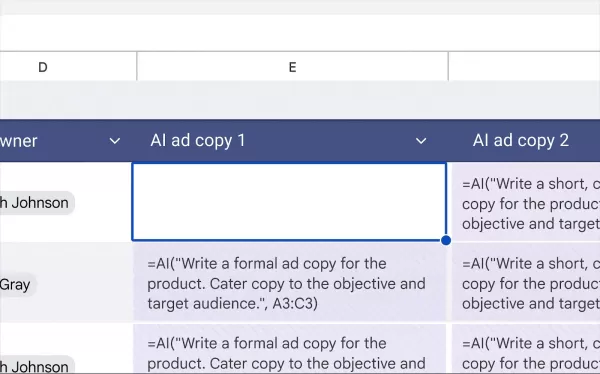
This example demonstrates how Gemini can generate ad copy from data in selected cells. GIF: GoogleThis addition builds on the existing Gemini-powered feature in Sheets that answers questions about your data and creates visualizations. However, the AI function currently has some limitations, as it only supports text-based responses. Google notes that it cannot access your entire spreadsheet or Google Drive files, and outputs can only be generated for up to 200 selected cells at a time—you'll need to wait for completion before selecting additional cells.
The AI function is now rolling out to Google Workspace users on business and enterprise plans, as well as Gemini AI Pro and Ultra subscribers. It is also available for those using the Gemini Education plan or add-on.
Related article
 Andreessen-backed Vals Targets AI Benchmarking Leadership
Benchmarking has become the industry standard for how AI companies validate their models’ capabilities, leverage favorable metrics to differentiate from competitors, and market their superiority. In short, strong benchmark results almost always trans
Apple Exec John Ternus Calls iPhone Best AI Device
Apple’s incoming CEO John Ternus clarified the company’s AI strategy during Wednesday’s Surprise and Shine event, asserting that the iPhone is already the premier AI device and prioritizing user data privacy over competitors.As Ternus succeeds Tim Co
Claude’s Cowork feature now recalls your past chat instructions
Anthropic’s update to Claude’s memory system removes a major friction point in using AI agents: the repetitive need to re-explain context that the AI already retains. By merging the memory architectures of standard chat and Claude Cowork, Claude now
Related Special Topic Recommendations
Design & Art
Andreessen-backed Vals Targets AI Benchmarking Leadership
Benchmarking has become the industry standard for how AI companies validate their models’ capabilities, leverage favorable metrics to differentiate from competitors, and market their superiority. In short, strong benchmark results almost always trans
Apple Exec John Ternus Calls iPhone Best AI Device
Apple’s incoming CEO John Ternus clarified the company’s AI strategy during Wednesday’s Surprise and Shine event, asserting that the iPhone is already the premier AI device and prioritizing user data privacy over competitors.As Ternus succeeds Tim Co
Claude’s Cowork feature now recalls your past chat instructions
Anthropic’s update to Claude’s memory system removes a major friction point in using AI agents: the repetitive need to re-explain context that the AI already retains. By merging the memory architectures of standard chat and Claude Cowork, Claude now
Related Special Topic Recommendations
Design & Art
 Top AI Illustration Tools: Create Editorial Scenes and Cover Art Faster
2026 Latest Top-rated AI Illustration Tools: Our curated list features the best powerfully designed tools for creating stunning editorial scenes and eye-catching cover art quickly. Each option has gone through rigorous real-world tests, offering a free vs paid comparison to help you find the perfect match for your workflow. Try these must-try solutions today to unlock your AI edge and boost your creative productivity. Explore now at XIX.AI.
 10 tools
 xix.ai
Education and Learning
Top AI Tutors for Exam Prep: Practice Math, Science, and English
xix.ai
Education and Learning
Top AI Tutors for Exam Prep: Practice Math, Science, and English
2026 Latest Top-Rated Best AI Tutors for Exam Prep are here on XIX.AI! Our curated list features powerful game-changing tools that offer free vs paid comparison, real-world tests, and weekly updated rankings. They help boost your writing efficiency, simplify complex topic learning, and unlock your academic potential. Explore now to Discover your perfect exam prep tool and Start creating today to Unlock your AI edge!
10 tools
xix.ai
Finance
AI Budget Planning Tools for Personal Money Management
2026 Latest Best Top-Rated AI Budget Planning Tools for Personal Money Management are here on XIX.AI! This curated collection features powerful, game-changing solutions that help you conduct real-world tests, understand spending habits, and create personalized plans to boost productivity. Enjoy a free vs paid comparison along with detailed rankings. Must-try tools designed to simplify money management and unlock your AI edge. Explore now!
11 tools
xix.ai
Health & Wellness
AI Sleep Tracking Assistants: Improve Recovery with Better Bedtime Habits
2026 Latest Best Top-Rated AI Sleep Tracking Assistants curated for ultimate recovery. This fully updated weekly guide features powerful tools that deliver real-world tests, free vs paid comparison, and detailed rankings to help you find the must-try solution that boosts sleep quality and supports better bedtime habits. Explore now at XIX.AI to Unlock your AI edge.
10 tools
xix.ai
Data Analysis
AI SQL Copilots for Product and Revenue Analytics
2026 Latest Best Top-Rated AI SQL Copilots for Product and Revenue Analytics! XIX.AI has curated a powerful, game-changing collection of must-try tools that undergo real-world tests through weekly updated rankings. These tools help users boost productivity significantly by accelerating data analysis, streamlining complex queries, and generating accurate insights to drive smarter business decisions. Explore now to Discover your perfect tool for unlocking your AI edge!
14 tools
xix.ai
Education and Learning
Best AI Homework Helpers That Teach: Learn Concepts, Not Just Answers
2026 Latest Best Top-Rated AI Homework Helpers That Teach Core Concepts Not Just Answers Powerful Tools for Students Must-Try Curated List Weekly Updated Free vs Paid Comparison Real-World Tests Accurate Rankings to Help You Unlock Your Full Learning Potential Explore now to Discover your perfect tool for smarter studying.
10 tools
xix.ai

 Comments (3)
0/500
Comments (3)
0/500
![LucasNelson]()
Finally, a tool that understands my messy data! 😂 Gemini in Sheets is a game-changer for anyone who hates manual entry. It’s like having a tiny assistant that actually gets context. Can’t wait to test it on my tax records... fingers crossed it doesn’t hallucinate my income! 📊✨
![PeterRoberts]()
這個功能看起來很實用!以後做報表時,那些重複性的填寫工作應該能省下不少時間。不過,AI生成的內容準確性如何?會不會需要花更多時間去核對和修正呢?有點期待實際試用看看效果如何。😊
![AlbertRodriguez]()
Essa função de preenchimento automático é uma mão na roda! Só tenho receio dos erros quando o contexto não for tão claro... 🤔 É um avanço incrível, mas será que a confiabilidade vai ser constante em dados mais complexos?
Google is introducing a new AI function in Sheets to assist with generating text for completing sections of your spreadsheet. Powered by Google Gemini, this functionality can reference specific cells to craft text, summarize details, or classify your data.
As illustrated in Google’s example, you can leverage this new AI function to create and customize advertisement copy based on different target audiences listed in your sheet. To do so, highlight the cells where you’d like the AI-generated copy to appear, then apply this function (ensuring to adjust the target range to match your specific data):
- =AI("Write a formal ad copy for the product. Cater copy to the objective and target audience.", A2:C2)
Another example involves using the AI function to condense customer feedback listed across a range of cells. This can be done by entering the following:
- =AI("For the customer, write a one sentence summary of their feedback.", A2:D2)
You can also categorize a customer inquiry as a compliment, exchange request, or return request, or use it to sort restaurants by location. Visit Google’s support page for a range of AI function examples.
This addition builds on the existing Gemini-powered feature in Sheets that answers questions about your data and creates visualizations. However, the AI function currently has some limitations, as it only supports text-based responses. Google notes that it cannot access your entire spreadsheet or Google Drive files, and outputs can only be generated for up to 200 selected cells at a time—you'll need to wait for completion before selecting additional cells.
The AI function is now rolling out to Google Workspace users on business and enterprise plans, as well as Gemini AI Pro and Ultra subscribers. It is also available for those using the Gemini Education plan or add-on.








 Andreessen-backed Vals Targets AI Benchmarking Leadership
Benchmarking has become the industry standard for how AI companies validate their models’ capabilities, leverage favorable metrics to differentiate from competitors, and market their superiority. In short, strong benchmark results almost always trans
Andreessen-backed Vals Targets AI Benchmarking Leadership
Benchmarking has become the industry standard for how AI companies validate their models’ capabilities, leverage favorable metrics to differentiate from competitors, and market their superiority. In short, strong benchmark results almost always trans
 Apple Exec John Ternus Calls iPhone Best AI Device
Apple’s incoming CEO John Ternus clarified the company’s AI strategy during Wednesday’s Surprise and Shine event, asserting that the iPhone is already the premier AI device and prioritizing user data privacy over competitors.As Ternus succeeds Tim Co
Apple Exec John Ternus Calls iPhone Best AI Device
Apple’s incoming CEO John Ternus clarified the company’s AI strategy during Wednesday’s Surprise and Shine event, asserting that the iPhone is already the premier AI device and prioritizing user data privacy over competitors.As Ternus succeeds Tim Co
 Claude’s Cowork feature now recalls your past chat instructions
Anthropic’s update to Claude’s memory system removes a major friction point in using AI agents: the repetitive need to re-explain context that the AI already retains. By merging the memory architectures of standard chat and Claude Cowork, Claude now
Claude’s Cowork feature now recalls your past chat instructions
Anthropic’s update to Claude’s memory system removes a major friction point in using AI agents: the repetitive need to re-explain context that the AI already retains. By merging the memory architectures of standard chat and Claude Cowork, Claude now

2026 Latest Top-rated AI Illustration Tools: Our curated list features the best powerfully designed tools for creating stunning editorial scenes and eye-catching cover art quickly. Each option has gone through rigorous real-world tests, offering a free vs paid comparison to help you find the perfect match for your workflow. Try these must-try solutions today to unlock your AI edge and boost your creative productivity. Explore now at XIX.AI.
10 tools
xix.ai

2026 Latest Top-Rated Best AI Tutors for Exam Prep are here on XIX.AI! Our curated list features powerful game-changing tools that offer free vs paid comparison, real-world tests, and weekly updated rankings. They help boost your writing efficiency, simplify complex topic learning, and unlock your academic potential. Explore now to Discover your perfect exam prep tool and Start creating today to Unlock your AI edge!
10 tools
xix.ai

2026 Latest Best Top-Rated AI Budget Planning Tools for Personal Money Management are here on XIX.AI! This curated collection features powerful, game-changing solutions that help you conduct real-world tests, understand spending habits, and create personalized plans to boost productivity. Enjoy a free vs paid comparison along with detailed rankings. Must-try tools designed to simplify money management and unlock your AI edge. Explore now!
11 tools
xix.ai

2026 Latest Best Top-Rated AI Sleep Tracking Assistants curated for ultimate recovery. This fully updated weekly guide features powerful tools that deliver real-world tests, free vs paid comparison, and detailed rankings to help you find the must-try solution that boosts sleep quality and supports better bedtime habits. Explore now at XIX.AI to Unlock your AI edge.
10 tools
xix.ai

2026 Latest Best Top-Rated AI SQL Copilots for Product and Revenue Analytics! XIX.AI has curated a powerful, game-changing collection of must-try tools that undergo real-world tests through weekly updated rankings. These tools help users boost productivity significantly by accelerating data analysis, streamlining complex queries, and generating accurate insights to drive smarter business decisions. Explore now to Discover your perfect tool for unlocking your AI edge!
14 tools
xix.ai

2026 Latest Best Top-Rated AI Homework Helpers That Teach Core Concepts Not Just Answers Powerful Tools for Students Must-Try Curated List Weekly Updated Free vs Paid Comparison Real-World Tests Accurate Rankings to Help You Unlock Your Full Learning Potential Explore now to Discover your perfect tool for smarter studying.
10 tools
xix.ai

Finally, a tool that understands my messy data! 😂 Gemini in Sheets is a game-changer for anyone who hates manual entry. It’s like having a tiny assistant that actually gets context. Can’t wait to test it on my tax records... fingers crossed it doesn’t hallucinate my income! 📊✨
這個功能看起來很實用!以後做報表時,那些重複性的填寫工作應該能省下不少時間。不過,AI生成的內容準確性如何?會不會需要花更多時間去核對和修正呢?有點期待實際試用看看效果如何。😊
Essa função de preenchimento automático é uma mão na roda! Só tenho receio dos erros quando o contexto não for tão claro... 🤔 É um avanço incrível, mas será que a confiabilidade vai ser constante em dados mais complexos?












