


 Home
HomeGoogle Gemini Launches Customizable AI Chatbots and Live Data Features
Google has rolled out a significant update to its Gemini AI platform, introducing a feature known as 'Gems.' These Gems mark the beginning of a new age for customizable AI chatbots, empowering users to personalize their AI interactions with custom commands and the capacity to incorporate real-time information from various Google services. This in-depth guide delves into the capabilities of Gemini Gems, covering their usage, creation process, and how they stack up against similar functionalities in other AI platforms.
Key Points
Google Gemini debuts 'Gems,' which are customizable AI chatbots.
Gems enable the creation of personalized AI experiences through custom commands.
A Gemini Advanced subscription is necessary to use Gems.
Gems can fetch live data from Google services such as Gmail, Docs, and YouTube.
Gemini includes a prompt generator to help formulate instructions.
The integration of live data into Gemini Gems is a distinguishing feature not commonly found in other AI chatbots services.
Custom instructions define the bot's purpose, objectives, general approach, and knowledge sources.
Understanding Google Gemini Gems
What are Google Gemini Gems?
Google Gemini Gems are, in essence, personalized iterations of the standard Google Gemini AI chatbot.
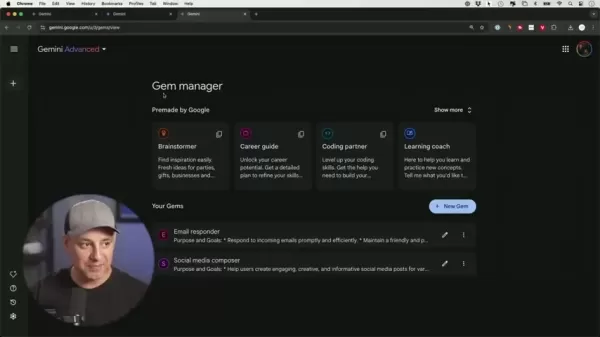
Consider them your dedicated AI assistants, precisely calibrated to execute specific duties following your directives and data. This degree of personalization unlocks a vast array of opportunities, allowing you to develop AI tools that are perfectly aligned with your unique requirements and work processes. This functionality lets users build their own versions of the bot that possess a deeper understanding of their work.
In contrast to the standard Gemini interface, Gems permit you to infuse the AI's reasoning with your own expertise and preferred methods. This ensures the final output is customized for particular applications and yields more practical outcomes.
The Power of Customization: Instructions and Data
The real strength of Gemini Gems stems from their adaptability. You can construct them with your own specific commands and enrich them with your personal data. This means you are not confined to the general functionalities of a typical chatbot. You can shape the AI to think, reply, and operate in a manner that mirrors your individual viewpoint and preferences.
Custom Instructions: These form the foundation of your Gem, governing its mission, aims, conduct, and overall strategy. Think of them as the AI's operational guide, molding its character and abilities. They are intended for highly specialized functions.
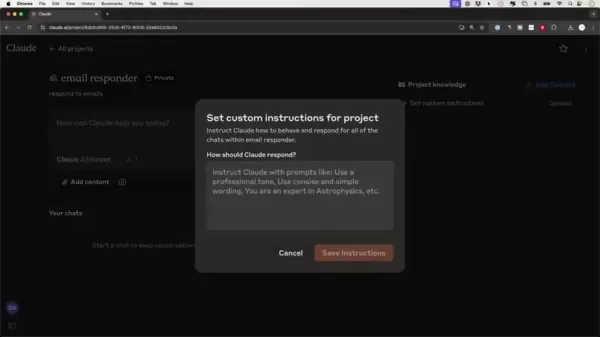
Data Integration: One of the most impressive attributes of Gemini Gems is the capacity to incorporate live data from various Google platforms. This characteristic distinguishes it from numerous other AI chatbots, allowing you to create AI assistants that are not just smart but also contextually informed and current.
By effectively combining instructions and data, you can produce Gems that manage intricate tasks, offer tailored insights, and automate laborious procedures. Personalized AI chatbots could become the standard for many end-users.
Data Sources for Google Gemini Gems
Unlocking Live Data Integration: Google's Ecosystem
Google Gemini's Gems have the exclusive capability to connect with the extensive network of Google services, facilitating smooth integration with live data.
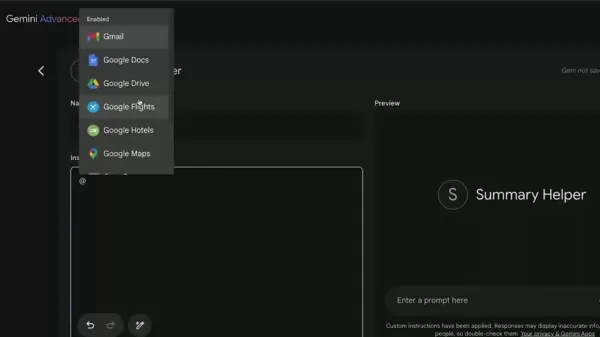
This functionality lets your tailored AI chatbots retrieve and analyze information directly from your:
- Gmail: Fetch and condense email threads, monitor important dates, and even compose replies based on your correspondence history.
- Google Drive: Open and examine documents, spreadsheets, and presentations, enabling your Gem to offer analysis, produce summaries, or automate data input jobs.
- YouTube: Find and pull information from videos, summarize content, or design customized learning paths from YouTube playlists.
The power to leverage these real-time data sources raises Gemini Gems above the abilities of conventional chatbots, turning them into potent, situationally aware helpers that can genuinely comprehend and address your requirements. With the Gemini AI update, the potential applications of AI are virtually limitless.
Building Your Own Google Gemini Gem: A Step-by-Step Guide
Step 1: Upgrading to Gemini Advanced
To start building your own Gems, you must first upgrade to Gemini Advanced.
This is a paid subscription that provides access to the complete suite of Gemini's customization tools. The Gemini Advanced plan costs $20 per month. Without this upgrade, the Gems feature remains inaccessible. Consequently, users should evaluate whether the benefits justify the cost before subscribing.
Step 2: Accessing the Gem Manager
After upgrading to Gemini Advanced, navigate to the Gem Manager.
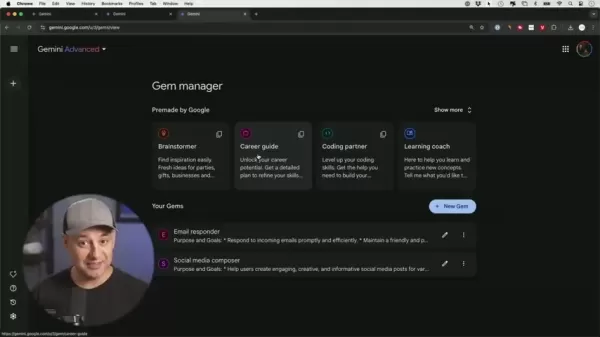
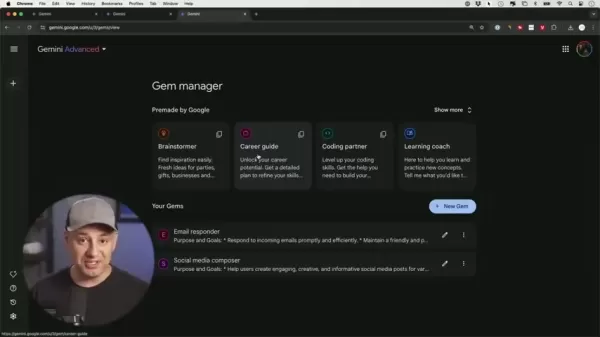
On the left-hand side of the interface, select the 'Gem Manager' icon. This directs you to the central dashboard where you can browse pre-existing Gems and initiate the creation of new ones.
Step 3: Exploring Pre-made Gems (Optional)
Before starting on your own Gem, it's beneficial to investigate the pre-configured Gems offered by Google.

These act as excellent illustrations of the feature's potential and can spark ideas for your own designs. Try them out to grasp their operation and the types of instructions that guide their performance.
Step 4: Creating a New Gem
Within the Gem Manager, select the '+ New Gem' option.
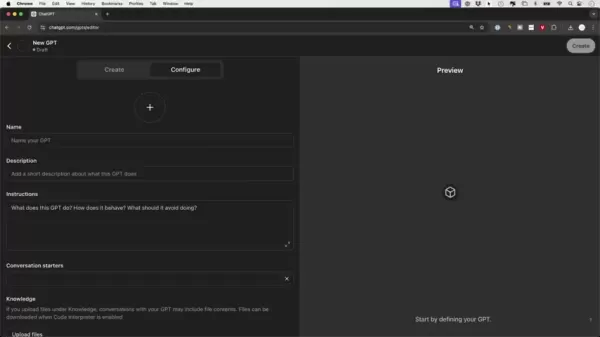
This launches the Gem creation workspace, where you will specify your Gem's identity, commands, and connected data services.
Step 5: Defining Your Gem's Instructions
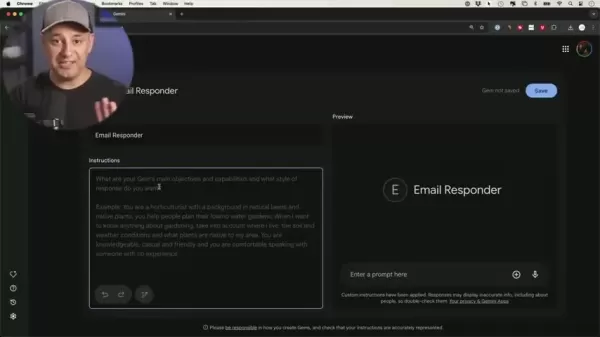
This stage is where you define your Gem's character and capabilities. The creation screen provides fields for your Gem's name at the top and a section for detailed instructions below.
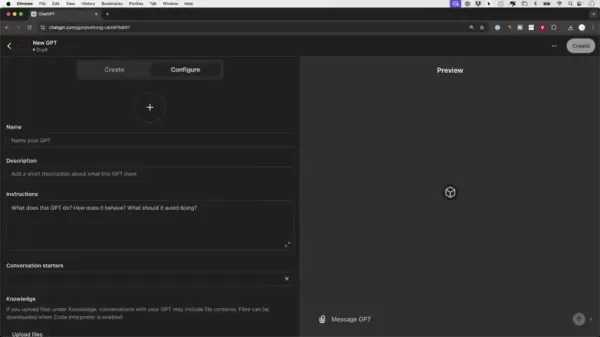
Begin by assigning a distinct and descriptive name that conveys its main function. Then, write comprehensive instructions that detail its targets, functions, and preferred communication manner.
Refer to the pre-made Gems or utilize the prompt generator for inspiration. Define the tone and style, such as making it businesslike or casual. Also provide clear, sequential guidance to give the chatbot a structured process to adhere to.
If you prefer not to type out instructions manually, you can employ Gemini AI's prompt generator. This serves as a valuable alternative capable of comprehensively rephrasing a prompt. This is particularly helpful if you wish to avoid extensive manual detailing of your prompt.
Keep these essential elements in mind when formulating your instructions:
- Purpose: What is the fundamental reason for this Gem's existence?
- Goals: What precise steps should it execute to fulfill its purpose?
- Overall Direction: What strategy should it employ for dialogues and assignments?
Utilize the preview panel on the right side of the interface to evaluate the Gem's performance.
Step 6: Integrating Live Data (Optional)
Should you want your Gem to utilize live data from Google services, employ the '@' symbol followed by the name of a Google application (e.g., Gmail, Google Docs).
This creates a live link, permitting the Gem to access and analyze pertinent information from that specific service.
Step 7: Testing and Saving Your Gem
Once you are happy with your Gem's instructions and data connections, conduct comprehensive tests using the preview function. Adjust its commands as required until it operates as intended. When confident in its performance, select the 'Save' option to include it in your personal library of Gems.
Google Gemini Pricing
Gemini Advanced Plan
The Gemini Advanced plan requires a recurring monthly payment of $20 from subscribers to access this tier. The standard version of Gemini does not provide access to the Gemini Gems feature.
Google Gemini's Gems: Pros and Cons
Pros
Customizable AI chatbots designed for particular requirements
Integration of real-time data from Google services
Prompt generator to aid in creating instructions
Potential to boost efficiency and automate tasks
Cons
Requires a paid Gemini Advanced subscription
Being a relatively new feature, it might have certain constraints
Heavy reliance on the Google ecosystem
Potential data security issues.
Related Questions
What are custom GPTs?
Custom GPTs, available on platforms such as ChatGPT, enable users to build customized versions of AI assistants. These personalized bots can be configured for specific jobs, furnished with specialized knowledge, and directed to operate in a defined manner. They represent a robust method for individualizing AI and making it fit personal workflows. Alternatives like Claude Projects also offer custom instruction features. The Gemini Gem AI update specifically focuses on deeply integrating elements of Google's services with AI. This distinctive capability is not readily available in other chatbot platforms. ChatGPT features a marketplace that lets users discover GPTs created by others. This provides an avenue for users to share and explore various AI creations.
Related article
 DeepMind CEO Hassabis: I sleep six hours a day, usually feel energetic around 1 a.m.
Fortune recently featured an interview with Demis Hassabis, CEO of Google DeepMind, revealing his unconventional approach to rest and productivity. Hassabis disclosed that he sleeps very little, structuring his waking hours into two distinct work blo
OpenAI, Anthropic Vie for Market Share Despite Revenue Shortfalls
Despite recent reports suggesting OpenAI missed revenue targets, creating pressure on tech stocks this Tuesday, private AI lab investors remain resilient. Seasoned backers have confirmed they will not reduce investment despite negative media coverage
California AV Compliance: A New Era of Tickets, Geofences, and 1M Miles
Guident operates an AuveTech shuttle in South Florida, managing a four-mile route in West Palm Beach and a one-mile route in Boca Raton using its remote monitoring technology. | Credit: GuidentCalifornia is redefining the regulatory landscape for dri
Related Special Topic Recommendations
chatbot
DeepMind CEO Hassabis: I sleep six hours a day, usually feel energetic around 1 a.m.
Fortune recently featured an interview with Demis Hassabis, CEO of Google DeepMind, revealing his unconventional approach to rest and productivity. Hassabis disclosed that he sleeps very little, structuring his waking hours into two distinct work blo
OpenAI, Anthropic Vie for Market Share Despite Revenue Shortfalls
Despite recent reports suggesting OpenAI missed revenue targets, creating pressure on tech stocks this Tuesday, private AI lab investors remain resilient. Seasoned backers have confirmed they will not reduce investment despite negative media coverage
California AV Compliance: A New Era of Tickets, Geofences, and 1M Miles
Guident operates an AuveTech shuttle in South Florida, managing a four-mile route in West Palm Beach and a one-mile route in Boca Raton using its remote monitoring technology. | Credit: GuidentCalifornia is redefining the regulatory landscape for dri
Related Special Topic Recommendations
chatbot
 Best AI Roleplay Chat Apps for Language Practice, Interview Prep, and Daily Fluency
2026 Latest Best Top-rated AI Roleplay Chat Apps for Language Practice, Interview Prep, and Daily Fluency! XIX.AI curates a powerful game-changing collection that offers free vs paid comparison, real-world tests, and updated rankings weekly. These must-try tools help you boost writing skills, overcome fluency challenges, and improve communication efficiency across all daily scenarios. Explore now to discover your perfect tool for language growth!
 10 tools
 xix.ai
Music composition
AI Stem Separation Tools for Remix Production, Sampling Prep, and Karaoke Masters
xix.ai
Music composition
AI Stem Separation Tools for Remix Production, Sampling Prep, and Karaoke Masters
2026 Latest Best Top-rated AI Stem Separation Tools Curated for Remix Production, Sampling Prep, and Karaoke Masters. These powerful game-changing tools offer real-world tests to deliver precise audio isolation, boosting productivity significantly. XIX.AI provides a weekly updated free vs paid comparison guide to help you find the must-try solution that suits your needs. Explore now to unlock your AI edge.
8 tools
xix.ai
Data Analysis
AI SQL Copilots for Revenue Dashboards, Funnel Analysis, and Product Metrics
2026 Latest Best AI SQL Copilots Ranked Top-Rated! XIX.AI curates a powerful game-changing collection for weekly updated real-world tests. These must-try tools help you generate accurate revenue dashboards, analyze sales funnels, and track product metrics swiftly, boosting productivity massively. Explore now to Discover your perfect tool for data-driven decision making! 238 characters
9 tools
xix.ai
Music composition
Best AI Melody Writing Tools for Song Drafts
2026 Latest Best Top-Rated AI Melody Writing Tools for Song Drafts! XIX.AI has curated a highly powerful game-changing collection that goes through rigorous real-world tests to deliver the best writing experience. You can find detailed free vs paid comparisons, accurate rankings, and must-try options designed to help you create stunning song drafts effortlessly and boost your creative productivity significantly. Explore now to discover your perfect tool!
8 tools
xix.ai
chatbot
Best AI Conversation Trainer Tools for Interview Practice
2026 Latest Best Top-rated AI Conversation Trainer Tools for Interview Practice are here on XIX.AI! This curated collection features powerful, game-changing tools that go through rigorous real-world tests to deliver accurate feedback. You’ll find a free vs paid comparison and detailed rankings to help you choose the must-try option that boosts your confidence and skills. Explore now to Discover your perfect tool for interview success!
12 tools
xix.ai
Design & Art
Best AI Style Transfer Tools for Creative Experiments
2026 Latest Best Top-rated AI Style Transfer Tools for Creative Experiments! XIX.AI has curated a powerful, game-changing collection of must-try tools that deliver exceptional results through real-world tests and rigorous rankings. These top solutions help creatives boost productivity significantly by accelerating content creation and unlocking endless creative possibilities. Explore now to discover your perfect tool and start creating today!
9 tools
xix.ai

 Comments (0)
0/500
Comments (0)
0/500
Google has rolled out a significant update to its Gemini AI platform, introducing a feature known as 'Gems.' These Gems mark the beginning of a new age for customizable AI chatbots, empowering users to personalize their AI interactions with custom commands and the capacity to incorporate real-time information from various Google services. This in-depth guide delves into the capabilities of Gemini Gems, covering their usage, creation process, and how they stack up against similar functionalities in other AI platforms.
Key Points
Google Gemini debuts 'Gems,' which are customizable AI chatbots.
Gems enable the creation of personalized AI experiences through custom commands.
A Gemini Advanced subscription is necessary to use Gems.
Gems can fetch live data from Google services such as Gmail, Docs, and YouTube.
Gemini includes a prompt generator to help formulate instructions.
The integration of live data into Gemini Gems is a distinguishing feature not commonly found in other AI chatbots services.
Custom instructions define the bot's purpose, objectives, general approach, and knowledge sources.
Understanding Google Gemini Gems
What are Google Gemini Gems?
Google Gemini Gems are, in essence, personalized iterations of the standard Google Gemini AI chatbot.
Consider them your dedicated AI assistants, precisely calibrated to execute specific duties following your directives and data. This degree of personalization unlocks a vast array of opportunities, allowing you to develop AI tools that are perfectly aligned with your unique requirements and work processes. This functionality lets users build their own versions of the bot that possess a deeper understanding of their work.
In contrast to the standard Gemini interface, Gems permit you to infuse the AI's reasoning with your own expertise and preferred methods. This ensures the final output is customized for particular applications and yields more practical outcomes.
The Power of Customization: Instructions and Data
The real strength of Gemini Gems stems from their adaptability. You can construct them with your own specific commands and enrich them with your personal data. This means you are not confined to the general functionalities of a typical chatbot. You can shape the AI to think, reply, and operate in a manner that mirrors your individual viewpoint and preferences.
Custom Instructions: These form the foundation of your Gem, governing its mission, aims, conduct, and overall strategy. Think of them as the AI's operational guide, molding its character and abilities. They are intended for highly specialized functions.
Data Integration: One of the most impressive attributes of Gemini Gems is the capacity to incorporate live data from various Google platforms. This characteristic distinguishes it from numerous other AI chatbots, allowing you to create AI assistants that are not just smart but also contextually informed and current.
By effectively combining instructions and data, you can produce Gems that manage intricate tasks, offer tailored insights, and automate laborious procedures. Personalized AI chatbots could become the standard for many end-users.
Data Sources for Google Gemini Gems
Unlocking Live Data Integration: Google's Ecosystem
Google Gemini's Gems have the exclusive capability to connect with the extensive network of Google services, facilitating smooth integration with live data.
This functionality lets your tailored AI chatbots retrieve and analyze information directly from your:
- Gmail: Fetch and condense email threads, monitor important dates, and even compose replies based on your correspondence history.
- Google Drive: Open and examine documents, spreadsheets, and presentations, enabling your Gem to offer analysis, produce summaries, or automate data input jobs.
- YouTube: Find and pull information from videos, summarize content, or design customized learning paths from YouTube playlists.
The power to leverage these real-time data sources raises Gemini Gems above the abilities of conventional chatbots, turning them into potent, situationally aware helpers that can genuinely comprehend and address your requirements. With the Gemini AI update, the potential applications of AI are virtually limitless.
Building Your Own Google Gemini Gem: A Step-by-Step Guide
Step 1: Upgrading to Gemini Advanced
To start building your own Gems, you must first upgrade to Gemini Advanced.
This is a paid subscription that provides access to the complete suite of Gemini's customization tools. The Gemini Advanced plan costs $20 per month. Without this upgrade, the Gems feature remains inaccessible. Consequently, users should evaluate whether the benefits justify the cost before subscribing.
Step 2: Accessing the Gem Manager
After upgrading to Gemini Advanced, navigate to the Gem Manager.
On the left-hand side of the interface, select the 'Gem Manager' icon. This directs you to the central dashboard where you can browse pre-existing Gems and initiate the creation of new ones.
Step 3: Exploring Pre-made Gems (Optional)
Before starting on your own Gem, it's beneficial to investigate the pre-configured Gems offered by Google.
These act as excellent illustrations of the feature's potential and can spark ideas for your own designs. Try them out to grasp their operation and the types of instructions that guide their performance.
Step 4: Creating a New Gem
Within the Gem Manager, select the '+ New Gem' option.
This launches the Gem creation workspace, where you will specify your Gem's identity, commands, and connected data services.
Step 5: Defining Your Gem's Instructions
This stage is where you define your Gem's character and capabilities. The creation screen provides fields for your Gem's name at the top and a section for detailed instructions below.
Begin by assigning a distinct and descriptive name that conveys its main function. Then, write comprehensive instructions that detail its targets, functions, and preferred communication manner.
Refer to the pre-made Gems or utilize the prompt generator for inspiration. Define the tone and style, such as making it businesslike or casual. Also provide clear, sequential guidance to give the chatbot a structured process to adhere to.
If you prefer not to type out instructions manually, you can employ Gemini AI's prompt generator. This serves as a valuable alternative capable of comprehensively rephrasing a prompt. This is particularly helpful if you wish to avoid extensive manual detailing of your prompt.
Keep these essential elements in mind when formulating your instructions:
- Purpose: What is the fundamental reason for this Gem's existence?
- Goals: What precise steps should it execute to fulfill its purpose?
- Overall Direction: What strategy should it employ for dialogues and assignments?
Utilize the preview panel on the right side of the interface to evaluate the Gem's performance.
Step 6: Integrating Live Data (Optional)
Should you want your Gem to utilize live data from Google services, employ the '@' symbol followed by the name of a Google application (e.g., Gmail, Google Docs).
This creates a live link, permitting the Gem to access and analyze pertinent information from that specific service.
Step 7: Testing and Saving Your Gem
Once you are happy with your Gem's instructions and data connections, conduct comprehensive tests using the preview function. Adjust its commands as required until it operates as intended. When confident in its performance, select the 'Save' option to include it in your personal library of Gems.
Google Gemini Pricing
Gemini Advanced Plan
The Gemini Advanced plan requires a recurring monthly payment of $20 from subscribers to access this tier. The standard version of Gemini does not provide access to the Gemini Gems feature.
Google Gemini's Gems: Pros and Cons
Pros
Customizable AI chatbots designed for particular requirements
Integration of real-time data from Google services
Prompt generator to aid in creating instructions
Potential to boost efficiency and automate tasks
Cons
Requires a paid Gemini Advanced subscription
Being a relatively new feature, it might have certain constraints
Heavy reliance on the Google ecosystem
Potential data security issues.
Related Questions
What are custom GPTs?
Custom GPTs, available on platforms such as ChatGPT, enable users to build customized versions of AI assistants. These personalized bots can be configured for specific jobs, furnished with specialized knowledge, and directed to operate in a defined manner. They represent a robust method for individualizing AI and making it fit personal workflows. Alternatives like Claude Projects also offer custom instruction features. The Gemini Gem AI update specifically focuses on deeply integrating elements of Google's services with AI. This distinctive capability is not readily available in other chatbot platforms. ChatGPT features a marketplace that lets users discover GPTs created by others. This provides an avenue for users to share and explore various AI creations.








 DeepMind CEO Hassabis: I sleep six hours a day, usually feel energetic around 1 a.m.
Fortune recently featured an interview with Demis Hassabis, CEO of Google DeepMind, revealing his unconventional approach to rest and productivity. Hassabis disclosed that he sleeps very little, structuring his waking hours into two distinct work blo
DeepMind CEO Hassabis: I sleep six hours a day, usually feel energetic around 1 a.m.
Fortune recently featured an interview with Demis Hassabis, CEO of Google DeepMind, revealing his unconventional approach to rest and productivity. Hassabis disclosed that he sleeps very little, structuring his waking hours into two distinct work blo
 OpenAI, Anthropic Vie for Market Share Despite Revenue Shortfalls
Despite recent reports suggesting OpenAI missed revenue targets, creating pressure on tech stocks this Tuesday, private AI lab investors remain resilient. Seasoned backers have confirmed they will not reduce investment despite negative media coverage
California AV Compliance: A New Era of Tickets, Geofences, and 1M Miles
Guident operates an AuveTech shuttle in South Florida, managing a four-mile route in West Palm Beach and a one-mile route in Boca Raton using its remote monitoring technology. | Credit: GuidentCalifornia is redefining the regulatory landscape for dri
OpenAI, Anthropic Vie for Market Share Despite Revenue Shortfalls
Despite recent reports suggesting OpenAI missed revenue targets, creating pressure on tech stocks this Tuesday, private AI lab investors remain resilient. Seasoned backers have confirmed they will not reduce investment despite negative media coverage
California AV Compliance: A New Era of Tickets, Geofences, and 1M Miles
Guident operates an AuveTech shuttle in South Florida, managing a four-mile route in West Palm Beach and a one-mile route in Boca Raton using its remote monitoring technology. | Credit: GuidentCalifornia is redefining the regulatory landscape for dri

2026 Latest Best Top-rated AI Roleplay Chat Apps for Language Practice, Interview Prep, and Daily Fluency! XIX.AI curates a powerful game-changing collection that offers free vs paid comparison, real-world tests, and updated rankings weekly. These must-try tools help you boost writing skills, overcome fluency challenges, and improve communication efficiency across all daily scenarios. Explore now to discover your perfect tool for language growth!
10 tools
xix.ai

2026 Latest Best Top-rated AI Stem Separation Tools Curated for Remix Production, Sampling Prep, and Karaoke Masters. These powerful game-changing tools offer real-world tests to deliver precise audio isolation, boosting productivity significantly. XIX.AI provides a weekly updated free vs paid comparison guide to help you find the must-try solution that suits your needs. Explore now to unlock your AI edge.
8 tools
xix.ai

2026 Latest Best AI SQL Copilots Ranked Top-Rated! XIX.AI curates a powerful game-changing collection for weekly updated real-world tests. These must-try tools help you generate accurate revenue dashboards, analyze sales funnels, and track product metrics swiftly, boosting productivity massively. Explore now to Discover your perfect tool for data-driven decision making! 238 characters
9 tools
xix.ai

2026 Latest Best Top-Rated AI Melody Writing Tools for Song Drafts! XIX.AI has curated a highly powerful game-changing collection that goes through rigorous real-world tests to deliver the best writing experience. You can find detailed free vs paid comparisons, accurate rankings, and must-try options designed to help you create stunning song drafts effortlessly and boost your creative productivity significantly. Explore now to discover your perfect tool!
8 tools
xix.ai

2026 Latest Best Top-rated AI Conversation Trainer Tools for Interview Practice are here on XIX.AI! This curated collection features powerful, game-changing tools that go through rigorous real-world tests to deliver accurate feedback. You’ll find a free vs paid comparison and detailed rankings to help you choose the must-try option that boosts your confidence and skills. Explore now to Discover your perfect tool for interview success!
12 tools
xix.ai

2026 Latest Best Top-rated AI Style Transfer Tools for Creative Experiments! XIX.AI has curated a powerful, game-changing collection of must-try tools that deliver exceptional results through real-world tests and rigorous rankings. These top solutions help creatives boost productivity significantly by accelerating content creation and unlocking endless creative possibilities. Explore now to discover your perfect tool and start creating today!
9 tools
xix.ai












