


 Home
HomeWhat is GitHub Copilot Agent Mode? 2026 guide for developer productivity.
GitHub Copilot is transforming software development by offering intelligent, real-time code suggestions. Its new Agent Mode elevates this capability, enabling developers to offload complex tasks to an AI-powered assistant. This lets programmers dedicate their energy to creative problem-solving and architectural design, while Copilot manages routine coding, testing, and documentation. The result is a significant boost in efficiency, fewer errors, and faster project completion.
Key Points
Agent Mode automates monotonous coding work, giving developers more time for critical thinking.
It improves code quality by enforcing consistent standards and testing procedures.
Developers can delegate issues directly to Copilot, simplifying project management.
Copilot intelligently analyzes projects, learns established patterns, and applies them to new code.
Automated testing and continuous integration enhance code reliability and minimize bugs.
The feature adapts to specific project needs and coding conventions for uniform, high-quality results.
Developers can concentrate on innovation and strategy while Copilot handles everyday development chores.
Copilot produces thorough documentation, improving code accessibility and long-term maintainability.
Unlocking Productivity with GitHub Copilot Agent Mode
The Power of AI-Driven Automation in Software Development
In the fast-moving world of software development, maximizing efficiency is essential. Developers are always looking for methods to optimize workflows, minimize repetitive work, and focus on creating novel solutions. GitHub Copilot Agent Mode meets these needs by bringing AI-driven automation into the development lifecycle.
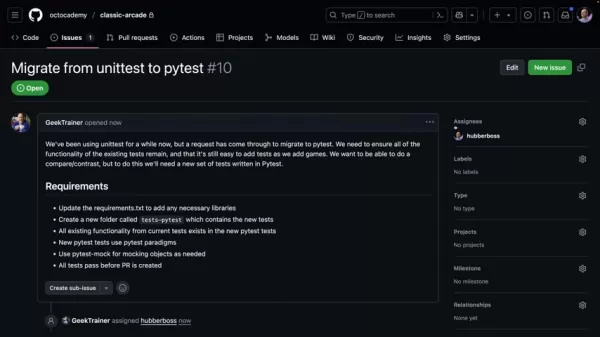
This functionality allows developers to assign tedious duties like code generation, testing, and documentation to Copilot, reclaiming valuable time and resources. The advantages of this AI-powered automation are substantial. It lowers the chance of human error, speeds up project delivery, and allows developers to concentrate on high-level design and complex challenges. By handling routine tasks, Agent Mode empowers developers to be more inventive, productive, and strategic.
Agent Mode examines project architecture, coding standards, and testing protocols to produce high-quality code that fits project specifications. This smart automation guarantees consistency, reduces manual code review needs, and shortens the development cycle. The outcome is a more efficient and dependable development process, empowering teams to deliver innovative software solutions more quickly and with greater assurance.
Assigning Issues to Copilot: A Seamless Workflow
A standout feature of GitHub Copilot Agent Mode is the option to assign issues directly to Copilot.
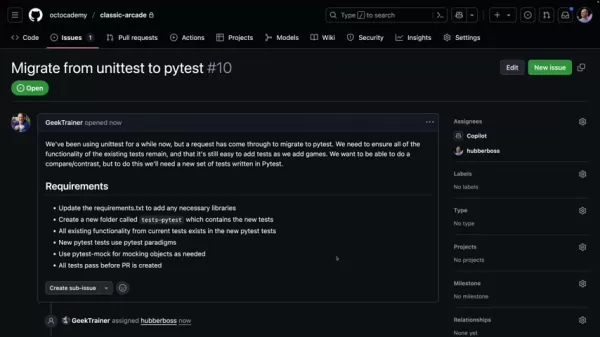
This smooth workflow makes project management and task delegation more straightforward. Rather than manually distributing tasks among team members, developers can simply assign an issue to Copilot and let the AI agent take over. This is especially helpful for repetitive, time-intensive tasks or those requiring strict adherence to specific coding standards. For instance, a developer might assign Copilot the job of migrating a testing framework, updating documentation, or refactoring code. Copilot will then assess the issue, investigate the project structure, and produce the necessary code to solve it. This efficient process not only saves time but also ensures consistency and reduces potential mistakes.
By delegating issues to Copilot, developers can dedicate their attention to more strategic work, such as designing new features, tackling complex problems, and collaborating with colleagues. This smarter resource allocation can greatly improve overall productivity and accelerate project schedules. The ability to assign tasks to an AI agent also lessens the load on individual developers, helping to prevent burnout and promote a more sustainable work environment. This cooperative model, where humans and AI work in tandem, points to the future of software development.
Copilot's Intelligent Exploration and Pattern Recognition
GitHub Copilot's Agent Mode is more than a simple code generator; it's an intelligent explorer with advanced pattern recognition.
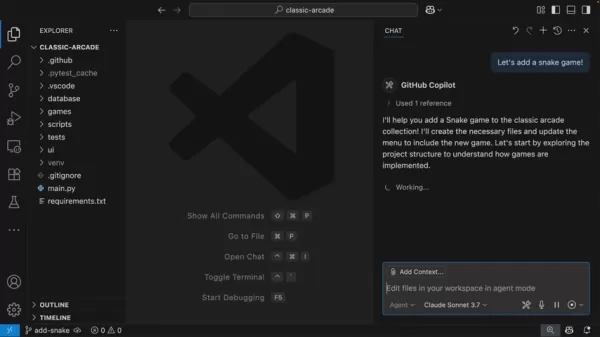
When given a task, Copilot doesn't just generate code in a vacuum. Instead, it carefully explores the project structure, detects existing patterns, and comprehends the established coding conventions. This deep project insight allows Copilot to generate code that integrates smoothly with the current codebase, maintaining consistency and reducing integration conflicts.
For example, if a project uses a particular base class for all game components, Copilot will recognize this pattern and ensure any new game components it creates inherit from that base class. This compliance with established patterns not only enhances code quality but also makes the code easier to understand, maintain, and expand. Copilot's capacity to learn from existing code patterns is a powerful feature that ensures consistency and reduces the need for manual code reviews. This intelligent exploration and pattern recognition distinguish Agent Mode from conventional code generation tools.
Automated Testing and Continuous Integration: Ensuring Code Reliability
Beyond code generation, GitHub Copilot Agent Mode also automates testing and continuous integration.
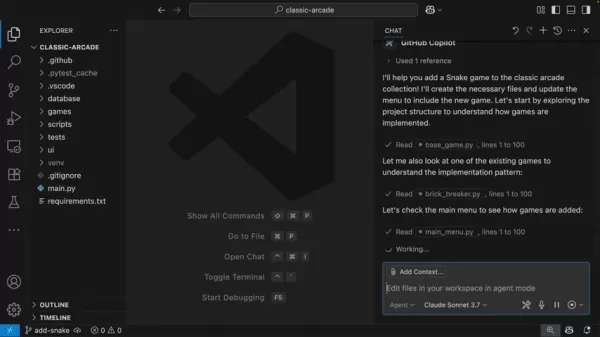
This functionality is vital for guaranteeing code reliability and minimizing error risks. Copilot can create unit tests for new code, execute existing tests to confirm functionality, and integrate code changes into the project seamlessly. This automated testing process not only conserves time but also elevates code quality. By identifying errors early in the development cycle, developers can avoid expensive rework and deliver more dependable software.
Copilot's automated testing capabilities are particularly valuable for complex projects with extensive test suites. The AI agent can rapidly run through all tests, pinpoint any failures, and supply developers with detailed reports. This continuous integration process ensures code changes are thoroughly tested before merging into the main branch, reducing the risk of introducing bugs or regressions. With automated testing and continuous integration, developers can have greater confidence in their code's quality and reliability.
A Practical Demonstration: Adding a Snake Game to a Classic Arcade App
Incorporating a New Game with Copilot's Assistance
To demonstrate GitHub Copilot Agent Mode's capabilities, consider the challenge of adding a new game—specifically a classic Snake game—to an existing arcade application. The difficulty lies in ensuring the new game integrates seamlessly with the current codebase, follows established coding standards, and includes comprehensive unit tests. Copilot's Agent Mode streamlines this process by automating many routine tasks.
The developer begins by assigning Copilot the task of adding the Snake game. Copilot then explores the project structure, identifies the base class for all games, and generates the initial Snake game code, ensuring it inherits from the base class. Copilot also creates a new unit test file, using the project's helper files to simplify the testing process. The AI agent then registers the new game in the main menu, making it available to users.
Copilot simplifies the creation of the Snake game, producing code that integrates smoothly with the existing codebase and follows established coding standards. The AI agent also automates unit test creation, ensuring code reliability and quality. This automation lets the developer focus on the creative aspects of game development, such as designing game logic and user interface.
Reviewing and Validating Copilot's Work
While GitHub Copilot Agent Mode automates many tasks involved in adding the Snake game, the developer still plays a vital role in reviewing and validating Copilot's work. The developer examines the generated code, verifies it meets project requirements, and makes any necessary adjustments. The developer also runs the unit tests to confirm the game works correctly and doesn't introduce any bugs.
This collaborative approach, combining human and AI efforts, is crucial for ensuring software quality and reliability. Copilot handles routine tasks like code generation and testing, while the developer provides domain expertise and critical thinking. This blend of AI-driven automation and human oversight creates a more efficient, reliable, and innovative development process.
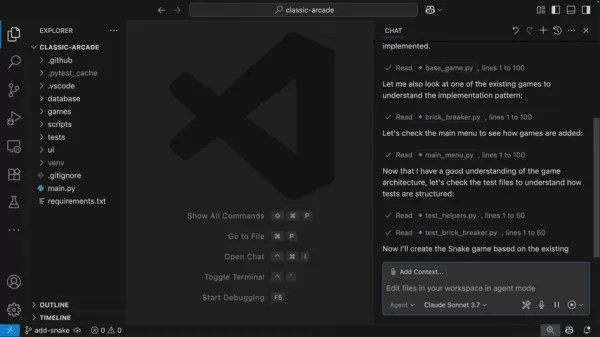
In this specific example, the developer opens the branch containing Copilot's changes in Codespaces and runs the tests to confirm everything passes. This final validation step ensures the new game is fully integrated and functional within the existing arcade application.
Leveraging GitHub Copilot Agent Mode: A Step-by-Step Guide
Step 1: Assigning an Issue to Copilot
The first step in using GitHub Copilot Agent Mode is to assign an issue to Copilot. This can be done directly from the GitHub issue tracker. Simply select the issue you want Copilot to handle and assign it to the 'Copilot' user. Provide a clear, concise description of the issue, including any specific requirements or constraints.
Clear instructions are essential for helping Copilot understand the task and generate appropriate code. You can also give Copilot additional context by linking to relevant files or documentation. The more information you provide, the better Copilot can comprehend the issue and produce an effective solution.
Step 2: Reviewing Copilot's Plan
After assigning the issue to Copilot, the AI agent will create a new branch for its code and submit a pull request. The pull request will include a detailed plan outlining how Copilot intends to address the issue. Review this plan carefully to ensure it matches your expectations.
Copilot's plan typically includes steps like exploring the project structure, identifying relevant files, generating new code, updating existing code, and creating unit tests. If you have concerns or suggestions, you can provide feedback to Copilot by commenting on the pull request. Copilot will then incorporate your feedback into its plan and update the code accordingly. This iterative process ensures the final solution meets your requirements and follows the project's coding standards.
Step 3: Validating Copilot's Changes
Once Copilot has implemented the changes described in its plan, it's important to validate its work. This involves reviewing the generated code, running the unit tests, and confirming the issue has been resolved. You can use GitHub's code review tools to examine code changes, add comments, and suggest improvements.
If the code passes all unit tests and meets your requirements, you can approve the pull request and merge the changes into the main branch. If any issues remain, you can provide feedback to Copilot and request further adjustments. This collaborative validation process ensures the final solution is high-quality and fulfills the project's needs.
GitHub Copilot Pricing
Subscription Plans
GitHub Copilot uses a subscription-based pricing model designed for individual developers and organizations. As of 2025, the pricing structure is as follows:
- Individual Plan: $10 per month or $100 per year. This plan provides GitHub Copilot access for personal use and small projects.
- Business Plan: $19 per user per month. This plan includes extra features like organization-wide policies, priority support, and advanced security options.
- Enterprise Plan: Available through custom pricing. This plan offers tailored solutions for large organizations with specific needs, such as custom models, dedicated support, and enterprise system integration.
Prices are subject to change, so always check the official GitHub Copilot website for current information. The value provided by Copilot is considerable, given the productivity gains and code quality improvements it enables.
Pros and Cons of GitHub Copilot
Pros
Increased developer productivity through AI-driven code completion and automation.
Enhanced code quality via automated unit testing and adherence to coding standards.
Simplified project management with direct issue assignment to Copilot.
Improved knowledge sharing with comprehensive AI-generated documentation.
Accelerated project timelines and lower development costs.
Cons
Subscription costs may be prohibitive for some individual developers and small teams.
Potential over-reliance on AI could lead to diminished coding skills if not used carefully.
Occasional code suggestions may be inaccurate or irrelevant, requiring thorough review.
Security concerns regarding data privacy and code ownership need careful attention and monitoring.
Key Features of GitHub Copilot
AI-Powered Code Completion
GitHub Copilot uses advanced AI algorithms to deliver real-time code suggestions and completions. As you type, Copilot analyzes your code and proposes relevant code snippets, function names, and even complete code blocks. This feature speeds up coding and reduces error risks. Copilot's code suggestions are context-aware, meaning they adapt to your specific coding style and project requirements. This ensures suggested code is not only accurate but also integrates smoothly with your existing codebase.
Automated Unit Testing
Agent Mode automates the creation of unit tests for new code. This feature is crucial for ensuring code reliability and minimizing errors. Copilot analyzes the code and generates comprehensive unit tests covering all critical functionalities. This automated testing process saves time while improving code quality. By catching errors early in the development cycle, developers can avoid costly rework and deliver more reliable software.
Project Exploration and Pattern Recognition
Copilot intelligently explores project structure, coding standards, and testing protocols to produce high-quality code that aligns with project requirements. This intelligent exploration and pattern recognition distinguish Agent Mode from traditional code generation tools.
Issue Assignment
Assign issues directly to Copilot, simplifying project management and task delegation. Instead of manually assigning tasks to team members, developers can simply assign an issue to Copilot and let the AI agent handle the rest.
GitHub Copilot Use Cases
Accelerating Development Workflows
GitHub Copilot significantly speeds up development workflows by automating repetitive tasks and providing real-time code suggestions. Developers can complete tasks faster with fewer errors, leading to higher productivity and shorter project timelines.
Improving Code Quality
GitHub Copilot helps enhance code quality by ensuring compliance with coding standards and testing protocols. The AI agent generates comprehensive unit tests, identifies potential errors, and offers improvement suggestions, resulting in more reliable and maintainable code.
Facilitating Knowledge Sharing
GitHub Copilot promotes knowledge sharing by generating thorough documentation for new code. This makes code more accessible to other developers and reduces manual knowledge transfer needs. Copilot also helps developers learn new programming languages and frameworks by providing real-time code examples and explanations.
FAQ
What coding languages does GitHub Copilot support?
GitHub Copilot supports numerous programming languages, including Python, JavaScript, TypeScript, Java, C#, C++, and Go. The AI agent continuously learns and improves its support for new languages and frameworks. GitHub Copilot works effectively with many popular frameworks like React, Angular, Vue.js, Node.js, Django, Flask, Spring Boot, .NET, and more. This broad compatibility ensures developers can leverage Copilot's benefits across diverse projects. While GitHub Copilot excels with these languages and frameworks, its performance may vary depending on the specific project and coding style.
Is GitHub Copilot suitable for both individual developers and teams?
Yes, GitHub Copilot is designed to benefit both individual developers and teams. The AI agent helps individual developers boost productivity and improve code quality. For teams, GitHub Copilot facilitates collaboration, knowledge sharing, and adherence to coding standards. GitHub Copilot offers different pricing plans to suit individual and team needs. Teams can also use organization-wide policies and advanced security options to ensure consistent and secure Copilot usage.
How does GitHub Copilot handle security and privacy concerns?
GitHub Copilot is built with security and privacy as priorities. Copilot does not store or transmit your code to third parties. The AI agent analyzes your code locally and generates suggestions based on your specific coding style and project requirements. GitHub Copilot also provides advanced security options, such as organization-wide policies, to prevent accidental code sharing or leakage. GitHub Copilot follows industry-standard security practices and undergoes regular security audits to identify and address potential vulnerabilities.
Related Questions
How does GitHub Copilot compare to other AI-powered code assistants?
GitHub Copilot distinguishes itself from other AI-powered code assistants through its deep GitHub platform integration, advanced AI algorithms, and comprehensive feature set. While other tools may offer similar code completion capabilities, Copilot goes further by providing automated testing, project exploration, and knowledge sharing features. GitHub Copilot's ability to learn from existing code patterns and adapt to specific coding styles sets it apart from traditional code generation tools. GitHub Copilot is designed to be more than a code assistant; it's intended as a collaborative partner that helps developers write better code faster.
What are the future trends in AI-assisted software development?
The future of AI-assisted software development is promising, with several exciting trends emerging. AI agents will become more intelligent and capable of handling increasingly complex tasks. We can anticipate AI agents that automatically generate complete applications, refactor legacy code, and debug complex software systems. AI will also play a larger role in facilitating developer collaboration. AI agents will help developers find relevant code snippets, identify potential conflicts, and suggest improvements, making team collaboration easier. AI will also be crucial in democratizing software development. AI agents will enable people with limited coding experience to create sophisticated applications, opening new opportunities for innovation and entrepreneurship.
Related article
 Apple Exec John Ternus Calls iPhone Best AI Device
Apple’s incoming CEO John Ternus clarified the company’s AI strategy during Wednesday’s Surprise and Shine event, asserting that the iPhone is already the premier AI device and prioritizing user data privacy over competitors.As Ternus succeeds Tim Co
Qwen-Audio-3.0-TTS: Qwen's Large Voice Synthesis Model Cuts First Packet Delay to 300ms
The competition in voice technology among major AI developers has intensified with a new entry. On July 20, Qwen released its latest audio synthesis model, Qwen-Audio-3.0-TTS, shifting control from complex technical configurations to simple natural l
Claude’s Cowork feature now recalls your past chat instructions
Anthropic’s update to Claude’s memory system removes a major friction point in using AI agents: the repetitive need to re-explain context that the AI already retains. By merging the memory architectures of standard chat and Claude Cowork, Claude now
Related Special Topic Recommendations
Design & Art
Apple Exec John Ternus Calls iPhone Best AI Device
Apple’s incoming CEO John Ternus clarified the company’s AI strategy during Wednesday’s Surprise and Shine event, asserting that the iPhone is already the premier AI device and prioritizing user data privacy over competitors.As Ternus succeeds Tim Co
Qwen-Audio-3.0-TTS: Qwen's Large Voice Synthesis Model Cuts First Packet Delay to 300ms
The competition in voice technology among major AI developers has intensified with a new entry. On July 20, Qwen released its latest audio synthesis model, Qwen-Audio-3.0-TTS, shifting control from complex technical configurations to simple natural l
Claude’s Cowork feature now recalls your past chat instructions
Anthropic’s update to Claude’s memory system removes a major friction point in using AI agents: the repetitive need to re-explain context that the AI already retains. By merging the memory architectures of standard chat and Claude Cowork, Claude now
Related Special Topic Recommendations
Design & Art
 Top AI Illustration Tools: Create Editorial Scenes and Cover Art Faster
2026 Latest Top-rated AI Illustration Tools: Our curated list features the best powerfully designed tools for creating stunning editorial scenes and eye-catching cover art quickly. Each option has gone through rigorous real-world tests, offering a free vs paid comparison to help you find the perfect match for your workflow. Try these must-try solutions today to unlock your AI edge and boost your creative productivity. Explore now at XIX.AI.
 10 tools
 xix.ai
Education and Learning
Top AI Tutors for Exam Prep: Practice Math, Science, and English
xix.ai
Education and Learning
Top AI Tutors for Exam Prep: Practice Math, Science, and English
2026 Latest Top-Rated Best AI Tutors for Exam Prep are here on XIX.AI! Our curated list features powerful game-changing tools that offer free vs paid comparison, real-world tests, and weekly updated rankings. They help boost your writing efficiency, simplify complex topic learning, and unlock your academic potential. Explore now to Discover your perfect exam prep tool and Start creating today to Unlock your AI edge!
10 tools
xix.ai
Finance
AI Budget Planning Tools for Personal Money Management
2026 Latest Best Top-Rated AI Budget Planning Tools for Personal Money Management are here on XIX.AI! This curated collection features powerful, game-changing solutions that help you conduct real-world tests, understand spending habits, and create personalized plans to boost productivity. Enjoy a free vs paid comparison along with detailed rankings. Must-try tools designed to simplify money management and unlock your AI edge. Explore now!
11 tools
xix.ai
Health & Wellness
AI Sleep Tracking Assistants: Improve Recovery with Better Bedtime Habits
2026 Latest Best Top-Rated AI Sleep Tracking Assistants curated for ultimate recovery. This fully updated weekly guide features powerful tools that deliver real-world tests, free vs paid comparison, and detailed rankings to help you find the must-try solution that boosts sleep quality and supports better bedtime habits. Explore now at XIX.AI to Unlock your AI edge.
10 tools
xix.ai
Data Analysis
AI SQL Copilots for Product and Revenue Analytics
2026 Latest Best Top-Rated AI SQL Copilots for Product and Revenue Analytics! XIX.AI has curated a powerful, game-changing collection of must-try tools that undergo real-world tests through weekly updated rankings. These tools help users boost productivity significantly by accelerating data analysis, streamlining complex queries, and generating accurate insights to drive smarter business decisions. Explore now to Discover your perfect tool for unlocking your AI edge!
14 tools
xix.ai
Education and Learning
Best AI Homework Helpers That Teach: Learn Concepts, Not Just Answers
2026 Latest Best Top-Rated AI Homework Helpers That Teach Core Concepts Not Just Answers Powerful Tools for Students Must-Try Curated List Weekly Updated Free vs Paid Comparison Real-World Tests Accurate Rankings to Help You Unlock Your Full Learning Potential Explore now to Discover your perfect tool for smarter studying.
10 tools
xix.ai

 Comments (2)
0/500
Comments (2)
0/500
![StephenGreen]()
GitHub Copilotのエージェントモードって、結局人間のプログラマーがやる仕事をどんどん減らしていく流れなのかな?🤔 複雑なタスクを任せられるのは便利だけど、このまま進むと10年後には開発者のスキルが退化しそうで少し怖い。AIに依存しすぎないバランスが大事だと思う。
![AnthonyRoberts]()
So Agent Mode is basically turning Copilot into a virtual pair programmer that can handle whole tasks? As a junior dev, the idea of delegating complex refactoring or debugging sounds both amazing and a bit scary. Hope the 'copilot' part stays true—we still need to be the pilots, not the passengers. The 2026 bit has me wondering about pricing tiers, though. 🤔
GitHub Copilot is transforming software development by offering intelligent, real-time code suggestions. Its new Agent Mode elevates this capability, enabling developers to offload complex tasks to an AI-powered assistant. This lets programmers dedicate their energy to creative problem-solving and architectural design, while Copilot manages routine coding, testing, and documentation. The result is a significant boost in efficiency, fewer errors, and faster project completion.
Key Points
Agent Mode automates monotonous coding work, giving developers more time for critical thinking.
It improves code quality by enforcing consistent standards and testing procedures.
Developers can delegate issues directly to Copilot, simplifying project management.
Copilot intelligently analyzes projects, learns established patterns, and applies them to new code.
Automated testing and continuous integration enhance code reliability and minimize bugs.
The feature adapts to specific project needs and coding conventions for uniform, high-quality results.
Developers can concentrate on innovation and strategy while Copilot handles everyday development chores.
Copilot produces thorough documentation, improving code accessibility and long-term maintainability.
Unlocking Productivity with GitHub Copilot Agent Mode
The Power of AI-Driven Automation in Software Development
In the fast-moving world of software development, maximizing efficiency is essential. Developers are always looking for methods to optimize workflows, minimize repetitive work, and focus on creating novel solutions. GitHub Copilot Agent Mode meets these needs by bringing AI-driven automation into the development lifecycle.
This functionality allows developers to assign tedious duties like code generation, testing, and documentation to Copilot, reclaiming valuable time and resources. The advantages of this AI-powered automation are substantial. It lowers the chance of human error, speeds up project delivery, and allows developers to concentrate on high-level design and complex challenges. By handling routine tasks, Agent Mode empowers developers to be more inventive, productive, and strategic.
Agent Mode examines project architecture, coding standards, and testing protocols to produce high-quality code that fits project specifications. This smart automation guarantees consistency, reduces manual code review needs, and shortens the development cycle. The outcome is a more efficient and dependable development process, empowering teams to deliver innovative software solutions more quickly and with greater assurance.
Assigning Issues to Copilot: A Seamless Workflow
A standout feature of GitHub Copilot Agent Mode is the option to assign issues directly to Copilot.
This smooth workflow makes project management and task delegation more straightforward. Rather than manually distributing tasks among team members, developers can simply assign an issue to Copilot and let the AI agent take over. This is especially helpful for repetitive, time-intensive tasks or those requiring strict adherence to specific coding standards. For instance, a developer might assign Copilot the job of migrating a testing framework, updating documentation, or refactoring code. Copilot will then assess the issue, investigate the project structure, and produce the necessary code to solve it. This efficient process not only saves time but also ensures consistency and reduces potential mistakes.
By delegating issues to Copilot, developers can dedicate their attention to more strategic work, such as designing new features, tackling complex problems, and collaborating with colleagues. This smarter resource allocation can greatly improve overall productivity and accelerate project schedules. The ability to assign tasks to an AI agent also lessens the load on individual developers, helping to prevent burnout and promote a more sustainable work environment. This cooperative model, where humans and AI work in tandem, points to the future of software development.
Copilot's Intelligent Exploration and Pattern Recognition
GitHub Copilot's Agent Mode is more than a simple code generator; it's an intelligent explorer with advanced pattern recognition.
When given a task, Copilot doesn't just generate code in a vacuum. Instead, it carefully explores the project structure, detects existing patterns, and comprehends the established coding conventions. This deep project insight allows Copilot to generate code that integrates smoothly with the current codebase, maintaining consistency and reducing integration conflicts.
For example, if a project uses a particular base class for all game components, Copilot will recognize this pattern and ensure any new game components it creates inherit from that base class. This compliance with established patterns not only enhances code quality but also makes the code easier to understand, maintain, and expand. Copilot's capacity to learn from existing code patterns is a powerful feature that ensures consistency and reduces the need for manual code reviews. This intelligent exploration and pattern recognition distinguish Agent Mode from conventional code generation tools.
Automated Testing and Continuous Integration: Ensuring Code Reliability
Beyond code generation, GitHub Copilot Agent Mode also automates testing and continuous integration.
This functionality is vital for guaranteeing code reliability and minimizing error risks. Copilot can create unit tests for new code, execute existing tests to confirm functionality, and integrate code changes into the project seamlessly. This automated testing process not only conserves time but also elevates code quality. By identifying errors early in the development cycle, developers can avoid expensive rework and deliver more dependable software.
Copilot's automated testing capabilities are particularly valuable for complex projects with extensive test suites. The AI agent can rapidly run through all tests, pinpoint any failures, and supply developers with detailed reports. This continuous integration process ensures code changes are thoroughly tested before merging into the main branch, reducing the risk of introducing bugs or regressions. With automated testing and continuous integration, developers can have greater confidence in their code's quality and reliability.
A Practical Demonstration: Adding a Snake Game to a Classic Arcade App
Incorporating a New Game with Copilot's Assistance
To demonstrate GitHub Copilot Agent Mode's capabilities, consider the challenge of adding a new game—specifically a classic Snake game—to an existing arcade application. The difficulty lies in ensuring the new game integrates seamlessly with the current codebase, follows established coding standards, and includes comprehensive unit tests. Copilot's Agent Mode streamlines this process by automating many routine tasks.
The developer begins by assigning Copilot the task of adding the Snake game. Copilot then explores the project structure, identifies the base class for all games, and generates the initial Snake game code, ensuring it inherits from the base class. Copilot also creates a new unit test file, using the project's helper files to simplify the testing process. The AI agent then registers the new game in the main menu, making it available to users.
Copilot simplifies the creation of the Snake game, producing code that integrates smoothly with the existing codebase and follows established coding standards. The AI agent also automates unit test creation, ensuring code reliability and quality. This automation lets the developer focus on the creative aspects of game development, such as designing game logic and user interface.
Reviewing and Validating Copilot's Work
While GitHub Copilot Agent Mode automates many tasks involved in adding the Snake game, the developer still plays a vital role in reviewing and validating Copilot's work. The developer examines the generated code, verifies it meets project requirements, and makes any necessary adjustments. The developer also runs the unit tests to confirm the game works correctly and doesn't introduce any bugs.
This collaborative approach, combining human and AI efforts, is crucial for ensuring software quality and reliability. Copilot handles routine tasks like code generation and testing, while the developer provides domain expertise and critical thinking. This blend of AI-driven automation and human oversight creates a more efficient, reliable, and innovative development process.
In this specific example, the developer opens the branch containing Copilot's changes in Codespaces and runs the tests to confirm everything passes. This final validation step ensures the new game is fully integrated and functional within the existing arcade application.
Leveraging GitHub Copilot Agent Mode: A Step-by-Step Guide
Step 1: Assigning an Issue to Copilot
The first step in using GitHub Copilot Agent Mode is to assign an issue to Copilot. This can be done directly from the GitHub issue tracker. Simply select the issue you want Copilot to handle and assign it to the 'Copilot' user. Provide a clear, concise description of the issue, including any specific requirements or constraints.
Clear instructions are essential for helping Copilot understand the task and generate appropriate code. You can also give Copilot additional context by linking to relevant files or documentation. The more information you provide, the better Copilot can comprehend the issue and produce an effective solution.
Step 2: Reviewing Copilot's Plan
After assigning the issue to Copilot, the AI agent will create a new branch for its code and submit a pull request. The pull request will include a detailed plan outlining how Copilot intends to address the issue. Review this plan carefully to ensure it matches your expectations.
Copilot's plan typically includes steps like exploring the project structure, identifying relevant files, generating new code, updating existing code, and creating unit tests. If you have concerns or suggestions, you can provide feedback to Copilot by commenting on the pull request. Copilot will then incorporate your feedback into its plan and update the code accordingly. This iterative process ensures the final solution meets your requirements and follows the project's coding standards.
Step 3: Validating Copilot's Changes
Once Copilot has implemented the changes described in its plan, it's important to validate its work. This involves reviewing the generated code, running the unit tests, and confirming the issue has been resolved. You can use GitHub's code review tools to examine code changes, add comments, and suggest improvements.
If the code passes all unit tests and meets your requirements, you can approve the pull request and merge the changes into the main branch. If any issues remain, you can provide feedback to Copilot and request further adjustments. This collaborative validation process ensures the final solution is high-quality and fulfills the project's needs.
GitHub Copilot Pricing
Subscription Plans
GitHub Copilot uses a subscription-based pricing model designed for individual developers and organizations. As of 2025, the pricing structure is as follows:
- Individual Plan: $10 per month or $100 per year. This plan provides GitHub Copilot access for personal use and small projects.
- Business Plan: $19 per user per month. This plan includes extra features like organization-wide policies, priority support, and advanced security options.
- Enterprise Plan: Available through custom pricing. This plan offers tailored solutions for large organizations with specific needs, such as custom models, dedicated support, and enterprise system integration.
Prices are subject to change, so always check the official GitHub Copilot website for current information. The value provided by Copilot is considerable, given the productivity gains and code quality improvements it enables.
Pros and Cons of GitHub Copilot
Pros
Increased developer productivity through AI-driven code completion and automation.
Enhanced code quality via automated unit testing and adherence to coding standards.
Simplified project management with direct issue assignment to Copilot.
Improved knowledge sharing with comprehensive AI-generated documentation.
Accelerated project timelines and lower development costs.
Cons
Subscription costs may be prohibitive for some individual developers and small teams.
Potential over-reliance on AI could lead to diminished coding skills if not used carefully.
Occasional code suggestions may be inaccurate or irrelevant, requiring thorough review.
Security concerns regarding data privacy and code ownership need careful attention and monitoring.
Key Features of GitHub Copilot
AI-Powered Code Completion
GitHub Copilot uses advanced AI algorithms to deliver real-time code suggestions and completions. As you type, Copilot analyzes your code and proposes relevant code snippets, function names, and even complete code blocks. This feature speeds up coding and reduces error risks. Copilot's code suggestions are context-aware, meaning they adapt to your specific coding style and project requirements. This ensures suggested code is not only accurate but also integrates smoothly with your existing codebase.
Automated Unit Testing
Agent Mode automates the creation of unit tests for new code. This feature is crucial for ensuring code reliability and minimizing errors. Copilot analyzes the code and generates comprehensive unit tests covering all critical functionalities. This automated testing process saves time while improving code quality. By catching errors early in the development cycle, developers can avoid costly rework and deliver more reliable software.
Project Exploration and Pattern Recognition
Copilot intelligently explores project structure, coding standards, and testing protocols to produce high-quality code that aligns with project requirements. This intelligent exploration and pattern recognition distinguish Agent Mode from traditional code generation tools.
Issue Assignment
Assign issues directly to Copilot, simplifying project management and task delegation. Instead of manually assigning tasks to team members, developers can simply assign an issue to Copilot and let the AI agent handle the rest.
GitHub Copilot Use Cases
Accelerating Development Workflows
GitHub Copilot significantly speeds up development workflows by automating repetitive tasks and providing real-time code suggestions. Developers can complete tasks faster with fewer errors, leading to higher productivity and shorter project timelines.
Improving Code Quality
GitHub Copilot helps enhance code quality by ensuring compliance with coding standards and testing protocols. The AI agent generates comprehensive unit tests, identifies potential errors, and offers improvement suggestions, resulting in more reliable and maintainable code.
Facilitating Knowledge Sharing
GitHub Copilot promotes knowledge sharing by generating thorough documentation for new code. This makes code more accessible to other developers and reduces manual knowledge transfer needs. Copilot also helps developers learn new programming languages and frameworks by providing real-time code examples and explanations.
FAQ
What coding languages does GitHub Copilot support?
GitHub Copilot supports numerous programming languages, including Python, JavaScript, TypeScript, Java, C#, C++, and Go. The AI agent continuously learns and improves its support for new languages and frameworks. GitHub Copilot works effectively with many popular frameworks like React, Angular, Vue.js, Node.js, Django, Flask, Spring Boot, .NET, and more. This broad compatibility ensures developers can leverage Copilot's benefits across diverse projects. While GitHub Copilot excels with these languages and frameworks, its performance may vary depending on the specific project and coding style.
Is GitHub Copilot suitable for both individual developers and teams?
Yes, GitHub Copilot is designed to benefit both individual developers and teams. The AI agent helps individual developers boost productivity and improve code quality. For teams, GitHub Copilot facilitates collaboration, knowledge sharing, and adherence to coding standards. GitHub Copilot offers different pricing plans to suit individual and team needs. Teams can also use organization-wide policies and advanced security options to ensure consistent and secure Copilot usage.
How does GitHub Copilot handle security and privacy concerns?
GitHub Copilot is built with security and privacy as priorities. Copilot does not store or transmit your code to third parties. The AI agent analyzes your code locally and generates suggestions based on your specific coding style and project requirements. GitHub Copilot also provides advanced security options, such as organization-wide policies, to prevent accidental code sharing or leakage. GitHub Copilot follows industry-standard security practices and undergoes regular security audits to identify and address potential vulnerabilities.
Related Questions
How does GitHub Copilot compare to other AI-powered code assistants?
GitHub Copilot distinguishes itself from other AI-powered code assistants through its deep GitHub platform integration, advanced AI algorithms, and comprehensive feature set. While other tools may offer similar code completion capabilities, Copilot goes further by providing automated testing, project exploration, and knowledge sharing features. GitHub Copilot's ability to learn from existing code patterns and adapt to specific coding styles sets it apart from traditional code generation tools. GitHub Copilot is designed to be more than a code assistant; it's intended as a collaborative partner that helps developers write better code faster.
What are the future trends in AI-assisted software development?
The future of AI-assisted software development is promising, with several exciting trends emerging. AI agents will become more intelligent and capable of handling increasingly complex tasks. We can anticipate AI agents that automatically generate complete applications, refactor legacy code, and debug complex software systems. AI will also play a larger role in facilitating developer collaboration. AI agents will help developers find relevant code snippets, identify potential conflicts, and suggest improvements, making team collaboration easier. AI will also be crucial in democratizing software development. AI agents will enable people with limited coding experience to create sophisticated applications, opening new opportunities for innovation and entrepreneurship.








 Apple Exec John Ternus Calls iPhone Best AI Device
Apple’s incoming CEO John Ternus clarified the company’s AI strategy during Wednesday’s Surprise and Shine event, asserting that the iPhone is already the premier AI device and prioritizing user data privacy over competitors.As Ternus succeeds Tim Co
Apple Exec John Ternus Calls iPhone Best AI Device
Apple’s incoming CEO John Ternus clarified the company’s AI strategy during Wednesday’s Surprise and Shine event, asserting that the iPhone is already the premier AI device and prioritizing user data privacy over competitors.As Ternus succeeds Tim Co
 Qwen-Audio-3.0-TTS: Qwen's Large Voice Synthesis Model Cuts First Packet Delay to 300ms
The competition in voice technology among major AI developers has intensified with a new entry. On July 20, Qwen released its latest audio synthesis model, Qwen-Audio-3.0-TTS, shifting control from complex technical configurations to simple natural l
Qwen-Audio-3.0-TTS: Qwen's Large Voice Synthesis Model Cuts First Packet Delay to 300ms
The competition in voice technology among major AI developers has intensified with a new entry. On July 20, Qwen released its latest audio synthesis model, Qwen-Audio-3.0-TTS, shifting control from complex technical configurations to simple natural l
 Claude’s Cowork feature now recalls your past chat instructions
Anthropic’s update to Claude’s memory system removes a major friction point in using AI agents: the repetitive need to re-explain context that the AI already retains. By merging the memory architectures of standard chat and Claude Cowork, Claude now
Claude’s Cowork feature now recalls your past chat instructions
Anthropic’s update to Claude’s memory system removes a major friction point in using AI agents: the repetitive need to re-explain context that the AI already retains. By merging the memory architectures of standard chat and Claude Cowork, Claude now

2026 Latest Top-rated AI Illustration Tools: Our curated list features the best powerfully designed tools for creating stunning editorial scenes and eye-catching cover art quickly. Each option has gone through rigorous real-world tests, offering a free vs paid comparison to help you find the perfect match for your workflow. Try these must-try solutions today to unlock your AI edge and boost your creative productivity. Explore now at XIX.AI.
10 tools
xix.ai

2026 Latest Top-Rated Best AI Tutors for Exam Prep are here on XIX.AI! Our curated list features powerful game-changing tools that offer free vs paid comparison, real-world tests, and weekly updated rankings. They help boost your writing efficiency, simplify complex topic learning, and unlock your academic potential. Explore now to Discover your perfect exam prep tool and Start creating today to Unlock your AI edge!
10 tools
xix.ai

2026 Latest Best Top-Rated AI Budget Planning Tools for Personal Money Management are here on XIX.AI! This curated collection features powerful, game-changing solutions that help you conduct real-world tests, understand spending habits, and create personalized plans to boost productivity. Enjoy a free vs paid comparison along with detailed rankings. Must-try tools designed to simplify money management and unlock your AI edge. Explore now!
11 tools
xix.ai

2026 Latest Best Top-Rated AI Sleep Tracking Assistants curated for ultimate recovery. This fully updated weekly guide features powerful tools that deliver real-world tests, free vs paid comparison, and detailed rankings to help you find the must-try solution that boosts sleep quality and supports better bedtime habits. Explore now at XIX.AI to Unlock your AI edge.
10 tools
xix.ai

2026 Latest Best Top-Rated AI SQL Copilots for Product and Revenue Analytics! XIX.AI has curated a powerful, game-changing collection of must-try tools that undergo real-world tests through weekly updated rankings. These tools help users boost productivity significantly by accelerating data analysis, streamlining complex queries, and generating accurate insights to drive smarter business decisions. Explore now to Discover your perfect tool for unlocking your AI edge!
14 tools
xix.ai

2026 Latest Best Top-Rated AI Homework Helpers That Teach Core Concepts Not Just Answers Powerful Tools for Students Must-Try Curated List Weekly Updated Free vs Paid Comparison Real-World Tests Accurate Rankings to Help You Unlock Your Full Learning Potential Explore now to Discover your perfect tool for smarter studying.
10 tools
xix.ai

GitHub Copilotのエージェントモードって、結局人間のプログラマーがやる仕事をどんどん減らしていく流れなのかな?🤔 複雑なタスクを任せられるのは便利だけど、このまま進むと10年後には開発者のスキルが退化しそうで少し怖い。AIに依存しすぎないバランスが大事だと思う。
So Agent Mode is basically turning Copilot into a virtual pair programmer that can handle whole tasks? As a junior dev, the idea of delegating complex refactoring or debugging sounds both amazing and a bit scary. Hope the 'copilot' part stays true—we still need to be the pilots, not the passengers. The 2026 bit has me wondering about pricing tiers, though. 🤔












