


 Home
HomeHow to create free AI videos in 2026? Magi AI & Vheer AI guide.
AI video generation is revolutionizing content creation, providing innovative methods to produce videos with minimal effort. However, many AI video tools come with expensive subscription fees, making them out of reach for casual users or those on a tight budget. Luckily, several free AI video generation platforms allow you to create compelling videos without a paid subscription. This article introduces two such tools—Magi AI and Vheer AI—that empower you to create impressive videos without spending a dime.
Key Points
Magi AI and Vheer AI are free AI video generators that require no subscription.
Magi AI provides image-to-video and video extension features through a credit-based system.
Vheer AI offers a simple image-to-video creation process with customizable settings.
Both tools come with unique capabilities, allowing users to turn static images into videos.
Unlimited video generation with Magi AI is possible using Temp Mail.
Output quality differs between the tools, with Vheer AI delivering better motion quality.
Introduction to Free AI Video Generation
The Rise of AI Video Generators
AI video generation is gaining significant attention.
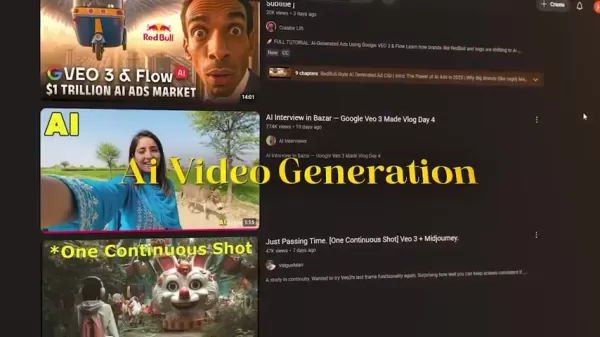
With constant advancements, new AI video generation tools are appearing regularly, but most require a paid subscription. For users looking for budget-friendly solutions, access to free AI video generation tools is essential. This article showcases two standout platforms that offer this accessibility with no subscription fees.
These AI video generators enable users to produce videos without needing advanced video editing or animation skills. This democratization of video creation is especially valuable for small businesses, educators, and hobbyists who may lack the resources for professional video production.
Magi AI: An AI-Powered Video Maker
Magi AI is an AI-powered video creator designed to produce engaging videos from images. It offers three main options: Canvas, Human, and Assets. Users receive 420 credits in the free plan, allowing them to explore its features.
To start creating videos, users click “Create New Project,” which presents two choices: uploading images or videos from their device or selecting from available assets. The image-to-video feature lets users upload their own images and convert them into short videos. Although Magi AI uses a credit system, there’s a way to bypass credit restrictions.
Vheer AI: Free Online AI Image Generator
Vheer AI is a free online AI image generator that transforms images into captivating videos. Unlike Magi AI, Vheer AI doesn’t require credits, making it completely free to use. The platform includes various tools such as text-to-image, image-to-image, and image-to-video generators. To use the image-to-video feature, users upload an image, and the AI automatically generates relevant prompts. Users can adjust parameters like video format, length, frame rate, and dimensions. This flexibility ensures the generated video meets specific needs. Vheer AI stands out with its faster processing speeds compared to Magi AI.
Tips for Optimizing Your AI Video Generation
Effective Prompting Techniques
Crafting effective prompts is crucial for achieving the desired results with AI video generators. Here are some techniques to optimize your prompts:
- Be Specific: Give clear, detailed instructions to guide the AI. Instead of a vague prompt like “a forest,” try “a dense, sunlit forest with tall pine trees and a winding path.”
- Use Descriptive Adjectives: Incorporate descriptive adjectives to enhance visual details. For instance, “a calm, turquoise lake” is more evocative than “a lake.”
- Specify the Mood or Tone: Include words that define the desired mood or tone. Use terms like “serene,” “mysterious,” or “dynamic” to set the right atmosphere.
- Define Camera Angles and Shots: If you have a specific vision, indicate the camera angle and shot type. For example, “close-up of a smiling face” or “wide shot of a bustling city street.”
- Experiment with Styles: Try different art styles, such as “photorealistic,” “impressionistic,” or “cartoonish,” to achieve unique visual effects.
- Combine Elements: Blend various elements and concepts to create imaginative scenes. For example, “a futuristic cityscape with flying cars and neon lights.”
- Iterate and Refine: Don’t hesitate to experiment with different prompts and refine them based on the results. Iteration is key to finding the perfect combination.
Here’s a table comparing optimized and unoptimized prompts.
Unoptimized Prompt Optimized Prompt CityA vibrant, bustling cityscape at night, with towering skyscrapers, neon lights, and a lively atmosphere.ForestA dense, sunlit forest with tall pine trees, a winding path, dappled sunlight filtering through the canopy, creating a serene atmosphere.PortraitA close-up portrait of a smiling woman with kind eyes, soft lighting, and natural skin texture, evoking warmth and approachability.BeachA serene, sandy beach at sunset, with gentle waves, golden sunlight reflecting on the water, and distant palm trees swaying in the breeze.AbstractA dynamic, abstract painting with bold colors, fluid shapes, and intricate patterns, conveying energy and complexity.LandscapeA panoramic landscape of snow-capped mountains, lush green valleys, and a winding river under a clear blue sky, inspiring awe and wonder.AnimalA majestic lion resting on a rocky outcrop, with a golden mane, piercing eyes, and a commanding presence, exuding strength and nobility.By using specific, descriptive, and well-crafted prompts, you can significantly improve the quality and relevance of your AI-generated videos.
Leveraging Temp Mail for Unlimited Magi AI Credits
To bypass credit limitations in Magi AI, use Temp Mail to create multiple accounts. Temp Mail provides temporary email addresses, allowing you to sign up for new Magi AI accounts and receive an extra 500 credits per account. Here’s how to do it:
Step 1: Access Temp Mail
Visit a Temp Mail website like tempmail.com. This gives you a temporary, disposable email address.
Step 2: Copy the Temporary Email Address
Copy the temporary email address generated by Temp Mail.
Step 3: Sign Up for Magi AI
Use the temporary email address to create a new account on Magi AI.
Step 4: Verify the Account
Check the Temp Mail inbox for a verification email from Magi AI. Click the verification link to activate your account.
Step 5: Start Using Magi AI
Log in to your new Magi AI account and enjoy the 500 free credits.
Step 6: Repeat the Process
Repeat the above steps to create multiple accounts and accumulate unlimited credits.
By using Temp Mail, you can create multiple Magi AI accounts, enabling unlimited video creation without paying for additional credits. However, this method may violate Magi AI’s terms of service, so use it responsibly.
How to Use Magi AI and Vheer AI
Creating Videos with Magi AI: A Step-by-Step Guide
Here’s how to create videos with Magi AI:
Step 1: Access Magi AI
Go to magi.sand.ai. This will take you to the main interface of Magi AI.
Step 2: Start a New Project
Click the “Create New Project” button. This redirects you to options for uploading content.
Step 3: Upload Your Image
Select the option to upload images or videos from your device. Choose the image you want to transform into a video.
Step 4: Customize Video Settings
After uploading, click the “+” icon on your image. This opens a settings panel.
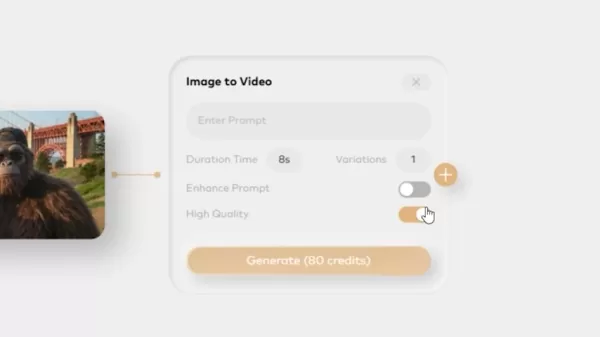
Here, you can:
- Enter a custom prompt to guide the AI.
- Adjust the duration (between 3 to 10 seconds).
- Select the number of variations you want.
- Enable or disable “Enhance Prompt.”
- Toggle “High Quality” to improve the output.
Step 5: Generate Your Video
Click the “Generate” button. Note that generating a video consumes credits from your free plan.
Step 6: Review and Download
Once the video is generated, review the output. If satisfied, download the video to your device.
Step 7: Extend Your Video
To make the video longer, click the “+” icon on the generated video and adjust the duration and prompt as needed.
Generating Videos with Vheer AI: A Quick Tutorial
Here’s how to generate videos with Vheer AI:
Step 1: Access Vheer AI
Go to vheer.com. This is the homepage of Vheer AI.
Step 2: Navigate to Image to Video
Click the “Image to Video” option in the top menu. This takes you to the image-to-video generator.
Step 3: Upload Your Image
Drag and drop your image or click “Upload Your Images” to select an image from your device.
Step 4: Customize Video Settings
Once uploaded, the AI automatically generates prompts based on your image. You can customize the following:
- Video Format: Choose between MP4 and WebM.
- Video Length: Set the video duration up to 5 seconds.
- Video Frame Rate: Adjust frames per second up to 30FPS.
- Video Dimension: Fixed at 768P.
Step 5: Generate Your Video
Click the “Generate” button to start creating your video.
Step 6: Download the Video
After the video is generated, download it directly to your device.
Magi AI Pricing Plans: Exploring Free and Paid Options
Magi AI Free Plan
Magi AI offers a free plan that provides 500 free credits per month. This plan includes high-quality video generation and unlimited video extension capabilities, making it an excellent starting point for users exploring AI video creation.
Magi AI Paid Plans
Magi AI offers three paid subscription plans tailored to different user needs. Each plan includes 500 free credits per month.
Plus Plan: Priced at $9.90 per month, this plan offers 1500 credits per month. It strikes a great balance between price and features, including watermark removal and commercial use rights.
Pro Plan: At $39.90 per month, this plan comes with 9000 credits per month. It also includes watermark removal and commercial use, and supports two custom voices.
Premium Plan: The premium plan, priced at $99.90 per month, provides 20000 credits per month. It includes watermark removal, commercial use, two custom voices, and a real-time generation feature.
Here’s a table summarizing the Magi AI pricing plans.
Feature Free Plan Plus Plan Pro Plan Premium Plan The Magi AI pricing model offers flexible options to suit various needs and budgets, making AI video generation accessible to a wide range of users.
Exploring Core Features of Magi AI and Vheer AI
Key Features of Magi AI
Magi AI’s key features include:
- Image-to-Video Conversion: Transforms static images into dynamic videos, enhancing engagement.
- Video Extension: Allows users to extend video length and continue the narrative.
- Custom Prompts: Guides the AI to produce videos based on user-defined instructions.
- High-Quality Output: Option to enhance video quality for a more polished look.
- Free Credits: Provides a starting allowance of credits for experimentation.
- Asset Library: Access to a range of assets for enhancing video content.
Notable Features of Vheer AI
Vheer AI offers the following main features:
- Free Usage: Unlimited access to video generation without subscription fees.
- Image-to-Video Conversion: Quickly converts images into short videos.
- Customizable Parameters: Adjusts video format, length, and frame rate.
- Automatic Prompt Generation: AI-generated prompts based on the uploaded image.
- Various AI Tools: Range of AI tools, including text-to-image and image-to-image generators.
- Fast Processing: Quick video generation compared to Magi AI.
- Various AI Tools Vheer AI offers a diverse array of AI tools that extend beyond video generation. These tools include features like Text to Image, which transforms textual descriptions into visual content; Image to Image, allowing for creative variations and enhancements of existing visuals; and even AI-driven background removal and changers, providing a comprehensive suite of AI-powered creativity.
Practical Use Cases: Magi AI and Vheer AI in Action
Magi AI Use Cases
Magi AI offers various use cases, which include:
- Social Media Content: Create engaging videos from static images for platforms like Instagram and TikTok.
- Educational Content: Develop short, animated explainers for online courses and tutorials.
- Marketing Materials: Produce eye-catching promotional videos for small businesses.
- Personal Projects: Animate memories by turning photos into videos.
Vheer AI Use Cases
Vheer AI has different use cases, which include:
- Rapid Prototyping: Quickly generate video drafts for client presentations.
- Content Marketing: Develop visual content for blog posts and articles.
- Event Promotion: Create short promotional videos for events and gatherings.
- Personal Entertainment: Produce fun, animated content for personal social media accounts.
Frequently Asked Questions (FAQ)
Can I use the videos generated by these tools for commercial purposes?
Commercial use depends on the specific terms of service for each tool. Magi AI requires a paid plan for commercial use, while Vheer AI's terms should be checked for their policy.
Do these AI video generators support custom aspect ratios?
Vheer AI offers a fixed resolution at 768P. For Magi AI, it depends on the source image being used.
Are there any watermarks on the videos generated by these tools?
Magi AI adds watermarks to videos generated on the free plan. Paid plans offer watermark removal. Vheer AI does not add watermarks.
What type of input files are supported by Magi AI and Vheer AI?
Both Magi AI and Vheer AI support common image files such as JPEG, PNG, and WebP. For video files, the supported formats may vary. Check the tool's documentation for detailed information.
Related Questions
What are the limitations of free AI video generators?
Free AI video generators often come with several limitations compared to their paid counterparts. These can include lower output quality, shorter video lengths, limited access to advanced features, fewer customization options, and the presence of watermarks. Additionally, free tools may impose usage restrictions, such as a limited number of video generations per day or a cap on available credits. While free AI video generators offer an accessible way to explore AI video creation, users should be aware of these potential constraints. Despite these limitations, free AI video generators are an excellent starting point for discovering the possibilities of AI-driven video creation.
Are there any alternatives to Magi AI and Vheer AI?
Yes, several alternatives to Magi AI and Vheer AI provide free AI video generation capabilities. Options include tools like Wan.Video, which operates on a credit-based daily system, and depending on your needs, other tools that combine image editing and AI functionalities may be more suitable. Keep an eye on emerging platforms, as the landscape of AI video generation tools is rapidly evolving. Additionally, AI-driven background removal and changers exist, offering a comprehensive suite of AI-powered creativity. By exploring and testing various options, you can find the perfect AI video generator that aligns with your unique requirements and artistic vision.
Related article
 DeepMind CEO Hassabis: I sleep six hours a day, usually feel energetic around 1 a.m.
Fortune recently featured an interview with Demis Hassabis, CEO of Google DeepMind, revealing his unconventional approach to rest and productivity. Hassabis disclosed that he sleeps very little, structuring his waking hours into two distinct work blo
OpenAI, Anthropic Vie for Market Share Despite Revenue Shortfalls
Despite recent reports suggesting OpenAI missed revenue targets, creating pressure on tech stocks this Tuesday, private AI lab investors remain resilient. Seasoned backers have confirmed they will not reduce investment despite negative media coverage
California AV Compliance: A New Era of Tickets, Geofences, and 1M Miles
Guident operates an AuveTech shuttle in South Florida, managing a four-mile route in West Palm Beach and a one-mile route in Boca Raton using its remote monitoring technology. | Credit: GuidentCalifornia is redefining the regulatory landscape for dri
Related Special Topic Recommendations
writing
DeepMind CEO Hassabis: I sleep six hours a day, usually feel energetic around 1 a.m.
Fortune recently featured an interview with Demis Hassabis, CEO of Google DeepMind, revealing his unconventional approach to rest and productivity. Hassabis disclosed that he sleeps very little, structuring his waking hours into two distinct work blo
OpenAI, Anthropic Vie for Market Share Despite Revenue Shortfalls
Despite recent reports suggesting OpenAI missed revenue targets, creating pressure on tech stocks this Tuesday, private AI lab investors remain resilient. Seasoned backers have confirmed they will not reduce investment despite negative media coverage
California AV Compliance: A New Era of Tickets, Geofences, and 1M Miles
Guident operates an AuveTech shuttle in South Florida, managing a four-mile route in West Palm Beach and a one-mile route in Boca Raton using its remote monitoring technology. | Credit: GuidentCalifornia is redefining the regulatory landscape for dri
Related Special Topic Recommendations
writing
 AI Article Outline Tools for Long Form Writing
2026 Latest Best Top-Rated AI Article Outline Tools for Long Form Writing! This curated collection features powerful, game-changing tools that deliver accurate, structured outlines with real-world tests to boost writing efficiency significantly. XIX.AI is part of this elite selection. Get a free vs paid comparison to help you choose the perfect tool. Explore now and Unlock your AI edge!
 9 tools
 xix.ai
chatbot
Best AI Roleplay Chat Apps for Language Practice, Interview Prep, and Daily Fluency
xix.ai
chatbot
Best AI Roleplay Chat Apps for Language Practice, Interview Prep, and Daily Fluency
2026 Latest Best Top-rated AI Roleplay Chat Apps for Language Practice, Interview Prep, and Daily Fluency! XIX.AI curates a powerful game-changing collection that offers free vs paid comparison, real-world tests, and updated rankings weekly. These must-try tools help you boost writing skills, overcome fluency challenges, and improve communication efficiency across all daily scenarios. Explore now to discover your perfect tool for language growth!
10 tools
xix.ai
Music composition
AI Stem Separation Tools for Remix Production, Sampling Prep, and Karaoke Masters
2026 Latest Best Top-rated AI Stem Separation Tools Curated for Remix Production, Sampling Prep, and Karaoke Masters. These powerful game-changing tools offer real-world tests to deliver precise audio isolation, boosting productivity significantly. XIX.AI provides a weekly updated free vs paid comparison guide to help you find the must-try solution that suits your needs. Explore now to unlock your AI edge.
8 tools
xix.ai
Data Analysis
AI SQL Copilots for Revenue Dashboards, Funnel Analysis, and Product Metrics
2026 Latest Best AI SQL Copilots Ranked Top-Rated! XIX.AI curates a powerful game-changing collection for weekly updated real-world tests. These must-try tools help you generate accurate revenue dashboards, analyze sales funnels, and track product metrics swiftly, boosting productivity massively. Explore now to Discover your perfect tool for data-driven decision making! 238 characters
9 tools
xix.ai
Music composition
Best AI Melody Writing Tools for Song Drafts
2026 Latest Best Top-Rated AI Melody Writing Tools for Song Drafts! XIX.AI has curated a highly powerful game-changing collection that goes through rigorous real-world tests to deliver the best writing experience. You can find detailed free vs paid comparisons, accurate rankings, and must-try options designed to help you create stunning song drafts effortlessly and boost your creative productivity significantly. Explore now to discover your perfect tool!
8 tools
xix.ai
chatbot
Best AI Conversation Trainer Tools for Interview Practice
2026 Latest Best Top-rated AI Conversation Trainer Tools for Interview Practice are here on XIX.AI! This curated collection features powerful, game-changing tools that go through rigorous real-world tests to deliver accurate feedback. You’ll find a free vs paid comparison and detailed rankings to help you choose the must-try option that boosts your confidence and skills. Explore now to Discover your perfect tool for interview success!
12 tools
xix.ai

 Comments (0)
0/500
Comments (0)
0/500
AI video generation is revolutionizing content creation, providing innovative methods to produce videos with minimal effort. However, many AI video tools come with expensive subscription fees, making them out of reach for casual users or those on a tight budget. Luckily, several free AI video generation platforms allow you to create compelling videos without a paid subscription. This article introduces two such tools—Magi AI and Vheer AI—that empower you to create impressive videos without spending a dime.
Key Points
Magi AI and Vheer AI are free AI video generators that require no subscription.
Magi AI provides image-to-video and video extension features through a credit-based system.
Vheer AI offers a simple image-to-video creation process with customizable settings.
Both tools come with unique capabilities, allowing users to turn static images into videos.
Unlimited video generation with Magi AI is possible using Temp Mail.
Output quality differs between the tools, with Vheer AI delivering better motion quality.
Introduction to Free AI Video Generation
The Rise of AI Video Generators
AI video generation is gaining significant attention.
With constant advancements, new AI video generation tools are appearing regularly, but most require a paid subscription. For users looking for budget-friendly solutions, access to free AI video generation tools is essential. This article showcases two standout platforms that offer this accessibility with no subscription fees.
These AI video generators enable users to produce videos without needing advanced video editing or animation skills. This democratization of video creation is especially valuable for small businesses, educators, and hobbyists who may lack the resources for professional video production.
Magi AI: An AI-Powered Video Maker
Magi AI is an AI-powered video creator designed to produce engaging videos from images. It offers three main options: Canvas, Human, and Assets. Users receive 420 credits in the free plan, allowing them to explore its features.
To start creating videos, users click “Create New Project,” which presents two choices: uploading images or videos from their device or selecting from available assets. The image-to-video feature lets users upload their own images and convert them into short videos. Although Magi AI uses a credit system, there’s a way to bypass credit restrictions.
Vheer AI: Free Online AI Image Generator
Vheer AI is a free online AI image generator that transforms images into captivating videos. Unlike Magi AI, Vheer AI doesn’t require credits, making it completely free to use. The platform includes various tools such as text-to-image, image-to-image, and image-to-video generators. To use the image-to-video feature, users upload an image, and the AI automatically generates relevant prompts. Users can adjust parameters like video format, length, frame rate, and dimensions. This flexibility ensures the generated video meets specific needs. Vheer AI stands out with its faster processing speeds compared to Magi AI.
Tips for Optimizing Your AI Video Generation
Effective Prompting Techniques
Crafting effective prompts is crucial for achieving the desired results with AI video generators. Here are some techniques to optimize your prompts:
- Be Specific: Give clear, detailed instructions to guide the AI. Instead of a vague prompt like “a forest,” try “a dense, sunlit forest with tall pine trees and a winding path.”
- Use Descriptive Adjectives: Incorporate descriptive adjectives to enhance visual details. For instance, “a calm, turquoise lake” is more evocative than “a lake.”
- Specify the Mood or Tone: Include words that define the desired mood or tone. Use terms like “serene,” “mysterious,” or “dynamic” to set the right atmosphere.
- Define Camera Angles and Shots: If you have a specific vision, indicate the camera angle and shot type. For example, “close-up of a smiling face” or “wide shot of a bustling city street.”
- Experiment with Styles: Try different art styles, such as “photorealistic,” “impressionistic,” or “cartoonish,” to achieve unique visual effects.
- Combine Elements: Blend various elements and concepts to create imaginative scenes. For example, “a futuristic cityscape with flying cars and neon lights.”
- Iterate and Refine: Don’t hesitate to experiment with different prompts and refine them based on the results. Iteration is key to finding the perfect combination.
Here’s a table comparing optimized and unoptimized prompts.
By using specific, descriptive, and well-crafted prompts, you can significantly improve the quality and relevance of your AI-generated videos.
Leveraging Temp Mail for Unlimited Magi AI Credits
To bypass credit limitations in Magi AI, use Temp Mail to create multiple accounts. Temp Mail provides temporary email addresses, allowing you to sign up for new Magi AI accounts and receive an extra 500 credits per account. Here’s how to do it:
Step 1: Access Temp Mail
Visit a Temp Mail website like tempmail.com. This gives you a temporary, disposable email address.
Step 2: Copy the Temporary Email Address
Copy the temporary email address generated by Temp Mail.
Step 3: Sign Up for Magi AI
Use the temporary email address to create a new account on Magi AI.
Step 4: Verify the Account
Check the Temp Mail inbox for a verification email from Magi AI. Click the verification link to activate your account.
Step 5: Start Using Magi AI
Log in to your new Magi AI account and enjoy the 500 free credits.
Step 6: Repeat the Process
Repeat the above steps to create multiple accounts and accumulate unlimited credits.
By using Temp Mail, you can create multiple Magi AI accounts, enabling unlimited video creation without paying for additional credits. However, this method may violate Magi AI’s terms of service, so use it responsibly.
How to Use Magi AI and Vheer AI
Creating Videos with Magi AI: A Step-by-Step Guide
Here’s how to create videos with Magi AI:
Step 1: Access Magi AI
Go to magi.sand.ai. This will take you to the main interface of Magi AI.
Step 2: Start a New Project
Click the “Create New Project” button. This redirects you to options for uploading content.
Step 3: Upload Your Image
Select the option to upload images or videos from your device. Choose the image you want to transform into a video.
Step 4: Customize Video Settings
After uploading, click the “+” icon on your image. This opens a settings panel.
Here, you can:
- Enter a custom prompt to guide the AI.
- Adjust the duration (between 3 to 10 seconds).
- Select the number of variations you want.
- Enable or disable “Enhance Prompt.”
- Toggle “High Quality” to improve the output.
Step 5: Generate Your Video
Click the “Generate” button. Note that generating a video consumes credits from your free plan.
Step 6: Review and Download
Once the video is generated, review the output. If satisfied, download the video to your device.
Step 7: Extend Your Video
To make the video longer, click the “+” icon on the generated video and adjust the duration and prompt as needed.
Generating Videos with Vheer AI: A Quick Tutorial
Here’s how to generate videos with Vheer AI:
Step 1: Access Vheer AI
Go to vheer.com. This is the homepage of Vheer AI.
Step 2: Navigate to Image to Video
Click the “Image to Video” option in the top menu. This takes you to the image-to-video generator.
Step 3: Upload Your Image
Drag and drop your image or click “Upload Your Images” to select an image from your device.
Step 4: Customize Video Settings
Once uploaded, the AI automatically generates prompts based on your image. You can customize the following:
- Video Format: Choose between MP4 and WebM.
- Video Length: Set the video duration up to 5 seconds.
- Video Frame Rate: Adjust frames per second up to 30FPS.
- Video Dimension: Fixed at 768P.
Step 5: Generate Your Video
Click the “Generate” button to start creating your video.
Step 6: Download the Video
After the video is generated, download it directly to your device.
Magi AI Pricing Plans: Exploring Free and Paid Options
Magi AI Free Plan
Magi AI offers a free plan that provides 500 free credits per month. This plan includes high-quality video generation and unlimited video extension capabilities, making it an excellent starting point for users exploring AI video creation.
Magi AI Paid Plans
Magi AI offers three paid subscription plans tailored to different user needs. Each plan includes 500 free credits per month.
Plus Plan: Priced at $9.90 per month, this plan offers 1500 credits per month. It strikes a great balance between price and features, including watermark removal and commercial use rights.
Pro Plan: At $39.90 per month, this plan comes with 9000 credits per month. It also includes watermark removal and commercial use, and supports two custom voices.
Premium Plan: The premium plan, priced at $99.90 per month, provides 20000 credits per month. It includes watermark removal, commercial use, two custom voices, and a real-time generation feature.
Here’s a table summarizing the Magi AI pricing plans.
The Magi AI pricing model offers flexible options to suit various needs and budgets, making AI video generation accessible to a wide range of users.
Exploring Core Features of Magi AI and Vheer AI
Key Features of Magi AI
Magi AI’s key features include:
- Image-to-Video Conversion: Transforms static images into dynamic videos, enhancing engagement.
- Video Extension: Allows users to extend video length and continue the narrative.
- Custom Prompts: Guides the AI to produce videos based on user-defined instructions.
- High-Quality Output: Option to enhance video quality for a more polished look.
- Free Credits: Provides a starting allowance of credits for experimentation.
- Asset Library: Access to a range of assets for enhancing video content.
Notable Features of Vheer AI
Vheer AI offers the following main features:
- Free Usage: Unlimited access to video generation without subscription fees.
- Image-to-Video Conversion: Quickly converts images into short videos.
- Customizable Parameters: Adjusts video format, length, and frame rate.
- Automatic Prompt Generation: AI-generated prompts based on the uploaded image.
- Various AI Tools: Range of AI tools, including text-to-image and image-to-image generators.
- Fast Processing: Quick video generation compared to Magi AI.
- Various AI Tools Vheer AI offers a diverse array of AI tools that extend beyond video generation. These tools include features like Text to Image, which transforms textual descriptions into visual content; Image to Image, allowing for creative variations and enhancements of existing visuals; and even AI-driven background removal and changers, providing a comprehensive suite of AI-powered creativity.
Practical Use Cases: Magi AI and Vheer AI in Action
Magi AI Use Cases
Magi AI offers various use cases, which include:
- Social Media Content: Create engaging videos from static images for platforms like Instagram and TikTok.
- Educational Content: Develop short, animated explainers for online courses and tutorials.
- Marketing Materials: Produce eye-catching promotional videos for small businesses.
- Personal Projects: Animate memories by turning photos into videos.
Vheer AI Use Cases
Vheer AI has different use cases, which include:
- Rapid Prototyping: Quickly generate video drafts for client presentations.
- Content Marketing: Develop visual content for blog posts and articles.
- Event Promotion: Create short promotional videos for events and gatherings.
- Personal Entertainment: Produce fun, animated content for personal social media accounts.
Frequently Asked Questions (FAQ)
Can I use the videos generated by these tools for commercial purposes?
Commercial use depends on the specific terms of service for each tool. Magi AI requires a paid plan for commercial use, while Vheer AI's terms should be checked for their policy.
Do these AI video generators support custom aspect ratios?
Vheer AI offers a fixed resolution at 768P. For Magi AI, it depends on the source image being used.
Are there any watermarks on the videos generated by these tools?
Magi AI adds watermarks to videos generated on the free plan. Paid plans offer watermark removal. Vheer AI does not add watermarks.
What type of input files are supported by Magi AI and Vheer AI?
Both Magi AI and Vheer AI support common image files such as JPEG, PNG, and WebP. For video files, the supported formats may vary. Check the tool's documentation for detailed information.
Related Questions
What are the limitations of free AI video generators?
Free AI video generators often come with several limitations compared to their paid counterparts. These can include lower output quality, shorter video lengths, limited access to advanced features, fewer customization options, and the presence of watermarks. Additionally, free tools may impose usage restrictions, such as a limited number of video generations per day or a cap on available credits. While free AI video generators offer an accessible way to explore AI video creation, users should be aware of these potential constraints. Despite these limitations, free AI video generators are an excellent starting point for discovering the possibilities of AI-driven video creation.
Are there any alternatives to Magi AI and Vheer AI?
Yes, several alternatives to Magi AI and Vheer AI provide free AI video generation capabilities. Options include tools like Wan.Video, which operates on a credit-based daily system, and depending on your needs, other tools that combine image editing and AI functionalities may be more suitable. Keep an eye on emerging platforms, as the landscape of AI video generation tools is rapidly evolving. Additionally, AI-driven background removal and changers exist, offering a comprehensive suite of AI-powered creativity. By exploring and testing various options, you can find the perfect AI video generator that aligns with your unique requirements and artistic vision.








 DeepMind CEO Hassabis: I sleep six hours a day, usually feel energetic around 1 a.m.
Fortune recently featured an interview with Demis Hassabis, CEO of Google DeepMind, revealing his unconventional approach to rest and productivity. Hassabis disclosed that he sleeps very little, structuring his waking hours into two distinct work blo
DeepMind CEO Hassabis: I sleep six hours a day, usually feel energetic around 1 a.m.
Fortune recently featured an interview with Demis Hassabis, CEO of Google DeepMind, revealing his unconventional approach to rest and productivity. Hassabis disclosed that he sleeps very little, structuring his waking hours into two distinct work blo
 OpenAI, Anthropic Vie for Market Share Despite Revenue Shortfalls
Despite recent reports suggesting OpenAI missed revenue targets, creating pressure on tech stocks this Tuesday, private AI lab investors remain resilient. Seasoned backers have confirmed they will not reduce investment despite negative media coverage
California AV Compliance: A New Era of Tickets, Geofences, and 1M Miles
Guident operates an AuveTech shuttle in South Florida, managing a four-mile route in West Palm Beach and a one-mile route in Boca Raton using its remote monitoring technology. | Credit: GuidentCalifornia is redefining the regulatory landscape for dri
OpenAI, Anthropic Vie for Market Share Despite Revenue Shortfalls
Despite recent reports suggesting OpenAI missed revenue targets, creating pressure on tech stocks this Tuesday, private AI lab investors remain resilient. Seasoned backers have confirmed they will not reduce investment despite negative media coverage
California AV Compliance: A New Era of Tickets, Geofences, and 1M Miles
Guident operates an AuveTech shuttle in South Florida, managing a four-mile route in West Palm Beach and a one-mile route in Boca Raton using its remote monitoring technology. | Credit: GuidentCalifornia is redefining the regulatory landscape for dri

2026 Latest Best Top-Rated AI Article Outline Tools for Long Form Writing! This curated collection features powerful, game-changing tools that deliver accurate, structured outlines with real-world tests to boost writing efficiency significantly. XIX.AI is part of this elite selection. Get a free vs paid comparison to help you choose the perfect tool. Explore now and Unlock your AI edge!
9 tools
xix.ai

2026 Latest Best Top-rated AI Roleplay Chat Apps for Language Practice, Interview Prep, and Daily Fluency! XIX.AI curates a powerful game-changing collection that offers free vs paid comparison, real-world tests, and updated rankings weekly. These must-try tools help you boost writing skills, overcome fluency challenges, and improve communication efficiency across all daily scenarios. Explore now to discover your perfect tool for language growth!
10 tools
xix.ai

2026 Latest Best Top-rated AI Stem Separation Tools Curated for Remix Production, Sampling Prep, and Karaoke Masters. These powerful game-changing tools offer real-world tests to deliver precise audio isolation, boosting productivity significantly. XIX.AI provides a weekly updated free vs paid comparison guide to help you find the must-try solution that suits your needs. Explore now to unlock your AI edge.
8 tools
xix.ai

2026 Latest Best AI SQL Copilots Ranked Top-Rated! XIX.AI curates a powerful game-changing collection for weekly updated real-world tests. These must-try tools help you generate accurate revenue dashboards, analyze sales funnels, and track product metrics swiftly, boosting productivity massively. Explore now to Discover your perfect tool for data-driven decision making! 238 characters
9 tools
xix.ai

2026 Latest Best Top-Rated AI Melody Writing Tools for Song Drafts! XIX.AI has curated a highly powerful game-changing collection that goes through rigorous real-world tests to deliver the best writing experience. You can find detailed free vs paid comparisons, accurate rankings, and must-try options designed to help you create stunning song drafts effortlessly and boost your creative productivity significantly. Explore now to discover your perfect tool!
8 tools
xix.ai

2026 Latest Best Top-rated AI Conversation Trainer Tools for Interview Practice are here on XIX.AI! This curated collection features powerful, game-changing tools that go through rigorous real-world tests to deliver accurate feedback. You’ll find a free vs paid comparison and detailed rankings to help you choose the must-try option that boosts your confidence and skills. Explore now to Discover your perfect tool for interview success!
12 tools
xix.ai












