


 Home
HomeEssential Google Workspace features powered by Gemini
Google is weaving Gemini into the very fabric of Google Workspace, bringing AI-powered assistance to Docs, Gmail, Sheets, Slides, Drive, and Meet. With this constant stream of updates, the key question shifts from "what can Gemini do?" to "which features deliver real, day-to-day value?"
The most impactful Gemini tools are often the practical ones that streamline your workflow—summarizing information, drafting content, organizing data, and keeping track of meetings. Let's explore the top features across the Workspace suite.
Top Gemini Features for Google Docs
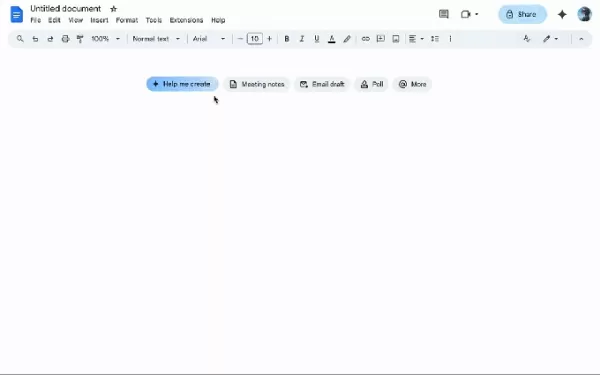
Image Credits:Google
Gemini shines in Docs through automatic summarization. Rather than sifting through lengthy reports, you can prompt Gemini to extract key points or create a concise outline, saving valuable time during reviews or when briefing colleagues.
The "Help me create" tool is another standout. Describe what you need—be it a newsletter or a report—and Gemini will pull relevant context from your Drive, Gmail, and Chat to generate a solid first draft.
Additional utilities include "Help me write" for polishing language and expanding ideas, and "Match writing style" to harmonize tone in collaborative documents. The "Match the format" feature is also handy for replicating the structure of an existing template. (These features are currently in beta.)
Top Gemini Features for Gmail
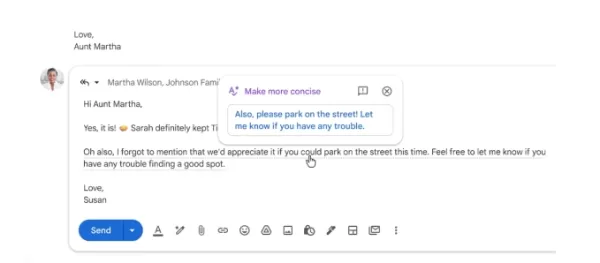
Image Credits:Google
Gemini helps tame an overflowing inbox. The "AI Inbox" filters out clutter to surface important emails, like appointment reminders or event details.
It also summarizes long email threads, presenting the core discussion in a summary card at the top so you can skip the scroll.
The "Help me write" feature crafts contextual replies, allowing you to adjust tone for formality or brevity. Contextual smart replies go a step further, generating detailed, nuanced responses.
With "AI Overview," you can ask Gemini to find specific information buried in your emails, such as "Find the quote from the plumber for last year's bathroom renovation."
Top Gemini Features for Google Sheets
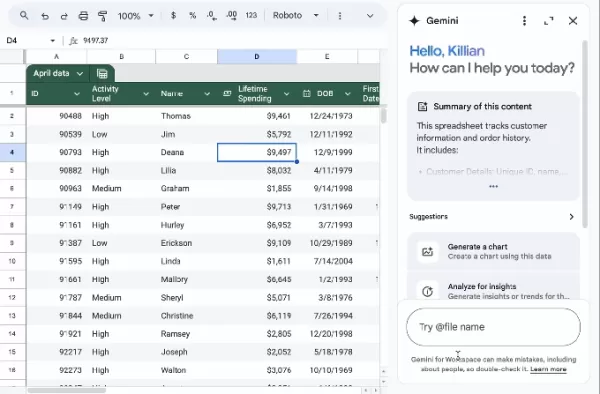
Image Credits:Google
Gemini can transform data from Gmail, Chat, and Drive into a fully structured spreadsheet with a simple prompt. It also assists in data visualization by generating charts and graphs.
The "Fill with Gemini" feature accelerates table population, which is ideal when working with raw or incomplete datasets.
Top Gemini Features for Google Slides
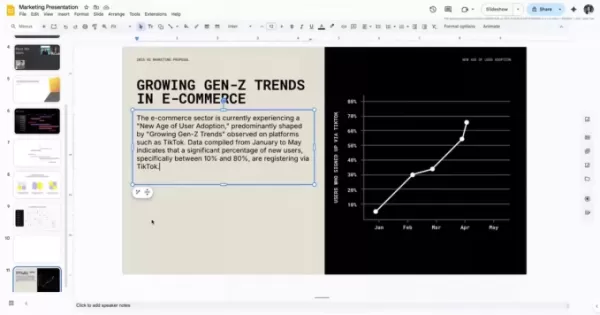
In Slides, Gemini excels at automated formatting, cutting out repetitive design work. It's perfect for quickly building internal presentations or creating a first draft.
Give a prompt like "create a 5-slide deck on our Q1 results," and Gemini will build a presentation that aligns with your theme, pulls in content, and organizes it with bullet points and visuals.
You can then instruct it to simplify slides, adjust formatting, or match a specific design. The "refine text" feature helps shorten or rephrase content.
A bonus: you can edit images directly in Slides using Google's Nano Banana image model.
Top Gemini Features for Google Meet

Image Credits:Google
Gemini's standout Meet feature is automatic note-taking. It captures key points, decisions, and action items, delivering organized notes ready to share post-meeting.
If you join late, simply ask what you missed for a quick, non-disruptive summary.
Practical upgrades include real-time translated captions, enhanced video quality, and the ability to reduce audio distortion for clearer communication.
Top Gemini Features for Google Drive
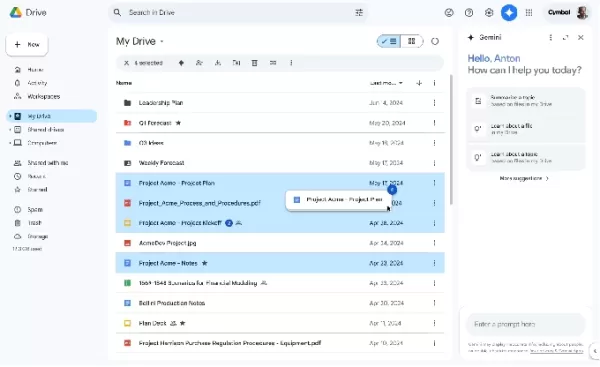
Image Credits:Google
Gemini in Drive enables powerful search, can summarize documents, extract specific targets, and draft updates based on recent files. It generates an "AI Overview" with citations, pulling the most relevant information from across your documents so you don't need to open multiple files.
The beta tool "Ask Gemini in Drive" lets you pose complex questions that span your calendar, documents, emails, and the web.
Top Gemini Features for Calendar
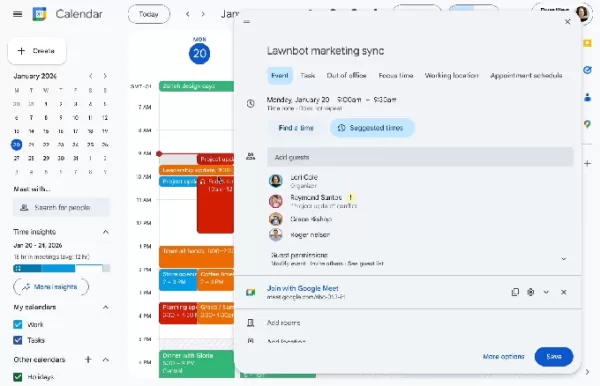
Image Credits:Google
A key AI feature in Calendar is "Help me schedule." Describe your needs, and Gemini suggests optimal times by scanning participants' calendars and preferences, such as avoiding early mornings. It can even check Gmail for contextual clues about availability.
Gemini streamlines event creation; a prompt like "Lunch with Nick" generates a complete event with suggested times and details.
It also simplifies rescheduling by proposing alternative times that minimize scheduling conflicts, especially useful for larger groups.
Top Gemini Features for Chat
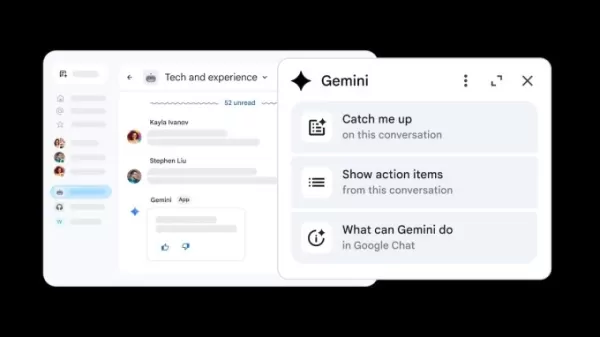
Image Credits:Google
In Chat, you can ask Gemini to summarize a space, highlight decisions, or extract action items—invaluable for busy team channels where details get lost.
It can draft contextual replies and, by learning from past conversations, reference previous details to sound more natural.
Another useful capability is the ability to connect chats with files, allowing you to query documents shared in a conversation without opening them separately.
Top Gemini Features for Google Vids
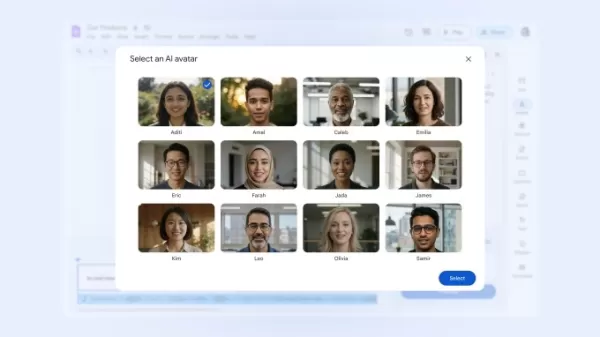
Image Credits:Google
Gemini in Google Vids assists in creating polished videos. Provide a topic or outline, and it will suggest scenes, structure your narrative, and draft scripts to build a rough cut.
It can generate variations for voiceovers and adjust their tone. The transcript trimming feature identifies and helps remove filler words and pauses.
Additional capabilities include converting images to video with Gemini Veo 3 and using an AI-powered avatar to present a script.
Top Gemini Features for Forms
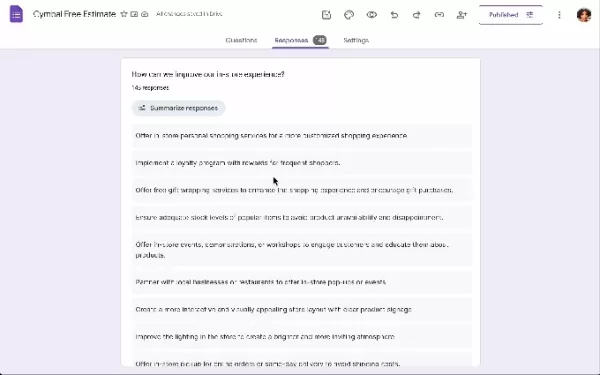
Image Credits:Google
In Forms, simply describe your goal (e.g., a customer feedback survey), and Gemini generates a complete form with relevant questions and structure.
It helps refine questions by suggesting clearer wording, better answer formats, and identifying gaps that could compromise data quality.
Furthermore, Gemini can summarize results in real time, highlighting trends and key takeaways directly within Forms, eliminating the need for manual data export and analysis.
Google rolls out new Gemini capabilities to Docs, Sheets, Slides, and Drive
Related article
 Google AI Overviews Gain Ground in Search Results
According to Similarweb’s 2026 Generative AI Landscape report, Google’s AI-generated summaries appeared in 43% of US searches, a significant rise from 15% recorded a year prior.While AI Overviews present generated summaries within standard search res
Google to Pay SpaceX $920M Monthly for Compute
SpaceX has secured another major compute agreement ahead of its landmark IPO, this time partnering with Google. The company disclosed the arrangement in a regulatory filing on Friday.According to the agreement, Google will pay SpaceX $920 million mon
Google expands AI Mode to track flight prices and book hotels
Google has introduced new capabilities within AI Mode, its conversational search interface, allowing users to plan and book trips more effectively, the company revealed on Thursday. The updated features enable users to inquire about flight price tren
Related Special Topic Recommendations
Design & Art
Google AI Overviews Gain Ground in Search Results
According to Similarweb’s 2026 Generative AI Landscape report, Google’s AI-generated summaries appeared in 43% of US searches, a significant rise from 15% recorded a year prior.While AI Overviews present generated summaries within standard search res
Google to Pay SpaceX $920M Monthly for Compute
SpaceX has secured another major compute agreement ahead of its landmark IPO, this time partnering with Google. The company disclosed the arrangement in a regulatory filing on Friday.According to the agreement, Google will pay SpaceX $920 million mon
Google expands AI Mode to track flight prices and book hotels
Google has introduced new capabilities within AI Mode, its conversational search interface, allowing users to plan and book trips more effectively, the company revealed on Thursday. The updated features enable users to inquire about flight price tren
Related Special Topic Recommendations
Design & Art
 Top AI Illustration Tools: Create Editorial Scenes and Cover Art Faster
2026 Latest Top-rated AI Illustration Tools: Our curated list features the best powerfully designed tools for creating stunning editorial scenes and eye-catching cover art quickly. Each option has gone through rigorous real-world tests, offering a free vs paid comparison to help you find the perfect match for your workflow. Try these must-try solutions today to unlock your AI edge and boost your creative productivity. Explore now at XIX.AI.
 10 tools
 xix.ai
Education and Learning
Top AI Tutors for Exam Prep: Practice Math, Science, and English
xix.ai
Education and Learning
Top AI Tutors for Exam Prep: Practice Math, Science, and English
2026 Latest Top-Rated Best AI Tutors for Exam Prep are here on XIX.AI! Our curated list features powerful game-changing tools that offer free vs paid comparison, real-world tests, and weekly updated rankings. They help boost your writing efficiency, simplify complex topic learning, and unlock your academic potential. Explore now to Discover your perfect exam prep tool and Start creating today to Unlock your AI edge!
10 tools
xix.ai
Finance
AI Budget Planning Tools for Personal Money Management
2026 Latest Best Top-Rated AI Budget Planning Tools for Personal Money Management are here on XIX.AI! This curated collection features powerful, game-changing solutions that help you conduct real-world tests, understand spending habits, and create personalized plans to boost productivity. Enjoy a free vs paid comparison along with detailed rankings. Must-try tools designed to simplify money management and unlock your AI edge. Explore now!
11 tools
xix.ai
Health & Wellness
AI Sleep Tracking Assistants: Improve Recovery with Better Bedtime Habits
2026 Latest Best Top-Rated AI Sleep Tracking Assistants curated for ultimate recovery. This fully updated weekly guide features powerful tools that deliver real-world tests, free vs paid comparison, and detailed rankings to help you find the must-try solution that boosts sleep quality and supports better bedtime habits. Explore now at XIX.AI to Unlock your AI edge.
10 tools
xix.ai
Data Analysis
AI SQL Copilots for Product and Revenue Analytics
2026 Latest Best Top-Rated AI SQL Copilots for Product and Revenue Analytics! XIX.AI has curated a powerful, game-changing collection of must-try tools that undergo real-world tests through weekly updated rankings. These tools help users boost productivity significantly by accelerating data analysis, streamlining complex queries, and generating accurate insights to drive smarter business decisions. Explore now to Discover your perfect tool for unlocking your AI edge!
14 tools
xix.ai
Education and Learning
Best AI Homework Helpers That Teach: Learn Concepts, Not Just Answers
2026 Latest Best Top-Rated AI Homework Helpers That Teach Core Concepts Not Just Answers Powerful Tools for Students Must-Try Curated List Weekly Updated Free vs Paid Comparison Real-World Tests Accurate Rankings to Help You Unlock Your Full Learning Potential Explore now to Discover your perfect tool for smarter studying.
10 tools
xix.ai

 Comments (1)
0/500
Comments (1)
0/500
![ArthurCarter]()
Finally, AI that actually helps with spreadsheets instead of just making pretty slides! 📊 Gemini in Workspace feels like a game-changer for productivity, though I'm still wary of it hallucinating my meeting notes. 🤖✨
Google is weaving Gemini into the very fabric of Google Workspace, bringing AI-powered assistance to Docs, Gmail, Sheets, Slides, Drive, and Meet. With this constant stream of updates, the key question shifts from "what can Gemini do?" to "which features deliver real, day-to-day value?"
The most impactful Gemini tools are often the practical ones that streamline your workflow—summarizing information, drafting content, organizing data, and keeping track of meetings. Let's explore the top features across the Workspace suite.
Top Gemini Features for Google Docs
Image Credits:Google
Gemini shines in Docs through automatic summarization. Rather than sifting through lengthy reports, you can prompt Gemini to extract key points or create a concise outline, saving valuable time during reviews or when briefing colleagues.
The "Help me create" tool is another standout. Describe what you need—be it a newsletter or a report—and Gemini will pull relevant context from your Drive, Gmail, and Chat to generate a solid first draft.
Additional utilities include "Help me write" for polishing language and expanding ideas, and "Match writing style" to harmonize tone in collaborative documents. The "Match the format" feature is also handy for replicating the structure of an existing template. (These features are currently in beta.)
Top Gemini Features for Gmail
Image Credits:Google
Gemini helps tame an overflowing inbox. The "AI Inbox" filters out clutter to surface important emails, like appointment reminders or event details.
It also summarizes long email threads, presenting the core discussion in a summary card at the top so you can skip the scroll.
The "Help me write" feature crafts contextual replies, allowing you to adjust tone for formality or brevity. Contextual smart replies go a step further, generating detailed, nuanced responses.
With "AI Overview," you can ask Gemini to find specific information buried in your emails, such as "Find the quote from the plumber for last year's bathroom renovation."
Top Gemini Features for Google Sheets
Image Credits:Google
Gemini can transform data from Gmail, Chat, and Drive into a fully structured spreadsheet with a simple prompt. It also assists in data visualization by generating charts and graphs.
The "Fill with Gemini" feature accelerates table population, which is ideal when working with raw or incomplete datasets.
Top Gemini Features for Google Slides
In Slides, Gemini excels at automated formatting, cutting out repetitive design work. It's perfect for quickly building internal presentations or creating a first draft.
Give a prompt like "create a 5-slide deck on our Q1 results," and Gemini will build a presentation that aligns with your theme, pulls in content, and organizes it with bullet points and visuals.
You can then instruct it to simplify slides, adjust formatting, or match a specific design. The "refine text" feature helps shorten or rephrase content.
A bonus: you can edit images directly in Slides using Google's Nano Banana image model.
Top Gemini Features for Google Meet
Image Credits:Google
Gemini's standout Meet feature is automatic note-taking. It captures key points, decisions, and action items, delivering organized notes ready to share post-meeting.
If you join late, simply ask what you missed for a quick, non-disruptive summary.
Practical upgrades include real-time translated captions, enhanced video quality, and the ability to reduce audio distortion for clearer communication.
Top Gemini Features for Google Drive
Image Credits:Google
Gemini in Drive enables powerful search, can summarize documents, extract specific targets, and draft updates based on recent files. It generates an "AI Overview" with citations, pulling the most relevant information from across your documents so you don't need to open multiple files.
The beta tool "Ask Gemini in Drive" lets you pose complex questions that span your calendar, documents, emails, and the web.
Top Gemini Features for Calendar
Image Credits:Google
A key AI feature in Calendar is "Help me schedule." Describe your needs, and Gemini suggests optimal times by scanning participants' calendars and preferences, such as avoiding early mornings. It can even check Gmail for contextual clues about availability.
Gemini streamlines event creation; a prompt like "Lunch with Nick" generates a complete event with suggested times and details.
It also simplifies rescheduling by proposing alternative times that minimize scheduling conflicts, especially useful for larger groups.
Top Gemini Features for Chat
Image Credits:Google
In Chat, you can ask Gemini to summarize a space, highlight decisions, or extract action items—invaluable for busy team channels where details get lost.
It can draft contextual replies and, by learning from past conversations, reference previous details to sound more natural.
Another useful capability is the ability to connect chats with files, allowing you to query documents shared in a conversation without opening them separately.
Top Gemini Features for Google Vids
Image Credits:Google
Gemini in Google Vids assists in creating polished videos. Provide a topic or outline, and it will suggest scenes, structure your narrative, and draft scripts to build a rough cut.
It can generate variations for voiceovers and adjust their tone. The transcript trimming feature identifies and helps remove filler words and pauses.
Additional capabilities include converting images to video with Gemini Veo 3 and using an AI-powered avatar to present a script.
Top Gemini Features for Forms
Image Credits:Google
In Forms, simply describe your goal (e.g., a customer feedback survey), and Gemini generates a complete form with relevant questions and structure.
It helps refine questions by suggesting clearer wording, better answer formats, and identifying gaps that could compromise data quality.
Furthermore, Gemini can summarize results in real time, highlighting trends and key takeaways directly within Forms, eliminating the need for manual data export and analysis.
Google rolls out new Gemini capabilities to Docs, Sheets, Slides, and Drive








 Google AI Overviews Gain Ground in Search Results
According to Similarweb’s 2026 Generative AI Landscape report, Google’s AI-generated summaries appeared in 43% of US searches, a significant rise from 15% recorded a year prior.While AI Overviews present generated summaries within standard search res
Google AI Overviews Gain Ground in Search Results
According to Similarweb’s 2026 Generative AI Landscape report, Google’s AI-generated summaries appeared in 43% of US searches, a significant rise from 15% recorded a year prior.While AI Overviews present generated summaries within standard search res
 Google to Pay SpaceX $920M Monthly for Compute
SpaceX has secured another major compute agreement ahead of its landmark IPO, this time partnering with Google. The company disclosed the arrangement in a regulatory filing on Friday.According to the agreement, Google will pay SpaceX $920 million mon
Google to Pay SpaceX $920M Monthly for Compute
SpaceX has secured another major compute agreement ahead of its landmark IPO, this time partnering with Google. The company disclosed the arrangement in a regulatory filing on Friday.According to the agreement, Google will pay SpaceX $920 million mon
 Google expands AI Mode to track flight prices and book hotels
Google has introduced new capabilities within AI Mode, its conversational search interface, allowing users to plan and book trips more effectively, the company revealed on Thursday. The updated features enable users to inquire about flight price tren
Google expands AI Mode to track flight prices and book hotels
Google has introduced new capabilities within AI Mode, its conversational search interface, allowing users to plan and book trips more effectively, the company revealed on Thursday. The updated features enable users to inquire about flight price tren

2026 Latest Top-rated AI Illustration Tools: Our curated list features the best powerfully designed tools for creating stunning editorial scenes and eye-catching cover art quickly. Each option has gone through rigorous real-world tests, offering a free vs paid comparison to help you find the perfect match for your workflow. Try these must-try solutions today to unlock your AI edge and boost your creative productivity. Explore now at XIX.AI.
10 tools
xix.ai

2026 Latest Top-Rated Best AI Tutors for Exam Prep are here on XIX.AI! Our curated list features powerful game-changing tools that offer free vs paid comparison, real-world tests, and weekly updated rankings. They help boost your writing efficiency, simplify complex topic learning, and unlock your academic potential. Explore now to Discover your perfect exam prep tool and Start creating today to Unlock your AI edge!
10 tools
xix.ai

2026 Latest Best Top-Rated AI Budget Planning Tools for Personal Money Management are here on XIX.AI! This curated collection features powerful, game-changing solutions that help you conduct real-world tests, understand spending habits, and create personalized plans to boost productivity. Enjoy a free vs paid comparison along with detailed rankings. Must-try tools designed to simplify money management and unlock your AI edge. Explore now!
11 tools
xix.ai

2026 Latest Best Top-Rated AI Sleep Tracking Assistants curated for ultimate recovery. This fully updated weekly guide features powerful tools that deliver real-world tests, free vs paid comparison, and detailed rankings to help you find the must-try solution that boosts sleep quality and supports better bedtime habits. Explore now at XIX.AI to Unlock your AI edge.
10 tools
xix.ai

2026 Latest Best Top-Rated AI SQL Copilots for Product and Revenue Analytics! XIX.AI has curated a powerful, game-changing collection of must-try tools that undergo real-world tests through weekly updated rankings. These tools help users boost productivity significantly by accelerating data analysis, streamlining complex queries, and generating accurate insights to drive smarter business decisions. Explore now to Discover your perfect tool for unlocking your AI edge!
14 tools
xix.ai

2026 Latest Best Top-Rated AI Homework Helpers That Teach Core Concepts Not Just Answers Powerful Tools for Students Must-Try Curated List Weekly Updated Free vs Paid Comparison Real-World Tests Accurate Rankings to Help You Unlock Your Full Learning Potential Explore now to Discover your perfect tool for smarter studying.
10 tools
xix.ai

Finally, AI that actually helps with spreadsheets instead of just making pretty slides! 📊 Gemini in Workspace feels like a game-changer for productivity, though I'm still wary of it hallucinating my meeting notes. 🤖✨












