


 Home
HomeHow is EdrawMax the ultimate diagramming tool in 2025? Full 2025 guide for diagrams.
In today's fast-paced work environment, visualizing ideas and processes is essential for clear communication and efficient project management. Wondershare EdrawMax stands out as a premier diagramming solution, providing a comprehensive set of features to turn any concept into a professional visual. Its intuitive interface, vast template collection, and advanced AI tools enable students, educators, business professionals, and creators to unlock their creativity and achieve outstanding outcomes.
Key Points
EdrawMax is a versatile diagramming tool designed for users of all levels.
Its features include AI-powered diagram generation and seamless real-time collaboration.
Access a library with over 210 diagram types and professionally designed templates.
Enjoy flexible export options to easily share your projects with others.
AI assistance and intuitive tools streamline the entire diagram creation process.
Unveiling Wondershare EdrawMax
What is Wondershare EdrawMax?
Wondershare EdrawMax is a powerful diagramming software created to simplify the design of charts, diagrams, and other visual aids. It serves a broad user base, from students and teachers to business leaders and creative professionals. Fundamentally, EdrawMax offers an intuitive platform for users to effectively visualize concepts, optimize workflows, and communicate intricate information.

The software's adaptability comes from its support for a multitude of diagram categories, such as flowcharts, mind maps, org charts, network diagrams, floor plans, and more. This wide selection ensures you have the right tool for almost any visual task.
Furthermore, EdrawMax features a user-friendly interface that shortens the learning process, allowing users to begin their projects quickly. Drag-and-drop functionality makes adding and connecting elements straightforward, rendering diagram creation both efficient and enjoyable.
Beyond ease of use, EdrawMax includes a rich array of features to boost productivity and creativity. These encompass intelligent drawing aids, real-time collaboration, and smooth integration with other popular applications. Whether working alone or with a team, EdrawMax provides the necessary tools to bring your ideas to life.
Key Features of EdrawMax
EdrawMax is packed with features to elevate your diagramming experience:
AI Diagram Creator: Instantly convert your ideas into polished diagrams. Simply type your concept, and EdrawMax's AI generates a professional visual layout.

Extensive Template Library: Choose from over 210 diagram types, including flowcharts, mind maps, timelines, and more. A wide selection of ready-made templates jumpstarts the creation process.
Real-Time Collaboration: Work with team members in real-time, share files, and collect feedback seamlessly within the platform.
Flexible Export Options: Export your diagrams in multiple formats like VSDX, PPTX, and SVG for easy sharing and integration into other documents.
User-Friendly Interface: An intuitive design ensures a smooth experience for both newcomers and seasoned users.
Cross-Platform Integration: Work seamlessly across Windows, macOS, Linux, and directly in your web browser.
AI Diagram Generation: A Closer Look
How AI Simplifies Diagram Creation
EdrawMax uses Artificial Intelligence (AI) to streamline the diagramming process. The AI Diagram Creator is especially helpful for generating initial diagram frameworks from text descriptions. It supports numerous formats like flowcharts, mind maps, timelines, slides, infographics, and social diagrams. The AI intelligently interprets user input to create an appropriate layout, saving significant time compared to building from scratch.
AI assists in creating professional slides and diagrams, such as:
- Flowcharts: Map out processes step-by-step with clear, logical visuals.
- Mind Maps: Capture, organize, and creatively expand on ideas.
- Analysis Canvases: Plan strategies, manage projects, and analyze workflows effectively.
- Org Charts: Clearly display team structures or company hierarchies.
- Basic Diagrams: Easily construct simple shapes and foundational diagrams.
Customization and Editing
While the AI Diagram Creator provides an excellent starting point, EdrawMax ensures full creative control. Users can fine-tune every aspect of generated diagrams to meet their exact needs. Colors, fonts, text, shapes, and layouts can be adjusted effortlessly using the software's comprehensive editing toolkit.
This blend of AI-driven automation and hands-on customization allows for rapid creation without compromising on quality or personal expression.
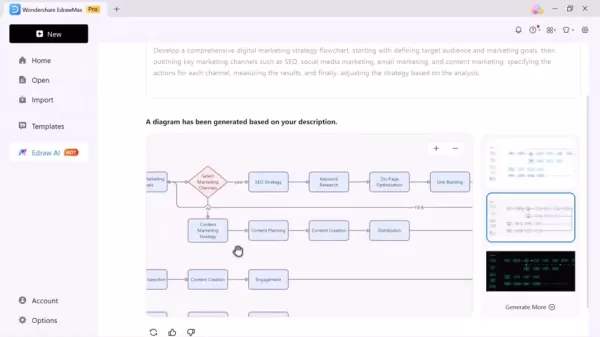
EdrawMax provides the ideal mix of AI assistance and creative freedom.
Drawing Tools and Freehand Shapes
EdrawMax offers a suite of drawing tools that enrich the diagramming experience. Users can incorporate freehand shapes, sketch ideas, and add unique elements to make their diagrams stand out. These tools are intuitive and simple to use, making it easy to add a personal touch to every project.
The Drawing Tool includes features such as:
- Text to Image Generation: Transform text descriptions into visual elements.
- Image to Image Conversion: Refine and adapt existing images for use in diagrams.
- Extensive Symbol Library: Access a vast collection of pre-designed symbols for various diagram types.
- Customizable Shapes: Easily create and modify shapes using intuitive drawing tools.
EdrawMax Pricing and Plans
Understanding Subscription Options
EdrawMax offers several subscription plans to suit different needs and budgets. These typically include:
- Free Plan: Provides limited access to features and templates, suitable for basic diagramming tasks.
- Individual Plans: Designed for single users, offering full access to all features, templates, and support. Options include monthly, annual, and perpetual licenses.
- Team Plans: Tailored for collaborative teams, allowing multiple users to access EdrawMax with centralized management and support.
- Educational Plans: Special pricing for students and educational institutions to support learning and teaching activities.
The subscription model lets users select the plan that best fits their needs, ensuring they pay only for the required features.

EdrawMax's pricing structure accommodates all diagramming requirements.
EdrawMax: Pros
and Cons
Pros
Intuitive and easy-to-use interface
Extensive variety of templates and diagram types
Powerful AI-assisted diagram creation
Robust real-time collaboration features
Flexible export and sharing options
Cons
Access to all advanced features requires a paid subscription
The extensive interface may feel overwhelming to some new users initially
Delving Deeper: EdrawMax's Core Features
AI-Powered Diagram Creation
The AI Diagram Creator is a standout feature, enabling users to convert text-based ideas into visually appealing diagrams in seconds. By typing a description, EdrawMax's AI algorithms generate a professional-looking diagram ready for further customization. This feature dramatically speeds up the diagramming process, conserving valuable time and effort.
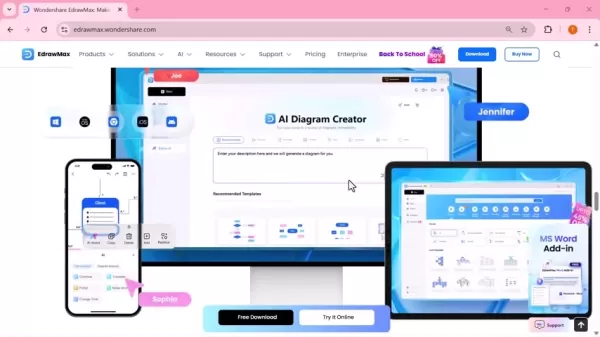
This capability truly distinguishes EdrawMax, effectively bridging the gap between abstract ideas and polished visualizations.
Moreover, the AI goes beyond creating basic diagrams; it understands context and suggests suitable layouts and connections, ensuring the final output is both visually attractive and logically coherent. Whether for a complex flowchart or a detailed mind map, the AI Diagram Creator handles the foundational work, letting users focus on refinement and adding their unique touch.
Vast Template Library and Diagram Types
One of EdrawMax's greatest strengths is its extensive library of templates and support for over 210 diagram types. This comprehensive collection caters to diverse use cases, from business and project management to education and personal organization. Users can quickly start with pre-designed templates or create diagrams from scratch using intuitive drawing tools.
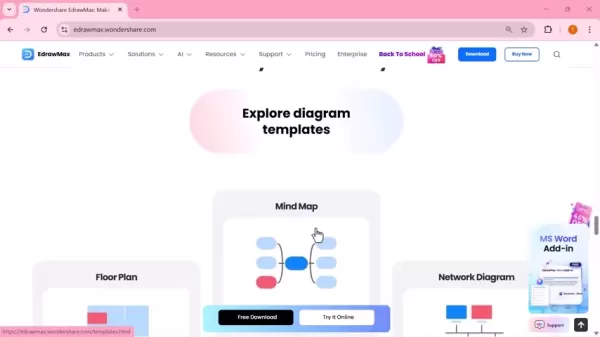
These include flowcharts, mind maps, org charts, Gantt charts, floor plans, and ER diagrams.
Real-Time Collaboration Tools
Effective teamwork is crucial for success in many projects, and EdrawMax addresses this with robust real-time collaboration tools. These features allow multiple users to work on the same diagram simultaneously, regardless of location. Real-time editing, commenting, and feedback mechanisms keep everyone aligned, fostering seamless collaboration and faster project completion.
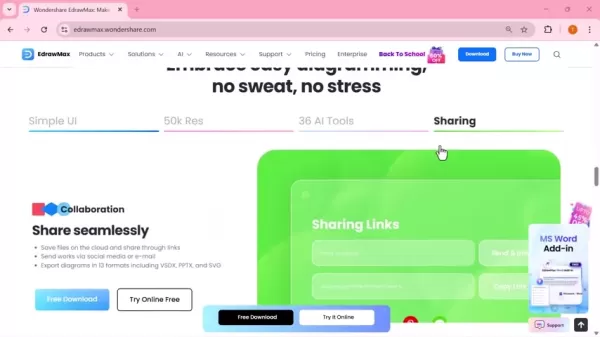
EdrawMax simplifies teamwork, whether your team is in one office or distributed worldwide.
EdrawMax in Action: Use Cases
Business and Project Management
EdrawMax proves invaluable for businesses and project managers needing to visualize complex data and processes. Flowcharts can map workflows, while Gantt charts help track project timelines and milestones. Organizational charts clarify company hierarchy, improving communication and coordination. Whether outlining project dependencies or visualizing marketing strategies, EdrawMax is engineered for project success.
Education
EdrawMax is a versatile asset for both educators and students. Mind maps facilitate brainstorming, note-taking, and information organization, making learning more engaging. Diagrams can illustrate complex concepts, aiding understanding and retention. EdrawMax serves as a valuable educational resource.
Content Creation
Content creators can use EdrawMax to produce compelling graphics and infographics that enhance their work. Diagrams present data engagingly, while illustrations add creativity to blog posts, articles, and social media content. For content creation, it is an essential tool for visual storytelling.
Frequently Asked Questions (FAQ)
Is EdrawMax suitable for beginners?
Absolutely. EdrawMax features an intuitive interface that makes diagram creation easy for beginners. Drag-and-drop functionality and pre-designed templates significantly reduce the learning curve.
Can I collaborate with my team members on EdrawMax?
Yes. EdrawMax offers real-time collaboration features, enabling multiple users to edit the same diagram simultaneously.
In what formats can I export my diagrams?
EdrawMax supports exporting diagrams in various formats, including VSDX, PPTX, SVG, PDF, and many others.
Is there a free version of EdrawMax?
Yes, a free version with limited features is available. Unlocking all features and templates requires a subscription.
How does the AI Diagram Creator work?
The AI Diagram Creator uses advanced algorithms to generate diagrams from text descriptions. Type your idea, and the AI will create a customizable diagram for you.
Related Questions
What types of diagrams can I create with EdrawMax?
EdrawMax supports a wide array of diagram types, including flowcharts, mind maps, organizational charts, network diagrams, floor plans, and ER diagrams. Each type comes with its own symbols, templates, and customization options, ensuring you have the tools to create accurate and impactful visuals.Flowcharts: Visualize processes, workflows, and decision-making steps.Mind Maps: Organize ideas, brainstorm solutions, and capture knowledge.Organizational Charts: Illustrate company hierarchy, team structures, and reporting lines.Network Diagrams: Map out network infrastructure, devices, and connections.Floor Plans: Design building layouts, furniture arrangements, and space planning.ER Diagrams: Model database structures, entities, and relationships.With its diverse range, EdrawMax is a versatile tool applicable for business planning, project management, education, and creative design. Whether mapping a complex process or illustrating a simple concept, EdrawMax provides the resources to create effective visuals.
Related article
 Robot.com teams with Sodexo to expand sidewalk delivery robot fleet
Robot.com’s sidewalk delivery robot R-Kiwi has completed 2.4 million tasks across campuses and city sidewalks. | Source: Robot.comRobot.com has entered into a seven-year commercial agreement with Sodexo Group, expanding a partnership that began in 20
US Halts Microsoft, Adobe From Tech Green Card Program
On October 8, the Trump administration formally suspended several major IT companies, including Microsoft and Adobe, from participating in the green card program aimed at helping foreign technical workers obtain permanent residency in the United Stat
Suduo Issues Full Apology and Removes AI-Generated Vulgar Videos
Soufun’s officially verified e-commerce store, "Soufun Personal Care Appliances Store," sparked widespread outrage after publishing numerous AI-generated videos with sexually suggestive themes. The content included inappropriate scenarios, such as a
Related Special Topic Recommendations
Video creation
Robot.com teams with Sodexo to expand sidewalk delivery robot fleet
Robot.com’s sidewalk delivery robot R-Kiwi has completed 2.4 million tasks across campuses and city sidewalks. | Source: Robot.comRobot.com has entered into a seven-year commercial agreement with Sodexo Group, expanding a partnership that began in 20
US Halts Microsoft, Adobe From Tech Green Card Program
On October 8, the Trump administration formally suspended several major IT companies, including Microsoft and Adobe, from participating in the green card program aimed at helping foreign technical workers obtain permanent residency in the United Stat
Suduo Issues Full Apology and Removes AI-Generated Vulgar Videos
Soufun’s officially verified e-commerce store, "Soufun Personal Care Appliances Store," sparked widespread outrage after publishing numerous AI-generated videos with sexually suggestive themes. The content included inappropriate scenarios, such as a
Related Special Topic Recommendations
Video creation
 AI Short-Form Video Hook Generators for Reels and Shorts
2026 Latest Best Top-Rated AI Short-Form Video Hook Generators for Reels and Shorts are here on XIX.AI! This curated collection features powerful, game-changing tools that go through rigorous real-world tests to deliver must-try content ideas fast. You’ll also find a detailed free vs paid comparison along with updated weekly rankings. Explore now to discover your perfect tool and boost your creativity instantly!
 10 tools
 xix.ai
automation
Best AI Browser Automation Tools for Web Operations
xix.ai
automation
Best AI Browser Automation Tools for Web Operations
2026 Latest Best Top-rated AI Browser Automation Tools for Web Operations are here on XIX.AI! This curated list features powerful, game-changing solutions that help boost productivity dramatically through real-world tests and strict rankings. We also provide a free vs paid comparison to help you choose the perfect option for streamlining web tasks, enhancing automation efficiency, and unlocking your AI edge. Explore now!
9 tools
xix.ai
Health & Wellness
AI Wellness Tools for Sleep and Habit Tracking
2026 Latest Best Top-Rated AI Wellness Tools for Sleep and Habit Tracking! XIX.AI curates a powerful, game-changing collection of must-try tools that offer real-world tests and detailed free vs paid comparison. These top-rated solutions help users boost sleep quality, monitor daily habits effectively, and unlock significant productivity improvements. Explore now to Discover your perfect tool and Start creating today to Unlock your AI edge!
11 tools
xix.ai
Business
AI Vendor Due Diligence Platforms for Procurement Reviews and Risk Screening
2026 Latest Best Top-rated AI Vendor Due Diligence Platforms for Procurement Reviews and Risk Screening! This curated list features powerful game-changing tools that go through rigorous real-world tests to deliver accurate rankings. You’ll find a free vs paid comparison, helping you identify the must-try solutions that boost procurement efficiency and cut risks. Backed by XIX.AI, it’s updated weekly. Explore now to discover your perfect tool for smarter sourcing! 238 characters
10 tools
xix.ai
Video creation
Best AI Video Generators for Demos: Turn Scripts into Explainer Videos
2026 Latest Best Top-Rated AI Video Generators for Demos are curated here, offering powerful game-changing solutions to turn scripts into professional explainer videos fast. XIX.AI provides weekly updated rankings based on real-world tests, including free vs paid comparison details. Must-try tools help boost productivity significantly. Explore now to discover your perfect demo video creation tool!
9 tools
xix.ai
Finance
AI Cash Flow Forecasting Tools for Small Business Finance
2026 Latest Best Top-rated AI Cash Flow Forecasting Tools for Small Business Finance are here on XIX.AI! Our curated list features powerful, game-changing solutions that go through real-world tests to help small business owners boost financial accuracy, plan budgets more effectively, and avoid cash flow issues. Get a free vs paid comparison and explore now to find your perfect tool for seamless financial management.
7 tools
xix.ai

 Comments (0)
0/500
Comments (0)
0/500
In today's fast-paced work environment, visualizing ideas and processes is essential for clear communication and efficient project management. Wondershare EdrawMax stands out as a premier diagramming solution, providing a comprehensive set of features to turn any concept into a professional visual. Its intuitive interface, vast template collection, and advanced AI tools enable students, educators, business professionals, and creators to unlock their creativity and achieve outstanding outcomes.
Key Points
EdrawMax is a versatile diagramming tool designed for users of all levels.
Its features include AI-powered diagram generation and seamless real-time collaboration.
Access a library with over 210 diagram types and professionally designed templates.
Enjoy flexible export options to easily share your projects with others.
AI assistance and intuitive tools streamline the entire diagram creation process.
Unveiling Wondershare EdrawMax
What is Wondershare EdrawMax?
Wondershare EdrawMax is a powerful diagramming software created to simplify the design of charts, diagrams, and other visual aids. It serves a broad user base, from students and teachers to business leaders and creative professionals. Fundamentally, EdrawMax offers an intuitive platform for users to effectively visualize concepts, optimize workflows, and communicate intricate information.
The software's adaptability comes from its support for a multitude of diagram categories, such as flowcharts, mind maps, org charts, network diagrams, floor plans, and more. This wide selection ensures you have the right tool for almost any visual task.
Furthermore, EdrawMax features a user-friendly interface that shortens the learning process, allowing users to begin their projects quickly. Drag-and-drop functionality makes adding and connecting elements straightforward, rendering diagram creation both efficient and enjoyable.
Beyond ease of use, EdrawMax includes a rich array of features to boost productivity and creativity. These encompass intelligent drawing aids, real-time collaboration, and smooth integration with other popular applications. Whether working alone or with a team, EdrawMax provides the necessary tools to bring your ideas to life.
Key Features of EdrawMax
EdrawMax is packed with features to elevate your diagramming experience:
AI Diagram Creator: Instantly convert your ideas into polished diagrams. Simply type your concept, and EdrawMax's AI generates a professional visual layout.
Extensive Template Library: Choose from over 210 diagram types, including flowcharts, mind maps, timelines, and more. A wide selection of ready-made templates jumpstarts the creation process.
Real-Time Collaboration: Work with team members in real-time, share files, and collect feedback seamlessly within the platform.
Flexible Export Options: Export your diagrams in multiple formats like VSDX, PPTX, and SVG for easy sharing and integration into other documents.
User-Friendly Interface: An intuitive design ensures a smooth experience for both newcomers and seasoned users.
Cross-Platform Integration: Work seamlessly across Windows, macOS, Linux, and directly in your web browser.
AI Diagram Generation: A Closer Look
How AI Simplifies Diagram Creation
EdrawMax uses Artificial Intelligence (AI) to streamline the diagramming process. The AI Diagram Creator is especially helpful for generating initial diagram frameworks from text descriptions. It supports numerous formats like flowcharts, mind maps, timelines, slides, infographics, and social diagrams. The AI intelligently interprets user input to create an appropriate layout, saving significant time compared to building from scratch.
AI assists in creating professional slides and diagrams, such as:
- Flowcharts: Map out processes step-by-step with clear, logical visuals.
- Mind Maps: Capture, organize, and creatively expand on ideas.
- Analysis Canvases: Plan strategies, manage projects, and analyze workflows effectively.
- Org Charts: Clearly display team structures or company hierarchies.
- Basic Diagrams: Easily construct simple shapes and foundational diagrams.
Customization and Editing
While the AI Diagram Creator provides an excellent starting point, EdrawMax ensures full creative control. Users can fine-tune every aspect of generated diagrams to meet their exact needs. Colors, fonts, text, shapes, and layouts can be adjusted effortlessly using the software's comprehensive editing toolkit.
This blend of AI-driven automation and hands-on customization allows for rapid creation without compromising on quality or personal expression.
EdrawMax provides the ideal mix of AI assistance and creative freedom.
Drawing Tools and Freehand Shapes
EdrawMax offers a suite of drawing tools that enrich the diagramming experience. Users can incorporate freehand shapes, sketch ideas, and add unique elements to make their diagrams stand out. These tools are intuitive and simple to use, making it easy to add a personal touch to every project.
The Drawing Tool includes features such as:
- Text to Image Generation: Transform text descriptions into visual elements.
- Image to Image Conversion: Refine and adapt existing images for use in diagrams.
- Extensive Symbol Library: Access a vast collection of pre-designed symbols for various diagram types.
- Customizable Shapes: Easily create and modify shapes using intuitive drawing tools.
EdrawMax Pricing and Plans
Understanding Subscription Options
EdrawMax offers several subscription plans to suit different needs and budgets. These typically include:
- Free Plan: Provides limited access to features and templates, suitable for basic diagramming tasks.
- Individual Plans: Designed for single users, offering full access to all features, templates, and support. Options include monthly, annual, and perpetual licenses.
- Team Plans: Tailored for collaborative teams, allowing multiple users to access EdrawMax with centralized management and support.
- Educational Plans: Special pricing for students and educational institutions to support learning and teaching activities.
The subscription model lets users select the plan that best fits their needs, ensuring they pay only for the required features.
EdrawMax's pricing structure accommodates all diagramming requirements.
EdrawMax: Pros
and Cons
Pros
Intuitive and easy-to-use interface
Extensive variety of templates and diagram types
Powerful AI-assisted diagram creation
Robust real-time collaboration features
Flexible export and sharing options
Cons
Access to all advanced features requires a paid subscription
The extensive interface may feel overwhelming to some new users initially
Delving Deeper: EdrawMax's Core Features
AI-Powered Diagram Creation
The AI Diagram Creator is a standout feature, enabling users to convert text-based ideas into visually appealing diagrams in seconds. By typing a description, EdrawMax's AI algorithms generate a professional-looking diagram ready for further customization. This feature dramatically speeds up the diagramming process, conserving valuable time and effort.
This capability truly distinguishes EdrawMax, effectively bridging the gap between abstract ideas and polished visualizations.
Moreover, the AI goes beyond creating basic diagrams; it understands context and suggests suitable layouts and connections, ensuring the final output is both visually attractive and logically coherent. Whether for a complex flowchart or a detailed mind map, the AI Diagram Creator handles the foundational work, letting users focus on refinement and adding their unique touch.
Vast Template Library and Diagram Types
One of EdrawMax's greatest strengths is its extensive library of templates and support for over 210 diagram types. This comprehensive collection caters to diverse use cases, from business and project management to education and personal organization. Users can quickly start with pre-designed templates or create diagrams from scratch using intuitive drawing tools.
These include flowcharts, mind maps, org charts, Gantt charts, floor plans, and ER diagrams.
Real-Time Collaboration Tools
Effective teamwork is crucial for success in many projects, and EdrawMax addresses this with robust real-time collaboration tools. These features allow multiple users to work on the same diagram simultaneously, regardless of location. Real-time editing, commenting, and feedback mechanisms keep everyone aligned, fostering seamless collaboration and faster project completion.
EdrawMax simplifies teamwork, whether your team is in one office or distributed worldwide.
EdrawMax in Action: Use Cases
Business and Project Management
EdrawMax proves invaluable for businesses and project managers needing to visualize complex data and processes. Flowcharts can map workflows, while Gantt charts help track project timelines and milestones. Organizational charts clarify company hierarchy, improving communication and coordination. Whether outlining project dependencies or visualizing marketing strategies, EdrawMax is engineered for project success.
Education
EdrawMax is a versatile asset for both educators and students. Mind maps facilitate brainstorming, note-taking, and information organization, making learning more engaging. Diagrams can illustrate complex concepts, aiding understanding and retention. EdrawMax serves as a valuable educational resource.
Content Creation
Content creators can use EdrawMax to produce compelling graphics and infographics that enhance their work. Diagrams present data engagingly, while illustrations add creativity to blog posts, articles, and social media content. For content creation, it is an essential tool for visual storytelling.
Frequently Asked Questions (FAQ)
Is EdrawMax suitable for beginners?
Absolutely. EdrawMax features an intuitive interface that makes diagram creation easy for beginners. Drag-and-drop functionality and pre-designed templates significantly reduce the learning curve.
Can I collaborate with my team members on EdrawMax?
Yes. EdrawMax offers real-time collaboration features, enabling multiple users to edit the same diagram simultaneously.
In what formats can I export my diagrams?
EdrawMax supports exporting diagrams in various formats, including VSDX, PPTX, SVG, PDF, and many others.
Is there a free version of EdrawMax?
Yes, a free version with limited features is available. Unlocking all features and templates requires a subscription.
How does the AI Diagram Creator work?
The AI Diagram Creator uses advanced algorithms to generate diagrams from text descriptions. Type your idea, and the AI will create a customizable diagram for you.
Related Questions
What types of diagrams can I create with EdrawMax?
EdrawMax supports a wide array of diagram types, including flowcharts, mind maps, organizational charts, network diagrams, floor plans, and ER diagrams. Each type comes with its own symbols, templates, and customization options, ensuring you have the tools to create accurate and impactful visuals.Flowcharts: Visualize processes, workflows, and decision-making steps.Mind Maps: Organize ideas, brainstorm solutions, and capture knowledge.Organizational Charts: Illustrate company hierarchy, team structures, and reporting lines.Network Diagrams: Map out network infrastructure, devices, and connections.Floor Plans: Design building layouts, furniture arrangements, and space planning.ER Diagrams: Model database structures, entities, and relationships.With its diverse range, EdrawMax is a versatile tool applicable for business planning, project management, education, and creative design. Whether mapping a complex process or illustrating a simple concept, EdrawMax provides the resources to create effective visuals.








 Robot.com teams with Sodexo to expand sidewalk delivery robot fleet
Robot.com’s sidewalk delivery robot R-Kiwi has completed 2.4 million tasks across campuses and city sidewalks. | Source: Robot.comRobot.com has entered into a seven-year commercial agreement with Sodexo Group, expanding a partnership that began in 20
Robot.com teams with Sodexo to expand sidewalk delivery robot fleet
Robot.com’s sidewalk delivery robot R-Kiwi has completed 2.4 million tasks across campuses and city sidewalks. | Source: Robot.comRobot.com has entered into a seven-year commercial agreement with Sodexo Group, expanding a partnership that began in 20
 US Halts Microsoft, Adobe From Tech Green Card Program
On October 8, the Trump administration formally suspended several major IT companies, including Microsoft and Adobe, from participating in the green card program aimed at helping foreign technical workers obtain permanent residency in the United Stat
Suduo Issues Full Apology and Removes AI-Generated Vulgar Videos
Soufun’s officially verified e-commerce store, "Soufun Personal Care Appliances Store," sparked widespread outrage after publishing numerous AI-generated videos with sexually suggestive themes. The content included inappropriate scenarios, such as a
US Halts Microsoft, Adobe From Tech Green Card Program
On October 8, the Trump administration formally suspended several major IT companies, including Microsoft and Adobe, from participating in the green card program aimed at helping foreign technical workers obtain permanent residency in the United Stat
Suduo Issues Full Apology and Removes AI-Generated Vulgar Videos
Soufun’s officially verified e-commerce store, "Soufun Personal Care Appliances Store," sparked widespread outrage after publishing numerous AI-generated videos with sexually suggestive themes. The content included inappropriate scenarios, such as a

2026 Latest Best Top-Rated AI Short-Form Video Hook Generators for Reels and Shorts are here on XIX.AI! This curated collection features powerful, game-changing tools that go through rigorous real-world tests to deliver must-try content ideas fast. You’ll also find a detailed free vs paid comparison along with updated weekly rankings. Explore now to discover your perfect tool and boost your creativity instantly!
10 tools
xix.ai

2026 Latest Best Top-rated AI Browser Automation Tools for Web Operations are here on XIX.AI! This curated list features powerful, game-changing solutions that help boost productivity dramatically through real-world tests and strict rankings. We also provide a free vs paid comparison to help you choose the perfect option for streamlining web tasks, enhancing automation efficiency, and unlocking your AI edge. Explore now!
9 tools
xix.ai

2026 Latest Best Top-Rated AI Wellness Tools for Sleep and Habit Tracking! XIX.AI curates a powerful, game-changing collection of must-try tools that offer real-world tests and detailed free vs paid comparison. These top-rated solutions help users boost sleep quality, monitor daily habits effectively, and unlock significant productivity improvements. Explore now to Discover your perfect tool and Start creating today to Unlock your AI edge!
11 tools
xix.ai

2026 Latest Best Top-rated AI Vendor Due Diligence Platforms for Procurement Reviews and Risk Screening! This curated list features powerful game-changing tools that go through rigorous real-world tests to deliver accurate rankings. You’ll find a free vs paid comparison, helping you identify the must-try solutions that boost procurement efficiency and cut risks. Backed by XIX.AI, it’s updated weekly. Explore now to discover your perfect tool for smarter sourcing! 238 characters
10 tools
xix.ai
2026 Latest Best Top-Rated AI Video Generators for Demos are curated here, offering powerful game-changing solutions to turn scripts into professional explainer videos fast. XIX.AI provides weekly updated rankings based on real-world tests, including free vs paid comparison details. Must-try tools help boost productivity significantly. Explore now to discover your perfect demo video creation tool!
9 tools
xix.ai

2026 Latest Best Top-rated AI Cash Flow Forecasting Tools for Small Business Finance are here on XIX.AI! Our curated list features powerful, game-changing solutions that go through real-world tests to help small business owners boost financial accuracy, plan budgets more effectively, and avoid cash flow issues. Get a free vs paid comparison and explore now to find your perfect tool for seamless financial management.
7 tools
xix.ai












