


 Home
HomeDisable AI in Google Docs
I opened a Google Doc to start writing an article, only to be greeted by a text box urging me to “write with Gemini.” I searched for a way to dismiss that flashy AI interface but couldn't find one. It frustrated me.
So instead of working on my intended article, I’m writing about how to remove those AI pop-ups from your Google Docs screen—because it took me a while to figure out. You're welcome.
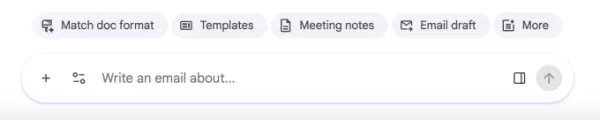
What is this monstrosity? Why won't it go away?Image credit:Screenshot from Google Docs
The first fix is pretty straightforward:
Click “Gemini” in the top menu bar above your document. From the drop-down menu, choose “Bottom bar preferences.” You can then disable that bottom bar, which removes the AI box at the bottom of your screen. 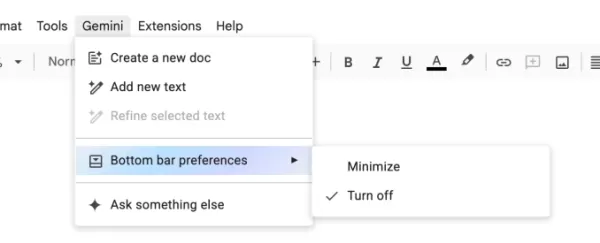
Image credit:Screenshot from Google Docs
Full disclosure: I was so frustrated searching for “bottom bar preferences” that I completely overlooked it at first. Instead, I clicked “Ask something else” and begged Gemini to remove itself from my life. AI may not be human, but Gemini appeared to have a survival instinct—it told me to click the “X” icon. That doesn't remove Gemini. It only closed the conversation where I was asking it how to turn itself off. Suspicious!
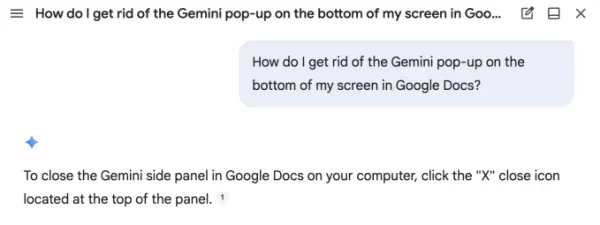
Image credit:Screenshot from Google Docs
Other frustrated Google Docs users have mentioned features I haven't seen yet, such as a “help me write” box that follows your cursor. That sounds annoying, so it's wise to stop it before it starts. Benjamin Franklin once said, “An ounce of prevention is worth a pound of cure.” (He meant fire safety; I mean product design.)
Rather than disabling each AI feature one by one like a game of Whac-A-Mole, you can turn off “smart features” across your entire Google Workspace through Gmail.
First, open your Gmail inbox. Then click the gear icon for Settings. In the menu that appears, choose “See all settings.” (While you're there, you might pick a playful theme for your inbox. A little whimsy never hurt anyone.) After clicking “See all settings,” scroll about halfway down to find “Google Workspace smart features” and click “Manage Workspace smart feature settings.”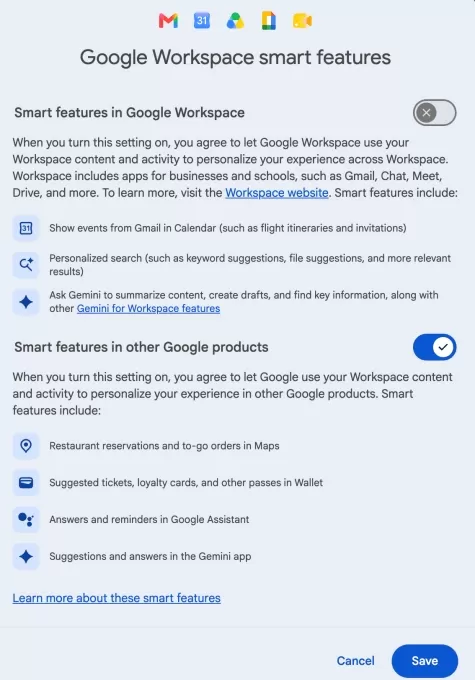
Image credit:Screenshot from Gmail
Here, you see two options: one to disable smart features in Google Workspace (including those annoying Gemini pop-ups in Google Docs), and another for other smart features (which I find less bothersome). I only turned off the first one, but if you dislike Gmail automatically creating calendar events from your flights, this is where you can change that.You should now be free from those irritating Gemini pop-ups that interrupt your writing in Google Docs. Rest easy.
Related article
 The Year's Biggest AI Stories So Far
You can track a year by product launches, but the bigger moments that reshape our understanding of AI matter more. The AI industry keeps generating headlines—major acquisitions, indie developer wins, backlash against questionable products, and high-s
Six Search Engines to Try When Google Isn't What It Used to Be
Google’s appearance is about to change drastically, and if you’re not a fan of AI Overviews, you won’t like what’s ahead.
During this week’s Google I/O 2026 keynote, the company revealed a major overhaul of Search, shifting toward a conversational, A
Top U.S. AI Firms Securing $100 Million-Plus Funding in 2026
In just under two months of 2026, nearly 20 AI startups based in the United States have already secured massive funding rounds of $100 million or more.If the initial weeks of the year are any indication, the AI startup scene is poised for another yea
Related Special Topic Recommendations
Prompt
The Year's Biggest AI Stories So Far
You can track a year by product launches, but the bigger moments that reshape our understanding of AI matter more. The AI industry keeps generating headlines—major acquisitions, indie developer wins, backlash against questionable products, and high-s
Six Search Engines to Try When Google Isn't What It Used to Be
Google’s appearance is about to change drastically, and if you’re not a fan of AI Overviews, you won’t like what’s ahead.
During this week’s Google I/O 2026 keynote, the company revealed a major overhaul of Search, shifting toward a conversational, A
Top U.S. AI Firms Securing $100 Million-Plus Funding in 2026
In just under two months of 2026, nearly 20 AI startups based in the United States have already secured massive funding rounds of $100 million or more.If the initial weeks of the year are any indication, the AI startup scene is poised for another yea
Related Special Topic Recommendations
Prompt
 Top Prompt Engineering Tools: Test, Version, and Improve Team Prompts
2026 Latest Top-rated Best Prompt Engineering Tools for Teams are featured here on XIX.AI. This curated collection includes powerful game-changing options that go through rigorous real-world tests. You’ll find a free vs paid comparison, detailed rankings, and easy tools to test, version track, and refine team prompts to boost productivity significantly. Explore now to Discover your perfect tool!
 9 tools
 xix.ai
Prompt
Best AI Prompt Libraries for Work: Reuse Proven Prompts Across Tasks
xix.ai
Prompt
Best AI Prompt Libraries for Work: Reuse Proven Prompts Across Tasks
2026 Latest Best AI Prompt Libraries for Work: XIX.AI curates a top-rated collection of powerful, game-changing prompt sets designed to help you reuse proven templates across countless tasks and boost your productivity significantly. Enjoy free vs paid comparison, detailed real-world tests, and updated rankings weekly. Explore now to discover your perfect tool and unlock your AI edge!
11 tools
xix.ai
Text-to-speech
AI Narration Tools for Audiobook Production
2026 Latest Best Top-rated AI Narration Tools for Audiobook Production! This curated collection features powerful, game-changing solutions that greatly boost writing efficiency and help creators overcome content creation bottlenecks. XIX.AI offers a free vs paid comparison along with detailed real-world tests and updated weekly rankings to help you find the perfect tool. Explore now to unlock your AI edge in audiobook production!
17 tools
xix.ai
Prompt
AI Prompt Optimizers for Marketing and Support
2026 Latest Best Top-rated AI Prompt Optimizers for Marketing and Support! XIX.AI curates a powerful game-changing collection of must-try tools, regularly updated weekly. These tools help you boost writing efficiency, create high-quality content faster, and streamline marketing campaigns as well as customer support tasks. Get a free vs paid comparison along with real-world tests and detailed rankings. Explore now to Discover your perfect tool for boosting productivity!
9 tools
xix.ai
Text-to-speech
AI YouTube Voiceover Generators for Tutorials, Shorts, and Faceless Channels
2026 Latest Best Top-rated AI YouTube Voiceover Generators for Tutorials, Shorts, and Faceless Channels are here on XIX.AI. Our curated list includes powerful game-changing tools that deliver professional-quality voiceovers quickly, helping creators boost productivity and save time. Enjoy a free vs paid comparison along with real-world tests and weekly updated rankings. Discover your perfect tool to unlock your AI edge today. Explore now!
16 tools
xix.ai
Software Development
Best AI Release Note Generators for SaaS Engineering Teams
2026 Latest Best Top-rated AI Release Note Generators for SaaS Engineering Teams, carefully curated by XIX.AI. These powerful tools help teams create clear, concise updates fast, boost writing efficiency significantly, and avoid common mistakes. Enjoy a free vs paid comparison along with real-world tests and weekly updated rankings. Discover your perfect tool to unlock your AI edge today. Explore now!
10 tools
xix.ai

 Comments (0)
0/500
Comments (0)
0/500
I opened a Google Doc to start writing an article, only to be greeted by a text box urging me to “write with Gemini.” I searched for a way to dismiss that flashy AI interface but couldn't find one. It frustrated me.
So instead of working on my intended article, I’m writing about how to remove those AI pop-ups from your Google Docs screen—because it took me a while to figure out. You're welcome.
What is this monstrosity? Why won't it go away?Image credit:Screenshot from Google Docs
The first fix is pretty straightforward:
Click “Gemini” in the top menu bar above your document. From the drop-down menu, choose “Bottom bar preferences.” You can then disable that bottom bar, which removes the AI box at the bottom of your screen.Image credit:Screenshot from Google Docs
Full disclosure: I was so frustrated searching for “bottom bar preferences” that I completely overlooked it at first. Instead, I clicked “Ask something else” and begged Gemini to remove itself from my life. AI may not be human, but Gemini appeared to have a survival instinct—it told me to click the “X” icon. That doesn't remove Gemini. It only closed the conversation where I was asking it how to turn itself off. Suspicious!
Image credit:Screenshot from Google Docs
Other frustrated Google Docs users have mentioned features I haven't seen yet, such as a “help me write” box that follows your cursor. That sounds annoying, so it's wise to stop it before it starts. Benjamin Franklin once said, “An ounce of prevention is worth a pound of cure.” (He meant fire safety; I mean product design.)
Rather than disabling each AI feature one by one like a game of Whac-A-Mole, you can turn off “smart features” across your entire Google Workspace through Gmail.
First, open your Gmail inbox. Then click the gear icon for Settings. In the menu that appears, choose “See all settings.” (While you're there, you might pick a playful theme for your inbox. A little whimsy never hurt anyone.) After clicking “See all settings,” scroll about halfway down to find “Google Workspace smart features” and click “Manage Workspace smart feature settings.”Image credit:Screenshot from Gmail
Here, you see two options: one to disable smart features in Google Workspace (including those annoying Gemini pop-ups in Google Docs), and another for other smart features (which I find less bothersome). I only turned off the first one, but if you dislike Gmail automatically creating calendar events from your flights, this is where you can change that.You should now be free from those irritating Gemini pop-ups that interrupt your writing in Google Docs. Rest easy.








 The Year's Biggest AI Stories So Far
You can track a year by product launches, but the bigger moments that reshape our understanding of AI matter more. The AI industry keeps generating headlines—major acquisitions, indie developer wins, backlash against questionable products, and high-s
The Year's Biggest AI Stories So Far
You can track a year by product launches, but the bigger moments that reshape our understanding of AI matter more. The AI industry keeps generating headlines—major acquisitions, indie developer wins, backlash against questionable products, and high-s
 Six Search Engines to Try When Google Isn't What It Used to Be
Google’s appearance is about to change drastically, and if you’re not a fan of AI Overviews, you won’t like what’s ahead.
During this week’s Google I/O 2026 keynote, the company revealed a major overhaul of Search, shifting toward a conversational, A
Six Search Engines to Try When Google Isn't What It Used to Be
Google’s appearance is about to change drastically, and if you’re not a fan of AI Overviews, you won’t like what’s ahead.
During this week’s Google I/O 2026 keynote, the company revealed a major overhaul of Search, shifting toward a conversational, A
 Top U.S. AI Firms Securing $100 Million-Plus Funding in 2026
In just under two months of 2026, nearly 20 AI startups based in the United States have already secured massive funding rounds of $100 million or more.If the initial weeks of the year are any indication, the AI startup scene is poised for another yea
Top U.S. AI Firms Securing $100 Million-Plus Funding in 2026
In just under two months of 2026, nearly 20 AI startups based in the United States have already secured massive funding rounds of $100 million or more.If the initial weeks of the year are any indication, the AI startup scene is poised for another yea
2026 Latest Top-rated Best Prompt Engineering Tools for Teams are featured here on XIX.AI. This curated collection includes powerful game-changing options that go through rigorous real-world tests. You’ll find a free vs paid comparison, detailed rankings, and easy tools to test, version track, and refine team prompts to boost productivity significantly. Explore now to Discover your perfect tool!
9 tools
xix.ai
2026 Latest Best AI Prompt Libraries for Work: XIX.AI curates a top-rated collection of powerful, game-changing prompt sets designed to help you reuse proven templates across countless tasks and boost your productivity significantly. Enjoy free vs paid comparison, detailed real-world tests, and updated rankings weekly. Explore now to discover your perfect tool and unlock your AI edge!
11 tools
xix.ai
2026 Latest Best Top-rated AI Narration Tools for Audiobook Production! This curated collection features powerful, game-changing solutions that greatly boost writing efficiency and help creators overcome content creation bottlenecks. XIX.AI offers a free vs paid comparison along with detailed real-world tests and updated weekly rankings to help you find the perfect tool. Explore now to unlock your AI edge in audiobook production!
17 tools
xix.ai

2026 Latest Best Top-rated AI Prompt Optimizers for Marketing and Support! XIX.AI curates a powerful game-changing collection of must-try tools, regularly updated weekly. These tools help you boost writing efficiency, create high-quality content faster, and streamline marketing campaigns as well as customer support tasks. Get a free vs paid comparison along with real-world tests and detailed rankings. Explore now to Discover your perfect tool for boosting productivity!
9 tools
xix.ai
2026 Latest Best Top-rated AI YouTube Voiceover Generators for Tutorials, Shorts, and Faceless Channels are here on XIX.AI. Our curated list includes powerful game-changing tools that deliver professional-quality voiceovers quickly, helping creators boost productivity and save time. Enjoy a free vs paid comparison along with real-world tests and weekly updated rankings. Discover your perfect tool to unlock your AI edge today. Explore now!
16 tools
xix.ai
2026 Latest Best Top-rated AI Release Note Generators for SaaS Engineering Teams, carefully curated by XIX.AI. These powerful tools help teams create clear, concise updates fast, boost writing efficiency significantly, and avoid common mistakes. Enjoy a free vs paid comparison along with real-world tests and weekly updated rankings. Discover your perfect tool to unlock your AI edge today. Explore now!
10 tools
xix.ai












