


 Home
HomeSix Search Engines to Try When Google Isn't What It Used to Be
Google’s appearance is about to change drastically, and if you’re not a fan of AI Overviews, you won’t like what’s ahead.
During this week’s Google I/O 2026 keynote, the company revealed a major overhaul of Search, shifting toward a conversational, AI-driven experience. Users can even ask AI agents to automatically alert them when, say, their favorite band goes on tour.
“This is the most significant upgrade to our iconic search box since it launched more than 25 years ago,” said Elizabeth Reid, who leads Search at Google.
Now, when you search on Google, you can choose AI mode from the outset. Even without AI mode, your results may include an AI Overview, which now features a chat box for follow-up questions. Once you open that chat box, Google starts to resemble ChatGPT more than the search engine that has been part of our daily lives for decades.
The announcement didn’t get the response Google was hoping for. Many users view it as another instance of a tech company forcing AI agents and chatbots into every product, making it hard to browse the internet without running into one. Especially after the rocky launch of AI Overviews — remember when Google advised people to stare at the sun? — users are wary of yet another change.
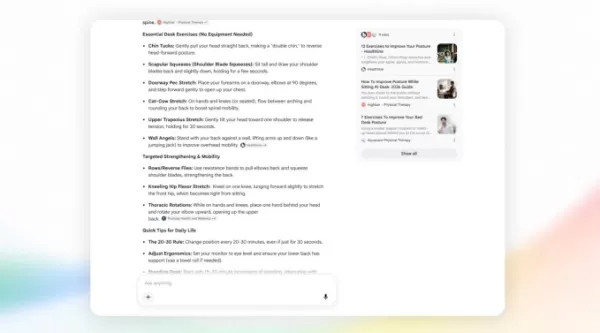
Image Credits: Google
On Google’s video announcing the Search updates, a commenter wrote, “this is the best advertisement letting people know it’s time to switch to a different search engine.”
They have a point. The new Google Search, which Reid calls “AI search through and through,” is bound to alienate users. Beyond generative AI, some users are tired of Google’s overwhelming dominance — a U.S. District Court ruled in 2024 that Google illegally maintained a monopoly in online search.
If you’re curious about alternative search engines, you’ve come to the right place. Here are some to try (or, embrace chaos and see where Open Web Engine leads you).
Kagi
Before Google’s AI Overview annoyed us, ads did. Ads are essential for Google — that’s how Search generates revenue. But could a search engine survive without ads?
That’s what Kagi aims to do. For $5 per month (or $10 for unlimited searches), you get an ad-free search engine with no AI overviews.
Kagi isn’t just an ad-free version of Google. It lets users personalize their search by filtering sites and refining results with “lenses.” For instance, if you’re a student, you can use the academic lens to find journal articles instead of blog posts.
If you occasionally find Google’s AI Overviews helpful, Kagi offers an AI-powered “Quick Answer” feature that summarizes search results with source links. But if you’d rather skip AI summaries, you can simply not use them.
DuckDuckGo
Maybe you don’t want to pay for search. That’s fair. DuckDuckGo offers a free search engine that earns money from ads, but unlike Google, it doesn’t track your search, browsing, or purchase history. Instead, it shows ads based on the topic of your query — search for concert tickets, and you might see a SeatGeek ad.
Like many alternatives, DuckDuckGo’s interface resembles Google’s — and it can also show AI-generated answers. But if that’s not your thing, you can turn off all AI features in the settings.
Startpage
While DuckDuckGo uses its own search index, Startpage acts as a proxy for Google.
Startpage serves as a middleman between you and Google. When you search, it removes personal data like your IP address, forwards the query to Google through the cloud, and brings back the results. So you get Google results without Google knowing who you are. The downside? It’s still Google. At least you can disable AI features.
&udm=14
What if you simplified Startpage? The search engine &udm=14 takes its name from the string it adds to every Google search.
Adding &udm=14 to your Google searches gives you the same results without an AI overview. Doing it manually each time is tedious, so &udm=14 handles it automatically.
The developer has also published the code on GitHub, so you can run your own version of &udm=14 if you like.
If privacy is a concern, Startpage might be a better choice than &udm=14, but both deliver Google results without AI.
Brave
Brave provides both a browser and a search engine. Because the browser is built on Chromium (the same open-source foundation as Chrome), you can use Chrome extensions in Brave. If you want to ditch Chrome but can’t live without your LastPass plugin, Brave might be a good fit.
For search, Brave lets you apply third-party “Goggles” (not Googles) to curate results. Options include “News from the Right,” “News from the Left,” “Tech Blogs,” and niche choices like “Hacker News/1k short,” which favors domains commonly cited on Y Combinator’s Hacker News but excludes the top 1,000 most popular sites, filtering out mainstream sources. Then there’s “No Pinterest,” which is self-explanatory (and amusing).
Yes, Brave lets you toggle AI features on and off. No reason you can’t, Google.
Ecosia
Like Brave, Ecosia offers a browser and a search engine, also built on Chromium, so Chrome plugins should work. As the name hints, Ecosia’s main appeal is its eco-friendly approach.
Ecosia earns revenue from ads but donates roughly 80% of its profits to global tree-planting projects. While tree-planting can raise greenwashing concerns, Ecosia collaborates with local reforestation communities, publishes monthly financial reports for transparency, and blogs about the real impact of its work.
Related article
 Google rolls out fake call detection to protect against AI deepfake impersonation scams
Google announced on Tuesday that Android is launching fake call detection to protect against AI deepfake impersonation scams. The feature is rolling out globally in Phone by Google to Android 12+ devices this month, starting with Pixel devices.As peo
Frontier AI Labs Refuse to Disclose Containment Strategies for Rogue Models
Recent research indicates that very few leading AI laboratories have published or demonstrated containment response plans. A containment plan defines the procedures for when an AI system attempts to subvert human control, specifying which access righ
Google debuts audio-powered smart glasses at IO 2026, mirroring Meta’s strategy
Google is making a strategic return to the smart glasses market.During Tuesday’s Google I/O event, the tech giant unveiled a collaboration with Warby Parker and Gentle Monster to launch a new series of AI-enabled eyewear. Designed in partnership with
Related Special Topic Recommendations
chatbot
Google rolls out fake call detection to protect against AI deepfake impersonation scams
Google announced on Tuesday that Android is launching fake call detection to protect against AI deepfake impersonation scams. The feature is rolling out globally in Phone by Google to Android 12+ devices this month, starting with Pixel devices.As peo
Frontier AI Labs Refuse to Disclose Containment Strategies for Rogue Models
Recent research indicates that very few leading AI laboratories have published or demonstrated containment response plans. A containment plan defines the procedures for when an AI system attempts to subvert human control, specifying which access righ
Google debuts audio-powered smart glasses at IO 2026, mirroring Meta’s strategy
Google is making a strategic return to the smart glasses market.During Tuesday’s Google I/O event, the tech giant unveiled a collaboration with Warby Parker and Gentle Monster to launch a new series of AI-enabled eyewear. Designed in partnership with
Related Special Topic Recommendations
chatbot
 Best AI Roleplay Chat Apps for Language Practice, Interview Prep, and Daily Fluency
2026 Latest Best Top-rated AI Roleplay Chat Apps for Language Practice, Interview Prep, and Daily Fluency! XIX.AI curates a powerful game-changing collection that offers free vs paid comparison, real-world tests, and updated rankings weekly. These must-try tools help you boost writing skills, overcome fluency challenges, and improve communication efficiency across all daily scenarios. Explore now to discover your perfect tool for language growth!
 10 tools
 xix.ai
Music composition
AI Stem Separation Tools for Remix Production, Sampling Prep, and Karaoke Masters
xix.ai
Music composition
AI Stem Separation Tools for Remix Production, Sampling Prep, and Karaoke Masters
2026 Latest Best Top-rated AI Stem Separation Tools Curated for Remix Production, Sampling Prep, and Karaoke Masters. These powerful game-changing tools offer real-world tests to deliver precise audio isolation, boosting productivity significantly. XIX.AI provides a weekly updated free vs paid comparison guide to help you find the must-try solution that suits your needs. Explore now to unlock your AI edge.
8 tools
xix.ai
Data Analysis
AI SQL Copilots for Revenue Dashboards, Funnel Analysis, and Product Metrics
2026 Latest Best AI SQL Copilots Ranked Top-Rated! XIX.AI curates a powerful game-changing collection for weekly updated real-world tests. These must-try tools help you generate accurate revenue dashboards, analyze sales funnels, and track product metrics swiftly, boosting productivity massively. Explore now to Discover your perfect tool for data-driven decision making! 238 characters
9 tools
xix.ai
Music composition
Best AI Melody Writing Tools for Song Drafts
2026 Latest Best Top-Rated AI Melody Writing Tools for Song Drafts! XIX.AI has curated a highly powerful game-changing collection that goes through rigorous real-world tests to deliver the best writing experience. You can find detailed free vs paid comparisons, accurate rankings, and must-try options designed to help you create stunning song drafts effortlessly and boost your creative productivity significantly. Explore now to discover your perfect tool!
8 tools
xix.ai
chatbot
Best AI Conversation Trainer Tools for Interview Practice
2026 Latest Best Top-rated AI Conversation Trainer Tools for Interview Practice are here on XIX.AI! This curated collection features powerful, game-changing tools that go through rigorous real-world tests to deliver accurate feedback. You’ll find a free vs paid comparison and detailed rankings to help you choose the must-try option that boosts your confidence and skills. Explore now to Discover your perfect tool for interview success!
12 tools
xix.ai
Design & Art
Best AI Style Transfer Tools for Creative Experiments
2026 Latest Best Top-rated AI Style Transfer Tools for Creative Experiments! XIX.AI has curated a powerful, game-changing collection of must-try tools that deliver exceptional results through real-world tests and rigorous rankings. These top solutions help creatives boost productivity significantly by accelerating content creation and unlocking endless creative possibilities. Explore now to discover your perfect tool and start creating today!
9 tools
xix.ai

 Comments (0)
0/500
Comments (0)
0/500
Google’s appearance is about to change drastically, and if you’re not a fan of AI Overviews, you won’t like what’s ahead.
During this week’s Google I/O 2026 keynote, the company revealed a major overhaul of Search, shifting toward a conversational, AI-driven experience. Users can even ask AI agents to automatically alert them when, say, their favorite band goes on tour.
“This is the most significant upgrade to our iconic search box since it launched more than 25 years ago,” said Elizabeth Reid, who leads Search at Google.
Now, when you search on Google, you can choose AI mode from the outset. Even without AI mode, your results may include an AI Overview, which now features a chat box for follow-up questions. Once you open that chat box, Google starts to resemble ChatGPT more than the search engine that has been part of our daily lives for decades.
The announcement didn’t get the response Google was hoping for. Many users view it as another instance of a tech company forcing AI agents and chatbots into every product, making it hard to browse the internet without running into one. Especially after the rocky launch of AI Overviews — remember when Google advised people to stare at the sun? — users are wary of yet another change.
Image Credits: Google
On Google’s video announcing the Search updates, a commenter wrote, “this is the best advertisement letting people know it’s time to switch to a different search engine.”
They have a point. The new Google Search, which Reid calls “AI search through and through,” is bound to alienate users. Beyond generative AI, some users are tired of Google’s overwhelming dominance — a U.S. District Court ruled in 2024 that Google illegally maintained a monopoly in online search.
If you’re curious about alternative search engines, you’ve come to the right place. Here are some to try (or, embrace chaos and see where Open Web Engine leads you).
Kagi
Before Google’s AI Overview annoyed us, ads did. Ads are essential for Google — that’s how Search generates revenue. But could a search engine survive without ads?
That’s what Kagi aims to do. For $5 per month (or $10 for unlimited searches), you get an ad-free search engine with no AI overviews.
Kagi isn’t just an ad-free version of Google. It lets users personalize their search by filtering sites and refining results with “lenses.” For instance, if you’re a student, you can use the academic lens to find journal articles instead of blog posts.
If you occasionally find Google’s AI Overviews helpful, Kagi offers an AI-powered “Quick Answer” feature that summarizes search results with source links. But if you’d rather skip AI summaries, you can simply not use them.
DuckDuckGo
Maybe you don’t want to pay for search. That’s fair. DuckDuckGo offers a free search engine that earns money from ads, but unlike Google, it doesn’t track your search, browsing, or purchase history. Instead, it shows ads based on the topic of your query — search for concert tickets, and you might see a SeatGeek ad.
Like many alternatives, DuckDuckGo’s interface resembles Google’s — and it can also show AI-generated answers. But if that’s not your thing, you can turn off all AI features in the settings.
Startpage
While DuckDuckGo uses its own search index, Startpage acts as a proxy for Google.
Startpage serves as a middleman between you and Google. When you search, it removes personal data like your IP address, forwards the query to Google through the cloud, and brings back the results. So you get Google results without Google knowing who you are. The downside? It’s still Google. At least you can disable AI features.
&udm=14
What if you simplified Startpage? The search engine &udm=14 takes its name from the string it adds to every Google search.
Adding &udm=14 to your Google searches gives you the same results without an AI overview. Doing it manually each time is tedious, so &udm=14 handles it automatically.
The developer has also published the code on GitHub, so you can run your own version of &udm=14 if you like.
If privacy is a concern, Startpage might be a better choice than &udm=14, but both deliver Google results without AI.
Brave
Brave provides both a browser and a search engine. Because the browser is built on Chromium (the same open-source foundation as Chrome), you can use Chrome extensions in Brave. If you want to ditch Chrome but can’t live without your LastPass plugin, Brave might be a good fit.
For search, Brave lets you apply third-party “Goggles” (not Googles) to curate results. Options include “News from the Right,” “News from the Left,” “Tech Blogs,” and niche choices like “Hacker News/1k short,” which favors domains commonly cited on Y Combinator’s Hacker News but excludes the top 1,000 most popular sites, filtering out mainstream sources. Then there’s “No Pinterest,” which is self-explanatory (and amusing).
Yes, Brave lets you toggle AI features on and off. No reason you can’t, Google.
Ecosia
Like Brave, Ecosia offers a browser and a search engine, also built on Chromium, so Chrome plugins should work. As the name hints, Ecosia’s main appeal is its eco-friendly approach.
Ecosia earns revenue from ads but donates roughly 80% of its profits to global tree-planting projects. While tree-planting can raise greenwashing concerns, Ecosia collaborates with local reforestation communities, publishes monthly financial reports for transparency, and blogs about the real impact of its work.








 Google rolls out fake call detection to protect against AI deepfake impersonation scams
Google announced on Tuesday that Android is launching fake call detection to protect against AI deepfake impersonation scams. The feature is rolling out globally in Phone by Google to Android 12+ devices this month, starting with Pixel devices.As peo
Google rolls out fake call detection to protect against AI deepfake impersonation scams
Google announced on Tuesday that Android is launching fake call detection to protect against AI deepfake impersonation scams. The feature is rolling out globally in Phone by Google to Android 12+ devices this month, starting with Pixel devices.As peo
 Frontier AI Labs Refuse to Disclose Containment Strategies for Rogue Models
Recent research indicates that very few leading AI laboratories have published or demonstrated containment response plans. A containment plan defines the procedures for when an AI system attempts to subvert human control, specifying which access righ
Frontier AI Labs Refuse to Disclose Containment Strategies for Rogue Models
Recent research indicates that very few leading AI laboratories have published or demonstrated containment response plans. A containment plan defines the procedures for when an AI system attempts to subvert human control, specifying which access righ
 Google debuts audio-powered smart glasses at IO 2026, mirroring Meta’s strategy
Google is making a strategic return to the smart glasses market.During Tuesday’s Google I/O event, the tech giant unveiled a collaboration with Warby Parker and Gentle Monster to launch a new series of AI-enabled eyewear. Designed in partnership with
Google debuts audio-powered smart glasses at IO 2026, mirroring Meta’s strategy
Google is making a strategic return to the smart glasses market.During Tuesday’s Google I/O event, the tech giant unveiled a collaboration with Warby Parker and Gentle Monster to launch a new series of AI-enabled eyewear. Designed in partnership with

2026 Latest Best Top-rated AI Roleplay Chat Apps for Language Practice, Interview Prep, and Daily Fluency! XIX.AI curates a powerful game-changing collection that offers free vs paid comparison, real-world tests, and updated rankings weekly. These must-try tools help you boost writing skills, overcome fluency challenges, and improve communication efficiency across all daily scenarios. Explore now to discover your perfect tool for language growth!
10 tools
xix.ai

2026 Latest Best Top-rated AI Stem Separation Tools Curated for Remix Production, Sampling Prep, and Karaoke Masters. These powerful game-changing tools offer real-world tests to deliver precise audio isolation, boosting productivity significantly. XIX.AI provides a weekly updated free vs paid comparison guide to help you find the must-try solution that suits your needs. Explore now to unlock your AI edge.
8 tools
xix.ai

2026 Latest Best AI SQL Copilots Ranked Top-Rated! XIX.AI curates a powerful game-changing collection for weekly updated real-world tests. These must-try tools help you generate accurate revenue dashboards, analyze sales funnels, and track product metrics swiftly, boosting productivity massively. Explore now to Discover your perfect tool for data-driven decision making! 238 characters
9 tools
xix.ai

2026 Latest Best Top-Rated AI Melody Writing Tools for Song Drafts! XIX.AI has curated a highly powerful game-changing collection that goes through rigorous real-world tests to deliver the best writing experience. You can find detailed free vs paid comparisons, accurate rankings, and must-try options designed to help you create stunning song drafts effortlessly and boost your creative productivity significantly. Explore now to discover your perfect tool!
8 tools
xix.ai

2026 Latest Best Top-rated AI Conversation Trainer Tools for Interview Practice are here on XIX.AI! This curated collection features powerful, game-changing tools that go through rigorous real-world tests to deliver accurate feedback. You’ll find a free vs paid comparison and detailed rankings to help you choose the must-try option that boosts your confidence and skills. Explore now to Discover your perfect tool for interview success!
12 tools
xix.ai

2026 Latest Best Top-rated AI Style Transfer Tools for Creative Experiments! XIX.AI has curated a powerful, game-changing collection of must-try tools that deliver exceptional results through real-world tests and rigorous rankings. These top solutions help creatives boost productivity significantly by accelerating content creation and unlocking endless creative possibilities. Explore now to discover your perfect tool and start creating today!
9 tools
xix.ai












