


 Home
HomeHow to master segmentation with Segment Anything in Delt.AI 2026?
Delt.AI is transforming image and video annotation with advanced capabilities like the Segment Anything Model (SAM). This guide explores the power of Delt.AI's SAM integration, walking you through installation, fundamental segmentation methods, advanced polygon refinement, and its application in video tracking. Whether you're starting with image segmentation or are an experienced annotator, Delt.AI delivers tools to speed up your workflow.
Key Points
Simplified Installation: Effortlessly set up SAM in Delt.AI using the Model Explorer.
Intuitive Segmentation: User-friendly tools for point-and-click or bounding box segmentation.
Polygon Enhancement: Improve existing annotations with SAM for greater precision.
Video Tracking: Use interpolation tracking to automate annotations across video frames.
Versatile Applications: Ideal for various tasks, from object recognition to building machine learning datasets.
Getting Started with Delt.AI and Segment Anything
Understanding the Power of Segment Anything
The Segment Anything Model (SAM) is a revolutionary AI model from Meta AI that enables zero-shot image segmentation. This means it can identify and segment objects in an image without needing specific training data for them.
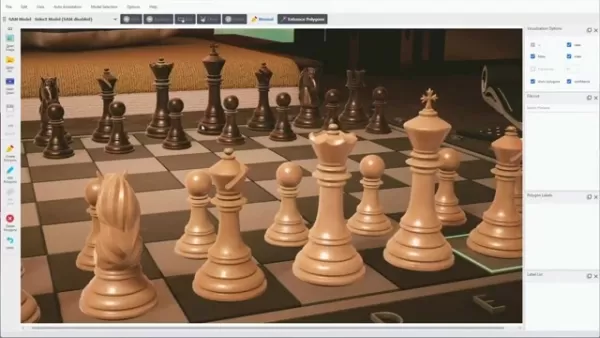
Delt.AI harnesses SAM's power to provide a highly efficient way to annotate images and videos for machine learning. By integrating SAM, Delt.AI simplifies the creation of high-quality training data, cutting down the time and effort of manual annotation. SAM's ability to generalize across diverse images and objects makes it essential for building robust AI models.
Installation Process: Integrating SAM into Delt.AI
Before using Segment Anything in Delt.AI, ensure it's properly installed. Delt.AI offers a straightforward interface for this, making it accessible even for users with limited technical background.
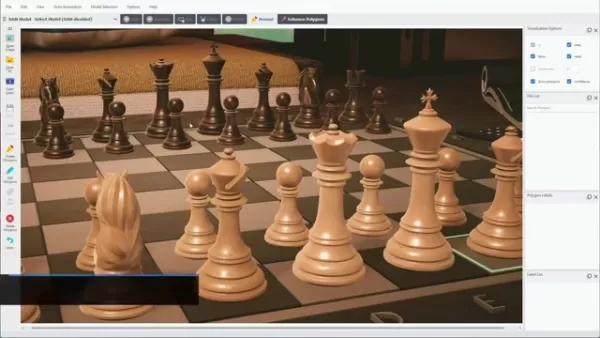
Follow these steps:
Open Model Explorer: Go to the 'Model Selection' menu in Delt.AI and select 'Model Explorer'. This displays available AI models for your workflow.
Filter by SAM: In Model Explorer, use the filter to search for 'SAM' models, narrowing the list to relevant options.
Download Checkpoints: Find the SAM models in the list. Check the 'Status' column; if it says 'Require Download', click to download the checkpoints. These contain the pre-trained weights needed for SAM to function.
Verify Installation: After downloading, confirm the status shows the checkpoints are downloaded, indicating successful integration.
SAM Toolbar Visibility: Ensure the SAM toolbar is visible at the top of the Delt.AI interface. If not, go to the 'View' menu and select 'SAM Toolbar'.
Once installed, you can start segmenting images with SAM in Delt.AI.
Selecting the SAM Model in Delt.AI
After installation, select the appropriate SAM model in Delt.AI to activate its features for your annotation tasks.
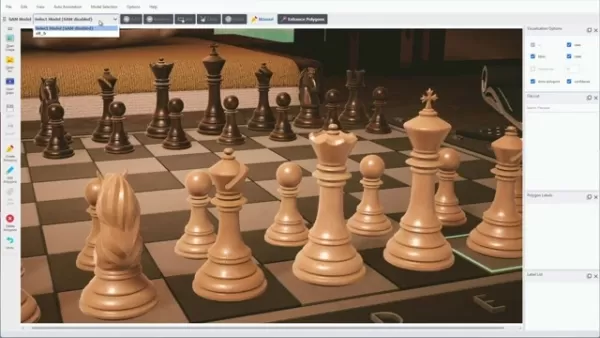
Follow these steps:
Locate the Model Selection Dropdown: Find the 'SAM Model' dropdown, usually near the SAM toolbar at the top of the Delt.AI window.
Choose Your SAM Model: Click the dropdown and select the model you downloaded, such as 'ViT-B' or 'ViT-L'.
Wait for Loading: After selection, Delt.AI loads the model into memory. A progress indicator like 'vit_b is Loading...' may appear; this can take a few seconds depending on model size and your system.
Once loaded, Delt.AI is ready for SAM-based image segmentation. Note that SAM loads into RAM and must be reloaded each time you start the software.
Delt.AI Keyboard Shortcuts for Efficient Image Annotation
Mastering Delt.AI with Keyboard Shortcuts
Using keyboard shortcuts in Delt.AI can significantly boost your productivity. Here are some key shortcuts to enhance your workflow:
Action Shortcut Add PointLeft ClickRemove PointRight ClickFinish PolygonEnterCreate Bounding BoxBEnhance PolygonCtrl+EDelete PolygonDelZoom InCtrl + +Zoom OutCtrl + -UndoCtrl + ZRedoCtrl + Shift + ZMastering these shortcuts reduces mouse dependency, speeding up annotation and improving efficiency.
Consider creating a cheat sheet with these shortcuts to have them readily available during your annotation sessions. Mastering these shortcuts will transform the way you interact with the Delt.AI platform.
Using Segment Anything in Delt.AI: Step-by-Step Guide
Basic Segmentation Techniques
Delt.AI provides multiple methods to use SAM for image segmentation. Here are the primary approaches:
Point-and-Click Segmentation:

Select the 'Add' tool from the SAM toolbar.
- Click on the object you want to segment. Each click acts as a positive prompt, guiding SAM to refine the segmentation.
- Add multiple points for better accuracy on complex shapes.
- Press 'Enter' to finalize the segmentation.
- Enter a class name (e.g., 'chess piece') for the object and confirm.
Bounding Box Segmentation:
- Choose the 'Box' tool from the SAM toolbar.
- Draw a rectangle around the target object.
- SAM automatically generates a segmentation mask within the box.
- Adjust the box to fine-tune the segmentation.
- Press 'Enter' to accept and assign a class name.
Combining points and bounding boxes lets you handle a wide range of segmentation tasks efficiently.
Advanced Segmentation: Removing unwanted Sections
If SAM includes unwanted areas in the segmentation, Delt.AI provides correction tools:
Select the Remove Tool: Choose the 'Remove' option in the SAM toolbar.
Click on unwanted areas: Click on points in areas to exclude from the segmentation.
Fine-Tune: Repeat as needed to refine the segmentation.
Finalize: Press 'Enter' and assign a class name to the segmented object.
The 'Remove' tool gives precise control over the mask, ensuring only the desired object is included.
Enhancing Polygons with Segment Anything
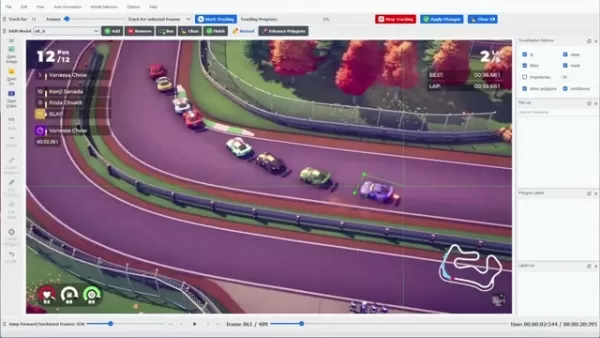
You can refine existing polygons, such as those from other object detection models, using SAM in Delt.AI. This improves annotation accuracy.
Right-Click on Polygon: Right-click the polygon you want to enhance.
Select 'Enhance Polygons:' Choose 'Enhance Polygons' from the context menu, or click the button in the SAM toolbar.
SAM automatically refines the polygon to better match the object's boundaries, leveraging its advanced segmentation for more precise results. Note: SAM will error if no polygons are present, and it must be loaded to function.
Interpolation Tracking for Video Annotation
Delt.AI extends SAM to video annotation with interpolation tracking, automating segmentation across frames to reduce manual effort.
Open a Video: Load your video file into Delt.AI.
Create Initial Polygons: In the first frame, manually create polygons around objects using point-and-click or bounding box methods.
Assign Tracking IDs: Give each object a unique tracking ID for consistency across frames.
Jump to a Later Frame: Move to a frame where objects have moved or changed.
Adjust Polygons: Readjust the polygons to fit the new object shape and position.
Select Interpolation Tracking: Select two annotated objects, right-click, and choose 'Interpolation Tracking'.
Choose SAM Interpolation: In the dialog, select 'SAM Interpolation' as the method.
Delt.AI will interpolate the segmentation between your keyframes. Tracking quality depends on accurate keyframe annotations.
Delt.AI Pricing and Subscription
Understanding Delt.AI Pricing
Delt.AI offers flexible pricing for various users, from individual researchers to enterprise teams. Plans are based on user count, data volume, and feature access.
Free Tier: A free tier lets new users explore basic features, suitable for small projects or education. It may limit annotation volume and advanced features.
Subscription Plans: Professional subscription plans cater to different needs:
- Basic/Standard: For small teams and individual professionals.
- Professional: For medium-sized teams with complex annotation needs.
- Enterprise: Custom solutions for large organizations with high-volume requirements.
Custom Pricing: Enterprise clients can get tailored pricing with specific features, dedicated infrastructure, and personalized support.
Delt.AI Pros
and Cons
: Evaluating the Benefits and Drawbacks
Pros
Seamless integration of the Segment Anything Model (SAM).
Intuitive user interface for easy navigation.
Comprehensive features for image and video annotation.
Powerful polygon enhancement and refinement tools.
Collaboration features for team projects.
Cons
Performance varies with hardware and image complexity.
SAM may be less accurate than specialized models for specific datasets.
Zero-shot capabilities might not suffice for highly nuanced tasks.
Potential issues with images having poor lighting, occlusion, or noise.
Core Features of Delt.AI for Image Segmentation
Key Segmentation Capabilities
Delt.AI is equipped with powerful features for image and video segmentation. Key highlights include:
Segment Anything Model (SAM) Integration:
- Zero-shot segmentation capabilities.
- Easy integration and model selection.
- Refine existing polygons for better accuracy.
Interactive Segmentation Tools:
- Intuitive point-and-click interface.
- Bounding box creation for quick object selection.
- Removal tool to exclude unwanted areas.
Video Annotation Features:
- Interpolation tracking for automated frame segmentation.
- Object tracking with unique IDs.
- SAM-powered video workflow.
User-Friendly Interface:
- Clean, intuitive design.
- Customizable toolbars and visualization.
- Easy navigation and project management.
Collaboration Features:
- Team accounts for collaborative work.
- Role-based access control.
- Annotation review and approval workflows.
Use Cases: Applying Delt.AI's Segment Anything in Real-World Scenarios
Diverse Applications Across Industries
Delt.AI and Segment Anything are versatile tools for various industries. Prominent use cases include:
Autonomous Driving:
- Annotating road scenes for self-driving algorithms.
- Segmenting vehicles, pedestrians, signs, and lane markings.
- Creating datasets for perception models.
Medical Imaging:
- Segmenting organs, tumors, and anatomical structures.
- Aiding in diagnosis and treatment planning.
- Generating training data for medical AI.
Retail and E-commerce:
- Segmenting products for visual search and recognition.
- Automating image tagging and categorization.
- Enhancing product recommendations and customer experience.
Agriculture:
- Segmenting crops and weeds in aerial imagery.
- Monitoring crop health and identifying issues.
- Optimizing irrigation and fertilization.
Robotics:
- Training robots to perceive and interact with environments.
- Segmenting objects for grasping and manipulation.
- Developing AI robots for manufacturing, logistics, and healthcare.
Frequently Asked Questions about Delt.AI and Segment Anything
What is the Segment Anything Model (SAM)?
The Segment Anything Model (SAM) is an AI model from Meta AI that performs zero-shot image segmentation, identifying and segmenting objects without specific training data.
How do I install SAM in Delt.AI?
Install SAM by opening Model Explorer, filtering for SAM, and downloading the checkpoints. Ensure the SAM toolbar is visible in the interface.
Can I enhance existing polygons with SAM in Delt.AI?
Yes, right-click a polygon and select 'Enhance Polygons'. SAM will refine it to better fit the object's boundaries.
Does Delt.AI support video annotation with SAM?
Yes, Delt.AI supports video annotation via interpolation tracking, automating segmentation across frames to reduce manual work.
Is Delt.AI suitable for team collaboration?
Yes, Delt.AI includes collaboration features like team accounts, role-based permissions, and annotation review workflows.
Related Questions about AI-Powered Image Segmentation
What are the benefits of using AI for image segmentation?
AI-powered image segmentation offers speed, accuracy, and reduced manual effort compared to traditional methods. Models like SAM automate complex tasks, letting users focus on analysis. AI ensures consistent, objective results, minimizing human error and bias. Additionally, AI models can be continuously improved for ongoing performance.
What are the limitations of Segment Anything Model (SAM)?
SAM has some limitations. Performance can vary with image complexity, quality, lighting, occlusion, or noise. As a general-purpose model, it may be less accurate than specialized models on specific datasets. Zero-shot capabilities might not handle highly nuanced tasks, requiring fine-tuning. SAM also has significant computational demands, needing powerful hardware for real-time use.
How does Delt.AI compare to other image annotation tools?
Delt.AI stands out with its seamless SAM integration, user-friendly interface, and comprehensive features. While other tools offer similar functions, Delt.AI's SAM support provides zero-shot segmentation and polygon enhancement advantages. It excels in video annotation with robust tracking, and its collaboration features and customizable workflows make it ideal for team projects.
Related article
 How to fix Core Web Vitals for better SEO rankings?
Turn PDFs into Audio: Free Urdu Text-to-Speech SolutionTable of Contents:IntroductionWhat is PD2Audio?The Benefits of PD2AudioHow to Convert a PDF into AudioStep 1: Visit the PD2Audio websiteStep 2: Choose your languageStep 3: Customize the settingsS
ZTE Partners With Tencent to Launch AI Cloud PC Featuring Native Hunyuan Large Model Integration
China’s "AI + PC" and cloud infrastructure sectors are undergoing a major cross-industry integration. At the AI Cloud Computer Experience Day event on June 3rd, ZTE officially announced a deep strategic partnership with Tencent. The two companies wil
Google Tests Gemini-Powered Accessibility Tools for Pixel 11
Google is rolling out a new experimental tool for the Pixel 11 lineup, dubbed "Device Help," which leverages Gemini to streamline troubleshooting. This feature is designed to make resolving common phone issues more intuitive and intelligent for every
Related Special Topic Recommendations
Design & Art
How to fix Core Web Vitals for better SEO rankings?
Turn PDFs into Audio: Free Urdu Text-to-Speech SolutionTable of Contents:IntroductionWhat is PD2Audio?The Benefits of PD2AudioHow to Convert a PDF into AudioStep 1: Visit the PD2Audio websiteStep 2: Choose your languageStep 3: Customize the settingsS
ZTE Partners With Tencent to Launch AI Cloud PC Featuring Native Hunyuan Large Model Integration
China’s "AI + PC" and cloud infrastructure sectors are undergoing a major cross-industry integration. At the AI Cloud Computer Experience Day event on June 3rd, ZTE officially announced a deep strategic partnership with Tencent. The two companies wil
Google Tests Gemini-Powered Accessibility Tools for Pixel 11
Google is rolling out a new experimental tool for the Pixel 11 lineup, dubbed "Device Help," which leverages Gemini to streamline troubleshooting. This feature is designed to make resolving common phone issues more intuitive and intelligent for every
Related Special Topic Recommendations
Design & Art
 Top AI Illustration Tools: Create Editorial Scenes and Cover Art Faster
2026 Latest Top-rated AI Illustration Tools: Our curated list features the best powerfully designed tools for creating stunning editorial scenes and eye-catching cover art quickly. Each option has gone through rigorous real-world tests, offering a free vs paid comparison to help you find the perfect match for your workflow. Try these must-try solutions today to unlock your AI edge and boost your creative productivity. Explore now at XIX.AI.
 10 tools
 xix.ai
Education and Learning
Top AI Tutors for Exam Prep: Practice Math, Science, and English
xix.ai
Education and Learning
Top AI Tutors for Exam Prep: Practice Math, Science, and English
2026 Latest Top-Rated Best AI Tutors for Exam Prep are here on XIX.AI! Our curated list features powerful game-changing tools that offer free vs paid comparison, real-world tests, and weekly updated rankings. They help boost your writing efficiency, simplify complex topic learning, and unlock your academic potential. Explore now to Discover your perfect exam prep tool and Start creating today to Unlock your AI edge!
10 tools
xix.ai
Finance
AI Budget Planning Tools for Personal Money Management
2026 Latest Best Top-Rated AI Budget Planning Tools for Personal Money Management are here on XIX.AI! This curated collection features powerful, game-changing solutions that help you conduct real-world tests, understand spending habits, and create personalized plans to boost productivity. Enjoy a free vs paid comparison along with detailed rankings. Must-try tools designed to simplify money management and unlock your AI edge. Explore now!
11 tools
xix.ai
Health & Wellness
AI Sleep Tracking Assistants: Improve Recovery with Better Bedtime Habits
2026 Latest Best Top-Rated AI Sleep Tracking Assistants curated for ultimate recovery. This fully updated weekly guide features powerful tools that deliver real-world tests, free vs paid comparison, and detailed rankings to help you find the must-try solution that boosts sleep quality and supports better bedtime habits. Explore now at XIX.AI to Unlock your AI edge.
10 tools
xix.ai
Data Analysis
AI SQL Copilots for Product and Revenue Analytics
2026 Latest Best Top-Rated AI SQL Copilots for Product and Revenue Analytics! XIX.AI has curated a powerful, game-changing collection of must-try tools that undergo real-world tests through weekly updated rankings. These tools help users boost productivity significantly by accelerating data analysis, streamlining complex queries, and generating accurate insights to drive smarter business decisions. Explore now to Discover your perfect tool for unlocking your AI edge!
14 tools
xix.ai
Education and Learning
Best AI Homework Helpers That Teach: Learn Concepts, Not Just Answers
2026 Latest Best Top-Rated AI Homework Helpers That Teach Core Concepts Not Just Answers Powerful Tools for Students Must-Try Curated List Weekly Updated Free vs Paid Comparison Real-World Tests Accurate Rankings to Help You Unlock Your Full Learning Potential Explore now to Discover your perfect tool for smarter studying.
10 tools
xix.ai

 Comments (1)
0/500
Comments (1)
0/500
![RichardHarris]()
I've been struggling with manual segmentation for ages, this SAM integration in Delt.AI looks like a game changer! Can't wait to try it out 🚀
Delt.AI is transforming image and video annotation with advanced capabilities like the Segment Anything Model (SAM). This guide explores the power of Delt.AI's SAM integration, walking you through installation, fundamental segmentation methods, advanced polygon refinement, and its application in video tracking. Whether you're starting with image segmentation or are an experienced annotator, Delt.AI delivers tools to speed up your workflow.
Key Points
Simplified Installation: Effortlessly set up SAM in Delt.AI using the Model Explorer.
Intuitive Segmentation: User-friendly tools for point-and-click or bounding box segmentation.
Polygon Enhancement: Improve existing annotations with SAM for greater precision.
Video Tracking: Use interpolation tracking to automate annotations across video frames.
Versatile Applications: Ideal for various tasks, from object recognition to building machine learning datasets.
Getting Started with Delt.AI and Segment Anything
Understanding the Power of Segment Anything
The Segment Anything Model (SAM) is a revolutionary AI model from Meta AI that enables zero-shot image segmentation. This means it can identify and segment objects in an image without needing specific training data for them.
Delt.AI harnesses SAM's power to provide a highly efficient way to annotate images and videos for machine learning. By integrating SAM, Delt.AI simplifies the creation of high-quality training data, cutting down the time and effort of manual annotation. SAM's ability to generalize across diverse images and objects makes it essential for building robust AI models.
Installation Process: Integrating SAM into Delt.AI
Before using Segment Anything in Delt.AI, ensure it's properly installed. Delt.AI offers a straightforward interface for this, making it accessible even for users with limited technical background.
Follow these steps:
Open Model Explorer: Go to the 'Model Selection' menu in Delt.AI and select 'Model Explorer'. This displays available AI models for your workflow.
Filter by SAM: In Model Explorer, use the filter to search for 'SAM' models, narrowing the list to relevant options.
Download Checkpoints: Find the SAM models in the list. Check the 'Status' column; if it says 'Require Download', click to download the checkpoints. These contain the pre-trained weights needed for SAM to function.
Verify Installation: After downloading, confirm the status shows the checkpoints are downloaded, indicating successful integration.
SAM Toolbar Visibility: Ensure the SAM toolbar is visible at the top of the Delt.AI interface. If not, go to the 'View' menu and select 'SAM Toolbar'.
Once installed, you can start segmenting images with SAM in Delt.AI.
Selecting the SAM Model in Delt.AI
After installation, select the appropriate SAM model in Delt.AI to activate its features for your annotation tasks.
Follow these steps:
Locate the Model Selection Dropdown: Find the 'SAM Model' dropdown, usually near the SAM toolbar at the top of the Delt.AI window.
Choose Your SAM Model: Click the dropdown and select the model you downloaded, such as 'ViT-B' or 'ViT-L'.
Wait for Loading: After selection, Delt.AI loads the model into memory. A progress indicator like 'vit_b is Loading...' may appear; this can take a few seconds depending on model size and your system.
Once loaded, Delt.AI is ready for SAM-based image segmentation. Note that SAM loads into RAM and must be reloaded each time you start the software.
Delt.AI Keyboard Shortcuts for Efficient Image Annotation
Mastering Delt.AI with Keyboard Shortcuts
Using keyboard shortcuts in Delt.AI can significantly boost your productivity. Here are some key shortcuts to enhance your workflow:
BEnhance PolygonCtrl+EDelete PolygonDelZoom InCtrl + +Zoom OutCtrl + -UndoCtrl + ZRedoCtrl + Shift + ZMastering these shortcuts reduces mouse dependency, speeding up annotation and improving efficiency.
Consider creating a cheat sheet with these shortcuts to have them readily available during your annotation sessions. Mastering these shortcuts will transform the way you interact with the Delt.AI platform.
Using Segment Anything in Delt.AI: Step-by-Step Guide
Basic Segmentation Techniques
Delt.AI provides multiple methods to use SAM for image segmentation. Here are the primary approaches:
Point-and-Click Segmentation:
Select the 'Add' tool from the SAM toolbar.
- Click on the object you want to segment. Each click acts as a positive prompt, guiding SAM to refine the segmentation.
- Add multiple points for better accuracy on complex shapes.
- Press 'Enter' to finalize the segmentation.
- Enter a class name (e.g., 'chess piece') for the object and confirm.
Bounding Box Segmentation:
- Choose the 'Box' tool from the SAM toolbar.
- Draw a rectangle around the target object.
- SAM automatically generates a segmentation mask within the box.
- Adjust the box to fine-tune the segmentation.
- Press 'Enter' to accept and assign a class name.
Combining points and bounding boxes lets you handle a wide range of segmentation tasks efficiently.
Advanced Segmentation: Removing unwanted Sections
If SAM includes unwanted areas in the segmentation, Delt.AI provides correction tools:
Select the Remove Tool: Choose the 'Remove' option in the SAM toolbar.
Click on unwanted areas: Click on points in areas to exclude from the segmentation.
Fine-Tune: Repeat as needed to refine the segmentation.
Finalize: Press 'Enter' and assign a class name to the segmented object.
The 'Remove' tool gives precise control over the mask, ensuring only the desired object is included.
Enhancing Polygons with Segment Anything
You can refine existing polygons, such as those from other object detection models, using SAM in Delt.AI. This improves annotation accuracy.
Right-Click on Polygon: Right-click the polygon you want to enhance.
Select 'Enhance Polygons:' Choose 'Enhance Polygons' from the context menu, or click the button in the SAM toolbar.
SAM automatically refines the polygon to better match the object's boundaries, leveraging its advanced segmentation for more precise results. Note: SAM will error if no polygons are present, and it must be loaded to function.
Interpolation Tracking for Video Annotation
Delt.AI extends SAM to video annotation with interpolation tracking, automating segmentation across frames to reduce manual effort.
Open a Video: Load your video file into Delt.AI.
Create Initial Polygons: In the first frame, manually create polygons around objects using point-and-click or bounding box methods.
Assign Tracking IDs: Give each object a unique tracking ID for consistency across frames.
Jump to a Later Frame: Move to a frame where objects have moved or changed.
Adjust Polygons: Readjust the polygons to fit the new object shape and position.
Select Interpolation Tracking: Select two annotated objects, right-click, and choose 'Interpolation Tracking'.
Choose SAM Interpolation: In the dialog, select 'SAM Interpolation' as the method.
Delt.AI will interpolate the segmentation between your keyframes. Tracking quality depends on accurate keyframe annotations.
Delt.AI Pricing and Subscription
Understanding Delt.AI Pricing
Delt.AI offers flexible pricing for various users, from individual researchers to enterprise teams. Plans are based on user count, data volume, and feature access.
Free Tier: A free tier lets new users explore basic features, suitable for small projects or education. It may limit annotation volume and advanced features.
Subscription Plans: Professional subscription plans cater to different needs:
- Basic/Standard: For small teams and individual professionals.
- Professional: For medium-sized teams with complex annotation needs.
- Enterprise: Custom solutions for large organizations with high-volume requirements.
Custom Pricing: Enterprise clients can get tailored pricing with specific features, dedicated infrastructure, and personalized support.
Delt.AI Pros
and Cons
: Evaluating the Benefits and Drawbacks
Pros
Seamless integration of the Segment Anything Model (SAM).
Intuitive user interface for easy navigation.
Comprehensive features for image and video annotation.
Powerful polygon enhancement and refinement tools.
Collaboration features for team projects.
Cons
Performance varies with hardware and image complexity.
SAM may be less accurate than specialized models for specific datasets.
Zero-shot capabilities might not suffice for highly nuanced tasks.
Potential issues with images having poor lighting, occlusion, or noise.
Core Features of Delt.AI for Image Segmentation
Key Segmentation Capabilities
Delt.AI is equipped with powerful features for image and video segmentation. Key highlights include:
Segment Anything Model (SAM) Integration:
- Zero-shot segmentation capabilities.
- Easy integration and model selection.
- Refine existing polygons for better accuracy.
Interactive Segmentation Tools:
- Intuitive point-and-click interface.
- Bounding box creation for quick object selection.
- Removal tool to exclude unwanted areas.
Video Annotation Features:
- Interpolation tracking for automated frame segmentation.
- Object tracking with unique IDs.
- SAM-powered video workflow.
User-Friendly Interface:
- Clean, intuitive design.
- Customizable toolbars and visualization.
- Easy navigation and project management.
Collaboration Features:
- Team accounts for collaborative work.
- Role-based access control.
- Annotation review and approval workflows.
Use Cases: Applying Delt.AI's Segment Anything in Real-World Scenarios
Diverse Applications Across Industries
Delt.AI and Segment Anything are versatile tools for various industries. Prominent use cases include:
Autonomous Driving:
- Annotating road scenes for self-driving algorithms.
- Segmenting vehicles, pedestrians, signs, and lane markings.
- Creating datasets for perception models.
Medical Imaging:
- Segmenting organs, tumors, and anatomical structures.
- Aiding in diagnosis and treatment planning.
- Generating training data for medical AI.
Retail and E-commerce:
- Segmenting products for visual search and recognition.
- Automating image tagging and categorization.
- Enhancing product recommendations and customer experience.
Agriculture:
- Segmenting crops and weeds in aerial imagery.
- Monitoring crop health and identifying issues.
- Optimizing irrigation and fertilization.
Robotics:
- Training robots to perceive and interact with environments.
- Segmenting objects for grasping and manipulation.
- Developing AI robots for manufacturing, logistics, and healthcare.
Frequently Asked Questions about Delt.AI and Segment Anything
What is the Segment Anything Model (SAM)?
The Segment Anything Model (SAM) is an AI model from Meta AI that performs zero-shot image segmentation, identifying and segmenting objects without specific training data.
How do I install SAM in Delt.AI?
Install SAM by opening Model Explorer, filtering for SAM, and downloading the checkpoints. Ensure the SAM toolbar is visible in the interface.
Can I enhance existing polygons with SAM in Delt.AI?
Yes, right-click a polygon and select 'Enhance Polygons'. SAM will refine it to better fit the object's boundaries.
Does Delt.AI support video annotation with SAM?
Yes, Delt.AI supports video annotation via interpolation tracking, automating segmentation across frames to reduce manual work.
Is Delt.AI suitable for team collaboration?
Yes, Delt.AI includes collaboration features like team accounts, role-based permissions, and annotation review workflows.
Related Questions about AI-Powered Image Segmentation
What are the benefits of using AI for image segmentation?
AI-powered image segmentation offers speed, accuracy, and reduced manual effort compared to traditional methods. Models like SAM automate complex tasks, letting users focus on analysis. AI ensures consistent, objective results, minimizing human error and bias. Additionally, AI models can be continuously improved for ongoing performance.
What are the limitations of Segment Anything Model (SAM)?
SAM has some limitations. Performance can vary with image complexity, quality, lighting, occlusion, or noise. As a general-purpose model, it may be less accurate than specialized models on specific datasets. Zero-shot capabilities might not handle highly nuanced tasks, requiring fine-tuning. SAM also has significant computational demands, needing powerful hardware for real-time use.
How does Delt.AI compare to other image annotation tools?
Delt.AI stands out with its seamless SAM integration, user-friendly interface, and comprehensive features. While other tools offer similar functions, Delt.AI's SAM support provides zero-shot segmentation and polygon enhancement advantages. It excels in video annotation with robust tracking, and its collaboration features and customizable workflows make it ideal for team projects.








 How to fix Core Web Vitals for better SEO rankings?
Turn PDFs into Audio: Free Urdu Text-to-Speech SolutionTable of Contents:IntroductionWhat is PD2Audio?The Benefits of PD2AudioHow to Convert a PDF into AudioStep 1: Visit the PD2Audio websiteStep 2: Choose your languageStep 3: Customize the settingsS
How to fix Core Web Vitals for better SEO rankings?
Turn PDFs into Audio: Free Urdu Text-to-Speech SolutionTable of Contents:IntroductionWhat is PD2Audio?The Benefits of PD2AudioHow to Convert a PDF into AudioStep 1: Visit the PD2Audio websiteStep 2: Choose your languageStep 3: Customize the settingsS
 ZTE Partners With Tencent to Launch AI Cloud PC Featuring Native Hunyuan Large Model Integration
China’s "AI + PC" and cloud infrastructure sectors are undergoing a major cross-industry integration. At the AI Cloud Computer Experience Day event on June 3rd, ZTE officially announced a deep strategic partnership with Tencent. The two companies wil
ZTE Partners With Tencent to Launch AI Cloud PC Featuring Native Hunyuan Large Model Integration
China’s "AI + PC" and cloud infrastructure sectors are undergoing a major cross-industry integration. At the AI Cloud Computer Experience Day event on June 3rd, ZTE officially announced a deep strategic partnership with Tencent. The two companies wil
 Google Tests Gemini-Powered Accessibility Tools for Pixel 11
Google is rolling out a new experimental tool for the Pixel 11 lineup, dubbed "Device Help," which leverages Gemini to streamline troubleshooting. This feature is designed to make resolving common phone issues more intuitive and intelligent for every
Google Tests Gemini-Powered Accessibility Tools for Pixel 11
Google is rolling out a new experimental tool for the Pixel 11 lineup, dubbed "Device Help," which leverages Gemini to streamline troubleshooting. This feature is designed to make resolving common phone issues more intuitive and intelligent for every

2026 Latest Top-rated AI Illustration Tools: Our curated list features the best powerfully designed tools for creating stunning editorial scenes and eye-catching cover art quickly. Each option has gone through rigorous real-world tests, offering a free vs paid comparison to help you find the perfect match for your workflow. Try these must-try solutions today to unlock your AI edge and boost your creative productivity. Explore now at XIX.AI.
10 tools
xix.ai

2026 Latest Top-Rated Best AI Tutors for Exam Prep are here on XIX.AI! Our curated list features powerful game-changing tools that offer free vs paid comparison, real-world tests, and weekly updated rankings. They help boost your writing efficiency, simplify complex topic learning, and unlock your academic potential. Explore now to Discover your perfect exam prep tool and Start creating today to Unlock your AI edge!
10 tools
xix.ai

2026 Latest Best Top-Rated AI Budget Planning Tools for Personal Money Management are here on XIX.AI! This curated collection features powerful, game-changing solutions that help you conduct real-world tests, understand spending habits, and create personalized plans to boost productivity. Enjoy a free vs paid comparison along with detailed rankings. Must-try tools designed to simplify money management and unlock your AI edge. Explore now!
11 tools
xix.ai

2026 Latest Best Top-Rated AI Sleep Tracking Assistants curated for ultimate recovery. This fully updated weekly guide features powerful tools that deliver real-world tests, free vs paid comparison, and detailed rankings to help you find the must-try solution that boosts sleep quality and supports better bedtime habits. Explore now at XIX.AI to Unlock your AI edge.
10 tools
xix.ai

2026 Latest Best Top-Rated AI SQL Copilots for Product and Revenue Analytics! XIX.AI has curated a powerful, game-changing collection of must-try tools that undergo real-world tests through weekly updated rankings. These tools help users boost productivity significantly by accelerating data analysis, streamlining complex queries, and generating accurate insights to drive smarter business decisions. Explore now to Discover your perfect tool for unlocking your AI edge!
14 tools
xix.ai

2026 Latest Best Top-Rated AI Homework Helpers That Teach Core Concepts Not Just Answers Powerful Tools for Students Must-Try Curated List Weekly Updated Free vs Paid Comparison Real-World Tests Accurate Rankings to Help You Unlock Your Full Learning Potential Explore now to Discover your perfect tool for smarter studying.
10 tools
xix.ai

I've been struggling with manual segmentation for ages, this SAM integration in Delt.AI looks like a game changer! Can't wait to try it out 🚀












