


 Home
HomeHow to create free animated travel maps with Mult.dev in 2025? Complete guide.
Want to add stunning, professional animated travel maps to your videos? Mult.dev provides a free, easy-to-use platform for creating beautiful map animations quickly. While the free tier has certain restrictions, it's a fantastic resource for travel vloggers, educators, and anyone wanting to visualize a journey. This guide details its features, walks you through how to use it, and outlines its plans and pricing.
Key Points
Mult.dev lets you create animated travel maps at no cost.
The free version limits export quality and transportation modes.
Creating a free account unlocks full customization for your animation.
The intuitive interface makes it simple to craft professional-looking maps.
Use the built-in AI assistant by typing your route into the text box.
Access to detailed sea and land routes requires a Pro subscription.
Getting Started with Mult.dev: A Free Travel Map Animator
What is Mult.dev?
Let's dive in. Here's a simple, step-by-step guide for creating your first map with Mult.dev:
Step-by-Step Guide: Creating Your First Travel Map AnimationFollow these quick steps to make your animated travel map:- Visit Mult.dev: Open your browser and go to Mult.dev.
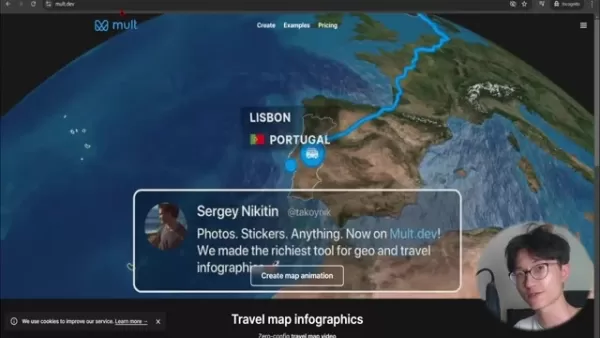
The homepage showcases several example animations.
- Create a Map Animation: Click the prominent “Create map animation” button in the center of the page.
- Sign Up for an Account: For full customization, sign up. Click the three-line menu in the top right, select “Start”, and register with your Google account.
- Access Customization: After signing in, click the top icon on the left sidebar to open the route editor.
- Start from Scratch: Clear the default demo locations to begin with a blank map.
- Add Your Destinations: Type a city or location into the ‘Name or coord…’ search bar and select from the dropdown.
- Choose Transportation: Select a travel method; 'flight' is free, with more options available for Pro users.
- Finalize and Render: After adding all destinations, close the editor with the 'X' button to see a preview render.
- Customize (Optional): Click the left-side icon for video settings. Here you can show/hide country names and flags. Additional customization requires an upgrade.
- Export: Click the Export button to download your video.
The entire process is streamlined, letting you quickly produce map animations to elevate travel videos or presentations. For even faster results, describe your trip to the AI Trip GPT to generate a route automatically!
Customizing Your Travel Map
Adding Locations and Defining Routes
Customizing a map on Mult.dev is about crafting a visual story. Each location is a chapter in your travel tale, whether it's Tokyo
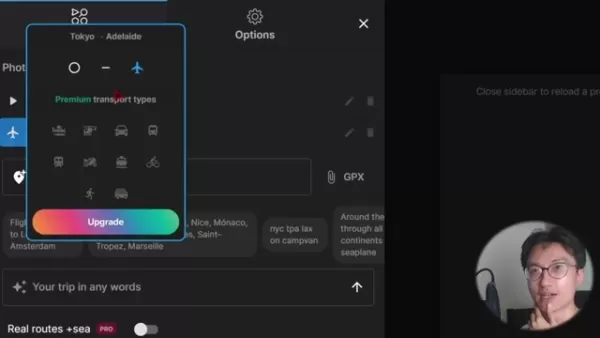
, Adelaide, or Melbourne. Every point shapes the narrative of your journey.
For best results, be specific when adding locations. While Mult.dev understands general names, entering the exact city ensures your route animation is precise. This is crucial for long-distance trips or routes with several stops in one area.
Finally, consider your travel mode. The free version offers basic options, but upgrading unlocks specific choices like boat or motorcycle. Choosing the right transportation adds depth and makes your animation more engaging.
Exploring Style Options for a Unique Visual
Beyond the route, Mult.dev lets you customize the map’s style to fit your video's mood.

Find these settings under ‘Options’.
Choose between the 'Eco' and 'Earth' visual themes. The 'Earth' theme offers a more realistic, geographical look. Pro users can access light, dark, and grey color modes, and can switch to a vertical format optimized for mobile viewing.
How to Use Mult.dev for Your Travel Videos
Add photos
Upgrading to Pro unlocks advanced features. Add photos, stickers, precise land and sea routing, GPX file imports, and export in high-resolution quality.
The Pro plan also increases the maximum location limit to 100 and enables detailed sea route mapping.
Mult.dev Pricing
Pricing Model
Mult.dev operates on a credit pack system. You can export a limited number of videos per month for free. After that, you'll need to purchase a pack.
Here's the pricing breakdown:
- 5 videos for $5.99
- 25 videos for $14.99
- 100 videos for $34.99
Pros and Cons of Using Mult.dev
Pros
Simple, intuitive interface
Free to start
Creates animated travel maps in seconds
Cons
Free version has low export resolution
Pro packs may be costly for occasional users
The AI Trip GPT feature can sometimes be unreliable
FAQ
Can I use Mult.dev for commercial purposes?
Yes. You can use maps created with Mult.dev, including those from the free plan, for commercial projects and monetization.
What video quality can I export with the free version?
The free version exports videos at a maximum of 432x768 resolution and 30 FPS. Higher resolutions like 1080p or 4K require a Pro upgrade.
How many videos can I create and export with the free plan?
The free plan includes a monthly pack of 10 videos. Once used, you must purchase a new pack to continue exporting.
Is Mult.dev easy to use for beginners?
Absolutely. Mult.dev is built for simplicity with a clear interface, making it easy for anyone to create polished map animations without technical skills.
Related Questions
What are some other free or affordable tools for creating travel videos?
Several other tools work well with Mult.dev for travel video creation:DaVinci Resolve: A professional-grade video editor with a robust free version.OpenShot: A user-friendly, open-source video editor perfect for beginners.CapCut: A feature-packed mobile app for editing engaging content on the go.Canva: A graphic design platform that also includes simple video editing tools for adding text and graphics.Using these alongside Mult.dev for your map animations helps you produce compelling travel videos affordably.
Related article
 Marc Benioff-backed startup aims to solve AI deployment challenges
Big enterprises face such steep challenges in deploying reliable AI tools that entire teams of forward-deployed engineers—specialists embedded within client companies to operationalize AI systems—are emerging to bridge the gap.“Paradoxically, AI driv
AliVideo Unveils Wan3.0, Delivering Ultra-Long Video Generation and Multi-Dimensional Consistency
On August 24, Alibaba unveiled Wan3.0, its latest video generation large model. This release represents a major leap forward for Alibaba’s video technology, delivering significant improvements in duration, universal creation, reference handling, and
MiniMax Large Model Mispronounces Names - Xiyu Technology: Insufficient Training After Specific Tokens
MiniMax recently published a technical report detailing why its M2 series models struggled to accurately generate specific names like "Ma Jiaqi." This apparent error highlights a systemic flaw in current large language model training.Token Offset: Th
Related Special Topic Recommendations
Design & Art
Marc Benioff-backed startup aims to solve AI deployment challenges
Big enterprises face such steep challenges in deploying reliable AI tools that entire teams of forward-deployed engineers—specialists embedded within client companies to operationalize AI systems—are emerging to bridge the gap.“Paradoxically, AI driv
AliVideo Unveils Wan3.0, Delivering Ultra-Long Video Generation and Multi-Dimensional Consistency
On August 24, Alibaba unveiled Wan3.0, its latest video generation large model. This release represents a major leap forward for Alibaba’s video technology, delivering significant improvements in duration, universal creation, reference handling, and
MiniMax Large Model Mispronounces Names - Xiyu Technology: Insufficient Training After Specific Tokens
MiniMax recently published a technical report detailing why its M2 series models struggled to accurately generate specific names like "Ma Jiaqi." This apparent error highlights a systemic flaw in current large language model training.Token Offset: Th
Related Special Topic Recommendations
Design & Art
 Top AI Illustration Tools: Create Editorial Scenes and Cover Art Faster
2026 Latest Top-rated AI Illustration Tools: Our curated list features the best powerfully designed tools for creating stunning editorial scenes and eye-catching cover art quickly. Each option has gone through rigorous real-world tests, offering a free vs paid comparison to help you find the perfect match for your workflow. Try these must-try solutions today to unlock your AI edge and boost your creative productivity. Explore now at XIX.AI.
 10 tools
 xix.ai
Education and Learning
Top AI Tutors for Exam Prep: Practice Math, Science, and English
xix.ai
Education and Learning
Top AI Tutors for Exam Prep: Practice Math, Science, and English
2026 Latest Top-Rated Best AI Tutors for Exam Prep are here on XIX.AI! Our curated list features powerful game-changing tools that offer free vs paid comparison, real-world tests, and weekly updated rankings. They help boost your writing efficiency, simplify complex topic learning, and unlock your academic potential. Explore now to Discover your perfect exam prep tool and Start creating today to Unlock your AI edge!
10 tools
xix.ai
Finance
AI Budget Planning Tools for Personal Money Management
2026 Latest Best Top-Rated AI Budget Planning Tools for Personal Money Management are here on XIX.AI! This curated collection features powerful, game-changing solutions that help you conduct real-world tests, understand spending habits, and create personalized plans to boost productivity. Enjoy a free vs paid comparison along with detailed rankings. Must-try tools designed to simplify money management and unlock your AI edge. Explore now!
11 tools
xix.ai
Health & Wellness
AI Sleep Tracking Assistants: Improve Recovery with Better Bedtime Habits
2026 Latest Best Top-Rated AI Sleep Tracking Assistants curated for ultimate recovery. This fully updated weekly guide features powerful tools that deliver real-world tests, free vs paid comparison, and detailed rankings to help you find the must-try solution that boosts sleep quality and supports better bedtime habits. Explore now at XIX.AI to Unlock your AI edge.
10 tools
xix.ai
Data Analysis
AI SQL Copilots for Product and Revenue Analytics
2026 Latest Best Top-Rated AI SQL Copilots for Product and Revenue Analytics! XIX.AI has curated a powerful, game-changing collection of must-try tools that undergo real-world tests through weekly updated rankings. These tools help users boost productivity significantly by accelerating data analysis, streamlining complex queries, and generating accurate insights to drive smarter business decisions. Explore now to Discover your perfect tool for unlocking your AI edge!
14 tools
xix.ai
Education and Learning
Best AI Homework Helpers That Teach: Learn Concepts, Not Just Answers
2026 Latest Best Top-Rated AI Homework Helpers That Teach Core Concepts Not Just Answers Powerful Tools for Students Must-Try Curated List Weekly Updated Free vs Paid Comparison Real-World Tests Accurate Rankings to Help You Unlock Your Full Learning Potential Explore now to Discover your perfect tool for smarter studying.
10 tools
xix.ai

 Comments (1)
0/500
Comments (1)
0/500
![ThomasHernández]()
This is super useful! I've been looking for a free tool like this. The guide is clear and easy to follow. Can't wait to try it on my next travel video! 🗺️✈️
Want to add stunning, professional animated travel maps to your videos? Mult.dev provides a free, easy-to-use platform for creating beautiful map animations quickly. While the free tier has certain restrictions, it's a fantastic resource for travel vloggers, educators, and anyone wanting to visualize a journey. This guide details its features, walks you through how to use it, and outlines its plans and pricing.
Key Points
Mult.dev lets you create animated travel maps at no cost.
The free version limits export quality and transportation modes.
Creating a free account unlocks full customization for your animation.
The intuitive interface makes it simple to craft professional-looking maps.
Use the built-in AI assistant by typing your route into the text box.
Access to detailed sea and land routes requires a Pro subscription.
Getting Started with Mult.dev: A Free Travel Map Animator
What is Mult.dev?
Let's dive in. Here's a simple, step-by-step guide for creating your first map with Mult.dev:
Step-by-Step Guide: Creating Your First Travel Map AnimationFollow these quick steps to make your animated travel map:- Visit Mult.dev: Open your browser and go to Mult.dev.
The homepage showcases several example animations.
- Create a Map Animation: Click the prominent “Create map animation” button in the center of the page.
- Sign Up for an Account: For full customization, sign up. Click the three-line menu in the top right, select “Start”, and register with your Google account.
- Access Customization: After signing in, click the top icon on the left sidebar to open the route editor.
- Start from Scratch: Clear the default demo locations to begin with a blank map.
- Add Your Destinations: Type a city or location into the ‘Name or coord…’ search bar and select from the dropdown.
- Choose Transportation: Select a travel method; 'flight' is free, with more options available for Pro users.
- Finalize and Render: After adding all destinations, close the editor with the 'X' button to see a preview render.
- Customize (Optional): Click the left-side icon for video settings. Here you can show/hide country names and flags. Additional customization requires an upgrade.
- Export: Click the Export button to download your video.
The homepage showcases several example animations.
The entire process is streamlined, letting you quickly produce map animations to elevate travel videos or presentations. For even faster results, describe your trip to the AI Trip GPT to generate a route automatically!
Customizing Your Travel Map
Adding Locations and Defining Routes
Customizing a map on Mult.dev is about crafting a visual story. Each location is a chapter in your travel tale, whether it's Tokyo
, Adelaide, or Melbourne. Every point shapes the narrative of your journey.
For best results, be specific when adding locations. While Mult.dev understands general names, entering the exact city ensures your route animation is precise. This is crucial for long-distance trips or routes with several stops in one area.
Finally, consider your travel mode. The free version offers basic options, but upgrading unlocks specific choices like boat or motorcycle. Choosing the right transportation adds depth and makes your animation more engaging.
Exploring Style Options for a Unique Visual
Beyond the route, Mult.dev lets you customize the map’s style to fit your video's mood.
Find these settings under ‘Options’.
Choose between the 'Eco' and 'Earth' visual themes. The 'Earth' theme offers a more realistic, geographical look. Pro users can access light, dark, and grey color modes, and can switch to a vertical format optimized for mobile viewing.
How to Use Mult.dev for Your Travel Videos
Add photos
Upgrading to Pro unlocks advanced features. Add photos, stickers, precise land and sea routing, GPX file imports, and export in high-resolution quality.
The Pro plan also increases the maximum location limit to 100 and enables detailed sea route mapping.
Mult.dev Pricing
Pricing Model
Mult.dev operates on a credit pack system. You can export a limited number of videos per month for free. After that, you'll need to purchase a pack.
Here's the pricing breakdown:
- 5 videos for $5.99
- 25 videos for $14.99
- 100 videos for $34.99
Pros and Cons of Using Mult.dev
Pros
Simple, intuitive interface
Free to start
Creates animated travel maps in seconds
Cons
Free version has low export resolution
Pro packs may be costly for occasional users
The AI Trip GPT feature can sometimes be unreliable
FAQ
Can I use Mult.dev for commercial purposes?
Yes. You can use maps created with Mult.dev, including those from the free plan, for commercial projects and monetization.
What video quality can I export with the free version?
The free version exports videos at a maximum of 432x768 resolution and 30 FPS. Higher resolutions like 1080p or 4K require a Pro upgrade.
How many videos can I create and export with the free plan?
The free plan includes a monthly pack of 10 videos. Once used, you must purchase a new pack to continue exporting.
Is Mult.dev easy to use for beginners?
Absolutely. Mult.dev is built for simplicity with a clear interface, making it easy for anyone to create polished map animations without technical skills.
Related Questions
What are some other free or affordable tools for creating travel videos?
Several other tools work well with Mult.dev for travel video creation:DaVinci Resolve: A professional-grade video editor with a robust free version.OpenShot: A user-friendly, open-source video editor perfect for beginners.CapCut: A feature-packed mobile app for editing engaging content on the go.Canva: A graphic design platform that also includes simple video editing tools for adding text and graphics.Using these alongside Mult.dev for your map animations helps you produce compelling travel videos affordably.








 Marc Benioff-backed startup aims to solve AI deployment challenges
Big enterprises face such steep challenges in deploying reliable AI tools that entire teams of forward-deployed engineers—specialists embedded within client companies to operationalize AI systems—are emerging to bridge the gap.“Paradoxically, AI driv
Marc Benioff-backed startup aims to solve AI deployment challenges
Big enterprises face such steep challenges in deploying reliable AI tools that entire teams of forward-deployed engineers—specialists embedded within client companies to operationalize AI systems—are emerging to bridge the gap.“Paradoxically, AI driv
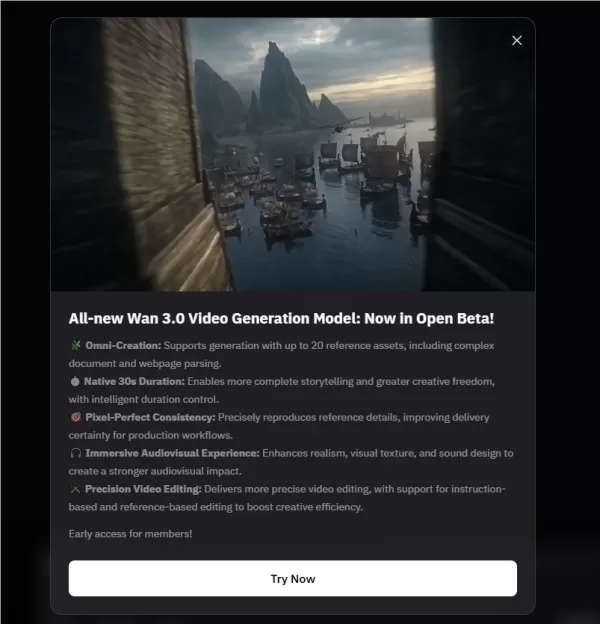 AliVideo Unveils Wan3.0, Delivering Ultra-Long Video Generation and Multi-Dimensional Consistency
On August 24, Alibaba unveiled Wan3.0, its latest video generation large model. This release represents a major leap forward for Alibaba’s video technology, delivering significant improvements in duration, universal creation, reference handling, and
AliVideo Unveils Wan3.0, Delivering Ultra-Long Video Generation and Multi-Dimensional Consistency
On August 24, Alibaba unveiled Wan3.0, its latest video generation large model. This release represents a major leap forward for Alibaba’s video technology, delivering significant improvements in duration, universal creation, reference handling, and
 MiniMax Large Model Mispronounces Names - Xiyu Technology: Insufficient Training After Specific Tokens
MiniMax recently published a technical report detailing why its M2 series models struggled to accurately generate specific names like "Ma Jiaqi." This apparent error highlights a systemic flaw in current large language model training.Token Offset: Th
MiniMax Large Model Mispronounces Names - Xiyu Technology: Insufficient Training After Specific Tokens
MiniMax recently published a technical report detailing why its M2 series models struggled to accurately generate specific names like "Ma Jiaqi." This apparent error highlights a systemic flaw in current large language model training.Token Offset: Th

2026 Latest Top-rated AI Illustration Tools: Our curated list features the best powerfully designed tools for creating stunning editorial scenes and eye-catching cover art quickly. Each option has gone through rigorous real-world tests, offering a free vs paid comparison to help you find the perfect match for your workflow. Try these must-try solutions today to unlock your AI edge and boost your creative productivity. Explore now at XIX.AI.
10 tools
xix.ai

2026 Latest Top-Rated Best AI Tutors for Exam Prep are here on XIX.AI! Our curated list features powerful game-changing tools that offer free vs paid comparison, real-world tests, and weekly updated rankings. They help boost your writing efficiency, simplify complex topic learning, and unlock your academic potential. Explore now to Discover your perfect exam prep tool and Start creating today to Unlock your AI edge!
10 tools
xix.ai

2026 Latest Best Top-Rated AI Budget Planning Tools for Personal Money Management are here on XIX.AI! This curated collection features powerful, game-changing solutions that help you conduct real-world tests, understand spending habits, and create personalized plans to boost productivity. Enjoy a free vs paid comparison along with detailed rankings. Must-try tools designed to simplify money management and unlock your AI edge. Explore now!
11 tools
xix.ai

2026 Latest Best Top-Rated AI Sleep Tracking Assistants curated for ultimate recovery. This fully updated weekly guide features powerful tools that deliver real-world tests, free vs paid comparison, and detailed rankings to help you find the must-try solution that boosts sleep quality and supports better bedtime habits. Explore now at XIX.AI to Unlock your AI edge.
10 tools
xix.ai

2026 Latest Best Top-Rated AI SQL Copilots for Product and Revenue Analytics! XIX.AI has curated a powerful, game-changing collection of must-try tools that undergo real-world tests through weekly updated rankings. These tools help users boost productivity significantly by accelerating data analysis, streamlining complex queries, and generating accurate insights to drive smarter business decisions. Explore now to Discover your perfect tool for unlocking your AI edge!
14 tools
xix.ai

2026 Latest Best Top-Rated AI Homework Helpers That Teach Core Concepts Not Just Answers Powerful Tools for Students Must-Try Curated List Weekly Updated Free vs Paid Comparison Real-World Tests Accurate Rankings to Help You Unlock Your Full Learning Potential Explore now to Discover your perfect tool for smarter studying.
10 tools
xix.ai

This is super useful! I've been looking for a free tool like this. The guide is clear and easy to follow. Can't wait to try it on my next travel video! 🗺️✈️












