


 Home
HomeCraft AI-Generated Thumbnails: The FarFromWeak Design Guide
In today's competitive digital environment, an eye-catching thumbnail is essential for capturing audience attention and boosting engagement. Successful channels like FarFromWeak have perfected the art of designing visually compelling thumbnails that stand out. This detailed guide shows how you can use AI technology to replicate and improve upon the distinctive FarFromWeak thumbnail style, increasing your content’s visibility and attractiveness.
Key Points
Utilizing AI platforms like Ideogram and Scenario AI to produce unique thumbnail artwork.
Emulating the signature 'painted' aesthetic found in FarFromWeak thumbnails.
Creating foundational models and reference images for AI generation.
Understanding how to use prompts and negative prompts for AI image creation.
Detailed, step-by-step instructions for producing custom thumbnails.
Optimizing thumbnails to increase views and user engagement.
Leveraging AI for efficient, high-quality thumbnail production.
Understanding the FarFromWeak Thumbnail Style
What Makes FarFromWeak Thumbnails Effective?
FarFromWeak thumbnails are defined by their unique painted appearance, bold visuals, and attention-grabbing designs. These components work in harmony to seize viewer interest amid abundant content. The goal is to merge realistic subjects with artistic style, creating a thumbnail that suggests the video's topic while generating curiosity.
These thumbnails are not only visually striking but are also strategically crafted to encourage clicks. The blend of captivating imagery and clear messaging lets potential viewers know what to expect, making them more inclined to watch.
By analyzing the FarFromWeak thumbnail approach, we can pinpoint the elements driving their success. These include:
- Unique Artistic Style:
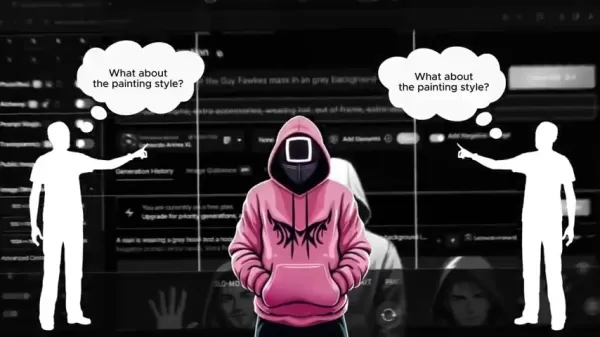
The painted effect lends the thumbnails a handcrafted, premium quality.
- Strong Central Figure: Typically featuring a muscular, imposing character (often Kratos) that immediately draws the eye.
- Clear and Concise Messaging: Text is used sparingly but effectively to communicate the video's core idea.
- Consistent Branding: Maintaining a uniform style helps build viewer recognition and trust.
Understanding these principles is the first step toward achieving similar success for your own channel.
The Role of AI in Thumbnail Creation
AI tools are transforming content creation, including thumbnail design. Artificial intelligence can assist with various stages of the thumbnail creation process, from generating base images to applying artistic styles and optimizing for engagement.
With AI, creators can:
- Generate High-Quality Images Quickly: AI image generators can produce impressive visuals much faster than manual creation.
- Experiment with Different Styles: AI facilitates easy testing of various artistic looks, helping creators find the perfect aesthetic for their thumbnails.
- Optimize for Engagement: AI-powered tools can analyze thumbnail performance and recommend improvements to maximize click-through rates.
- Automate Repetitive Tasks: AI can handle tasks like background removal, image resizing, and style application, freeing creators to focus on creative work.
Integrating AI into their workflow allows content creators to significantly improve the quality and impact of their thumbnails, leading to more views and subscriber growth.
Tools for AI Thumbnail Generation
Ideogram: Crafting Your Base Model
Ideogram is an AI-powered tool specialized in generating images from text descriptions. It is particularly effective for creating the base model for your thumbnail. Here, a base model refers to the initial image that will be refined using other AI tools.
To use Ideogram effectively, follow these steps:
- Prompt Creation:

Write a detailed description of the image you want to generate. For example: “A shirtless bald man with a full beard and muscular shoulders is holding and presenting a large, blank white page toward the camera in a frontal shot. The page should not obscure the man's face.” Be as specific as possible to guide the AI accurately.
- Filter Selection: Choose the "illustration" filter to give the image a stylized, artistic appearance.
- Aspect Ratio: Set the aspect ratio to 16:9, the standard for YouTube thumbnails.
- Generate and Select: Generate multiple images and pick the one that best matches your desired base model. Download your chosen image for further refinement.
The closer the base model resembles your target image (e.g., Kratos holding a sign), the better your final results will be. Experiment with different prompts and settings to achieve the desired outcome.
Scenario AI: Adding the Artistic Flair
Scenario AI is another powerful tool that specializes in applying artistic styles to images. It excels at replicating the painted look characteristic of FarFromWeak thumbnails. This tool can transform a realistic base model into a stylized artistic piece.
To use Scenario AI, follow these steps:
- Sign Up and Access Models: Create a free account on Scenario AI and go to the models section.
- Select “Dark Inked Characters” Model: Choose the “Dark Inked Characters” model from the available options. Use the search function if needed.
- Generate with the Model:

Click “Generate with This Model” to start creating images in this style.
- Prompt and Negative Prompt: Paste your descriptive prompt into the prompt box. Include a negative prompt to exclude unwanted elements from the generated image. A negative prompt instructs the AI on what not to include (e.g., “long neck, low quality, low-res, malformed limbs, missing arms, missing legs, morbid, mutated hands, mutation, text, signature, ugly, username, watermark, poorly drawn hands, worst quality”).
- Reference Image: Upload the base model you created in Ideogram as a reference image.
- ControlNet Settings: In the reference image settings, set the mode to “ControlNet” and ensure the value is set to “character”.
- Influence and Sampling Steps: Set the influence to 60 and the sampling steps to 45.
- Generate and Refine: Generate the image and review the results. If necessary, regenerate multiple times to achieve the desired painted effect.
Scenario AI’s ControlNet feature is crucial for preserving the character's pose and composition from the base model while applying the artistic style. Experiment with different influence and sampling step values to fine-tune the output. Be sure to use the negative prompt to prevent unwanted artifacts. Regenerate until you are satisfied with the result.
Step-by-Step Guide to Creating a FarFromWeak Style Thumbnail
Step 1: Generating the Base Model with Ideogram
The first step in creating your AI-powered thumbnail is generating a suitable base model. Ideogram is ideal for this task. Follow these steps:
- Visit Ideogram: Go to the Ideogram website.
- Craft a Detailed Prompt:
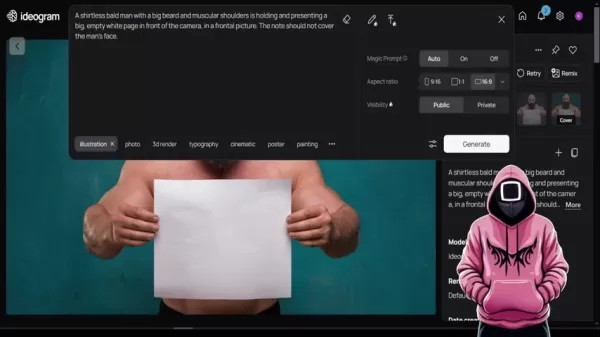
Write a prompt that describes the image you want to generate. Include details about the character, pose, and setting. For example: “A shirtless bald man with a full beard and muscular shoulders is holding and presenting a large, blank white page toward the camera in a frontal shot. The page should not cover the man's face.”
- Apply Filters and Settings: Select the “illustration” filter. Set the aspect ratio to 16:9.
- Generate Images: Click the “Generate” button and review the results.
- Select and Download: Choose the image that best aligns with your vision and download it.
Remember, the quality of your base model directly influences the final thumbnail. Invest time in crafting a prompt that accurately describes your desired image.
Step 2: Adding the Painted Style with Scenario AI
Once you have your base model, the next step is to apply the distinctive painted style using Scenario AI. Follow these steps:
- Sign Up for Scenario AI: Create a free account on the Scenario AI website.
- Access Models: Navigate to the models section.
- Select “Dark Inked Characters”: Find and select the “Dark Inked Characters” model.
- Begin Generation: Click “Generate with This Model”.
- Upload Reference Image:
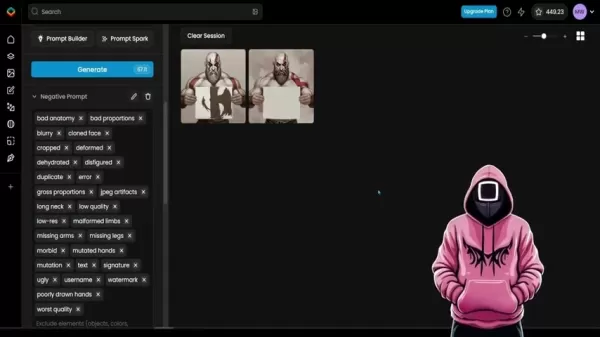
Upload the base model image you downloaded from Ideogram.
- Configure Settings: Set the mode to “ControlNet” and ensure it is set to “character”. Set the influence to 60 and the sampling steps to 45.
- Add Prompt and Negative Prompt: Copy and paste your detailed prompt and the negative prompt (as provided in the video description) into the respective boxes.
- Generate and Refine: Click the “Generate” button and review the results. Regenerate as needed to achieve the desired painted style.
Using a detailed prompt and a comprehensive negative prompt is vital for guiding the AI effectively. Experiment with influence and sampling step values to perfect the final image.
Step 3: Final Touches and Optimization
After generating your thumbnail in Scenario AI, you may want to add final touches using image editing software. This could involve adding text, adjusting colors, or cropping the image. Optimize the image for YouTube by ensuring it meets the recommended size and resolution specifications.
Here’s a quick checklist:
- Add Text: Use clear, concise text to communicate the video’s main message.
- Adjust Colors: Ensure colors are vibrant and eye-catching.
- Optimize Size: Keep the file size manageable for faster loading times.
- Test Different Versions: Try various thumbnail versions to determine which performs best.
By following these steps, you can create AI-powered thumbnails that capture attention, drive clicks, and enhance your video’s performance.
Pricing for AI Thumbnail Tools
Ideogram Pricing
Ideogram is an excellent tool for creating base models and offers a free plan with limited features. For more advanced capabilities, you can upgrade to a paid plan.
- Free Plan: Includes a set number of monthly generations and access to basic features.
- Paid Plans: Offer more generations, faster processing, and access to premium features. Visit the Ideogram website for current pricing details.
Scenario AI Pricing
Scenario AI also provides a free plan, suitable for experimentation and creating basic thumbnails. For professional use, a paid plan is often necessary to access more models and features.
- Free Plan: Limited generations and basic features.
- Paid Plans: Provide more generations, access to premium models, and priority support. Check the Scenario AI website for the latest pricing information.
Pros and Cons of Using AI for Thumbnail Creation
Pros
Saves time and effort compared to manual thumbnail creation.
Enables easy experimentation with various styles and designs.
Can produce high-quality images even without advanced artistic skills.
Offers affordable options for creators on a budget.
Provides a competitive advantage by creating striking thumbnails.
Cons
May require some technical knowledge to use effectively.
AI-generated images can sometimes lack originality.
Over-reliance on AI may hinder creativity and artistic growth.
Free plans often have limitations on generations and features.
Paid plans can be costly for some content creators.
Core Features of AI Thumbnail Generation Tools
Ideogram Core Features
Ideogram is known for its user-friendly interface and robust text-to-image capabilities. Key features include:
- Text-to-Image Generation: Create images from detailed text descriptions.
- Filter Options: Apply various filters to achieve different artistic effects.
- Aspect Ratio Control: Set the aspect ratio to match your thumbnail dimensions.
- Community Sharing: Share your creations with the Ideogram community and find inspiration from others.
Scenario AI Core Features
Scenario AI excels at applying artistic styles and refining images. Its core features include:
- Model Selection: Choose from a variety of AI models to achieve distinct artistic styles.
- ControlNet: Maintain character consistency from a reference image.
- Prompt and Negative Prompt: Guide the AI with detailed prompts and exclude unwanted elements.
- Parameter Control: Fine-tune influence and sampling steps for optimal results.
Use Cases for AI-Generated Thumbnails
YouTube Content Creation
The primary use is creating attention-grabbing thumbnails for YouTube videos. Whether you run a gaming channel, tutorial channel, or vlog, AI can help you design thumbnails that stand out and attract viewers.
Social Media Marketing
AI-generated thumbnails are also useful for social media posts, advertisements, and other marketing materials. A visually appealing thumbnail can significantly boost engagement and click-through rates on platforms like Instagram, Facebook, and X (formerly Twitter).
Blog and Website Content
Thumbnails aren't just for videos. They can also enhance the visual appeal of blog posts and website content. A well-designed thumbnail can encourage visitors to click and read your content.
Frequently Asked Questions
What is a negative prompt and why is it important?
A negative prompt is a list of elements you want the AI to avoid including in the generated image. It helps the AI steer clear of common errors and produce a cleaner, more polished result. For instance, specifying "long neck, low quality, low-res" in a negative prompt can prevent the AI from generating images with these flaws. The negative prompt is crucial for generating high-quality output.
How can I ensure the AI generates images that closely resemble my desired outcome?
The key is to provide detailed and specific prompts. The more information you give the AI, the better it can interpret your vision and produce images that match your expectations. Use descriptive language and include specifics about the character, pose, setting, and style.
Why do I need to regenerate the image multiple times in Scenario AI?
AI image generation is not always perfect on the first attempt. Regenerating the image allows the AI to refine its output and correct any initial mistakes. It also lets you experiment with different variations to find the ideal thumbnail.
Related Questions
What other AI tools can I use for content creation?
AI is reshaping content creation across multiple domains. Beyond thumbnail generation, you can use AI for:Scriptwriting: AI tools can assist with brainstorming ideas and writing video scripts.Voiceovers: AI-powered text-to-speech software can create natural-sounding voiceovers.Video Editing: AI can automate repetitive tasks like clip trimming and transition addition.SEO Optimization: AI can help identify relevant keywords and optimize your content for search engines.Some popular AI tools for content creation include:Jasper: An AI writing assistant that helps create blog posts, social media content, and marketing copy.Synthesia: An AI video creation platform that lets you produce videos from text without actors.Pictory: An AI video editing tool that can automatically create short clips from longer content.Exploring these tools can further streamline your content creation process and improve the quality of your work.
How can I optimize my thumbnails for mobile devices?
Since most YouTube viewers watch on mobile devices, it's essential to optimize your thumbnails for smaller screens. Here are some tips:Use High-Resolution Images: Ensure your thumbnails appear sharp and clear on all devices.Keep Text Concise: Use large, legible text that is easily readable on small screens.Avoid Clutter: Keep the thumbnail simple and uncluttered to prevent overwhelming viewers.Focus on the Central Element: Make sure the thumbnail's most important element is clearly visible.Test on Different Devices: Check how your thumbnails look on various mobile devices to ensure they are optimized for all viewers.
Related article
 TVB Launches First Phase of 10-Petaflop AI Computing Facilities in 2027
On August 11, TVB Group Limited (TVB) issued a voluntary announcement confirming the signing of a framework agreement with Triton Square Limited, an affiliate of The Capital Group Companies, Inc. The partnership aims to launch a joint venture deliver
OpenAI Unveils AI Onboarding Event, Launches Six Industry Workflow Plugins
OpenAI, the leading force in artificial intelligence, hosted a significant event called "Intelligence at Work" on Wednesday morning, Beijing time. Amidst growing competition in the office AI sector, OpenAI has introduced Codex workflow plugins tailor
OpenAI’s first hardware device reportedly a mobile, screenless speaker
Reports indicate OpenAI’s initial hardware venture is a mobile smart speaker featuring integrated AI that syncs with ChatGPT to deliver various home automation services.According to a Tuesday Bloomberg report, the device, currently in development, is
Related Special Topic Recommendations
Business
TVB Launches First Phase of 10-Petaflop AI Computing Facilities in 2027
On August 11, TVB Group Limited (TVB) issued a voluntary announcement confirming the signing of a framework agreement with Triton Square Limited, an affiliate of The Capital Group Companies, Inc. The partnership aims to launch a joint venture deliver
OpenAI Unveils AI Onboarding Event, Launches Six Industry Workflow Plugins
OpenAI, the leading force in artificial intelligence, hosted a significant event called "Intelligence at Work" on Wednesday morning, Beijing time. Amidst growing competition in the office AI sector, OpenAI has introduced Codex workflow plugins tailor
OpenAI’s first hardware device reportedly a mobile, screenless speaker
Reports indicate OpenAI’s initial hardware venture is a mobile smart speaker featuring integrated AI that syncs with ChatGPT to deliver various home automation services.According to a Tuesday Bloomberg report, the device, currently in development, is
Related Special Topic Recommendations
Business
 AI Vendor Due Diligence Platforms for Procurement Reviews and Risk Screening
2026 Latest Best Top-rated AI Vendor Due Diligence Platforms for Procurement Reviews and Risk Screening! This curated list features powerful game-changing tools that go through rigorous real-world tests to deliver accurate rankings. You’ll find a free vs paid comparison, helping you identify the must-try solutions that boost procurement efficiency and cut risks. Backed by XIX.AI, it’s updated weekly. Explore now to discover your perfect tool for smarter sourcing! 238 characters
 10 tools
 xix.ai
Video creation
Best AI Video Generators for Demos: Turn Scripts into Explainer Videos
xix.ai
Video creation
Best AI Video Generators for Demos: Turn Scripts into Explainer Videos
2026 Latest Best Top-Rated AI Video Generators for Demos are curated here, offering powerful game-changing solutions to turn scripts into professional explainer videos fast. XIX.AI provides weekly updated rankings based on real-world tests, including free vs paid comparison details. Must-try tools help boost productivity significantly. Explore now to discover your perfect demo video creation tool!
9 tools
xix.ai
Finance
AI Cash Flow Forecasting Tools for Small Business Finance
2026 Latest Best Top-rated AI Cash Flow Forecasting Tools for Small Business Finance are here on XIX.AI! Our curated list features powerful, game-changing solutions that go through real-world tests to help small business owners boost financial accuracy, plan budgets more effectively, and avoid cash flow issues. Get a free vs paid comparison and explore now to find your perfect tool for seamless financial management.
7 tools
xix.ai
code
Best AI Coding Chatbots: Debug Python, JS, and SQL in One Place
2026 Latest Best Top-Rated AI Coding Chatbots Curated for Developers! Experience powerful game-changing tools that help you debug Python, JS, and SQL issues quickly. Get a free vs paid comparison along with real-world tests and detailed rankings to find the perfect fit for boosting your coding productivity. Try XIX.AI today to unlock your AI edge! Explore now.
12 tools
xix.ai
Prompt
AI Prompt Versioning Platforms for Reusable Claude and ChatGPT Playbooks
2026 Latest Best Top-rated AI Prompt Versioning Platforms for Reusable Playbooks are here on XIX.AI! Our curated list includes powerful game-changing tools that help you keep track of all prompts, test variations efficiently, and boost productivity across writing, content creation, and more. Get a free vs paid comparison along with real-world tests and updated rankings weekly. Explore now to discover your perfect tool for staying ahead in AI tasks!
9 tools
xix.ai
writing
Best AI Writing Assistants for Long Articles: Outline and Draft Faster
2026 Latest Best AI Writing Assistants for Long Articles: Outline and Draft Faster. XIX.AI curates the top-rated, must-try tools that offer powerful, game-changing support to boost writing efficiency significantly. You’ll find detailed free vs paid comparison, real-world tests, and updated rankings weekly. Explore now to Discover your perfect tool and Start creating today to Unlock your AI edge.
8 tools
xix.ai

 Comments (0)
0/500
Comments (0)
0/500
In today's competitive digital environment, an eye-catching thumbnail is essential for capturing audience attention and boosting engagement. Successful channels like FarFromWeak have perfected the art of designing visually compelling thumbnails that stand out. This detailed guide shows how you can use AI technology to replicate and improve upon the distinctive FarFromWeak thumbnail style, increasing your content’s visibility and attractiveness.
Key Points
Utilizing AI platforms like Ideogram and Scenario AI to produce unique thumbnail artwork.
Emulating the signature 'painted' aesthetic found in FarFromWeak thumbnails.
Creating foundational models and reference images for AI generation.
Understanding how to use prompts and negative prompts for AI image creation.
Detailed, step-by-step instructions for producing custom thumbnails.
Optimizing thumbnails to increase views and user engagement.
Leveraging AI for efficient, high-quality thumbnail production.
Understanding the FarFromWeak Thumbnail Style
What Makes FarFromWeak Thumbnails Effective?
FarFromWeak thumbnails are defined by their unique painted appearance, bold visuals, and attention-grabbing designs. These components work in harmony to seize viewer interest amid abundant content. The goal is to merge realistic subjects with artistic style, creating a thumbnail that suggests the video's topic while generating curiosity.
These thumbnails are not only visually striking but are also strategically crafted to encourage clicks. The blend of captivating imagery and clear messaging lets potential viewers know what to expect, making them more inclined to watch.
By analyzing the FarFromWeak thumbnail approach, we can pinpoint the elements driving their success. These include:
- Unique Artistic Style:
The painted effect lends the thumbnails a handcrafted, premium quality.
- Strong Central Figure: Typically featuring a muscular, imposing character (often Kratos) that immediately draws the eye.
- Clear and Concise Messaging: Text is used sparingly but effectively to communicate the video's core idea.
- Consistent Branding: Maintaining a uniform style helps build viewer recognition and trust.
Understanding these principles is the first step toward achieving similar success for your own channel.
The Role of AI in Thumbnail Creation
AI tools are transforming content creation, including thumbnail design. Artificial intelligence can assist with various stages of the thumbnail creation process, from generating base images to applying artistic styles and optimizing for engagement.
With AI, creators can:
- Generate High-Quality Images Quickly: AI image generators can produce impressive visuals much faster than manual creation.
- Experiment with Different Styles: AI facilitates easy testing of various artistic looks, helping creators find the perfect aesthetic for their thumbnails.
- Optimize for Engagement: AI-powered tools can analyze thumbnail performance and recommend improvements to maximize click-through rates.
- Automate Repetitive Tasks: AI can handle tasks like background removal, image resizing, and style application, freeing creators to focus on creative work.
Integrating AI into their workflow allows content creators to significantly improve the quality and impact of their thumbnails, leading to more views and subscriber growth.
Tools for AI Thumbnail Generation
Ideogram: Crafting Your Base Model
Ideogram is an AI-powered tool specialized in generating images from text descriptions. It is particularly effective for creating the base model for your thumbnail. Here, a base model refers to the initial image that will be refined using other AI tools.
To use Ideogram effectively, follow these steps:
- Prompt Creation:
Write a detailed description of the image you want to generate. For example: “A shirtless bald man with a full beard and muscular shoulders is holding and presenting a large, blank white page toward the camera in a frontal shot. The page should not obscure the man's face.” Be as specific as possible to guide the AI accurately.
- Filter Selection: Choose the "illustration" filter to give the image a stylized, artistic appearance.
- Aspect Ratio: Set the aspect ratio to 16:9, the standard for YouTube thumbnails.
- Generate and Select: Generate multiple images and pick the one that best matches your desired base model. Download your chosen image for further refinement.
The closer the base model resembles your target image (e.g., Kratos holding a sign), the better your final results will be. Experiment with different prompts and settings to achieve the desired outcome.
Scenario AI: Adding the Artistic Flair
Scenario AI is another powerful tool that specializes in applying artistic styles to images. It excels at replicating the painted look characteristic of FarFromWeak thumbnails. This tool can transform a realistic base model into a stylized artistic piece.
To use Scenario AI, follow these steps:
- Sign Up and Access Models: Create a free account on Scenario AI and go to the models section.
- Select “Dark Inked Characters” Model: Choose the “Dark Inked Characters” model from the available options. Use the search function if needed.
- Generate with the Model:
Click “Generate with This Model” to start creating images in this style.
- Prompt and Negative Prompt: Paste your descriptive prompt into the prompt box. Include a negative prompt to exclude unwanted elements from the generated image. A negative prompt instructs the AI on what not to include (e.g., “long neck, low quality, low-res, malformed limbs, missing arms, missing legs, morbid, mutated hands, mutation, text, signature, ugly, username, watermark, poorly drawn hands, worst quality”).
- Reference Image: Upload the base model you created in Ideogram as a reference image.
- ControlNet Settings: In the reference image settings, set the mode to “ControlNet” and ensure the value is set to “character”.
- Influence and Sampling Steps: Set the influence to 60 and the sampling steps to 45.
- Generate and Refine: Generate the image and review the results. If necessary, regenerate multiple times to achieve the desired painted effect.
Scenario AI’s ControlNet feature is crucial for preserving the character's pose and composition from the base model while applying the artistic style. Experiment with different influence and sampling step values to fine-tune the output. Be sure to use the negative prompt to prevent unwanted artifacts. Regenerate until you are satisfied with the result.
Step-by-Step Guide to Creating a FarFromWeak Style Thumbnail
Step 1: Generating the Base Model with Ideogram
The first step in creating your AI-powered thumbnail is generating a suitable base model. Ideogram is ideal for this task. Follow these steps:
- Visit Ideogram: Go to the Ideogram website.
- Craft a Detailed Prompt:
Write a prompt that describes the image you want to generate. Include details about the character, pose, and setting. For example: “A shirtless bald man with a full beard and muscular shoulders is holding and presenting a large, blank white page toward the camera in a frontal shot. The page should not cover the man's face.”
- Apply Filters and Settings: Select the “illustration” filter. Set the aspect ratio to 16:9.
- Generate Images: Click the “Generate” button and review the results.
- Select and Download: Choose the image that best aligns with your vision and download it.
Remember, the quality of your base model directly influences the final thumbnail. Invest time in crafting a prompt that accurately describes your desired image.
Step 2: Adding the Painted Style with Scenario AI
Once you have your base model, the next step is to apply the distinctive painted style using Scenario AI. Follow these steps:
- Sign Up for Scenario AI: Create a free account on the Scenario AI website.
- Access Models: Navigate to the models section.
- Select “Dark Inked Characters”: Find and select the “Dark Inked Characters” model.
- Begin Generation: Click “Generate with This Model”.
- Upload Reference Image:
Upload the base model image you downloaded from Ideogram.
- Configure Settings: Set the mode to “ControlNet” and ensure it is set to “character”. Set the influence to 60 and the sampling steps to 45.
- Add Prompt and Negative Prompt: Copy and paste your detailed prompt and the negative prompt (as provided in the video description) into the respective boxes.
- Generate and Refine: Click the “Generate” button and review the results. Regenerate as needed to achieve the desired painted style.
Using a detailed prompt and a comprehensive negative prompt is vital for guiding the AI effectively. Experiment with influence and sampling step values to perfect the final image.
Step 3: Final Touches and Optimization
After generating your thumbnail in Scenario AI, you may want to add final touches using image editing software. This could involve adding text, adjusting colors, or cropping the image. Optimize the image for YouTube by ensuring it meets the recommended size and resolution specifications.
Here’s a quick checklist:
- Add Text: Use clear, concise text to communicate the video’s main message.
- Adjust Colors: Ensure colors are vibrant and eye-catching.
- Optimize Size: Keep the file size manageable for faster loading times.
- Test Different Versions: Try various thumbnail versions to determine which performs best.
By following these steps, you can create AI-powered thumbnails that capture attention, drive clicks, and enhance your video’s performance.
Pricing for AI Thumbnail Tools
Ideogram Pricing
Ideogram is an excellent tool for creating base models and offers a free plan with limited features. For more advanced capabilities, you can upgrade to a paid plan.
- Free Plan: Includes a set number of monthly generations and access to basic features.
- Paid Plans: Offer more generations, faster processing, and access to premium features. Visit the Ideogram website for current pricing details.
Scenario AI Pricing
Scenario AI also provides a free plan, suitable for experimentation and creating basic thumbnails. For professional use, a paid plan is often necessary to access more models and features.
- Free Plan: Limited generations and basic features.
- Paid Plans: Provide more generations, access to premium models, and priority support. Check the Scenario AI website for the latest pricing information.
Pros and Cons of Using AI for Thumbnail Creation
Pros
Saves time and effort compared to manual thumbnail creation.
Enables easy experimentation with various styles and designs.
Can produce high-quality images even without advanced artistic skills.
Offers affordable options for creators on a budget.
Provides a competitive advantage by creating striking thumbnails.
Cons
May require some technical knowledge to use effectively.
AI-generated images can sometimes lack originality.
Over-reliance on AI may hinder creativity and artistic growth.
Free plans often have limitations on generations and features.
Paid plans can be costly for some content creators.
Core Features of AI Thumbnail Generation Tools
Ideogram Core Features
Ideogram is known for its user-friendly interface and robust text-to-image capabilities. Key features include:
- Text-to-Image Generation: Create images from detailed text descriptions.
- Filter Options: Apply various filters to achieve different artistic effects.
- Aspect Ratio Control: Set the aspect ratio to match your thumbnail dimensions.
- Community Sharing: Share your creations with the Ideogram community and find inspiration from others.
Scenario AI Core Features
Scenario AI excels at applying artistic styles and refining images. Its core features include:
- Model Selection: Choose from a variety of AI models to achieve distinct artistic styles.
- ControlNet: Maintain character consistency from a reference image.
- Prompt and Negative Prompt: Guide the AI with detailed prompts and exclude unwanted elements.
- Parameter Control: Fine-tune influence and sampling steps for optimal results.
Use Cases for AI-Generated Thumbnails
YouTube Content Creation
The primary use is creating attention-grabbing thumbnails for YouTube videos. Whether you run a gaming channel, tutorial channel, or vlog, AI can help you design thumbnails that stand out and attract viewers.
Social Media Marketing
AI-generated thumbnails are also useful for social media posts, advertisements, and other marketing materials. A visually appealing thumbnail can significantly boost engagement and click-through rates on platforms like Instagram, Facebook, and X (formerly Twitter).
Blog and Website Content
Thumbnails aren't just for videos. They can also enhance the visual appeal of blog posts and website content. A well-designed thumbnail can encourage visitors to click and read your content.
Frequently Asked Questions
What is a negative prompt and why is it important?
A negative prompt is a list of elements you want the AI to avoid including in the generated image. It helps the AI steer clear of common errors and produce a cleaner, more polished result. For instance, specifying "long neck, low quality, low-res" in a negative prompt can prevent the AI from generating images with these flaws. The negative prompt is crucial for generating high-quality output.
How can I ensure the AI generates images that closely resemble my desired outcome?
The key is to provide detailed and specific prompts. The more information you give the AI, the better it can interpret your vision and produce images that match your expectations. Use descriptive language and include specifics about the character, pose, setting, and style.
Why do I need to regenerate the image multiple times in Scenario AI?
AI image generation is not always perfect on the first attempt. Regenerating the image allows the AI to refine its output and correct any initial mistakes. It also lets you experiment with different variations to find the ideal thumbnail.
Related Questions
What other AI tools can I use for content creation?
AI is reshaping content creation across multiple domains. Beyond thumbnail generation, you can use AI for:Scriptwriting: AI tools can assist with brainstorming ideas and writing video scripts.Voiceovers: AI-powered text-to-speech software can create natural-sounding voiceovers.Video Editing: AI can automate repetitive tasks like clip trimming and transition addition.SEO Optimization: AI can help identify relevant keywords and optimize your content for search engines.Some popular AI tools for content creation include:Jasper: An AI writing assistant that helps create blog posts, social media content, and marketing copy.Synthesia: An AI video creation platform that lets you produce videos from text without actors.Pictory: An AI video editing tool that can automatically create short clips from longer content.Exploring these tools can further streamline your content creation process and improve the quality of your work.
How can I optimize my thumbnails for mobile devices?
Since most YouTube viewers watch on mobile devices, it's essential to optimize your thumbnails for smaller screens. Here are some tips:Use High-Resolution Images: Ensure your thumbnails appear sharp and clear on all devices.Keep Text Concise: Use large, legible text that is easily readable on small screens.Avoid Clutter: Keep the thumbnail simple and uncluttered to prevent overwhelming viewers.Focus on the Central Element: Make sure the thumbnail's most important element is clearly visible.Test on Different Devices: Check how your thumbnails look on various mobile devices to ensure they are optimized for all viewers.








 TVB Launches First Phase of 10-Petaflop AI Computing Facilities in 2027
On August 11, TVB Group Limited (TVB) issued a voluntary announcement confirming the signing of a framework agreement with Triton Square Limited, an affiliate of The Capital Group Companies, Inc. The partnership aims to launch a joint venture deliver
TVB Launches First Phase of 10-Petaflop AI Computing Facilities in 2027
On August 11, TVB Group Limited (TVB) issued a voluntary announcement confirming the signing of a framework agreement with Triton Square Limited, an affiliate of The Capital Group Companies, Inc. The partnership aims to launch a joint venture deliver
 OpenAI Unveils AI Onboarding Event, Launches Six Industry Workflow Plugins
OpenAI, the leading force in artificial intelligence, hosted a significant event called "Intelligence at Work" on Wednesday morning, Beijing time. Amidst growing competition in the office AI sector, OpenAI has introduced Codex workflow plugins tailor
OpenAI Unveils AI Onboarding Event, Launches Six Industry Workflow Plugins
OpenAI, the leading force in artificial intelligence, hosted a significant event called "Intelligence at Work" on Wednesday morning, Beijing time. Amidst growing competition in the office AI sector, OpenAI has introduced Codex workflow plugins tailor
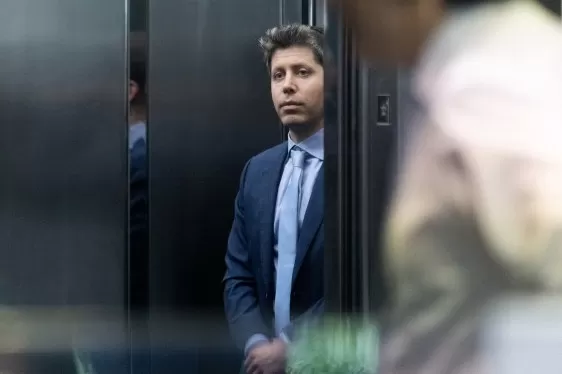 OpenAI’s first hardware device reportedly a mobile, screenless speaker
Reports indicate OpenAI’s initial hardware venture is a mobile smart speaker featuring integrated AI that syncs with ChatGPT to deliver various home automation services.According to a Tuesday Bloomberg report, the device, currently in development, is
OpenAI’s first hardware device reportedly a mobile, screenless speaker
Reports indicate OpenAI’s initial hardware venture is a mobile smart speaker featuring integrated AI that syncs with ChatGPT to deliver various home automation services.According to a Tuesday Bloomberg report, the device, currently in development, is

2026 Latest Best Top-rated AI Vendor Due Diligence Platforms for Procurement Reviews and Risk Screening! This curated list features powerful game-changing tools that go through rigorous real-world tests to deliver accurate rankings. You’ll find a free vs paid comparison, helping you identify the must-try solutions that boost procurement efficiency and cut risks. Backed by XIX.AI, it’s updated weekly. Explore now to discover your perfect tool for smarter sourcing! 238 characters
10 tools
xix.ai
2026 Latest Best Top-Rated AI Video Generators for Demos are curated here, offering powerful game-changing solutions to turn scripts into professional explainer videos fast. XIX.AI provides weekly updated rankings based on real-world tests, including free vs paid comparison details. Must-try tools help boost productivity significantly. Explore now to discover your perfect demo video creation tool!
9 tools
xix.ai
2026 Latest Best Top-rated AI Cash Flow Forecasting Tools for Small Business Finance are here on XIX.AI! Our curated list features powerful, game-changing solutions that go through real-world tests to help small business owners boost financial accuracy, plan budgets more effectively, and avoid cash flow issues. Get a free vs paid comparison and explore now to find your perfect tool for seamless financial management.
7 tools
xix.ai

2026 Latest Best Top-Rated AI Coding Chatbots Curated for Developers! Experience powerful game-changing tools that help you debug Python, JS, and SQL issues quickly. Get a free vs paid comparison along with real-world tests and detailed rankings to find the perfect fit for boosting your coding productivity. Try XIX.AI today to unlock your AI edge! Explore now.
12 tools
xix.ai

2026 Latest Best Top-rated AI Prompt Versioning Platforms for Reusable Playbooks are here on XIX.AI! Our curated list includes powerful game-changing tools that help you keep track of all prompts, test variations efficiently, and boost productivity across writing, content creation, and more. Get a free vs paid comparison along with real-world tests and updated rankings weekly. Explore now to discover your perfect tool for staying ahead in AI tasks!
9 tools
xix.ai
2026 Latest Best AI Writing Assistants for Long Articles: Outline and Draft Faster. XIX.AI curates the top-rated, must-try tools that offer powerful, game-changing support to boost writing efficiency significantly. You’ll find detailed free vs paid comparison, real-world tests, and updated rankings weekly. Explore now to Discover your perfect tool and Start creating today to Unlock your AI edge.
8 tools
xix.ai












