


 Home
HomeAI Voice Cloning Guide: How to Replicate and Use Custom Voices
Imagine having the power to transform any written text into spoken audio, delivered in a voice of your choice, all through the magic of artificial intelligence. This is the promise of voice cloning technology, a rapidly advancing field with significant potential for content creation, accessibility, and personalization. This comprehensive guide explores how to use an AI-powered voice cloning PDF reader to bring documents to life with a cloned voice. We'll cover everything you need to know about this innovative tool and provide a step-by-step walkthrough for setting it up effectively. Get ready to experience a world where your PDFs can speak in familiar and engaging voices.
Key Points
Voice cloning technology utilizes AI to replicate a person's voice from a brief audio sample.
A voice cloning PDF reader converts written text into speech using a cloned voice.
Setup involves installing required libraries and configuring the voice cloning parameters.
Users can upload a personal voice sample or use provided defaults, such as a sample of Elon Musk.
The process includes selecting which pages from the PDF should be read aloud.
The resulting audio files can be downloaded for offline listening.
Customization options let users fine-tune the voice cloning experience.
Understanding AI Voice Cloning
The Magic Behind AI Voice Cloning
AI voice cloning is a transformative technology that creates highly realistic synthetic voices, often indistinguishable from the original speaker. This capability is powered by sophisticated artificial intelligence and machine learning models trained on vast datasets of speech recordings. These systems meticulously analyze and replicate the unique characteristics of a voice, including its tone, rhythm, accent, and speech patterns, with impressive accuracy. Voice cloning PDF readers represent a novel application of this tech, enabling any PDF to be read aloud with a cloned voice.
The process typically starts by collecting a sufficient audio sample from the target speaker. This data trains the machine learning model to recognize and mimic the speaker's vocal identity. Once trained, the model can generate new speech from text input, effectively cloning the voice for diverse uses. This technology holds tremendous potential for creating audiobooks, voiceovers, and personalized interactive experiences, making information more accessible and engaging.
AI voice cloning is revolutionizing our interaction with technology and how we consume information. By enabling voice replication, it unlocks a wide array of previously unimaginable applications. A voice cloning PDF reader is one such practical application, significantly changing how users engage with document files.
Applications of Voice Cloning: Voice Cloning PDF Reader and Beyond
The applications of AI voice cloning are extensive and growing across numerous sectors. A major use is in producing personalized and engaging content. For instance, it can generate audiobooks narrated in the cloned voice of an author or a preferred celebrity, offering a uniquely captivating listening experience. In entertainment, voice cloning creates realistic character voices for animations, video games, and virtual assistants, enhancing immersion in digital worlds. Furthermore, it offers profound benefits for accessibility, allowing individuals with speech impairments to communicate using a synthetic version of their own voice.
Beyond content and accessibility, AI voice cloning is making headway in marketing and advertising, where it can produce personalized audio ads and voiceovers that connect with audiences. In customer service, it can develop virtual agents that provide consistent, human-like support. As AI algorithms become more advanced, the scope of voice cloning will continue to expand, paving the way for a future where voice is central to our technological interactions. The voice cloning PDF reader is an exciting example, enhancing ease of access for many users.
Maximizing Your Voice Cloning Experience
Experimenting with Different Voices
After setting up your voice cloning PDF reader, spend time experimenting with various voices and accents to find the ideal match for your needs and preferences. Whether you're interested in a celebrity voice like Donald Trump's or Elon Musk's, a specific accent, or even your own cloned voice, the platform offers versatile options to explore AI voice cloning's full potential. You can even configure the system to read PDFs using a clone of your own voice.
Take advantage of the diverse voice library to tailor the listening experience. Whether you need a calm, soothing voice for relaxation or a dynamic, expressive one for learning, the voice cloning PDF reader allows you to customize the auditory dimension of your digital content.
Troubleshooting Common Issues
While setting up and using your voice cloning PDF reader, you might encounter some issues. Here are tips for resolving common problems:
- Library Installation Errors: If installation errors occur, ensure you have a stable internet connection and a properly configured runtime environment. Try restarting the runtime and re-running the setup cell.
- Audio Sample Upload Issues: If you have trouble uploading an audio sample, verify the file format, duration, and clarity. Use a .wav file with 5-10 seconds of clear, English speech and minimal background noise.
- Conversion Errors: If the conversion fails, double-check the specified page numbers to ensure they correspond to actual content in the PDF. Try processing fewer pages at once to see if that resolves the issue.
- Audio Quality Issues: For poor audio quality or distortion, try different voice samples and adjust audio settings like speaking rate and pitch. Using higher-quality source samples can significantly improve output.
Following these troubleshooting steps can help you address common challenges and ensure a reliable, high-quality experience with your voice cloning PDF reader. For persistent issues, consult community forums or official documentation.
Step-by-Step Guide: Setting Up Your Voice Cloning PDF Reader
Accessing the Colab File
Start by accessing the provided Colab file, which opens directly to the setup section. This file is your starting point for the voice cloning process.
Step 1: Setting Up the Libraries
The first step is installing the necessary libraries for the voice cloning PDF reader to function properly.
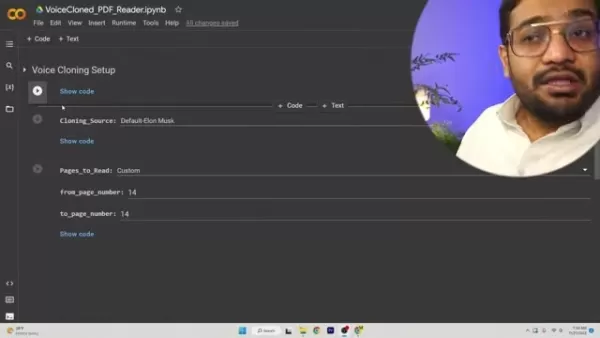
This involves installing key software components and dependencies that enable AI-powered voice cloning and text-to-speech conversion. Click the play button to begin. First, perform a crucial preliminary check: go to the Runtime menu and select 'Change runtime type'.
- Ensure GPU is Selected: In the 'Notebook settings' popup, confirm the 'Hardware accelerator' is set to GPU. This leverages graphics processing units to speed up the computationally intensive AI tasks, ensuring optimal performance and faster processing. After confirming the GPU setting, run the setup cell. Installation may take a few minutes as all required libraries are installed. This step handles all necessary AI and PDF processing files.
Step 2: Uploading or Selecting an Audio Sample
Once libraries are installed, proceed to provide an audio sample as the source for voice cloning. You have two choices:
- Upload Your Own Sample: To clone a specific voice, upload an audio file (ideally a 5-10 second .wav file) containing clear English speech.
Use the Default Sample: Alternatively, you can use a pre-existing sample, such as the default Elon Musk clip.
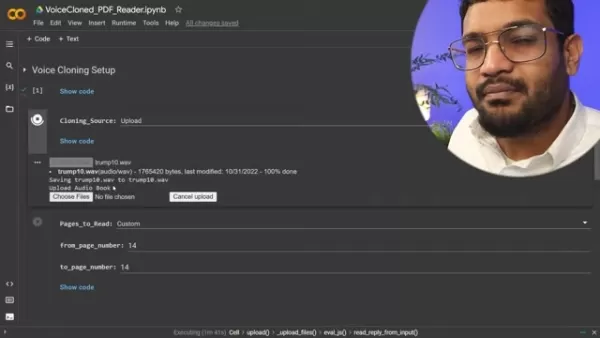
Choosing this option lets you skip the upload and move to the next step. To upload, select the 'Upload' cloning source, press play, and select your audio file. For example, you might upload a sample of Donald Trump speaking a sentence.
Step 3: Uploading the PDF and Choosing Page Numbers
In this step, upload the PDF document you want converted to audio. You'll also specify which pages to read.
- Uploading the PDF: Click 'Choose Files' to browse and select your PDF.
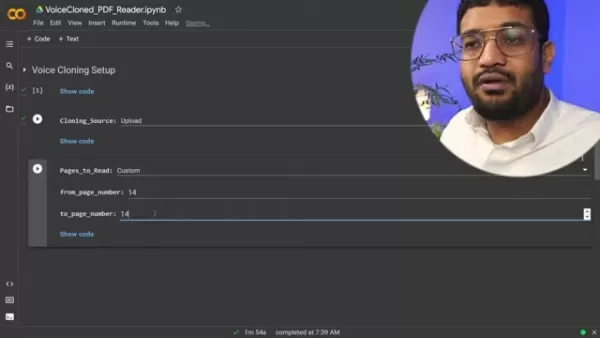
You can also convert text to a Word document and then to a PDF for processing.
- Selecting Page Numbers: Choose 'All' to process the entire document or 'Custom' to define a specific page range. Custom page numbers are useful for targeting the main content, avoiding introductions or indexes. Click play to start the conversion. The AI will analyze the text and generate an audio file. Processing time varies from minutes to hours, depending on the PDF's size.
Step 4: Locating and Downloading the Generated Audio File
Once conversion is complete, navigate to the project folder (typically named 'Real-Time-Voice-Cloning-1') to find the generated '.wav' audio file, usually called 'generated_audio.wav'. If the folder isn't visible, try refreshing the page.
To download the file, click the three dots next to it and select 'Download' from the menu. The file will save to your computer, allowing you to listen to your PDF being read by the cloned voice at any time.
Weighing the Voice Cloning PDF Reader: Pros and Cons
Pros
Improves accessibility for users with visual impairments.
Enhances comprehension through auditory learning.
Offers a personalized reading experience with custom voices.
Provides hands-free convenience for multitasking.
Supports language learning with multilingual capabilities.
Cons
The accuracy and naturalness of cloned voices can vary.
Potential exists for misuse or unethical applications.
Users may become dependent on the technology, which can have glitches.
Premium features or software may involve costs.
Privacy concerns arise from voice data collection and storage.
Frequently Asked Questions
What is AI voice cloning?
AI voice cloning is a technology that uses artificial intelligence to create a synthetic voice that mimics a specific person's voice based on a short audio sample. It allows users to clone their own voice or use samples from celebrities like Donald Trump.
How long does it take to clone a voice?
The time required varies based on the voice's complexity and the amount of training data. It can range from a few minutes to several hours. The quality of the source audio sample is a significant factor.
Is it legal to clone someone's voice?
The legality depends on the intended use and local laws. It's essential to respect intellectual property rights and privacy regulations. In the United States, replicating someone's voice without permission can be considered a form of identity theft and may be a federal crime, especially if used for illegal purposes.
Can I use my cloned voice for commercial purposes?
This depends on the terms of service and licensing agreements of the voice cloning platform you use. Always review the applicable terms and conditions carefully before using a cloned voice in commercial projects.
Are there any ethical considerations when using voice cloning technology?
Yes, ethical considerations are important. They include the potential for malicious misuse, the necessity for transparency, and the importance of obtaining consent when using cloned voices in commercial or public applications. Full transparency from all parties involved is crucial.
Related Questions
What are the best AI voice cloning software options available in 2025?
As of 2025, several leading AI voice cloning platforms are available. Descript's Overdub feature is popular for creating lifelike voice clones and editing audio via text. Resemble AI offers advanced capabilities, including emotional speech generation and unique voice identities. Murf AI provides a user-friendly platform for AI voiceovers with a wide range of customizable voices. Lovo.ai is a comprehensive AI voice generator and text-to-speech platform with an extensive voice library. The best choice depends on your specific needs, budget, and technical expertise. Each tool has strengths: Descript excels at editing, Lovo.ai is known for its simple interface, Murf AI offers over 120 voices, and Resemble AI is noted for producing highly realistic voices.
How can AI voice cloning improve accessibility for individuals with disabilities?
AI voice cloning can greatly enhance accessibility in several ways. Individuals with speech impairments can use it to create a synthetic voice that closely matches their natural one, aiding more authentic communication. For those with visual impairments, it can convert digital text—like articles and books—into speech using a familiar, engaging cloned voice. It also allows for personalized learning experiences for people with learning disabilities by tailoring the voice, pace, and instructional style to their preferences. Ultimately, AI voice cloning empowers individuals with disabilities, promoting inclusivity, independence, and equal access to information and opportunities.
Related article
 DeepMind CEO Hassabis: I sleep six hours a day, usually feel energetic around 1 a.m.
Fortune recently featured an interview with Demis Hassabis, CEO of Google DeepMind, revealing his unconventional approach to rest and productivity. Hassabis disclosed that he sleeps very little, structuring his waking hours into two distinct work blo
OpenAI, Anthropic Vie for Market Share Despite Revenue Shortfalls
Despite recent reports suggesting OpenAI missed revenue targets, creating pressure on tech stocks this Tuesday, private AI lab investors remain resilient. Seasoned backers have confirmed they will not reduce investment despite negative media coverage
California AV Compliance: A New Era of Tickets, Geofences, and 1M Miles
Guident operates an AuveTech shuttle in South Florida, managing a four-mile route in West Palm Beach and a one-mile route in Boca Raton using its remote monitoring technology. | Credit: GuidentCalifornia is redefining the regulatory landscape for dri
Related Special Topic Recommendations
chatbot
DeepMind CEO Hassabis: I sleep six hours a day, usually feel energetic around 1 a.m.
Fortune recently featured an interview with Demis Hassabis, CEO of Google DeepMind, revealing his unconventional approach to rest and productivity. Hassabis disclosed that he sleeps very little, structuring his waking hours into two distinct work blo
OpenAI, Anthropic Vie for Market Share Despite Revenue Shortfalls
Despite recent reports suggesting OpenAI missed revenue targets, creating pressure on tech stocks this Tuesday, private AI lab investors remain resilient. Seasoned backers have confirmed they will not reduce investment despite negative media coverage
California AV Compliance: A New Era of Tickets, Geofences, and 1M Miles
Guident operates an AuveTech shuttle in South Florida, managing a four-mile route in West Palm Beach and a one-mile route in Boca Raton using its remote monitoring technology. | Credit: GuidentCalifornia is redefining the regulatory landscape for dri
Related Special Topic Recommendations
chatbot
 Best AI Roleplay Chat Apps for Language Practice, Interview Prep, and Daily Fluency
2026 Latest Best Top-rated AI Roleplay Chat Apps for Language Practice, Interview Prep, and Daily Fluency! XIX.AI curates a powerful game-changing collection that offers free vs paid comparison, real-world tests, and updated rankings weekly. These must-try tools help you boost writing skills, overcome fluency challenges, and improve communication efficiency across all daily scenarios. Explore now to discover your perfect tool for language growth!
 10 tools
 xix.ai
Music composition
AI Stem Separation Tools for Remix Production, Sampling Prep, and Karaoke Masters
xix.ai
Music composition
AI Stem Separation Tools for Remix Production, Sampling Prep, and Karaoke Masters
2026 Latest Best Top-rated AI Stem Separation Tools Curated for Remix Production, Sampling Prep, and Karaoke Masters. These powerful game-changing tools offer real-world tests to deliver precise audio isolation, boosting productivity significantly. XIX.AI provides a weekly updated free vs paid comparison guide to help you find the must-try solution that suits your needs. Explore now to unlock your AI edge.
8 tools
xix.ai
Data Analysis
AI SQL Copilots for Revenue Dashboards, Funnel Analysis, and Product Metrics
2026 Latest Best AI SQL Copilots Ranked Top-Rated! XIX.AI curates a powerful game-changing collection for weekly updated real-world tests. These must-try tools help you generate accurate revenue dashboards, analyze sales funnels, and track product metrics swiftly, boosting productivity massively. Explore now to Discover your perfect tool for data-driven decision making! 238 characters
9 tools
xix.ai
Music composition
Best AI Melody Writing Tools for Song Drafts
2026 Latest Best Top-Rated AI Melody Writing Tools for Song Drafts! XIX.AI has curated a highly powerful game-changing collection that goes through rigorous real-world tests to deliver the best writing experience. You can find detailed free vs paid comparisons, accurate rankings, and must-try options designed to help you create stunning song drafts effortlessly and boost your creative productivity significantly. Explore now to discover your perfect tool!
8 tools
xix.ai
chatbot
Best AI Conversation Trainer Tools for Interview Practice
2026 Latest Best Top-rated AI Conversation Trainer Tools for Interview Practice are here on XIX.AI! This curated collection features powerful, game-changing tools that go through rigorous real-world tests to deliver accurate feedback. You’ll find a free vs paid comparison and detailed rankings to help you choose the must-try option that boosts your confidence and skills. Explore now to Discover your perfect tool for interview success!
12 tools
xix.ai
Design & Art
Best AI Style Transfer Tools for Creative Experiments
2026 Latest Best Top-rated AI Style Transfer Tools for Creative Experiments! XIX.AI has curated a powerful, game-changing collection of must-try tools that deliver exceptional results through real-world tests and rigorous rankings. These top solutions help creatives boost productivity significantly by accelerating content creation and unlocking endless creative possibilities. Explore now to discover your perfect tool and start creating today!
9 tools
xix.ai

 Comments (2)
0/500
Comments (2)
0/500
![HarryLewis]()
声を複製する技術は便利そうだけど、ちょっと怖くないですか?個人情報やプライバシーの観点から、このガイドではちゃんと倫理的な使い方に触れてるのかが気になりますね…。ユーチューバーが面白い動画作るのに使えそうと思いましたけど😄
![DouglasAnderson]()
Die Möglichkeit, Texte in jede beliebige Stimme zu verwandeln, ist faszinierend und leicht unheimlich zugleich! 😅 Ich hoffe, die Regulierungsbehörden kommen bei den ethischen Fragen hinterher - sonst gibt's bald ein Stimmen-Chaos im Netz.
Imagine having the power to transform any written text into spoken audio, delivered in a voice of your choice, all through the magic of artificial intelligence. This is the promise of voice cloning technology, a rapidly advancing field with significant potential for content creation, accessibility, and personalization. This comprehensive guide explores how to use an AI-powered voice cloning PDF reader to bring documents to life with a cloned voice. We'll cover everything you need to know about this innovative tool and provide a step-by-step walkthrough for setting it up effectively. Get ready to experience a world where your PDFs can speak in familiar and engaging voices.
Key Points
Voice cloning technology utilizes AI to replicate a person's voice from a brief audio sample.
A voice cloning PDF reader converts written text into speech using a cloned voice.
Setup involves installing required libraries and configuring the voice cloning parameters.
Users can upload a personal voice sample or use provided defaults, such as a sample of Elon Musk.
The process includes selecting which pages from the PDF should be read aloud.
The resulting audio files can be downloaded for offline listening.
Customization options let users fine-tune the voice cloning experience.
Understanding AI Voice Cloning
The Magic Behind AI Voice Cloning
AI voice cloning is a transformative technology that creates highly realistic synthetic voices, often indistinguishable from the original speaker. This capability is powered by sophisticated artificial intelligence and machine learning models trained on vast datasets of speech recordings. These systems meticulously analyze and replicate the unique characteristics of a voice, including its tone, rhythm, accent, and speech patterns, with impressive accuracy. Voice cloning PDF readers represent a novel application of this tech, enabling any PDF to be read aloud with a cloned voice.
The process typically starts by collecting a sufficient audio sample from the target speaker. This data trains the machine learning model to recognize and mimic the speaker's vocal identity. Once trained, the model can generate new speech from text input, effectively cloning the voice for diverse uses. This technology holds tremendous potential for creating audiobooks, voiceovers, and personalized interactive experiences, making information more accessible and engaging.
AI voice cloning is revolutionizing our interaction with technology and how we consume information. By enabling voice replication, it unlocks a wide array of previously unimaginable applications. A voice cloning PDF reader is one such practical application, significantly changing how users engage with document files.
Applications of Voice Cloning: Voice Cloning PDF Reader and Beyond
The applications of AI voice cloning are extensive and growing across numerous sectors. A major use is in producing personalized and engaging content. For instance, it can generate audiobooks narrated in the cloned voice of an author or a preferred celebrity, offering a uniquely captivating listening experience. In entertainment, voice cloning creates realistic character voices for animations, video games, and virtual assistants, enhancing immersion in digital worlds. Furthermore, it offers profound benefits for accessibility, allowing individuals with speech impairments to communicate using a synthetic version of their own voice.
Beyond content and accessibility, AI voice cloning is making headway in marketing and advertising, where it can produce personalized audio ads and voiceovers that connect with audiences. In customer service, it can develop virtual agents that provide consistent, human-like support. As AI algorithms become more advanced, the scope of voice cloning will continue to expand, paving the way for a future where voice is central to our technological interactions. The voice cloning PDF reader is an exciting example, enhancing ease of access for many users.
Maximizing Your Voice Cloning Experience
Experimenting with Different Voices
After setting up your voice cloning PDF reader, spend time experimenting with various voices and accents to find the ideal match for your needs and preferences. Whether you're interested in a celebrity voice like Donald Trump's or Elon Musk's, a specific accent, or even your own cloned voice, the platform offers versatile options to explore AI voice cloning's full potential. You can even configure the system to read PDFs using a clone of your own voice.
Take advantage of the diverse voice library to tailor the listening experience. Whether you need a calm, soothing voice for relaxation or a dynamic, expressive one for learning, the voice cloning PDF reader allows you to customize the auditory dimension of your digital content.
Troubleshooting Common Issues
While setting up and using your voice cloning PDF reader, you might encounter some issues. Here are tips for resolving common problems:
- Library Installation Errors: If installation errors occur, ensure you have a stable internet connection and a properly configured runtime environment. Try restarting the runtime and re-running the setup cell.
- Audio Sample Upload Issues: If you have trouble uploading an audio sample, verify the file format, duration, and clarity. Use a .wav file with 5-10 seconds of clear, English speech and minimal background noise.
- Conversion Errors: If the conversion fails, double-check the specified page numbers to ensure they correspond to actual content in the PDF. Try processing fewer pages at once to see if that resolves the issue.
- Audio Quality Issues: For poor audio quality or distortion, try different voice samples and adjust audio settings like speaking rate and pitch. Using higher-quality source samples can significantly improve output.
Following these troubleshooting steps can help you address common challenges and ensure a reliable, high-quality experience with your voice cloning PDF reader. For persistent issues, consult community forums or official documentation.
Step-by-Step Guide: Setting Up Your Voice Cloning PDF Reader
Accessing the Colab File
Start by accessing the provided Colab file, which opens directly to the setup section. This file is your starting point for the voice cloning process.
Step 1: Setting Up the Libraries
The first step is installing the necessary libraries for the voice cloning PDF reader to function properly.
This involves installing key software components and dependencies that enable AI-powered voice cloning and text-to-speech conversion. Click the play button to begin. First, perform a crucial preliminary check: go to the Runtime menu and select 'Change runtime type'.
- Ensure GPU is Selected: In the 'Notebook settings' popup, confirm the 'Hardware accelerator' is set to GPU. This leverages graphics processing units to speed up the computationally intensive AI tasks, ensuring optimal performance and faster processing. After confirming the GPU setting, run the setup cell. Installation may take a few minutes as all required libraries are installed. This step handles all necessary AI and PDF processing files.
Step 2: Uploading or Selecting an Audio Sample
Once libraries are installed, proceed to provide an audio sample as the source for voice cloning. You have two choices:
- Upload Your Own Sample: To clone a specific voice, upload an audio file (ideally a 5-10 second .wav file) containing clear English speech.
Use the Default Sample: Alternatively, you can use a pre-existing sample, such as the default Elon Musk clip.
Choosing this option lets you skip the upload and move to the next step. To upload, select the 'Upload' cloning source, press play, and select your audio file. For example, you might upload a sample of Donald Trump speaking a sentence.
Step 3: Uploading the PDF and Choosing Page Numbers
In this step, upload the PDF document you want converted to audio. You'll also specify which pages to read.
- Uploading the PDF: Click 'Choose Files' to browse and select your PDF.
You can also convert text to a Word document and then to a PDF for processing.
- Selecting Page Numbers: Choose 'All' to process the entire document or 'Custom' to define a specific page range. Custom page numbers are useful for targeting the main content, avoiding introductions or indexes. Click play to start the conversion. The AI will analyze the text and generate an audio file. Processing time varies from minutes to hours, depending on the PDF's size.
Step 4: Locating and Downloading the Generated Audio File
Once conversion is complete, navigate to the project folder (typically named 'Real-Time-Voice-Cloning-1') to find the generated '.wav' audio file, usually called 'generated_audio.wav'. If the folder isn't visible, try refreshing the page.
To download the file, click the three dots next to it and select 'Download' from the menu. The file will save to your computer, allowing you to listen to your PDF being read by the cloned voice at any time.
Weighing the Voice Cloning PDF Reader: Pros and Cons
Pros
Improves accessibility for users with visual impairments.
Enhances comprehension through auditory learning.
Offers a personalized reading experience with custom voices.
Provides hands-free convenience for multitasking.
Supports language learning with multilingual capabilities.
Cons
The accuracy and naturalness of cloned voices can vary.
Potential exists for misuse or unethical applications.
Users may become dependent on the technology, which can have glitches.
Premium features or software may involve costs.
Privacy concerns arise from voice data collection and storage.
Frequently Asked Questions
What is AI voice cloning?
AI voice cloning is a technology that uses artificial intelligence to create a synthetic voice that mimics a specific person's voice based on a short audio sample. It allows users to clone their own voice or use samples from celebrities like Donald Trump.
How long does it take to clone a voice?
The time required varies based on the voice's complexity and the amount of training data. It can range from a few minutes to several hours. The quality of the source audio sample is a significant factor.
Is it legal to clone someone's voice?
The legality depends on the intended use and local laws. It's essential to respect intellectual property rights and privacy regulations. In the United States, replicating someone's voice without permission can be considered a form of identity theft and may be a federal crime, especially if used for illegal purposes.
Can I use my cloned voice for commercial purposes?
This depends on the terms of service and licensing agreements of the voice cloning platform you use. Always review the applicable terms and conditions carefully before using a cloned voice in commercial projects.
Are there any ethical considerations when using voice cloning technology?
Yes, ethical considerations are important. They include the potential for malicious misuse, the necessity for transparency, and the importance of obtaining consent when using cloned voices in commercial or public applications. Full transparency from all parties involved is crucial.
Related Questions
What are the best AI voice cloning software options available in 2025?
As of 2025, several leading AI voice cloning platforms are available. Descript's Overdub feature is popular for creating lifelike voice clones and editing audio via text. Resemble AI offers advanced capabilities, including emotional speech generation and unique voice identities. Murf AI provides a user-friendly platform for AI voiceovers with a wide range of customizable voices. Lovo.ai is a comprehensive AI voice generator and text-to-speech platform with an extensive voice library. The best choice depends on your specific needs, budget, and technical expertise. Each tool has strengths: Descript excels at editing, Lovo.ai is known for its simple interface, Murf AI offers over 120 voices, and Resemble AI is noted for producing highly realistic voices.
How can AI voice cloning improve accessibility for individuals with disabilities?
AI voice cloning can greatly enhance accessibility in several ways. Individuals with speech impairments can use it to create a synthetic voice that closely matches their natural one, aiding more authentic communication. For those with visual impairments, it can convert digital text—like articles and books—into speech using a familiar, engaging cloned voice. It also allows for personalized learning experiences for people with learning disabilities by tailoring the voice, pace, and instructional style to their preferences. Ultimately, AI voice cloning empowers individuals with disabilities, promoting inclusivity, independence, and equal access to information and opportunities.








 DeepMind CEO Hassabis: I sleep six hours a day, usually feel energetic around 1 a.m.
Fortune recently featured an interview with Demis Hassabis, CEO of Google DeepMind, revealing his unconventional approach to rest and productivity. Hassabis disclosed that he sleeps very little, structuring his waking hours into two distinct work blo
DeepMind CEO Hassabis: I sleep six hours a day, usually feel energetic around 1 a.m.
Fortune recently featured an interview with Demis Hassabis, CEO of Google DeepMind, revealing his unconventional approach to rest and productivity. Hassabis disclosed that he sleeps very little, structuring his waking hours into two distinct work blo
 OpenAI, Anthropic Vie for Market Share Despite Revenue Shortfalls
Despite recent reports suggesting OpenAI missed revenue targets, creating pressure on tech stocks this Tuesday, private AI lab investors remain resilient. Seasoned backers have confirmed they will not reduce investment despite negative media coverage
California AV Compliance: A New Era of Tickets, Geofences, and 1M Miles
Guident operates an AuveTech shuttle in South Florida, managing a four-mile route in West Palm Beach and a one-mile route in Boca Raton using its remote monitoring technology. | Credit: GuidentCalifornia is redefining the regulatory landscape for dri
OpenAI, Anthropic Vie for Market Share Despite Revenue Shortfalls
Despite recent reports suggesting OpenAI missed revenue targets, creating pressure on tech stocks this Tuesday, private AI lab investors remain resilient. Seasoned backers have confirmed they will not reduce investment despite negative media coverage
California AV Compliance: A New Era of Tickets, Geofences, and 1M Miles
Guident operates an AuveTech shuttle in South Florida, managing a four-mile route in West Palm Beach and a one-mile route in Boca Raton using its remote monitoring technology. | Credit: GuidentCalifornia is redefining the regulatory landscape for dri

2026 Latest Best Top-rated AI Roleplay Chat Apps for Language Practice, Interview Prep, and Daily Fluency! XIX.AI curates a powerful game-changing collection that offers free vs paid comparison, real-world tests, and updated rankings weekly. These must-try tools help you boost writing skills, overcome fluency challenges, and improve communication efficiency across all daily scenarios. Explore now to discover your perfect tool for language growth!
10 tools
xix.ai

2026 Latest Best Top-rated AI Stem Separation Tools Curated for Remix Production, Sampling Prep, and Karaoke Masters. These powerful game-changing tools offer real-world tests to deliver precise audio isolation, boosting productivity significantly. XIX.AI provides a weekly updated free vs paid comparison guide to help you find the must-try solution that suits your needs. Explore now to unlock your AI edge.
8 tools
xix.ai

2026 Latest Best AI SQL Copilots Ranked Top-Rated! XIX.AI curates a powerful game-changing collection for weekly updated real-world tests. These must-try tools help you generate accurate revenue dashboards, analyze sales funnels, and track product metrics swiftly, boosting productivity massively. Explore now to Discover your perfect tool for data-driven decision making! 238 characters
9 tools
xix.ai

2026 Latest Best Top-Rated AI Melody Writing Tools for Song Drafts! XIX.AI has curated a highly powerful game-changing collection that goes through rigorous real-world tests to deliver the best writing experience. You can find detailed free vs paid comparisons, accurate rankings, and must-try options designed to help you create stunning song drafts effortlessly and boost your creative productivity significantly. Explore now to discover your perfect tool!
8 tools
xix.ai

2026 Latest Best Top-rated AI Conversation Trainer Tools for Interview Practice are here on XIX.AI! This curated collection features powerful, game-changing tools that go through rigorous real-world tests to deliver accurate feedback. You’ll find a free vs paid comparison and detailed rankings to help you choose the must-try option that boosts your confidence and skills. Explore now to Discover your perfect tool for interview success!
12 tools
xix.ai

2026 Latest Best Top-rated AI Style Transfer Tools for Creative Experiments! XIX.AI has curated a powerful, game-changing collection of must-try tools that deliver exceptional results through real-world tests and rigorous rankings. These top solutions help creatives boost productivity significantly by accelerating content creation and unlocking endless creative possibilities. Explore now to discover your perfect tool and start creating today!
9 tools
xix.ai

声を複製する技術は便利そうだけど、ちょっと怖くないですか?個人情報やプライバシーの観点から、このガイドではちゃんと倫理的な使い方に触れてるのかが気になりますね…。ユーチューバーが面白い動画作るのに使えそうと思いましたけど😄
Die Möglichkeit, Texte in jede beliebige Stimme zu verwandeln, ist faszinierend und leicht unheimlich zugleich! 😅 Ich hoffe, die Regulierungsbehörden kommen bei den ethischen Fragen hinterher - sonst gibt's bald ein Stimmen-Chaos im Netz.












