


 Home
HomeCapCut Unveils Major Upgrade with AI-Powered Canvas Studio, Revolutionizing Video Editing
On March 26th, the international video editing tool CapCut launched two major AI features: Video Studio and AI Video. Deeply integrated with the new Dreamina Seedance2.0 video generation model, these tools dramatically simplify the journey from creative idea to finished video, signaling the arrival of an AI-native "canvas era" for video creation.
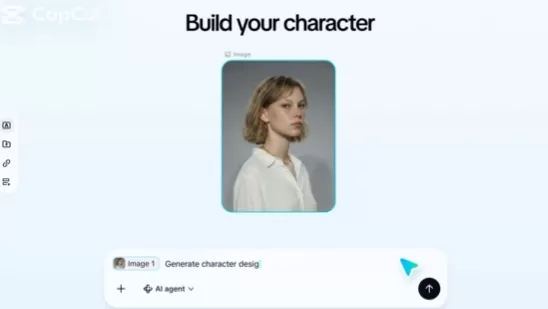
Video Studio: Ditch the Timeline, Welcome Infinite Canvas AI Production
Traditional video editing revolves around the timeline, where all clips must be arranged in strict chronological order, often requiring meticulous manual adjustments. Video Studio upends this model by replacing the timeline with an infinite canvas, effectively creating an AI-powered "video Miro whiteboard."
Accessible via CapCut's web version, Video Studio lets users create three project types: Canvas Project, Storyboard Project, and Auto-Generated Project. Within the infinite canvas space, you can freely arrange materials, ideas, and elements. The built-in AI Screenwriter Agent actively assists with brainstorming plots, writing scripts, and structuring narratives, making the process as intuitive as a creative workshop.
The storyboard feature is particularly powerful: AI automatically breaks down the script into individual shot cards. Each card can independently generate images or video clips using Seedance2.0. If a specific shot isn't right, you can modify it directly on the card with new prompts or references, eliminating the need for constant timeline adjustments and significantly boosting creative efficiency.
AIbase Review: This canvas-based workflow aligns better with creators' nonlinear thinking, completing the entire process from "idea" to "final cut" in a single interface. It's especially suited for short-form videos, narrative content, and creative experiments.
AI Video: Summon Seedance2.0 Instantly While Editing, Ending the Material Shortage
The other key feature, AI Video, is embedded within CapCut's traditional editor (available on mobile and desktop), acting as an "instant material generator" for creators.
During normal editing, if you're missing a specific clip, simply navigate to the AI Video section. Enter text prompts, upload reference images, videos, or audio, and quickly generate high-quality footage using Seedance2.0. The generated clip can be inserted directly into your timeline for further refinement. Seedance2.0 supports multi-modal input (text, image, video, audio), accepting up to 9 images, 3 videos, and 3 audio references. It excels in motion stability, joint audio-video generation, and offers director-level controls for lighting, camera movement, and character consistency, delivering near-cinematic results.
This feature effectively solves the common pain point of scavenging for materials, making the editing workflow seamless and more efficient.
Powered by Seedance2.0: Multi-Modal Generation for Professional Output
As the core engine behind CapCut's update, Dreamina Seedance2.0 is built on a unified multi-modal architecture. It supports text-to-video generation and reference-based creation from images, videos, or audio. The model shines in multi-shot narrative continuity, lip-sync accuracy, and creating immersive audiovisual experiences. It is now being rolled out globally, with international users able to access these features on CapCut's web, desktop, and app versions.
AIbase Observation: CapCut is evolving from a straightforward "editing tool" into a comprehensive "AI full-stack video creation platform." Video Studio caters to creators from beginners to pros seeking end-to-end generation, while AI Video perfectly complements traditional editing. Together, they significantly lower the barrier to video production while preserving options for fine-grained control.
Currently, Video Studio on the web version offers free trial credits (approximately 150 per week, ideal for experimentation). A paid Pro subscription unlocks higher limits and advanced features like 4K export. Creators can visit the CapCut website or app to try the latest features.
With the rapid advancement of AI video generation, CapCut's update is set to further democratize content creation, empowering more people to produce professional-quality video work with ease. In the future, canvas-style AI workstations may well become the new industry standard.
Related article
 DeepMind CEO Hassabis: I sleep six hours a day, usually feel energetic around 1 a.m.
Fortune recently featured an interview with Demis Hassabis, CEO of Google DeepMind, revealing his unconventional approach to rest and productivity. Hassabis disclosed that he sleeps very little, structuring his waking hours into two distinct work blo
OpenAI, Anthropic Vie for Market Share Despite Revenue Shortfalls
Despite recent reports suggesting OpenAI missed revenue targets, creating pressure on tech stocks this Tuesday, private AI lab investors remain resilient. Seasoned backers have confirmed they will not reduce investment despite negative media coverage
California AV Compliance: A New Era of Tickets, Geofences, and 1M Miles
Guident operates an AuveTech shuttle in South Florida, managing a four-mile route in West Palm Beach and a one-mile route in Boca Raton using its remote monitoring technology. | Credit: GuidentCalifornia is redefining the regulatory landscape for dri
Related Special Topic Recommendations
Video creation
DeepMind CEO Hassabis: I sleep six hours a day, usually feel energetic around 1 a.m.
Fortune recently featured an interview with Demis Hassabis, CEO of Google DeepMind, revealing his unconventional approach to rest and productivity. Hassabis disclosed that he sleeps very little, structuring his waking hours into two distinct work blo
OpenAI, Anthropic Vie for Market Share Despite Revenue Shortfalls
Despite recent reports suggesting OpenAI missed revenue targets, creating pressure on tech stocks this Tuesday, private AI lab investors remain resilient. Seasoned backers have confirmed they will not reduce investment despite negative media coverage
California AV Compliance: A New Era of Tickets, Geofences, and 1M Miles
Guident operates an AuveTech shuttle in South Florida, managing a four-mile route in West Palm Beach and a one-mile route in Boca Raton using its remote monitoring technology. | Credit: GuidentCalifornia is redefining the regulatory landscape for dri
Related Special Topic Recommendations
Video creation
 AI Short-Form Video Hook Generators for Reels, Shorts, and Product Launch Campaigns
2026 Latest Best AI Short-Form Video Hook Generators for Reels Shorts and Product Launch Campaigns! XIX.AI curates top-rated powerful game-changing tools that deliver must-try results through real-world tests. This weekly updated page offers free vs paid comparison rankings to help you find the perfect solution for boosting content creativity and productivity. Explore now to Unlock your AI edge!
 11 tools
 xix.ai
writing
AI Article Outline Tools for Long Form Writing
xix.ai
writing
AI Article Outline Tools for Long Form Writing
2026 Latest Best Top-Rated AI Article Outline Tools for Long Form Writing! This curated collection features powerful, game-changing tools that deliver accurate, structured outlines with real-world tests to boost writing efficiency significantly. XIX.AI is part of this elite selection. Get a free vs paid comparison to help you choose the perfect tool. Explore now and Unlock your AI edge!
9 tools
xix.ai
chatbot
Best AI Roleplay Chat Apps for Language Practice, Interview Prep, and Daily Fluency
2026 Latest Best Top-rated AI Roleplay Chat Apps for Language Practice, Interview Prep, and Daily Fluency! XIX.AI curates a powerful game-changing collection that offers free vs paid comparison, real-world tests, and updated rankings weekly. These must-try tools help you boost writing skills, overcome fluency challenges, and improve communication efficiency across all daily scenarios. Explore now to discover your perfect tool for language growth!
10 tools
xix.ai
Music composition
AI Stem Separation Tools for Remix Production, Sampling Prep, and Karaoke Masters
2026 Latest Best Top-rated AI Stem Separation Tools Curated for Remix Production, Sampling Prep, and Karaoke Masters. These powerful game-changing tools offer real-world tests to deliver precise audio isolation, boosting productivity significantly. XIX.AI provides a weekly updated free vs paid comparison guide to help you find the must-try solution that suits your needs. Explore now to unlock your AI edge.
8 tools
xix.ai
Data Analysis
AI SQL Copilots for Revenue Dashboards, Funnel Analysis, and Product Metrics
2026 Latest Best AI SQL Copilots Ranked Top-Rated! XIX.AI curates a powerful game-changing collection for weekly updated real-world tests. These must-try tools help you generate accurate revenue dashboards, analyze sales funnels, and track product metrics swiftly, boosting productivity massively. Explore now to Discover your perfect tool for data-driven decision making! 238 characters
9 tools
xix.ai
Music composition
Best AI Melody Writing Tools for Song Drafts
2026 Latest Best Top-Rated AI Melody Writing Tools for Song Drafts! XIX.AI has curated a highly powerful game-changing collection that goes through rigorous real-world tests to deliver the best writing experience. You can find detailed free vs paid comparisons, accurate rankings, and must-try options designed to help you create stunning song drafts effortlessly and boost your creative productivity significantly. Explore now to discover your perfect tool!
8 tools
xix.ai

 Comments (1)
0/500
Comments (1)
0/500
![NicholasAdams]()
CapCutのAI機能、結構凄いね。Video StudioとAI Videoって名前の通り、動画生成がめっちゃ楽になりそう。Dreamina Seedance2.0との連携は魅力的だけど、結局有料プランじゃないと使えないの?😅 一般ユーザーにもっと手軽に使えるようになるといいな。制作のハードル下がるのは歓迎だけど、著作権とかどうなるのか気になります。🤔 #CapCut #AI動画
On March 26th, the international video editing tool CapCut launched two major AI features: Video Studio and AI Video. Deeply integrated with the new Dreamina Seedance2.0 video generation model, these tools dramatically simplify the journey from creative idea to finished video, signaling the arrival of an AI-native "canvas era" for video creation.
Video Studio: Ditch the Timeline, Welcome Infinite Canvas AI Production
Traditional video editing revolves around the timeline, where all clips must be arranged in strict chronological order, often requiring meticulous manual adjustments. Video Studio upends this model by replacing the timeline with an infinite canvas, effectively creating an AI-powered "video Miro whiteboard."
Accessible via CapCut's web version, Video Studio lets users create three project types: Canvas Project, Storyboard Project, and Auto-Generated Project. Within the infinite canvas space, you can freely arrange materials, ideas, and elements. The built-in AI Screenwriter Agent actively assists with brainstorming plots, writing scripts, and structuring narratives, making the process as intuitive as a creative workshop.
The storyboard feature is particularly powerful: AI automatically breaks down the script into individual shot cards. Each card can independently generate images or video clips using Seedance2.0. If a specific shot isn't right, you can modify it directly on the card with new prompts or references, eliminating the need for constant timeline adjustments and significantly boosting creative efficiency.
AIbase Review: This canvas-based workflow aligns better with creators' nonlinear thinking, completing the entire process from "idea" to "final cut" in a single interface. It's especially suited for short-form videos, narrative content, and creative experiments.
AI Video: Summon Seedance2.0 Instantly While Editing, Ending the Material Shortage
The other key feature, AI Video, is embedded within CapCut's traditional editor (available on mobile and desktop), acting as an "instant material generator" for creators.
During normal editing, if you're missing a specific clip, simply navigate to the AI Video section. Enter text prompts, upload reference images, videos, or audio, and quickly generate high-quality footage using Seedance2.0. The generated clip can be inserted directly into your timeline for further refinement. Seedance2.0 supports multi-modal input (text, image, video, audio), accepting up to 9 images, 3 videos, and 3 audio references. It excels in motion stability, joint audio-video generation, and offers director-level controls for lighting, camera movement, and character consistency, delivering near-cinematic results.
This feature effectively solves the common pain point of scavenging for materials, making the editing workflow seamless and more efficient.
Powered by Seedance2.0: Multi-Modal Generation for Professional Output
As the core engine behind CapCut's update, Dreamina Seedance2.0 is built on a unified multi-modal architecture. It supports text-to-video generation and reference-based creation from images, videos, or audio. The model shines in multi-shot narrative continuity, lip-sync accuracy, and creating immersive audiovisual experiences. It is now being rolled out globally, with international users able to access these features on CapCut's web, desktop, and app versions.
AIbase Observation: CapCut is evolving from a straightforward "editing tool" into a comprehensive "AI full-stack video creation platform." Video Studio caters to creators from beginners to pros seeking end-to-end generation, while AI Video perfectly complements traditional editing. Together, they significantly lower the barrier to video production while preserving options for fine-grained control.
Currently, Video Studio on the web version offers free trial credits (approximately 150 per week, ideal for experimentation). A paid Pro subscription unlocks higher limits and advanced features like 4K export. Creators can visit the CapCut website or app to try the latest features.
With the rapid advancement of AI video generation, CapCut's update is set to further democratize content creation, empowering more people to produce professional-quality video work with ease. In the future, canvas-style AI workstations may well become the new industry standard.








 DeepMind CEO Hassabis: I sleep six hours a day, usually feel energetic around 1 a.m.
Fortune recently featured an interview with Demis Hassabis, CEO of Google DeepMind, revealing his unconventional approach to rest and productivity. Hassabis disclosed that he sleeps very little, structuring his waking hours into two distinct work blo
DeepMind CEO Hassabis: I sleep six hours a day, usually feel energetic around 1 a.m.
Fortune recently featured an interview with Demis Hassabis, CEO of Google DeepMind, revealing his unconventional approach to rest and productivity. Hassabis disclosed that he sleeps very little, structuring his waking hours into two distinct work blo
 OpenAI, Anthropic Vie for Market Share Despite Revenue Shortfalls
Despite recent reports suggesting OpenAI missed revenue targets, creating pressure on tech stocks this Tuesday, private AI lab investors remain resilient. Seasoned backers have confirmed they will not reduce investment despite negative media coverage
California AV Compliance: A New Era of Tickets, Geofences, and 1M Miles
Guident operates an AuveTech shuttle in South Florida, managing a four-mile route in West Palm Beach and a one-mile route in Boca Raton using its remote monitoring technology. | Credit: GuidentCalifornia is redefining the regulatory landscape for dri
OpenAI, Anthropic Vie for Market Share Despite Revenue Shortfalls
Despite recent reports suggesting OpenAI missed revenue targets, creating pressure on tech stocks this Tuesday, private AI lab investors remain resilient. Seasoned backers have confirmed they will not reduce investment despite negative media coverage
California AV Compliance: A New Era of Tickets, Geofences, and 1M Miles
Guident operates an AuveTech shuttle in South Florida, managing a four-mile route in West Palm Beach and a one-mile route in Boca Raton using its remote monitoring technology. | Credit: GuidentCalifornia is redefining the regulatory landscape for dri

2026 Latest Best AI Short-Form Video Hook Generators for Reels Shorts and Product Launch Campaigns! XIX.AI curates top-rated powerful game-changing tools that deliver must-try results through real-world tests. This weekly updated page offers free vs paid comparison rankings to help you find the perfect solution for boosting content creativity and productivity. Explore now to Unlock your AI edge!
11 tools
xix.ai

2026 Latest Best Top-Rated AI Article Outline Tools for Long Form Writing! This curated collection features powerful, game-changing tools that deliver accurate, structured outlines with real-world tests to boost writing efficiency significantly. XIX.AI is part of this elite selection. Get a free vs paid comparison to help you choose the perfect tool. Explore now and Unlock your AI edge!
9 tools
xix.ai

2026 Latest Best Top-rated AI Roleplay Chat Apps for Language Practice, Interview Prep, and Daily Fluency! XIX.AI curates a powerful game-changing collection that offers free vs paid comparison, real-world tests, and updated rankings weekly. These must-try tools help you boost writing skills, overcome fluency challenges, and improve communication efficiency across all daily scenarios. Explore now to discover your perfect tool for language growth!
10 tools
xix.ai

2026 Latest Best Top-rated AI Stem Separation Tools Curated for Remix Production, Sampling Prep, and Karaoke Masters. These powerful game-changing tools offer real-world tests to deliver precise audio isolation, boosting productivity significantly. XIX.AI provides a weekly updated free vs paid comparison guide to help you find the must-try solution that suits your needs. Explore now to unlock your AI edge.
8 tools
xix.ai

2026 Latest Best AI SQL Copilots Ranked Top-Rated! XIX.AI curates a powerful game-changing collection for weekly updated real-world tests. These must-try tools help you generate accurate revenue dashboards, analyze sales funnels, and track product metrics swiftly, boosting productivity massively. Explore now to Discover your perfect tool for data-driven decision making! 238 characters
9 tools
xix.ai

2026 Latest Best Top-Rated AI Melody Writing Tools for Song Drafts! XIX.AI has curated a highly powerful game-changing collection that goes through rigorous real-world tests to deliver the best writing experience. You can find detailed free vs paid comparisons, accurate rankings, and must-try options designed to help you create stunning song drafts effortlessly and boost your creative productivity significantly. Explore now to discover your perfect tool!
8 tools
xix.ai

CapCutのAI機能、結構凄いね。Video StudioとAI Videoって名前の通り、動画生成がめっちゃ楽になりそう。Dreamina Seedance2.0との連携は魅力的だけど、結局有料プランじゃないと使えないの?😅 一般ユーザーにもっと手軽に使えるようになるといいな。制作のハードル下がるのは歓迎だけど、著作権とかどうなるのか気になります。🤔 #CapCut #AI動画












