


 Home
HomeAdvancing Portrait Photography with Midjourney's Camera Models
Using specific camera models in Midjourney prompts unlocks a powerful tool for crafting AI-generated portraits. This guide examines how different professional cameras influence the style and quality of AI art. By learning how real-world camera characteristics translate into digital creations, photographers and artists can refine their prompts to achieve more nuanced and visually striking results. Join us in exploring how to elevate simple text prompts into breathtaking photographic art with Midjourney.
Key Points
Learn how specifying camera models in Midjourney directly affects portrait quality.
Explore how Nikon, Fujifilm, Canon, Panasonic, Leica, Sony, and Olympus camera traits appear in AI art.
Master using the '--style raw' parameter to reduce Midjourney's automatic image enhancement.
Understand how specifying focal lengths like 85mm or 110mm alters the look of a portrait.
Compare outputs from different camera models to define your preferred aesthetic in AI portraits.
Discover how to integrate specific camera features into your prompts for greater creative control.
Understanding Camera Models in AI Art Generation
The Purpose of Experimenting with Camera Models in Prompts
Integrating specific camera models into AI art prompts aims to shape the aesthetic and technical qualities of the final image.
Specifying a camera model allows you to harness its unique characteristics—like color science, sharpness, and overall image rendering—for greater control over the output. This technique can help replicate the style of famous photographers or achieve particular visual effects.
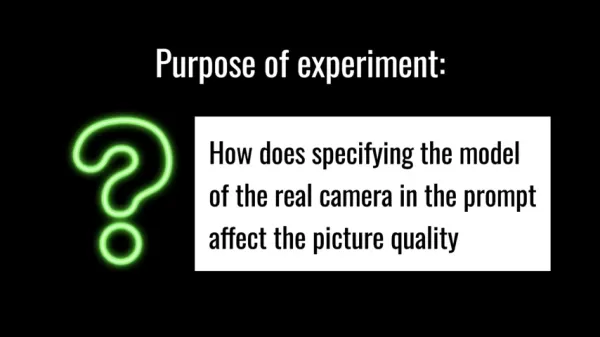
The central question is: How does naming a real camera model in a prompt influence image quality in Midjourney? Answering this empowers users to leverage AI tools more effectively, creating visuals that align with their artistic vision. The objective is to produce images that resemble the output of a specific camera.
Popular Professional Camera Models for Portrait Photography
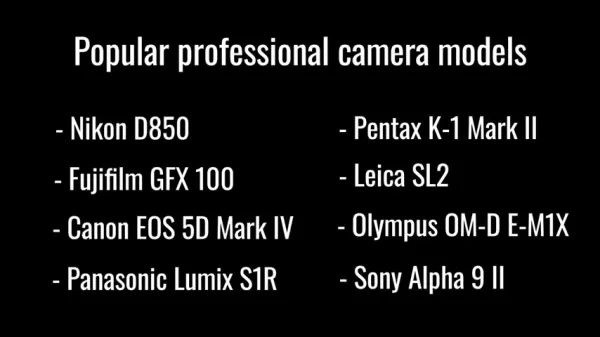
To conduct a thorough analysis, we reference several popular professional camera models known for their portrait capabilities.
These cameras offer distinct features that can be emulated in AI art, testing the system's ability to mimic real-world camera characteristics. The models include:
- Nikon D850: Renowned for its exceptional clarity and rich color reproduction.
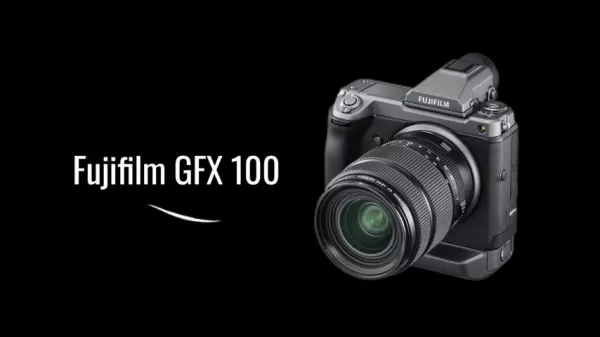
- Fujifilm GFX 100: Celebrated for its incredible detail and smooth tonal gradations.
- Canon EOS 5D Mark IV: Admired for its sharpness, detail, and natural color rendering.
- Panasonic Lumix S1R: Known for its high resolution and wide dynamic range.
- Pentax K-1 Mark II: Notable for its robust construction and image stabilization.
- Leica SL2: Esteemed for its premium build and exceptional image quality.
- Olympus OM-D E-M1X: Recognized for its speed and advanced features.
- Sony Alpha 9 II: Valued for its fast autofocus and high-speed performance.
While this list isn't exhaustive, it provides a strong foundation for experimentation within Midjourney. Using these models as references helps artists explore diverse aesthetics, enhance their creative vision, and deepen their understanding of AI image generation.
Experiment Setup and Methodology
Establishing a Baseline: The Initial Prompt
Before testing camera-specific prompts, we establish a baseline using a generic prompt without any camera model.
This baseline provides a clear point of comparison, highlighting the impact each camera model has on the final image.
The initial prompt is simple: "A beautiful young woman with long hair --style raw --ar 9:16". The '--style raw' parameter is crucial, as it minimizes Midjourney's automatic beautification, yielding a more authentic look that better reflects a camera's inherent qualities. The "--ar 9:16" sets the aspect ratio.
This baseline helps distinguish which image aspects are generated by the AI inherently and which are influenced by the specified camera model. This foundation makes it easier to identify the subtle nuances different cameras contribute to the AI artwork.
Prompting with Specific Camera Models and Parameters
After establishing the baseline, we modify the prompt to include specific camera models.
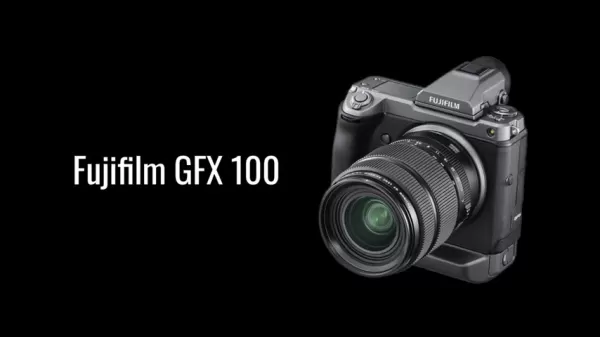
This is done by adding phrases like "shot on a Nikon D850" or "shot on a Fujifilm GFX 100". By systematically changing only the camera model, we can observe how Midjourney emulates different photographic characteristics.
Additional parameters like focal length can be incorporated for further refinement. Adding "with an 85mm lens" or "with a 110mm lens" influences depth of field, perspective, and composition. These adjustments allow for a detailed exploration of how camera and lens combinations translate into AI art.
The goal is to understand how each camera's strengths—such as color rendition, sharpness, and tonal transitions—are represented. This process deepens your understanding of AI image generation and refines your prompt engineering skills.
Step-by-Step Guide to Using Camera Models in Midjourney Prompts
Step 1: Craft Your Base Prompt
Begin with a simple, generic prompt describing your desired subject and setting.
Avoid mentioning any camera models or technical details initially. For example: "A portrait of a young woman in a sunlit forest."
Including the "--style raw" parameter reduces automatic beautification, creating a cleaner canvas for the specific aesthetic effects of your chosen camera.
Example Prompt: "A portrait of a young woman in a sunlit forest --style raw --ar 3:2"
Step 2: Incorporate the Camera Model
Modify your base prompt by adding "shot on a [Camera Model]". Replace "[Camera Model]" with your desired camera, like "Nikon D850". This choice will significantly impact the image's colors, sharpness, and overall feel.
Example Prompts:
- "A portrait of a young woman in a sunlit forest, shot on a Nikon D850 --style raw --ar 3:2"
- "A portrait of a young woman in a sunlit forest, shot on a Fujifilm GFX 100 --style raw --ar 3:2"
- "A portrait of a young woman in a sunlit forest, shot on a Canon EOS 5D Mark IV --style raw --ar 3:2"
Step 3: Refine with Focal Length (Optional)
For added control, specify a focal length by adding "with an [XX]mm lens". Use values like 50mm, 85mm, or 100mm for portraits. Note that not all focal lengths are available.
Example Prompts:
- "A portrait of a young woman in a sunlit forest, shot on a Nikon D850 with an 85mm lens --style raw --ar 3:2"
- "A portrait of a young woman in a sunlit forest, shot on a Fujifilm GFX 100 with a 110mm lens --style raw --ar 3:2"
- "A portrait of a young woman in a sunlit forest, shot on a Canon EOS 5D Mark IV with a 50mm lens --style raw --ar 3:2"
Step 4: Experiment and Iterate
Generate multiple images using different camera models and settings to observe variations. Analyze the results to determine which combinations best achieve your desired look. Experiment further with parameters like aperture, ISO, and lighting for additional refinement.
Through systematic experimentation, you'll develop a strong understanding of how specific cameras and settings influence AI art. This knowledge allows you to predict aesthetic outcomes more accurately, leading to greater creative control and more personalized, stunning results.
Pricing & Models
AI Model
Pricing is not relevant to this experiment, as Midjourney is a service. This article focuses on technique rather than any specific AI model's cost.
Pros and Cons of Using Camera Models in Midjourney Prompts
Pros
Greater aesthetic control
Enhanced image quality
Increased creative versatility
Ability to reproduce professional-grade results
Opportunity to experiment with camera-specific features
Cons
Requires some technical photography knowledge
Can be time-consuming to test different options
Results may sometimes be inconsistent
May not perfectly replicate real-world camera traits
Can feel overwhelming for beginners
Core Features of Camera Models
Nikon D850 Camera
- High Resolution: Delivers exceptional detail with its high megapixel count.
- Wide Dynamic Range: Captures a broad range of tones from shadows to highlights.
- Rich Color Reproduction: Produces vibrant and true-to-life colors.
- Strong Low Light Performance: Performs reliably in difficult lighting.
- Fast Autofocus: Offers quick and accurate focusing, even on moving subjects.
Fujifilm GFX 100 Camera
- Medium Format Sensor: Provides superior image quality and depth.
- Smooth Tonal Transitions: Creates subtle gradations for enhanced realism.
- Exceptional Detail: Captures intricate details with stunning clarity.
- Robust Build Quality: Ensures durability for professional use.
- Film Simulation Modes: Offers a range of classic film-like color profiles.
Canon EOS 5D Mark IV Camera
- Dual Pixel CMOS AF: Enables smooth and precise autofocus in video mode.
- High Dynamic Range: Maintains detail in both bright and dark areas.
- Natural Color Reproduction: Renders colors accurately without over-saturation.
- Versatile Performance: Excels across various photographic styles.
- Intuitive Controls: Provides a user-friendly shooting experience.
Use Cases for Camera Models
Professional Photography
These camera models are ideal for professional portrait work, delivering outstanding image quality, detail, and color fidelity.
They are widely used in studio settings with controlled lighting and outdoors for capturing natural scenes. They are also popular in fine art photography for creating digitally produced images with specific aesthetic qualities.
The Nikon D850, Fujifilm GFX 100, and Canon EOS 5D Mark IV are favored by professionals for their reliability and top-tier performance.
AI-Generated Art
By specifying camera models in Midjourney, artists can replicate the aesthetic of professionally shot portraits. This opens new creative avenues for producing unique, high-quality artwork. Integrating camera characteristics allows for detailed customization, offering unprecedented control over the artistic outcome.
Frequently Asked Questions
Why use camera models in AI image generation?
Specifying camera models provides greater control over the final aesthetic. Different cameras have unique signatures in color, sharpness, and tonal range. Emulating these traits through AI prompts leads to more visually appealing and personalized artwork.
What is the significance of the '--style raw' parameter?
The '--style raw' parameter reduces Midjourney's automatic image enhancement. This helps preserve the inherent qualities of the specified camera model, resulting in a more authentic, less processed appearance.
How does focal length affect portrait photography?
Focal length dictates perspective, depth of field, and composition. Shorter focal lenses widen the view, while longer lenses compress the scene and create a more blurred background. Experimenting with focal lengths allows precise control over the portrait's look.
Can AI accurately replicate the characteristics of different cameras?
AI models like Midjourney can effectively emulate many key characteristics of various cameras. While not a perfect replication, the AI captures the essence of each camera's aesthetic, enabling creative exploration and personalized results.
Related Questions
What other parameters can be used to refine AI-generated portraits?
Beyond camera models and focal length, several other parameters can refine AI portraits:Aperture: Controls depth of field and light intake. Lower f-numbers (e.g., f/1.8) create a shallow depth of field, blurring the background. Higher f-numbers (e.g., f/11) keep more of the scene in focus.ISO: Sets the sensor's light sensitivity. Lower ISO values (e.g., ISO 100) yield cleaner images. Higher ISOs (e.g., ISO 1600) help in low light but can introduce noise.Lighting: Shapes the portrait's mood. Natural light, studio setups, and artificial light create different effects. Experimenting with lighting dramatically alters the subject's appearance.Composition: Involves arranging elements within the frame. Techniques like the rule of thirds, leading lines, and symmetry create engaging portraits.Combining these parameters with camera models and focal length allows artists to create AI portraits with remarkable detail, depth, and visual impact.
Related article
 DeepMind CEO Hassabis: I sleep six hours a day, usually feel energetic around 1 a.m.
Fortune recently featured an interview with Demis Hassabis, CEO of Google DeepMind, revealing his unconventional approach to rest and productivity. Hassabis disclosed that he sleeps very little, structuring his waking hours into two distinct work blo
OpenAI, Anthropic Vie for Market Share Despite Revenue Shortfalls
Despite recent reports suggesting OpenAI missed revenue targets, creating pressure on tech stocks this Tuesday, private AI lab investors remain resilient. Seasoned backers have confirmed they will not reduce investment despite negative media coverage
California AV Compliance: A New Era of Tickets, Geofences, and 1M Miles
Guident operates an AuveTech shuttle in South Florida, managing a four-mile route in West Palm Beach and a one-mile route in Boca Raton using its remote monitoring technology. | Credit: GuidentCalifornia is redefining the regulatory landscape for dri
Related Special Topic Recommendations
Video creation
DeepMind CEO Hassabis: I sleep six hours a day, usually feel energetic around 1 a.m.
Fortune recently featured an interview with Demis Hassabis, CEO of Google DeepMind, revealing his unconventional approach to rest and productivity. Hassabis disclosed that he sleeps very little, structuring his waking hours into two distinct work blo
OpenAI, Anthropic Vie for Market Share Despite Revenue Shortfalls
Despite recent reports suggesting OpenAI missed revenue targets, creating pressure on tech stocks this Tuesday, private AI lab investors remain resilient. Seasoned backers have confirmed they will not reduce investment despite negative media coverage
California AV Compliance: A New Era of Tickets, Geofences, and 1M Miles
Guident operates an AuveTech shuttle in South Florida, managing a four-mile route in West Palm Beach and a one-mile route in Boca Raton using its remote monitoring technology. | Credit: GuidentCalifornia is redefining the regulatory landscape for dri
Related Special Topic Recommendations
Video creation
 AI Short-Form Video Hook Generators for Reels, Shorts, and Product Launch Campaigns
2026 Latest Best AI Short-Form Video Hook Generators for Reels Shorts and Product Launch Campaigns! XIX.AI curates top-rated powerful game-changing tools that deliver must-try results through real-world tests. This weekly updated page offers free vs paid comparison rankings to help you find the perfect solution for boosting content creativity and productivity. Explore now to Unlock your AI edge!
 11 tools
 xix.ai
writing
AI Article Outline Tools for Long Form Writing
xix.ai
writing
AI Article Outline Tools for Long Form Writing
2026 Latest Best Top-Rated AI Article Outline Tools for Long Form Writing! This curated collection features powerful, game-changing tools that deliver accurate, structured outlines with real-world tests to boost writing efficiency significantly. XIX.AI is part of this elite selection. Get a free vs paid comparison to help you choose the perfect tool. Explore now and Unlock your AI edge!
9 tools
xix.ai
chatbot
Best AI Roleplay Chat Apps for Language Practice, Interview Prep, and Daily Fluency
2026 Latest Best Top-rated AI Roleplay Chat Apps for Language Practice, Interview Prep, and Daily Fluency! XIX.AI curates a powerful game-changing collection that offers free vs paid comparison, real-world tests, and updated rankings weekly. These must-try tools help you boost writing skills, overcome fluency challenges, and improve communication efficiency across all daily scenarios. Explore now to discover your perfect tool for language growth!
10 tools
xix.ai
Music composition
AI Stem Separation Tools for Remix Production, Sampling Prep, and Karaoke Masters
2026 Latest Best Top-rated AI Stem Separation Tools Curated for Remix Production, Sampling Prep, and Karaoke Masters. These powerful game-changing tools offer real-world tests to deliver precise audio isolation, boosting productivity significantly. XIX.AI provides a weekly updated free vs paid comparison guide to help you find the must-try solution that suits your needs. Explore now to unlock your AI edge.
8 tools
xix.ai
Data Analysis
AI SQL Copilots for Revenue Dashboards, Funnel Analysis, and Product Metrics
2026 Latest Best AI SQL Copilots Ranked Top-Rated! XIX.AI curates a powerful game-changing collection for weekly updated real-world tests. These must-try tools help you generate accurate revenue dashboards, analyze sales funnels, and track product metrics swiftly, boosting productivity massively. Explore now to Discover your perfect tool for data-driven decision making! 238 characters
9 tools
xix.ai
Music composition
Best AI Melody Writing Tools for Song Drafts
2026 Latest Best Top-Rated AI Melody Writing Tools for Song Drafts! XIX.AI has curated a highly powerful game-changing collection that goes through rigorous real-world tests to deliver the best writing experience. You can find detailed free vs paid comparisons, accurate rankings, and must-try options designed to help you create stunning song drafts effortlessly and boost your creative productivity significantly. Explore now to discover your perfect tool!
8 tools
xix.ai

 Comments (2)
0/500
Comments (2)
0/500
![MarkSanchez]()
Interesting read! I've been playing with Midjourney for a while but never thought to specify camera models like this. Makes total sense though—different lenses and sensors would totally change the vibe. Gonna try adding 'shot on a Leica M10' to my next portrait prompt and see what happens. The AI art rabbit hole just gets deeper! 📸
![JustinAnderson]()
作为一个摄影爱好者,看到 Midjourney 可以通过相机模型来调整人像风格,真的挺有趣的。没想到AI还能学习不同相机镜头的成像特点,不知道用手机相机的风格会不会也能生成类似的效果呢?感觉这功能对没有真机的人挺有帮助的,至少知道怎么在AI里模仿徕卡或者哈苏那种独特的调色了。不过也得小心别太依赖,免得忽略了构图和光影的基础 😅。
Using specific camera models in Midjourney prompts unlocks a powerful tool for crafting AI-generated portraits. This guide examines how different professional cameras influence the style and quality of AI art. By learning how real-world camera characteristics translate into digital creations, photographers and artists can refine their prompts to achieve more nuanced and visually striking results. Join us in exploring how to elevate simple text prompts into breathtaking photographic art with Midjourney.
Key Points
Learn how specifying camera models in Midjourney directly affects portrait quality.
Explore how Nikon, Fujifilm, Canon, Panasonic, Leica, Sony, and Olympus camera traits appear in AI art.
Master using the '--style raw' parameter to reduce Midjourney's automatic image enhancement.
Understand how specifying focal lengths like 85mm or 110mm alters the look of a portrait.
Compare outputs from different camera models to define your preferred aesthetic in AI portraits.
Discover how to integrate specific camera features into your prompts for greater creative control.
Understanding Camera Models in AI Art Generation
The Purpose of Experimenting with Camera Models in Prompts
Integrating specific camera models into AI art prompts aims to shape the aesthetic and technical qualities of the final image.
Specifying a camera model allows you to harness its unique characteristics—like color science, sharpness, and overall image rendering—for greater control over the output. This technique can help replicate the style of famous photographers or achieve particular visual effects.
The central question is: How does naming a real camera model in a prompt influence image quality in Midjourney? Answering this empowers users to leverage AI tools more effectively, creating visuals that align with their artistic vision. The objective is to produce images that resemble the output of a specific camera.
Popular Professional Camera Models for Portrait Photography
To conduct a thorough analysis, we reference several popular professional camera models known for their portrait capabilities.
These cameras offer distinct features that can be emulated in AI art, testing the system's ability to mimic real-world camera characteristics. The models include:
- Nikon D850: Renowned for its exceptional clarity and rich color reproduction.
- Fujifilm GFX 100: Celebrated for its incredible detail and smooth tonal gradations.
- Canon EOS 5D Mark IV: Admired for its sharpness, detail, and natural color rendering.
- Panasonic Lumix S1R: Known for its high resolution and wide dynamic range.
- Pentax K-1 Mark II: Notable for its robust construction and image stabilization.
- Leica SL2: Esteemed for its premium build and exceptional image quality.
- Olympus OM-D E-M1X: Recognized for its speed and advanced features.
- Sony Alpha 9 II: Valued for its fast autofocus and high-speed performance.
While this list isn't exhaustive, it provides a strong foundation for experimentation within Midjourney. Using these models as references helps artists explore diverse aesthetics, enhance their creative vision, and deepen their understanding of AI image generation.
Experiment Setup and Methodology
Establishing a Baseline: The Initial Prompt
Before testing camera-specific prompts, we establish a baseline using a generic prompt without any camera model.
This baseline provides a clear point of comparison, highlighting the impact each camera model has on the final image.
The initial prompt is simple: "A beautiful young woman with long hair --style raw --ar 9:16". The '--style raw' parameter is crucial, as it minimizes Midjourney's automatic beautification, yielding a more authentic look that better reflects a camera's inherent qualities. The "--ar 9:16" sets the aspect ratio.
This baseline helps distinguish which image aspects are generated by the AI inherently and which are influenced by the specified camera model. This foundation makes it easier to identify the subtle nuances different cameras contribute to the AI artwork.
Prompting with Specific Camera Models and Parameters
After establishing the baseline, we modify the prompt to include specific camera models.
This is done by adding phrases like "shot on a Nikon D850" or "shot on a Fujifilm GFX 100". By systematically changing only the camera model, we can observe how Midjourney emulates different photographic characteristics.
Additional parameters like focal length can be incorporated for further refinement. Adding "with an 85mm lens" or "with a 110mm lens" influences depth of field, perspective, and composition. These adjustments allow for a detailed exploration of how camera and lens combinations translate into AI art.
The goal is to understand how each camera's strengths—such as color rendition, sharpness, and tonal transitions—are represented. This process deepens your understanding of AI image generation and refines your prompt engineering skills.
Step-by-Step Guide to Using Camera Models in Midjourney Prompts
Step 1: Craft Your Base Prompt
Begin with a simple, generic prompt describing your desired subject and setting.
Avoid mentioning any camera models or technical details initially. For example: "A portrait of a young woman in a sunlit forest."
Including the "--style raw" parameter reduces automatic beautification, creating a cleaner canvas for the specific aesthetic effects of your chosen camera.
Example Prompt: "A portrait of a young woman in a sunlit forest --style raw --ar 3:2"
Step 2: Incorporate the Camera Model
Modify your base prompt by adding "shot on a [Camera Model]". Replace "[Camera Model]" with your desired camera, like "Nikon D850". This choice will significantly impact the image's colors, sharpness, and overall feel.
Example Prompts:
- "A portrait of a young woman in a sunlit forest, shot on a Nikon D850 --style raw --ar 3:2"
- "A portrait of a young woman in a sunlit forest, shot on a Fujifilm GFX 100 --style raw --ar 3:2"
- "A portrait of a young woman in a sunlit forest, shot on a Canon EOS 5D Mark IV --style raw --ar 3:2"
Step 3: Refine with Focal Length (Optional)
For added control, specify a focal length by adding "with an [XX]mm lens". Use values like 50mm, 85mm, or 100mm for portraits. Note that not all focal lengths are available.
Example Prompts:
- "A portrait of a young woman in a sunlit forest, shot on a Nikon D850 with an 85mm lens --style raw --ar 3:2"
- "A portrait of a young woman in a sunlit forest, shot on a Fujifilm GFX 100 with a 110mm lens --style raw --ar 3:2"
- "A portrait of a young woman in a sunlit forest, shot on a Canon EOS 5D Mark IV with a 50mm lens --style raw --ar 3:2"
Step 4: Experiment and Iterate
Generate multiple images using different camera models and settings to observe variations. Analyze the results to determine which combinations best achieve your desired look. Experiment further with parameters like aperture, ISO, and lighting for additional refinement.
Through systematic experimentation, you'll develop a strong understanding of how specific cameras and settings influence AI art. This knowledge allows you to predict aesthetic outcomes more accurately, leading to greater creative control and more personalized, stunning results.
Pricing & Models
AI Model
Pricing is not relevant to this experiment, as Midjourney is a service. This article focuses on technique rather than any specific AI model's cost.
Pros and Cons of Using Camera Models in Midjourney Prompts
Pros
Greater aesthetic control
Enhanced image quality
Increased creative versatility
Ability to reproduce professional-grade results
Opportunity to experiment with camera-specific features
Cons
Requires some technical photography knowledge
Can be time-consuming to test different options
Results may sometimes be inconsistent
May not perfectly replicate real-world camera traits
Can feel overwhelming for beginners
Core Features of Camera Models
Nikon D850 Camera
- High Resolution: Delivers exceptional detail with its high megapixel count.
- Wide Dynamic Range: Captures a broad range of tones from shadows to highlights.
- Rich Color Reproduction: Produces vibrant and true-to-life colors.
- Strong Low Light Performance: Performs reliably in difficult lighting.
- Fast Autofocus: Offers quick and accurate focusing, even on moving subjects.
Fujifilm GFX 100 Camera
- Medium Format Sensor: Provides superior image quality and depth.
- Smooth Tonal Transitions: Creates subtle gradations for enhanced realism.
- Exceptional Detail: Captures intricate details with stunning clarity.
- Robust Build Quality: Ensures durability for professional use.
- Film Simulation Modes: Offers a range of classic film-like color profiles.
Canon EOS 5D Mark IV Camera
- Dual Pixel CMOS AF: Enables smooth and precise autofocus in video mode.
- High Dynamic Range: Maintains detail in both bright and dark areas.
- Natural Color Reproduction: Renders colors accurately without over-saturation.
- Versatile Performance: Excels across various photographic styles.
- Intuitive Controls: Provides a user-friendly shooting experience.
Use Cases for Camera Models
Professional Photography
These camera models are ideal for professional portrait work, delivering outstanding image quality, detail, and color fidelity.
They are widely used in studio settings with controlled lighting and outdoors for capturing natural scenes. They are also popular in fine art photography for creating digitally produced images with specific aesthetic qualities.
The Nikon D850, Fujifilm GFX 100, and Canon EOS 5D Mark IV are favored by professionals for their reliability and top-tier performance.
AI-Generated Art
By specifying camera models in Midjourney, artists can replicate the aesthetic of professionally shot portraits. This opens new creative avenues for producing unique, high-quality artwork. Integrating camera characteristics allows for detailed customization, offering unprecedented control over the artistic outcome.
Frequently Asked Questions
Why use camera models in AI image generation?
Specifying camera models provides greater control over the final aesthetic. Different cameras have unique signatures in color, sharpness, and tonal range. Emulating these traits through AI prompts leads to more visually appealing and personalized artwork.
What is the significance of the '--style raw' parameter?
The '--style raw' parameter reduces Midjourney's automatic image enhancement. This helps preserve the inherent qualities of the specified camera model, resulting in a more authentic, less processed appearance.
How does focal length affect portrait photography?
Focal length dictates perspective, depth of field, and composition. Shorter focal lenses widen the view, while longer lenses compress the scene and create a more blurred background. Experimenting with focal lengths allows precise control over the portrait's look.
Can AI accurately replicate the characteristics of different cameras?
AI models like Midjourney can effectively emulate many key characteristics of various cameras. While not a perfect replication, the AI captures the essence of each camera's aesthetic, enabling creative exploration and personalized results.
Related Questions
What other parameters can be used to refine AI-generated portraits?
Beyond camera models and focal length, several other parameters can refine AI portraits:Aperture: Controls depth of field and light intake. Lower f-numbers (e.g., f/1.8) create a shallow depth of field, blurring the background. Higher f-numbers (e.g., f/11) keep more of the scene in focus.ISO: Sets the sensor's light sensitivity. Lower ISO values (e.g., ISO 100) yield cleaner images. Higher ISOs (e.g., ISO 1600) help in low light but can introduce noise.Lighting: Shapes the portrait's mood. Natural light, studio setups, and artificial light create different effects. Experimenting with lighting dramatically alters the subject's appearance.Composition: Involves arranging elements within the frame. Techniques like the rule of thirds, leading lines, and symmetry create engaging portraits.Combining these parameters with camera models and focal length allows artists to create AI portraits with remarkable detail, depth, and visual impact.








 DeepMind CEO Hassabis: I sleep six hours a day, usually feel energetic around 1 a.m.
Fortune recently featured an interview with Demis Hassabis, CEO of Google DeepMind, revealing his unconventional approach to rest and productivity. Hassabis disclosed that he sleeps very little, structuring his waking hours into two distinct work blo
DeepMind CEO Hassabis: I sleep six hours a day, usually feel energetic around 1 a.m.
Fortune recently featured an interview with Demis Hassabis, CEO of Google DeepMind, revealing his unconventional approach to rest and productivity. Hassabis disclosed that he sleeps very little, structuring his waking hours into two distinct work blo
 OpenAI, Anthropic Vie for Market Share Despite Revenue Shortfalls
Despite recent reports suggesting OpenAI missed revenue targets, creating pressure on tech stocks this Tuesday, private AI lab investors remain resilient. Seasoned backers have confirmed they will not reduce investment despite negative media coverage
California AV Compliance: A New Era of Tickets, Geofences, and 1M Miles
Guident operates an AuveTech shuttle in South Florida, managing a four-mile route in West Palm Beach and a one-mile route in Boca Raton using its remote monitoring technology. | Credit: GuidentCalifornia is redefining the regulatory landscape for dri
OpenAI, Anthropic Vie for Market Share Despite Revenue Shortfalls
Despite recent reports suggesting OpenAI missed revenue targets, creating pressure on tech stocks this Tuesday, private AI lab investors remain resilient. Seasoned backers have confirmed they will not reduce investment despite negative media coverage
California AV Compliance: A New Era of Tickets, Geofences, and 1M Miles
Guident operates an AuveTech shuttle in South Florida, managing a four-mile route in West Palm Beach and a one-mile route in Boca Raton using its remote monitoring technology. | Credit: GuidentCalifornia is redefining the regulatory landscape for dri

2026 Latest Best AI Short-Form Video Hook Generators for Reels Shorts and Product Launch Campaigns! XIX.AI curates top-rated powerful game-changing tools that deliver must-try results through real-world tests. This weekly updated page offers free vs paid comparison rankings to help you find the perfect solution for boosting content creativity and productivity. Explore now to Unlock your AI edge!
11 tools
xix.ai

2026 Latest Best Top-Rated AI Article Outline Tools for Long Form Writing! This curated collection features powerful, game-changing tools that deliver accurate, structured outlines with real-world tests to boost writing efficiency significantly. XIX.AI is part of this elite selection. Get a free vs paid comparison to help you choose the perfect tool. Explore now and Unlock your AI edge!
9 tools
xix.ai

2026 Latest Best Top-rated AI Roleplay Chat Apps for Language Practice, Interview Prep, and Daily Fluency! XIX.AI curates a powerful game-changing collection that offers free vs paid comparison, real-world tests, and updated rankings weekly. These must-try tools help you boost writing skills, overcome fluency challenges, and improve communication efficiency across all daily scenarios. Explore now to discover your perfect tool for language growth!
10 tools
xix.ai

2026 Latest Best Top-rated AI Stem Separation Tools Curated for Remix Production, Sampling Prep, and Karaoke Masters. These powerful game-changing tools offer real-world tests to deliver precise audio isolation, boosting productivity significantly. XIX.AI provides a weekly updated free vs paid comparison guide to help you find the must-try solution that suits your needs. Explore now to unlock your AI edge.
8 tools
xix.ai

2026 Latest Best AI SQL Copilots Ranked Top-Rated! XIX.AI curates a powerful game-changing collection for weekly updated real-world tests. These must-try tools help you generate accurate revenue dashboards, analyze sales funnels, and track product metrics swiftly, boosting productivity massively. Explore now to Discover your perfect tool for data-driven decision making! 238 characters
9 tools
xix.ai

2026 Latest Best Top-Rated AI Melody Writing Tools for Song Drafts! XIX.AI has curated a highly powerful game-changing collection that goes through rigorous real-world tests to deliver the best writing experience. You can find detailed free vs paid comparisons, accurate rankings, and must-try options designed to help you create stunning song drafts effortlessly and boost your creative productivity significantly. Explore now to discover your perfect tool!
8 tools
xix.ai

Interesting read! I've been playing with Midjourney for a while but never thought to specify camera models like this. Makes total sense though—different lenses and sensors would totally change the vibe. Gonna try adding 'shot on a Leica M10' to my next portrait prompt and see what happens. The AI art rabbit hole just gets deeper! 📸
作为一个摄影爱好者,看到 Midjourney 可以通过相机模型来调整人像风格,真的挺有趣的。没想到AI还能学习不同相机镜头的成像特点,不知道用手机相机的风格会不会也能生成类似的效果呢?感觉这功能对没有真机的人挺有帮助的,至少知道怎么在AI里模仿徕卡或者哈苏那种独特的调色了。不过也得小心别太依赖,免得忽略了构图和光影的基础 😅。












