


 Home
HomeBeautiful.ai in 2025: How AI is Revolutionizing Presentation Design
In today's rapidly evolving professional landscape, effective presentation tools are more critical than ever. Beautiful.ai stands out as a leading AI-powered platform that simplifies presentation creation while delivering visually impressive results. This review explores Beautiful.ai's strengths and limitations for individuals and teams looking to enhance their presentations in 2025. We'll examine its AI features, customization options, and practical aspects to help you decide if it meets your presentation requirements.
Key Points
Beautiful.ai uses AI to automate design and layout, guaranteeing visually attractive presentations.
The platform allows template customization and personal content integration, striking a balance between AI assistance and creative control.
Real-time collaboration features support teamwork and boost productivity.
Some limitations include constrained design flexibility and reliance on internet connectivity.
The tool is ideal for professionals and teams wanting efficient, eye-catching presentations.
It's crucial to understand the platform's limitations before using it for high-stakes presentations.
Users can export presentations in multiple formats, accommodating various sharing and presentation needs.
Overview of Beautiful.ai: The AI Presentation Revolution
What is Beautiful.ai?
Beautiful.ai is an innovative presentation tool that uses artificial intelligence to automate design tasks.
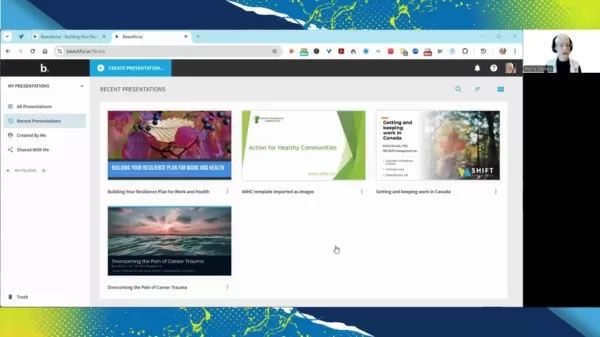
It streamlines the process of creating visually compelling presentations. Unlike traditional software such as PowerPoint, Beautiful.ai emphasizes smart templates and AI-powered design, enabling users to produce professional-looking presentations efficiently.
The platform's core philosophy is to make professional design accessible to all users. Whether you're an experienced professional or a student, this AI presentation tool empowers you to create striking visuals and polished slideshows with ease. While conventional tools often require substantial design expertise, Beautiful.ai automates many complex design tasks.
Key Features That Make Beautiful.ai Stand Out
Beautiful.ai incorporates several features that streamline presentation creation and enhance visual impact. Here are the standout characteristics:
- AI-Powered Design Assistance: The platform's AI automatically handles design and layout decisions, ensuring your presentations are both informative and aesthetically pleasing. Its algorithms optimize slide design, font selection, and image placement, delivering a cohesive, professional appearance.
- Smart Templates: A diverse selection of smart templates automatically adjusts to your content. These templates cover various slide formats, including title slides, content slides, charts, and graphs. This functionality helps users structure information quickly without grappling with design complexity.
- Customization: While AI manages the core design, Beautiful.ai offers extensive customization capabilities. Users can modify color schemes, fonts, and layouts to align with their brand or personal style, ensuring presentations reflect their unique identity.
- Real-Time Collaboration: Multiple users can work on the same presentation simultaneously.
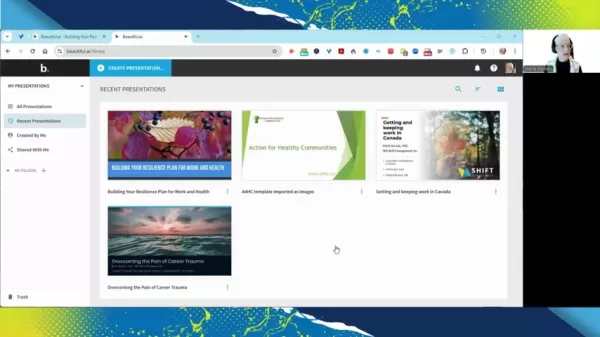
This fosters teamwork and improves productivity through features like commenting, version control, and adjustable access permissions.
- Extensive Media Library: The tool includes a comprehensive library of high-quality images, icons, and videos. This allows users to incorporate relevant, engaging media directly into their slides, eliminating the need for external asset searches.
- Data Visualization: Beautiful.ai simplifies chart and graph creation. Users can import spreadsheet data or enter it manually to generate clear, attractive visualizations, making complex data easily understandable.
- Presentation Analytics: To maximize presentation effectiveness, Beautiful.ai provides analytics on viewer engagement. Presenters can identify which slides perform best, enabling data-informed improvements for future presentations.
Diving Deep: How to Create a Presentation with Beautiful.ai
Step-by-Step Guide to Presentation Creation
Creating a presentation with Beautiful.ai is intuitive, thanks to its user-friendly interface and AI-driven functionality. Follow this detailed guide to get started:
Step 1: Account Setup and Dashboard Overview
- Start by visiting the Beautiful.ai website and signing up for an account. Choose between a free trial or paid subscription based on your requirements.
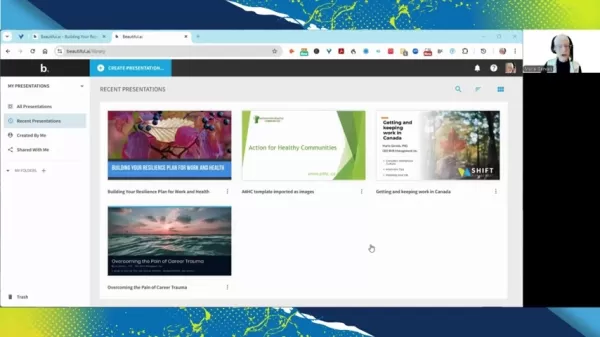
After logging in, you'll access the dashboard, which shows recent presentations, available templates, and options to start new projects.
Step 2: Starting a New Presentation
- Click the "Create Presentation" button to begin. You can start with a blank presentation, use an AI-generated presentation, or select from starter templates. For this guide, we'll focus on AI-generated presentations.
Step 3: Generating a Presentation with AI
- Choose the "Generate with AI" option. You'll see a prompt asking for your presentation topic. Enter a specific description, such as "Job trends for professionals in 2025," then click "Generate Presentation."
Step 4: Reviewing and Customizing AI-Generated Slides
Beautiful.ai will create an outline with slides tailored to your topic. Review these slides to ensure they match your content goals. The platform automatically includes relevant images, charts, and text based on its understanding of your subject.
Customizing Slides:
- Click any slide to enter edit mode. Here you can modify text, change layouts, add or replace images, and adjust colors to match your brand. The smart templates automatically resize and reposition elements for consistent design.
Step 5: Adding New Slides and Content
Add new slides by clicking the "Add Slide" button. Choose from various layouts based on your content type, including bullet points, charts, images, and quotes.
Adding Text:
- Select a slide layout with a text placeholder, click the placeholder, and start typing. Use text options to adjust font, size, color, and alignment.
Step 6: Incorporating Data Visualizations
Data visualization is essential for presenting complex information clearly. Beautiful.ai offers multiple chart and graph options.
Creating Charts:
- Select a slide layout with a chart placeholder, then click the placeholder to open the chart editor. Choose from bar charts, pie charts, line graphs, and more.
Importing Data:
- Import data from spreadsheets or enter it manually. Beautiful.ai automatically formats the data into visually appealing charts.
Step 7: Customizing Design Elements
Beautiful.ai provides numerous design customization options to maintain professional, consistent presentations.
Color Schemes:
- Select color schemes that complement your brand. Choose from pre-designed themes or create custom palettes.
Fonts:
- Choose readable fonts that match your brand's style. Maintain consistent font sizes throughout your presentation.
Layouts:
- Experiment with different slide layouts to find the most effective way to present your content. The smart templates automatically adjust elements for design cohesion.
Step 8: Collaborating with Team Members
Beautiful.ai excels in real-time collaboration. Share your presentation by clicking the "Share" button and set permissions for viewing, commenting, or editing.
Commenting:
- Use the commenting feature to provide feedback and discuss changes directly on slides with team members.
Step 9: Review and Finalize
- Before finalizing, review all slides for accuracy and clarity. Check for grammatical errors and ensure all visuals are properly aligned and optimized. Solicit team feedback to catch any overlooked issues.
Step 10: Exporting Your Presentation
- Once satisfied, export your presentation in a suitable format. Beautiful.ai supports exporting as PowerPoint files or PDFs.
By following these steps, you can leverage Beautiful.ai to create impressive, impactful presentations efficiently. The platform's AI-driven features and smart templates make it accessible to users at all skill levels, while customization options preserve personalization.
Beautiful.ai Pricing: Plans for Every Need
Understanding Beautiful.ai's Subscription Model
Beautiful.ai uses a tiered pricing structure to serve different users, from individual professionals to large teams. Understanding each plan's features helps you select the best option for your presentation needs.
Free Plan:
- Beautiful.ai offers a free plan that lets users explore basic features. This plan suits individuals wanting to test the tool and create limited presentations. However, the free version restricts presentation numbers and template access.
Pro Plan:
- The Pro Plan targets individual professionals needing advanced features. It typically includes unlimited presentations, full template access, and enhanced customization. This plan works well for frequent presenters requiring a reliable, versatile tool.
Team Plan:
- Designed for collaborative teams, the Team Plan includes all Pro features plus real-time collaboration tools and shared access permissions. Supporting multiple users with enhanced security and administrative controls, it's ideal for businesses of all sizes.
For informed decisions, visit the Beautiful.ai website to review current pricing and features, ensuring your selected plan matches both your presentation requirements and budget.
Beautiful.ai: Weighing the Pros and Cons
Pros
User-friendly interface
Rapid slide generation
Visually appealing results
Cons
Limited customization freedom
Restricted offline functionality
No internal hyperlinking capabilities
Platform may alter some presentation elements
Core Features of Beautiful.ai
Exploring Beautiful.ai's AI-Driven Capabilities
Beautiful.ai is a presentation tool recognized for its AI-powered features. Here are its primary capabilities:
- AI-Powered Design Automation: Beautiful.ai utilizes artificial intelligence to simplify design workflows, ensuring visually attractive presentations. The AI optimizes slide layouts, font selection, and image positioning, automating intricate design choices.
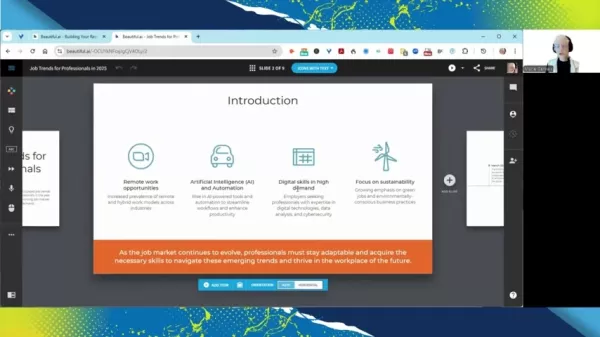
With AI support, you can create polished slideshows quickly and efficiently.
- Smart Templates: Beautiful.ai provides an extensive collection of smart templates with options for various slide types, including title slides, content layouts, charts, and graphs. These templates automatically adapt to your content, saving considerable time in the creation process.
- Customization: While AI manages design fundamentals, Beautiful.ai offers substantial customization possibilities. You can modify color palettes, fonts, and layouts to suit your brand or personal taste, helping maintain consistent brand representation.
- Real-Time Collaboration: Beautiful.ai enables multiple users to collaborate on presentations simultaneously. This functionality benefits team projects, enhances productivity, and ensures alignment among collaborators.
- Media Library: The platform grants access to a comprehensive library of high-quality images, icons, and videos, enabling users to enhance slides with engaging visual content. You can easily add pertinent media without searching external sources.
- Data Visualization: The tool simplifies chart and graph creation by allowing data import from spreadsheets or manual entry. The platform then transforms data into clear visual charts, making complex information easily digestible.
- Presentation Analytics: Beautiful.ai monitors audience engagement, offering insights into which slides perform best. This data helps you refine future presentations for greater impact.
Related article
 DeepMind CEO Hassabis: I sleep six hours a day, usually feel energetic around 1 a.m.
Fortune recently featured an interview with Demis Hassabis, CEO of Google DeepMind, revealing his unconventional approach to rest and productivity. Hassabis disclosed that he sleeps very little, structuring his waking hours into two distinct work blo
OpenAI, Anthropic Vie for Market Share Despite Revenue Shortfalls
Despite recent reports suggesting OpenAI missed revenue targets, creating pressure on tech stocks this Tuesday, private AI lab investors remain resilient. Seasoned backers have confirmed they will not reduce investment despite negative media coverage
California AV Compliance: A New Era of Tickets, Geofences, and 1M Miles
Guident operates an AuveTech shuttle in South Florida, managing a four-mile route in West Palm Beach and a one-mile route in Boca Raton using its remote monitoring technology. | Credit: GuidentCalifornia is redefining the regulatory landscape for dri
Related Special Topic Recommendations
Music composition
DeepMind CEO Hassabis: I sleep six hours a day, usually feel energetic around 1 a.m.
Fortune recently featured an interview with Demis Hassabis, CEO of Google DeepMind, revealing his unconventional approach to rest and productivity. Hassabis disclosed that he sleeps very little, structuring his waking hours into two distinct work blo
OpenAI, Anthropic Vie for Market Share Despite Revenue Shortfalls
Despite recent reports suggesting OpenAI missed revenue targets, creating pressure on tech stocks this Tuesday, private AI lab investors remain resilient. Seasoned backers have confirmed they will not reduce investment despite negative media coverage
California AV Compliance: A New Era of Tickets, Geofences, and 1M Miles
Guident operates an AuveTech shuttle in South Florida, managing a four-mile route in West Palm Beach and a one-mile route in Boca Raton using its remote monitoring technology. | Credit: GuidentCalifornia is redefining the regulatory landscape for dri
Related Special Topic Recommendations
Music composition
 AI Stem Separation Tools for Remix Production, Sampling Prep, and Karaoke Masters
2026 Latest Best Top-rated AI Stem Separation Tools Curated for Remix Production, Sampling Prep, and Karaoke Masters. These powerful game-changing tools offer real-world tests to deliver precise audio isolation, boosting productivity significantly. XIX.AI provides a weekly updated free vs paid comparison guide to help you find the must-try solution that suits your needs. Explore now to unlock your AI edge.
 8 tools
 xix.ai
Data Analysis
AI SQL Copilots for Revenue Dashboards, Funnel Analysis, and Product Metrics
xix.ai
Data Analysis
AI SQL Copilots for Revenue Dashboards, Funnel Analysis, and Product Metrics
2026 Latest Best AI SQL Copilots Ranked Top-Rated! XIX.AI curates a powerful game-changing collection for weekly updated real-world tests. These must-try tools help you generate accurate revenue dashboards, analyze sales funnels, and track product metrics swiftly, boosting productivity massively. Explore now to Discover your perfect tool for data-driven decision making! 238 characters
9 tools
xix.ai
Music composition
Best AI Melody Writing Tools for Song Drafts
2026 Latest Best Top-Rated AI Melody Writing Tools for Song Drafts! XIX.AI has curated a highly powerful game-changing collection that goes through rigorous real-world tests to deliver the best writing experience. You can find detailed free vs paid comparisons, accurate rankings, and must-try options designed to help you create stunning song drafts effortlessly and boost your creative productivity significantly. Explore now to discover your perfect tool!
8 tools
xix.ai
chatbot
Best AI Conversation Trainer Tools for Interview Practice
2026 Latest Best Top-rated AI Conversation Trainer Tools for Interview Practice are here on XIX.AI! This curated collection features powerful, game-changing tools that go through rigorous real-world tests to deliver accurate feedback. You’ll find a free vs paid comparison and detailed rankings to help you choose the must-try option that boosts your confidence and skills. Explore now to Discover your perfect tool for interview success!
12 tools
xix.ai
Design & Art
Best AI Style Transfer Tools for Creative Experiments
2026 Latest Best Top-rated AI Style Transfer Tools for Creative Experiments! XIX.AI has curated a powerful, game-changing collection of must-try tools that deliver exceptional results through real-world tests and rigorous rankings. These top solutions help creatives boost productivity significantly by accelerating content creation and unlocking endless creative possibilities. Explore now to discover your perfect tool and start creating today!
9 tools
xix.ai
Comic Creation
Best AI Dialogue Bubble Tools for Visual Storytelling
2026 Latest Best Top-Rated AI Dialogue Bubble Tools for Visual Storytelling are here on XIX.AI! This curated collection features powerful, game-changing tools that help creators boost productivity and overcome creative bottlenecks. Get a free vs paid comparison, see real-world tests, and check the latest rankings to find the must-try solutions perfect for crafting engaging visual narratives. Explore now to discover your ideal tool!
10 tools
xix.ai

 Comments (1)
0/500
Comments (1)
0/500
![WalterWalker]()
AIを使ってプレゼンテーションを自動で作れるのは便利そう!ただ、デザインが画一的にならないか少し心配😅 他のツールとの差別化ポイントも気になります。
In today's rapidly evolving professional landscape, effective presentation tools are more critical than ever. Beautiful.ai stands out as a leading AI-powered platform that simplifies presentation creation while delivering visually impressive results. This review explores Beautiful.ai's strengths and limitations for individuals and teams looking to enhance their presentations in 2025. We'll examine its AI features, customization options, and practical aspects to help you decide if it meets your presentation requirements.
Key Points
Beautiful.ai uses AI to automate design and layout, guaranteeing visually attractive presentations.
The platform allows template customization and personal content integration, striking a balance between AI assistance and creative control.
Real-time collaboration features support teamwork and boost productivity.
Some limitations include constrained design flexibility and reliance on internet connectivity.
The tool is ideal for professionals and teams wanting efficient, eye-catching presentations.
It's crucial to understand the platform's limitations before using it for high-stakes presentations.
Users can export presentations in multiple formats, accommodating various sharing and presentation needs.
Overview of Beautiful.ai: The AI Presentation Revolution
What is Beautiful.ai?
Beautiful.ai is an innovative presentation tool that uses artificial intelligence to automate design tasks.
It streamlines the process of creating visually compelling presentations. Unlike traditional software such as PowerPoint, Beautiful.ai emphasizes smart templates and AI-powered design, enabling users to produce professional-looking presentations efficiently.
The platform's core philosophy is to make professional design accessible to all users. Whether you're an experienced professional or a student, this AI presentation tool empowers you to create striking visuals and polished slideshows with ease. While conventional tools often require substantial design expertise, Beautiful.ai automates many complex design tasks.
Key Features That Make Beautiful.ai Stand Out
Beautiful.ai incorporates several features that streamline presentation creation and enhance visual impact. Here are the standout characteristics:
- AI-Powered Design Assistance: The platform's AI automatically handles design and layout decisions, ensuring your presentations are both informative and aesthetically pleasing. Its algorithms optimize slide design, font selection, and image placement, delivering a cohesive, professional appearance.
- Smart Templates: A diverse selection of smart templates automatically adjusts to your content. These templates cover various slide formats, including title slides, content slides, charts, and graphs. This functionality helps users structure information quickly without grappling with design complexity.
- Customization: While AI manages the core design, Beautiful.ai offers extensive customization capabilities. Users can modify color schemes, fonts, and layouts to align with their brand or personal style, ensuring presentations reflect their unique identity.
- Real-Time Collaboration: Multiple users can work on the same presentation simultaneously.
This fosters teamwork and improves productivity through features like commenting, version control, and adjustable access permissions.
- Extensive Media Library: The tool includes a comprehensive library of high-quality images, icons, and videos. This allows users to incorporate relevant, engaging media directly into their slides, eliminating the need for external asset searches.
- Data Visualization: Beautiful.ai simplifies chart and graph creation. Users can import spreadsheet data or enter it manually to generate clear, attractive visualizations, making complex data easily understandable.
- Presentation Analytics: To maximize presentation effectiveness, Beautiful.ai provides analytics on viewer engagement. Presenters can identify which slides perform best, enabling data-informed improvements for future presentations.
Diving Deep: How to Create a Presentation with Beautiful.ai
Step-by-Step Guide to Presentation Creation
Creating a presentation with Beautiful.ai is intuitive, thanks to its user-friendly interface and AI-driven functionality. Follow this detailed guide to get started:
Step 1: Account Setup and Dashboard Overview
- Start by visiting the Beautiful.ai website and signing up for an account. Choose between a free trial or paid subscription based on your requirements.
After logging in, you'll access the dashboard, which shows recent presentations, available templates, and options to start new projects.
Step 2: Starting a New Presentation
- Click the "Create Presentation" button to begin. You can start with a blank presentation, use an AI-generated presentation, or select from starter templates. For this guide, we'll focus on AI-generated presentations.
Step 3: Generating a Presentation with AI
- Choose the "Generate with AI" option. You'll see a prompt asking for your presentation topic. Enter a specific description, such as "Job trends for professionals in 2025," then click "Generate Presentation."
Step 4: Reviewing and Customizing AI-Generated Slides
Beautiful.ai will create an outline with slides tailored to your topic. Review these slides to ensure they match your content goals. The platform automatically includes relevant images, charts, and text based on its understanding of your subject.
Customizing Slides:
- Click any slide to enter edit mode. Here you can modify text, change layouts, add or replace images, and adjust colors to match your brand. The smart templates automatically resize and reposition elements for consistent design.
Step 5: Adding New Slides and Content
Add new slides by clicking the "Add Slide" button. Choose from various layouts based on your content type, including bullet points, charts, images, and quotes.
Adding Text:
- Select a slide layout with a text placeholder, click the placeholder, and start typing. Use text options to adjust font, size, color, and alignment.
Step 6: Incorporating Data Visualizations
Data visualization is essential for presenting complex information clearly. Beautiful.ai offers multiple chart and graph options.
Creating Charts:
- Select a slide layout with a chart placeholder, then click the placeholder to open the chart editor. Choose from bar charts, pie charts, line graphs, and more.
Importing Data:
- Import data from spreadsheets or enter it manually. Beautiful.ai automatically formats the data into visually appealing charts.
Step 7: Customizing Design Elements
Beautiful.ai provides numerous design customization options to maintain professional, consistent presentations.
Color Schemes:
- Select color schemes that complement your brand. Choose from pre-designed themes or create custom palettes.
Fonts:
- Choose readable fonts that match your brand's style. Maintain consistent font sizes throughout your presentation.
Layouts:
- Experiment with different slide layouts to find the most effective way to present your content. The smart templates automatically adjust elements for design cohesion.
Step 8: Collaborating with Team Members
Beautiful.ai excels in real-time collaboration. Share your presentation by clicking the "Share" button and set permissions for viewing, commenting, or editing.
Commenting:
- Use the commenting feature to provide feedback and discuss changes directly on slides with team members.
Step 9: Review and Finalize
- Before finalizing, review all slides for accuracy and clarity. Check for grammatical errors and ensure all visuals are properly aligned and optimized. Solicit team feedback to catch any overlooked issues.
Step 10: Exporting Your Presentation
- Once satisfied, export your presentation in a suitable format. Beautiful.ai supports exporting as PowerPoint files or PDFs.
By following these steps, you can leverage Beautiful.ai to create impressive, impactful presentations efficiently. The platform's AI-driven features and smart templates make it accessible to users at all skill levels, while customization options preserve personalization.
Beautiful.ai Pricing: Plans for Every Need
Understanding Beautiful.ai's Subscription Model
Beautiful.ai uses a tiered pricing structure to serve different users, from individual professionals to large teams. Understanding each plan's features helps you select the best option for your presentation needs.
Free Plan:
- Beautiful.ai offers a free plan that lets users explore basic features. This plan suits individuals wanting to test the tool and create limited presentations. However, the free version restricts presentation numbers and template access.
Pro Plan:
- The Pro Plan targets individual professionals needing advanced features. It typically includes unlimited presentations, full template access, and enhanced customization. This plan works well for frequent presenters requiring a reliable, versatile tool.
Team Plan:
- Designed for collaborative teams, the Team Plan includes all Pro features plus real-time collaboration tools and shared access permissions. Supporting multiple users with enhanced security and administrative controls, it's ideal for businesses of all sizes.
For informed decisions, visit the Beautiful.ai website to review current pricing and features, ensuring your selected plan matches both your presentation requirements and budget.
Beautiful.ai: Weighing the Pros and Cons
Pros
User-friendly interface
Rapid slide generation
Visually appealing results
Cons
Limited customization freedom
Restricted offline functionality
No internal hyperlinking capabilities
Platform may alter some presentation elements
Core Features of Beautiful.ai
Exploring Beautiful.ai's AI-Driven Capabilities
Beautiful.ai is a presentation tool recognized for its AI-powered features. Here are its primary capabilities:
- AI-Powered Design Automation: Beautiful.ai utilizes artificial intelligence to simplify design workflows, ensuring visually attractive presentations. The AI optimizes slide layouts, font selection, and image positioning, automating intricate design choices.
With AI support, you can create polished slideshows quickly and efficiently.
- Smart Templates: Beautiful.ai provides an extensive collection of smart templates with options for various slide types, including title slides, content layouts, charts, and graphs. These templates automatically adapt to your content, saving considerable time in the creation process.
- Customization: While AI manages design fundamentals, Beautiful.ai offers substantial customization possibilities. You can modify color palettes, fonts, and layouts to suit your brand or personal taste, helping maintain consistent brand representation.
- Real-Time Collaboration: Beautiful.ai enables multiple users to collaborate on presentations simultaneously. This functionality benefits team projects, enhances productivity, and ensures alignment among collaborators.
- Media Library: The platform grants access to a comprehensive library of high-quality images, icons, and videos, enabling users to enhance slides with engaging visual content. You can easily add pertinent media without searching external sources.
- Data Visualization: The tool simplifies chart and graph creation by allowing data import from spreadsheets or manual entry. The platform then transforms data into clear visual charts, making complex information easily digestible.
- Presentation Analytics: Beautiful.ai monitors audience engagement, offering insights into which slides perform best. This data helps you refine future presentations for greater impact.








 DeepMind CEO Hassabis: I sleep six hours a day, usually feel energetic around 1 a.m.
Fortune recently featured an interview with Demis Hassabis, CEO of Google DeepMind, revealing his unconventional approach to rest and productivity. Hassabis disclosed that he sleeps very little, structuring his waking hours into two distinct work blo
DeepMind CEO Hassabis: I sleep six hours a day, usually feel energetic around 1 a.m.
Fortune recently featured an interview with Demis Hassabis, CEO of Google DeepMind, revealing his unconventional approach to rest and productivity. Hassabis disclosed that he sleeps very little, structuring his waking hours into two distinct work blo
 OpenAI, Anthropic Vie for Market Share Despite Revenue Shortfalls
Despite recent reports suggesting OpenAI missed revenue targets, creating pressure on tech stocks this Tuesday, private AI lab investors remain resilient. Seasoned backers have confirmed they will not reduce investment despite negative media coverage
California AV Compliance: A New Era of Tickets, Geofences, and 1M Miles
Guident operates an AuveTech shuttle in South Florida, managing a four-mile route in West Palm Beach and a one-mile route in Boca Raton using its remote monitoring technology. | Credit: GuidentCalifornia is redefining the regulatory landscape for dri
OpenAI, Anthropic Vie for Market Share Despite Revenue Shortfalls
Despite recent reports suggesting OpenAI missed revenue targets, creating pressure on tech stocks this Tuesday, private AI lab investors remain resilient. Seasoned backers have confirmed they will not reduce investment despite negative media coverage
California AV Compliance: A New Era of Tickets, Geofences, and 1M Miles
Guident operates an AuveTech shuttle in South Florida, managing a four-mile route in West Palm Beach and a one-mile route in Boca Raton using its remote monitoring technology. | Credit: GuidentCalifornia is redefining the regulatory landscape for dri

2026 Latest Best Top-rated AI Stem Separation Tools Curated for Remix Production, Sampling Prep, and Karaoke Masters. These powerful game-changing tools offer real-world tests to deliver precise audio isolation, boosting productivity significantly. XIX.AI provides a weekly updated free vs paid comparison guide to help you find the must-try solution that suits your needs. Explore now to unlock your AI edge.
8 tools
xix.ai

2026 Latest Best AI SQL Copilots Ranked Top-Rated! XIX.AI curates a powerful game-changing collection for weekly updated real-world tests. These must-try tools help you generate accurate revenue dashboards, analyze sales funnels, and track product metrics swiftly, boosting productivity massively. Explore now to Discover your perfect tool for data-driven decision making! 238 characters
9 tools
xix.ai

2026 Latest Best Top-Rated AI Melody Writing Tools for Song Drafts! XIX.AI has curated a highly powerful game-changing collection that goes through rigorous real-world tests to deliver the best writing experience. You can find detailed free vs paid comparisons, accurate rankings, and must-try options designed to help you create stunning song drafts effortlessly and boost your creative productivity significantly. Explore now to discover your perfect tool!
8 tools
xix.ai

2026 Latest Best Top-rated AI Conversation Trainer Tools for Interview Practice are here on XIX.AI! This curated collection features powerful, game-changing tools that go through rigorous real-world tests to deliver accurate feedback. You’ll find a free vs paid comparison and detailed rankings to help you choose the must-try option that boosts your confidence and skills. Explore now to Discover your perfect tool for interview success!
12 tools
xix.ai

2026 Latest Best Top-rated AI Style Transfer Tools for Creative Experiments! XIX.AI has curated a powerful, game-changing collection of must-try tools that deliver exceptional results through real-world tests and rigorous rankings. These top solutions help creatives boost productivity significantly by accelerating content creation and unlocking endless creative possibilities. Explore now to discover your perfect tool and start creating today!
9 tools
xix.ai

2026 Latest Best Top-Rated AI Dialogue Bubble Tools for Visual Storytelling are here on XIX.AI! This curated collection features powerful, game-changing tools that help creators boost productivity and overcome creative bottlenecks. Get a free vs paid comparison, see real-world tests, and check the latest rankings to find the must-try solutions perfect for crafting engaging visual narratives. Explore now to discover your ideal tool!
10 tools
xix.ai

AIを使ってプレゼンテーションを自動で作れるのは便利そう!ただ、デザインが画一的にならないか少し心配😅 他のツールとの差別化ポイントも気になります。












