


 Home
HomeHow to build a website with AI in 2025? Free tools and mobile guide.
Creating a professional website no longer requires extensive technical skills, thanks to Artificial Intelligence (AI) transforming web development. AI website builders utilize machine learning to automate design, content generation, and SEO optimization, allowing anyone to launch a polished site efficiently. This article examines how AI provides intuitive solutions that streamline web creation, eliminating the need for manual coding and complex design work.
Key Points
AI website builders automate site creation, minimizing the demand for coding expertise.
Platforms offer intuitive interfaces and straightforward drag-and-drop features.
AI technology can produce content, enhance SEO, and guarantee mobile responsiveness.
Hostinger AI is a widely-recognized option, officially recommended by WordPress.org.
Access cost-effective logo design services through Fiverr to strengthen your branding.
The Rise of AI Website Builders
The Power of AI in Web Design
AI website builders have become essential for individuals and businesses aiming to establish an online presence effortlessly.

These platforms analyze user preferences, suggest design concepts, and optimize performance within a user-friendly environment. By automating key steps, AI enables the creation of attractive and functional websites much faster than traditional methods. Terms such as AI Website Builder, automated web design, and website creation are increasingly relevant online.
The appeal of an AI Website Builder lies in its straightforward approach. Users answer a few questions about their business, audience, and style preferences. The AI then creates a custom website design based on their input, ensuring the result aligns with their brand and connects with their target market. Creating a website with AI has never been more accessible.
Hostinger AI: A Leading AI Website Builder
Hostinger AI is a standout choice among AI website builders, endorsed by WordPress.org. It provides various hosting packages and an easy-to-use AI builder that simplifies the entire process.
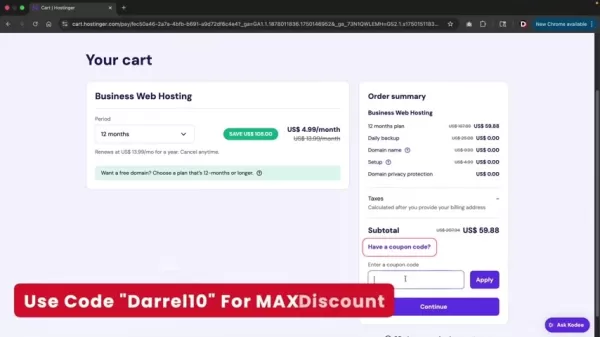
Using Hostinger AI, you can design professional websites rapidly, with AI handling both design and content generation.
Hostinger includes a drag-and-drop editor, allowing seamless customization of site elements. The AI also manages mobile responsiveness and SEO, so your site performs well on any device and ranks favorably in search results. Combining simplicity with advanced AI, Hostinger opens up web development to users of all skill levels. The Business plan offers full access to the AI tool, making Hostinger AI one of the top solutions for fast website creation.
Choosing the Right Plan with Hostinger AI
To unlock Hostinger’s AI website builder capabilities, select the appropriate plan. The Business plan, specifically, includes the AI builder, enabling custom site generation based on your needs.
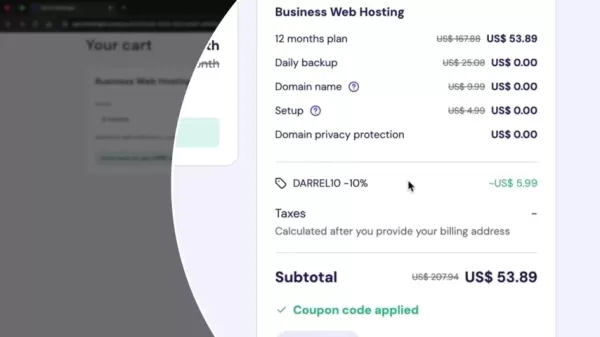
Though the Premium plan includes many features, it doesn’t offer the AI builder. The Business plan is therefore the best option for leveraging AI to build a website effortlessly. This plan is ideal for using the AI tool and crafting distinctive websites for any business. You can choose a subscription period that fits your timeline, and apply discount codes for additional savings.
Enhancing Your Brand with a Professional Logo
The Importance of a Custom Logo
While AI website builders handle many tasks, a custom logo remains essential for brand identity.
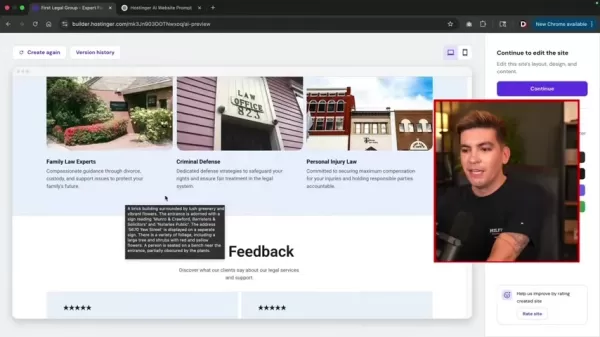
A thoughtfully designed logo communicates your brand’s values, personality, and audience, leaving a memorable impact on potential clients. A professional logo boosts credibility and helps distinguish your business in a crowded market.
Your logo is a fundamental part of brand identity. It should be distinctive and reflect your business values and audience. Fiverr is an excellent platform to find logo designers. It’s a popular choice for small and medium businesses looking for quick, affordable logo designs.
Fiverr: Your Destination for Affordable Logo Design
For businesses wanting budget-friendly, quality logo design, Fiverr is a top choice. This marketplace links you with skilled designers who can produce logos customized to your brand.
With numerous designers offering various styles and expertise, Fiverr accommodates businesses of any size or budget. Free logo generators are not advisable due to potential legal issues, so Fiverr is strongly recommended. Investing in professional designers is preferable, as they bring advanced skills and originality to the table.
Step-by-Step Guide to Building Your AI Website
Getting Started with Hostinger AI
Once you’ve chosen your Hostinger plan and set up your account, begin building your AI-powered website. A few simple steps give the AI the details it needs to craft a site that matches your vision.
1. Familiarizing AI with Hostinger AI Builder: Start by informing the AI about the Hostinger AI website builder to establish a solid foundation.
2. Describe Your Business:
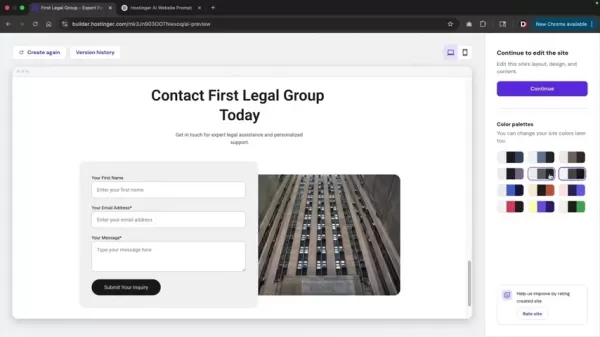
Enter your brand name and a short business description. This helps the AI grasp your brand identity and audience, so it generates a site that truly represents your business.
3. Generate Detailed Prompts with Chat GPT: Using prompts from Chat GPT can help your website stand out. Input your requirements to create prompts that guide the AI more precisely.
4. Select a Design Template: Review the AI-generated design options and pick the template that fits your style best.
5. Customize Your Website: After selecting a template, use the drag-and-drop editor to add, rearrange, and personalize elements like text, images, videos, and calls to action. These adjustments add a unique touch, and the AI builder supports features that save time and skill.
Customizing Website Elements
Hostinger’s AI website builder includes multiple customization features to refine your site’s look and usability. Explore these primary options:
1. Text Elements: Edit text components, adjusting color, heading style, font, and size.
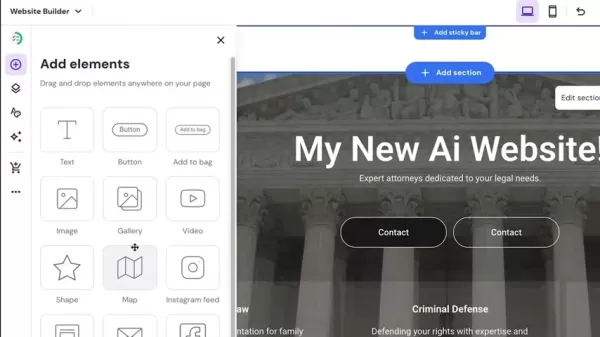
This ensures your content is both attractive and readable.
2. Color Palette: Modify the color scheme to match your brand, creating a unified, professional appearance.
3. Button Styles: Customize button shapes, styles, and animations to fit your design theme.
4. Background and images: Select from various background styles, including solid colors, images, or videos. Upload your own media or choose from Hostinger’s collection of royalty-free assets. Abide by content restrictions relevant to your website. A broad selection of images is available for any type of business.
Optimizing for Mobile Devices
With mobile usage dominant, it’s critical your website looks and works perfectly on smartphones and tablets. Follow these steps to optimize for mobile:
1. Switch to Mobile View: Hostinger lets you preview your site on smaller screens.
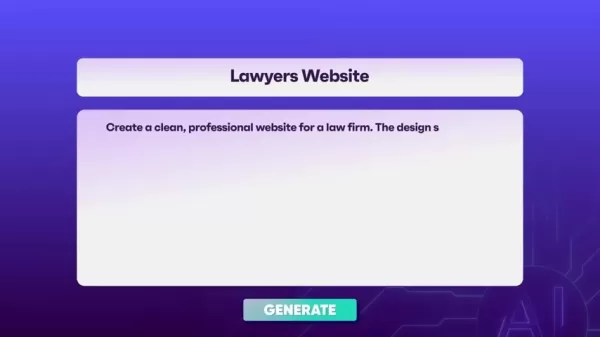
2. Adjust Elements for Mobile: In mobile view, resize, reposition, or hide elements to improve the mobile user experience.
3. Preview and Test: After adjustments, preview and test your site on various mobile devices and emulators to ensure smooth performance.
Essential Settings for SEO
To boost your AI website’s visibility in search results, configure SEO settings for every page. Align these with your company, brand, and name:
1. SEO Title: Write a brief, compelling SEO title for each page that reflects its content and integrates relevant keywords.
2. Meta Description: Draft a concise, informative meta description summarizing the page and encouraging clicks from search results.
Hostinger AI Pricing Options
Cost-Effective Plans for Website Building
Hostinger AI offers several affordable pricing plans for website creation:
Plan Name Description Price (Monthly) PremiumEverything required to build your website.$2.99BusinessUpgrade for more power and enhanced capabilities.$3.99Cloud StartupOptimized performance and advanced features.$9.99Remember, the Business plan is required for AI-generated website creation.
Benefits and Drawbacks of Using AI Website Builders
Pros
Ease of Use: AI website builders feature intuitive interfaces, making site creation possible for non-technical users.
Time Savings: AI automates many development tasks, cutting down the time needed significantly.
Cost-Effectiveness: Plans are affordable, removing the expense of hiring developers or designers.
Customization Options: Users can personalize their websites to match their brand with various available settings.
Cons
Limited Design Control: Automation can restrict how much you can customize, potentially leading to less unique sites.
Potential for Generic Designs: AI-generated designs may sometimes lack originality, making sites look similar to others.
Dependence on AI Algorithm: The output quality relies on the underlying AI’s sophistication and accuracy.
Frequently Asked Questions
What is an AI website builder?
An AI website builder is a platform that uses artificial intelligence to automate website design and development. This includes generating design options, creating content, optimizing for SEO, and ensuring mobile compatibility—all through a simple, user-focused interface. AI brings substantial power to website creation.
Can you give me promo codes to save money on Hostinger
Use the code 'Darrel10' at sign-up to receive an extra 10% off any plan.
Can I use AI generated content for SEO purposes?
Yes, by adhering to a few basic principles, you can produce content that supports SEO. Search engine optimization is essential for any website’s success.
Related Questions
How can Artificial Intelligence be used in creating websites?
AI revolutionizes web design, reshaping traditional practices. Key applications include: Automated Design: AI algorithms assess user preferences and produce unique layouts, color palettes, and typography. Intelligent Content Creation: AI can generate engaging website text, such as product details, blog articles, and promotional copy. Enhanced User Experience: AI-driven chatbots and assistants deliver personalized support, increasing engagement. Predictive Analytics: AI evaluates user behavior to forecast trends, helping optimize sites for better results. Automated SEO: AI helps improve your site’s SEO, increasing its online visibility.
What are things I can do to increase traffic on my website?
Consider these strategies to attract more visitors: Improve SEO (Search Engine Optimization): A clear meta title helps Google understand your site’s content. Keyword Implementation: Choose relevant, high-traffic keywords to improve search rankings. Remember to focus on SEO in titles, layouts, images, videos, and other elements to drive more traffic.
Related article
 DeepMind CEO Hassabis: I sleep six hours a day, usually feel energetic around 1 a.m.
Fortune recently featured an interview with Demis Hassabis, CEO of Google DeepMind, revealing his unconventional approach to rest and productivity. Hassabis disclosed that he sleeps very little, structuring his waking hours into two distinct work blo
OpenAI, Anthropic Vie for Market Share Despite Revenue Shortfalls
Despite recent reports suggesting OpenAI missed revenue targets, creating pressure on tech stocks this Tuesday, private AI lab investors remain resilient. Seasoned backers have confirmed they will not reduce investment despite negative media coverage
California AV Compliance: A New Era of Tickets, Geofences, and 1M Miles
Guident operates an AuveTech shuttle in South Florida, managing a four-mile route in West Palm Beach and a one-mile route in Boca Raton using its remote monitoring technology. | Credit: GuidentCalifornia is redefining the regulatory landscape for dri
Related Special Topic Recommendations
writing
DeepMind CEO Hassabis: I sleep six hours a day, usually feel energetic around 1 a.m.
Fortune recently featured an interview with Demis Hassabis, CEO of Google DeepMind, revealing his unconventional approach to rest and productivity. Hassabis disclosed that he sleeps very little, structuring his waking hours into two distinct work blo
OpenAI, Anthropic Vie for Market Share Despite Revenue Shortfalls
Despite recent reports suggesting OpenAI missed revenue targets, creating pressure on tech stocks this Tuesday, private AI lab investors remain resilient. Seasoned backers have confirmed they will not reduce investment despite negative media coverage
California AV Compliance: A New Era of Tickets, Geofences, and 1M Miles
Guident operates an AuveTech shuttle in South Florida, managing a four-mile route in West Palm Beach and a one-mile route in Boca Raton using its remote monitoring technology. | Credit: GuidentCalifornia is redefining the regulatory landscape for dri
Related Special Topic Recommendations
writing
 AI Article Outline Tools for Long Form Writing
2026 Latest Best Top-Rated AI Article Outline Tools for Long Form Writing! This curated collection features powerful, game-changing tools that deliver accurate, structured outlines with real-world tests to boost writing efficiency significantly. XIX.AI is part of this elite selection. Get a free vs paid comparison to help you choose the perfect tool. Explore now and Unlock your AI edge!
 9 tools
 xix.ai
chatbot
Best AI Roleplay Chat Apps for Language Practice, Interview Prep, and Daily Fluency
xix.ai
chatbot
Best AI Roleplay Chat Apps for Language Practice, Interview Prep, and Daily Fluency
2026 Latest Best Top-rated AI Roleplay Chat Apps for Language Practice, Interview Prep, and Daily Fluency! XIX.AI curates a powerful game-changing collection that offers free vs paid comparison, real-world tests, and updated rankings weekly. These must-try tools help you boost writing skills, overcome fluency challenges, and improve communication efficiency across all daily scenarios. Explore now to discover your perfect tool for language growth!
10 tools
xix.ai
Music composition
AI Stem Separation Tools for Remix Production, Sampling Prep, and Karaoke Masters
2026 Latest Best Top-rated AI Stem Separation Tools Curated for Remix Production, Sampling Prep, and Karaoke Masters. These powerful game-changing tools offer real-world tests to deliver precise audio isolation, boosting productivity significantly. XIX.AI provides a weekly updated free vs paid comparison guide to help you find the must-try solution that suits your needs. Explore now to unlock your AI edge.
8 tools
xix.ai
Data Analysis
AI SQL Copilots for Revenue Dashboards, Funnel Analysis, and Product Metrics
2026 Latest Best AI SQL Copilots Ranked Top-Rated! XIX.AI curates a powerful game-changing collection for weekly updated real-world tests. These must-try tools help you generate accurate revenue dashboards, analyze sales funnels, and track product metrics swiftly, boosting productivity massively. Explore now to Discover your perfect tool for data-driven decision making! 238 characters
9 tools
xix.ai
Music composition
Best AI Melody Writing Tools for Song Drafts
2026 Latest Best Top-Rated AI Melody Writing Tools for Song Drafts! XIX.AI has curated a highly powerful game-changing collection that goes through rigorous real-world tests to deliver the best writing experience. You can find detailed free vs paid comparisons, accurate rankings, and must-try options designed to help you create stunning song drafts effortlessly and boost your creative productivity significantly. Explore now to discover your perfect tool!
8 tools
xix.ai
chatbot
Best AI Conversation Trainer Tools for Interview Practice
2026 Latest Best Top-rated AI Conversation Trainer Tools for Interview Practice are here on XIX.AI! This curated collection features powerful, game-changing tools that go through rigorous real-world tests to deliver accurate feedback. You’ll find a free vs paid comparison and detailed rankings to help you choose the must-try option that boosts your confidence and skills. Explore now to Discover your perfect tool for interview success!
12 tools
xix.ai

 Comments (2)
0/500
Comments (2)
0/500
![ChloeGreen]()
Finally! I've been waiting for AI to make website building less painful. No more staring at HTML code. But is it really that good for mobile optimization? I'm tempted to try it out. 🤔
![RobertWhite]()
La promesse d'un site web professionnel sans compétences techniques en 2025... c'est un peu trop marketing à mon goût. 😅 J'ai testé un de ces 'générateurs d'AI' l'année dernière, et le design était certes joli, mais le code source derrière était un vrai champ de mines ! Reste à voir si ça va vraiment remplacer un développeur humain pour des projets complexes.
Creating a professional website no longer requires extensive technical skills, thanks to Artificial Intelligence (AI) transforming web development. AI website builders utilize machine learning to automate design, content generation, and SEO optimization, allowing anyone to launch a polished site efficiently. This article examines how AI provides intuitive solutions that streamline web creation, eliminating the need for manual coding and complex design work.
Key Points
AI website builders automate site creation, minimizing the demand for coding expertise.
Platforms offer intuitive interfaces and straightforward drag-and-drop features.
AI technology can produce content, enhance SEO, and guarantee mobile responsiveness.
Hostinger AI is a widely-recognized option, officially recommended by WordPress.org.
Access cost-effective logo design services through Fiverr to strengthen your branding.
The Rise of AI Website Builders
The Power of AI in Web Design
AI website builders have become essential for individuals and businesses aiming to establish an online presence effortlessly.
These platforms analyze user preferences, suggest design concepts, and optimize performance within a user-friendly environment. By automating key steps, AI enables the creation of attractive and functional websites much faster than traditional methods. Terms such as AI Website Builder, automated web design, and website creation are increasingly relevant online.
The appeal of an AI Website Builder lies in its straightforward approach. Users answer a few questions about their business, audience, and style preferences. The AI then creates a custom website design based on their input, ensuring the result aligns with their brand and connects with their target market. Creating a website with AI has never been more accessible.
Hostinger AI: A Leading AI Website Builder
Hostinger AI is a standout choice among AI website builders, endorsed by WordPress.org. It provides various hosting packages and an easy-to-use AI builder that simplifies the entire process.
Using Hostinger AI, you can design professional websites rapidly, with AI handling both design and content generation.
Hostinger includes a drag-and-drop editor, allowing seamless customization of site elements. The AI also manages mobile responsiveness and SEO, so your site performs well on any device and ranks favorably in search results. Combining simplicity with advanced AI, Hostinger opens up web development to users of all skill levels. The Business plan offers full access to the AI tool, making Hostinger AI one of the top solutions for fast website creation.
Choosing the Right Plan with Hostinger AI
To unlock Hostinger’s AI website builder capabilities, select the appropriate plan. The Business plan, specifically, includes the AI builder, enabling custom site generation based on your needs.
Though the Premium plan includes many features, it doesn’t offer the AI builder. The Business plan is therefore the best option for leveraging AI to build a website effortlessly. This plan is ideal for using the AI tool and crafting distinctive websites for any business. You can choose a subscription period that fits your timeline, and apply discount codes for additional savings.
Enhancing Your Brand with a Professional Logo
The Importance of a Custom Logo
While AI website builders handle many tasks, a custom logo remains essential for brand identity.
A thoughtfully designed logo communicates your brand’s values, personality, and audience, leaving a memorable impact on potential clients. A professional logo boosts credibility and helps distinguish your business in a crowded market.
Your logo is a fundamental part of brand identity. It should be distinctive and reflect your business values and audience. Fiverr is an excellent platform to find logo designers. It’s a popular choice for small and medium businesses looking for quick, affordable logo designs.
Fiverr: Your Destination for Affordable Logo Design
For businesses wanting budget-friendly, quality logo design, Fiverr is a top choice. This marketplace links you with skilled designers who can produce logos customized to your brand.
With numerous designers offering various styles and expertise, Fiverr accommodates businesses of any size or budget. Free logo generators are not advisable due to potential legal issues, so Fiverr is strongly recommended. Investing in professional designers is preferable, as they bring advanced skills and originality to the table.
Step-by-Step Guide to Building Your AI Website
Getting Started with Hostinger AI
Once you’ve chosen your Hostinger plan and set up your account, begin building your AI-powered website. A few simple steps give the AI the details it needs to craft a site that matches your vision.
1. Familiarizing AI with Hostinger AI Builder: Start by informing the AI about the Hostinger AI website builder to establish a solid foundation.
2. Describe Your Business:
Enter your brand name and a short business description. This helps the AI grasp your brand identity and audience, so it generates a site that truly represents your business.
3. Generate Detailed Prompts with Chat GPT: Using prompts from Chat GPT can help your website stand out. Input your requirements to create prompts that guide the AI more precisely.
4. Select a Design Template: Review the AI-generated design options and pick the template that fits your style best.
5. Customize Your Website: After selecting a template, use the drag-and-drop editor to add, rearrange, and personalize elements like text, images, videos, and calls to action. These adjustments add a unique touch, and the AI builder supports features that save time and skill.
Customizing Website Elements
Hostinger’s AI website builder includes multiple customization features to refine your site’s look and usability. Explore these primary options:
1. Text Elements: Edit text components, adjusting color, heading style, font, and size.
This ensures your content is both attractive and readable.
2. Color Palette: Modify the color scheme to match your brand, creating a unified, professional appearance.
3. Button Styles: Customize button shapes, styles, and animations to fit your design theme.
4. Background and images: Select from various background styles, including solid colors, images, or videos. Upload your own media or choose from Hostinger’s collection of royalty-free assets. Abide by content restrictions relevant to your website. A broad selection of images is available for any type of business.
Optimizing for Mobile Devices
With mobile usage dominant, it’s critical your website looks and works perfectly on smartphones and tablets. Follow these steps to optimize for mobile:
1. Switch to Mobile View: Hostinger lets you preview your site on smaller screens.
2. Adjust Elements for Mobile: In mobile view, resize, reposition, or hide elements to improve the mobile user experience.
3. Preview and Test: After adjustments, preview and test your site on various mobile devices and emulators to ensure smooth performance.
Essential Settings for SEO
To boost your AI website’s visibility in search results, configure SEO settings for every page. Align these with your company, brand, and name:
1. SEO Title: Write a brief, compelling SEO title for each page that reflects its content and integrates relevant keywords.
2. Meta Description: Draft a concise, informative meta description summarizing the page and encouraging clicks from search results.
Hostinger AI Pricing Options
Cost-Effective Plans for Website Building
Hostinger AI offers several affordable pricing plans for website creation:
Remember, the Business plan is required for AI-generated website creation.
Benefits and Drawbacks of Using AI Website Builders
Pros
Ease of Use: AI website builders feature intuitive interfaces, making site creation possible for non-technical users.
Time Savings: AI automates many development tasks, cutting down the time needed significantly.
Cost-Effectiveness: Plans are affordable, removing the expense of hiring developers or designers.
Customization Options: Users can personalize their websites to match their brand with various available settings.
Cons
Limited Design Control: Automation can restrict how much you can customize, potentially leading to less unique sites.
Potential for Generic Designs: AI-generated designs may sometimes lack originality, making sites look similar to others.
Dependence on AI Algorithm: The output quality relies on the underlying AI’s sophistication and accuracy.
Frequently Asked Questions
What is an AI website builder?
An AI website builder is a platform that uses artificial intelligence to automate website design and development. This includes generating design options, creating content, optimizing for SEO, and ensuring mobile compatibility—all through a simple, user-focused interface. AI brings substantial power to website creation.
Can you give me promo codes to save money on Hostinger
Use the code 'Darrel10' at sign-up to receive an extra 10% off any plan.
Can I use AI generated content for SEO purposes?
Yes, by adhering to a few basic principles, you can produce content that supports SEO. Search engine optimization is essential for any website’s success.
Related Questions
How can Artificial Intelligence be used in creating websites?
AI revolutionizes web design, reshaping traditional practices. Key applications include: Automated Design: AI algorithms assess user preferences and produce unique layouts, color palettes, and typography. Intelligent Content Creation: AI can generate engaging website text, such as product details, blog articles, and promotional copy. Enhanced User Experience: AI-driven chatbots and assistants deliver personalized support, increasing engagement. Predictive Analytics: AI evaluates user behavior to forecast trends, helping optimize sites for better results. Automated SEO: AI helps improve your site’s SEO, increasing its online visibility.
What are things I can do to increase traffic on my website?
Consider these strategies to attract more visitors: Improve SEO (Search Engine Optimization): A clear meta title helps Google understand your site’s content. Keyword Implementation: Choose relevant, high-traffic keywords to improve search rankings. Remember to focus on SEO in titles, layouts, images, videos, and other elements to drive more traffic.








 DeepMind CEO Hassabis: I sleep six hours a day, usually feel energetic around 1 a.m.
Fortune recently featured an interview with Demis Hassabis, CEO of Google DeepMind, revealing his unconventional approach to rest and productivity. Hassabis disclosed that he sleeps very little, structuring his waking hours into two distinct work blo
DeepMind CEO Hassabis: I sleep six hours a day, usually feel energetic around 1 a.m.
Fortune recently featured an interview with Demis Hassabis, CEO of Google DeepMind, revealing his unconventional approach to rest and productivity. Hassabis disclosed that he sleeps very little, structuring his waking hours into two distinct work blo
 OpenAI, Anthropic Vie for Market Share Despite Revenue Shortfalls
Despite recent reports suggesting OpenAI missed revenue targets, creating pressure on tech stocks this Tuesday, private AI lab investors remain resilient. Seasoned backers have confirmed they will not reduce investment despite negative media coverage
California AV Compliance: A New Era of Tickets, Geofences, and 1M Miles
Guident operates an AuveTech shuttle in South Florida, managing a four-mile route in West Palm Beach and a one-mile route in Boca Raton using its remote monitoring technology. | Credit: GuidentCalifornia is redefining the regulatory landscape for dri
OpenAI, Anthropic Vie for Market Share Despite Revenue Shortfalls
Despite recent reports suggesting OpenAI missed revenue targets, creating pressure on tech stocks this Tuesday, private AI lab investors remain resilient. Seasoned backers have confirmed they will not reduce investment despite negative media coverage
California AV Compliance: A New Era of Tickets, Geofences, and 1M Miles
Guident operates an AuveTech shuttle in South Florida, managing a four-mile route in West Palm Beach and a one-mile route in Boca Raton using its remote monitoring technology. | Credit: GuidentCalifornia is redefining the regulatory landscape for dri

2026 Latest Best Top-Rated AI Article Outline Tools for Long Form Writing! This curated collection features powerful, game-changing tools that deliver accurate, structured outlines with real-world tests to boost writing efficiency significantly. XIX.AI is part of this elite selection. Get a free vs paid comparison to help you choose the perfect tool. Explore now and Unlock your AI edge!
9 tools
xix.ai

2026 Latest Best Top-rated AI Roleplay Chat Apps for Language Practice, Interview Prep, and Daily Fluency! XIX.AI curates a powerful game-changing collection that offers free vs paid comparison, real-world tests, and updated rankings weekly. These must-try tools help you boost writing skills, overcome fluency challenges, and improve communication efficiency across all daily scenarios. Explore now to discover your perfect tool for language growth!
10 tools
xix.ai

2026 Latest Best Top-rated AI Stem Separation Tools Curated for Remix Production, Sampling Prep, and Karaoke Masters. These powerful game-changing tools offer real-world tests to deliver precise audio isolation, boosting productivity significantly. XIX.AI provides a weekly updated free vs paid comparison guide to help you find the must-try solution that suits your needs. Explore now to unlock your AI edge.
8 tools
xix.ai

2026 Latest Best AI SQL Copilots Ranked Top-Rated! XIX.AI curates a powerful game-changing collection for weekly updated real-world tests. These must-try tools help you generate accurate revenue dashboards, analyze sales funnels, and track product metrics swiftly, boosting productivity massively. Explore now to Discover your perfect tool for data-driven decision making! 238 characters
9 tools
xix.ai

2026 Latest Best Top-Rated AI Melody Writing Tools for Song Drafts! XIX.AI has curated a highly powerful game-changing collection that goes through rigorous real-world tests to deliver the best writing experience. You can find detailed free vs paid comparisons, accurate rankings, and must-try options designed to help you create stunning song drafts effortlessly and boost your creative productivity significantly. Explore now to discover your perfect tool!
8 tools
xix.ai

2026 Latest Best Top-rated AI Conversation Trainer Tools for Interview Practice are here on XIX.AI! This curated collection features powerful, game-changing tools that go through rigorous real-world tests to deliver accurate feedback. You’ll find a free vs paid comparison and detailed rankings to help you choose the must-try option that boosts your confidence and skills. Explore now to Discover your perfect tool for interview success!
12 tools
xix.ai

Finally! I've been waiting for AI to make website building less painful. No more staring at HTML code. But is it really that good for mobile optimization? I'm tempted to try it out. 🤔
La promesse d'un site web professionnel sans compétences techniques en 2025... c'est un peu trop marketing à mon goût. 😅 J'ai testé un de ces 'générateurs d'AI' l'année dernière, et le design était certes joli, mais le code source derrière était un vrai champ de mines ! Reste à voir si ça va vraiment remplacer un développeur humain pour des projets complexes.












