


 Home
HomeUnlock Peak Productivity with AI Voice Keyboard
In our fast-paced digital era, maximizing productivity is essential. Imagine dramatically cutting down on typing time and optimizing your entire workflow using just your voice. The AI Voice Keyboard makes this a reality, combining seamless voice-to-text capabilities with advanced AI functions. Far more than a simple dictation app, it fundamentally transforms your interaction with computers to boost both efficiency and creativity. This article examines its core features, diverse applications, and provides a free step-by-step setup guide to help you harness its full power.
Key Points
The AI Voice Keyboard redefines computer interaction through voice commands.
It offers powerful features like voice-to-text, real-time translation, and text rephrasing.
The program is highly adaptable to meet individual preferences and workflows.
Support for multiple languages is enabled by the Whisper model.
Setup is quick and easy, with free API keys available.
It emphasizes customization and flexibility.
Understanding the AI Voice Keyboard
What is the AI Voice Keyboard?
The AI Voice Keyboard is a specialized program that efficiently converts spoken language into written text. It employs advanced speech recognition models, enabling highly accurate dictation for documents, emails, and other text-based content.
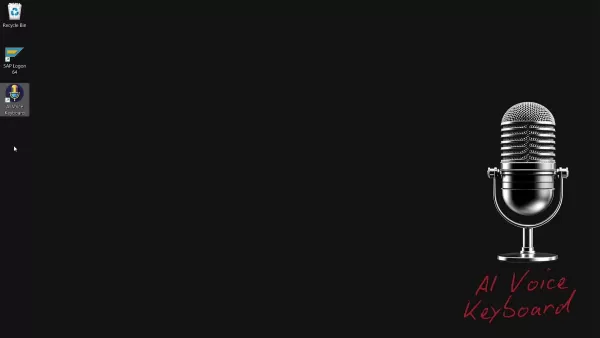
Beyond basic transcription, it includes a suite of AI-powered tools like real-time translation, text rephrasing, and text expansion. The program's customizable nature lets users fine-tune it to their specific requirements, enhancing workflow and overall productivity. This AI Voice Keyboard is straightforward, minimalist, and exceptionally functional.
Key Features of the AI Voice Keyboard
The AI Voice Keyboard is equipped with a variety of features aimed at increasing productivity and streamlining digital tasks.
- Voice-to-Text Conversion: The core function involves accurately transcribing spoken words into text.
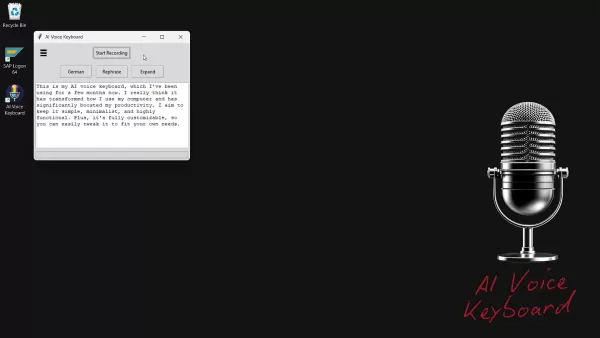
This drastically cuts down on typing time and supports hands-free content creation. Processed transcriptions are automatically copied to the clipboard.
- Real-Time Translation: Instantly translate your speech into numerous languages. This feature removes communication barriers and simplifies creating content for international audiences.
- Text Rephrasing: Improve your writing by restructuring sentences and paragraphs. This enhances clarity, refines tone, and elevates the overall quality of your text.
- Text Expansion: Elaborate on your initial thoughts with the text expansion feature. This helps produce more detailed, polite, and formally structured text.
- Customizable Commands: Tailor the AI Voice Keyboard's commands to match your unique workflow. This high degree of personalization ensures the tool adapts to you, not the reverse.
- Multi-Language Support: With the backing of the Whisper model, the AI Voice Keyboard accommodates a broad spectrum of languages, serving as a versatile tool for global users. The full transcribed text is automatically copied to the clipboard.
Customizing Your AI Voice Keyboard
Tailoring the AI Voice Keyboard to Your Needs
A key strength of the AI Voice Keyboard is its extensive customization, letting you adjust the program to your specific processes and preferences. This personalization can greatly improve efficiency, making the tool a vital part of your everyday activities.
- Transcription API Selection:
You can select from different transcription APIs, including Groq and OpenAI. This choice allows you to pick the API that aligns best with your priorities for accuracy, speed, and budget.
- Custom Prompts: For specialized tasks, you can configure custom prompts to direct the AI model. This is especially valuable for technical or industry-specific content demanding precise terminology.
Here’s a quick summary of accessible models and their typical applications:
Model Description GPT-4 Excellent for general tasks, balancing speed and accuracy effectively. Llama Well-suited for detailed-oriented work, often chosen for its nuanced comprehension and output. GPT-4 Mini A faster, streamlined option for when speed is the primary concern, maintaining solid accuracy. Distil-Whisper Specifically optimized for superior speech recognition performance.
*Note: Each model is designed for specific scenarios.
These tailored AI queries are crucial for translation, rephrasing, and vocabulary enhancement.
Getting Started with the AI Voice Keyboard: A Step-by-Step Guide
Downloading and Installing the AI Voice Keyboard
The AI Voice Keyboard is currently offered as a portable application, so no standard installation is required. Follow these steps to begin:
Download the Program: Go to the official website linked in the video description.
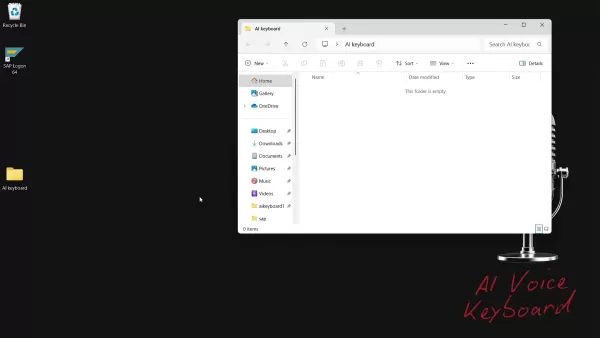
Extract the Files: Since the AI Voice Keyboard is portable, simply unzip the files into a folder on your desktop or any directory you prefer.
Create a Shortcut (Optional): For convenience, create a shortcut to the program’s main executable file and place it on your desktop or start menu.
Configuring the AI Voice Keyboard
Before using the AI Voice Keyboard, you must configure it with an API key. Here’s the process:
- Launch the Program: Run the AI Voice Keyboard executable file.
- Select an API Provider:
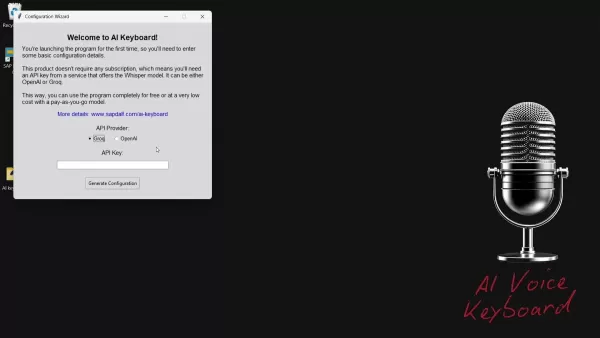
Choose either Groq or OpenAI as your provider. For free usage, Groq is the recommended option.
- Obtain an API Key:
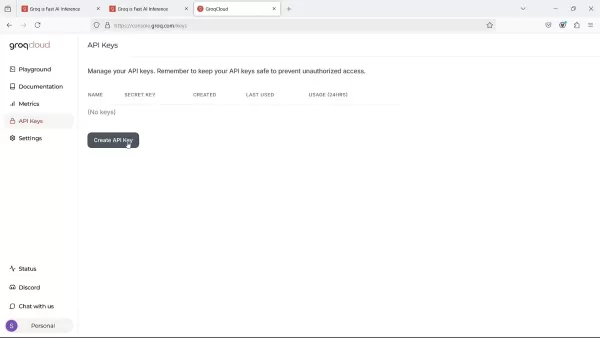
- For Groq: Visit the Groq website, sign up for a free account, go to the API Keys section, and generate a new key.
- For OpenAI: If you opt for OpenAI, create an account on their platform and get an API key. Note that OpenAI generally operates on a paid basis.
- Enter the API Key: Paste your new API key into the appropriate field within the AI Voice Keyboard setup wizard.
- Generate Configuration: Click the "Generate Configuration" button to finalize the setup.
Using the AI Voice Keyboard: A Quick Start
Once configured, operating the AI Voice Keyboard is simple and user-friendly:
Launch the Program: Start the AI Voice Keyboard application.
Start Recording: Press the "Start Recording" button and begin speaking.
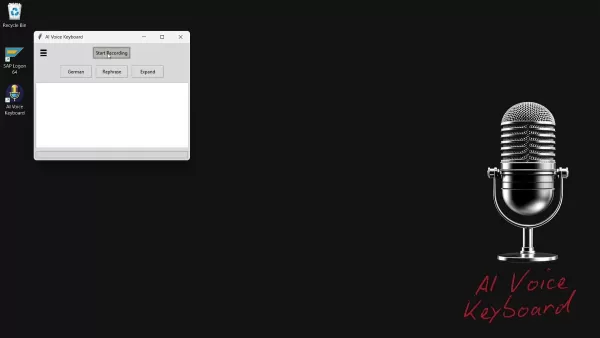
Stop Recording: Click the "Stop Recording" button when you finish speaking.
Process and Use: The program will process your recording and copy the resulting text to your clipboard. You can then paste it into any application.
Explore AI Features: Utilize the available buttons to translate, rephrase, or expand your content.
Understanding the Cost: API Pricing
Maximizing Value
The AI Voice Keyboard application is free to download and use. However, it relies on external APIs; Groq and OpenAI offer competitive rates. For instance, Groq's Whisper v3 costs approximately $0.111 per hour. By understanding the pricing models of these APIs, you can manage your usage effectively to control costs, particularly for large-scale transcription work.
AI Voice Keyboard: Weighing the Benefits and Drawbacks
Pros
Significantly increases productivity with rapid voice-to-text conversion.
Facilitates global communication through multi-language support.
Features customizable commands for a personalized user experience.
Free to download, ensuring wide accessibility.
Cons
Requires an API key from Groq or OpenAI, which might incur expenses.
Transcription accuracy is dependent on the underlying speech recognition model's performance.
Some initial setup and configuration are necessary.
Currently, it is only compatible with the Windows operating system.
Exploring the Core Features of AI Voice Keyboard
Key Functionalities That Enhance Productivity
Here are the main features that distinguish this AI Voice Keyboard:
- Real-time Voice to Text
- Translation Support
- Text Rephrasing Options
- Text Expansion
- Customizable interface
- Multi language use
Unlocking Potential: Use Cases for the AI Voice Keyboard
Applications Across Industries
The AI Voice Keyboard is a highly adaptable tool with uses in many sectors and professions. Prominent applications include:
- Content Creation: Rapidly draft articles, blog posts, and social media content using voice commands.
- Email Communication: Dictate emails and manage messages without typing, saving time and improving workflow.
- Note-Taking: Capture ideas, brainstorming sessions, and meeting notes instantly.
- Accessibility: Provides an easier way for individuals with physical limitations to use computers.
- Multilingual Communication: Translate material into various languages for worldwide distribution.
Frequently Asked Questions about the AI Voice Keyboard
Is the AI Voice Keyboard really free to use?
The AI Voice Keyboard program is a free, portable download available on sapdalf.com. However, the program does not provide API keys directly. You must generate these keys from OpenAI or Groq, which may involve fees depending on the provider.
What languages does the AI Voice Keyboard support?
The AI Voice Keyboard uses the Whisper model, which supports an extensive list of languages. Consult the official Whisper model documentation for the most current language support information.
Can I use the AI Voice Keyboard with other applications?
Yes. The AI Voice Keyboard copies the transcribed text directly to your clipboard, enabling you to paste it into virtually any application that accepts text input.
Is my data secure when using the AI Voice Keyboard?
The AI Voice Keyboard application itself does not store or transmit your data. For data handling and privacy, please review the respective privacy policies of Groq and OpenAI, as their APIs process the audio.
Related Questions: Diving Deeper into Voice-to-Text Technology
What is speech recognition technology?
Speech recognition technology is the foundational component of the AI Voice Keyboard, enabling devices to identify spoken words and convert them into digital text. This process involves acoustic modeling, language modeling, and phonetic analysis to ensure precise transcription. Progress in machine learning and neural networks has greatly improved the reliability and speed of modern speech recognition, powering everything from virtual assistants to professional dictation software.
How can voice recognition software improve business accessibility?
Implementing voice recognition software allows businesses to develop more accessible and intuitive products and services. It improves communication channels, offers customers smoother interaction methods, and helps employees handle administrative duties more effectively, freeing up time for project management and enhancing customer experience.
Related article
 DeepMind CEO Hassabis: I sleep six hours a day, usually feel energetic around 1 a.m.
Fortune recently featured an interview with Demis Hassabis, CEO of Google DeepMind, revealing his unconventional approach to rest and productivity. Hassabis disclosed that he sleeps very little, structuring his waking hours into two distinct work blo
OpenAI, Anthropic Vie for Market Share Despite Revenue Shortfalls
Despite recent reports suggesting OpenAI missed revenue targets, creating pressure on tech stocks this Tuesday, private AI lab investors remain resilient. Seasoned backers have confirmed they will not reduce investment despite negative media coverage
California AV Compliance: A New Era of Tickets, Geofences, and 1M Miles
Guident operates an AuveTech shuttle in South Florida, managing a four-mile route in West Palm Beach and a one-mile route in Boca Raton using its remote monitoring technology. | Credit: GuidentCalifornia is redefining the regulatory landscape for dri
Related Special Topic Recommendations
writing
DeepMind CEO Hassabis: I sleep six hours a day, usually feel energetic around 1 a.m.
Fortune recently featured an interview with Demis Hassabis, CEO of Google DeepMind, revealing his unconventional approach to rest and productivity. Hassabis disclosed that he sleeps very little, structuring his waking hours into two distinct work blo
OpenAI, Anthropic Vie for Market Share Despite Revenue Shortfalls
Despite recent reports suggesting OpenAI missed revenue targets, creating pressure on tech stocks this Tuesday, private AI lab investors remain resilient. Seasoned backers have confirmed they will not reduce investment despite negative media coverage
California AV Compliance: A New Era of Tickets, Geofences, and 1M Miles
Guident operates an AuveTech shuttle in South Florida, managing a four-mile route in West Palm Beach and a one-mile route in Boca Raton using its remote monitoring technology. | Credit: GuidentCalifornia is redefining the regulatory landscape for dri
Related Special Topic Recommendations
writing
 AI Article Outline Tools for Long Form Writing
2026 Latest Best Top-Rated AI Article Outline Tools for Long Form Writing! This curated collection features powerful, game-changing tools that deliver accurate, structured outlines with real-world tests to boost writing efficiency significantly. XIX.AI is part of this elite selection. Get a free vs paid comparison to help you choose the perfect tool. Explore now and Unlock your AI edge!
 9 tools
 xix.ai
chatbot
Best AI Roleplay Chat Apps for Language Practice, Interview Prep, and Daily Fluency
xix.ai
chatbot
Best AI Roleplay Chat Apps for Language Practice, Interview Prep, and Daily Fluency
2026 Latest Best Top-rated AI Roleplay Chat Apps for Language Practice, Interview Prep, and Daily Fluency! XIX.AI curates a powerful game-changing collection that offers free vs paid comparison, real-world tests, and updated rankings weekly. These must-try tools help you boost writing skills, overcome fluency challenges, and improve communication efficiency across all daily scenarios. Explore now to discover your perfect tool for language growth!
10 tools
xix.ai
Music composition
AI Stem Separation Tools for Remix Production, Sampling Prep, and Karaoke Masters
2026 Latest Best Top-rated AI Stem Separation Tools Curated for Remix Production, Sampling Prep, and Karaoke Masters. These powerful game-changing tools offer real-world tests to deliver precise audio isolation, boosting productivity significantly. XIX.AI provides a weekly updated free vs paid comparison guide to help you find the must-try solution that suits your needs. Explore now to unlock your AI edge.
8 tools
xix.ai
Data Analysis
AI SQL Copilots for Revenue Dashboards, Funnel Analysis, and Product Metrics
2026 Latest Best AI SQL Copilots Ranked Top-Rated! XIX.AI curates a powerful game-changing collection for weekly updated real-world tests. These must-try tools help you generate accurate revenue dashboards, analyze sales funnels, and track product metrics swiftly, boosting productivity massively. Explore now to Discover your perfect tool for data-driven decision making! 238 characters
9 tools
xix.ai
Music composition
Best AI Melody Writing Tools for Song Drafts
2026 Latest Best Top-Rated AI Melody Writing Tools for Song Drafts! XIX.AI has curated a highly powerful game-changing collection that goes through rigorous real-world tests to deliver the best writing experience. You can find detailed free vs paid comparisons, accurate rankings, and must-try options designed to help you create stunning song drafts effortlessly and boost your creative productivity significantly. Explore now to discover your perfect tool!
8 tools
xix.ai
chatbot
Best AI Conversation Trainer Tools for Interview Practice
2026 Latest Best Top-rated AI Conversation Trainer Tools for Interview Practice are here on XIX.AI! This curated collection features powerful, game-changing tools that go through rigorous real-world tests to deliver accurate feedback. You’ll find a free vs paid comparison and detailed rankings to help you choose the must-try option that boosts your confidence and skills. Explore now to Discover your perfect tool for interview success!
12 tools
xix.ai

 Comments (1)
0/500
Comments (1)
0/500
![DonaldSanchez]()
음성 인식 정확도 실사용 중에 얼마나 되는지 궁금하네요. 혹시 동영상 편집이나 프로그래밍 같은 특수한 작업에도 적용 가능할까요? 경쟁사 제품과 비교했을 때 메리트가 부족하다는 글을 본 것 같은데... 실제로 써본 분들 후기가 더 필요해 보여요 😅
In our fast-paced digital era, maximizing productivity is essential. Imagine dramatically cutting down on typing time and optimizing your entire workflow using just your voice. The AI Voice Keyboard makes this a reality, combining seamless voice-to-text capabilities with advanced AI functions. Far more than a simple dictation app, it fundamentally transforms your interaction with computers to boost both efficiency and creativity. This article examines its core features, diverse applications, and provides a free step-by-step setup guide to help you harness its full power.
Key Points
The AI Voice Keyboard redefines computer interaction through voice commands.
It offers powerful features like voice-to-text, real-time translation, and text rephrasing.
The program is highly adaptable to meet individual preferences and workflows.
Support for multiple languages is enabled by the Whisper model.
Setup is quick and easy, with free API keys available.
It emphasizes customization and flexibility.
Understanding the AI Voice Keyboard
What is the AI Voice Keyboard?
The AI Voice Keyboard is a specialized program that efficiently converts spoken language into written text. It employs advanced speech recognition models, enabling highly accurate dictation for documents, emails, and other text-based content.
Beyond basic transcription, it includes a suite of AI-powered tools like real-time translation, text rephrasing, and text expansion. The program's customizable nature lets users fine-tune it to their specific requirements, enhancing workflow and overall productivity. This AI Voice Keyboard is straightforward, minimalist, and exceptionally functional.
Key Features of the AI Voice Keyboard
The AI Voice Keyboard is equipped with a variety of features aimed at increasing productivity and streamlining digital tasks.
- Voice-to-Text Conversion: The core function involves accurately transcribing spoken words into text.
This drastically cuts down on typing time and supports hands-free content creation. Processed transcriptions are automatically copied to the clipboard.
- Real-Time Translation: Instantly translate your speech into numerous languages. This feature removes communication barriers and simplifies creating content for international audiences.
- Text Rephrasing: Improve your writing by restructuring sentences and paragraphs. This enhances clarity, refines tone, and elevates the overall quality of your text.
- Text Expansion: Elaborate on your initial thoughts with the text expansion feature. This helps produce more detailed, polite, and formally structured text.
- Customizable Commands: Tailor the AI Voice Keyboard's commands to match your unique workflow. This high degree of personalization ensures the tool adapts to you, not the reverse.
- Multi-Language Support: With the backing of the Whisper model, the AI Voice Keyboard accommodates a broad spectrum of languages, serving as a versatile tool for global users. The full transcribed text is automatically copied to the clipboard.
Customizing Your AI Voice Keyboard
Tailoring the AI Voice Keyboard to Your Needs
A key strength of the AI Voice Keyboard is its extensive customization, letting you adjust the program to your specific processes and preferences. This personalization can greatly improve efficiency, making the tool a vital part of your everyday activities.
- Transcription API Selection:
You can select from different transcription APIs, including Groq and OpenAI. This choice allows you to pick the API that aligns best with your priorities for accuracy, speed, and budget.
- Custom Prompts: For specialized tasks, you can configure custom prompts to direct the AI model. This is especially valuable for technical or industry-specific content demanding precise terminology.
Here’s a quick summary of accessible models and their typical applications:
| Model | Description |
|---|---|
| GPT-4 | Excellent for general tasks, balancing speed and accuracy effectively. |
| Llama | Well-suited for detailed-oriented work, often chosen for its nuanced comprehension and output. |
| GPT-4 Mini | A faster, streamlined option for when speed is the primary concern, maintaining solid accuracy. |
| Distil-Whisper | Specifically optimized for superior speech recognition performance. |
*Note: Each model is designed for specific scenarios.
These tailored AI queries are crucial for translation, rephrasing, and vocabulary enhancement.
Getting Started with the AI Voice Keyboard: A Step-by-Step Guide
Downloading and Installing the AI Voice Keyboard
The AI Voice Keyboard is currently offered as a portable application, so no standard installation is required. Follow these steps to begin:
Download the Program: Go to the official website linked in the video description.
Extract the Files: Since the AI Voice Keyboard is portable, simply unzip the files into a folder on your desktop or any directory you prefer.
Create a Shortcut (Optional): For convenience, create a shortcut to the program’s main executable file and place it on your desktop or start menu.
Configuring the AI Voice Keyboard
Before using the AI Voice Keyboard, you must configure it with an API key. Here’s the process:
- Launch the Program: Run the AI Voice Keyboard executable file.
- Select an API Provider:
Choose either Groq or OpenAI as your provider. For free usage, Groq is the recommended option.
- Obtain an API Key:
- For Groq: Visit the Groq website, sign up for a free account, go to the API Keys section, and generate a new key.
- For OpenAI: If you opt for OpenAI, create an account on their platform and get an API key. Note that OpenAI generally operates on a paid basis.
- Enter the API Key: Paste your new API key into the appropriate field within the AI Voice Keyboard setup wizard.
- Generate Configuration: Click the "Generate Configuration" button to finalize the setup.
Using the AI Voice Keyboard: A Quick Start
Once configured, operating the AI Voice Keyboard is simple and user-friendly:
Launch the Program: Start the AI Voice Keyboard application.
Start Recording: Press the "Start Recording" button and begin speaking.
Stop Recording: Click the "Stop Recording" button when you finish speaking.
Process and Use: The program will process your recording and copy the resulting text to your clipboard. You can then paste it into any application.
Explore AI Features: Utilize the available buttons to translate, rephrase, or expand your content.
Understanding the Cost: API Pricing
Maximizing Value
The AI Voice Keyboard application is free to download and use. However, it relies on external APIs; Groq and OpenAI offer competitive rates. For instance, Groq's Whisper v3 costs approximately $0.111 per hour. By understanding the pricing models of these APIs, you can manage your usage effectively to control costs, particularly for large-scale transcription work.
AI Voice Keyboard: Weighing the Benefits and Drawbacks
Pros
Significantly increases productivity with rapid voice-to-text conversion.
Facilitates global communication through multi-language support.
Features customizable commands for a personalized user experience.
Free to download, ensuring wide accessibility.
Cons
Requires an API key from Groq or OpenAI, which might incur expenses.
Transcription accuracy is dependent on the underlying speech recognition model's performance.
Some initial setup and configuration are necessary.
Currently, it is only compatible with the Windows operating system.
Exploring the Core Features of AI Voice Keyboard
Key Functionalities That Enhance Productivity
Here are the main features that distinguish this AI Voice Keyboard:
- Real-time Voice to Text
- Translation Support
- Text Rephrasing Options
- Text Expansion
- Customizable interface
- Multi language use
Unlocking Potential: Use Cases for the AI Voice Keyboard
Applications Across Industries
The AI Voice Keyboard is a highly adaptable tool with uses in many sectors and professions. Prominent applications include:
- Content Creation: Rapidly draft articles, blog posts, and social media content using voice commands.
- Email Communication: Dictate emails and manage messages without typing, saving time and improving workflow.
- Note-Taking: Capture ideas, brainstorming sessions, and meeting notes instantly.
- Accessibility: Provides an easier way for individuals with physical limitations to use computers.
- Multilingual Communication: Translate material into various languages for worldwide distribution.
Frequently Asked Questions about the AI Voice Keyboard
Is the AI Voice Keyboard really free to use?
The AI Voice Keyboard program is a free, portable download available on sapdalf.com. However, the program does not provide API keys directly. You must generate these keys from OpenAI or Groq, which may involve fees depending on the provider.
What languages does the AI Voice Keyboard support?
The AI Voice Keyboard uses the Whisper model, which supports an extensive list of languages. Consult the official Whisper model documentation for the most current language support information.
Can I use the AI Voice Keyboard with other applications?
Yes. The AI Voice Keyboard copies the transcribed text directly to your clipboard, enabling you to paste it into virtually any application that accepts text input.
Is my data secure when using the AI Voice Keyboard?
The AI Voice Keyboard application itself does not store or transmit your data. For data handling and privacy, please review the respective privacy policies of Groq and OpenAI, as their APIs process the audio.
Related Questions: Diving Deeper into Voice-to-Text Technology
What is speech recognition technology?
Speech recognition technology is the foundational component of the AI Voice Keyboard, enabling devices to identify spoken words and convert them into digital text. This process involves acoustic modeling, language modeling, and phonetic analysis to ensure precise transcription. Progress in machine learning and neural networks has greatly improved the reliability and speed of modern speech recognition, powering everything from virtual assistants to professional dictation software.
How can voice recognition software improve business accessibility?
Implementing voice recognition software allows businesses to develop more accessible and intuitive products and services. It improves communication channels, offers customers smoother interaction methods, and helps employees handle administrative duties more effectively, freeing up time for project management and enhancing customer experience.








 DeepMind CEO Hassabis: I sleep six hours a day, usually feel energetic around 1 a.m.
Fortune recently featured an interview with Demis Hassabis, CEO of Google DeepMind, revealing his unconventional approach to rest and productivity. Hassabis disclosed that he sleeps very little, structuring his waking hours into two distinct work blo
DeepMind CEO Hassabis: I sleep six hours a day, usually feel energetic around 1 a.m.
Fortune recently featured an interview with Demis Hassabis, CEO of Google DeepMind, revealing his unconventional approach to rest and productivity. Hassabis disclosed that he sleeps very little, structuring his waking hours into two distinct work blo
 OpenAI, Anthropic Vie for Market Share Despite Revenue Shortfalls
Despite recent reports suggesting OpenAI missed revenue targets, creating pressure on tech stocks this Tuesday, private AI lab investors remain resilient. Seasoned backers have confirmed they will not reduce investment despite negative media coverage
California AV Compliance: A New Era of Tickets, Geofences, and 1M Miles
Guident operates an AuveTech shuttle in South Florida, managing a four-mile route in West Palm Beach and a one-mile route in Boca Raton using its remote monitoring technology. | Credit: GuidentCalifornia is redefining the regulatory landscape for dri
OpenAI, Anthropic Vie for Market Share Despite Revenue Shortfalls
Despite recent reports suggesting OpenAI missed revenue targets, creating pressure on tech stocks this Tuesday, private AI lab investors remain resilient. Seasoned backers have confirmed they will not reduce investment despite negative media coverage
California AV Compliance: A New Era of Tickets, Geofences, and 1M Miles
Guident operates an AuveTech shuttle in South Florida, managing a four-mile route in West Palm Beach and a one-mile route in Boca Raton using its remote monitoring technology. | Credit: GuidentCalifornia is redefining the regulatory landscape for dri

2026 Latest Best Top-Rated AI Article Outline Tools for Long Form Writing! This curated collection features powerful, game-changing tools that deliver accurate, structured outlines with real-world tests to boost writing efficiency significantly. XIX.AI is part of this elite selection. Get a free vs paid comparison to help you choose the perfect tool. Explore now and Unlock your AI edge!
9 tools
xix.ai

2026 Latest Best Top-rated AI Roleplay Chat Apps for Language Practice, Interview Prep, and Daily Fluency! XIX.AI curates a powerful game-changing collection that offers free vs paid comparison, real-world tests, and updated rankings weekly. These must-try tools help you boost writing skills, overcome fluency challenges, and improve communication efficiency across all daily scenarios. Explore now to discover your perfect tool for language growth!
10 tools
xix.ai

2026 Latest Best Top-rated AI Stem Separation Tools Curated for Remix Production, Sampling Prep, and Karaoke Masters. These powerful game-changing tools offer real-world tests to deliver precise audio isolation, boosting productivity significantly. XIX.AI provides a weekly updated free vs paid comparison guide to help you find the must-try solution that suits your needs. Explore now to unlock your AI edge.
8 tools
xix.ai

2026 Latest Best AI SQL Copilots Ranked Top-Rated! XIX.AI curates a powerful game-changing collection for weekly updated real-world tests. These must-try tools help you generate accurate revenue dashboards, analyze sales funnels, and track product metrics swiftly, boosting productivity massively. Explore now to Discover your perfect tool for data-driven decision making! 238 characters
9 tools
xix.ai

2026 Latest Best Top-Rated AI Melody Writing Tools for Song Drafts! XIX.AI has curated a highly powerful game-changing collection that goes through rigorous real-world tests to deliver the best writing experience. You can find detailed free vs paid comparisons, accurate rankings, and must-try options designed to help you create stunning song drafts effortlessly and boost your creative productivity significantly. Explore now to discover your perfect tool!
8 tools
xix.ai

2026 Latest Best Top-rated AI Conversation Trainer Tools for Interview Practice are here on XIX.AI! This curated collection features powerful, game-changing tools that go through rigorous real-world tests to deliver accurate feedback. You’ll find a free vs paid comparison and detailed rankings to help you choose the must-try option that boosts your confidence and skills. Explore now to Discover your perfect tool for interview success!
12 tools
xix.ai

음성 인식 정확도 실사용 중에 얼마나 되는지 궁금하네요. 혹시 동영상 편집이나 프로그래밍 같은 특수한 작업에도 적용 가능할까요? 경쟁사 제품과 비교했을 때 메리트가 부족하다는 글을 본 것 같은데... 실제로 써본 분들 후기가 더 필요해 보여요 😅












