


 Home
HomeAI Tournament Scheduler Automates Match Arrangements
Welcome to the future of tournament management! The R2 Sports AI automated match scheduler revolutionizes how you organize and run competitions. This advanced tool uses artificial intelligence to create optimal time grids, customize scheduling rules, and deliver a seamless, efficient tournament experience for organizers and participants. In this guide, discover the system's core features and learn how to leverage them to streamline your event operations.
Key Points
AI-driven automated match scheduling for tournaments.
Flexible rules and scheduling options to meet your needs.
Optimized time grid planning for division rounds.
Manual scheduling and conflict resolution capabilities.
Color-coded display for quick identification of match status and time conflicts.
Understanding the R2 Sports AI Automated Match Scheduler
What is the R2 Sports AI Automated Match Scheduler?
The R2 Sports AI Automated Match Scheduler is a web-based application that simplifies the intricate task of tournament scheduling.
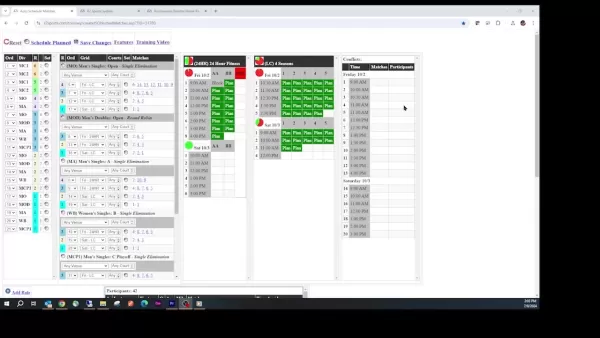
Unlike conventional methods that depend on manual input and estimation, this tool uses artificial intelligence to assess factors like participant availability, venue limitations, and scheduling preferences to generate an optimized tournament schedule. This approach saves time and effort while minimizing conflicts and ensuring fair competition.
Key Components of the Scheduling Panel
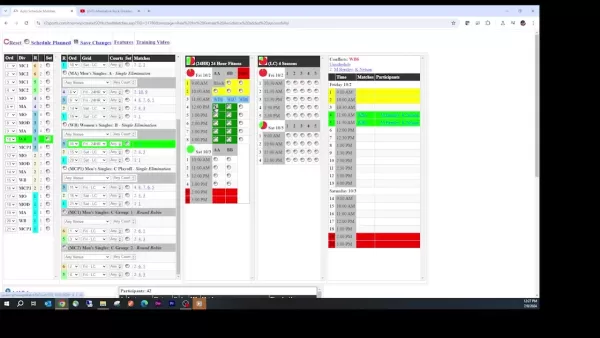
The scheduling panel is logically structured into multiple sections, each playing a specific role in the scheduling workflow. These integrated components offer a thorough and user-friendly interface for tournament organizers.
- Unscheduled Divisions Panel: This area shows all divisions and matches that haven't been assigned a specific time and court.
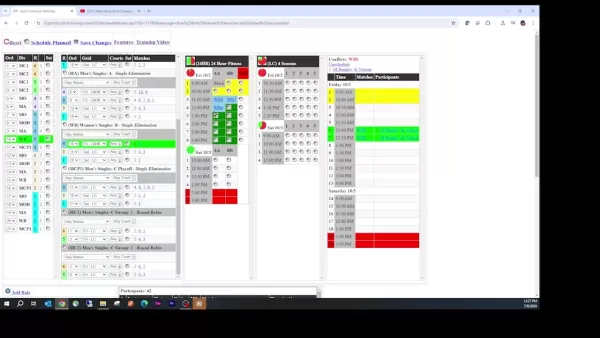
It serves as the foundation for your scheduling work, giving you a clear picture of what remains to be scheduled.
- Time Grid: The time grid visually represents available time slots across various venues or courts. It indicates which slots are free, planned, or already booked for other matches.
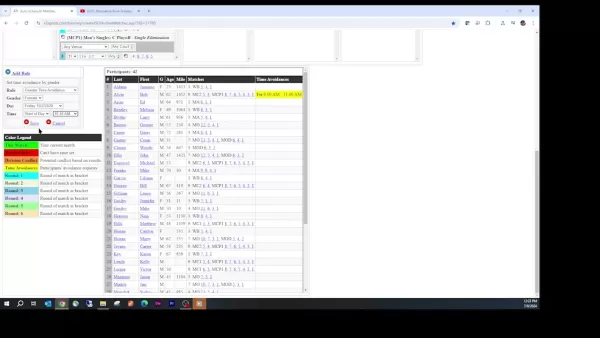
- Participants List: This section displays all registered participants, along with any time restrictions or scheduling preferences they've provided. This data is essential for avoiding conflicts and honoring individual requests.
- Conflicts Section: The conflict section assists in identifying and manually resolving scheduling issues.
Customizing the AI Scheduler: Setting Rules and Preferences
Adding Rules for Customized Scheduling
The true strength of the R2 Sports AI scheduler is its adaptability to your tournament's specific demands. By establishing rules and preferences, you can refine the scheduling process to match your unique requirements. Here’s how to add a rule:
- Access the 'Add Rule' Link:
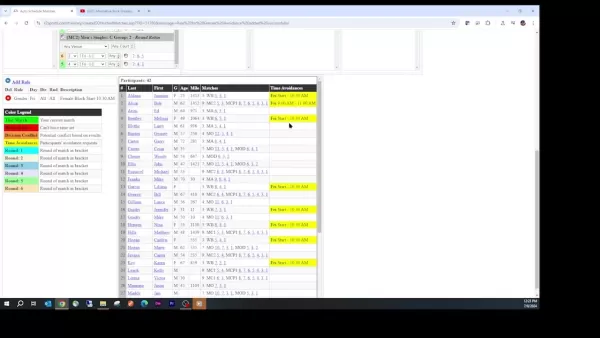
Navigate to the bottom of the scheduling panel and click the 'Add Rule' link. This opens the rule creation interface.
- Select Rule Type: Pick the type of rule you need from the dropdown menu. Options typically include time restrictions, gender-based rules, court preferences, and more.
- Define Rule Parameters: Specify the details for your selected rule. For instance, if setting a time avoidance rule, choose the specific day, start time, and end time to block off.
Save the Rule: After defining the parameters, click 'Save' to activate the rule. The scheduler will then incorporate this rule into its planning.
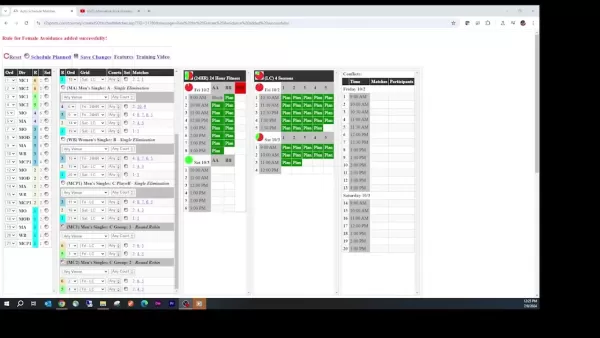
Example: To ensure all female participants have adequate breaks, create a rule preventing them from being scheduled for back-to-back matches.
Customization is vital for effective tournament management. For example, you could restrict female athletes from competing before 10:30 a.m. You can review and modify your active rules at any time.
Understanding Time Avoidances
Another key customization feature involves handling time avoidances.
These are specific periods when participants have stated they cannot play. Time constraints are usually submitted during registration and are critical for preventing disruptions to the tournament schedule.
When creating rules, the scheduler clearly indicates which players have time limitations, helping you avoid booking them during those slots.
Step-by-Step Guide: Scheduling Matches Manually
Manual Match Scheduling: Overriding the AI
Although the R2 Sports AI scheduler is highly effective at automation, there may be occasions when manual scheduling is necessary.
This might be due to unexpected changes, special participant needs, or strategic planning adjustments.
Here's the manual scheduling process:
- Select a Match: In the 'Unscheduled Divisions' panel, find the match you wish to schedule. You can select it by clicking the match number or locating it in the Participants list.
- Choose a Time Slot: In the time grid, find a suitable open time slot. The grid uses a color-coded system to show slot availability.
- Assign the Match: Click your chosen time slot to assign the selected match to that court and time. The match will then move from the 'Unscheduled Divisions' panel to the time grid.
Remember that manual scheduling overrides the AI's automated plans. Assess how your changes might affect the overall schedule and participant availability.
How To Move Manually Scheduled Matches
Rescheduling a match is simple:
- Click on the scheduled match in the time grid.
- Then, select a different available time slot to move it.
Manual scheduling lets you adapt the schedule to meet evolving participant requirements.
R2Sports AI Automated Match Scheduler Pricing Plans
Understanding the Value of Efficient Tournament Scheduling
For precise pricing, contact R2 Sports directly. However, consider the substantial value this automated scheduler provides. By simplifying scheduling, reducing conflicts, and maximizing venue use, it can save considerable time and resources, allowing you to concentrate on other vital aspects of tournament management.
Evaluating the R2 Sports AI Scheduler: Pros and Cons
Pros
Substantial time savings through automation.
Fewer scheduling conflicts and higher participant satisfaction.
Efficient use of venue facilities.
Custom rules to fit specific tournament needs.
Cons
New users may face a learning curve.
Optimal performance relies on accurate data input.
Manual adjustments might be needed in complex situations.
Core Features of the R2 Sports AI Scheduler
AI-Powered Automation and Efficiency
The R2 Sports AI scheduler transforms tournament scheduling, saving time and reducing disputes.
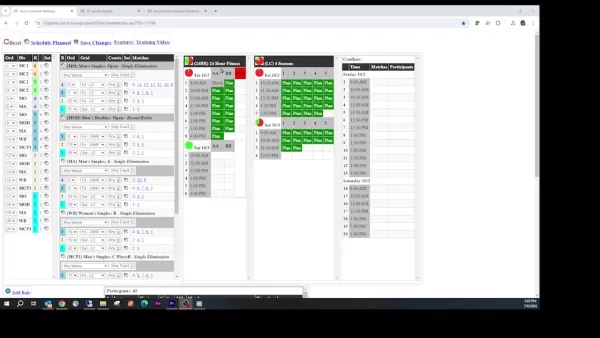
Its AI evaluates participant availability and venue limits to automate scheduling, a major improvement over manual techniques. Core aspects include:
Key Features and Functionality
- Automated Time Grid Creation
- Customizable Scheduling Rules
- Manual Scheduling and Adjustment
- Conflict Identification and Management
- Color-Coded Visual Interface
- Participant Time Restriction Handling
- Intuitive Drag-and-Drop Scheduling
- Real-Time Updates and Alerts
- Comprehensive Reporting and Analytics
Use Cases: Who Benefits from the R2 Sports AI Scheduler?
Ideal Scenarios for Automated Tournament Scheduling
The R2 Sports AI Automated Match Scheduler is a flexible solution that serves many types of tournament organizers.
Key applications include:
- Large-Scale Tournaments: For events with hundreds or thousands of participants, the automation saves immense manual effort.
- Multi-Venue Tournaments: When events occur across several locations, the scheduler optimizes venue usage and reduces participant travel time.
- Tournaments with Complex Scheduling Needs: If your event has special constraints like time blocks, gender rules, or court assignments, the customizable rules engine can handle them.
- Organizations Aiming for Operational Efficiency: Any group looking to enhance the effectiveness and professionalism of their tournament operations can gain from using the R2 Sports AI scheduler.
FAQ
What is the primary function of the R2 Sports AI Automated Match Scheduler?
The primary role of the R2 Sports AI Automated Match Scheduler is to automate and simplify tournament schedule creation, optimizing time allocation and reducing conflicts.
Can I manually adjust the schedule created by the AI?
Absolutely. The scheduler supports manual modifications, giving you the flexibility to override the AI's recommendations as required.
How does the scheduler handle participant time avoidances?
The scheduler integrates participant time constraints provided during registration to prevent scheduling issues.
Can I restrict certain divisions to specific courts?
Yes, you can limit specific divisions to particular courts using the available configuration settings.
Is it possible to change the order in which divisions are scheduled?
Yes, the sequence of division rounds can be tailored to your preferences.
Related Questions
What are the benefits of using an AI-powered tournament scheduler?
Employing an AI-powered tournament scheduler delivers multiple advantages, such as:Time Efficiency: Automates scheduling, freeing organizers for other tasks.Reduced Disputes: Lowers the chance of scheduling clashes and promotes fairness.Optimized Facilities: Makes the best use of available venues and courts.Enhanced Participant Experience: Respects player preferences and avoids inconvenient timings.Increased Professionalism: Delivers a polished, well-organized tournament experience.By handling the labor-intensive parts of scheduling, AI tools like the R2 Sports scheduler enable you to focus on delivering a memorable and enjoyable event for everyone.
Related article
 Hiroshi Fujiwara and Robert Little Win 2026 Engelberger Robotics Awards
Hiroshi Fujiwara (left) and Robert Little (right) are the 2026 recipients of the Joseph F. Engelberger Robotics Award. | Credit: A3The Association for Advancing Automation (A3) has announced Hiroshi Fujiwara and Robert Little as the winners of the 20
AI Transforms Data Science: Automate Your SQL Queries
In the fast-moving field of data science, efficiency is essential. Automating repetitive tasks frees up valuable time for deeper analysis and model development. This guide explains how to use AI to automate SQL database queries, cutting down the manu
AI Voice Agents Streamline Sales: A Look at CallFluent
In the fast-paced landscape of modern business, automation has shifted from a luxury to an essential tool. AI-powered voice agents are fundamentally changing how companies manage sales and customer support, delivering exceptional efficiency and signi
Related Special Topic Recommendations
Design & Art
Hiroshi Fujiwara and Robert Little Win 2026 Engelberger Robotics Awards
Hiroshi Fujiwara (left) and Robert Little (right) are the 2026 recipients of the Joseph F. Engelberger Robotics Award. | Credit: A3The Association for Advancing Automation (A3) has announced Hiroshi Fujiwara and Robert Little as the winners of the 20
AI Transforms Data Science: Automate Your SQL Queries
In the fast-moving field of data science, efficiency is essential. Automating repetitive tasks frees up valuable time for deeper analysis and model development. This guide explains how to use AI to automate SQL database queries, cutting down the manu
AI Voice Agents Streamline Sales: A Look at CallFluent
In the fast-paced landscape of modern business, automation has shifted from a luxury to an essential tool. AI-powered voice agents are fundamentally changing how companies manage sales and customer support, delivering exceptional efficiency and signi
Related Special Topic Recommendations
Design & Art
 Top AI Illustration Tools: Create Editorial Scenes and Cover Art Faster
2026 Latest Top-rated AI Illustration Tools: Our curated list features the best powerfully designed tools for creating stunning editorial scenes and eye-catching cover art quickly. Each option has gone through rigorous real-world tests, offering a free vs paid comparison to help you find the perfect match for your workflow. Try these must-try solutions today to unlock your AI edge and boost your creative productivity. Explore now at XIX.AI.
 10 tools
 xix.ai
Education and Learning
Top AI Tutors for Exam Prep: Practice Math, Science, and English
xix.ai
Education and Learning
Top AI Tutors for Exam Prep: Practice Math, Science, and English
2026 Latest Top-Rated Best AI Tutors for Exam Prep are here on XIX.AI! Our curated list features powerful game-changing tools that offer free vs paid comparison, real-world tests, and weekly updated rankings. They help boost your writing efficiency, simplify complex topic learning, and unlock your academic potential. Explore now to Discover your perfect exam prep tool and Start creating today to Unlock your AI edge!
10 tools
xix.ai
Finance
AI Budget Planning Tools for Personal Money Management
2026 Latest Best Top-Rated AI Budget Planning Tools for Personal Money Management are here on XIX.AI! This curated collection features powerful, game-changing solutions that help you conduct real-world tests, understand spending habits, and create personalized plans to boost productivity. Enjoy a free vs paid comparison along with detailed rankings. Must-try tools designed to simplify money management and unlock your AI edge. Explore now!
11 tools
xix.ai
Health & Wellness
AI Sleep Tracking Assistants: Improve Recovery with Better Bedtime Habits
2026 Latest Best Top-Rated AI Sleep Tracking Assistants curated for ultimate recovery. This fully updated weekly guide features powerful tools that deliver real-world tests, free vs paid comparison, and detailed rankings to help you find the must-try solution that boosts sleep quality and supports better bedtime habits. Explore now at XIX.AI to Unlock your AI edge.
10 tools
xix.ai
Data Analysis
AI SQL Copilots for Product and Revenue Analytics
2026 Latest Best Top-Rated AI SQL Copilots for Product and Revenue Analytics! XIX.AI has curated a powerful, game-changing collection of must-try tools that undergo real-world tests through weekly updated rankings. These tools help users boost productivity significantly by accelerating data analysis, streamlining complex queries, and generating accurate insights to drive smarter business decisions. Explore now to Discover your perfect tool for unlocking your AI edge!
14 tools
xix.ai
Education and Learning
Best AI Homework Helpers That Teach: Learn Concepts, Not Just Answers
2026 Latest Best Top-Rated AI Homework Helpers That Teach Core Concepts Not Just Answers Powerful Tools for Students Must-Try Curated List Weekly Updated Free vs Paid Comparison Real-World Tests Accurate Rankings to Help You Unlock Your Full Learning Potential Explore now to Discover your perfect tool for smarter studying.
10 tools
xix.ai

 Comments (1)
0/500
Comments (1)
0/500
![NicholasLewis]()
Also das klingt ja echt praktisch! Endlich muss man nicht mehr stundenlang manuell rumplanen. Hoffentlich ist die KI auch fair und berücksichtigt wirklich alle Faktoren wie Pausen oder Reisezeiten. Mal sehen, ob sich das in unseren lokalen Vereinen durchsetzt. Die alten Hasen werden sich bestimmt erstmal sträuben 😅
Welcome to the future of tournament management! The R2 Sports AI automated match scheduler revolutionizes how you organize and run competitions. This advanced tool uses artificial intelligence to create optimal time grids, customize scheduling rules, and deliver a seamless, efficient tournament experience for organizers and participants. In this guide, discover the system's core features and learn how to leverage them to streamline your event operations.
Key Points
AI-driven automated match scheduling for tournaments.
Flexible rules and scheduling options to meet your needs.
Optimized time grid planning for division rounds.
Manual scheduling and conflict resolution capabilities.
Color-coded display for quick identification of match status and time conflicts.
Understanding the R2 Sports AI Automated Match Scheduler
What is the R2 Sports AI Automated Match Scheduler?
The R2 Sports AI Automated Match Scheduler is a web-based application that simplifies the intricate task of tournament scheduling.
Unlike conventional methods that depend on manual input and estimation, this tool uses artificial intelligence to assess factors like participant availability, venue limitations, and scheduling preferences to generate an optimized tournament schedule. This approach saves time and effort while minimizing conflicts and ensuring fair competition.
Key Components of the Scheduling Panel
The scheduling panel is logically structured into multiple sections, each playing a specific role in the scheduling workflow. These integrated components offer a thorough and user-friendly interface for tournament organizers.
- Unscheduled Divisions Panel: This area shows all divisions and matches that haven't been assigned a specific time and court.
It serves as the foundation for your scheduling work, giving you a clear picture of what remains to be scheduled.
- Time Grid: The time grid visually represents available time slots across various venues or courts. It indicates which slots are free, planned, or already booked for other matches.
- Participants List: This section displays all registered participants, along with any time restrictions or scheduling preferences they've provided. This data is essential for avoiding conflicts and honoring individual requests.
- Conflicts Section: The conflict section assists in identifying and manually resolving scheduling issues.
Customizing the AI Scheduler: Setting Rules and Preferences
Adding Rules for Customized Scheduling
The true strength of the R2 Sports AI scheduler is its adaptability to your tournament's specific demands. By establishing rules and preferences, you can refine the scheduling process to match your unique requirements. Here’s how to add a rule:
- Access the 'Add Rule' Link:
Navigate to the bottom of the scheduling panel and click the 'Add Rule' link. This opens the rule creation interface.
- Select Rule Type: Pick the type of rule you need from the dropdown menu. Options typically include time restrictions, gender-based rules, court preferences, and more.
- Define Rule Parameters: Specify the details for your selected rule. For instance, if setting a time avoidance rule, choose the specific day, start time, and end time to block off.
Save the Rule: After defining the parameters, click 'Save' to activate the rule. The scheduler will then incorporate this rule into its planning.
Example: To ensure all female participants have adequate breaks, create a rule preventing them from being scheduled for back-to-back matches.
Customization is vital for effective tournament management. For example, you could restrict female athletes from competing before 10:30 a.m. You can review and modify your active rules at any time.
Understanding Time Avoidances
Another key customization feature involves handling time avoidances.
These are specific periods when participants have stated they cannot play. Time constraints are usually submitted during registration and are critical for preventing disruptions to the tournament schedule.
When creating rules, the scheduler clearly indicates which players have time limitations, helping you avoid booking them during those slots.
Step-by-Step Guide: Scheduling Matches Manually
Manual Match Scheduling: Overriding the AI
Although the R2 Sports AI scheduler is highly effective at automation, there may be occasions when manual scheduling is necessary.
This might be due to unexpected changes, special participant needs, or strategic planning adjustments.
Here's the manual scheduling process:
- Select a Match: In the 'Unscheduled Divisions' panel, find the match you wish to schedule. You can select it by clicking the match number or locating it in the Participants list.
- Choose a Time Slot: In the time grid, find a suitable open time slot. The grid uses a color-coded system to show slot availability.
- Assign the Match: Click your chosen time slot to assign the selected match to that court and time. The match will then move from the 'Unscheduled Divisions' panel to the time grid.
Remember that manual scheduling overrides the AI's automated plans. Assess how your changes might affect the overall schedule and participant availability.
How To Move Manually Scheduled Matches
Rescheduling a match is simple:
- Click on the scheduled match in the time grid.
- Then, select a different available time slot to move it.
Manual scheduling lets you adapt the schedule to meet evolving participant requirements.
R2Sports AI Automated Match Scheduler Pricing Plans
Understanding the Value of Efficient Tournament Scheduling
For precise pricing, contact R2 Sports directly. However, consider the substantial value this automated scheduler provides. By simplifying scheduling, reducing conflicts, and maximizing venue use, it can save considerable time and resources, allowing you to concentrate on other vital aspects of tournament management.
Evaluating the R2 Sports AI Scheduler: Pros and Cons
Pros
Substantial time savings through automation.
Fewer scheduling conflicts and higher participant satisfaction.
Efficient use of venue facilities.
Custom rules to fit specific tournament needs.
Cons
New users may face a learning curve.
Optimal performance relies on accurate data input.
Manual adjustments might be needed in complex situations.
Core Features of the R2 Sports AI Scheduler
AI-Powered Automation and Efficiency
The R2 Sports AI scheduler transforms tournament scheduling, saving time and reducing disputes.
Its AI evaluates participant availability and venue limits to automate scheduling, a major improvement over manual techniques. Core aspects include:
Key Features and Functionality
- Automated Time Grid Creation
- Customizable Scheduling Rules
- Manual Scheduling and Adjustment
- Conflict Identification and Management
- Color-Coded Visual Interface
- Participant Time Restriction Handling
- Intuitive Drag-and-Drop Scheduling
- Real-Time Updates and Alerts
- Comprehensive Reporting and Analytics
Use Cases: Who Benefits from the R2 Sports AI Scheduler?
Ideal Scenarios for Automated Tournament Scheduling
The R2 Sports AI Automated Match Scheduler is a flexible solution that serves many types of tournament organizers.
Key applications include:
- Large-Scale Tournaments: For events with hundreds or thousands of participants, the automation saves immense manual effort.
- Multi-Venue Tournaments: When events occur across several locations, the scheduler optimizes venue usage and reduces participant travel time.
- Tournaments with Complex Scheduling Needs: If your event has special constraints like time blocks, gender rules, or court assignments, the customizable rules engine can handle them.
- Organizations Aiming for Operational Efficiency: Any group looking to enhance the effectiveness and professionalism of their tournament operations can gain from using the R2 Sports AI scheduler.
FAQ
What is the primary function of the R2 Sports AI Automated Match Scheduler?
The primary role of the R2 Sports AI Automated Match Scheduler is to automate and simplify tournament schedule creation, optimizing time allocation and reducing conflicts.
Can I manually adjust the schedule created by the AI?
Absolutely. The scheduler supports manual modifications, giving you the flexibility to override the AI's recommendations as required.
How does the scheduler handle participant time avoidances?
The scheduler integrates participant time constraints provided during registration to prevent scheduling issues.
Can I restrict certain divisions to specific courts?
Yes, you can limit specific divisions to particular courts using the available configuration settings.
Is it possible to change the order in which divisions are scheduled?
Yes, the sequence of division rounds can be tailored to your preferences.
Related Questions
What are the benefits of using an AI-powered tournament scheduler?
Employing an AI-powered tournament scheduler delivers multiple advantages, such as:Time Efficiency: Automates scheduling, freeing organizers for other tasks.Reduced Disputes: Lowers the chance of scheduling clashes and promotes fairness.Optimized Facilities: Makes the best use of available venues and courts.Enhanced Participant Experience: Respects player preferences and avoids inconvenient timings.Increased Professionalism: Delivers a polished, well-organized tournament experience.By handling the labor-intensive parts of scheduling, AI tools like the R2 Sports scheduler enable you to focus on delivering a memorable and enjoyable event for everyone.







 Hiroshi Fujiwara and Robert Little Win 2026 Engelberger Robotics Awards
Hiroshi Fujiwara (left) and Robert Little (right) are the 2026 recipients of the Joseph F. Engelberger Robotics Award. | Credit: A3The Association for Advancing Automation (A3) has announced Hiroshi Fujiwara and Robert Little as the winners of the 20
Hiroshi Fujiwara and Robert Little Win 2026 Engelberger Robotics Awards
Hiroshi Fujiwara (left) and Robert Little (right) are the 2026 recipients of the Joseph F. Engelberger Robotics Award. | Credit: A3The Association for Advancing Automation (A3) has announced Hiroshi Fujiwara and Robert Little as the winners of the 20
 AI Transforms Data Science: Automate Your SQL Queries
In the fast-moving field of data science, efficiency is essential. Automating repetitive tasks frees up valuable time for deeper analysis and model development. This guide explains how to use AI to automate SQL database queries, cutting down the manu
AI Transforms Data Science: Automate Your SQL Queries
In the fast-moving field of data science, efficiency is essential. Automating repetitive tasks frees up valuable time for deeper analysis and model development. This guide explains how to use AI to automate SQL database queries, cutting down the manu
 AI Voice Agents Streamline Sales: A Look at CallFluent
In the fast-paced landscape of modern business, automation has shifted from a luxury to an essential tool. AI-powered voice agents are fundamentally changing how companies manage sales and customer support, delivering exceptional efficiency and signi
AI Voice Agents Streamline Sales: A Look at CallFluent
In the fast-paced landscape of modern business, automation has shifted from a luxury to an essential tool. AI-powered voice agents are fundamentally changing how companies manage sales and customer support, delivering exceptional efficiency and signi

2026 Latest Top-rated AI Illustration Tools: Our curated list features the best powerfully designed tools for creating stunning editorial scenes and eye-catching cover art quickly. Each option has gone through rigorous real-world tests, offering a free vs paid comparison to help you find the perfect match for your workflow. Try these must-try solutions today to unlock your AI edge and boost your creative productivity. Explore now at XIX.AI.
10 tools
xix.ai

2026 Latest Top-Rated Best AI Tutors for Exam Prep are here on XIX.AI! Our curated list features powerful game-changing tools that offer free vs paid comparison, real-world tests, and weekly updated rankings. They help boost your writing efficiency, simplify complex topic learning, and unlock your academic potential. Explore now to Discover your perfect exam prep tool and Start creating today to Unlock your AI edge!
10 tools
xix.ai

2026 Latest Best Top-Rated AI Budget Planning Tools for Personal Money Management are here on XIX.AI! This curated collection features powerful, game-changing solutions that help you conduct real-world tests, understand spending habits, and create personalized plans to boost productivity. Enjoy a free vs paid comparison along with detailed rankings. Must-try tools designed to simplify money management and unlock your AI edge. Explore now!
11 tools
xix.ai

2026 Latest Best Top-Rated AI Sleep Tracking Assistants curated for ultimate recovery. This fully updated weekly guide features powerful tools that deliver real-world tests, free vs paid comparison, and detailed rankings to help you find the must-try solution that boosts sleep quality and supports better bedtime habits. Explore now at XIX.AI to Unlock your AI edge.
10 tools
xix.ai

2026 Latest Best Top-Rated AI SQL Copilots for Product and Revenue Analytics! XIX.AI has curated a powerful, game-changing collection of must-try tools that undergo real-world tests through weekly updated rankings. These tools help users boost productivity significantly by accelerating data analysis, streamlining complex queries, and generating accurate insights to drive smarter business decisions. Explore now to Discover your perfect tool for unlocking your AI edge!
14 tools
xix.ai

2026 Latest Best Top-Rated AI Homework Helpers That Teach Core Concepts Not Just Answers Powerful Tools for Students Must-Try Curated List Weekly Updated Free vs Paid Comparison Real-World Tests Accurate Rankings to Help You Unlock Your Full Learning Potential Explore now to Discover your perfect tool for smarter studying.
10 tools
xix.ai

Also das klingt ja echt praktisch! Endlich muss man nicht mehr stundenlang manuell rumplanen. Hoffentlich ist die KI auch fair und berücksichtigt wirklich alle Faktoren wie Pausen oder Reisezeiten. Mal sehen, ob sich das in unseren lokalen Vereinen durchsetzt. Die alten Hasen werden sich bestimmt erstmal sträuben 😅












