


 Home
HomeAI Transforms Data Science: Automate Your SQL Queries
In the fast-moving field of data science, efficiency is essential. Automating repetitive tasks frees up valuable time for deeper analysis and model development. This guide explains how to use AI to automate SQL database queries, cutting down the manual work needed for data retrieval and preparation. By integrating AI into SQL workflows, data scientists can speed up their processes, enhance accuracy, and spend more time uncovering meaningful insights. This article introduces a fresh approach to this challenge, demonstrating how generative AI can boost productivity in your SQL operations.
Key Points
Explore a new AI-driven method for automating SQL database queries.
Find out how to configure an AI agent to generate and run SQL code.
Learn how to use the 'AI Data Science Team' to access ready-to-use AI agents.
Discover how to simplify your data analysis workflow by automating SQL tasks.
Learn to activate agent setup using your OpenAI key.
Unlocking Efficiency: Automating SQL with AI
The Power of Automated SQL
Data scientists frequently dedicate a large part of their workday to writing and running SQL queries. This manual approach can be slow and error-prone. Automating SQL queries with AI brings several key benefits:
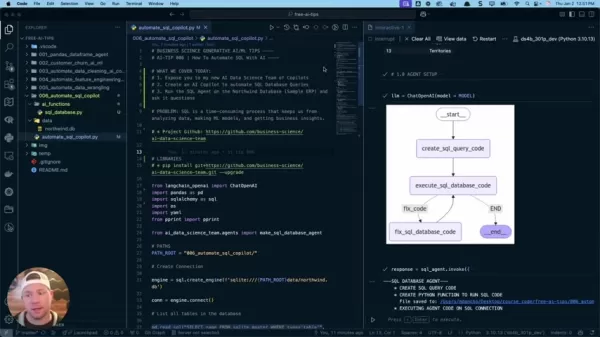
- Greater Efficiency: AI automatically generates SQL code, saving data scientists considerable time.
- Enhanced Accuracy: AI-powered agents help reduce mistakes in SQL code.
- Faster Data Analysis: Automated SQL queries speed up data retrieval and analysis, accelerating the entire data science process.
- Focus on Insights: Automating SQL tasks lets data scientists concentrate on higher-value work like interpreting data, building models, and extracting actionable insights.
This article explores the practical side of implementing AI-driven SQL automation, offering a step-by-step guide to setting up and using an AI agent for database interactions. Using a SQL agent to automate queries removes the tedious aspects of writing SQL code. It lets you focus on areas like machine learning and data analysis instead of generating the actual SQL.
Introducing the AI Data Science Team of Copilots
The 'AI Data Science Team' is a project that gives data scientists access to pre-built AI agents designed to automate common data tasks. Imagine having a team of AI assistants ready to handle different parts of your data workflow!
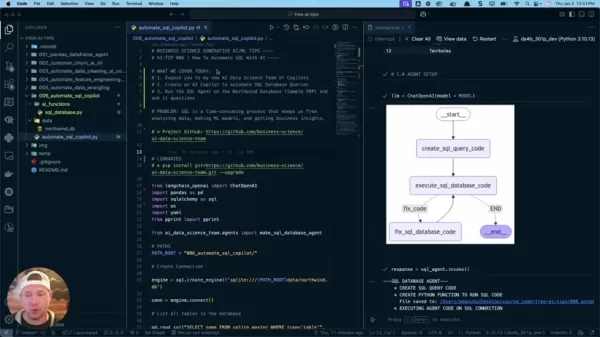
This project is built to improve efficiency and increase productivity, making data tasks significantly faster.
- Data Wrangling Agent: Merges, joins, and prepares data for analysis.
- Feature Engineering Agent: Transforms prepared data into ML-ready formats. Adds features to improve the predictive power of machine learning models.
- Data Cleaning Agent: Handles data preparation steps like managing missing values, outliers, and data type conversions.
- SQL Database Agent: Connects to SQL databases to import data into the data science environment. Creates pipelines to automate data extraction. Performs joins, aggregations, and other SQL operations.
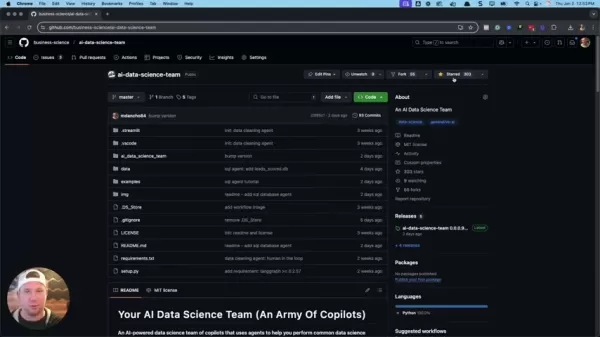
GitHub Repository: The foundation of the AI-driven SQL automation process is a well-organized GitHub repository with nearly 400 stars, serving as a central resource for accessing the pre-built AI agents. It provides various tools, including:
- Data cleaning agent
- SQL agent tutorial
- SQL database agent
Automating SQL Interactions with the SQL Database Agent
The SQL Database Agent is a central part of the 'AI Data Science Team,'
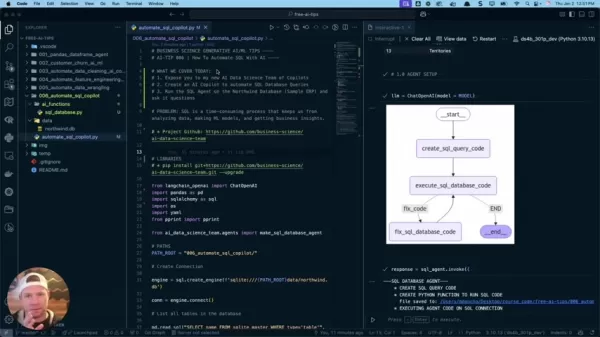
offering a smooth way to interact with SQL databases using natural language queries. This agent removes the need for data scientists to write complex SQL code by hand. A sample ERP database was created to link the customer database and automate data science workflows. The database is designed to:
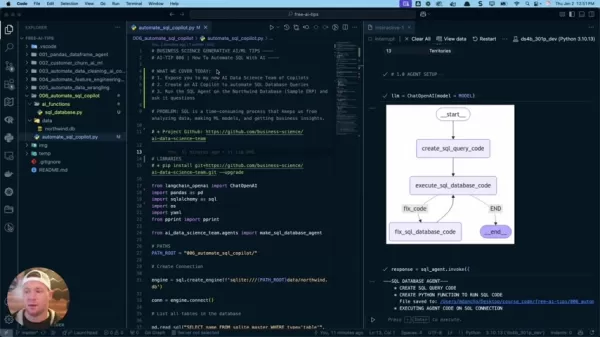
- Generate SQL query code.
- Create Python functions to execute SQL code.
- Run agent code on the SQL connection.
Step-by-Step Guide: Automating SQL Queries with AI
Step 1: Setting up Your Environment
Before starting the automation process, it's important to set up your environment with the required tools and libraries.
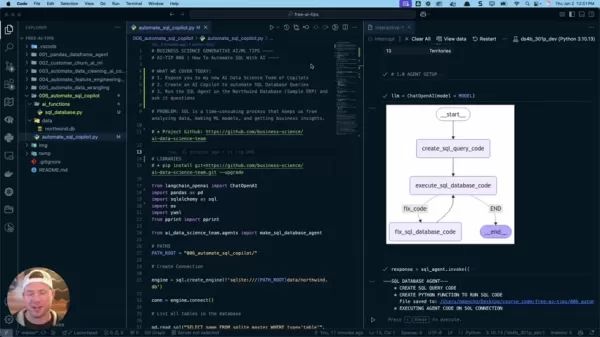
- Install the AI Data Science Team Package:
pip install git+https://github.com/business-science/ai-data-science-team.git --upgrade
This command installs the newest version of the 'AI Data Science Team' package, giving you access to the SQL Database Agent and other pre-built AI agents.
- Import Libraries:
To manage the agent effectively, make sure these libraries are available:
from langchain_openai import ChatOpenAIimport pandas as pdimport sqlalchemy as sqlimport osimport yamlimport pprintfrom ai_data_science_team.agents import make_sql_database_agent
- Establish Database Connection:Use a tool like SQLAlchemy to help:
engine = sql.create_engine('sqlite:///'+PATH_ROOT+'/northwind.db')conn = engine.connect()
Step 2: Creating and Configuring the SQL Agent
The next step is to create and configure the SQL Agent for database interaction.
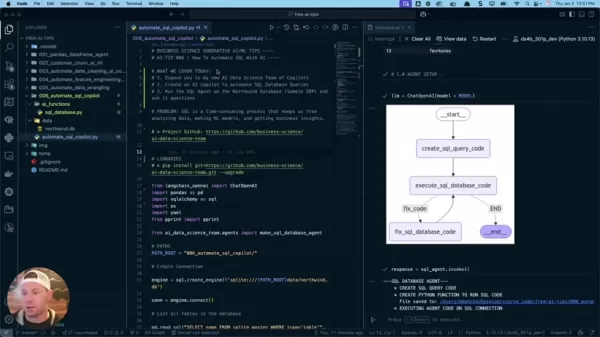
This involves setting up the language model and API keys.
- Configure the LLM: Connect to an LLM provider to enable code analysis. Here's an example:
llm = ChatOpenAI(model = MODEL)
- Set up Agent Setup: You need an OpenAI key to enable agent setup.
os.environ["OPENAI_API_KEY"] = "YOUR_OPENAI_API_KEY"os.environ["OPENAI_API_KEY"] = yaml.safe_load(open('./credentials.yml'))['openai']
Warning: Make sure to set up proper credentials with your OpenAI key to avoid errors. This saves time better spent on improving machine learning models.
Step 3: Running the SQL Agent and Retrieving Data
With the SQL Agent configured, you can now run queries and retrieve data from your database.
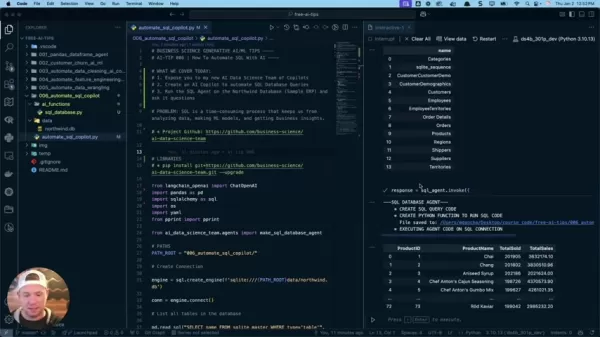
First, connect your data source to retrieve the data.
What's in the database? A common task is identifying the number of tables. Use this prompt:
response = sql_agent.invoke({"user_instructions": "What tables are in the database?"})
The agent builds a SQL database to help fetch the relevant tables.
Display the Key: You can extract important objects like:
- Messages
- SQL Database
- SQL database function
Create Data Frame: Generate a data frame saved to a course directory. From this response, we can extract all data from the different keys.
Open AI Pricing: Understanding the Costs
Considerations for Using Open AI API.
While automating SQL queries with AI offers major advantages,
it's important to be aware of the costs linked to using LLMs. OpenAI charges based on token usage, which can vary with query complexity and data size. Keep these pricing strategies in mind:
- Cost Effectiveness: Choose an efficient and budget-friendly OpenAI model to keep costs low.
- Set Token Limits: Control OpenAI usage to stay within your budget.
- Limited Samples: Provide enough samples for the database query to work properly. You don't always need to supply all samples.
SQL Agent : Weighing the Options
Pros
Automates the data engineering pipeline.
Setup time is reduced with the data science team.
Increases data output.
Cons
Can be costly due to the required OpenAI key.
Sample databases are often large, requiring time to configure for user needs.
Core Features of SQL Agent
What are key features of SQL Agent
Here are the core features of the SQL agent:
- SQL Query Code: Uses natural language to guide the SQL agent's functions.
- Python Function: Employs Python functions to run SQL code that can be saved to the user's folder.
- Executes Agent Code: Runs code on the SQL connection.
FAQ
What is a SQL agent?
A SQL Agent is an AI tool that automates query creation and execution, reducing routine work and increasing actionable insights.
What are the benefits of using AI-Automated SQL?
Improves productivity and accuracy. Lets you focus on data analysis, ML modeling, and business insights.
What type of Data Science do I need to do to start using a SQL Agent?
A Generative AI Data Scientist specializes in generative AI and LLMs for data science. This subset is in growing demand.
Related Questions
How do the AI Copilots connect to SQL?
Companies like OpenAI, NVIDIA, Walmart, and Home Depot connect customer databases with large language models. To set this up, you need to configure the large language model, OpenAI key, and API key.
Related article
 Hiroshi Fujiwara and Robert Little Win 2026 Engelberger Robotics Awards
Hiroshi Fujiwara (left) and Robert Little (right) are the 2026 recipients of the Joseph F. Engelberger Robotics Award. | Credit: A3The Association for Advancing Automation (A3) has announced Hiroshi Fujiwara and Robert Little as the winners of the 20
AI Voice Agents Streamline Sales: A Look at CallFluent
In the fast-paced landscape of modern business, automation has shifted from a luxury to an essential tool. AI-powered voice agents are fundamentally changing how companies manage sales and customer support, delivering exceptional efficiency and signi
How to automate YouTube with AI scripting using Subscriber AI in 2025?
Consistently creating engaging YouTube content can feel overwhelming. Many creators face challenges with scripting, researching topics, and adapting to the platform's constantly evolving algorithm. Imagine an AI-powered solution designed specifically
Related Special Topic Recommendations
chatbot
Hiroshi Fujiwara and Robert Little Win 2026 Engelberger Robotics Awards
Hiroshi Fujiwara (left) and Robert Little (right) are the 2026 recipients of the Joseph F. Engelberger Robotics Award. | Credit: A3The Association for Advancing Automation (A3) has announced Hiroshi Fujiwara and Robert Little as the winners of the 20
AI Voice Agents Streamline Sales: A Look at CallFluent
In the fast-paced landscape of modern business, automation has shifted from a luxury to an essential tool. AI-powered voice agents are fundamentally changing how companies manage sales and customer support, delivering exceptional efficiency and signi
How to automate YouTube with AI scripting using Subscriber AI in 2025?
Consistently creating engaging YouTube content can feel overwhelming. Many creators face challenges with scripting, researching topics, and adapting to the platform's constantly evolving algorithm. Imagine an AI-powered solution designed specifically
Related Special Topic Recommendations
chatbot
 Best AI Conversation Trainer Tools for Interview Practice
2026 Latest Best Top-rated AI Conversation Trainer Tools for Interview Practice are here on XIX.AI! This curated collection features powerful, game-changing tools that go through rigorous real-world tests to deliver accurate feedback. You’ll find a free vs paid comparison and detailed rankings to help you choose the must-try option that boosts your confidence and skills. Explore now to Discover your perfect tool for interview success!
 12 tools
 xix.ai
Design & Art
Best AI Style Transfer Tools for Creative Experiments
xix.ai
Design & Art
Best AI Style Transfer Tools for Creative Experiments
2026 Latest Best Top-rated AI Style Transfer Tools for Creative Experiments! XIX.AI has curated a powerful, game-changing collection of must-try tools that deliver exceptional results through real-world tests and rigorous rankings. These top solutions help creatives boost productivity significantly by accelerating content creation and unlocking endless creative possibilities. Explore now to discover your perfect tool and start creating today!
9 tools
xix.ai
Comic Creation
Best AI Dialogue Bubble Tools for Visual Storytelling
2026 Latest Best Top-Rated AI Dialogue Bubble Tools for Visual Storytelling are here on XIX.AI! This curated collection features powerful, game-changing tools that help creators boost productivity and overcome creative bottlenecks. Get a free vs paid comparison, see real-world tests, and check the latest rankings to find the must-try solutions perfect for crafting engaging visual narratives. Explore now to discover your ideal tool!
10 tools
xix.ai
Meeting Assistant
Top AI Meeting Summary Tools: Track Decisions and Follow-Ups Clearly
2026 Latest Top-Rated Best AI Meeting Summary Tools for Clear Decision Tracking and Effortless Follow-Ups. This curated list showcases powerful, game-changing solutions that boost productivity dramatically by automating meeting notes, identifying key action items, and streamlining team coordination across all projects. Get a free vs paid comparison along with real-world tests and weekly updated rankings to help you find the perfect tool. Explore now to unlock your AI edge!
9 tools
xix.ai
Data Analysis
Best AI Data Cleaning Tools: Fix Missing Values and Duplicates Fast
2026 Latest Best Top-rated AI Data Cleaning Tools for quick fixing of missing values and duplicates. This curated list showcases powerful, game-changing solutions that boost productivity significantly. Each option has undergone rigorous real-world tests to ensure reliability. Get a free vs paid comparison and discover the must-try tool that fits your needs best. Explore now at XIX.AI to Unlock your AI edge.
11 tools
xix.ai
Design & Art
Best AI Creative Ideation Tools for Artists: Break Through Visual Blocks
2026 Latest Best Top-Rated AI Creative Ideation Tools for Artists are curated by XIX.AI to help creators break through visual blocks and boost creativity instantly. These powerful game-changing tools offer real-world tests, detailed free vs paid comparison, and weekly updated rankings. Discover your perfect tool to accelerate content creation and unlock your AI edge today. Explore now!
14 tools
xix.ai

 Comments (3)
0/500
Comments (3)
0/500
![WillLopez]()
This is a game-changer for data scientists! I've been manually writing SQL queries for years and it's such a drag. Automating them with AI sounds like a dream come true. But I wonder: how reliable is it with complex joins? 🤔
![StevenGonzalez]()
This is a game-changer for data teams! I've spent countless hours writing and debugging SQL queries. If AI can handle the routine stuff, we can finally focus on the fun part—finding insights and building models. Hope it's not just hype though. 🤞
![LarryWilliams]()
As a data analyst who writes SQL every day, this is a game-changer for batch processing! Can't wait to try automating those monthly report queries. The free time might finally let me look into those advanced models my boss keeps mentioning hope it's not too complex to implement.
In the fast-moving field of data science, efficiency is essential. Automating repetitive tasks frees up valuable time for deeper analysis and model development. This guide explains how to use AI to automate SQL database queries, cutting down the manual work needed for data retrieval and preparation. By integrating AI into SQL workflows, data scientists can speed up their processes, enhance accuracy, and spend more time uncovering meaningful insights. This article introduces a fresh approach to this challenge, demonstrating how generative AI can boost productivity in your SQL operations.
Key Points
Explore a new AI-driven method for automating SQL database queries.
Find out how to configure an AI agent to generate and run SQL code.
Learn how to use the 'AI Data Science Team' to access ready-to-use AI agents.
Discover how to simplify your data analysis workflow by automating SQL tasks.
Learn to activate agent setup using your OpenAI key.
Unlocking Efficiency: Automating SQL with AI
The Power of Automated SQL
Data scientists frequently dedicate a large part of their workday to writing and running SQL queries. This manual approach can be slow and error-prone. Automating SQL queries with AI brings several key benefits:
- Greater Efficiency: AI automatically generates SQL code, saving data scientists considerable time.
- Enhanced Accuracy: AI-powered agents help reduce mistakes in SQL code.
- Faster Data Analysis: Automated SQL queries speed up data retrieval and analysis, accelerating the entire data science process.
- Focus on Insights: Automating SQL tasks lets data scientists concentrate on higher-value work like interpreting data, building models, and extracting actionable insights.
This article explores the practical side of implementing AI-driven SQL automation, offering a step-by-step guide to setting up and using an AI agent for database interactions. Using a SQL agent to automate queries removes the tedious aspects of writing SQL code. It lets you focus on areas like machine learning and data analysis instead of generating the actual SQL.
Introducing the AI Data Science Team of Copilots
The 'AI Data Science Team' is a project that gives data scientists access to pre-built AI agents designed to automate common data tasks. Imagine having a team of AI assistants ready to handle different parts of your data workflow!
This project is built to improve efficiency and increase productivity, making data tasks significantly faster.
- Data Wrangling Agent: Merges, joins, and prepares data for analysis.
- Feature Engineering Agent: Transforms prepared data into ML-ready formats. Adds features to improve the predictive power of machine learning models.
- Data Cleaning Agent: Handles data preparation steps like managing missing values, outliers, and data type conversions.
- SQL Database Agent: Connects to SQL databases to import data into the data science environment. Creates pipelines to automate data extraction. Performs joins, aggregations, and other SQL operations.
GitHub Repository: The foundation of the AI-driven SQL automation process is a well-organized GitHub repository with nearly 400 stars, serving as a central resource for accessing the pre-built AI agents. It provides various tools, including:
- Data cleaning agent
- SQL agent tutorial
- SQL database agent
Automating SQL Interactions with the SQL Database Agent
The SQL Database Agent is a central part of the 'AI Data Science Team,'
offering a smooth way to interact with SQL databases using natural language queries. This agent removes the need for data scientists to write complex SQL code by hand. A sample ERP database was created to link the customer database and automate data science workflows. The database is designed to:
- Generate SQL query code.
- Create Python functions to execute SQL code.
- Run agent code on the SQL connection.
Step-by-Step Guide: Automating SQL Queries with AI
Step 1: Setting up Your Environment
Before starting the automation process, it's important to set up your environment with the required tools and libraries.
- Install the AI Data Science Team Package:
pip install git+https://github.com/business-science/ai-data-science-team.git --upgradeThis command installs the newest version of the 'AI Data Science Team' package, giving you access to the SQL Database Agent and other pre-built AI agents.
- Import Libraries:
To manage the agent effectively, make sure these libraries are available:
from langchain_openai import ChatOpenAIimport pandas as pdimport sqlalchemy as sqlimport osimport yamlimport pprintfrom ai_data_science_team.agents import make_sql_database_agent
- Establish Database Connection:Use a tool like SQLAlchemy to help:
engine = sql.create_engine('sqlite:///'+PATH_ROOT+'/northwind.db')conn = engine.connect()
Step 2: Creating and Configuring the SQL Agent
The next step is to create and configure the SQL Agent for database interaction.
This involves setting up the language model and API keys.
- Configure the LLM: Connect to an LLM provider to enable code analysis. Here's an example:
llm = ChatOpenAI(model = MODEL) - Set up Agent Setup: You need an OpenAI key to enable agent setup.
os.environ["OPENAI_API_KEY"] = "YOUR_OPENAI_API_KEY"os.environ["OPENAI_API_KEY"] = yaml.safe_load(open('./credentials.yml'))['openai']
Warning: Make sure to set up proper credentials with your OpenAI key to avoid errors. This saves time better spent on improving machine learning models.
Step 3: Running the SQL Agent and Retrieving Data
With the SQL Agent configured, you can now run queries and retrieve data from your database.
First, connect your data source to retrieve the data.
What's in the database? A common task is identifying the number of tables. Use this prompt:
response = sql_agent.invoke({"user_instructions": "What tables are in the database?"})The agent builds a SQL database to help fetch the relevant tables.
Display the Key: You can extract important objects like:
- Messages
- SQL Database
- SQL database function
Create Data Frame: Generate a data frame saved to a course directory. From this response, we can extract all data from the different keys.
Open AI Pricing: Understanding the Costs
Considerations for Using Open AI API.
While automating SQL queries with AI offers major advantages,
it's important to be aware of the costs linked to using LLMs. OpenAI charges based on token usage, which can vary with query complexity and data size. Keep these pricing strategies in mind:
- Cost Effectiveness: Choose an efficient and budget-friendly OpenAI model to keep costs low.
- Set Token Limits: Control OpenAI usage to stay within your budget.
- Limited Samples: Provide enough samples for the database query to work properly. You don't always need to supply all samples.
SQL Agent : Weighing the Options
Pros
Automates the data engineering pipeline.
Setup time is reduced with the data science team.
Increases data output.
Cons
Can be costly due to the required OpenAI key.
Sample databases are often large, requiring time to configure for user needs.
Core Features of SQL Agent
What are key features of SQL Agent
Here are the core features of the SQL agent:
- SQL Query Code: Uses natural language to guide the SQL agent's functions.
- Python Function: Employs Python functions to run SQL code that can be saved to the user's folder.
- Executes Agent Code: Runs code on the SQL connection.
FAQ
What is a SQL agent?
A SQL Agent is an AI tool that automates query creation and execution, reducing routine work and increasing actionable insights.
What are the benefits of using AI-Automated SQL?
Improves productivity and accuracy. Lets you focus on data analysis, ML modeling, and business insights.
What type of Data Science do I need to do to start using a SQL Agent?
A Generative AI Data Scientist specializes in generative AI and LLMs for data science. This subset is in growing demand.
Related Questions
How do the AI Copilots connect to SQL?
Companies like OpenAI, NVIDIA, Walmart, and Home Depot connect customer databases with large language models. To set this up, you need to configure the large language model, OpenAI key, and API key.







 Hiroshi Fujiwara and Robert Little Win 2026 Engelberger Robotics Awards
Hiroshi Fujiwara (left) and Robert Little (right) are the 2026 recipients of the Joseph F. Engelberger Robotics Award. | Credit: A3The Association for Advancing Automation (A3) has announced Hiroshi Fujiwara and Robert Little as the winners of the 20
Hiroshi Fujiwara and Robert Little Win 2026 Engelberger Robotics Awards
Hiroshi Fujiwara (left) and Robert Little (right) are the 2026 recipients of the Joseph F. Engelberger Robotics Award. | Credit: A3The Association for Advancing Automation (A3) has announced Hiroshi Fujiwara and Robert Little as the winners of the 20
 AI Voice Agents Streamline Sales: A Look at CallFluent
In the fast-paced landscape of modern business, automation has shifted from a luxury to an essential tool. AI-powered voice agents are fundamentally changing how companies manage sales and customer support, delivering exceptional efficiency and signi
AI Voice Agents Streamline Sales: A Look at CallFluent
In the fast-paced landscape of modern business, automation has shifted from a luxury to an essential tool. AI-powered voice agents are fundamentally changing how companies manage sales and customer support, delivering exceptional efficiency and signi
 How to automate YouTube with AI scripting using Subscriber AI in 2025?
Consistently creating engaging YouTube content can feel overwhelming. Many creators face challenges with scripting, researching topics, and adapting to the platform's constantly evolving algorithm. Imagine an AI-powered solution designed specifically
How to automate YouTube with AI scripting using Subscriber AI in 2025?
Consistently creating engaging YouTube content can feel overwhelming. Many creators face challenges with scripting, researching topics, and adapting to the platform's constantly evolving algorithm. Imagine an AI-powered solution designed specifically

2026 Latest Best Top-rated AI Conversation Trainer Tools for Interview Practice are here on XIX.AI! This curated collection features powerful, game-changing tools that go through rigorous real-world tests to deliver accurate feedback. You’ll find a free vs paid comparison and detailed rankings to help you choose the must-try option that boosts your confidence and skills. Explore now to Discover your perfect tool for interview success!
12 tools
xix.ai

2026 Latest Best Top-rated AI Style Transfer Tools for Creative Experiments! XIX.AI has curated a powerful, game-changing collection of must-try tools that deliver exceptional results through real-world tests and rigorous rankings. These top solutions help creatives boost productivity significantly by accelerating content creation and unlocking endless creative possibilities. Explore now to discover your perfect tool and start creating today!
9 tools
xix.ai

2026 Latest Best Top-Rated AI Dialogue Bubble Tools for Visual Storytelling are here on XIX.AI! This curated collection features powerful, game-changing tools that help creators boost productivity and overcome creative bottlenecks. Get a free vs paid comparison, see real-world tests, and check the latest rankings to find the must-try solutions perfect for crafting engaging visual narratives. Explore now to discover your ideal tool!
10 tools
xix.ai

2026 Latest Top-Rated Best AI Meeting Summary Tools for Clear Decision Tracking and Effortless Follow-Ups. This curated list showcases powerful, game-changing solutions that boost productivity dramatically by automating meeting notes, identifying key action items, and streamlining team coordination across all projects. Get a free vs paid comparison along with real-world tests and weekly updated rankings to help you find the perfect tool. Explore now to unlock your AI edge!
9 tools
xix.ai

2026 Latest Best Top-rated AI Data Cleaning Tools for quick fixing of missing values and duplicates. This curated list showcases powerful, game-changing solutions that boost productivity significantly. Each option has undergone rigorous real-world tests to ensure reliability. Get a free vs paid comparison and discover the must-try tool that fits your needs best. Explore now at XIX.AI to Unlock your AI edge.
11 tools
xix.ai

2026 Latest Best Top-Rated AI Creative Ideation Tools for Artists are curated by XIX.AI to help creators break through visual blocks and boost creativity instantly. These powerful game-changing tools offer real-world tests, detailed free vs paid comparison, and weekly updated rankings. Discover your perfect tool to accelerate content creation and unlock your AI edge today. Explore now!
14 tools
xix.ai

This is a game-changer for data scientists! I've been manually writing SQL queries for years and it's such a drag. Automating them with AI sounds like a dream come true. But I wonder: how reliable is it with complex joins? 🤔
This is a game-changer for data teams! I've spent countless hours writing and debugging SQL queries. If AI can handle the routine stuff, we can finally focus on the fun part—finding insights and building models. Hope it's not just hype though. 🤞
As a data analyst who writes SQL every day, this is a game-changer for batch processing! Can't wait to try automating those monthly report queries. The free time might finally let me look into those advanced models my boss keeps mentioning hope it's not too complex to implement.












