


 Home
HomeUnveiling the Turing 1950: A Guide to the AI Infographic Video Generator
In today's fast-paced digital landscape, compelling and informative content is essential for effective communication. Infographic videos are a powerful medium for presenting data and complex information in an easily digestible format. Turing 1950 is an innovative, AI-powered tool that streamlines and automates the creation of engaging infographic videos from text or CSV data. This article provides a demonstration of Turing 1950, examining its features, capabilities, and potential applications.
Key Points
Turing 1950 uses artificial intelligence to produce infographic videos.
Data can be entered via text queries or by uploading CSV files.
The platform provides different video templates, such as Modern and Gradient.
AI technology refines text and automatically creates video frames.
The tool builds charts and data visualizations from provided information.
While still under development, it shows significant promise.
Turing 1950: An AI-Powered Infographic Video Generator
What is Turing 1950?
Turing 1950 is a state-of-the-art AI platform dedicated to effortless infographic video production.
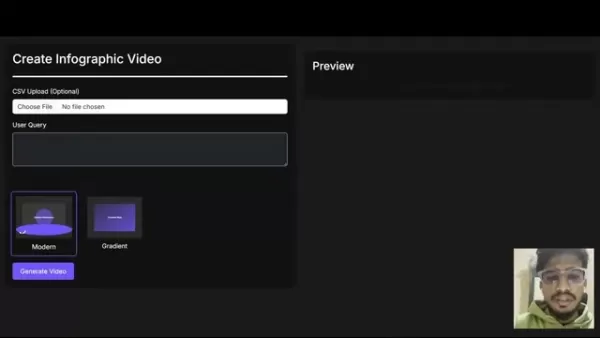
It enables users to create visually appealing and informative videos from straightforward text inputs or structured data in CSV files. The objective is to democratize video creation, making it accessible to individuals and businesses without advanced design or video editing expertise. Turing 1950 was conceived to address the specific challenge faced by AOS Lab: generating infographic videos with ease, even under tight deadlines. Powered by sophisticated AI algorithms, Turing 1950 automates the entire video creation workflow, from content comprehension to final visualization and rendering. It is a transformative tool for content creators, marketers, educators, and anyone needing to communicate intricate information more effectively.
Core features include:
- Text-to-video generation: Transform written content into dynamic video formats.
- CSV data visualization: Convert spreadsheet data into insightful charts and graphs within videos.
- Automated frame creation: AI-driven generation of video frames and scene transitions.
- Customizable templates: A selection of pre-designed video templates to choose from.
The Infographic Video Generator helps overcome the difficulty of rapidly updating visualizations with new data, empowering content creators, video editors, designers, data analysts, and their audiences to access fresh content swiftly. It provides a system that accepts text input with data or statistics, automatically identifies the data type, selects suitable visualization techniques, dynamically generates animated infographics, and exports them as production-ready video files.
The Turing 1950 Demo: A Step-by-Step Walkthrough
The demonstration video thoroughly showcases Turing 1950's functionalities. Here is the detailed process:
Accessing the Dashboard: The presenter starts by explaining the straightforward MVP dashboard of Turing 1950.
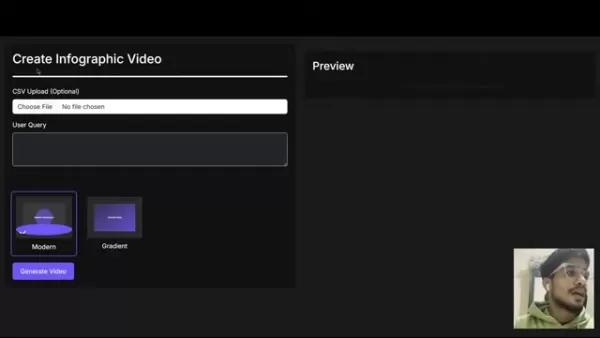
Data Input Options: Users can input their data in two primary ways:
- CSV Upload: Upload a CSV file with structured data. This is ideal for more complex datasets.
- User Query: Type a text query directly into the system. This method works well for simpler data points or statements.
Template Selection: Currently, Turing 1950 features two distinct video styles: Modern and Gradient. Users can pick the template that aligns best with their intended visual presentation.
Generating the Video: After providing the data and choosing a template, the user clicks the Generate Video button. The AI then processes the information, improves the text, and creates frames and transitions.
Preview and Download: Once generation is complete, a preview of the video is displayed. The user can then download the final video in MP4 format.
Example 1: Text-Based Input
The presenter first shows how text-based input works. A sample problem statement from AOS Lab is copied:
"20% of users own an iPhone, 50% own a Samsung, and the rest own a variety of brands."
This text query is pasted into the dashboard. The Modern template is selected, and the Generate Video button is clicked. The system intelligently analyzes the data and produces a visually clear pie chart showing the smartphone ownership distribution.
Example 2: CSV File Input
To demonstrate CSV file input, a "Spotify Most Streamed Songs" dataset from Kaggle is used. The file is uploaded to the platform. The user then enters the query “top release in 2023”. After the video is generated, it displays various charts automatically created by the system from the CSV data, specifically tailored to the “top release” prompt. These include a bar graph and animated metrics.
The following table provides a summary of the workflow:
Step Description 1. Accessing Dashboard An introduction to the Turing 1950 dashboard interface. 2. Data Input Option to input text data or upload a CSV file. 3. Template Selection Choice between the Modern or Gradient template to define the video's look and feel. 4. Generate Video The AI processes the input data and selected template to create the video. 5. Preview and Download Review the generated video and download it as an MP4 file.
Disclaimers and Future Potential
Important Considerations
The presenter stressed that Turing 1950 is currently in the early phases of its development.
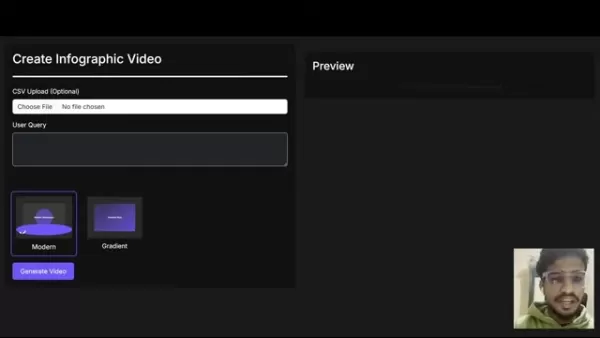
The team had only started developing the project within the 24 hours preceding the demonstration, indicating it is a Minimum Viable Product (MVP). A clear understanding of the central problem and the desired outcome only emerged after discussions with AOS Lab. Consequently, the platform's quality, accuracy, and feature set are expected to improve substantially over time. This demonstration is intended to highlight the fundamental potential of an AI-driven infographic video generator.
The presenter notes, "Our perspective on this issue evolved. It was only after our initial call with AOS Lab that we truly grasped the core of the problem."
Key Metrics Displayed on the Output
The infographic videos produced by Turing 1950 showcase a variety of metrics and statistics.
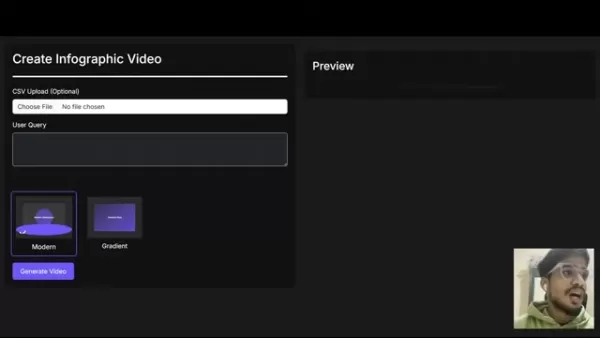
These key performance indicators include:
- Pie Charts: For example, showing 20% iPhone ownership, 50% Samsung, and 30% other devices.
- Animations for 2023 Top Releases and other music statistics.
- Visualizations tracking performance over different time periods.
This data is dynamically presented through automatically generated animated infographic videos.
Pros and Cons
Pros
Streamlines the process of creating infographic videos.
Automates the generation of frames and scene transitions.
Provides a selection of different templates.
Uses AI to polish text and produce captivating videos.
Enables quick updates to visualizations when new data is available.
Cons
Currently in the early stages of development.
Customization options were limited during the demonstration.
Depends on AI's interpretation of data, which may occasionally lack perfect accuracy.
Frequently Asked Questions
What type of data inputs does Turing 1950 support?
Turing 1950 accepts data through text-based queries or by uploading CSV files. This flexibility allows users to efficiently produce infographic videos from various data sources.
What templates are available?
During the demonstration, Turing 1950 offered two main video templates: Modern and Gradient. The development team is working on introducing more options.
Is this AI infographic video generator easy to use?
A primary objective of Turing 1950 is to make video creation accessible to all. The platform's user-friendly dashboard and automated AI operations significantly simplify the entire workflow.
Are the output videos customizable?
Yes, you can customize the final videos by selecting the template that best presents your data. The team is actively developing further customization features.
Related Questions
What are the benefits of infographic videos?
Infographic videos are highly engaging and excellent for conveying data, concepts, and complex information. They can be easily distributed across social media platforms, leading to greater brand visibility and improved conversion rates. Viewers retain approximately 95% of a message from a video, compared to only about 10% when reading text.
How can AI tools be used in marketing?
AI has the potential to transform marketing by enhancing customer experiences through personalization, increasing marketing ROI via customer insight analysis, and automating routine tasks. It can be effectively used to generate infographic videos from straightforward datasets.
Related article
 Stripe to Acquire OpenRouter as AI Model Routing Gains Momentum
Stripe has agreed to acquire OpenRouter, an AI model-routing platform that gives developers access to hundreds of models through a single interface. The deal adds model selection and routing to Stripe’s existing work around AI usage and token-based b
Former OpenAI Researcher Barrett Zoph Returns to Google to Support Gemini Development
Barret Zoph, who previously abruptly left and joined OpenAI due to a disagreement with Thinking Machines Lab CEO Miriam Mularati, has once again changed employers. Alphabet's Google announced that Zoph will return as Vice President of Research, bring
How Recursive Intelligence Raised $335M at $4B Valuation in 4 Months
The co-founders of startup Ricursive Intelligence seemed destined to be co-founders.Anna Goldie, CEO, and Azalia Mirhoseini, CTO, are so well-known in the AI community that they were among those AI engineers who “got those weird emails from Zuckerber
Related Special Topic Recommendations
Design & Art
Stripe to Acquire OpenRouter as AI Model Routing Gains Momentum
Stripe has agreed to acquire OpenRouter, an AI model-routing platform that gives developers access to hundreds of models through a single interface. The deal adds model selection and routing to Stripe’s existing work around AI usage and token-based b
Former OpenAI Researcher Barrett Zoph Returns to Google to Support Gemini Development
Barret Zoph, who previously abruptly left and joined OpenAI due to a disagreement with Thinking Machines Lab CEO Miriam Mularati, has once again changed employers. Alphabet's Google announced that Zoph will return as Vice President of Research, bring
How Recursive Intelligence Raised $335M at $4B Valuation in 4 Months
The co-founders of startup Ricursive Intelligence seemed destined to be co-founders.Anna Goldie, CEO, and Azalia Mirhoseini, CTO, are so well-known in the AI community that they were among those AI engineers who “got those weird emails from Zuckerber
Related Special Topic Recommendations
Design & Art
 Top AI Illustration Tools: Create Editorial Scenes and Cover Art Faster
2026 Latest Top-rated AI Illustration Tools: Our curated list features the best powerfully designed tools for creating stunning editorial scenes and eye-catching cover art quickly. Each option has gone through rigorous real-world tests, offering a free vs paid comparison to help you find the perfect match for your workflow. Try these must-try solutions today to unlock your AI edge and boost your creative productivity. Explore now at XIX.AI.
 10 tools
 xix.ai
Education and Learning
Top AI Tutors for Exam Prep: Practice Math, Science, and English
xix.ai
Education and Learning
Top AI Tutors for Exam Prep: Practice Math, Science, and English
2026 Latest Top-Rated Best AI Tutors for Exam Prep are here on XIX.AI! Our curated list features powerful game-changing tools that offer free vs paid comparison, real-world tests, and weekly updated rankings. They help boost your writing efficiency, simplify complex topic learning, and unlock your academic potential. Explore now to Discover your perfect exam prep tool and Start creating today to Unlock your AI edge!
10 tools
xix.ai
Finance
AI Budget Planning Tools for Personal Money Management
2026 Latest Best Top-Rated AI Budget Planning Tools for Personal Money Management are here on XIX.AI! This curated collection features powerful, game-changing solutions that help you conduct real-world tests, understand spending habits, and create personalized plans to boost productivity. Enjoy a free vs paid comparison along with detailed rankings. Must-try tools designed to simplify money management and unlock your AI edge. Explore now!
11 tools
xix.ai
Health & Wellness
AI Sleep Tracking Assistants: Improve Recovery with Better Bedtime Habits
2026 Latest Best Top-Rated AI Sleep Tracking Assistants curated for ultimate recovery. This fully updated weekly guide features powerful tools that deliver real-world tests, free vs paid comparison, and detailed rankings to help you find the must-try solution that boosts sleep quality and supports better bedtime habits. Explore now at XIX.AI to Unlock your AI edge.
10 tools
xix.ai
Data Analysis
AI SQL Copilots for Product and Revenue Analytics
2026 Latest Best Top-Rated AI SQL Copilots for Product and Revenue Analytics! XIX.AI has curated a powerful, game-changing collection of must-try tools that undergo real-world tests through weekly updated rankings. These tools help users boost productivity significantly by accelerating data analysis, streamlining complex queries, and generating accurate insights to drive smarter business decisions. Explore now to Discover your perfect tool for unlocking your AI edge!
14 tools
xix.ai
Education and Learning
Best AI Homework Helpers That Teach: Learn Concepts, Not Just Answers
2026 Latest Best Top-Rated AI Homework Helpers That Teach Core Concepts Not Just Answers Powerful Tools for Students Must-Try Curated List Weekly Updated Free vs Paid Comparison Real-World Tests Accurate Rankings to Help You Unlock Your Full Learning Potential Explore now to Discover your perfect tool for smarter studying.
10 tools
xix.ai

 Comments (12)
0/500
Comments (12)
0/500
![StevenSanchez]()
Finally, a tool that makes creating infographic videos as easy as pie! 🥧 I've been struggling with Canva for ages, so this Turing 1950 looks like a game-changer for my workflow. Can't wait to test it out and see if it actually handles complex data visualization well without looking too generic. 🤞
![SebastianAnderson]()
Me encanta la idea de simplificar la información compleja. ¿Es compatible con exportación en alta resolución? Sería un game changer para las redes sociales. ¡Ojalá funcione tan bien como prometen!
![KevinMartinez]()
Генератор инфографики? Звучит как будущее. Главное, чтобы он не генерировал глупости вместо данных. Технологии развиваются быстро, но качество контента остается ключевым фактором.
![CarlTaylor]()
Que ferramenta incrível! Transformar dados chatos em vídeos dinâmicos é o sonho de qualquer analista. Espero que a curva de aprendizado seja baixa, senão vai ser difícil adotar na equipe.
![PeterRoberts]()
這功能看起來很實用,特別是對於需要快速產出視覺內容的行銷人員。不過,生成的影片是否支援自訂品牌色系?這點很重要,不然做出來還是沒有辨識度。
![AlbertGarcía]()
Interessantes Tool! Infografiken sind oft langweilig, aber Videos könnten das ändern. Ich bin skeptisch, ob die KI wirklich komplexe Zusammenhänge korrekt darstellt. Mal sehen, wie es sich in der Praxis bewährt.
In today's fast-paced digital landscape, compelling and informative content is essential for effective communication. Infographic videos are a powerful medium for presenting data and complex information in an easily digestible format. Turing 1950 is an innovative, AI-powered tool that streamlines and automates the creation of engaging infographic videos from text or CSV data. This article provides a demonstration of Turing 1950, examining its features, capabilities, and potential applications.
Key Points
Turing 1950 uses artificial intelligence to produce infographic videos.
Data can be entered via text queries or by uploading CSV files.
The platform provides different video templates, such as Modern and Gradient.
AI technology refines text and automatically creates video frames.
The tool builds charts and data visualizations from provided information.
While still under development, it shows significant promise.
Turing 1950: An AI-Powered Infographic Video Generator
What is Turing 1950?
Turing 1950 is a state-of-the-art AI platform dedicated to effortless infographic video production.
It enables users to create visually appealing and informative videos from straightforward text inputs or structured data in CSV files. The objective is to democratize video creation, making it accessible to individuals and businesses without advanced design or video editing expertise. Turing 1950 was conceived to address the specific challenge faced by AOS Lab: generating infographic videos with ease, even under tight deadlines. Powered by sophisticated AI algorithms, Turing 1950 automates the entire video creation workflow, from content comprehension to final visualization and rendering. It is a transformative tool for content creators, marketers, educators, and anyone needing to communicate intricate information more effectively.
Core features include:
- Text-to-video generation: Transform written content into dynamic video formats.
- CSV data visualization: Convert spreadsheet data into insightful charts and graphs within videos.
- Automated frame creation: AI-driven generation of video frames and scene transitions.
- Customizable templates: A selection of pre-designed video templates to choose from.
The Infographic Video Generator helps overcome the difficulty of rapidly updating visualizations with new data, empowering content creators, video editors, designers, data analysts, and their audiences to access fresh content swiftly. It provides a system that accepts text input with data or statistics, automatically identifies the data type, selects suitable visualization techniques, dynamically generates animated infographics, and exports them as production-ready video files.
The Turing 1950 Demo: A Step-by-Step Walkthrough
The demonstration video thoroughly showcases Turing 1950's functionalities. Here is the detailed process:
Accessing the Dashboard: The presenter starts by explaining the straightforward MVP dashboard of Turing 1950.
Data Input Options: Users can input their data in two primary ways:
- CSV Upload: Upload a CSV file with structured data. This is ideal for more complex datasets.
- User Query: Type a text query directly into the system. This method works well for simpler data points or statements.
Template Selection: Currently, Turing 1950 features two distinct video styles: Modern and Gradient. Users can pick the template that aligns best with their intended visual presentation.
Generating the Video: After providing the data and choosing a template, the user clicks the Generate Video button. The AI then processes the information, improves the text, and creates frames and transitions.
Preview and Download: Once generation is complete, a preview of the video is displayed. The user can then download the final video in MP4 format.
Example 1: Text-Based Input
The presenter first shows how text-based input works. A sample problem statement from AOS Lab is copied:
"20% of users own an iPhone, 50% own a Samsung, and the rest own a variety of brands."
This text query is pasted into the dashboard. The Modern template is selected, and the Generate Video button is clicked. The system intelligently analyzes the data and produces a visually clear pie chart showing the smartphone ownership distribution.
Example 2: CSV File Input
To demonstrate CSV file input, a "Spotify Most Streamed Songs" dataset from Kaggle is used. The file is uploaded to the platform. The user then enters the query “top release in 2023”. After the video is generated, it displays various charts automatically created by the system from the CSV data, specifically tailored to the “top release” prompt. These include a bar graph and animated metrics.
The following table provides a summary of the workflow:
| Step | Description |
|---|---|
| 1. Accessing Dashboard | An introduction to the Turing 1950 dashboard interface. |
| 2. Data Input | Option to input text data or upload a CSV file. |
| 3. Template Selection | Choice between the Modern or Gradient template to define the video's look and feel. |
| 4. Generate Video | The AI processes the input data and selected template to create the video. |
| 5. Preview and Download | Review the generated video and download it as an MP4 file. |
Disclaimers and Future Potential
Important Considerations
The presenter stressed that Turing 1950 is currently in the early phases of its development.
The team had only started developing the project within the 24 hours preceding the demonstration, indicating it is a Minimum Viable Product (MVP). A clear understanding of the central problem and the desired outcome only emerged after discussions with AOS Lab. Consequently, the platform's quality, accuracy, and feature set are expected to improve substantially over time. This demonstration is intended to highlight the fundamental potential of an AI-driven infographic video generator.
The presenter notes, "Our perspective on this issue evolved. It was only after our initial call with AOS Lab that we truly grasped the core of the problem."
Key Metrics Displayed on the Output
The infographic videos produced by Turing 1950 showcase a variety of metrics and statistics.
These key performance indicators include:
- Pie Charts: For example, showing 20% iPhone ownership, 50% Samsung, and 30% other devices.
- Animations for 2023 Top Releases and other music statistics.
- Visualizations tracking performance over different time periods.
This data is dynamically presented through automatically generated animated infographic videos.
Pros and Cons
Pros
Streamlines the process of creating infographic videos.
Automates the generation of frames and scene transitions.
Provides a selection of different templates.
Uses AI to polish text and produce captivating videos.
Enables quick updates to visualizations when new data is available.
Cons
Currently in the early stages of development.
Customization options were limited during the demonstration.
Depends on AI's interpretation of data, which may occasionally lack perfect accuracy.
Frequently Asked Questions
What type of data inputs does Turing 1950 support?
Turing 1950 accepts data through text-based queries or by uploading CSV files. This flexibility allows users to efficiently produce infographic videos from various data sources.
What templates are available?
During the demonstration, Turing 1950 offered two main video templates: Modern and Gradient. The development team is working on introducing more options.
Is this AI infographic video generator easy to use?
A primary objective of Turing 1950 is to make video creation accessible to all. The platform's user-friendly dashboard and automated AI operations significantly simplify the entire workflow.
Are the output videos customizable?
Yes, you can customize the final videos by selecting the template that best presents your data. The team is actively developing further customization features.
Related Questions
What are the benefits of infographic videos?
Infographic videos are highly engaging and excellent for conveying data, concepts, and complex information. They can be easily distributed across social media platforms, leading to greater brand visibility and improved conversion rates. Viewers retain approximately 95% of a message from a video, compared to only about 10% when reading text.
How can AI tools be used in marketing?
AI has the potential to transform marketing by enhancing customer experiences through personalization, increasing marketing ROI via customer insight analysis, and automating routine tasks. It can be effectively used to generate infographic videos from straightforward datasets.








 Stripe to Acquire OpenRouter as AI Model Routing Gains Momentum
Stripe has agreed to acquire OpenRouter, an AI model-routing platform that gives developers access to hundreds of models through a single interface. The deal adds model selection and routing to Stripe’s existing work around AI usage and token-based b
Stripe to Acquire OpenRouter as AI Model Routing Gains Momentum
Stripe has agreed to acquire OpenRouter, an AI model-routing platform that gives developers access to hundreds of models through a single interface. The deal adds model selection and routing to Stripe’s existing work around AI usage and token-based b
 Former OpenAI Researcher Barrett Zoph Returns to Google to Support Gemini Development
Barret Zoph, who previously abruptly left and joined OpenAI due to a disagreement with Thinking Machines Lab CEO Miriam Mularati, has once again changed employers. Alphabet's Google announced that Zoph will return as Vice President of Research, bring
Former OpenAI Researcher Barrett Zoph Returns to Google to Support Gemini Development
Barret Zoph, who previously abruptly left and joined OpenAI due to a disagreement with Thinking Machines Lab CEO Miriam Mularati, has once again changed employers. Alphabet's Google announced that Zoph will return as Vice President of Research, bring
 How Recursive Intelligence Raised $335M at $4B Valuation in 4 Months
The co-founders of startup Ricursive Intelligence seemed destined to be co-founders.Anna Goldie, CEO, and Azalia Mirhoseini, CTO, are so well-known in the AI community that they were among those AI engineers who “got those weird emails from Zuckerber
How Recursive Intelligence Raised $335M at $4B Valuation in 4 Months
The co-founders of startup Ricursive Intelligence seemed destined to be co-founders.Anna Goldie, CEO, and Azalia Mirhoseini, CTO, are so well-known in the AI community that they were among those AI engineers who “got those weird emails from Zuckerber

2026 Latest Top-rated AI Illustration Tools: Our curated list features the best powerfully designed tools for creating stunning editorial scenes and eye-catching cover art quickly. Each option has gone through rigorous real-world tests, offering a free vs paid comparison to help you find the perfect match for your workflow. Try these must-try solutions today to unlock your AI edge and boost your creative productivity. Explore now at XIX.AI.
10 tools
xix.ai

2026 Latest Top-Rated Best AI Tutors for Exam Prep are here on XIX.AI! Our curated list features powerful game-changing tools that offer free vs paid comparison, real-world tests, and weekly updated rankings. They help boost your writing efficiency, simplify complex topic learning, and unlock your academic potential. Explore now to Discover your perfect exam prep tool and Start creating today to Unlock your AI edge!
10 tools
xix.ai

2026 Latest Best Top-Rated AI Budget Planning Tools for Personal Money Management are here on XIX.AI! This curated collection features powerful, game-changing solutions that help you conduct real-world tests, understand spending habits, and create personalized plans to boost productivity. Enjoy a free vs paid comparison along with detailed rankings. Must-try tools designed to simplify money management and unlock your AI edge. Explore now!
11 tools
xix.ai

2026 Latest Best Top-Rated AI Sleep Tracking Assistants curated for ultimate recovery. This fully updated weekly guide features powerful tools that deliver real-world tests, free vs paid comparison, and detailed rankings to help you find the must-try solution that boosts sleep quality and supports better bedtime habits. Explore now at XIX.AI to Unlock your AI edge.
10 tools
xix.ai

2026 Latest Best Top-Rated AI SQL Copilots for Product and Revenue Analytics! XIX.AI has curated a powerful, game-changing collection of must-try tools that undergo real-world tests through weekly updated rankings. These tools help users boost productivity significantly by accelerating data analysis, streamlining complex queries, and generating accurate insights to drive smarter business decisions. Explore now to Discover your perfect tool for unlocking your AI edge!
14 tools
xix.ai

2026 Latest Best Top-Rated AI Homework Helpers That Teach Core Concepts Not Just Answers Powerful Tools for Students Must-Try Curated List Weekly Updated Free vs Paid Comparison Real-World Tests Accurate Rankings to Help You Unlock Your Full Learning Potential Explore now to Discover your perfect tool for smarter studying.
10 tools
xix.ai

Finally, a tool that makes creating infographic videos as easy as pie! 🥧 I've been struggling with Canva for ages, so this Turing 1950 looks like a game-changer for my workflow. Can't wait to test it out and see if it actually handles complex data visualization well without looking too generic. 🤞
Me encanta la idea de simplificar la información compleja. ¿Es compatible con exportación en alta resolución? Sería un game changer para las redes sociales. ¡Ojalá funcione tan bien como prometen!
Генератор инфографики? Звучит как будущее. Главное, чтобы он не генерировал глупости вместо данных. Технологии развиваются быстро, но качество контента остается ключевым фактором.
Que ferramenta incrível! Transformar dados chatos em vídeos dinâmicos é o sonho de qualquer analista. Espero que a curva de aprendizado seja baixa, senão vai ser difícil adotar na equipe.
這功能看起來很實用,特別是對於需要快速產出視覺內容的行銷人員。不過,生成的影片是否支援自訂品牌色系?這點很重要,不然做出來還是沒有辨識度。
Interessantes Tool! Infografiken sind oft langweilig, aber Videos könnten das ändern. Ich bin skeptisch, ob die KI wirklich komplexe Zusammenhänge korrekt darstellt. Mal sehen, wie es sich in der Praxis bewährt.












