


 Home
HomePhotoAlign Studio



Helps TikTok sellers, brands, MCNs, and TAPs discover winning products and find creators.

HelpLook is an AI-powered all-in-one knowledge base tool that helps businesses quickly build knowledge bases, help centers, and...

Your AI Workspace

302.AI is an enterprise-grade AI resource platform with pay-as-you-go pricing, API access to a full range of AI models, and ready-to-use online applications.

剧火AI — AI Screenwriter + Director, a One-Person Short Drama Studio In one sentence, what is it?

What is Deepfake Maker? Deepfake Maker is a comprehensive, browser-based AI tool for creating deepfakes, tailored for creators, marketers, and designers who need striking visuals without complicated software. It combines multiple AI capabilities: adv

Ever wondered what it would be like to step into a world where fashion is just a click away? Well, DRESSX GEN AI is here to make that dream a reality. This nifty tool lets you upload a photo of yourself and, in a snap, you're digitally dressed in an outfi
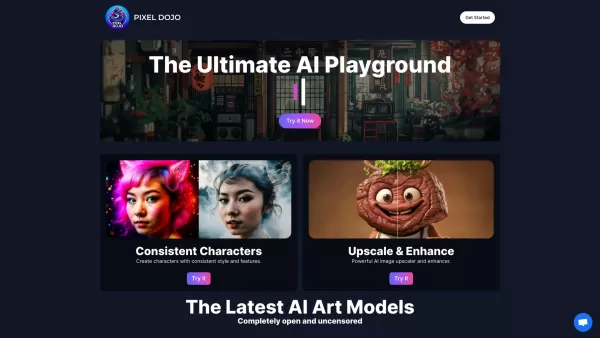
What is PixelDojo?Pixel Dojo is an innovative creative platform that offers a comprehensive suite of generative art tools. It empowers users to generate images from scratch, improve them with advanced upscaling technology, design consistent character

What is Banana AI - Free AI Photo Editor?Banana AI is a free, AI-driven photo editor that uses Google's Nano Banana technology (Gemini 2.5 Flash Image) to transform your pictures with simple text commands. Easily remove unwanted objects, swap backgro
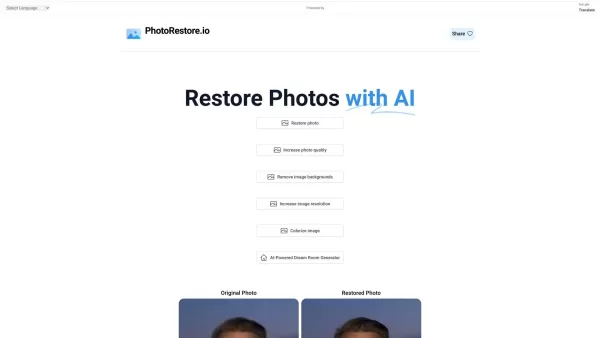
What is Photo Restore?PhotoRestore.io provides a specialized, free AI photo restoration service dedicated to reviving old, blurry, or damaged photographs. Utilizing advanced artificial intelligence, it repairs fading, enhances clarity, and improves o
PhotoAlign Studio Product Information
What is PhotoAlign Studio?
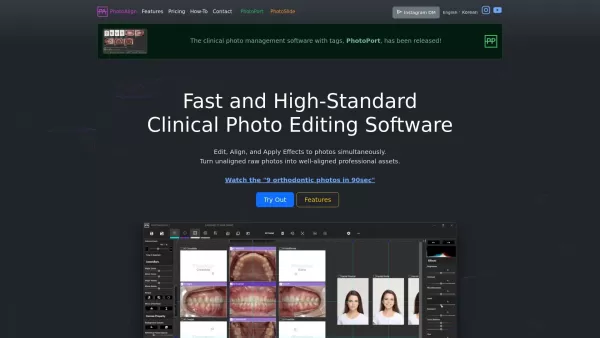
PhotoAlign Studio is a specialized photo editing application designed specifically for dental professionals. It enables users to simultaneously edit, align, and enhance clinical photos, transforming raw images into professional-quality assets. The software utilizes AI technology to automatically categorize and position photos, delivering accurate alignment without manual input. Features like LiveWatch for real-time photo importing, batch processing capabilities, and precise editing tools help boost productivity and maintain consistency in clinical photo documentation.
Who uses PhotoAlign Studio?
- Dental hygienists
- Orthodontic specialists
- Pediatric dentistry specialists
- Dental assistants
- Clinical photographers
- Dental clinics
How to use PhotoAlign Studio
- Step 1: Launch PhotoAlign and import your photos.
- Step 2: Let the AI allocation tool automatically place your photos.
- Step 3: Use alignment and editing tools to refine your images.
- Step 4: Apply effects and make adjustments as needed.
- Step 5: Save all your edited photos with one click.
Platform
- Web
- Windows
PhotoAlign Studio's Core Features & Benefits
Core Features
- AI-driven photo allocation
- LiveWatch real-time import
- Batch processing
- Photo alignment tools
- Standard templates
- Color and effect adjustments
Benefits
- Increased productivity
- Consistent results
- Effortless standardization
- Time-saving automated features
- Enhanced photo quality
PhotoAlign Studio's Main Use Cases & Applications
- Quick orthodontic photo editing
- Standardizing clinical photo sets
- Efficient batch processing
- Applying uniform adjustments for documentation
- Instant photo import from digital cameras
PhotoAlign Studio's Pros & Cons
Pros
AI-powered automatic photo allocation saves time by eliminating manual sorting.
Allows editing multiple photos at once on a single screen.
Precise control over rotation, cropping, and resizing with 0.1° accuracy.
Seamless integration with WEBCEPH to enhance clinical workflows.
Strong data privacy with all AI processing done locally—no internet data transfer required.
Offers various templates and customizable settings that meet clinical photography standards.
Cons
Currently available only for Windows 10 and 11 (64-bit), with no macOS or Linux support.
No mobile app support for iOS or Android platforms.
AI allocation limited to orthodontic intraoral and facial photo orientations.
Not available as open-source software.
PhotoAlign Studio's Pricing
Free plan available | No |
|---|---|
Free trial details | |
Pricing model | Paid |
Credit card required | No |
Starting price | 10.99 USD |
Lifetime plan available | No |
Billing frequency | Monthly |
Details of Pricing Plan
Monthly Subscription
10.99 USD
- Single user/device
- Includes PhotoAlign + PhotoPort
- Monthly upfront subscription
- One free template customization per year
Annual Subscription
99 USD
- Single user/device
- Includes PhotoAlign + PhotoPort
- Annual upfront subscription
- One free template customization
- Same annual price
2+1 Subscription
198 USD
- Three licenses
- Includes PhotoAlign + PhotoPort
- Annual upfront subscription
- Three free template customizations
- Same annual price
Multi-license (10+)
0 USD
- 10+ licenses
- Additional discounts
- Flexible licensing period
- Subscription or one-time purchase options
- Multiple free template customizations
Discount:
Limited Time Promotion: Discounts on 1-Month Plan and 2+1 Yearly Plan until July 31, 2025; e.g., Annual Subscription $139→$99, 2+1 Subscription $417→$198, Monthly Subscription 5% off
For the latest pricing, visit: https://photoalign.com/pricing
FAQs of PhotoAlign Studio
How do I import photos into PhotoAlign?
You can import photos using the LiveWatch feature or by manually adding them to the asset list.
Is PhotoAlign suitable for non-dental photos?
While optimized for dental photo management, PhotoAlign can also handle other types of photo editing.
Does PhotoAlign support batch processing?
Yes, batch processing allows you to edit multiple photos at the same time.
Can I use custom templates in PhotoAlign?
Yes, custom templates are supported with basic HTML tag knowledge.
What photo formats does PhotoAlign support?
PhotoAlign supports JPG, JPEG, BMP, PNG, and GIF formats.
Is there a trial version available?
Visit the PhotoAlign website for details on trial versions and available plans.
Do I need an internet connection to use PhotoAlign?
Internet is required for installation and authentication, but not for regular use.
Can PhotoAlign automatically adjust photo parameters?
Yes, it can automatically adjust brightness, contrast, and other parameters.
Is PhotoAlign compatible with Windows 10?
Yes, it is compatible with Windows 10 and later versions.
How does AI allocation work?
AI allocation automatically identifies and positions photos on appropriate canvases based on their orientation and type.
PhotoAlign Studio Company Information
- PhotoAlign
- https://photoalign.com
- https://www.youtube.com/@photoalign
- https://instagram.com/photoalignstudio
PhotoAlign Studio Screenshot

2026 Latest Best Top-Rated AI Melody Writing Tools for Song Drafts! XIX.AI has curated a highly powerful game-changing collection that goes through rigorous real-world tests to deliver the best writing experience. You can find detailed free vs paid comparisons, accurate rankings, and must-try options designed to help you create stunning song drafts effortlessly and boost your creative productivity significantly. Explore now to discover your perfect tool!
 8 tools
 xix.ai

2026 Latest Best Top-rated AI Conversation Trainer Tools for Interview Practice are here on XIX.AI! This curated collection features powerful, game-changing tools that go through rigorous real-world tests to deliver accurate feedback. You’ll find a free vs paid comparison and detailed rankings to help you choose the must-try option that boosts your confidence and skills. Explore now to Discover your perfect tool for interview success!
12 tools
xix.ai

2026 Latest Best Top-rated AI Style Transfer Tools for Creative Experiments! XIX.AI has curated a powerful, game-changing collection of must-try tools that deliver exceptional results through real-world tests and rigorous rankings. These top solutions help creatives boost productivity significantly by accelerating content creation and unlocking endless creative possibilities. Explore now to discover your perfect tool and start creating today!
9 tools
xix.ai

2026 Latest Best Top-Rated AI Dialogue Bubble Tools for Visual Storytelling are here on XIX.AI! This curated collection features powerful, game-changing tools that help creators boost productivity and overcome creative bottlenecks. Get a free vs paid comparison, see real-world tests, and check the latest rankings to find the must-try solutions perfect for crafting engaging visual narratives. Explore now to discover your ideal tool!
10 tools
xix.ai

2026 Latest Top-Rated Best AI Meeting Summary Tools for Clear Decision Tracking and Effortless Follow-Ups. This curated list showcases powerful, game-changing solutions that boost productivity dramatically by automating meeting notes, identifying key action items, and streamlining team coordination across all projects. Get a free vs paid comparison along with real-world tests and weekly updated rankings to help you find the perfect tool. Explore now to unlock your AI edge!
9 tools
xix.ai

2026 Latest Best Top-rated AI Data Cleaning Tools for quick fixing of missing values and duplicates. This curated list showcases powerful, game-changing solutions that boost productivity significantly. Each option has undergone rigorous real-world tests to ensure reliability. Get a free vs paid comparison and discover the must-try tool that fits your needs best. Explore now at XIX.AI to Unlock your AI edge.
11 tools
xix.ai


