


 Home
HomeWhat is Verix Demo Analytics? Mastering call recording insights guide.
In today's data-driven business environment, gaining a clear understanding of customer interactions is vital for success. Verix Demo Analytics offers a complete solution for examining call recordings, delivering actionable insights into agent performance, regulatory compliance, and customer sentiment. This guide details the essential features of Verix’s call recording interface, showing you how to leverage your customer conversations to streamline operations and boost satisfaction. By converting raw audio into strategic intelligence, Verix Demo Analytics supports better decision-making and helps you reach your organizational objectives.
Key Points
Agent and Client Information: Instantly identify all participants in a conversation.
Compliance Score Tracking: Maintain oversight of adherence to regulatory standards.
Performance Evaluation: Assess agent effectiveness based on compliance metrics.
Sentiment Analysis: Gauge the emotional tone of both customers and agents during calls.
Call Review Workflow: Simplify the process of assigning and evaluating calls.
Advanced Filtering: Quickly search and sort through your call recording library.
Actionable Insights: Uncover key strengths and opportunities for improvement.
Transcription and Audio Playback: Review call content directly within the platform.
Call Summaries and Smart Notes: Access AI-generated highlights for rapid comprehension.
Understanding the Verix Demo Analytics Call Recording Page
Exploring the Call Recordings Dashboard
The Verix Demo Analytics Call Recording page serves as a central command center for managing and evaluating customer interactions. This robust tool presents a wealth of information at a glance, enabling you to swiftly assess agent performance, pinpoint potential compliance issues, and gain deep insights into customer sentiment.
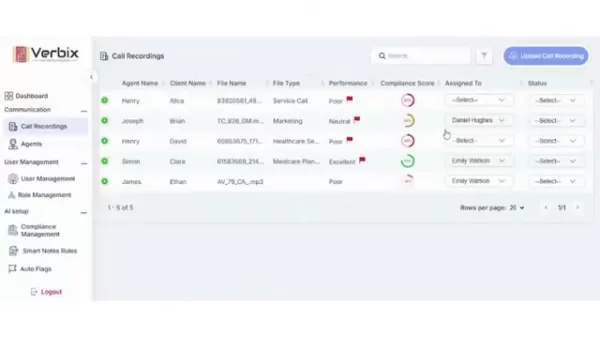
Designed for user-friendliness, the dashboard features clear columns and intuitive navigation, simplifying the process of finding necessary information and taking action. Key capabilities include detailed call information, compliance scoring, sentiment analysis, and comprehensive call review workflows, all integrated into a single, streamlined interface.
The benefits of the Verix call recording page:
- Improved Agent Performance: Clear metrics and actionable feedback empower your agents to refine their skills and deliver outstanding customer service.
- Reduced Compliance Risk: Real-time compliance monitoring helps you identify and address potential violations before they escalate into costly issues.
- Enhanced Customer Satisfaction: Understanding customer sentiment allows you to tailor interactions to meet client needs and build stronger relationships.
- Data-Driven Decision Making: Transform audio data into actionable intelligence, driving superior decisions across your organization.
With Verix Demo Analytics, you can unlock the full potential of your call recordings, fostering continuous improvement and achieving your business goals.
Key Columns and Their Significance
The call recordings dashboard organizes a vast amount of information into several key columns, each offering unique insights into the characteristics and quality of individual calls. Understanding these columns is essential for maximizing the value of Verix Demo Analytics.
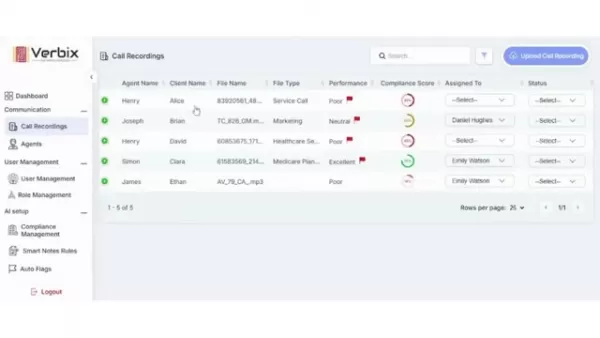
Agent Name: Identifies the agent who handled the call, which is crucial for tracking individual performance and identifying top performers or training needs.
Client Name: Displays the name of the client involved, helping to identify trends or issues related to specific customer segments.
File Name: Provides a unique identifier for each recording, facilitating easy retrieval and reference.
File Type: Specifies the call's category, such as service, marketing, healthcare, or sales, aiding in performance and compliance analysis across different interaction types.
Performance: Reflects the agent's overall effectiveness during the call, often correlated with the compliance score for a quick assessment.
Compliance Score: Shows a numerical rating of how well the agent adhered to compliance guidelines; a higher score indicates better adherence and is critical for performance evaluation and risk mitigation.
Assigned To: Indicates the individual responsible for reviewing the call, facilitating efficient workflow management and accountability.
Status: Reflects the current stage of the call review process (e.g., in progress, completed), helping to track progress and identify bottlenecks.
Sentiment: Displays the overall emotional tone of the call (e.g., neutral, positive, negative), offering valuable insight into customer satisfaction and potential concerns.
Call Length: Shows the duration of the call, which can be a factor in analyzing agent efficiency and customer engagement.
Created Date: Indicates when the recording was created, helping to organize and filter calls chronologically.
Action: Offers options for downloading the recording or transcript, or deleting the call, providing convenient access to essential management functions.
By mastering these key columns, you can efficiently navigate the Verix Demo Analytics call recording page and extract the insights needed to enhance your business operations.
Deeper Dive: Sentiment, Call Length, and Actions
Beyond the basic columns, the Verix Demo Analytics call recording page provides additional layers of data and functionality for a more nuanced understanding of each customer interaction. These features include sentiment analysis, call length metrics, and a suite of actions available for individual recordings.
These components are designed to optimize your workflow and help you extract maximum value from your call recordings.
Sentiment Analysis: This critical feature assesses the emotional tone of the call. Verix analyzes the audio to determine if the overall sentiment is neutral, positive, or negative. This insight is invaluable for identifying calls where customers may be dissatisfied, allowing for proactive issue resolution.
Call Length: The call's duration can indicate its complexity and the agent's efficiency. Longer calls may suggest difficulty in resolving issues, while shorter calls could signal efficient problem-solving or a lack of thoroughness. Analyzing length alongside compliance and sentiment provides a fuller picture of performance.
Actions: Verix provides several actionable options for each recording:
- Download Recording: Save a copy of the audio file for offline analysis or archiving, ensuring data accessibility.
- Download Transcript: Obtain a text version of the call for easy searching of specific keywords, facilitating in-depth analysis.
- Delete Call: Remove the recording from the system; use this feature cautiously as deletions are permanent.
These enhanced features strengthen the functionality of the Verix Demo Analytics call recording page, equipping you with the tools needed for effective management and analysis of customer interactions.
Filtering and Advanced Search Capabilities
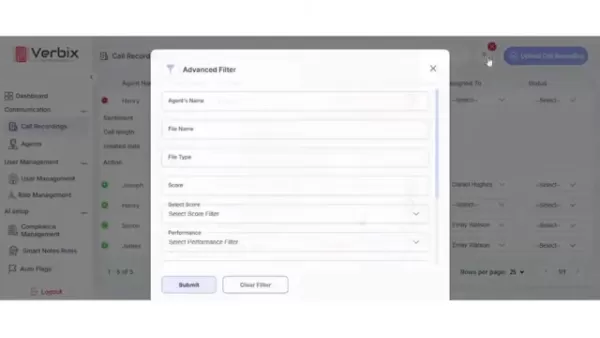
The Verix Demo Analytics call recording page includes powerful filtering and search capabilities, enabling you to quickly locate specific calls based on various criteria. These tools are essential for efficiently managing large datasets and identifying trends or issues requiring attention.
Advanced Filtering: The advanced filter option allows you to narrow searches using multiple parameters, including:
- Agent's Name: Find calls handled by a specific agent.
- File Name: Search for calls by their file name.
- Call Length: Filter calls based on duration.
- File Type: Filter by call type, such as service or marketing.
- Score: Search calls within specific score ranges.
This multifaceted filtering system lets you pinpoint the most relevant calls for your analysis. By filtering by agent name, for instance, you can review the performance of specific team members with precision.
These filtering options save time and effort by helping you quickly find the necessary calls, streamlining your analysis process.
Uploading Call Recordings into Verix
Uploading call recordings into Verix Demo Analytics is a simple process, allowing for quick integration of your audio data. The upload feature supports various audio formats and languages, ensuring compatibility with your existing systems.
To upload a call recording:
- Click the "Upload Call Recording" button: This button is prominently located on the call recording page.
- Select the Language: Choose the call's language from the dropdown menu; Verix supports multiple languages for accurate transcription.
- Choose the Audio File: Click to upload or drag and drop the file into the designated area; supported formats include MP3, M4A, and WAV.
- Import the Recording: Click "Import" to begin uploading. The recording will then be processed and analyzed by Verix, making it available for review.
With Verix Demo Analytics, uploading and analyzing call recordings is a seamless experience, providing the insights needed to enhance your business operations.
In-Depth Call Recording Details: A Comprehensive View
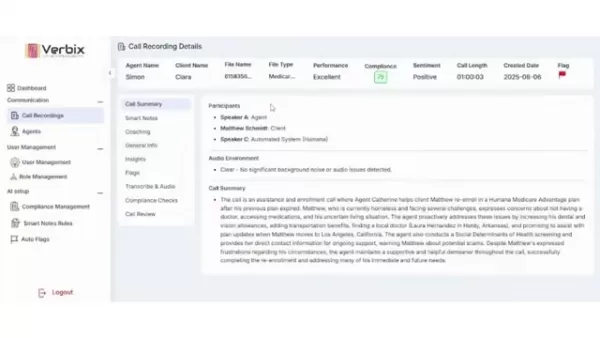
Selecting a specific call recording in Verix Demo Analytics reveals a comprehensive view of that interaction, offering detailed information and functionalities for thorough analysis. This in-depth perspective helps you understand the context and identify improvement areas.
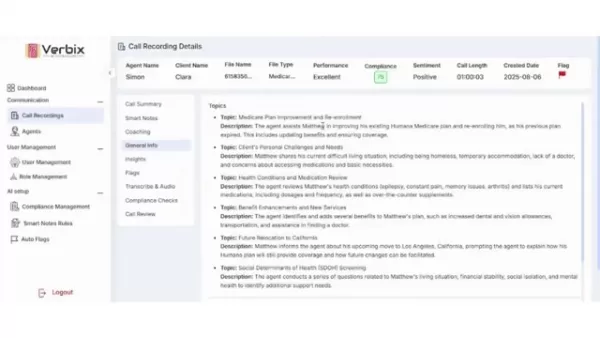
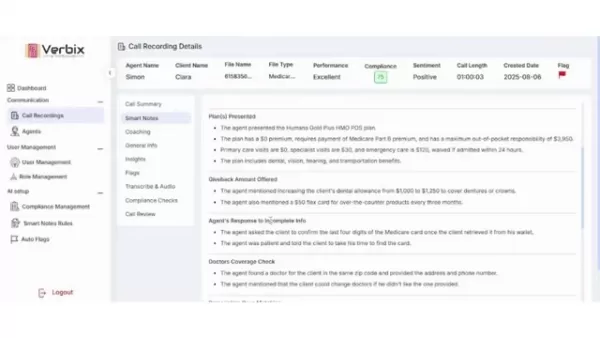
Header Information: The header displays key call details, including Agent Name, Client Name, File Name, File Type, Performance, Compliance, Sentiment, Call Length, Created Date, and Flag status, providing a quick overview.
Call Summary: This section offers a high-level summary, including participants, audio environment quality, and a brief overview of the call's purpose and outcome.
Smart Notes: Provides AI-generated notes summarizing key discussion points and action items for quick comprehension.
Coaching: Identifies the agent's key strengths and areas for improvement based on the call, facilitating targeted coaching efforts.
General Info: Offers context on the call's topics and technical terms used, aiding in understanding the content and background.
Insights: Extracts key data points like client age, status, living situation, and health conditions, helping you quickly grasp the client's profile.
Flags: Highlights any issues raised during the call, such as frustration or compliance breaches, enabling prompt attention to problem interactions.
Transcribe & Audio: Allows you to listen to the recording and view the transcript, enabling deeper analysis of specific moments.
Compliance Checks: Shows compliance scores for various call aspects, guiding your analysis and helping ensure regulatory adherence.
Call Review: Facilitates assigning review tasks and coordinating team efforts to maintain quality and compliance standards.
This detailed view empowers you to make informed decisions and drive continuous improvement across your organization.
Leveraging Verix Demo Analytics for Training and Development
Identifying Training Opportunities
Verix Demo Analytics is a powerful tool not only for monitoring performance and compliance but also for identifying training and development opportunities. By analyzing call recordings, you can pinpoint specific areas where agents need additional support or skill enhancement. This targeted approach ensures resources are allocated effectively, and agents receive the specific guidance required for improvement.
For example, consistently low compliance scores in specific categories may indicate a need for training on those topics. Similarly, sentiment analysis can reveal whether agents are effectively building rapport and addressing customer concerns.
Using Verix to identify these opportunities allows for the creation of customized learning programs that address specific needs, leading to improved performance and higher customer satisfaction.
Training with Verix Demo Analytics helps in:
- Improving customer service skills
- Enhancing communication and revenue
- Boosting employee morale
- Reducing compliance risks
- Developing customized learning programs
Developing Targeted Coaching Strategies
Coaching is a vital part of ongoing agent development, and Verix Demo Analytics provides the data necessary for effective coaching sessions. The coaching section within call details highlights strengths and improvement areas, offering a foundation for focused discussions.
For instance, if an agent excels at rapport-building but struggles with closing sales, coaching can target closing techniques. Similarly, consistent misses on compliance points can be addressed through reinforced guidelines.
Using Verix to guide coaching strategies ensures agents receive personalized support to reach their full potential.
Creating a Culture of Continuous Improvement
Consistently using Verix Demo Analytics to analyze calls, identify training needs, and develop coaching strategies fosters a culture of continuous improvement. This culture encourages agents to seek feedback, learn from mistakes, and strive for excellence in every interaction.
When agents know their performance is monitored and they will receive constructive feedback, they are more likely to take ownership of their development. This proactive approach leads to a more engaged and motivated workforce.
By embracing continuous improvement, you can transform your call center into a high-performing team that consistently delivers exceptional customer service.
Step-by-Step Guide to Using Verix Demo Analytics Call Recording Page
Step 1: Accessing the Call Recording Page
Log into your Verix Demo Analytics account. Navigate to the communication section and select “Call Recordings” to access the central hub for managing and analyzing customer interactions.
Step 2: Understanding the Dashboard
Familiarize yourself with the dashboard layout. Note key columns like Agent Name, Client Name, File Name, File Type, Performance, Compliance Score, and Sentiment to quickly scan and sort recordings based on your needs.
Step 3: Filtering Call Recordings
Use the advanced filter option to narrow your search. Select criteria such as agent name, call length, file type, or compliance score to find the most relevant recordings for your analysis.
Step 4: Reviewing Call Details
Click on a specific recording to access the detailed view. Here, you will find a call summary, smart notes, coaching insights, general information, flags, a transcript, and the audio recording for comprehensive analysis.
Step 5: Analyzing Compliance and Sentiment
Focus on the Compliance Checks and Sentiment sections to evaluate adherence to guidelines and customer emotions. These areas provide valuable insights into potential concerns or excellence.
Step 6: Taking Action
Use the action options to manage the recording—download it or its transcript, or delete it. Assign the call to a reviewer, update the status, and add comments to document your findings.
Evaluating Verix Demo Analytics: Weighing the Pros
and Cons
Pros
Comprehensive Feature Set: Offers a wide range of functionalities, including call recording, compliance scoring, sentiment analysis, and more.
User-Friendly Interface: Designed for ease of use with clear columns and intuitive navigation.
AI-Powered Insights: Leverages AI to automate tasks and extract valuable insights from recordings.
Customizable Compliance Checks: Allows tailoring of compliance checks to match your organization's specific guidelines.
Integration Capabilities: Integrates seamlessly with other business systems like CRM and help desk software.
Cons
Cost: The platform's cost may be prohibitive for smaller organizations.
Learning Curve: Some users may need time to master all features despite the user-friendly design.
Data Security: Handling sensitive customer information always involves security considerations.
Dependence on AI Accuracy: The reliability of AI-powered insights depends on algorithm quality and training data.
Limited Customization: Some users may find customization options limited compared to more complex solutions.
FAQ
What audio file formats are supported for uploading?
Verix Demo Analytics supports common audio formats like MP3, M4A, and WAV, with a file size limit of 2.2GB for seamless uploading.
How accurate is the sentiment analysis feature?
Verix’s sentiment analysis uses advanced AI algorithms for high accuracy. While no system is perfect, Verix continuously improves its capabilities to provide reliable emotional insights.
Can I customize the compliance checks to align with my organization's specific guidelines?
Yes, Verix Demo Analytics allows customization of compliance checks to match your organization’s unique requirements, ensuring relevant and actionable insights.
How often is the Verix Demo Analytics platform updated?
Verix Demo Analytics receives continuous updates with new features, improvements, and bug fixes to ensure access to the latest technology and optimal user experience.
Is there a limit to the number of call recordings I can upload and store in Verix?
The limit depends on your specific plan. Please refer to your plan details or contact customer service to determine your storage capacity.
Related Questions
What is speech analytics, and how does it relate to call recording analysis?
Speech analytics involves analyzing recorded conversations to extract valuable insights using natural language processing and machine learning. Call recording analysis is a specific application of this technology focused on customer interactions in call centers. It automates the process of scanning calls to save time and effort, relating to call recording analysis by using calls as a data source to identify patterns, improve performance, monitor compliance, understand customers, and enhance efficiency through automation.
How can AI-powered analytics improve call center operations?
AI-powered analytics revolutionizes call center operations by improving efficiency, performance, and customer satisfaction. Key applications include automated call summarization, real-time agent guidance, personalized customer experiences, predictive analytics, fraud detection, workforce management, and cost reduction. These tools help save time and enhance agent performance, transforming call centers into data-driven powerhouses that achieve business goals.
What are the ethical considerations when using call recording analytics?
Using call
Related article
 Stripe to Acquire OpenRouter as AI Model Routing Gains Momentum
Stripe has agreed to acquire OpenRouter, an AI model-routing platform that gives developers access to hundreds of models through a single interface. The deal adds model selection and routing to Stripe’s existing work around AI usage and token-based b
Former OpenAI Researcher Barrett Zoph Returns to Google to Support Gemini Development
Barret Zoph, who previously abruptly left and joined OpenAI due to a disagreement with Thinking Machines Lab CEO Miriam Mularati, has once again changed employers. Alphabet's Google announced that Zoph will return as Vice President of Research, bring
How Recursive Intelligence Raised $335M at $4B Valuation in 4 Months
The co-founders of startup Ricursive Intelligence seemed destined to be co-founders.Anna Goldie, CEO, and Azalia Mirhoseini, CTO, are so well-known in the AI community that they were among those AI engineers who “got those weird emails from Zuckerber
Related Special Topic Recommendations
Design & Art
Stripe to Acquire OpenRouter as AI Model Routing Gains Momentum
Stripe has agreed to acquire OpenRouter, an AI model-routing platform that gives developers access to hundreds of models through a single interface. The deal adds model selection and routing to Stripe’s existing work around AI usage and token-based b
Former OpenAI Researcher Barrett Zoph Returns to Google to Support Gemini Development
Barret Zoph, who previously abruptly left and joined OpenAI due to a disagreement with Thinking Machines Lab CEO Miriam Mularati, has once again changed employers. Alphabet's Google announced that Zoph will return as Vice President of Research, bring
How Recursive Intelligence Raised $335M at $4B Valuation in 4 Months
The co-founders of startup Ricursive Intelligence seemed destined to be co-founders.Anna Goldie, CEO, and Azalia Mirhoseini, CTO, are so well-known in the AI community that they were among those AI engineers who “got those weird emails from Zuckerber
Related Special Topic Recommendations
Design & Art
 Top AI Illustration Tools: Create Editorial Scenes and Cover Art Faster
2026 Latest Top-rated AI Illustration Tools: Our curated list features the best powerfully designed tools for creating stunning editorial scenes and eye-catching cover art quickly. Each option has gone through rigorous real-world tests, offering a free vs paid comparison to help you find the perfect match for your workflow. Try these must-try solutions today to unlock your AI edge and boost your creative productivity. Explore now at XIX.AI.
 10 tools
 xix.ai
Education and Learning
Top AI Tutors for Exam Prep: Practice Math, Science, and English
xix.ai
Education and Learning
Top AI Tutors for Exam Prep: Practice Math, Science, and English
2026 Latest Top-Rated Best AI Tutors for Exam Prep are here on XIX.AI! Our curated list features powerful game-changing tools that offer free vs paid comparison, real-world tests, and weekly updated rankings. They help boost your writing efficiency, simplify complex topic learning, and unlock your academic potential. Explore now to Discover your perfect exam prep tool and Start creating today to Unlock your AI edge!
10 tools
xix.ai
Finance
AI Budget Planning Tools for Personal Money Management
2026 Latest Best Top-Rated AI Budget Planning Tools for Personal Money Management are here on XIX.AI! This curated collection features powerful, game-changing solutions that help you conduct real-world tests, understand spending habits, and create personalized plans to boost productivity. Enjoy a free vs paid comparison along with detailed rankings. Must-try tools designed to simplify money management and unlock your AI edge. Explore now!
11 tools
xix.ai
Health & Wellness
AI Sleep Tracking Assistants: Improve Recovery with Better Bedtime Habits
2026 Latest Best Top-Rated AI Sleep Tracking Assistants curated for ultimate recovery. This fully updated weekly guide features powerful tools that deliver real-world tests, free vs paid comparison, and detailed rankings to help you find the must-try solution that boosts sleep quality and supports better bedtime habits. Explore now at XIX.AI to Unlock your AI edge.
10 tools
xix.ai
Data Analysis
AI SQL Copilots for Product and Revenue Analytics
2026 Latest Best Top-Rated AI SQL Copilots for Product and Revenue Analytics! XIX.AI has curated a powerful, game-changing collection of must-try tools that undergo real-world tests through weekly updated rankings. These tools help users boost productivity significantly by accelerating data analysis, streamlining complex queries, and generating accurate insights to drive smarter business decisions. Explore now to Discover your perfect tool for unlocking your AI edge!
14 tools
xix.ai
Education and Learning
Best AI Homework Helpers That Teach: Learn Concepts, Not Just Answers
2026 Latest Best Top-Rated AI Homework Helpers That Teach Core Concepts Not Just Answers Powerful Tools for Students Must-Try Curated List Weekly Updated Free vs Paid Comparison Real-World Tests Accurate Rankings to Help You Unlock Your Full Learning Potential Explore now to Discover your perfect tool for smarter studying.
10 tools
xix.ai

 Comments (2)
0/500
Comments (2)
0/500
![JuanAllen]()
This tool sounds super useful for call centers! I've always wondered how companies analyze those thousands of hours of calls. Does it use AI to detect customer sentiment, or is it more about keyword spotting? Would love to see a demo to understand the real-world impact on training and KPIs. 🤔
![KevinBrown]()
Ah, c'est une solution bien spécifique. J'ai toujours pensé que l'analyse des appels était un peu floue, mais il semble que cela devienne de plus en plus fin. Reste à voir l'impact sur la vie privée des conseillers, c'est un sujet sensible. 😅
In today's data-driven business environment, gaining a clear understanding of customer interactions is vital for success. Verix Demo Analytics offers a complete solution for examining call recordings, delivering actionable insights into agent performance, regulatory compliance, and customer sentiment. This guide details the essential features of Verix’s call recording interface, showing you how to leverage your customer conversations to streamline operations and boost satisfaction. By converting raw audio into strategic intelligence, Verix Demo Analytics supports better decision-making and helps you reach your organizational objectives.
Key Points
Agent and Client Information: Instantly identify all participants in a conversation.
Compliance Score Tracking: Maintain oversight of adherence to regulatory standards.
Performance Evaluation: Assess agent effectiveness based on compliance metrics.
Sentiment Analysis: Gauge the emotional tone of both customers and agents during calls.
Call Review Workflow: Simplify the process of assigning and evaluating calls.
Advanced Filtering: Quickly search and sort through your call recording library.
Actionable Insights: Uncover key strengths and opportunities for improvement.
Transcription and Audio Playback: Review call content directly within the platform.
Call Summaries and Smart Notes: Access AI-generated highlights for rapid comprehension.
Understanding the Verix Demo Analytics Call Recording Page
Exploring the Call Recordings Dashboard
The Verix Demo Analytics Call Recording page serves as a central command center for managing and evaluating customer interactions. This robust tool presents a wealth of information at a glance, enabling you to swiftly assess agent performance, pinpoint potential compliance issues, and gain deep insights into customer sentiment.
Designed for user-friendliness, the dashboard features clear columns and intuitive navigation, simplifying the process of finding necessary information and taking action. Key capabilities include detailed call information, compliance scoring, sentiment analysis, and comprehensive call review workflows, all integrated into a single, streamlined interface.
The benefits of the Verix call recording page:
- Improved Agent Performance: Clear metrics and actionable feedback empower your agents to refine their skills and deliver outstanding customer service.
- Reduced Compliance Risk: Real-time compliance monitoring helps you identify and address potential violations before they escalate into costly issues.
- Enhanced Customer Satisfaction: Understanding customer sentiment allows you to tailor interactions to meet client needs and build stronger relationships.
- Data-Driven Decision Making: Transform audio data into actionable intelligence, driving superior decisions across your organization.
With Verix Demo Analytics, you can unlock the full potential of your call recordings, fostering continuous improvement and achieving your business goals.
Key Columns and Their Significance
The call recordings dashboard organizes a vast amount of information into several key columns, each offering unique insights into the characteristics and quality of individual calls. Understanding these columns is essential for maximizing the value of Verix Demo Analytics.
Agent Name: Identifies the agent who handled the call, which is crucial for tracking individual performance and identifying top performers or training needs.
Client Name: Displays the name of the client involved, helping to identify trends or issues related to specific customer segments.
File Name: Provides a unique identifier for each recording, facilitating easy retrieval and reference.
File Type: Specifies the call's category, such as service, marketing, healthcare, or sales, aiding in performance and compliance analysis across different interaction types.
Performance: Reflects the agent's overall effectiveness during the call, often correlated with the compliance score for a quick assessment.
Compliance Score: Shows a numerical rating of how well the agent adhered to compliance guidelines; a higher score indicates better adherence and is critical for performance evaluation and risk mitigation.
Assigned To: Indicates the individual responsible for reviewing the call, facilitating efficient workflow management and accountability.
Status: Reflects the current stage of the call review process (e.g., in progress, completed), helping to track progress and identify bottlenecks.
Sentiment: Displays the overall emotional tone of the call (e.g., neutral, positive, negative), offering valuable insight into customer satisfaction and potential concerns.
Call Length: Shows the duration of the call, which can be a factor in analyzing agent efficiency and customer engagement.
Created Date: Indicates when the recording was created, helping to organize and filter calls chronologically.
Action: Offers options for downloading the recording or transcript, or deleting the call, providing convenient access to essential management functions.
By mastering these key columns, you can efficiently navigate the Verix Demo Analytics call recording page and extract the insights needed to enhance your business operations.
Deeper Dive: Sentiment, Call Length, and Actions
Beyond the basic columns, the Verix Demo Analytics call recording page provides additional layers of data and functionality for a more nuanced understanding of each customer interaction. These features include sentiment analysis, call length metrics, and a suite of actions available for individual recordings.
These components are designed to optimize your workflow and help you extract maximum value from your call recordings.
Sentiment Analysis: This critical feature assesses the emotional tone of the call. Verix analyzes the audio to determine if the overall sentiment is neutral, positive, or negative. This insight is invaluable for identifying calls where customers may be dissatisfied, allowing for proactive issue resolution.
Call Length: The call's duration can indicate its complexity and the agent's efficiency. Longer calls may suggest difficulty in resolving issues, while shorter calls could signal efficient problem-solving or a lack of thoroughness. Analyzing length alongside compliance and sentiment provides a fuller picture of performance.
Actions: Verix provides several actionable options for each recording:
- Download Recording: Save a copy of the audio file for offline analysis or archiving, ensuring data accessibility.
- Download Transcript: Obtain a text version of the call for easy searching of specific keywords, facilitating in-depth analysis.
- Delete Call: Remove the recording from the system; use this feature cautiously as deletions are permanent.
These enhanced features strengthen the functionality of the Verix Demo Analytics call recording page, equipping you with the tools needed for effective management and analysis of customer interactions.
Filtering and Advanced Search Capabilities
The Verix Demo Analytics call recording page includes powerful filtering and search capabilities, enabling you to quickly locate specific calls based on various criteria. These tools are essential for efficiently managing large datasets and identifying trends or issues requiring attention.
Advanced Filtering: The advanced filter option allows you to narrow searches using multiple parameters, including:
- Agent's Name: Find calls handled by a specific agent.
- File Name: Search for calls by their file name.
- Call Length: Filter calls based on duration.
- File Type: Filter by call type, such as service or marketing.
- Score: Search calls within specific score ranges.
This multifaceted filtering system lets you pinpoint the most relevant calls for your analysis. By filtering by agent name, for instance, you can review the performance of specific team members with precision.
These filtering options save time and effort by helping you quickly find the necessary calls, streamlining your analysis process.
Uploading Call Recordings into Verix
Uploading call recordings into Verix Demo Analytics is a simple process, allowing for quick integration of your audio data. The upload feature supports various audio formats and languages, ensuring compatibility with your existing systems.
To upload a call recording:
- Click the "Upload Call Recording" button: This button is prominently located on the call recording page.
- Select the Language: Choose the call's language from the dropdown menu; Verix supports multiple languages for accurate transcription.
- Choose the Audio File: Click to upload or drag and drop the file into the designated area; supported formats include MP3, M4A, and WAV.
- Import the Recording: Click "Import" to begin uploading. The recording will then be processed and analyzed by Verix, making it available for review.
With Verix Demo Analytics, uploading and analyzing call recordings is a seamless experience, providing the insights needed to enhance your business operations.
In-Depth Call Recording Details: A Comprehensive View
Selecting a specific call recording in Verix Demo Analytics reveals a comprehensive view of that interaction, offering detailed information and functionalities for thorough analysis. This in-depth perspective helps you understand the context and identify improvement areas.
Header Information: The header displays key call details, including Agent Name, Client Name, File Name, File Type, Performance, Compliance, Sentiment, Call Length, Created Date, and Flag status, providing a quick overview.
Call Summary: This section offers a high-level summary, including participants, audio environment quality, and a brief overview of the call's purpose and outcome.
Smart Notes: Provides AI-generated notes summarizing key discussion points and action items for quick comprehension.
Coaching: Identifies the agent's key strengths and areas for improvement based on the call, facilitating targeted coaching efforts.
General Info: Offers context on the call's topics and technical terms used, aiding in understanding the content and background.
Insights: Extracts key data points like client age, status, living situation, and health conditions, helping you quickly grasp the client's profile.
Flags: Highlights any issues raised during the call, such as frustration or compliance breaches, enabling prompt attention to problem interactions.
Transcribe & Audio: Allows you to listen to the recording and view the transcript, enabling deeper analysis of specific moments.
Compliance Checks: Shows compliance scores for various call aspects, guiding your analysis and helping ensure regulatory adherence.
Call Review: Facilitates assigning review tasks and coordinating team efforts to maintain quality and compliance standards.
This detailed view empowers you to make informed decisions and drive continuous improvement across your organization.
Leveraging Verix Demo Analytics for Training and Development
Identifying Training Opportunities
Verix Demo Analytics is a powerful tool not only for monitoring performance and compliance but also for identifying training and development opportunities. By analyzing call recordings, you can pinpoint specific areas where agents need additional support or skill enhancement. This targeted approach ensures resources are allocated effectively, and agents receive the specific guidance required for improvement.
For example, consistently low compliance scores in specific categories may indicate a need for training on those topics. Similarly, sentiment analysis can reveal whether agents are effectively building rapport and addressing customer concerns.
Using Verix to identify these opportunities allows for the creation of customized learning programs that address specific needs, leading to improved performance and higher customer satisfaction.
Training with Verix Demo Analytics helps in:
- Improving customer service skills
- Enhancing communication and revenue
- Boosting employee morale
- Reducing compliance risks
- Developing customized learning programs
Developing Targeted Coaching Strategies
Coaching is a vital part of ongoing agent development, and Verix Demo Analytics provides the data necessary for effective coaching sessions. The coaching section within call details highlights strengths and improvement areas, offering a foundation for focused discussions.
For instance, if an agent excels at rapport-building but struggles with closing sales, coaching can target closing techniques. Similarly, consistent misses on compliance points can be addressed through reinforced guidelines.
Using Verix to guide coaching strategies ensures agents receive personalized support to reach their full potential.
Creating a Culture of Continuous Improvement
Consistently using Verix Demo Analytics to analyze calls, identify training needs, and develop coaching strategies fosters a culture of continuous improvement. This culture encourages agents to seek feedback, learn from mistakes, and strive for excellence in every interaction.
When agents know their performance is monitored and they will receive constructive feedback, they are more likely to take ownership of their development. This proactive approach leads to a more engaged and motivated workforce.
By embracing continuous improvement, you can transform your call center into a high-performing team that consistently delivers exceptional customer service.
Step-by-Step Guide to Using Verix Demo Analytics Call Recording Page
Step 1: Accessing the Call Recording Page
Log into your Verix Demo Analytics account. Navigate to the communication section and select “Call Recordings” to access the central hub for managing and analyzing customer interactions.
Step 2: Understanding the Dashboard
Familiarize yourself with the dashboard layout. Note key columns like Agent Name, Client Name, File Name, File Type, Performance, Compliance Score, and Sentiment to quickly scan and sort recordings based on your needs.
Step 3: Filtering Call Recordings
Use the advanced filter option to narrow your search. Select criteria such as agent name, call length, file type, or compliance score to find the most relevant recordings for your analysis.
Step 4: Reviewing Call Details
Click on a specific recording to access the detailed view. Here, you will find a call summary, smart notes, coaching insights, general information, flags, a transcript, and the audio recording for comprehensive analysis.
Step 5: Analyzing Compliance and Sentiment
Focus on the Compliance Checks and Sentiment sections to evaluate adherence to guidelines and customer emotions. These areas provide valuable insights into potential concerns or excellence.
Step 6: Taking Action
Use the action options to manage the recording—download it or its transcript, or delete it. Assign the call to a reviewer, update the status, and add comments to document your findings.
Evaluating Verix Demo Analytics: Weighing the Pros
and Cons
Pros
Comprehensive Feature Set: Offers a wide range of functionalities, including call recording, compliance scoring, sentiment analysis, and more.
User-Friendly Interface: Designed for ease of use with clear columns and intuitive navigation.
AI-Powered Insights: Leverages AI to automate tasks and extract valuable insights from recordings.
Customizable Compliance Checks: Allows tailoring of compliance checks to match your organization's specific guidelines.
Integration Capabilities: Integrates seamlessly with other business systems like CRM and help desk software.
Cons
Cost: The platform's cost may be prohibitive for smaller organizations.
Learning Curve: Some users may need time to master all features despite the user-friendly design.
Data Security: Handling sensitive customer information always involves security considerations.
Dependence on AI Accuracy: The reliability of AI-powered insights depends on algorithm quality and training data.
Limited Customization: Some users may find customization options limited compared to more complex solutions.
FAQ
What audio file formats are supported for uploading?
Verix Demo Analytics supports common audio formats like MP3, M4A, and WAV, with a file size limit of 2.2GB for seamless uploading.
How accurate is the sentiment analysis feature?
Verix’s sentiment analysis uses advanced AI algorithms for high accuracy. While no system is perfect, Verix continuously improves its capabilities to provide reliable emotional insights.
Can I customize the compliance checks to align with my organization's specific guidelines?
Yes, Verix Demo Analytics allows customization of compliance checks to match your organization’s unique requirements, ensuring relevant and actionable insights.
How often is the Verix Demo Analytics platform updated?
Verix Demo Analytics receives continuous updates with new features, improvements, and bug fixes to ensure access to the latest technology and optimal user experience.
Is there a limit to the number of call recordings I can upload and store in Verix?
The limit depends on your specific plan. Please refer to your plan details or contact customer service to determine your storage capacity.
Related Questions
What is speech analytics, and how does it relate to call recording analysis?
Speech analytics involves analyzing recorded conversations to extract valuable insights using natural language processing and machine learning. Call recording analysis is a specific application of this technology focused on customer interactions in call centers. It automates the process of scanning calls to save time and effort, relating to call recording analysis by using calls as a data source to identify patterns, improve performance, monitor compliance, understand customers, and enhance efficiency through automation.
How can AI-powered analytics improve call center operations?
AI-powered analytics revolutionizes call center operations by improving efficiency, performance, and customer satisfaction. Key applications include automated call summarization, real-time agent guidance, personalized customer experiences, predictive analytics, fraud detection, workforce management, and cost reduction. These tools help save time and enhance agent performance, transforming call centers into data-driven powerhouses that achieve business goals.
What are the ethical considerations when using call recording analytics?
Using call








 Stripe to Acquire OpenRouter as AI Model Routing Gains Momentum
Stripe has agreed to acquire OpenRouter, an AI model-routing platform that gives developers access to hundreds of models through a single interface. The deal adds model selection and routing to Stripe’s existing work around AI usage and token-based b
Stripe to Acquire OpenRouter as AI Model Routing Gains Momentum
Stripe has agreed to acquire OpenRouter, an AI model-routing platform that gives developers access to hundreds of models through a single interface. The deal adds model selection and routing to Stripe’s existing work around AI usage and token-based b
 Former OpenAI Researcher Barrett Zoph Returns to Google to Support Gemini Development
Barret Zoph, who previously abruptly left and joined OpenAI due to a disagreement with Thinking Machines Lab CEO Miriam Mularati, has once again changed employers. Alphabet's Google announced that Zoph will return as Vice President of Research, bring
Former OpenAI Researcher Barrett Zoph Returns to Google to Support Gemini Development
Barret Zoph, who previously abruptly left and joined OpenAI due to a disagreement with Thinking Machines Lab CEO Miriam Mularati, has once again changed employers. Alphabet's Google announced that Zoph will return as Vice President of Research, bring
 How Recursive Intelligence Raised $335M at $4B Valuation in 4 Months
The co-founders of startup Ricursive Intelligence seemed destined to be co-founders.Anna Goldie, CEO, and Azalia Mirhoseini, CTO, are so well-known in the AI community that they were among those AI engineers who “got those weird emails from Zuckerber
How Recursive Intelligence Raised $335M at $4B Valuation in 4 Months
The co-founders of startup Ricursive Intelligence seemed destined to be co-founders.Anna Goldie, CEO, and Azalia Mirhoseini, CTO, are so well-known in the AI community that they were among those AI engineers who “got those weird emails from Zuckerber

2026 Latest Top-rated AI Illustration Tools: Our curated list features the best powerfully designed tools for creating stunning editorial scenes and eye-catching cover art quickly. Each option has gone through rigorous real-world tests, offering a free vs paid comparison to help you find the perfect match for your workflow. Try these must-try solutions today to unlock your AI edge and boost your creative productivity. Explore now at XIX.AI.
10 tools
xix.ai

2026 Latest Top-Rated Best AI Tutors for Exam Prep are here on XIX.AI! Our curated list features powerful game-changing tools that offer free vs paid comparison, real-world tests, and weekly updated rankings. They help boost your writing efficiency, simplify complex topic learning, and unlock your academic potential. Explore now to Discover your perfect exam prep tool and Start creating today to Unlock your AI edge!
10 tools
xix.ai

2026 Latest Best Top-Rated AI Budget Planning Tools for Personal Money Management are here on XIX.AI! This curated collection features powerful, game-changing solutions that help you conduct real-world tests, understand spending habits, and create personalized plans to boost productivity. Enjoy a free vs paid comparison along with detailed rankings. Must-try tools designed to simplify money management and unlock your AI edge. Explore now!
11 tools
xix.ai

2026 Latest Best Top-Rated AI Sleep Tracking Assistants curated for ultimate recovery. This fully updated weekly guide features powerful tools that deliver real-world tests, free vs paid comparison, and detailed rankings to help you find the must-try solution that boosts sleep quality and supports better bedtime habits. Explore now at XIX.AI to Unlock your AI edge.
10 tools
xix.ai

2026 Latest Best Top-Rated AI SQL Copilots for Product and Revenue Analytics! XIX.AI has curated a powerful, game-changing collection of must-try tools that undergo real-world tests through weekly updated rankings. These tools help users boost productivity significantly by accelerating data analysis, streamlining complex queries, and generating accurate insights to drive smarter business decisions. Explore now to Discover your perfect tool for unlocking your AI edge!
14 tools
xix.ai

2026 Latest Best Top-Rated AI Homework Helpers That Teach Core Concepts Not Just Answers Powerful Tools for Students Must-Try Curated List Weekly Updated Free vs Paid Comparison Real-World Tests Accurate Rankings to Help You Unlock Your Full Learning Potential Explore now to Discover your perfect tool for smarter studying.
10 tools
xix.ai

This tool sounds super useful for call centers! I've always wondered how companies analyze those thousands of hours of calls. Does it use AI to detect customer sentiment, or is it more about keyword spotting? Would love to see a demo to understand the real-world impact on training and KPIs. 🤔
Ah, c'est une solution bien spécifique. J'ai toujours pensé que l'analyse des appels était un peu floue, mais il semble que cela devienne de plus en plus fin. Reste à voir l'impact sur la vie privée des conseillers, c'est un sujet sensible. 😅












